lights OPEL GRANDLAND X 2019 Manual user
[x] Cancel search | Manufacturer: OPEL, Model Year: 2019, Model line: GRANDLAND X, Model: OPEL GRANDLAND X 2019Pages: 277, PDF Size: 7.75 MB
Page 165 of 277
Driving and operating163vehicle speed increases or decreases
to follow the vehicle ahead, but will
not exceed the set speed. It may
apply limited braking with activated
brake lights.
If the vehicle ahead accelerates or
changes lane, the adaptive cruise
control progressively accelerates the
vehicle to return to the stored set
speed. If the driver operates a the turn lights to overtake a slower vehicle, the
adaptive cruise control allows the
vehicle to temporarily approach the
vehicle ahead to help passing it.
However, the set speed will never be
exceeded.
The adaptive cruise control can store set speeds over 30 km/h for manual
transmission. If the vehicle ahead is
moving too slowly and the selected
following distance cannot be
maintained anymore, a warning
chime is given and a message is
displayed in the Driver Information
Centre. The message prompts the
driver to take back control of the
vehicle. On vehicles with automatic
transmission, the system can brake
the vehicle until a full stop.9 Warning
The complete driver attention is
always required while driving with adaptive cruise control. The driver stays fully in control of the vehicle
because the brake pedal, the
accelerator pedal and the button
Ñ have priority over any adaptive
cruise control operation.
Switching on the system
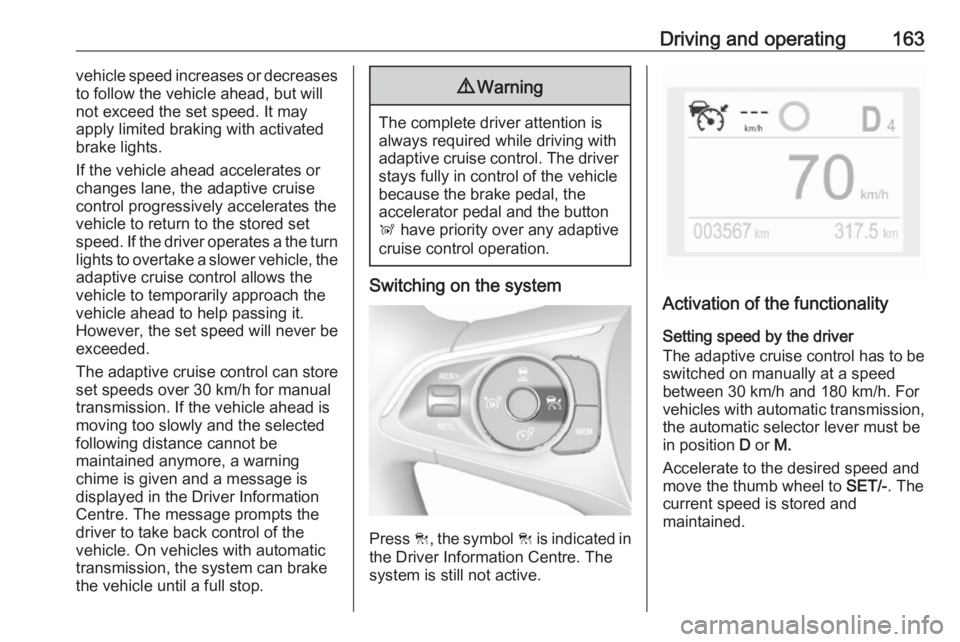
Press C, the symbol C is indicated in
the Driver Information Centre. The system is still not active.
Activation of the functionality
Setting speed by the driver
The adaptive cruise control has to be switched on manually at a speed
between 30 km/h and 180 km/h. For
vehicles with automatic transmission, the automatic selector lever must be
in position D or M.
Accelerate to the desired speed and
move the thumb wheel to SET/-. The
current speed is stored and
maintained.
Page 171 of 277
Driving and operating169The front bumper may appear to
be intact, however the sensor
behind may be affected and react
incorrectly. After an accident,
consult a workshop to verify and
adjust the radar unit position.
Fault
In the event of a fault with the adaptive cruise control, you are alerted by the
illumination of a warning light and the
display of a message in the
instrument panel, accompanied by an
audible signal.
The adaptive cruise control may not
operate correctly if traffic signs do not comply with the Vienna Convention
on Road Signs and Signals.
Have the system checked by a dealer
or a qualified workshop.
As a safety measure, do not use the
system if the brake lights are faulty.
Do not use the system if the front
bumper is damaged.
Forward collision alert
The forward collision alert may help toavoid or reduce the harm caused by
front-end crashes.
The forward collision alert uses the
front camera in the windscreen and a
radar unit located behind the front
bumper of the vehicle to detect a
vehicle directly ahead, in your path.
If a vehicle directly ahead is
approached too quickly, a warning
chime and alert in the Driver
Information Centre is provided.9 Warning
Forward collision alert is just a
warning system and does not
apply the brakes. When
approaching a vehicle ahead too
rapidly, it may not provide you
enough time to avoid a collision.
The driver accepts full
responsibility for the appropriate
following distance based on traffic, weather and visibility conditions.
The complete attention of the
driver is always required while
driving. The driver must always be
ready to take action and apply the
brakes.
Activation
Forward collision alert detects
vehicles and operates automatically
at all speeds between 5 km/h and 140 km/h.
Alerting the driver
The driver is warned by following
alerts:
● Symbol , illuminates and a
warning message is displayed in
the Driver Information Center,
when the distance to the vehicle
ahead gets to small.
● Symbol , illuminates, a warning
message is displayed in the
Driver Information Center and a
warning chime sounds, when a
collision is imminent and
immediate driver's action is
required.
Page 188 of 277
186Driving and operating180° view
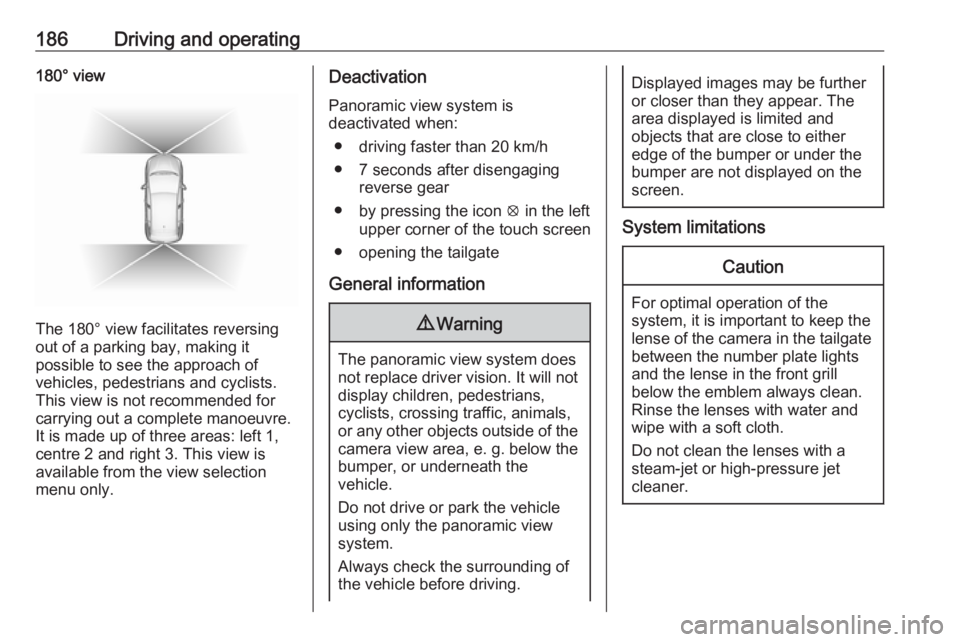
The 180° view facilitates reversing
out of a parking bay, making it
possible to see the approach of
vehicles, pedestrians and cyclists.
This view is not recommended for
carrying out a complete manoeuvre.
It is made up of three areas: left 1,
centre 2 and right 3. This view is
available from the view selection menu only.
Deactivation
Panoramic view system is
deactivated when:
● driving faster than 20 km/h
● 7 seconds after disengaging reverse gear
● by pressing the icon q in the left
upper corner of the touch screen
● opening the tailgate
General information9 Warning
The panoramic view system does
not replace driver vision. It will not display children, pedestrians,
cyclists, crossing traffic, animals,
or any other objects outside of the camera view area, e. g. below the
bumper, or underneath the
vehicle.
Do not drive or park the vehicle
using only the panoramic view
system.
Always check the surrounding of
the vehicle before driving.
Displayed images may be further
or closer than they appear. The
area displayed is limited and
objects that are close to either
edge of the bumper or under the
bumper are not displayed on the
screen.
System limitations
Caution
For optimal operation of the
system, it is important to keep the
lense of the camera in the tailgate between the number plate lightsand the lense in the front grill
below the emblem always clean.
Rinse the lenses with water and
wipe with a soft cloth.
Do not clean the lenses with a
steam-jet or high-pressure jet
cleaner.
Page 189 of 277
Driving and operating187The panoramic view system may not
operate properly when:
● The surrounding is dark.
● The sun or the beam of headlights is shining directly into
the camera lenses.
● Weather limits visibility, such as fog, rain, or snow.
● The camera lenses are blocked by snow, ice, slush, mud, dirt.
● The vehicle is towing a trailer.
● The vehicle had an accident.
● There are extreme temperature changes.
Rear view camera The rear view camera assists the
driver when reversing by displaying a view of the area behind the vehicle.
The view of the camera is displayed
in the Info Display.9 Warning
The rear view camera does not
replace driver vision. Note that
objects that are outside the
camera's field of view and the
parking assist sensors, e.g. below
the bumper or underneath the
vehicle, are not displayed.
Do not reverse or park the vehicle
using only the rear view camera.
Always check the surrounding of
the vehicle before driving.
Switching on
Rear view camera is automatically
activated when reverse gear is
engaged.
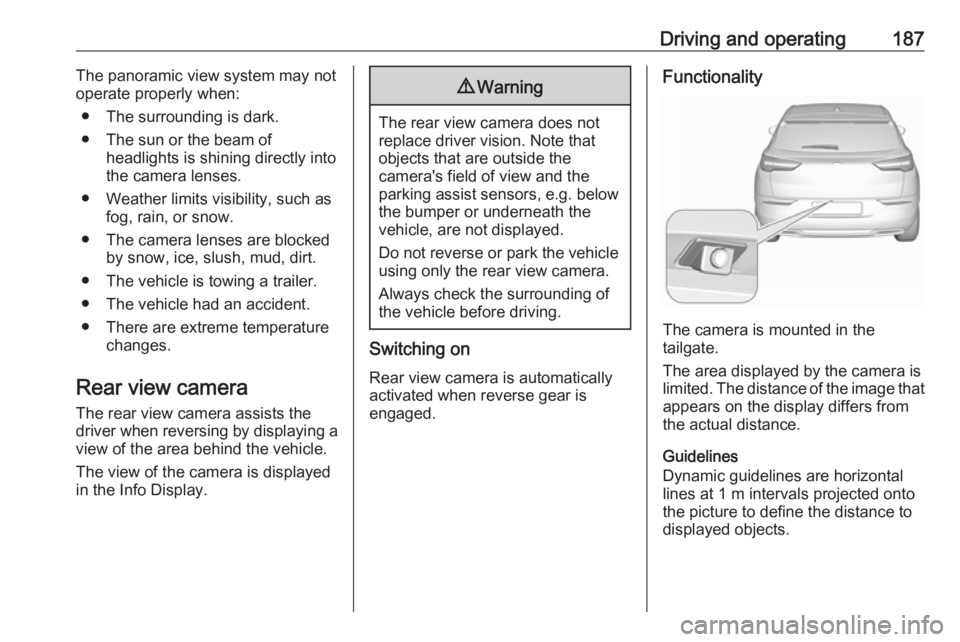
Functionality
The camera is mounted in the
tailgate.
The area displayed by the camera is
limited. The distance of the image that
appears on the display differs from
the actual distance.
Guidelines
Dynamic guidelines are horizontal
lines at 1 m intervals projected onto
the picture to define the distance to displayed objects.
Page 190 of 277
188Driving and operating
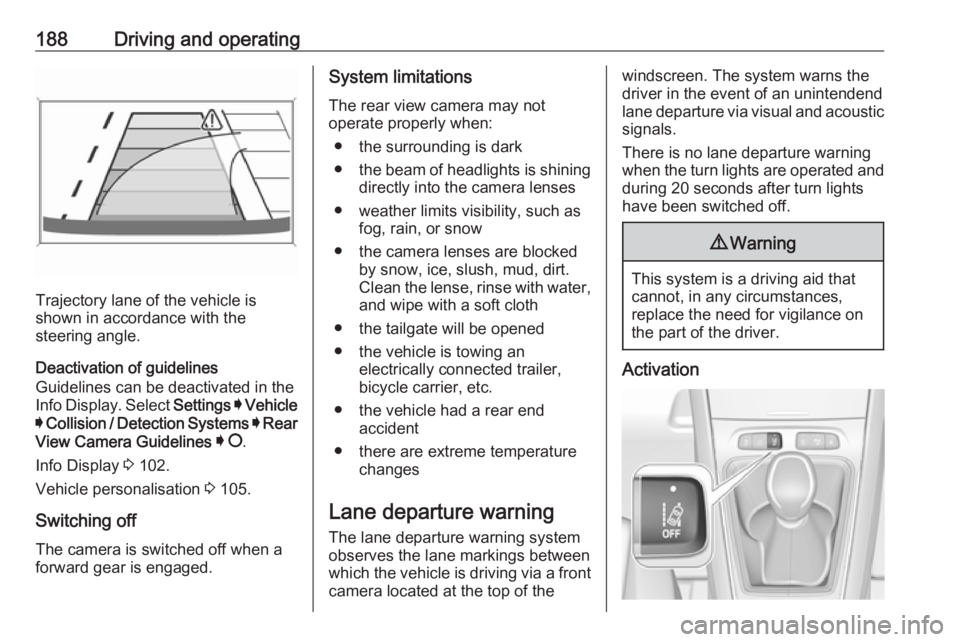
Trajectory lane of the vehicle is
shown in accordance with the
steering angle.
Deactivation of guidelines
Guidelines can be deactivated in the
Info Display. Select Settings I Vehicle
I Collision / Detection Systems I Rear
View Camera Guidelines I § .
Info Display 3 102.
Vehicle personalisation 3 105.
Switching off
The camera is switched off when a
forward gear is engaged.
System limitations
The rear view camera may not
operate properly when:
● the surrounding is dark
● the beam of headlights is shining
directly into the camera lenses
● weather limits visibility, such as fog, rain, or snow
● the camera lenses are blocked by snow, ice, slush, mud, dirt.Clean the lense, rinse with water,
and wipe with a soft cloth
● the tailgate will be opened
● the vehicle is towing an electrically connected trailer,
bicycle carrier, etc.
● the vehicle had a rear end accident
● there are extreme temperature changes
Lane departure warning
The lane departure warning system
observes the lane markings between which the vehicle is driving via a front camera located at the top of thewindscreen. The system warns the
driver in the event of an unintendend
lane departure via visual and acoustic signals.
There is no lane departure warning when the turn lights are operated and during 20 seconds after turn lights
have been switched off.9 Warning
This system is a driving aid that
cannot, in any circumstances,
replace the need for vigilance on
the part of the driver.
Activation
Page 192 of 277
190Driving and operatingWhen the system steers to correct thetrajectory of the vehicle, a flashes
yellow in the instrument cluster.
A warning message in the Driver
Information Centre accompanied by a warning chime alerts the driver when
immediate driver´s action is required.
Unintended lane departure is not
assumed by the system when the turn lights are operated and during
20 seconds after turn lights have
been switched off.
Note
The system may be switched off if it
detects lanes which are too narrow,
too wide or too curved.
Following preconditions have to be
fullfilled:
● vehicle speed must be between 65 km/h and 180 km/h
● the driver must hold the steering wheel with both hands
● the change of trajectory is not accompanied by operation of the
turn signals
● the Electronic Stability Control is activated and not in operation● the vehicle is not connected to atrailer or an electric bicycle carrier
● normal driving behaviour (system
detects dynamic driving style, i.e.
pressure on the brake or
accelerator pedal)
● roads with poor lane markings
● no spare wheel is used
● the driver needs to be active during the correction
● the vehicle is not driven in a tight
corner
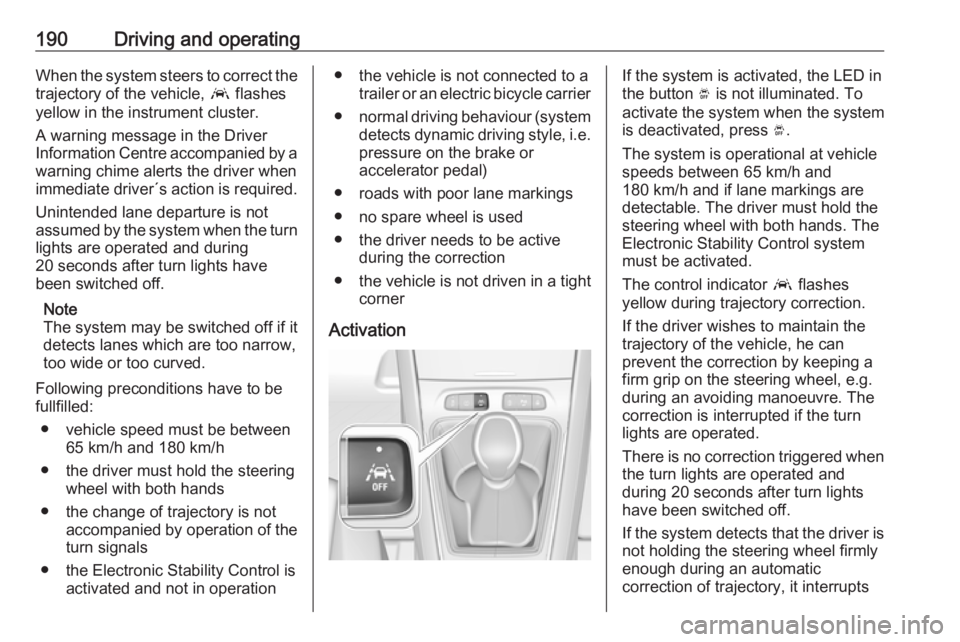
ActivationIf the system is activated, the LED in
the button Ó is not illuminated. To
activate the system when the system
is deactivated, press Ó.
The system is operational at vehicle
speeds between 65 km/h and
180 km/h and if lane markings are
detectable. The driver must hold the
steering wheel with both hands. The Electronic Stability Control system
must be activated.
The control indicator a flashes
yellow during trajectory correction.
If the driver wishes to maintain the
trajectory of the vehicle, he can
prevent the correction by keeping a
firm grip on the steering wheel, e.g.
during an avoiding manoeuvre. The correction is interrupted if the turn
lights are operated.
There is no correction triggered when
the turn lights are operated and
during 20 seconds after turn lights
have been switched off.
If the system detects that the driver is not holding the steering wheel firmly
enough during an automatic
correction of trajectory, it interrupts
Page 198 of 277

196Driving and operatingTo close, turn the fuel filler cap
clockwise until it clicks.
Close the flap and allow it to engage.
Fuel filler cap
Only use genuine fuel filler caps.
Diesel-engined vehicles have special fuel filler caps.Trailer hitch
General information
Only use towing equipment that has
been approved for your vehicle. If
using non-factory fitted towing
equipment, deactivation of the hands- free tailgate operation may be
required 3 30.
Entrust retrofitting of towing
equipment to a workshop. It may be
necessary to make changes that
affect the cooling system, heat
shields or other equipment.
The bulb outage detection function for
trailer brake light cannot detect a
partial bulb outage. E.g. in case of
four bulbs with a power of 5 W each,
the function only detects lamp outage when only a single 5 W lamp remains
or none remain.
Trailers equipped with LED lights are
not suitable for the wiring harness of
this trailer hitch.
Fitting of towing equipment could
cover the opening of the towing eye.
If this is the case use the coupling ballbar for towing. Always keep the
coupling ball bar in the vehicle to have it on hand if needed.
Driving characteristics andtowing tips
Before attaching a trailer, lubricate
the coupling ball. However, do not do
so if a stabiliser, which acts on the coupling ball, is being used to reduce snaking movements.
During trailer towing do not exceed a
speed of 80 km/h. A maximum speed
of 100 km/h is only appropriate if an
oscillation damper is used and the
permissible gross trailer weight does
not exceed the vehicle’s curb weight.
For trailers with low driving stability
and caravan trailers, the use of an
oscillation damper is strongly
recommended.
If the trailer starts snaking, drive more
slowly, do not attempt to correct the
steering and brake sharply if
necessary.
When driving downhill, drive in the
same gear as if driving uphill and
drive at a similar speed.
Page 203 of 277
Vehicle care201Vehicle careGeneral Information...................201
Accessories and vehicle modifications .......................... 201
Vehicle storage ........................202
End-of-life vehicle recovery .....203
Vehicle checks ........................... 203
Performing work ......................203
Bonnet ..................................... 203
Engine oil ................................. 204
Engine coolant ......................... 205
Washer fluid ............................ 206
Brakes ..................................... 206
Brake fluid ............................... 206
Vehicle battery ......................... 206
Diesel fuel system bleeding .....208
Wiper blade replacement ........208
Bulb replacement .......................209
Halogen headlights ..................209
LED headlights ........................ 210
Front fog lights ......................... 210
Tail lights ................................. 211
Side turn lights ......................... 214
Number plate light ...................214
Interior lights ............................ 214Electrical system........................215
Fuses ....................................... 215
Engine compartment fuse box . 216
Instrument panel fuse box .......217
Vehicle tools .............................. 219
Tools ........................................ 219
Wheels and tyres .......................220
Winter tyres ............................. 220
Tyre designations ....................221
Tyre pressure .......................... 221
Tyre deflation detection system .................................... 222
Tread depth ............................. 223
Changing tyre and wheel size . 224
Wheel covers ........................... 224
Tyre chains .............................. 224
Tyre repair kit .......................... 225
Wheel changing .......................228
Spare wheel ............................ 229
Jump starting ............................. 233
Towing ....................................... 234
Towing the vehicle ...................234
Towing another vehicle ...........235
Appearance care .......................236
Exterior care ............................ 236
Interior care ............................. 238General Information
Accessories and vehiclemodifications
We recommend the use of genuine
parts and accessories and factory approved parts specific for your
vehicle type. We cannot assess or guarantee reliability of other products
- even if they have a regulatory or
otherwise granted approval.
Any modification, conversion or other changes made to standard vehicle
specifications (including, without
limitation, software modifications,
modifications of the electronic control
units) may invalidate the warranty
offered by Opel. Furthermore, such
changes may affect driver assistance
systems, may impact fuel
consumption, CO 2 emissions and
other emissions of the vehicle and
cause the vehicle to no longer
conform to the operating permit,
impacting the validity of your vehicle
registration.
Page 211 of 277
Vehicle care209Bulb replacement
Switch off the ignition and switch off
the relevant switch or close the doors.
Only hold a new bulb at the base. Do
not touch the bulb glass with bare
hands.
Use only the same bulb type for
replacement.
Replace headlight bulbs from within
the engine compartment.
Bulb check After a bulb replacement switch on
the ignition, operate and check the
lights.
Halogen headlights Halogen headlights with separate
bulbs for low beam and high beam.
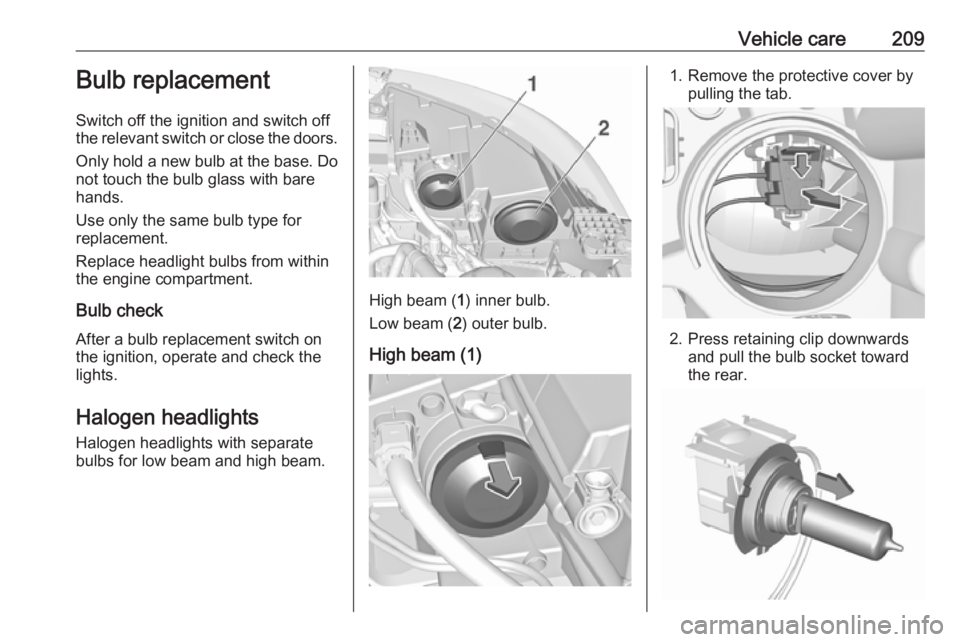
High beam ( 1) inner bulb.
Low beam ( 2) outer bulb.
High beam (1)
1. Remove the protective cover by pulling the tab.
2. Press retaining clip downwardsand pull the bulb socket toward
the rear.
Page 212 of 277
210Vehicle care3. Detach the bulb from the bulbsocket and replace the bulb.
4. Insert the bulb socket into the reflector housing.
5. Fit the cap on.
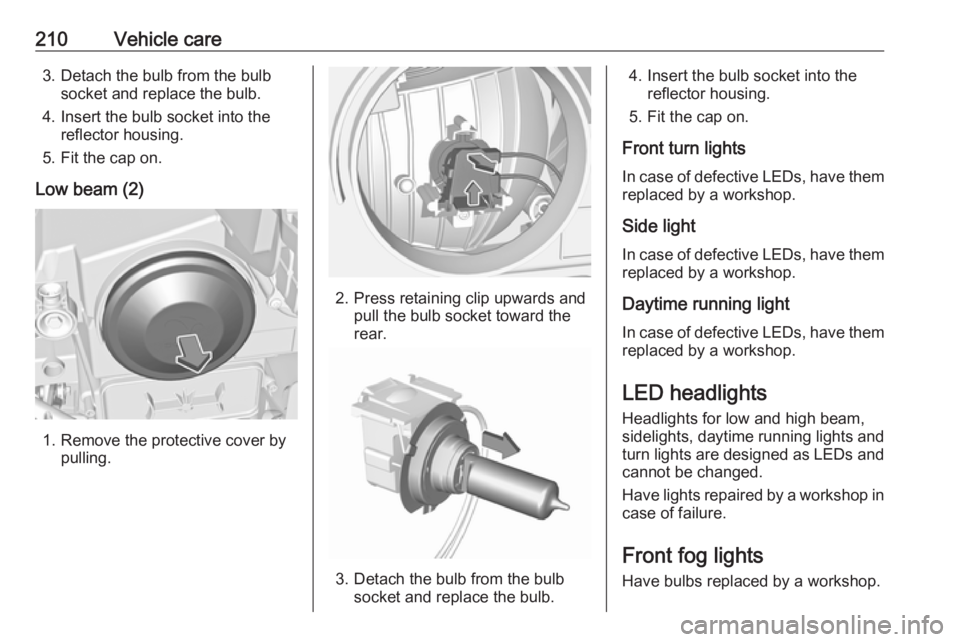
Low beam (2)
1. Remove the protective cover by pulling.
2. Press retaining clip upwards and pull the bulb socket toward the
rear.
3. Detach the bulb from the bulb socket and replace the bulb.
4. Insert the bulb socket into the reflector housing.
5. Fit the cap on.
Front turn lights
In case of defective LEDs, have them replaced by a workshop.
Side light
In case of defective LEDs, have them
replaced by a workshop.
Daytime running light
In case of defective LEDs, have them replaced by a workshop.
LED headlights Headlights for low and high beam,
sidelights, daytime running lights and turn lights are designed as LEDs and
cannot be changed.
Have lights repaired by a workshop in
case of failure.
Front fog lights
Have bulbs replaced by a workshop.