change time OPEL GRANDLAND X 2020 Manual user
[x] Cancel search | Manufacturer: OPEL, Model Year: 2020, Model line: GRANDLAND X, Model: OPEL GRANDLAND X 2020Pages: 283, PDF Size: 22.19 MB
Page 175 of 283
Driving and operating173Selecting the alert sensitivity7'' Colour Info Display: Adjust the alert
sensitivity in the vehicle
personalisation 3 108.
8'' Colour Info Display: Adjust the alert
sensitivity in the settings of the active safety brake in the vehicle
personalisation 3 108.
The chosen setting will remain until it is changed. The alert timing will vary
based on vehicle speed. The faster
the vehicle speed, the farther away
the alert will occur. Consider traffic
and weather conditions when
selecting the alert timing.
Deactivation
The system can only be deactivated
by deactivating the active emergency braking in the vehicle personalisation
3 108.
System limitations Forward collision alert is designed to
warn on vehicles only, but may react
also to other objects.In the following cases, forward
collision alert may not detect a vehicle ahead or sensor performance is
limited:
● driving on winding or hilly roads
● driving during nighttime
● weather limits visibility, such as fog, rain, or snow
● the sensor in the windscreen or the radar unit behind the front
bumper are blocked by snow, ice,
slush, mud, dirt etc.
● the windscreen is damaged or affected by foreign objects, e.g.
stickers
Active emergency braking
Active emergency braking can help to reduce the damage and injury from
crashes with vehicles, pedestrians and obstacles directly ahead, when a
collision can no longer be avoided
either by manual braking or by
steering. Before the active
emergency braking applies, the driver is warned by the forward collision
alert or the front pedestrian protection
alert.Forward collision alert 3 171
Front pedestrian protection 3 176
Active emergency braking can be
deactivated in the personalisation
menu 3 108. If deactivated, m
illuminates in the instrument cluster
and a warning message is displayed
in the Driver Information Centre.
The feature uses various inputs (e.g.
camera sensor, radar sensor, brake
pressure, vehicle speed) to calculate
the probability of a frontal collision.9 Warning
This system is not intended to
replace the driver responsibility for driving the vehicle and looking
ahead. Its function is limited to
supplemental use only to reduce
the vehicle speed before a
collision.
The system may not react to
animals. After a sudden lane
change, the system needs a
certain time to detect the next
preceding vehicle.
Page 177 of 283
Driving and operating175the brake pedal less strongly results
in immediate hard braking. This
function helps the driver brake
quicker and harder before the
imminent collision.9 Warning
Active emergency braking is not
designed to apply hard
autonomous braking or to
automatically avoid a collision. It is
designed to reduce the vehicle
speed before a collision. It may not
react to animals. After a sudden
lane change, the system needs a
certain time to detect the next
preceding vehicle.
The complete attention of the
driver is always required while
driving. The driver must always be
ready to take action and apply the brakes and steer to avoid
collisions.
The system is designed to work with
all occupants wearing their seat belts.
Intelligent brake assist
If the vehicle is equipped with radar
sensor, intelligent brake assist may
be available. Intelligent brake assist
provides a boost to braking when the
brake pedal is quickly applied. The
braking is based on the speed of
approach and distance to a vehicle
ahead.
Minor brake pedal pulsations or pedal movement during this time is normal
and the brake pedal should continue to be applied as needed. Intelligent
brake assist will automatically
disengage only when the brake pedal is released.9 Warning
Intelligent brake assist may
increase vehicle braking in
situations when it may not be
necessary. You could block the
flow of traffic. If this occurs, take
your foot off the brake pedal and
then apply the brakes as needed.
Forward collision alert 3 171.
Front pedestrian protection 3 176.
System limitations
In some cases, the active emergencybraking system may provide an
automatic braking in situations that
seem to be unnecessary, for instance
in parking garages, due to traffic signs in a curve or due to vehicles in
another lane. This is normal
operation, the vehicle does not need service. Firmly apply the accelerator
pedal to override the automatic
braking if the situation and the
surroundings permit.
In the following cases, active
emergency braking performance is limited:
● driving on winding or hilly roads
● detecting all vehicles, especially vehicles with a trailer, tractors,
muddy vehicles, etc.
● weather limits visibility, such as fog, rain, or snow
● driving during nighttime
Page 189 of 283

Driving and operating187
The screen in the Info Display is
divided into two parts. On the right
there is a view from above the vehicle and on the left there is the view from
the rear or the front displayed. The
parking sensors complete the
information on the view from above
the vehicle.
Activation
The panoramic view system is
activated by:
● engaging a gear or gearbox in a neutral position (front view)
● engaging reverse gear (rear view)
● manual activation in the Info Display when driving not more
than 20 km/h
Functionality
Different views can be selected in the left part of the display. Change the
type of view at any time during a
manoeuvre by pressing the touch
field in the left lower zone of the
display and selecting a view from the
view selection menu:
● Standard view
● Auto mode
● Zoom view
● 180° view
The display is immediately updated
with the type of view selected.Auto mode is activated by default. In
this mode, the system selects the
best view, standard, or zoom, to
display according to the information
from the parking sensors.
The state of the system is not kept in
memory when the ignition is switched
off.
Standard view
The standard view consists of a rear
view and a front view.Rear view
The area behind the vehicle is
displayed in the screen. The vertical
lines represent the width of the
Page 194 of 283
192Driving and operatingAt speeds below 60 km/h the systemis inoperable.
Fault
In the event of a fault, C appears in
the instrument panel, accompanied
by a display message and a warning
chime. Contact a dealer or a qualified
workshop to have the system
checked.
System limitations The system performance may notoperate properly when:
● Vehicle speed is below 60 km/h.
● Windscreen is not clean or affected by foreign objects, e.g.
stickers.
● Driving on winding or hilly roads.
● During nighttime driving.
● Adverse environmental conditions like heavy rain, snow,
direct sunlight or shadows.
● The sensor in the windscreen is blocked by snow, ice, slush, mud,dirt, windscreen damage or
affected by foreign objects, e.g.
stickers.● The sun is shining directly into the camera lens.
● Close vehicles ahead.
● Driving on banked roads.
● Driving on road edges.
● Driving on roads with poor lane markings.
● Sudden lighting changes.
The system can not operate when no
lane marking is detected.
Lane keep assist
Lane keep assist helps to avoid
crashes due to unintentional lane
departures. The front camera
observes the lane markings between
which the vehicle is driving. If the
vehicle approaches a lane marking, the steering wheel is gently turned to
position the vehicle back into the lane. The driver will then notice a turning
movement of the steering wheel. Turn steering wheel in same direction, if
system steers not sufficient. Turn
steering wheel gently into opposite
direction, if lane change is intended.When the system steers to correct the trajectory of the vehicle, a flashes
yellow in the instrument cluster.
A warning message in the Driver
Information Centre accompanied by a
warning chime alerts the driver when
immediate driver´s action is required.
Unintended lane departure is not
assumed by the system when the turn lights are operated and during
20 seconds after turn lights have
been switched off.
Note
The system may be switched off if it
detects lanes which are too narrow,
too wide or too curved.
Following preconditions have to be
fullfilled:
● vehicle speed must be between 65 km/h and 180 km/h
● the driver must hold the steering wheel with both hands
● the change of trajectory is not accompanied by operation of theturn lights
● the Electronic Stability Control is activated and not in operation
Page 196 of 283
194Driving and operating● winding or hilly roads
● road edges
● sudden lighting changes
● adverse environmental conditions, e.g. heavy rain or
snow
● vehicle modifications, e.g. tyres
Switch off the system if the system is
disturbed by tar marks, shadows,
road cracks, temporary or
construction lane markings, or other
road imperfections.9 Warning
Always keep your attention on the
road and maintain proper vehicle
position within the lane, otherwise
vehicle damage, injury or death
could occur.
Lane keep assist does not
continuously steer the vehicle.
The system may not keep the
vehicle in the lane or give an alert,
even if a lane marking is detected.
The steering of the lane keep
assist may not be sufficient to
avoid a lane departure.
The system may not detect hands-
off driving due to external
influences like road condition and
surface and weather. The driver has full responsibility to control the vehicle and is always required to
keep the hands on the steering
wheel while driving.
Using the system while towing a
trailer or on slippery roads could
cause loss of control of the vehicle
and a crash. Switch the system off.
Driver alert
The driver alert system monitores the driving time and the vigilance of the
driver. Monitoring the vigilance of the
driver is based on the trajectory
variations of the vehicle compared to
the lane markings.
9 Warning
The system cannot replace the
need for vigilance on the part of
the driver. Taking a break is
recommended as soon as feeling tired or at least every two hours.
Do not take the steering wheel
when feeling tired.
Activation or Deactivation
The system can be activated or
deactivated in the vehicle
personalisation 3 108.
The state of the system stays in
memory when the ignition is switched
off.
Driving time alert The driver gets notified by a pop-up
reminder symbol € in the Driver
Information Centre simultaneously with an acoustic alert if the driver has
not taken a break after 2 hours of
driving at a speed above 65 km/h. The
alert is repeated hourly until the
vehicle is stopped, no matter how
vehicle speed evolves.
Page 215 of 283

Vehicle care213Vehicle storageStorage for a long period of time
If the vehicle is to be stored for several months:
● Wash and wax the vehicle.
● Have the wax in the engine compartment and underbody
checked.
● Clean and preserve the rubber seals.
● Fill up fuel tank completely.
● Change the engine oil.
● Drain the washer fluid reservoir.
● Check the coolant antifreeze and
corrosion protection.
● Adjust tyre pressure to the value specified for full load.
● Park the vehicle in a dry, well ventilated place. Engage first or
reverse gear or set selector lever
to P. Prevent the vehicle from
rolling.
● Do not apply the parking brake.● Open the bonnet, close all doors and lock the vehicle.
● Disconnect the clamp from the negative terminal of the vehicle
battery. Note that all systems are
not functional, e.g. anti-theft
alarm system.
Putting back into operation
When the vehicle is to be put back into
operation:
● Connect the clamp to the negative terminal of the vehicle
battery. Initialize the power
windows 3 40.
● Check tyre pressure.
● Fill up the washer fluid reservoir.
● Check the engine oil level.
● Check the coolant level.
● Fit the number plate if necessary.End-of-life vehicle recovery
Information on end-of-life vehicle
recovery centres and the recycling of
end-of-life vehicles is available on our website, where legally required. Only
entrust this work to an authorised
recycling centre.
Page 224 of 283
222Vehicle care
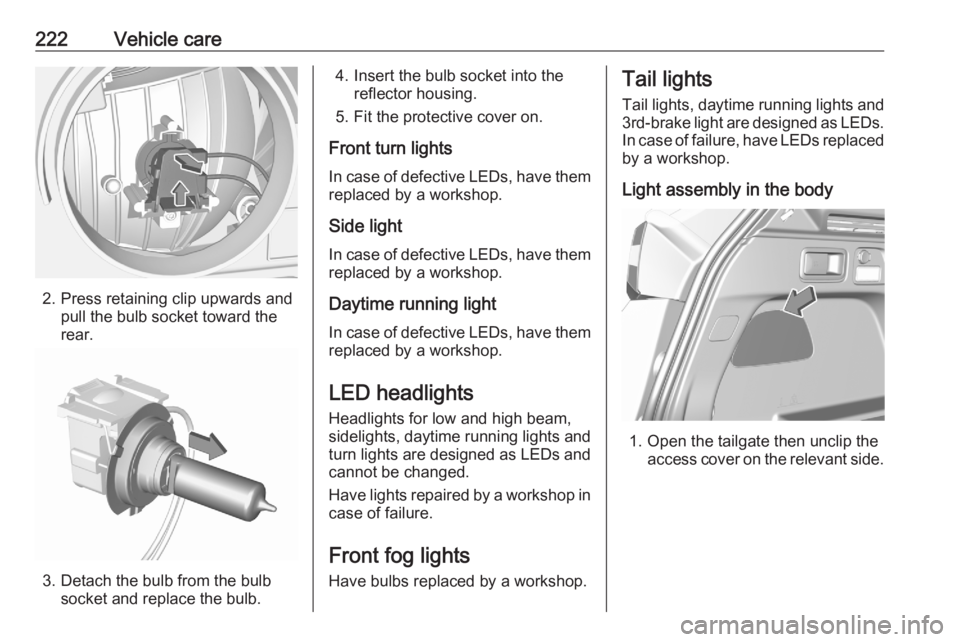
2. Press retaining clip upwards andpull the bulb socket toward the
rear.
3. Detach the bulb from the bulb socket and replace the bulb.
4. Insert the bulb socket into the reflector housing.
5. Fit the protective cover on.
Front turn lights
In case of defective LEDs, have them
replaced by a workshop.
Side light
In case of defective LEDs, have them replaced by a workshop.
Daytime running light
In case of defective LEDs, have them
replaced by a workshop.
LED headlights
Headlights for low and high beam,
sidelights, daytime running lights and turn lights are designed as LEDs and
cannot be changed.
Have lights repaired by a workshop in
case of failure.
Front fog lights
Have bulbs replaced by a workshop.Tail lights
Tail lights, daytime running lights and
3rd-brake light are designed as LEDs.
In case of failure, have LEDs replaced by a workshop.
Light assembly in the body
1. Open the tailgate then unclip the access cover on the relevant side.
Page 236 of 283
234Vehicle careSystem initialisation
After tyre pressure correction or
wheel change, the system must be
initialised to learn new circumference reference values:
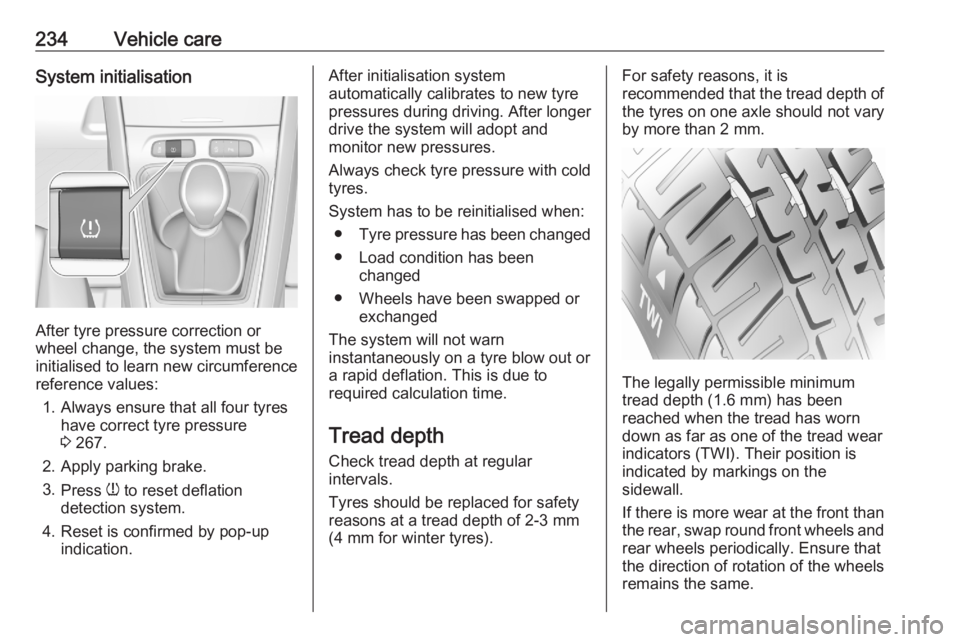
1. Always ensure that all four tyres have correct tyre pressure3 267.
2. Apply parking brake. 3. Press w to reset deflation
detection system.
4. Reset is confirmed by pop-up indication.
After initialisation system
automatically calibrates to new tyre
pressures during driving. After longer
drive the system will adopt and
monitor new pressures.
Always check tyre pressure with cold
tyres.
System has to be reinitialised when: ● Tyre pressure has been changed
● Load condition has been changed
● Wheels have been swapped or exchanged
The system will not warn
instantaneously on a tyre blow out or
a rapid deflation. This is due to
required calculation time.
Tread depthCheck tread depth at regular
intervals.
Tyres should be replaced for safety
reasons at a tread depth of 2-3 mm
(4 mm for winter tyres).For safety reasons, it is
recommended that the tread depth of
the tyres on one axle should not vary
by more than 2 mm.
The legally permissible minimum
tread depth (1.6 mm) has been
reached when the tread has worn
down as far as one of the tread wear
indicators (TWI). Their position is
indicated by markings on the
sidewall.
If there is more wear at the front than
the rear, swap round front wheels and rear wheels periodically. Ensure that
the direction of rotation of the wheels
remains the same.
Page 275 of 283

Customer information273Depending on technical equipment
levels, the data stored is as follows:
● system component operating states (e.g. fill level, tyre
pressure, battery status)
● faults and defects in important system components (e.g. lights,
brakes)
● system reactions in special driving situations (e.g. triggeringof an airbag, actuation of the
stability control systems)
● information on events damaging the vehicle
● for electric vehicles the amount of
charge in the high-voltage
battery, estimated range
In special cases (e.g. if the vehicle
has detected a malfunction), it may be
necessary to save data that would
otherwise just be volatile.
When you use services (e.g. repairs,
maintenance), the operating data
saved can be read together with the
vehicle identification number and
used where necessary. Staff working
for the service network ( e.g. garages,
manufacturers) or third parties (e.g.breakdown services) can read the
data from the vehicle. The same
applies to warranty work and quality
assurance measures.
Data is generally read via the OBD
(On-Board Diagnostics) port
prescribed by law in the vehicle. The operating data read documents the
technical condition of the vehicle or
individual components and assists
with fault diagnosis, compliance with
warranty obligations and quality
improvement. This data, in particular information on component stress,
technical events, operator errors and
other faults, is transmitted to the
manufacturer where appropriate,
together with the vehicle identification
number. The manufacturer is also
subject to product liability. The
manufacturer potentially also uses operating data from vehicles for
product recalls. This data can also be used to check customer warranty and
guarantee claims.
Fault memories in the vehicle can be
reset by a service company when
carrying out servicing or repairs or at
your request.Comfort and infotainment
functions
Comfort settings and custom settings can be stored in the vehicle and
changed or reset at any time.
Depending on the equipment level in
question, these include
● seat and steering wheel position settings
● chassis and air conditioning settings
● custom settings such as interior lighting
You can input your own data in the
infotainment functions for your
vehicle as part of the selected
features.
Depending on the equipment level in
question, these include
● multimedia data such as music, videos or photos for playback in
an integrated multimedia system
● address book data for use with an
integrated hands-free system or an integrated navigation system
Page 276 of 283
274Customer information● input destinations
● data on the use of online services
This data for comfort and
infotainment functions can be stored
locally in the vehicle or be kept on a
device that you have connected to the vehicle ( e.g. a smartphone, USB stick
or MP3 player). Data that you have
input yourself can be deleted at any
time.
This data can only be transmitted out of the vehicle at your request,
particularly when using online
services in accordance with the
settings selected by you.
Smartphone integration, e.g.
Android Auto or Apple CarPlay
If your vehicle is equipped
accordingly, you can connect your
smartphone or another mobile device
to the vehicle so that you can control
it via the controls integrated in the
vehicle. The smartphone image and
sound can be output via the
multimedia system in this case. At the
same time, specific information is
transmitted to your smartphone.
Depending on the type of integration,this includes data such as position
data, day / night mode and other
general vehicle information. For more information, please see the operating
instructions for the vehicle /
infotainment system.
Integration allows selected
smartphone apps to be used, such as
navigation or music playback. No
further integration is possible
between smartphone and vehicle, in
particular active access to vehicle
data. The nature of further data
processing is determined by the
provider of the app used. Whether
you can define settings, and if so
which ones, is dependent on the app
in question and your smartphone's
operating system.Online services
If your vehicle has a radio networkconnection, this allows data to be exchanged between your vehicle and other systems. The radio network
connection is made possible by
means of a transmitter device in your
vehicle or a mobile device provided
by you (e.g. a smartphone). Online
functions can be used via this radio
network connection. These include
online services and applications /
apps provided to you by the
manufacturer or other providers.
Proprietary services
In the case of the manufacturer's
online services, the relevant functions are described by the manufacturer in
an appropriate location (e.g. Owner's
Manual, the manufacturer's website)
and the associated data protection
information is provided. Personal
data may be used to provide online
services. Data exchange for this
purpose takes place via a protected
connection, e.g. using the
manufacturer's IT systems provided
for the purpose. Collection,