remote control OPEL GT 2012 User Guide
[x] Cancel search | Manufacturer: OPEL, Model Year: 2012, Model line: GT, Model: OPEL GT 2012Pages: 190, PDF Size: 2.46 MB
Page 68 of 190
68 In struments, controls
The p ers onalis ation mode ends after
mak ing your language selection and the
display g oes back to the previously
dis playe d me nu ite m in the informa tion
dis play - se e page 60 .
Alternative ly, pre ss and hold buttons S
and T at the sam e time to e xit the
pe rsonalisation mode .
Re mote control - s ee page 2 2,
Ce ntral locking - s ee page 2 4 ,
Dela yed locking - s ee page 2 4,
Autom atic locking - s e e pa ge 2 5 ,
Autom atic unlock ing - s ee page 2 5.Che ck co ntro l w ar ni ng me ss ag e s
Check control monitors s e veral fluid le vels ,
the remote control batte ry , the e ng ine , the
fue l fille r cap and the s tatus of se veral
vehicle features including cruise control,
tra ction control, the Ele ctronic S tability
Program (ESP) and the airbag sy ste ms.
"ES C" ap pears in some warning mes s ages .
Elec tronic S tability C ontrol (ES C) is a
component part of the Ele ctronic S tability
Program (ESP), im proving driving s tability.
Warning me s sage s appe ar in the driv er
information ce ntre and a chime may s ound
w h en th e m es sa g e i s di s p l a ye d. If t he r e a r e
se veral warning mes s ages , the y are
display ed one after the other.
Some of the warning me ss age s ap pear on
the dis play in a bbrevia te d form.
Exa mples of warning me ss ages are shown
on the following pages .
Ac know le dge warning me ss age s as
des cribed on page 60 . The me ss age s will
clear from the display when the condition
no longe r ex ists .
Una cknowledge d warning me s sage s will
be re dis playe d later if the condition still
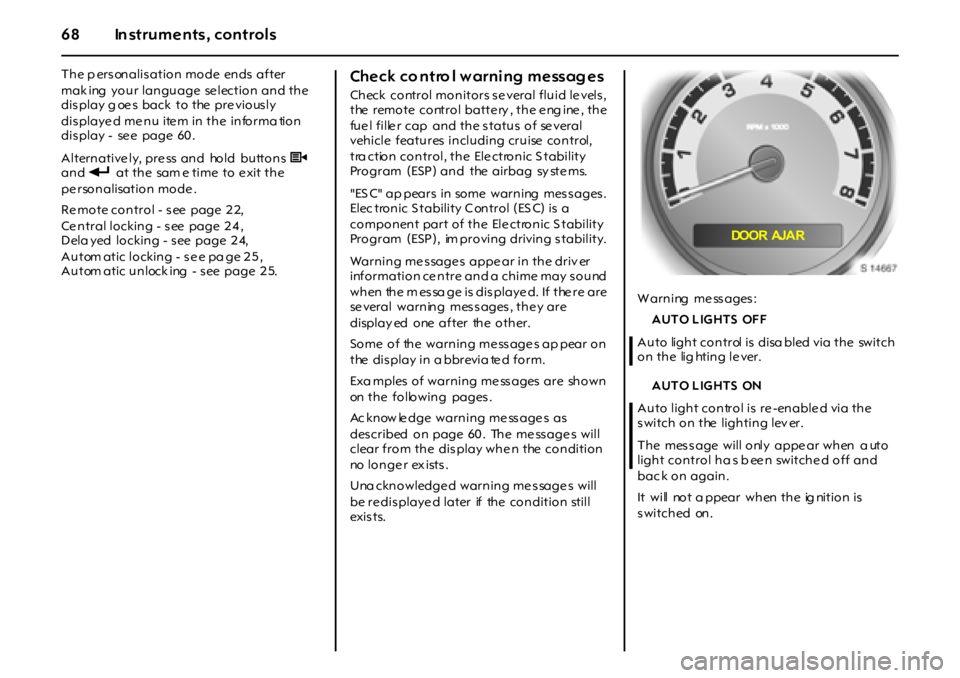
exi s t s.W arning me ss ages :
AUTO LIGHTS OFF
Auto light control is disa bled via the switch
on the lig hting le ver.
AUTO LIGHTS ON
Auto light control is re -enable d via the
switch on the lighting lev er.
The mes s age will only appe ar when a uto
light control ha s b een switched off and
bac k on again.
It will not a ppear when the ig nition is
switched on.
DOOR AJA R
Page 70 of 190

70 In struments, controls
KE Y FOB BA TT LOW
Batte ry voltage of remote control is
too low. Re place battery - s ee page 2 3.
LO W COO L A N T
Engine coola nt le vel is low. Top up coolant
lev el and have ca us e of loss reme died by a
workshop .
Coolant le vel - se e page 15 5 .
LO W TR A CT IO N
Traction control has come into action, to
limit whee l spin in s lippe ry roa d conditions.
Control indicator v also flas hes in the
instrume nt panel.
Adjust y our driving accordingly.
The me s sage may rema in for a s hort while
after trac tion control has ende d.
Ele ctronic Stability Program (ESP) -
s ee page 1 18 .
PA R KIN G B R A K E
T h e h a n d br a ke i s a p p l i ed a t sp ee ds ov er
8 km/h (5 mph). C ontrol indicator R als o
flashe s in the instrume nt panel.
Release hand brake before continuing
journe y, to avoid ove rhe ating and
da m a g i ng t h e br a k e s ys t em .
Hand b rake - se e page 12 4 .SE RV ICE AIR BAG
Fault in airbag sy ste m. C ontrol indicator v
also illuminates in the ins trument pa ne l.
The airbags m ay fail to trigge r in the e ve nt
of an accide nt. Consult a workshop
immed iately.
SE RV ICE ES C
Fault in E SP. C ontrol indicator v als o
illuminate s in the instrume nt panel. I n
slippe ry road conditions , the s ys tem will not
ass ist driving s ta bility . Adjust your driving
accordingly.
If the me ss age appe ars while driving, s top
the ve hicle and switch the ignition off and
back on again. If the me ss age s till appe ars,
cons ult a works hop as s oon as pos sib le .
Elec tronic S tability Program (E SP) -
se e p age 11 8 .
SERVICE TRACTI ON
Fault in traction control. Control ind ic ator
v a ls o illuminates in the ins trum ent pane l.
In slipp ery road cond itions , the sys tem will
not lim it whee l spin. Ad jus t your driving
accordingly.
Consult a work shop as s oon as poss ible.
Elec tronic S tability Program (E SP) -
se e p age 11 8 .TRACTIO N O FF
Traction control has be en d eactiva te d v ia
button R on the centre console. Control
indicator v als o illum inate s in the
ins trume nt panel. Adjus t your driving
acc ordingly.
E lectronic Stability Program (ES P) -
s ee page 1 18 .
TRUNK AJAR
The lugga ge comp artment lid is open or is
not close d p rope rly. C ontrol indicator s
als o illumina tes in the ins trume nt panel.
C los e lug gage compartme nt lid .
Do not drive with the lugga ge
compa rtm ent ope n.
L uggage compartme nt - s ee page s 2 6 , 5 5 .
Page 71 of 190
71Instru men ts, c ontrols
Warning buzzers
W hen s tarting the e ngine or while d riv ing:
zif d r iv e r ’ s s e a t b e l t i s n o t f a s t e n e d ,
zif passenger’s seat belt is not fa stened
whe n the s e at occupancy re cognition
system d etec ts tha t the passe nger’s se at
is occupie d,
zif the doors or the luggage comp artment
ha v e n o t be en p ro p e r l y cl o s ed w h en
st a r t i n g - o ff ,
zif the hand brake is applie d at s pee ds
ov er 8 km /h ( 5 mph ) ,
zwhile opera ting the indicators.
When the vehicle is parked and the driver’s
door is opened:
zif the head la mps or parking lam ps a re
sw i t c h ed o n ,
zwhe n the k ey is in the ignition switch,
zif any door remains open when the doors
are locke d with the remote control 3.
Driving hints - se e p age 11 0 ,
Saving fuel, protecting the environment -
s ee page 1 12 .
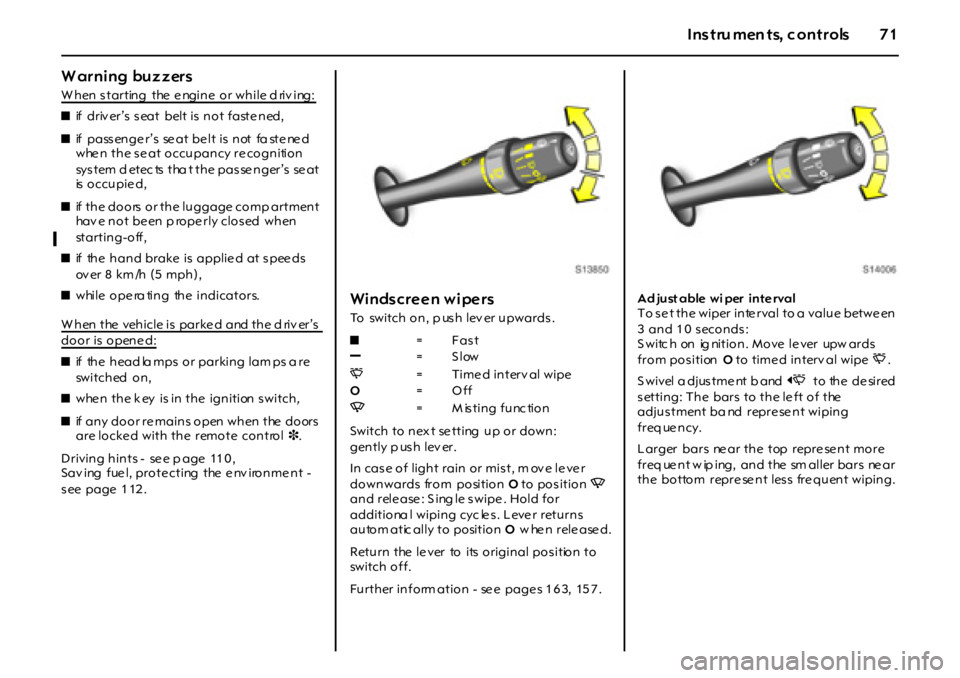
Windscreen wipers
To switch on, p us h lev er upwards .
Switch to n ex t se tting u p o r do wn :
gently p us h lev er.
In cas e o f ligh t rain o r mis t, m ov e le ve r
downwards from position O to position Q
and rele ase : S ing le s wipe . Hold for
additiona l wiping cyc le s. Leve r returns
autom atic ally to position O w hen released.
Return the le ver to its original pos ition to
switch off.
Further inform ation - se e page s 1 6 3, 15 7 .Ad just able wi per inte rval
To s e t the wiper inte rval to a value betwe en
3 and 10 seconds:
S witc h on ig nition. Move le ver upw ards
from positionO to time d interv al wipeP.
S w i v el a d j us t m e nt b a nd O to the de sired
setting: The bars to the le ft of the
adjus tment ba nd repre se nt wiping
freq ue ncy.
Larger bars ne ar the top repre se nt more
f r eq ue n t w ip i ng , a n d t he sm a l l er b a r s ne a r
the bottom repre se nt less fre quent wiping. z=Fast
]=Slow
P= Time d interv al wipe
O=Off
Q=Misting function
Page 73 of 190
73Lightin g
Lighting
Ex t e ri or la m ps
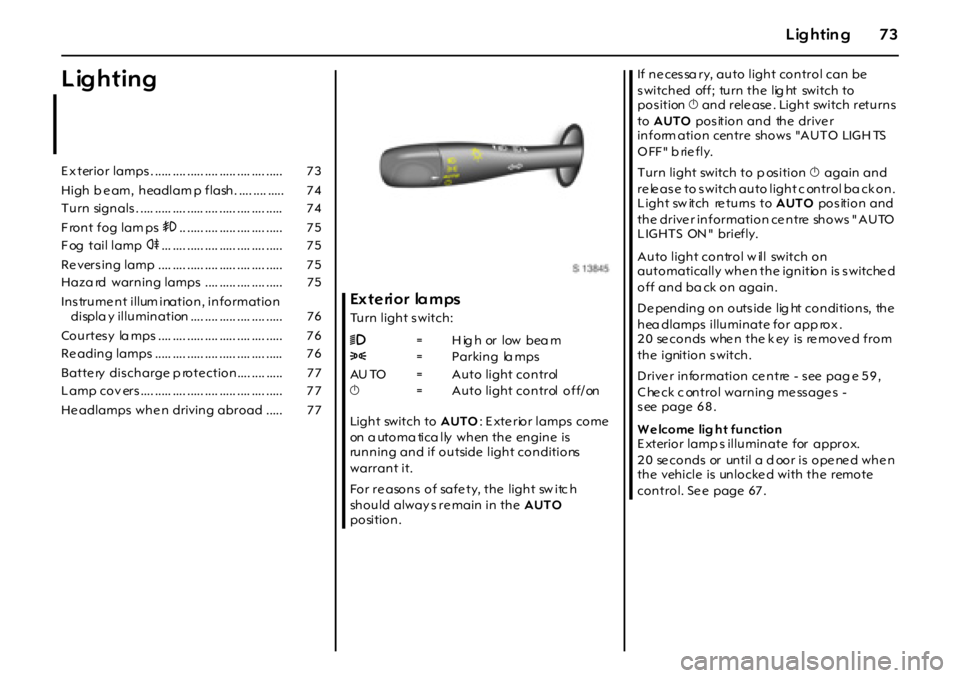
Turn light s witch:
Light switch to AUTO: E xte rior lamps come
on a utoma tica lly when the engine is
running and if outside light conditions
warrant it.
For re asons of safe ty, the light sw itc h
should alway s re main in the AUTO
position.If necessa ry, auto light control can be
s witched off; turn the lig ht switch to
pos ition X and rele ase . Light switch returns
to AUTO pos ition and the drive r
i n f o rm a t i o n c en t r e sh o w s "A U T O LIG H TS
OFF" briefly.
Turn light switch to p os ition X again and
re le as e to s witch auto light c ontrol ba ck on.
Light sw itch re turns to AUTO pos ition and
the drive r information ce ntre shows " AUTO
LIGHTS ON" briefly.
Auto light control w ill switch on
automatically whe n the ignition is s witche d
off and ba ck on again.
De pending on outs ide lig ht conditions, the
hea dlamps illuminate for app rox .
2 0 se c o n d s w he n t h e k ey i s re m o ve d f r o m
the ignition switch.
Drive r information ce ntre - s ee pag e 5 9 ,
C he ck c ontrol warning me ss age s -
s ee page 6 8 .
W e lcome lig ht function
E xterior lamp s illuminate for approx.
20 seconds or until a door is opened when
the vehicle is unlocke d with the remote
control. Se e page 67 . E x terio r lamps . ..... .... ..... .... ..... .... .... ..... 7 3
High b e am, h eadlam p f lash . .... .... ..... 7 4
T u rn sign als . .... ..... .... ..... .... ..... .... .... ..... 7 4
Front fog lam ps >.. ..... .... ..... .... .... ..... 7 5
F og tail lamp r... .... ..... .... ..... .... .... ..... 7 5
Re vers in g lamp .... .... ..... .... ..... .... .... ..... 7 5
Haza rd warn in g lamps .... ..... .... .... ..... 7 5
Ins trume nt illum ination, information
displa y illu min ation .... .... ..... .... .... ..... 7 6
Co u rtes y la mps .... .... ..... .... ..... .... .... ..... 7 6
Re adin g lamps ..... .... ..... .... ..... .... .... ..... 7 6
Batte ry dis ch arge p ro te ctio n .... .... ..... 7 7
L amp co v ers .... ..... .... ..... .... ..... .... .... ..... 7 7
He adlamps wh e n drivin g abro ad ..... 7 79=High or low beam
8=Parking lamps
AU TO = Auto light control
X= Auto light control off/on
Page 76 of 190
76 Ligh ting
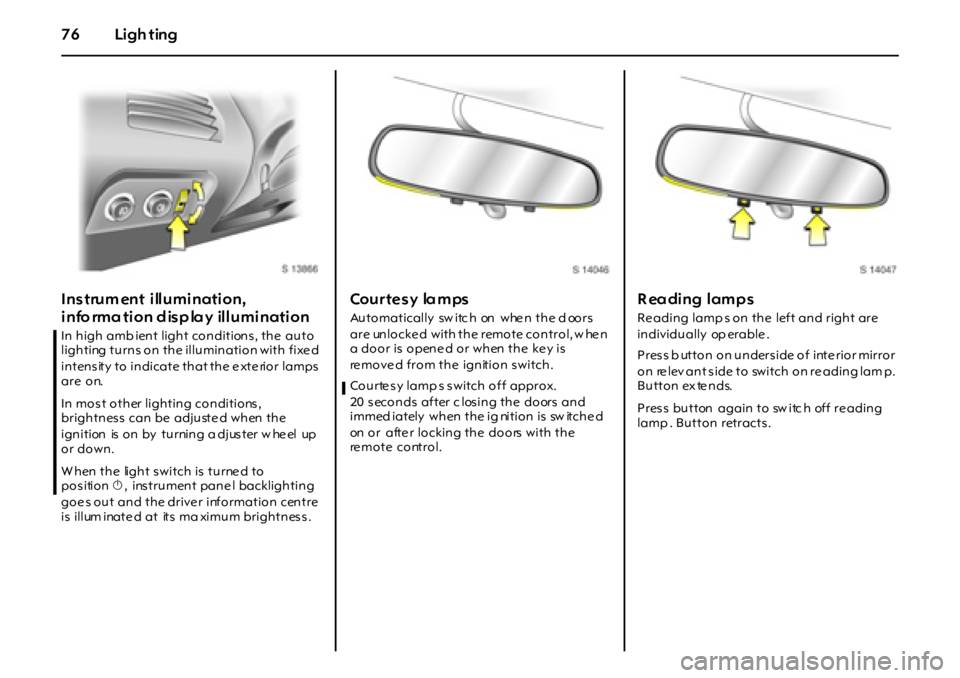
Instrum ent illumination,
info rmation display illumination
In high amb ient light conditions, the auto
lighting turns on the illumination with fixe d
intensity to indicate that the e xte rior lamps
are on.
In most other lighting conditions,
brightness can be adjusted when the
ignition is on by turning a djuster w he el up
or down.
W hen the light switch is turne d to
pos itionX, ins trument pane l backlighting
goe s out and the drive r information centre
is illum inate d at its ma ximum brightnes s .
Courtesy lamps
Automatically sw itc h on whe n the d oors
are unlocke d with the remote control, w he n
a door is opened or when the key is
re move d from the ignition switch.
Courte s y lamp s s witch off approx.
20 seconds after c losing the doors and
i m m ed i a t el y w h en t h e i g ni t i o n i s sw it ch e d
on or afte r locking the doors with the
re m o t e c o nt r o l .
R eading lamps
Re ading lamp s on the left and right are
individually op erable .
Press b utton on underside of inte rior mirror
o n re lev an t s ide to switch o n re adin g lam p.
Button ex te nds.
Pres s button again to sw itc h off re ading
lamp . Button retracts.
Page 79 of 190
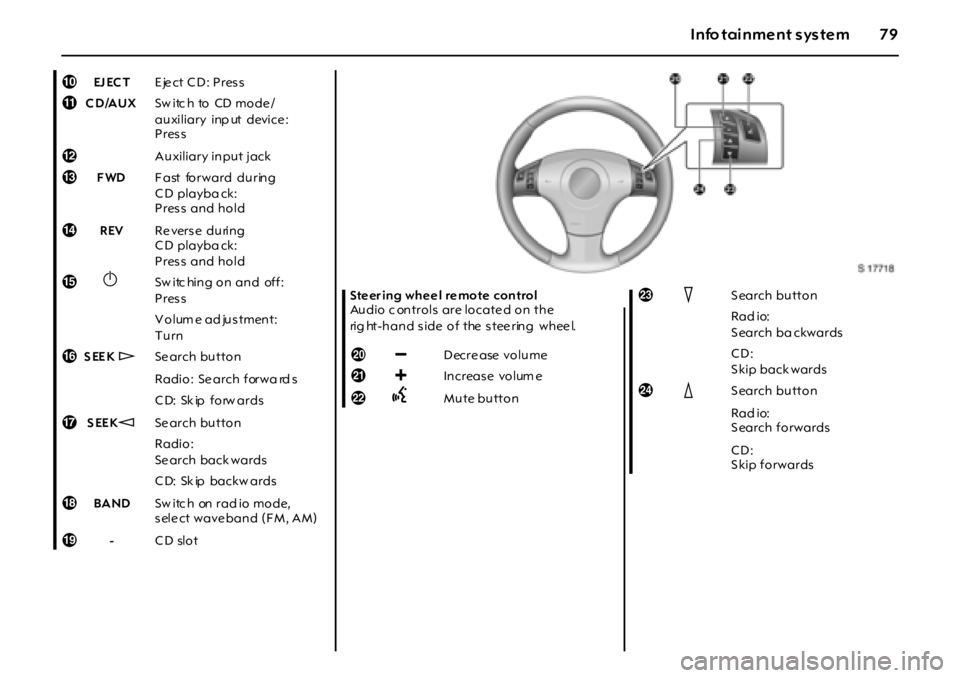
79Info tainment system
0EJ EC TEject CD: Press
aCD/AUXSw itc h to CD mo de /
auxiliary inp ut device :
Press
bAuxiliary input jack
cFWDF ast forward during
C D playba ck:
Press and hold
dREVRe verse during
C D playba ck:
Press and hold
e
XSw itc hing on and off:
Press
Volum e ad justment:
Turn
fSEEK wSe arch button
Radio: Se arch forwa rd s
CD: Skip forwards
gSEEKqSe arch button
Radio:
Se arch back wards
CD: Skip backwards
hBANDS w i tc h on r a d i o m o d e,
s ele ct wave ban d ( F M , A M )
i-CD slotSteer ing wheel remote control
Audio c ontrols are locate d on the
rig ht-hand side of the steering wheel.
j]
]] ]Decrease volume
k<
<<
AMute buttonmIS earch button
Rad io:
S earch ba ckwards
CD:
Skip backwards
nJS earch button
Rad io:
S earch forwards
CD:
Skip forwards