fog light OPEL INSIGNIA BREAK 2017.75 Manual user
[x] Cancel search | Manufacturer: OPEL, Model Year: 2017.75, Model line: INSIGNIA BREAK, Model: OPEL INSIGNIA BREAK 2017.75Pages: 323, PDF Size: 9.18 MB
Page 143 of 323
Lighting141Activate high beam assist by pushing
the indicator lever twice. High beam is switched on automatically at a speed
above 50 km/h. High beam is
switched off at a speed below
35 km/h, but high beam assist
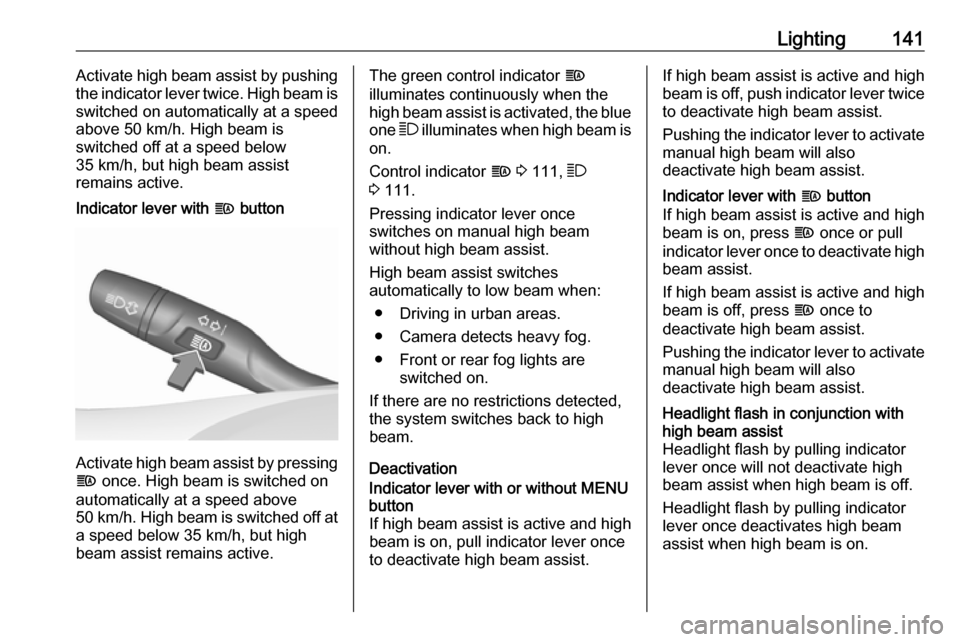
remains active.Indicator lever with f button
Activate high beam assist by pressing
f once. High beam is switched on
automatically at a speed above
50 km/h. High beam is switched off at
a speed below 35 km/h, but high
beam assist remains active.
The green control indicator f
illuminates continuously when the
high beam assist is activated, the blue one 7 illuminates when high beam is
on.
Control indicator f 3 111, 7
3 111.
Pressing indicator lever once
switches on manual high beam
without high beam assist.
High beam assist switches
automatically to low beam when:
● Driving in urban areas.
● Camera detects heavy fog.
● Front or rear fog lights are switched on.
If there are no restrictions detected, the system switches back to high
beam.
DeactivationIndicator lever with or without MENU
button
If high beam assist is active and high
beam is on, pull indicator lever once
to deactivate high beam assist.If high beam assist is active and high
beam is off, push indicator lever twice
to deactivate high beam assist.
Pushing the indicator lever to activate manual high beam will also
deactivate high beam assist.Indicator lever with f button
If high beam assist is active and high beam is on, press f once or pull
indicator lever once to deactivate high
beam assist.
If high beam assist is active and high
beam is off, press f once to
deactivate high beam assist.
Pushing the indicator lever to activate manual high beam will also
deactivate high beam assist.Headlight flash in conjunction with
high beam assist
Headlight flash by pulling indicator
lever once will not deactivate high beam assist when high beam is off.
Headlight flash by pulling indicator
lever once deactivates high beam
assist when high beam is on.
Page 145 of 323
Lighting143With a trailer connected, turn signal
flashes six times and tone frequency
changes when pressing the lever until
resistance is felt and then releasing.
Move the lever to the resistance point
and hold for longer indication.
Switch the turn signal off manually by moving the lever to its original
position.
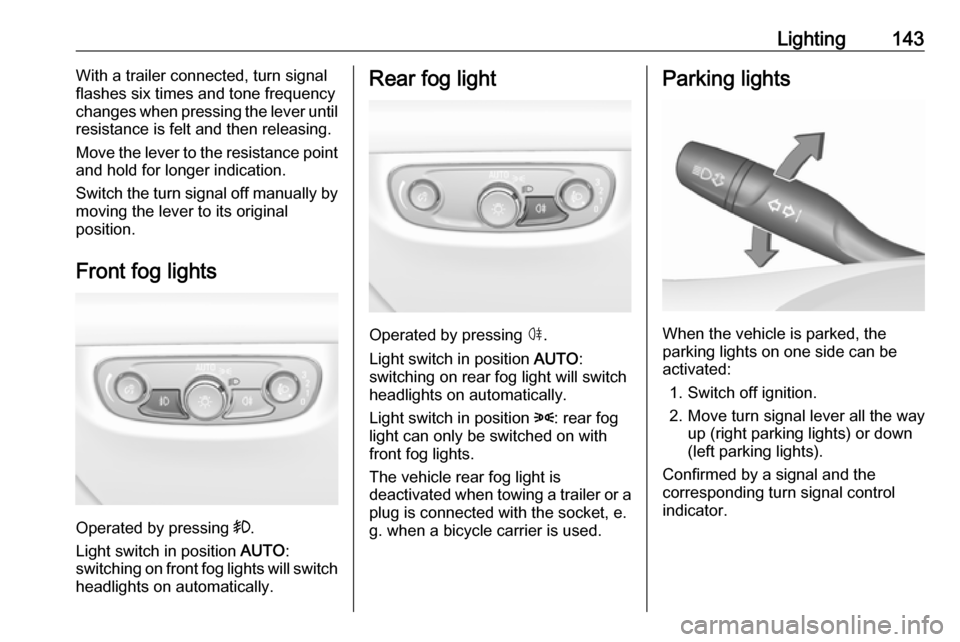
Front fog lights
Operated by pressing >.
Light switch in position AUTO:
switching on front fog lights will switch headlights on automatically.
Rear fog light
Operated by pressing ø.
Light switch in position AUTO:
switching on rear fog light will switch
headlights on automatically.
Light switch in position 8: rear fog
light can only be switched on with
front fog lights.
The vehicle rear fog light is
deactivated when towing a trailer or a
plug is connected with the socket, e.
g. when a bicycle carrier is used.
Parking lights
When the vehicle is parked, the
parking lights on one side can be
activated:
1. Switch off ignition.
2. Move turn signal lever all the way up (right parking lights) or down
(left parking lights).
Confirmed by a signal and the
corresponding turn signal control
indicator.
Page 204 of 323

202Driving and operating● Weather limits visibility, such asfog, rain, or snow.
● The sensor is blocked by snow, ice, slush, mud, dirt, windscreen
damage or affected by foreign
items, e.g. stickers.
Active emergency braking
Active emergency braking can help to reduce the damage and injury from
crashes with vehicles, pedestrians and obstacles directly ahead, when a
collision can no longer be avoided
either by manual braking or by
steering. Before the active
emergency braking applies, the driver is warned by the Forward collision
alert 3 198 or the Front pedestrian
protection alert 3 205.
The feature uses various inputs (e.g.
camera sensor, radar sensor, brake
pressure, vehicle speed) to calculate
the probability of a frontal collision.9 Warning
This system is not intended to
replace the driver responsibility for driving the vehicle and looking
ahead. Its function is limited to
supplemental use only to reduce
the vehicle speed before a
collision.
The system may not react to
animals. After a sudden lane
change, the system needs a
certain time to detect the next
preceding vehicle.
The driver must always be ready
to take action and apply the brakes and steer to avoid collisions.
Functionality
If equipped only with front camera the
active emergency braking operates in forward gear above walking speed up
to 85 km/h.
With radar sensor active emergency
braking operates in forward gear
above walking speed at all speeds.
A precondition is that forward collision
alert with front camera system is not
deactivated in the vehicle
personalisation menu 3 126.
The system includes: ● brake preparation system
● emergency automatic braking ● forward looking brake assist
● intelligent brake assist (only with radar sensor)
● front pedestrian protection system
Brake preparation system
When approaching a vehicle ahead
or a pedestrian so quickly that a
collision is likely, the brake
preparation system slightly
pressurizes the brakes. This reduces
the response time, when a manual or automatic braking is requested.
The brake system is prepared so that braking can occur more rapidly.
If equipped only with front camera the
system operates up to a speed of 80
km/h.
Page 222 of 323
220Driving and operating9Warning
Displayed images may be further
or closer than they appear. The
area displayed is limited and
objects that are close to either
edge of the bumper or under the
bumper are not displayed on the
screen.
9 Warning
The panoramic view cameras
have blind spot areas and will not
display all objects near the edges
of the vehicle. Folding side mirrors that are out of position will not
display the panoramic view
correctly.
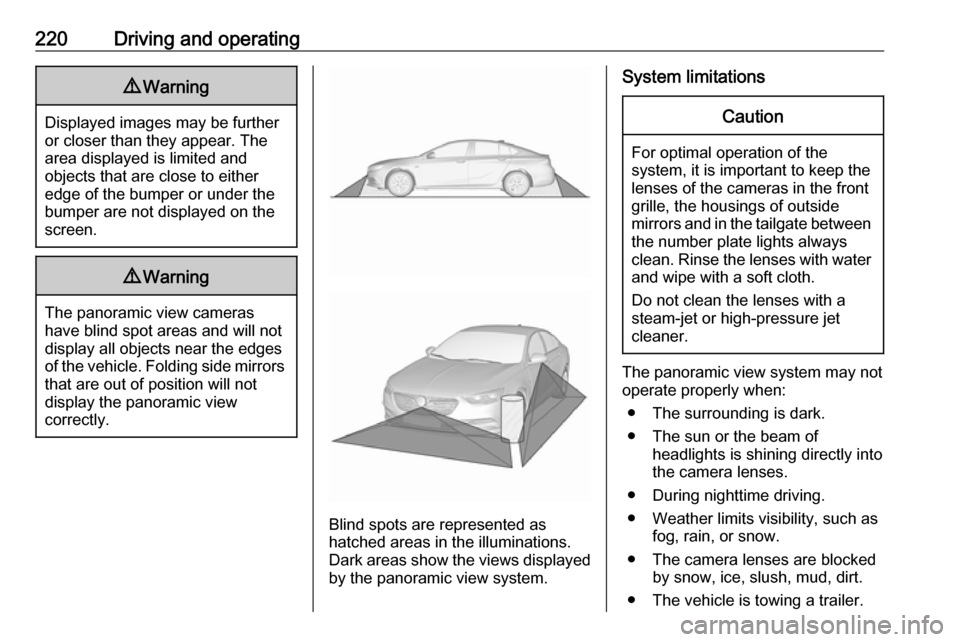
Blind spots are represented as
hatched areas in the illuminations.
Dark areas show the views displayed by the panoramic view system.
System limitationsCaution
For optimal operation of the
system, it is important to keep the
lenses of the cameras in the front
grille, the housings of outside
mirrors and in the tailgate between the number plate lights always
clean. Rinse the lenses with water and wipe with a soft cloth.
Do not clean the lenses with a
steam-jet or high-pressure jet
cleaner.
The panoramic view system may not
operate properly when:
● The surrounding is dark.
● The sun or the beam of headlights is shining directly into
the camera lenses.
● During nighttime driving.
● Weather limits visibility, such as fog, rain, or snow.
● The camera lenses are blocked by snow, ice, slush, mud, dirt.
● The vehicle is towing a trailer.
Page 224 of 323

222Driving and operating
Trajectory lane of the vehicle is
shown in accordance with the
steering angle.
Warning symbols
Warning symbols are indicated as
triangles 9 on the picture, which show
obstacles detected by the rear
sensors of the advanced parking
assist.
Additionally 9 appears on the top line
of the Info-Display with the warning to
check the vehicle surrounding.
Deactivation
The camera is switched off when a
certain forward speed is exceeded or
if reverse gear is not engaged for
approx. 10 seconds.
Deactivation of guiding lines and
warning symbols
7'' Colour-Info-Display: Activation or
deactivation of the visual guiding lines and the warning symbols can be
changed via touch buttons in the
lower zone of the display.
8'' Colour-Info-Display: Activation or
deactivation of the visual guiding lines
and the warning symbols can be
changed in the Settings menu in the
Info-Display. Select the relevant
setting in Settings, I Rear Camera .
Info-Display 3 120.
Vehicle personalisation 3 126.
System limitations The rear view camera may not
operate properly when:
● The surrounding is dark.
● The sun or the beam of headlights is shining directly into
the camera lenses.
● During nighttime driving.
● Weather limits visibility, such as fog, rain, or snow.
● The camera lenses are blocked by snow, ice, slush, mud, dirt.Clean the lense, rinse with water, and wipe with a soft cloth.
● The vehicle is towing a trailer.
● The vehicle had a rear end accident.
● There are extreme temperature changes.
Page 241 of 323

Vehicle care239Vehicle careGeneral Information...................239
Accessories and vehicle modifications .......................... 239
Vehicle storage ........................240
End-of-life vehicle recovery .....240
Vehicle checks ........................... 241
Performing work ......................241
Bonnet ..................................... 241
Engine oil ................................. 242
Engine coolant ......................... 243
Washer fluid ............................ 244
Brakes ..................................... 244
Brake fluid ............................... 244
Vehicle battery ......................... 245
Diesel fuel system bleeding .....246
Wiper blade replacement ........247
Bulb replacement .......................248
Halogen headlights ..................248
LED headlights ........................ 250
Fog lights ................................. 250
Tail lights ................................. 251
Side turn signal lights ..............256
Number plate light ...................256
Interior lights ............................ 256
Instrument panel illumination ...256Electrical system ........................257
Fuses ....................................... 257
Engine compartment fuse box . 258
Instrument panel fuse box .......260
Vehicle tools .............................. 262
Tools ........................................ 262
Wheels and tyres .......................263
Winter tyres ............................. 263
Tyre designations ....................263
Tyre pressure .......................... 264
Tyre pressure monitoring system .................................... 265
Tread depth ............................. 267
Changing tyre and wheel size . 267
Wheel covers ........................... 268
Tyre chains .............................. 268
Tyre repair kit .......................... 268
Wheel changing .......................273
Spare wheel ............................ 275
Jump starting ............................. 277
Towing ....................................... 278
Towing the vehicle ...................278
Towing another vehicle ...........279
Appearance care .......................280
Exterior care ............................ 280
Interior care ............................. 282General Information
Accessories and vehiclemodifications
We recommend the use of genuine
parts and accessories and factory approved parts specific for your
vehicle type. We cannot assess or guarantee reliability of other products
- even if they have a regulatory or
otherwise granted approval.
Any modification, conversion or other changes made to standard vehicle
specifications (including, without
limitation, software modifications,
modifications of the electronic control
units) may invalidate the warranty
offered by Opel. Furthermore, such
changes may impact fuel
consumption, CO 2 emissions and
other emissions of the vehicle and
cause the vehicle to no longer
conform to the operating permit,
impacting the validity of your vehicle
registration.
Page 252 of 323

250Vehicle careDaytime running light
In case of defective LEDs, have them replaced by a workshop.
LED headlights Headlights for low and high beam,
sidelights, daytime running lights and turn signal lights are designed as
LEDs and cannot be changed.
Have lights repaired by a workshop in
case of failure.
Fog lights1. Disengage the cover with a screwdriver in the recess and
remove the cover.
2. Undo screw and remove the faceplate.
3. Undo three screws and removethe light assembly to the front.
4. Turn the bulb socketanticlockwise and remove it from
the light assembly.
Page 255 of 323
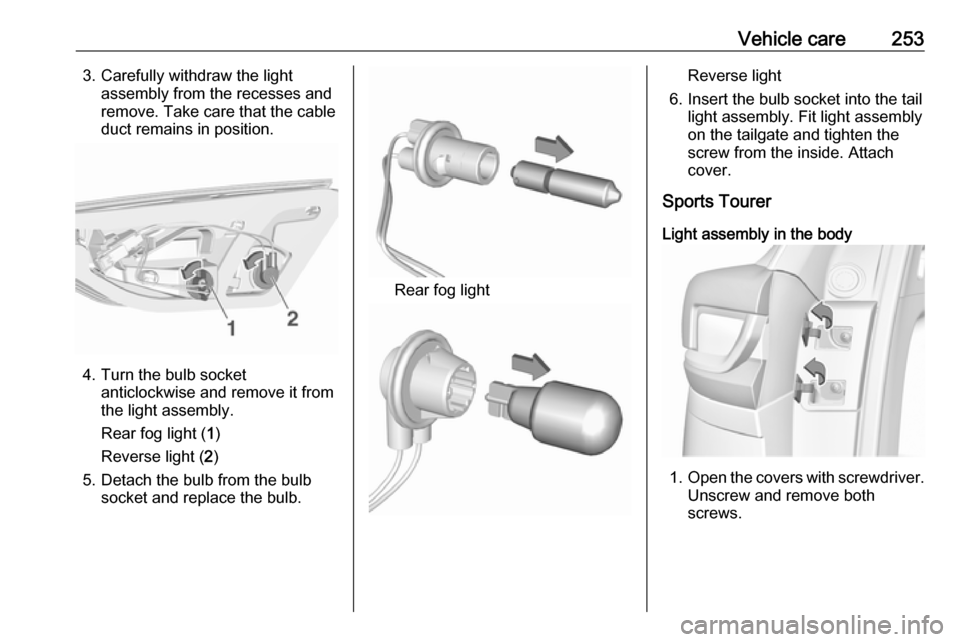
Vehicle care2533. Carefully withdraw the lightassembly from the recesses and
remove. Take care that the cable
duct remains in position.
4. Turn the bulb socket anticlockwise and remove it from
the light assembly.
Rear fog light ( 1)
Reverse light ( 2)
5. Detach the bulb from the bulb socket and replace the bulb.
Rear fog light
Reverse light
6. Insert the bulb socket into the tail light assembly. Fit light assembly
on the tailgate and tighten the
screw from the inside. Attach
cover.
Sports Tourer
Light assembly in the body
1. Open the covers with screwdriver.
Unscrew and remove both
screws.
Page 257 of 323
Vehicle care255
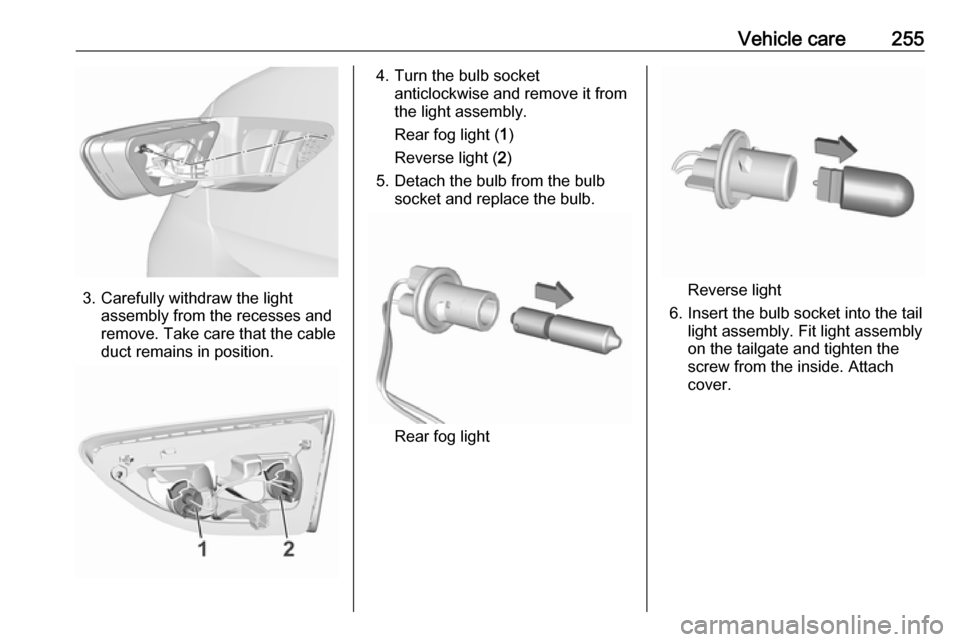
3. Carefully withdraw the lightassembly from the recesses and
remove. Take care that the cable
duct remains in position.
4. Turn the bulb socket anticlockwise and remove it from
the light assembly.
Rear fog light ( 1)
Reverse light ( 2)
5. Detach the bulb from the bulb socket and replace the bulb.
Rear fog light
Reverse light
6. Insert the bulb socket into the tail light assembly. Fit light assembly
on the tailgate and tighten the
screw from the inside. Attach
cover.
Page 260 of 323
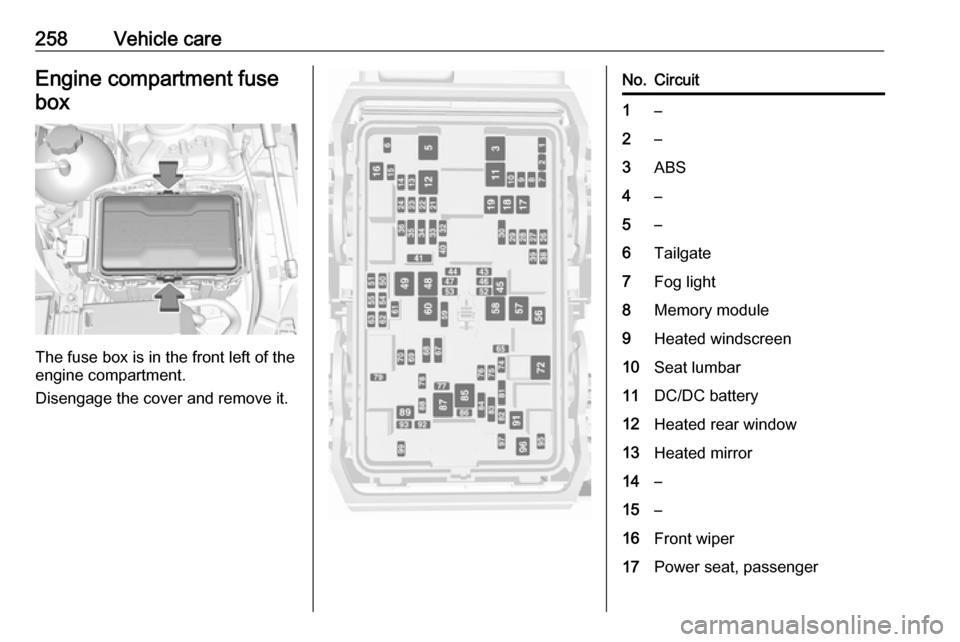
258Vehicle careEngine compartment fuse
box
The fuse box is in the front left of the
engine compartment.
Disengage the cover and remove it.
No.Circuit1–2–3ABS4–5–6Tailgate7Fog light8Memory module9Heated windscreen10Seat lumbar11DC/DC battery12Heated rear window13Heated mirror14–15–16Front wiper17Power seat, passenger