automatic transmission OPEL INSIGNIA BREAK 2017.75 Manual user
[x] Cancel search | Manufacturer: OPEL, Model Year: 2017.75, Model line: INSIGNIA BREAK, Model: OPEL INSIGNIA BREAK 2017.75Pages: 323, PDF Size: 9.18 MB
Page 194 of 323
192Driving and operatingPress C to switch on adaptive cruise
control. C appears in the Driver
Information Centre.
Activation by setting the speedAdaptive cruise control can be
activated at speeds above 25 km/h on
vehicles with automatic transmission
or 30 km/h on vehicles with manual
transmission. The upper speed limit is 180 km/h.
Accelerate to the desired speed and
turn thumb wheel to SET/-, the
current speed is stored and
maintained.
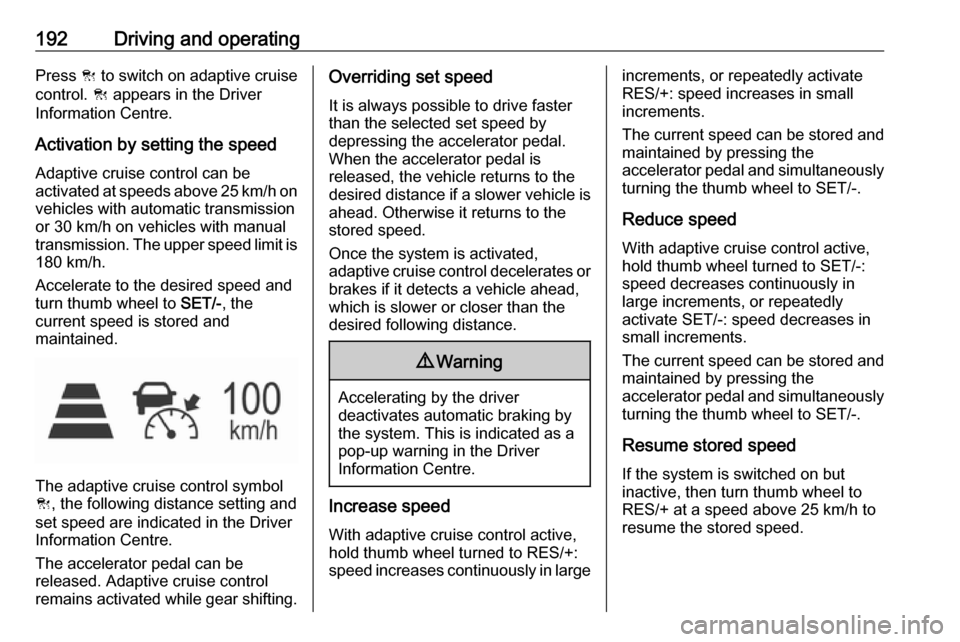
The adaptive cruise control symbol
C , the following distance setting and
set speed are indicated in the Driver
Information Centre.
The accelerator pedal can be
released. Adaptive cruise control
remains activated while gear shifting.
Overriding set speed
It is always possible to drive faster
than the selected set speed by
depressing the accelerator pedal.
When the accelerator pedal is
released, the vehicle returns to the
desired distance if a slower vehicle is
ahead. Otherwise it returns to the
stored speed.
Once the system is activated,
adaptive cruise control decelerates or
brakes if it detects a vehicle ahead,
which is slower or closer than the
desired following distance.9 Warning
Accelerating by the driver
deactivates automatic braking by
the system. This is indicated as a
pop-up warning in the Driver
Information Centre.
Increase speed
With adaptive cruise control active,
hold thumb wheel turned to RES/+:
speed increases continuously in large
increments, or repeatedly activate
RES/+: speed increases in small
increments.
The current speed can be stored and maintained by pressing the
accelerator pedal and simultaneously turning the thumb wheel to SET/-.
Reduce speed With adaptive cruise control active,
hold thumb wheel turned to SET/-:
speed decreases continuously in
large increments, or repeatedly
activate SET/-: speed decreases in
small increments.
The current speed can be stored and
maintained by pressing the
accelerator pedal and simultaneously turning the thumb wheel to SET/-.
Resume stored speed
If the system is switched on but
inactive, then turn thumb wheel to
RES/+ at a speed above 25 km/h to
resume the stored speed.
Page 195 of 323
Driving and operating193Full speed range adaptive cruise
control on vehicles with automatic transmission
Full speed range adaptive cruisecontrol will maintain a following
distance behind a detected vehicle
and slow your vehicle to a stop behind
that vehicle.
In case of a brief stop of the vehicle
ahead the adaptive cruise control will
drive off automatically without driver
action. If necessary, press RES/+ or
the accelerator pedal to resume
adaptive cruise control.
If the stopped vehicle ahead was
stopped for a longer time and then
begins to move forward, the green
illuminated vehicle ahead control
indicator A will flash and a warning
chime will sound as a reminder to
check traffic before resuming.
When the vehicle ahead drives away,
press RES+ or the accelerator pedal
to resume adaptive cruise control. If
stopped for more than five minutes or
if the driver's door is opened and the
driver's seat belt is unbuckled, the
electric parking brake is appliedautomatically to hold the vehicle.
Control indicator m will illuminate. To
release electric parking brake, press
the accelerator pedal. Electric parking
brake 3 1809 Warning
When full speed range adaptive
cruise control is deactivated or
cancelled, the vehicle will no
longer be held at a stop and can
start to move. Always be prepared to manually apply the brake to hold the vehicle stationary.
Do not leave the vehicle while it is being held at a stop by the full
speed range adaptive cruise
control. Always move selector
lever to park position P and switch
off the ignition before leaving the
vehicle.
Setting the following distance
When adaptive cruise control detects
a slower moving vehicle in the driving path, it will adjust the vehicle speed tomaintain the following distance
selected by the driver.
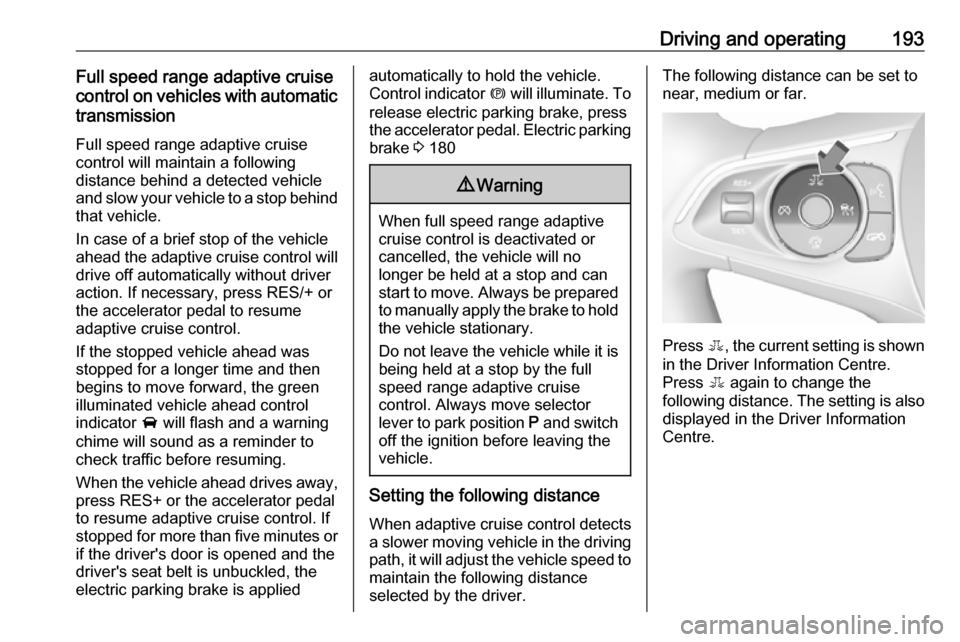
The following distance can be set to
near, medium or far.
Press E, the current setting is shown
in the Driver Information Centre.
Press E again to change the
following distance. The setting is also displayed in the Driver Information
Centre.
Page 197 of 323

Driving and operating195DeactivationAdaptive cruise control is deactivatedby the driver when:
● y is pressed.
● Brake pedal is applied.
● Clutch pedal is depressed for more than four seconds.
● Selector lever of automatic transmission is moved to N.
The system is also automatically
deactivated when:
● Vehicle speed accelerates above
190 km/h or slows down below
25 km/h, on vehicles with
automatic transmission it slows
down to a stop without
deactivating within five minutes.
● The Traction Control system is deactivated or operating.
● The Electronic Stability Control is
deactivated or operating.
● There is no traffic and nothing detected on the road sides forapprox. one minute. In this casethere are no radar echoes and
the sensor may report that it is blocked.● The active emergency braking system is applying the brakes.
● Driving on steep inclines.
● The radar sensor is blocked by an ice or water film.
● A fault is detected in the radar, camera, engine or brake system.
● The brakes are too hot.
Additionally, the system is
automatically deactivated on vehicles
with automatic transmission (full
speed range adaptive cruise control)
when:
● The electric parking brake is applied.
● The vehicle is being held to a stop
by the system for more than
five minutes.
● The vehicle stops, the driver's seat belt is unbuckled and thedriver's door is opened.
When adaptive cruise control is
deactivated, the control indicator m
changes from green to white and a
pop-up message is displayed in the
Driver Information Centre.
The stored speed is maintained.
On Midlevel display, the stored speed is indicated in brackets in the Driver
Information Centre when the system
is deactivated but not switched off.
On Uplevel display, the adaptive
cruise control symbol C changes
from green to white when the system
is deactivated but not switched off.
9 Warning
When adaptive cruise control is
deactivated, the driver must take
over full brake and engine control
immediately.
Switching off
Press C to switch off adaptive cruise
control. C in the Driver Information
Centre extinguishes. The stored
speed is deleted.
Page 212 of 323
210Driving and operating
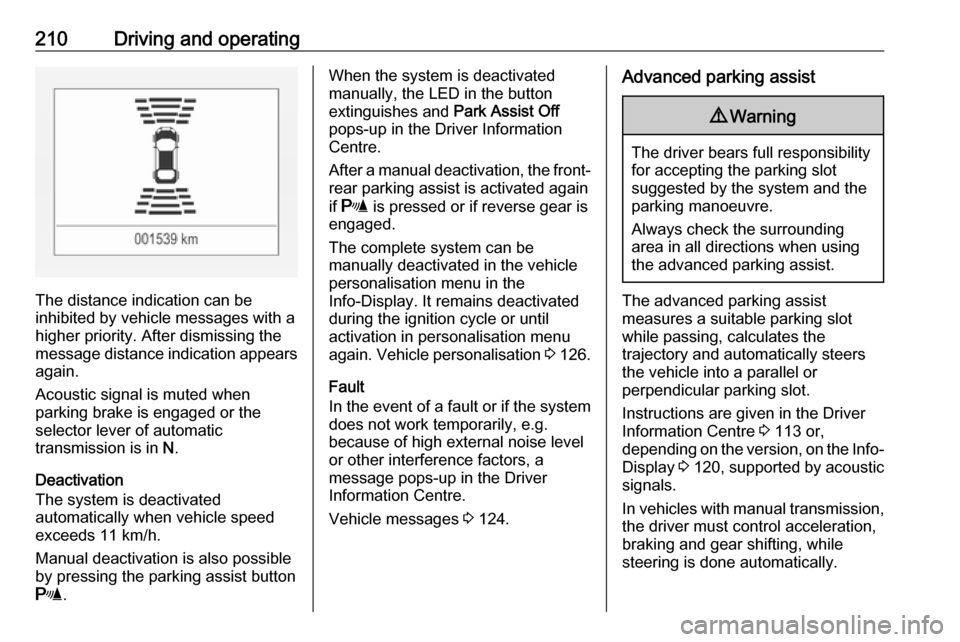
The distance indication can be
inhibited by vehicle messages with a higher priority. After dismissing themessage distance indication appears again.
Acoustic signal is muted when
parking brake is engaged or the
selector lever of automatic
transmission is in N.
Deactivation
The system is deactivated
automatically when vehicle speed
exceeds 11 km/h.
Manual deactivation is also possible by pressing the parking assist button
r .
When the system is deactivated
manually, the LED in the button
extinguishes and Park Assist Off
pops-up in the Driver Information
Centre.
After a manual deactivation, the front- rear parking assist is activated again
if r is pressed or if reverse gear is
engaged.
The complete system can be
manually deactivated in the vehicle
personalisation menu in the
Info-Display. It remains deactivated
during the ignition cycle or until
activation in personalisation menu
again. Vehicle personalisation 3 126.
Fault
In the event of a fault or if the system does not work temporarily, e.g.
because of high external noise level
or other interference factors, a
message pops-up in the Driver
Information Centre.
Vehicle messages 3 124.Advanced parking assist9 Warning
The driver bears full responsibility
for accepting the parking slot
suggested by the system and the
parking manoeuvre.
Always check the surrounding
area in all directions when using
the advanced parking assist.
The advanced parking assist
measures a suitable parking slot
while passing, calculates the
trajectory and automatically steers
the vehicle into a parallel or
perpendicular parking slot.
Instructions are given in the Driver
Information Centre 3 113 or,
depending on the version, on the Info- Display 3 120 , supported by acoustic
signals.
In vehicles with manual transmission, the driver must control acceleration,
braking and gear shifting, while
steering is done automatically.
Page 213 of 323

Driving and operating211In vehicles with automatic
transmission, the driver must control
acceleration and gear shifting, while
braking and steering is done
automatically.
Advanced parking assist is always
combined with front-rear parking assist. Both systems use the same
sensors in the front and rear bumper.
The system has six ultrasonic parking sensors each in both the rear and
front bumper.
Activation of advanced parking assist
Advanced parking assist can only be
activated when driving forwards.
When searching for a parking slot, the system is ready to operate with a
short press of (.
The system recognises and
memorises ten metres for parallel parking slots or six metres for
perpendicular parking slots in the
parking assist mode.
The system can only be activated at
a speed up to 30 km/h and the system
searches for a parking slot at a speed up to 30 km/h.
The maximum allowed parallel
distance between the vehicle and a
row of parked cars is 1.8 metres for
parallel parking and 2.5 metres for
perpendicular parking.
FunctionalityParking slot searching mode,
indication in the Driver Information
Centre
Select parallel or perpendicular
parking slot in Driver Information
Centre by long press on (.
The system is configured to detect parking slots by default on the
passenger side. To detect parking
slots on the driver side, switch on turn
signal indicator on the driver side.
Page 215 of 323

Driving and operating213A brief vibration in the steering wheel
after engaging reverse gear indicates
that the steering is controlled by the
system. Then the vehicle with manual
transmission is steered into the slot
automatically by giving the driver
detailed instructions for braking,
accelerating and gear shifting. With
automatic transmission the vehicle is
steered into the slot automatically by
giving the driver detailed instructions
for accelerating and shifting forward
or reversing. The driver must keep
hands away from the steering wheel.
During park guiding mode the
manoeuvring speed is limited.
Always pay attention to the sound of the front-rear parking assist.
Continuous sound indicates that the
distance to an obstacle is less than
approx. 30 cm.
If, for any reason, the driver must take over control of the steering, hold the
steering wheel only at the outer edge. Automatic steering is cancelled in thisevent.Display indication
The instructions on the display show:
● General hints and warning messages.
● A hint when driving faster than 30 km/h during parking slot
searching mode.
● The demand to stop the vehicle, when a parking slot is detected.
● The direction of driving during the
parking manoeuvre.
● The demand to shift into reverse or first gear, or R or D with
automatic transmission.
● The demand to stop or to drive slowly.
● For some of the instructions a progress bar is shown in the
Driver Information Centre.
● The successful completion of the
parking manoeuvre indicated bya pop-up symbol and a chime.
● The cancelling of a parking manoeuvre.Display priorities
Advanced parking assist indication in
the Driver Information Centre can be
inhibited by vehicle messages with a higher priority. After approving the
message by pressing SET/CLR on
the turn signal lever or 9 on the
steering wheel, advanced parking
assist instructions appear again and
the parking manoeuvre can be
continued.
Deactivation
The system is deactivated by:
● a short press of (
● parking manoeuvre successfully ended
● driving faster than 30 km/h during
parking slot search
● driving faster than 8 km/h during parking guidance
● driver interference on steering wheel detected
● exceeding maximum number of gear changes: eight cycles when
parallel parking or five cycles
when perpendicular parking
● switching off the ignition
Page 221 of 323

Driving and operating219The screen in the Info Display is
divided into two parts: on the left there
is a view from above the vehicle, and
on the right there is the view from front or the rear displayed, according to the
gear engaged. The parking sensors
complete the information on the view.
Activation
Panoramic view system is activated: ● engaging reverse gear
● touching the camera icon ë in
the Info Display
● approaching too close to an object ahead
Functionality
Rear view
Rear view displays an image of the
area behind the vehicle on the right
part of the screen when reverse gear
is engaged.
A warning triangle 9 may be
displayed on the screen when
obstacles are detected by the rear
sensors of the parking assist. Thistriangle changes from yellow to red
and increases in size the closer the
object gets.
The previous content of the Info
Display appears when the vehicle is
shifted out of reverse gear after a
short delay. To return to the previous
display content sooner, press the
camera icon in the Info Display.
Driving faster than 11 km/h in a
forward gear will deactivate the
panoramic system also.
Surround view
Surround view displays an image of the area surrounding the vehicle from
above, along with the front or rear
camera views in the Info Display.
Front view
Front view displays an image of the area in front of the vehicle on the right
part of the screen. The view displays
after shifting from reverse gear to a
forward gear, or by touching the
camera icon in the Info Display. Front
view also displays objects
automatically detected within 30 cm.
The front view is only displayed up to a speed of 11 km/h in a forward gear.Deactivation
Panoramic view system is
deactivated:
● driving faster than 11 km/h
● touching the camera icon ë in
the Info Display
● shifting into neutral or P with automatic transmission.
General information9 Warning
The panoramic view system does
not replace driver vision. It will not display children, pedestrians,
cyclists, crossing traffic, animals,
or any other objects outside of the camera view areas, e. g. below the
bumper, or underneath the
vehicle.
Do not drive or park the vehicle
using only the panoramic view
system.
Always check the surrounding of
the vehicle before driving.
Page 268 of 323

266Vehicle careA detected low tyre pressure
condition is indicated by the control
indicator w 3 110.
If w illuminates, stop as soon as
possible and inflate the tyres as
recommended 3 301.
Ensure that vehicle loading status
matches selected tyre pressure.
Vehicle loading status, see below in
this chapter.
After inflating, some driving may be
required to update the tyre pressure
values in the Driver Information
Centre. During this time w may
continue to illuminate.
If w illuminates at lower temperatures
and extinguishes after some driving,
this could be an indicator for
approaching a low tyre pressure
condition. Check tyre pressure.
Vehicle messages 3 124.
Only mount wheels with pressure
sensors, otherwise the tyre pressure
will not be displayed and w
illuminates continuously.
A spare wheel or temporary spare
wheel is not equipped with pressure
sensors. The tyre pressuremonitoring system is not operational
for these wheels. Control indicator w
illuminates. For the further three
wheels the system remains
operational.
The use of commercially available
liquid tyre repair kits can impair the
function of the system. Factory-
approved repair kits can be used.
Operating electronic devices or being
close to facilities using similar wave
frequencies could disrupt the tyre
pressure monitoring system.
Each time the tyres are replaced tyre
pressure monitoring system sensors
must be dismounted and serviced.
For the screwed sensor replace valve core and sealing ring, for clipped
sensor replace complete valve stem.
Use only original plastic valve caps to
protect valve on any damage.Caution
Do not use metal valve caps as
they lead to valve oxidation and
damage.
Vehicle loading status
Adjust tyre pressure to load condition
according tyre information label or
tyre pressure chart 3 301, and select
the appropriate setting in the Tyre
loading page under the Settings
menu in the Driver Information Centre 3 113. This setting determines the
reference pressures for the tyre
pressure warnings.
Depending on the display, the menu
Tyre loading only appears if the
vehicle is at a standstill and the
parking brake is applied. On vehicles
with automatic transmission the
selector lever must be in P.
Page 280 of 323
278Vehicle care● The vehicles must not come intocontact with each other during
the jump starting process.
● Apply the parking brake, transmission in neutral,
automatic transmission in P.
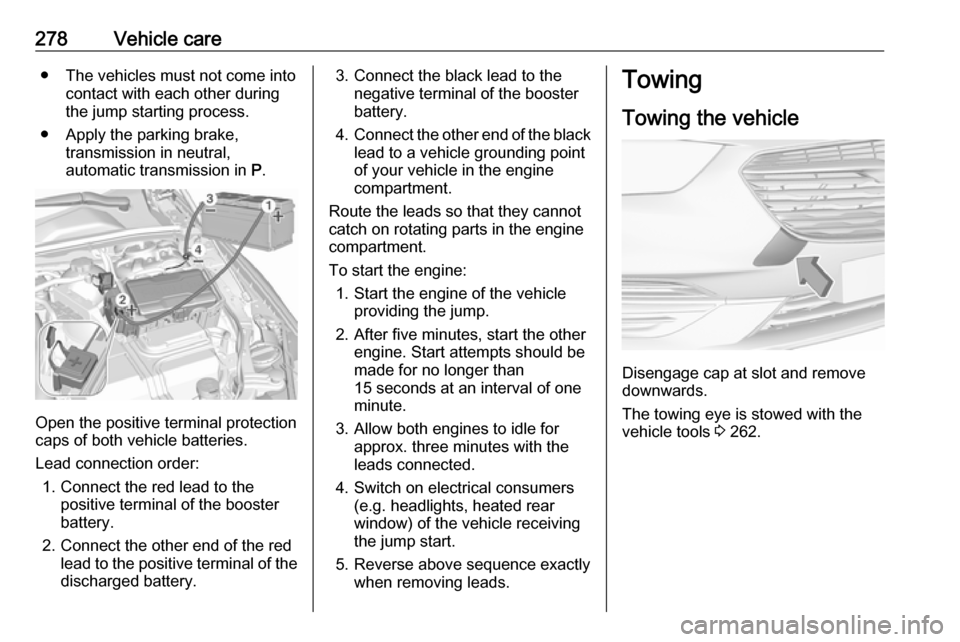
Open the positive terminal protection
caps of both vehicle batteries.
Lead connection order: 1. Connect the red lead to the positive terminal of the booster
battery.
2. Connect the other end of the red lead to the positive terminal of the
discharged battery.
3. Connect the black lead to the negative terminal of the boosterbattery.
4. Connect the other end of the black
lead to a vehicle grounding point
of your vehicle in the engine
compartment.
Route the leads so that they cannot
catch on rotating parts in the engine
compartment.
To start the engine: 1. Start the engine of the vehicle providing the jump.
2. After five minutes, start the other engine. Start attempts should be
made for no longer than
15 seconds at an interval of one
minute.
3. Allow both engines to idle for approx. three minutes with the
leads connected.
4. Switch on electrical consumers (e.g. headlights, heated rear
window) of the vehicle receiving
the jump start.
5. Reverse above sequence exactly when removing leads.Towing
Towing the vehicle
Disengage cap at slot and remove
downwards.
The towing eye is stowed with the
vehicle tools 3 262.
Page 281 of 323
Vehicle care279
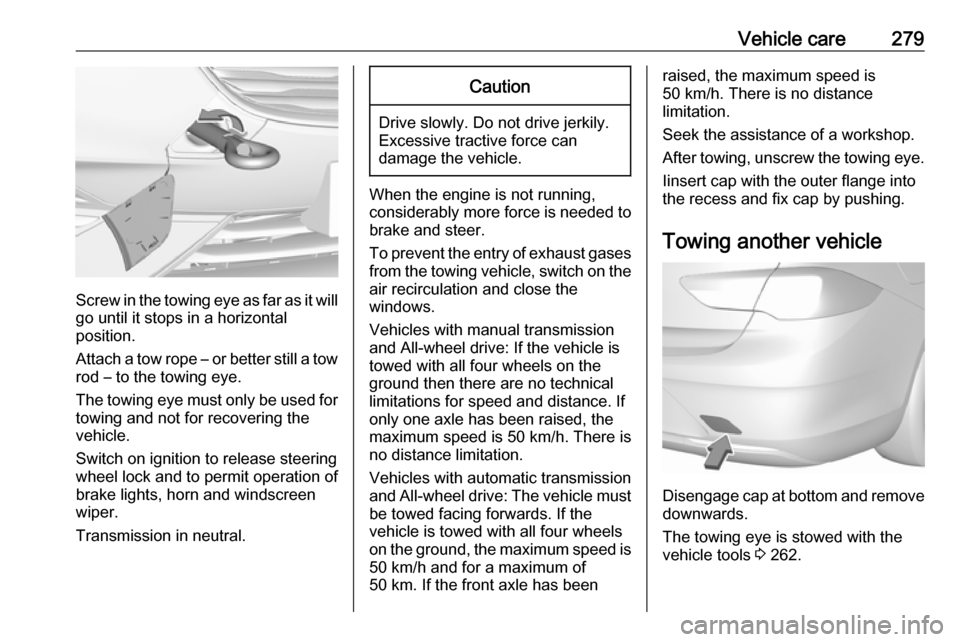
Screw in the towing eye as far as it will
go until it stops in a horizontal
position.
Attach a tow rope – or better still a tow
rod – to the towing eye.
The towing eye must only be used for towing and not for recovering the
vehicle.
Switch on ignition to release steering
wheel lock and to permit operation of
brake lights, horn and windscreen
wiper.
Transmission in neutral.
Caution
Drive slowly. Do not drive jerkily.
Excessive tractive force can
damage the vehicle.
When the engine is not running,
considerably more force is needed to
brake and steer.
To prevent the entry of exhaust gases from the towing vehicle, switch on the
air recirculation and close the
windows.
Vehicles with manual transmission
and All-wheel drive: If the vehicle is
towed with all four wheels on the
ground then there are no technical
limitations for speed and distance. If
only one axle has been raised, the
maximum speed is 50 km/h. There is
no distance limitation.
Vehicles with automatic transmission and All-wheel drive: The vehicle must
be towed facing forwards. If the
vehicle is towed with all four wheels
on the ground, the maximum speed is 50 km/h and for a maximum of
50 km. If the front axle has been
raised, the maximum speed is
50 km/h. There is no distance
limitation.
Seek the assistance of a workshop.
After towing, unscrew the towing eye.
Iinsert cap with the outer flange into
the recess and fix cap by pushing.
Towing another vehicle
Disengage cap at bottom and remove downwards.
The towing eye is stowed with the
vehicle tools 3 262.