fuel consumption OPEL INSIGNIA BREAK 2017.75 Manual user
[x] Cancel search | Manufacturer: OPEL, Model Year: 2017.75, Model line: INSIGNIA BREAK, Model: OPEL INSIGNIA BREAK 2017.75Pages: 323, PDF Size: 9.18 MB
Page 118 of 323

116Instruments and controlsSome of the displayed functions differ
when the vehicle is being driven or at
a standstill and some functions are
only active when the vehicle is being
driven.
Uplevel instrument cluster can be
displayed as Sport mode or Tour
mode. See below: Settings Menu,
Display Themes.
Selecting menus and functions
The menus and functions can be
selected via the buttons on the right
side of the steering wheel.
Press è to open main menu page.
Select a main menu page with ä or å.
Confirm a main menu page with 9.
Once a main menu page is selected, press ä or å to select subpages.
Press é to open the next folder of the
selected subpage.
Press ä or å to select functions or to
set a numeric value, if required.
Press 9 to select and confirm a
function.
Once a main menu page is selected, this selection remains stored until
another main menu page is selected.
Subpages are changed by pressing
å or ä.
Vehicle and service messages are
popped-up in the Driver Information
Centre if required. Confirm messages
by pressing 9. Vehicle messages
3 124.
Trip/fuel information menu, ;
or Info
The following list contains all possible Info Menu pages. Some may not beavailable for your particular vehicle.
Depending on the display some
functions are symbolised.Turn the adjuster wheel or press ä or
å to select a page:
● trip odometer 1 or A average fuel consumption 1 or A
average speed 1 or A
● trip odometer 2 or B average fuel consumption 2 or B
average speed 2 or B
● digital speed
● fuel range
● instantaneous fuel consumption
● remaining oil life
● tyre pressure
● timer
● traffic sign assistant
● following distance
● blank page
On Baselevel display, the pages
Remaining Oil Life, Tyre Pressure,
Traffic Sign Assistant and Following
Distance are displayed in the Vehicle
information menu, select ? by
pressing MENU.
Page 119 of 323

Instruments and controls117Trip odometer 1/A or 2/B
Trip odometer displays the current distance since a certain reset.
Trip odometer counts up to a distance
of 9,999 km then restarts at 0.
To reset on Baselevel display, press
SET/CLR for a few seconds, on
Midlevel and Uplevel display, press é and confirm with 9.
The information of trip odometer page
1 and 2 can be reset separately for
odometer, average consumption and
average speed while the respective
display is active.
Average fuel consumption 1/A or 2/B
Display of average consumption. The measurement can be reset at any
time and starts with a default value.
To reset on Baselevel display, press
SET/CLR for a few seconds, on
Midlevel and Uplevel display, press
é and confirm with 9.
Average speed 1/A or 2/B
Display of average speed. The
measurement can be reset at any
time.To reset on Baselevel display, press
SET/CLR for a few seconds, on
Midlevel and Uplevel display, press
é and confirm with 9.
Digital speed
Digital display of the instantaneous
speed.
Fuel range
Range is calculated from current fuel
tank level and current consumption.
The display shows average values.
After refuelling, the range is updated
automatically after a brief delay.
When the fuel level in the tank is low,
a message appears on the display
and control indicator Y in the fuel
gauge illuminates.
When the tank must be refuelled
immediately, a warning message
appears and remains on the display.
Additionally, control indicator Y in the
fuel gauge flashes 3 111.
Instantaneous fuel consumption
Display of the instantaneous
consumption.Remaining oil life
Indicates an estimate of the oil's
useful life. The number in % means
the remaining of current oil life 3 105.
Tire pressure
Checks tyre pressure of all wheels
during driving 3 265.
Timer
To start and stop press 9. To reset,
press é and confirm Reset.
Traffic sign assistant
Displays the detected traffic signs for
the current route section 3 224.
Following distance
Displays the distance in seconds to a
preceding moving vehicle 3 201. If
Adaptive cruise control is active this
page shows the following distance
setting instead.
Blank page
A blank page can be selected when
no DIC information is requested.
Page 120 of 323
118Instruments and controlsEco information menu, @
● Top consumers
● Economy trend
● Eco index
On Mid- and Uplevel display the
pages Top Consumers, Economy
Trend and Eco index, are displayed in
the Trip/fuel information menu, select
Info .
Top Consumers
List of top comfort consumers
currently switched on is displayed in
descending order. Fuel saving
potential is indicated.
During sporadic driving conditions,
the engine will activate the heated
rear window automatically to increase the engine load. In this event, the
heated rear window is indicated as
one of the top consumers, without
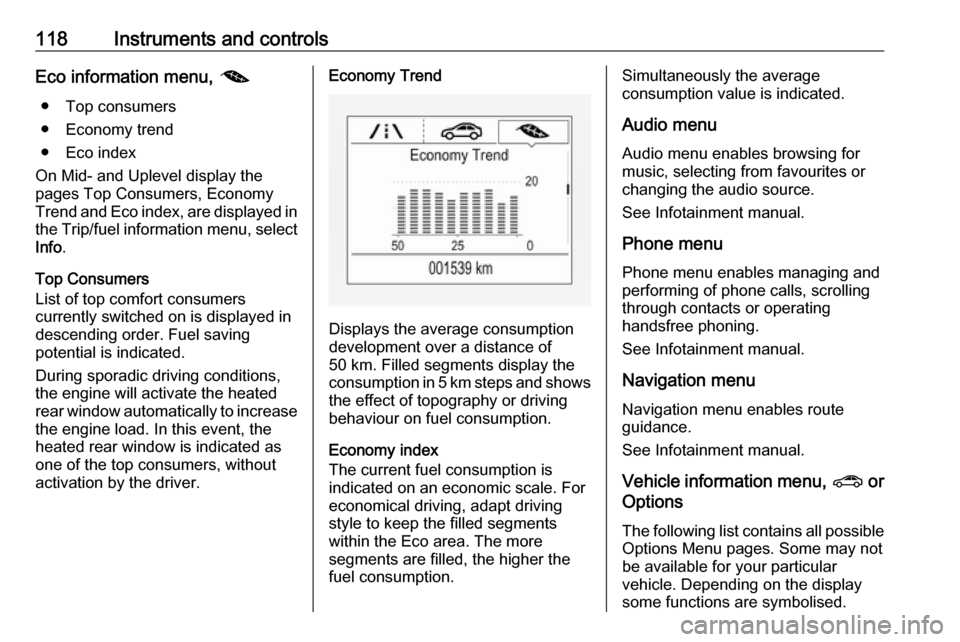
activation by the driver.Economy Trend
Displays the average consumption
development over a distance of
50 km. Filled segments display the
consumption in 5 km steps and shows the effect of topography or driving
behaviour on fuel consumption.
Economy index
The current fuel consumption is
indicated on an economic scale. For
economical driving, adapt driving
style to keep the filled segments
within the Eco area. The more
segments are filled, the higher the
fuel consumption.
Simultaneously the average
consumption value is indicated.
Audio menu
Audio menu enables browsing for
music, selecting from favourites or
changing the audio source.
See Infotainment manual.
Phone menu
Phone menu enables managing and performing of phone calls, scrolling
through contacts or operating
handsfree phoning.
See Infotainment manual.
Navigation menu
Navigation menu enables route
guidance.
See Infotainment manual.
Vehicle information menu, ? or
Options
The following list contains all possible Options Menu pages. Some may notbe available for your particular
vehicle. Depending on the display
some functions are symbolised.
Page 163 of 323

Driving and operating161Driving and
operatingDriving hints ............................... 162
Control of the vehicle ...............162
Steering ................................... 162
Starting and operating ...............162
New vehicle running-in ............162
Power button ........................... 163
Retained power off ..................164
Starting the engine ..................164
Overrun cut-off ........................ 165
Stop-start system ....................166
Parking .................................... 168
Engine exhaust .......................... 169
Diesel particle filter ..................169
Catalytic converter ...................170
AdBlue ..................................... 171
Automatic transmission ..............174
Manual transmission ..................178
Drive systems ............................ 179
All-wheel drive ......................... 179
Brakes ........................................ 179
Antilock brake system .............179
Parking brake .......................... 180Brake assist............................. 181
Hill start assist ......................... 182
Ride control systems .................182
Traction Control system ..........182
Electronic Stability Control ......183
Interactive driving system ........184
Driver assistance systems .........187
Cruise control .......................... 187
Speed limiter ........................... 189
Adaptive cruise control ............190
Forward collision alert .............198
Following distance indication ...201
Active emergency braking .......202
Front pedestrian protection .....205
Parking assist .......................... 207
Side blind zone assistant .........215
Lane change alert ....................216
Panoramic view system ...........218
Rear view camera ...................221
Rear cross traffic alert .............223
Traffic sign assistant ................224
Lane keep assist .....................228
Fuel ............................................ 230
Fuel for petrol engines .............230
Fuel for diesel engines ............231
Refuelling ................................ 232
Fuel consumption - CO 2-
Emissions ............................... 234Trailer hitch................................ 235
General information .................235
Driving characteristics and towing tips .............................. 235
Trailer towing ........................... 235
Towing equipment ...................236
Trailer stability assist ...............238
Page 164 of 323

162Driving and operatingDriving hints
Control of the vehicle
Never coast with engine not
running
Many systems will not function in this situation ( e.g. brake servo unit, power
steering). Driving in this manner is a
danger to yourself and others.
All systems function during an
Autostop.
Stop-start system 3 166.
Idle boost
If charging of the vehicle battery is
required due to battery condition, the
power output of the generator must
be increased. This will be achieved by an idle boost which may be audible.
A message appears in the Driver
Information Centre.
Pedals
To ensure the pedal travel is
uninhibited, there must be no mats in
the area of the pedals.Use only floor mats, which fit properly and are fixed by the retainers on the
driver side.
Steering If power steering assist is lost
because the engine stops or due to a system malfunction, the vehicle can
be steered but may require increased
effort.Starting and operating
New vehicle running-in Do not brake unnecessarily hard for
the first few journeys.
During the first drive, smoke may
occur because of wax and oil
evaporating off the exhaust system.
Park the vehicle in the open for a
while after the first drive and avoid
inhaling the fumes.
During the running-in period, fuel and engine oil consumption may be
higher.
Additionally, the cleaning process of
the diesel particle filter may take
place more often.
Diesel particle filter 3 169.
Autostop may be inhibited to allow for
charging of the vehicle battery.
Page 171 of 323
Driving and operating169Note
In the event of an accident with
airbag deployment, the engine is
turned off automatically if the vehicle
comes to a standstill within a certain
time.Engine exhaust9 Danger
Engine exhaust gases contain
poisonous carbon monoxide,
which is colourless and odourless and could be fatal if inhaled.
If exhaust gases enter the interior
of the vehicle, open the windows.
Have the cause of the fault
rectified by a workshop.
Avoid driving with an open load
compartment, otherwise exhaust
gases could enter the vehicle.
Diesel particle filter
Automatic cleaning process
The diesel particle filter system filters
harmful soot particles out of the
exhaust gases. The system includes
a self-cleaning function that runs
automatically during driving without
any notification. The filter is cleaned
by periodically burning off the soot
particles at high temperature. This
process takes place automatically
under set driving conditions and may take up to 25 minutes. Typically it
needs between seven and twelve
minutes. Autostop is not available
and fuel consumption may be higher
during this period. The emission of
smells and smoke during this process is normal.
System requires cleaning process
Under certain driving conditions, e.g.
short distances, the system cannot
clean itself automatically.
If cleaning of the filter is required and
if previous driving conditions did not
enable automatic cleaning, it will be
Page 232 of 323
230Driving and operating● The sensor in the windscreen isblocked by snow, ice, slush, mud,dirt, windscreen damage or
affected by foreign items, e.g.
stickers.
● The sun is shining directly into the camera lens.
● Close vehicles ahead
● Banked roads
● Road edges
● Roads with poor lane markings
● Sudden lighting changes
● Vehicle modifications, e.g. tyres.
Switch off the system if the system is
disturbed by tar marks, shadows,
road cracks, temporary or
construction lane markings, or other
road imperfections.9 Warning
Always keep your attention on the
road and maintain proper vehicle
position within the lane, otherwise
vehicle damage, injury or death
could occur.
Lane keep assist does not
continuously steer the vehicle.
The system may not keep the
vehicle in the lane or give an alert,
even if a lane marking is detected.
The steering of the lane keep
assist may not be sufficient to
avoid a lane departure.
The system may not detect hands-
off driving due to external
influences (road condition and
surface, weather etc). The driver
has full responsibility to control the vehicle and is always required tokeep the hands on the steeringwheel while driving.
Using the system while towing a
trailer or on slippery roads could
cause loss of control of the vehicle
and a crash. Switch the system off.Fuel
Fuel for petrol engines Only use unleaded fuel that complies
with European standard EN 228 or equivalent.
The engine is capable of running with fuel that contains up to 10% ethanol
(e.g. named E10).
Use fuel with the recommended
octane rating. A lower octane rating
can reduce engine power and torque
and slightly increases fuel
consumption.Caution
Do not use fuel or fuel additives
that contain metallic compounds
such as manganese-based
additives. This may cause engine
damage.
Page 236 of 323
234Driving and operating
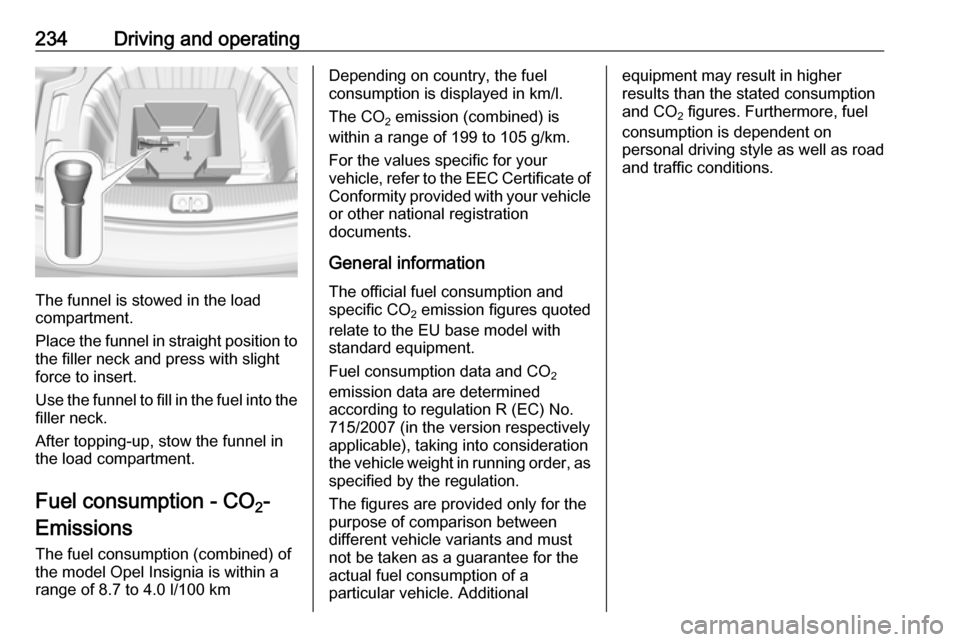
The funnel is stowed in the load
compartment.
Place the funnel in straight position to the filler neck and press with slight
force to insert.
Use the funnel to fill in the fuel into the
filler neck.
After topping-up, stow the funnel in
the load compartment.
Fuel consumption - CO 2-
Emissions
The fuel consumption (combined) of the model Opel Insignia is within a
range of 8.7 to 4.0 l/100 km
Depending on country, the fuel
consumption is displayed in km/l.
The CO 2 emission (combined) is
within a range of 199 to 105 g/km.
For the values specific for your
vehicle, refer to the EEC Certificate of
Conformity provided with your vehicle or other national registration
documents.
General information The official fuel consumption and
specific CO 2 emission figures quoted
relate to the EU base model with standard equipment.
Fuel consumption data and CO 2
emission data are determined
according to regulation R (EC) No.
715/2007 (in the version respectively
applicable), taking into consideration
the vehicle weight in running order, as specified by the regulation.
The figures are provided only for the
purpose of comparison between
different vehicle variants and must not be taken as a guarantee for the
actual fuel consumption of a
particular vehicle. Additionalequipment may result in higher
results than the stated consumption
and CO 2 figures. Furthermore, fuel
consumption is dependent on
personal driving style as well as road
and traffic conditions.
Page 241 of 323

Vehicle care239Vehicle careGeneral Information...................239
Accessories and vehicle modifications .......................... 239
Vehicle storage ........................240
End-of-life vehicle recovery .....240
Vehicle checks ........................... 241
Performing work ......................241
Bonnet ..................................... 241
Engine oil ................................. 242
Engine coolant ......................... 243
Washer fluid ............................ 244
Brakes ..................................... 244
Brake fluid ............................... 244
Vehicle battery ......................... 245
Diesel fuel system bleeding .....246
Wiper blade replacement ........247
Bulb replacement .......................248
Halogen headlights ..................248
LED headlights ........................ 250
Fog lights ................................. 250
Tail lights ................................. 251
Side turn signal lights ..............256
Number plate light ...................256
Interior lights ............................ 256
Instrument panel illumination ...256Electrical system ........................257
Fuses ....................................... 257
Engine compartment fuse box . 258
Instrument panel fuse box .......260
Vehicle tools .............................. 262
Tools ........................................ 262
Wheels and tyres .......................263
Winter tyres ............................. 263
Tyre designations ....................263
Tyre pressure .......................... 264
Tyre pressure monitoring system .................................... 265
Tread depth ............................. 267
Changing tyre and wheel size . 267
Wheel covers ........................... 268
Tyre chains .............................. 268
Tyre repair kit .......................... 268
Wheel changing .......................273
Spare wheel ............................ 275
Jump starting ............................. 277
Towing ....................................... 278
Towing the vehicle ...................278
Towing another vehicle ...........279
Appearance care .......................280
Exterior care ............................ 280
Interior care ............................. 282General Information
Accessories and vehiclemodifications
We recommend the use of genuine
parts and accessories and factory approved parts specific for your
vehicle type. We cannot assess or guarantee reliability of other products
- even if they have a regulatory or
otherwise granted approval.
Any modification, conversion or other changes made to standard vehicle
specifications (including, without
limitation, software modifications,
modifications of the electronic control
units) may invalidate the warranty
offered by Opel. Furthermore, such
changes may impact fuel
consumption, CO 2 emissions and
other emissions of the vehicle and
cause the vehicle to no longer
conform to the operating permit,
impacting the validity of your vehicle
registration.
Page 266 of 323
264Vehicle careDirectional tyres
Directional tyres should be mounted so that they rotate in the correct
direction. The proper rotation
direction is indicated by a symbol
(e.g. an arrow) on the sidewall.
Tyre pressure
Check the pressure of cold tyres at
least every 14 days and before any
long journey. Do not forget the spare
wheel. This also applies to vehicles
with tyre pressure monitoring system.
Unscrew the valve cap.
Tyre pressure 3 301.
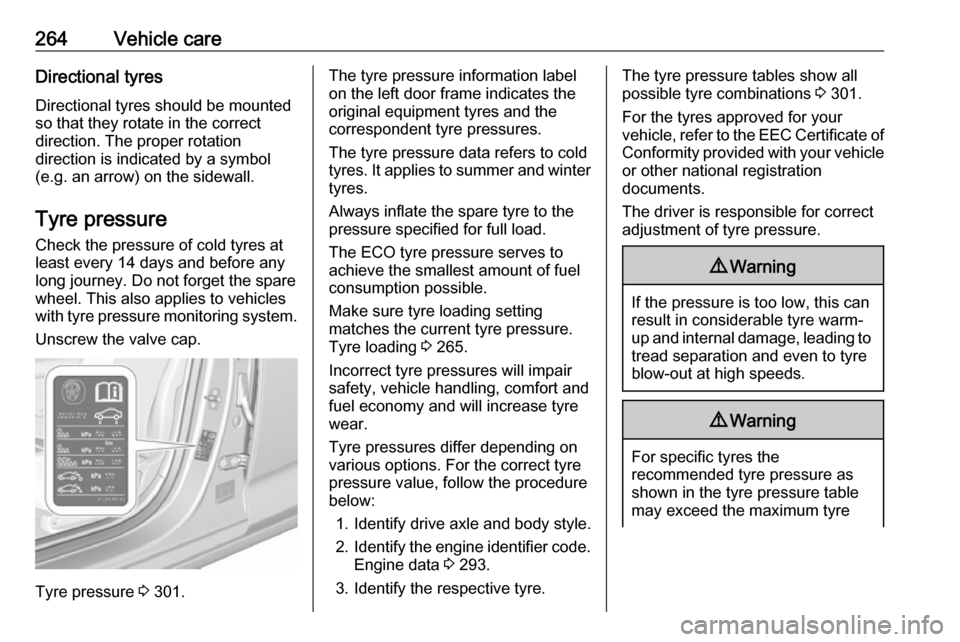
The tyre pressure information label
on the left door frame indicates the
original equipment tyres and the
correspondent tyre pressures.
The tyre pressure data refers to cold
tyres. It applies to summer and winter tyres.
Always inflate the spare tyre to the
pressure specified for full load.
The ECO tyre pressure serves to
achieve the smallest amount of fuel
consumption possible.
Make sure tyre loading setting
matches the current tyre pressure.
Tyre loading 3 265.
Incorrect tyre pressures will impair
safety, vehicle handling, comfort and
fuel economy and will increase tyre
wear.
Tyre pressures differ depending on
various options. For the correct tyre
pressure value, follow the procedure
below:
1. Identify drive axle and body style.
2. Identify the engine identifier code.
Engine data 3 293.
3. Identify the respective tyre.The tyre pressure tables show all
possible tyre combinations 3 301.
For the tyres approved for your
vehicle, refer to the EEC Certificate of Conformity provided with your vehicle
or other national registration
documents.
The driver is responsible for correct
adjustment of tyre pressure.9 Warning
If the pressure is too low, this can
result in considerable tyre warm-
up and internal damage, leading to tread separation and even to tyre
blow-out at high speeds.
9 Warning
For specific tyres the
recommended tyre pressure as
shown in the tyre pressure table may exceed the maximum tyre