air condition OPEL INSIGNIA BREAK 2018.5 Manual user
[x] Cancel search | Manufacturer: OPEL, Model Year: 2018.5, Model line: INSIGNIA BREAK, Model: OPEL INSIGNIA BREAK 2018.5Pages: 329, PDF Size: 9.32 MB
Page 156 of 329
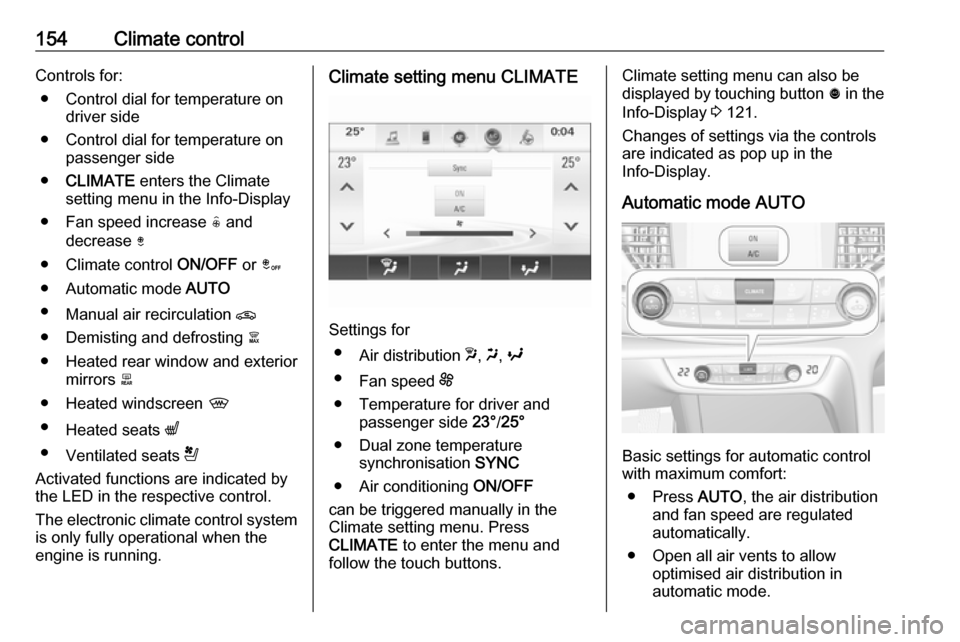
154Climate controlControls for:● Control dial for temperature on driver side
● Control dial for temperature on passenger side
● CLIMATE enters the Climate
setting menu in the Info-Display
● Fan speed increase ( and
decrease )
● Climate control ON/OFF or â
● Automatic mode AUTO
● Manual air recirculation n
● Demisting and defrosting à
● Heated rear window and exterior mirrors b
● Heated windscreen ,
● Heated seats q
● Ventilated seats r
Activated functions are indicated by the LED in the respective control.
The electronic climate control system
is only fully operational when the
engine is running.Climate setting menu CLIMATE
Settings for
● Air distribution w, x , y
● Fan speed E
● Temperature for driver and passenger side 23°/25°
● Dual zone temperature synchronisation SYNC
● Air conditioning ON/OFF
can be triggered manually in the
Climate setting menu. Press
CLIMATE to enter the menu and
follow the touch buttons.
Climate setting menu can also be
displayed by touching button ã in the
Info-Display 3 121.
Changes of settings via the controls
are indicated as pop up in the
Info-Display.
Automatic mode AUTO
Basic settings for automatic control
with maximum comfort:
● Press AUTO, the air distribution
and fan speed are regulated
automatically.
● Open all air vents to allow optimised air distribution in
automatic mode.
Page 157 of 329
Climate control155● Cooling must be activated in theclimate setting menu for optimalcooling and demisting. Press
Climate to enter the menu and
follow the touch button to switch on air conditioning A/C.
● Set the preselected temperatures separately for
driver and front passenger using
the left and right control dials.
Recommended temperature is
22 °C. Temperature is indicated briefly in displays beside the
control dials and in the climate
setting menu.
● Air recirculation mode n should
be deactivated. When
deactivated the LED in the button is not illuminated.
Manual settings Climate control system settings can
be changed by activating the
following functions as described
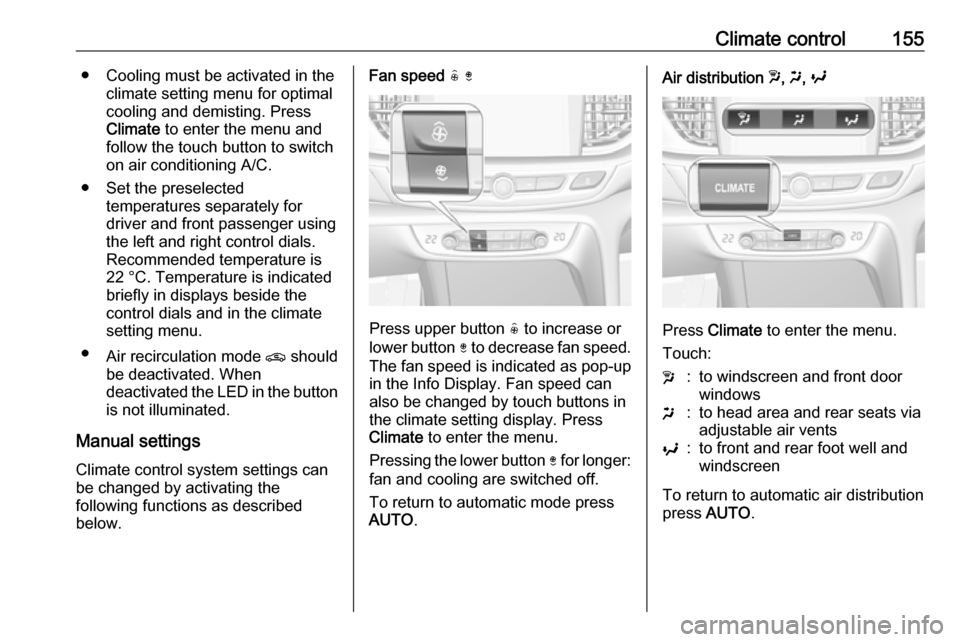
below.Fan speed ( )
Press upper button ( to increase or
lower button ) to decrease fan speed.
The fan speed is indicated as pop-up in the Info Display. Fan speed can
also be changed by touch buttons in
the climate setting display. Press
Climate to enter the menu.
Pressing the lower button ) for longer:
fan and cooling are switched off.
To return to automatic mode press
AUTO .
Air distribution w, x , y
Press Climate to enter the menu.
Touch:
w:to windscreen and front door
windowsx:to head area and rear seats via
adjustable air ventsy:to front and rear foot well and
windscreen
To return to automatic air distribution
press AUTO .
Page 158 of 329
156Climate controlTemperature preselection
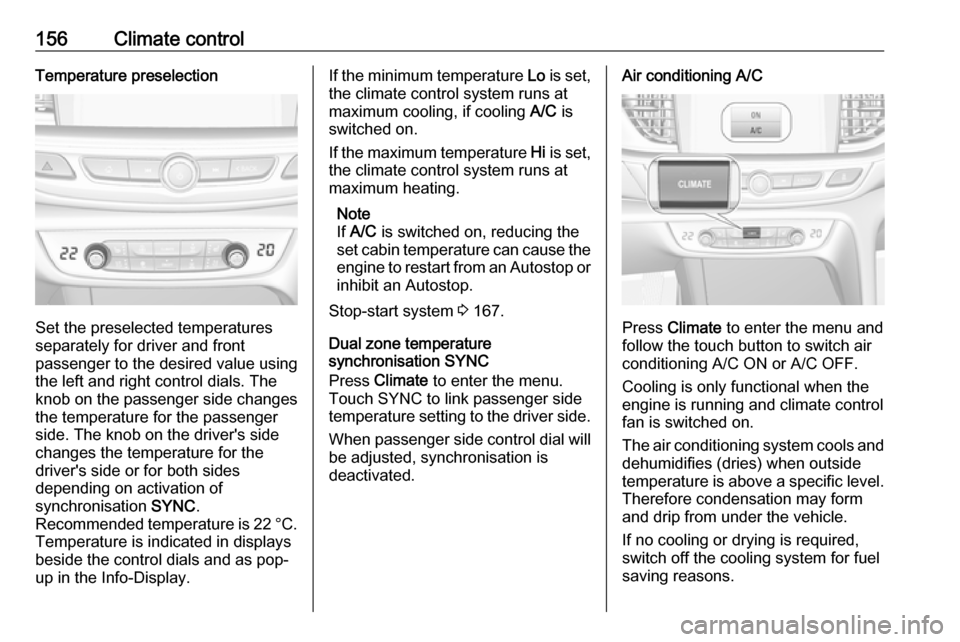
Set the preselected temperatures
separately for driver and front
passenger to the desired value using
the left and right control dials. The
knob on the passenger side changes
the temperature for the passenger
side. The knob on the driver's side
changes the temperature for the
driver's side or for both sides
depending on activation of
synchronisation SYNC.
Recommended temperature is 22 °C .
Temperature is indicated in displays
beside the control dials and as pop-
up in the Info-Display.
If the minimum temperature Lo is set,
the climate control system runs at maximum cooling, if cooling A/C is
switched on.
If the maximum temperature Hi is set,
the climate control system runs at maximum heating.
Note
If A/C is switched on, reducing the
set cabin temperature can cause the engine to restart from an Autostop or
inhibit an Autostop.
Stop-start system 3 167.
Dual zone temperature
synchronisation SYNC
Press Climate to enter the menu.
Touch SYNC to link passenger side
temperature setting to the driver side.
When passenger side control dial will be adjusted, synchronisation is
deactivated.Air conditioning A/C
Press Climate to enter the menu and
follow the touch button to switch air
conditioning A/C ON or A/C OFF.
Cooling is only functional when the
engine is running and climate control
fan is switched on.
The air conditioning system cools and
dehumidifies (dries) when outside
temperature is above a specific level. Therefore condensation may form
and drip from under the vehicle.
If no cooling or drying is required,
switch off the cooling system for fuel
saving reasons.
Page 159 of 329
Climate control157Manual air recirculation n
Press n to activate the air
recirculation mode. The LED in the
button illuminates to indicate
activation.
Press n again to deactivate
recirculation mode.
9 Warning
The exchange of fresh air is
reduced in air recirculation mode.
In operation without cooling the air humidity increases, so the
windows may mist up from inside.
The quality of the passenger
compartment air deteriorates,
which may cause the vehicle
occupants to feel drowsy.
In warm and very humid ambient air conditions, the windscreen may mist
up from outside, when cold air is
directed towards it. If windscreen
mists up from outside, activate
windscreen wiper and deactivate w.
Automatic air recirculation
An air humidity sensor switches
automatically to external air if internal air humidity is too high.
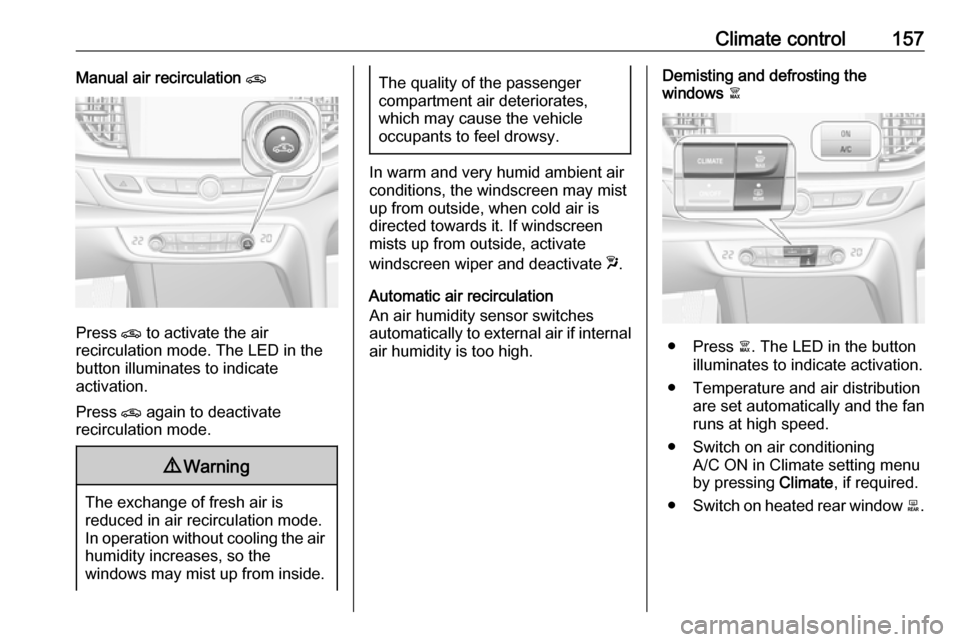
Demisting and defrosting the
windows à
● Press à. The LED in the button
illuminates to indicate activation.
● Temperature and air distribution are set automatically and the fan
runs at high speed.
● Switch on air conditioning A/C ON in Climate setting menu
by pressing Climate, if required.
● Switch on heated rear window b.
Page 163 of 329

Climate control161Air conditioning regular
operation
In order to ensure continuously
efficient performance, cooling must
be operated for a few minutes once a month, irrespective of the weather
and time of year. Operation with
cooling is not possible when the
outside temperature is too low.
Service For optimal cooling performance, it is
recommended to annually check the
climate control system, starting
three years after initial vehicle
registration, including:
● functionality and pressure test
● heating functionality
● leakage check
● check of drive belts
● cleaning of condenser and evaporator drainage
● performance check
● cabin air filter check
Page 171 of 329
Driving and operating169Vehicles with automatic transmissionRelease the brake pedal or move
selector lever out of D into N or P to
restart the engine.
Restart of the engine by the stop-
start system
The selector lever must be in neutral
to enable an automatic restart.
If one of the following conditions
occurs during an Autostop, the
engine will be restarted automatically
by the stop-start system:
● The stop-start system is manually deactivated.
● The bonnet is opened.
● The driver's seat belt is unfastened and the driver's door
is opened.
● The engine temperature is too low.
● The charging level of the vehicle battery is below a defined level.
● The brake vacuum is not sufficient.
● The vehicle is driven at least at walking speed.● The climate control systemrequests an engine start.
● The air conditioning is manually switched on.
If the bonnet is not fully closed, a warning message is displayed in the
Driver Information Centre.
If an electrical accessory, e.g. a
portable CD player, is connected to
the power outlet, a brief power drop
during the restart might be noticeable.
Parking9 Warning
● Do not park the vehicle on an
easily ignitable surface. The
high temperature of the
exhaust system could ignite the
surface.
● Always apply the parking brake. Pull switch m for
approx. one second and check
if the control indicator m
illuminates.
The electric parking brake is applied when control indicator
m illuminates 3 109.
● Switch off the engine. ● If the vehicle is on a level surface or uphill slope, engage
first gear or set the selector
lever to position P before
switching off ignition. On an
uphill slope, turn the front
wheels away from the kerb.
If the vehicle is on a downhill
slope, engage reverse gear or
set the selector lever to position P before switching off ignition.
Turn the front wheels towards
the kerb.
● Close the windows and the sunroof.
● Switch off ignition with power button. Turn the steering wheel
until the steering wheel lock is
felt to engage.
Page 172 of 329
170Driving and operating● Lock the vehicle with button onthe door handle.
● Activate the anti-theft alarm system.
● The engine cooling fans may run
after the engine has been
switched off 3 241.Caution
After running at high engine
speeds or with high engine loads,
operate the engine briefly at a low
load or run in neutral for
approx. 30 seconds before
switching off, in order to protect
the turbocharger.
Note
In the event of an accident with
airbag deployment, the engine is
turned off automatically if the vehicle
comes to a standstill within a certain time.
Engine exhaust9 Danger
Engine exhaust gases contain
poisonous carbon monoxide,
which is colourless and odourless and could be fatal if inhaled.
If exhaust gases enter the interior
of the vehicle, open the windows.
Have the cause of the fault
rectified by a workshop.
Avoid driving with an open load
compartment, otherwise exhaust
gases could enter the vehicle.
Diesel particle filter
Automatic cleaning process
The diesel particle filter system filters
harmful soot particles out of the
exhaust gases. The system includes
a self-cleaning function that runs
automatically during driving without
any notification. The filter is cleaned
by periodically burning off the soot
particles at high temperature. This
process takes place automatically
under set driving conditions and may take up to 25 minutes. Typically it
needs between seven and twelve
minutes. Autostop is not available
and fuel consumption may be higher
during this period. The emission of
smells and smoke during this process is normal.
System requires cleaning process
Under certain driving conditions, e.g.
short distances, the system cannot
clean itself automatically.
If cleaning of the filter is required and
if previous driving conditions did not
enable automatic cleaning, it will be
Page 219 of 329

Driving and operating217● The vehicle had an accident or ifthe area surrounding the
detection sensor is damaged or
not properly repaired.
● There are extreme temperature changes.
● The vehicle is towing a trailer
In the event of a fault in the system or
if the system does not work due to
temporary conditions, the symbols in
the mirrors will be permanently
illuminated and a message is
displayed in the Driver Information
Centre. Seek the assistance of a
workshop.
Lane change alert
Additional to the side blind spot alert
3 215, lane change alert recognizes
rapidly approaching vehicles from
behind on parallel lanes next to your
vehicle.
The system alerts visually in each
exterior mirror when detecting rapidly
approaching vehicles from behind.
The radar distance sensors are
located in the rear bumper.9 Warning
Lane change alert does not
replace driver vision.
Before changing a lane, always
check all mirrors, look over the
shoulder and use the turn signal.
When the system detects an
approaching vehicle from behind
which drives considerably faster, the
yellow warning symbol F will
illuminate in the relevant exterior mirror. If the driver then activates the
turn signal, the warning symbol F
starts flashing yellow as a warning not to change lanes.
Lane change alert is active at all
speeds.
When the vehicle is started, both exterior mirror displays will briefly
come on to indicate that the system is
operating.
Page 220 of 329
218Driving and operatingDetection zones
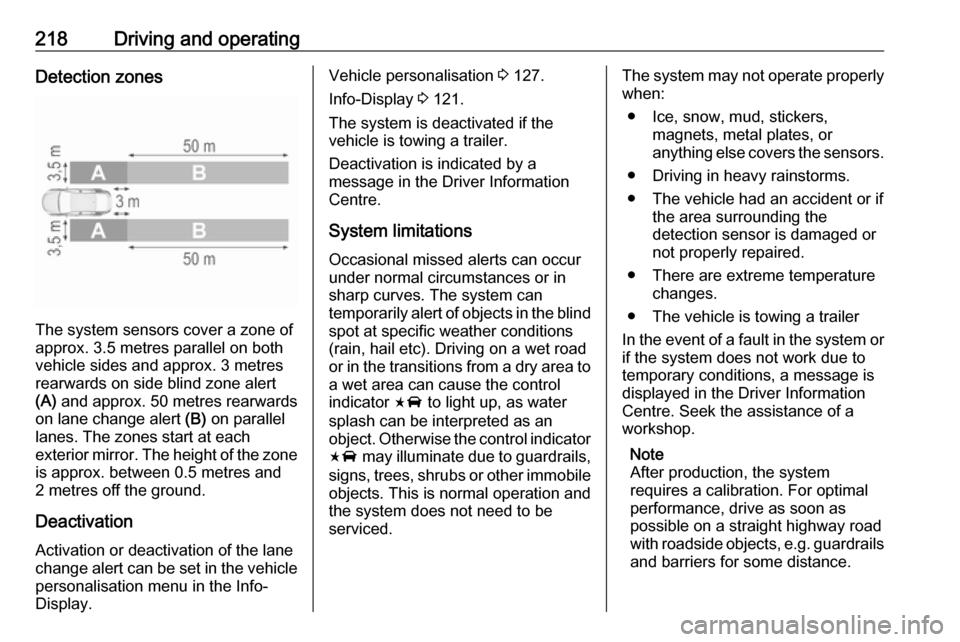
The system sensors cover a zone of
approx. 3.5 metres parallel on both
vehicle sides and approx. 3 metres
rearwards on side blind zone alert
(A) and approx. 50 metres rearwards
on lane change alert (B) on parallel
lanes. The zones start at each
exterior mirror. The height of the zone
is approx. between 0.5 metres and
2 metres off the ground.
Deactivation
Activation or deactivation of the lane
change alert can be set in the vehicle personalisation menu in the Info-
Display.
Vehicle personalisation 3 127.
Info-Display 3 121.
The system is deactivated if the
vehicle is towing a trailer.
Deactivation is indicated by a
message in the Driver Information
Centre.
System limitations Occasional missed alerts can occur
under normal circumstances or in
sharp curves. The system can
temporarily alert of objects in the blind spot at specific weather conditions(rain, hail etc). Driving on a wet road
or in the transitions from a dry area to
a wet area can cause the control
indicator F to light up, as water
splash can be interpreted as an
object. Otherwise the control indicator F may illuminate due to guardrails,
signs, trees, shrubs or other immobile
objects. This is normal operation and
the system does not need to be
serviced.The system may not operate properly
when:
● Ice, snow, mud, stickers, magnets, metal plates, or
anything else covers the sensors.
● Driving in heavy rainstorms.
● The vehicle had an accident or if the area surrounding the
detection sensor is damaged or
not properly repaired.
● There are extreme temperature changes.
● The vehicle is towing a trailer
In the event of a fault in the system or if the system does not work due to
temporary conditions, a message is
displayed in the Driver Information
Centre. Seek the assistance of a
workshop.
Note
After production, the system
requires a calibration. For optimal
performance, drive as soon as
possible on a straight highway road
with roadside objects, e.g. guardrails
and barriers for some distance.
Page 226 of 329
224Driving and operatingDetection zones
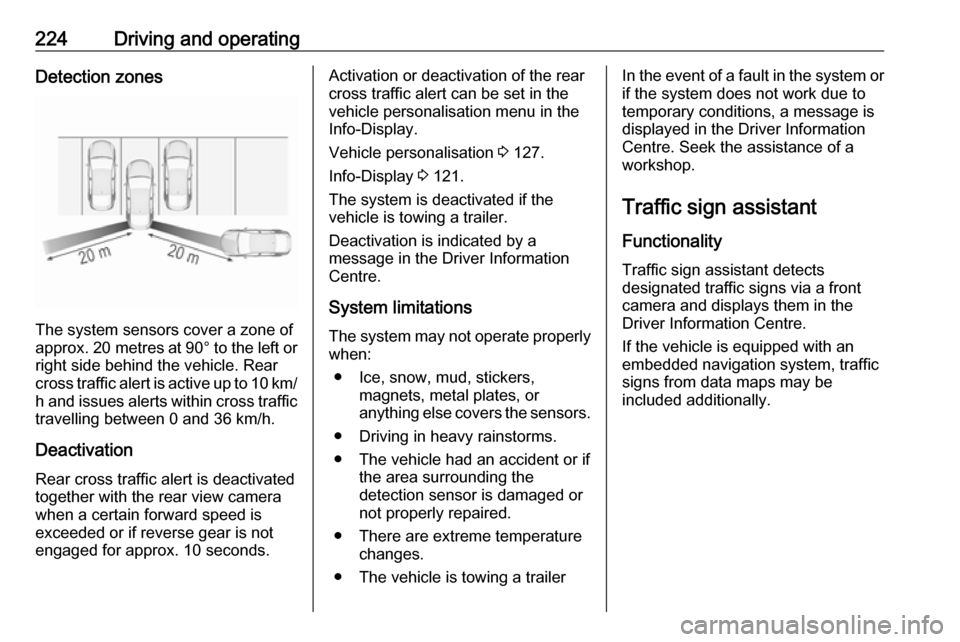
The system sensors cover a zone of
approx. 20 metres at 90° to the left or
right side behind the vehicle. Rear cross traffic alert is active up to 10 km/ h and issues alerts within cross traffic
travelling between 0 and 36 km/h.
Deactivation
Rear cross traffic alert is deactivated together with the rear view camera
when a certain forward speed is
exceeded or if reverse gear is not
engaged for approx. 10 seconds.
Activation or deactivation of the rear
cross traffic alert can be set in the
vehicle personalisation menu in the
Info-Display.
Vehicle personalisation 3 127.
Info-Display 3 121.
The system is deactivated if the
vehicle is towing a trailer.
Deactivation is indicated by a
message in the Driver Information
Centre.
System limitations The system may not operate properly
when:
● Ice, snow, mud, stickers, magnets, metal plates, or
anything else covers the sensors.
● Driving in heavy rainstorms.
● The vehicle had an accident or if the area surrounding the
detection sensor is damaged or
not properly repaired.
● There are extreme temperature changes.
● The vehicle is towing a trailerIn the event of a fault in the system or if the system does not work due to
temporary conditions, a message is
displayed in the Driver Information Centre. Seek the assistance of a
workshop.
Traffic sign assistant
Functionality Traffic sign assistant detects
designated traffic signs via a front
camera and displays them in the
Driver Information Centre.
If the vehicle is equipped with an
embedded navigation system, traffic
signs from data maps may be
included additionally.