light OPEL INSIGNIA BREAK 2018 Manual user
[x] Cancel search | Manufacturer: OPEL, Model Year: 2018, Model line: INSIGNIA BREAK, Model: OPEL INSIGNIA BREAK 2018Pages: 323, PDF Size: 9.37 MB
Page 167 of 323

Driving and operating165To switch off the engine when vehicle
is stationary, press
Engine Start/Stop briefly. Automatic
transmission: apply the parking brake
and engage P.
Manual transmission: during an
Autostop, the engine can be started
by depressing the clutch pedal
3 166.
Automatic transmission: during an
Autostop, the engine can be started
by releasing the brake pedal 3 166.
Emergency engine shut off during driving
If the engine needs to be switched off during driving in case of emergency,
press Engine Start/Stop for more than
two seconds or press twice briefly
within five seconds.9 Danger
Switching off the engine during
driving may cause loss of power
support for brake and steering
systems. Assistance systems and
airbag systems are disabled.
Lighting and brake lights will
extinguish. Therefore power down the engine and ignition while
driving only when required in case of emergency.
Starting the vehicle at low
temperatures
Starting the engine without additional
heaters is possible down to -25 °С for diesel engines and -30 °C for petrol
engines. Required is an engine oil
with the correct viscosity, the correct fuel, performed services and a
sufficiently charged vehicle battery.
With temperatures below -30 °C the
automatic transmission requires a
warming phase of approx.
five minutes. The selector lever must
be in position P.
Automatic Starter Control
This function controls the engine
starting procedure. The driver does
not need to hold Engine Start/Stop
pressed. Once applied, the system
will go on starting automatically until
the engine is running. Because of the checking procedure, the engine startsrunning after a short delay.
Possible reasons for a non-starting
engine:
● Clutch pedal not operated (manual transmission).
● Brake pedal not operated or selector lever not in P or N
(automatic transmission).
● Timeout occurred.
Turbo engine warm-up
Upon start-up, engine available
torque may be limited for a short time, especially when the engine
temperature is cold. The limitation is
to allow the lubrication system to fully
protect the engine.
Overrun cut-off
The fuel supply is automatically cut off
during overrun, i.e. when the vehicle
is driven with a gear engaged but accelerator pedal is released.
Depending on driving conditions, the
overrun cut-off may be deactivated.
Page 168 of 323
166Driving and operatingStop-start systemThe stop-start system helps to save
fuel and to reduce the exhaust
emissions. When conditions allow, it
switches off the engine as soon as the
vehicle is at a low speed or at a
standstill, e.g. at a traffic light or in a
traffic jam.
Activation
The stop-start system is available as
soon as the engine is started, the
vehicle starts-off and the conditions
as stated below in this section are
fulfilled.
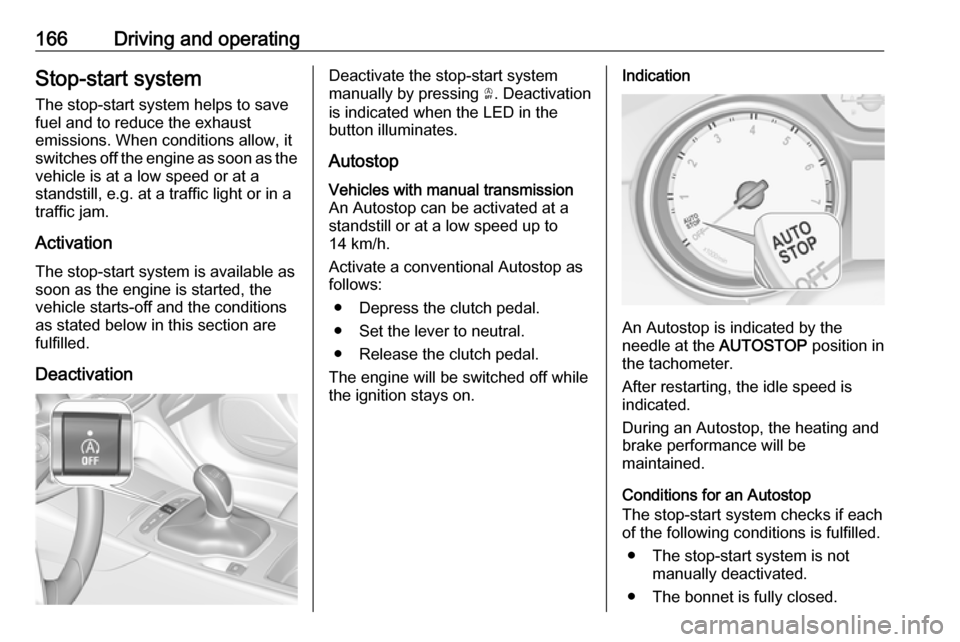
DeactivationDeactivate the stop-start system
manually by pressing Ò. Deactivation
is indicated when the LED in the
button illuminates.
AutostopVehicles with manual transmission
An Autostop can be activated at a
standstill or at a low speed up to
14 km/h.
Activate a conventional Autostop as
follows:
● Depress the clutch pedal.
● Set the lever to neutral.
● Release the clutch pedal.
The engine will be switched off while
the ignition stays on.Indication
An Autostop is indicated by the
needle at the AUTOSTOP position in
the tachometer.
After restarting, the idle speed is
indicated.
During an Autostop, the heating and
brake performance will be
maintained.
Conditions for an Autostop
The stop-start system checks if each
of the following conditions is fulfilled.
● The stop-start system is not manually deactivated.
● The bonnet is fully closed.
Page 182 of 323
180Driving and operatingABS starts to regulate brake pressureas soon as a wheel shows a tendency to lock. The vehicle remains
steerable, even during hard braking.
ABS control is made apparent
through a pulse in the brake pedal
and the noise of the regulation
process.
For optimum braking, keep the brake
pedal fully depressed throughout the
braking process, despite the fact that
the pedal is pulsating. Do not reduce
the pressure on the pedal.
After starting off, the system performs
a self-test which may be audible.
Control indicator u 3 109.
Adaptive brake light During full braking, all three brake
lights flash for the duration of ABS
control.
Fault9 Warning
If there is a fault in the ABS, the
wheels may be liable to lock due
to braking that is heavier than
normal. The advantages of ABS are no longer available. During
hard braking, the vehicle can no longer be steered and may
swerve.
Have the cause of the fault remedied
by a workshop.
Parking brake
9 Warning
Before leaving the vehicle, check
parking brake status. Control
indicator m must illuminate
constantly.
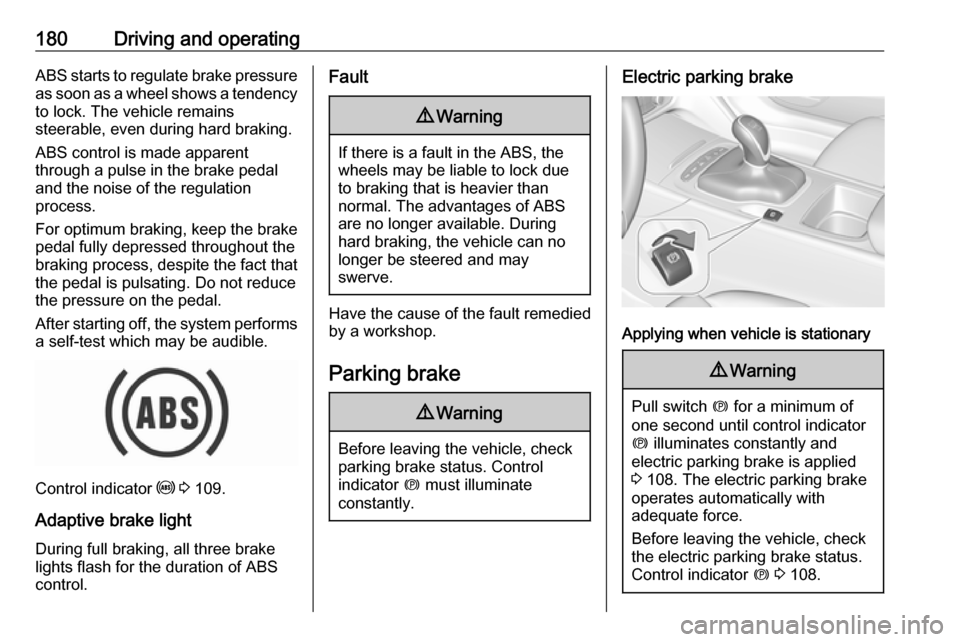
Electric parking brake
Applying when vehicle is stationary
9 Warning
Pull switch m for a minimum of
one second until control indicator
m illuminates constantly and
electric parking brake is applied
3 108. The electric parking brake
operates automatically with
adequate force.
Before leaving the vehicle, check
the electric parking brake status.
Control indicator m 3 108.
Page 183 of 323

Driving and operating181The electric parking brake can always
be activated, even if the ignition is off.
Do not operate electric parking brake
system too often without engine
running as this will discharge the
vehicle battery.
Releasing
Switch on ignition. Keep foot brake
pedal depressed and then push
switch m.
Drive away function
Vehicles with manual transmission:
Depressing the clutch pedal and then slightly releasing the clutch pedal and
slightly depressing the accelerator
pedal releases the electric parking
brake automatically. This is not
possible when switch m is pulled at
the same time.
Vehicles with automatic transmission: Engaging D and then depressing the
accelerator pedal releases the
electric parking brake automatically.
This is not possible when switch m is
pulled at the same time.Dynamic braking when vehicle is
moving
When the vehicle is moving and the
switch m is kept pulled, the electric
parking brake system will decelerate the vehicle, but will not apply
statically.
As soon as the switch m is released,
dynamic braking will be stopped.
Automatic applying
If the vehicle is equipped with
automatic transmission and adaptive cruise control is active, electric
parking brake is applied automatically when vehicle is stopped by the
system for more than two minutes.
Parking brake releases automatically
after moving off.
Functionality check
When the vehicle is not moving, the
electric parking brake might be
applied automatically. This is done to
check the system.Fault
Failure mode of electric parking brake
is indicated by a control indicator j
and by a vehicle message which is
displayed in the Driver Information
Centre. Vehicle messages 3 124.
Apply electric parking brake: pull and
hold the switch m for more than
five seconds. If control indicator m
illuminates, electric parking brake is
applied.
Release electric parking brake: push
and hold the switch m for more than
two seconds. If control indicator m
extinguishes, electric parking brake is
released.
Control indicator m flashes: electric
parking brake is not fully applied or
released. When continuously
flashing, release electric parking
brake and retry applying.
Brake assist If brake pedal is depressed quickly
and forcefully, maximum brake force
is automatically applied.
Page 188 of 323

186Driving and operatingIf, for example, normal settings are
active in AUTO mode and DMC
detects a sporty driving behaviour, it
automatically changes systems into
sporty settings unless the driver
deselects sporty damping or steering
in the Sport Mode Customisation .
If, for another example, comfort settings are active in TOUR mode
and whilst driving on a winding road a sudden hard brake is necessary,DMC will detect the dynamic vehicle
condition and changes the settings
for suspension back to normal
(default) setting to enhance vehicle
stability.
When the driving characteristic or the
dynamic vehicle state returns to the
former state, DMC will change to
preselected settings.Flex Ride visualisation menu
On 8" Info Display a Flex Ride
visualisation menu can be displayed
by touching ê on the screen. On this
page the selected drive mode and
active setup are displayed.
System settings are highlighted in red for sport, blue for comfort and yellowfor normal.
Additionally the personalisation of
adaptive AUTO mode sensitivity as
well as the personalisation of Sport
mode functions can be displayed in
the visualisation menu by selecting
the respective button on the Info
display.
Personalisation of AUTO mode
sensitivity
The driver can change the sensitivity
of adaptive AUTO mode in three
steps via the Flex Ride visualisation
menu.
● Normal: default setting.
● Sport sensitive: systems change to sport settings faster while
driving sporty.
● Comfort sensitive: systems change to comfort settings faster
while cruising.
Additionally any drive mode control adaption can be deactivated.
Flex Ride visualisation menu will be
displayed by touching ê on the 8"
Info display.
Select Auto-Mode Customisation and
change the relevant settings.
The settings can also be changed in
the personalisation menu in the Info
display, I Settings 3 126.
Info display 3 120.
Page 193 of 323

Driving and operating191Adaptive cruise control automatically
decelerates the vehicle when
approaching a slower moving vehicle.
It then adjusts the vehicle speed to
follow the vehicle ahead at the
selected following distance. The
vehicle speed increases or decreases to follow the vehicle in front, but willnot exceed the set speed. It may
apply limited braking with activated
brake lights.
To facilitate overtaking a vehicle on
the motorway, the activation of the
turn signal reduces the following
distance for a short time. This function is implemented only on the respective
driver's side depending on left or right
hand drive vehicle configuration.
The adaptive cruise control can store
set speed over 30 km/h for manual
transmission. On vehicles with
automatic transmissions the system
can brake until a full stop and drive off from a stop.
Adaptive cruise control uses radar
and camera sensors to detect the
vehicles ahead. If no vehicle is
detected in the driving path, the
adaptive cruise control will behave
like a conventional cruise control.
Adaptive cruise control is mainly
advised to be used on long straight
roads like highways or country roads
with steady traffic. Do not use the
system if it is not advisable to
maintain a constant speed.
Control indicator A 3 112, C 3 112.
9 Warning
The complete driver attention is
always required while driving with adaptive cruise control. The driver
stays fully in control of the vehicle
because the brake pedal, the
accelerator pedal and the cancel
switch have priority over any
adaptive cruise control operation.
Switching on
Illustrations show different versions.
Page 196 of 323

194Driving and operatingPress E, the current setting is shown
in the Driver Information Centre.
Press E again to change the
following distance. The setting is also displayed in the Driver Information
Centre.
The selected following distance is
indicated by filled distance bars in the
adaptive cruise control page.
Note that the following distance
setting is shared with the sensitivity
setting of forward collision alert
3 198.
Example: If setting 3 (far) is selected,
then the driver is warned sooner
before a possible collision, also if
adaptive cruise control is inactive or
switched off.9 Warning
The Driver accepts full
responsibility to drive with the
appropriate following distance
based on traffic, weather, visibility
and regional regulation. Followingdistance must be adjusted or the
system switched off when required by the prevailing conditions.
Adaptive cruise control in Sport
mode
On vehicles with Flex Ride driving
modes, the driver can slightly
increase the Adaptive cruise control
acceleration when Sport mode is
selected. This function can be
deactivated in the Flex Ride
visualisation menu 3 184
Page 199 of 323

Driving and operating197● Do not use adaptive cruisecontrol when towing a trailer.
● Do not use adaptive cruise control on roads with an incline ofmore than 10%.
Bends
The adaptive cruise control calculates
a predicted path based on the
centrifugal force. This predicted path
considers the current bend
characteristic, but cannot consider a
future bend change. The system may lose the current vehicle ahead or
consider a vehicle which is not in the
actual lane. This can happen when
entering or exiting a bend or if the
bend gets stronger or weaker. The
camera applies a certain correction
based on the detectable lane
markings. The control indicator A will
extinguish, if a vehicle ahead is no longer detected.
If the centrifugal force is too high in a
bend, the system slows down the
vehicle slightly. This braking level is
not designed to avoid spinning-off the
bend. The driver is responsible for
reducing the selected speed before
entering a bend and in general to
adapt the speed to the road type and
to existing speed limits.
Motorways
On motorways, adapt the set speed
to the situation and the weather.
Always consider that adaptive cruise
control has a limited visibility range, a
limited braking level and a certain
reaction time to verify if a vehicle is on
the driving path or not. Furthermore,
Adaptive cruise control was designed to brake as late as possible to allow
changing the lane before the
automatic braking. Adaptive cruise
control may not be able to brake the
vehicle in time to avoid a collision with
a much slower vehicle or after a lane
change.This is particularly true while
driving fast or if the visibility is
reduced due to weather conditions.
While entering or exiting a motorway, adaptive cruise control may lose the
vehicle ahead and accelerate up to
the set speed. For this reason,
decrease the set speed before the
exit or before the entry.
Vehicle path changes
If another vehicle enters your driving
path, adaptive cruise control will first
consider the vehicle when it is
completely in your path. Be ready to
take action and depress the brake
pedal, if you need to brake more
quickly.
Page 201 of 323

Driving and operating199If the vehicle is equipped with
conventional cruise control, the
forward collision alert uses the front
camera in the windscreen to detect a
vehicle directly ahead, in your path.
If the vehicle is equipped with
adaptive cruise control, the forward
collision alert uses the radar sensor
and front camera to detect a vehicle
directly ahead, in your path.
A vehicle ahead is indicated by the
control indicator A.
If a vehicle directly ahead is
approached too quickly, a warning
chime and alert in the Driver
Information Centre is provided.
Additionally the driver gets notified by
a flashing red LED stripe or a pop up
symbol in the head-up display which
is projected on the windscreen in the
driver's field of view.
A precondition is that forward collision
alert in the vehicle personalisation
menu is not deactivated 3 126.
Activation
Forward collision alert with front
camera detects vehicles to distances
of approximately 60 metres and
operates automatically at all speeds
above walking speed.
Forward collision alert with radar
sensor detects vehicles to distances
of approximately 150 metres and
operates automatically at all speeds
above walking speed.
Alerting the driver The vehicle ahead control indicator
A illuminates green in the instrument
cluster when the system has detected
a vehicle in the driving path. On
vehicles with head-up display, A is
projected on the windscreen.
The control indicator A changes to
yellow when the distance to a
preceding moving vehicle gets too
small.Caution
The colour lighting of this control
indicator does not correspond to
local traffic laws on following
distance. The driver bears full
responsibility for maintaining safe
following distance according to
applicable traffic rules, weather
and road conditions etc. at all
times.
When the time to a potential collision
with a vehicle in front gets too small
and a collision is imminent, the
collision alert symbol pops-up in the
Driver Information Centre and the
driver gets notified by a flashing red
LED stripe or the pop-up symbol in
the head-up display which is
projected on the windscreen in the
driver's field of view.
Page 205 of 323

Driving and operating203A precondition is that forward collision
alert with front camera system is not
deactivated in the vehicle
personalisation menu 3 126.
The system includes: ● brake preparation system
● emergency automatic braking
● forward looking brake assist
● intelligent brake assist (only with radar sensor)
● front pedestrian protection system
Brake preparation system When approaching a vehicle ahead
or a pedestrian so quickly that a
collision is likely, the brake
preparation system slightly
pressurizes the brakes. This reduces
the response time, when a manual or
automatic braking is requested.
The brake system is prepared so that braking can occur more rapidly.
If equipped only with front camera the system operates up to a speed of 80
km/h.Emergency automatic braking
After activation of brake preparation
system and just before the imminent
collision, this function automatically
applies limited braking to reduce the
impact speed of the collision or
prohibit a crash. Depending on the
situation, the vehicle may
automatically brake moderately or
hard. This front automatic braking can only occur if a vehicle ahead is
detected, indicated by the vehicle ahead indicator A 3 198 . On vehicles
with front pedestrian protection, front automatic braking can also occur
when a pedestrian ahead is detected,
indicated by the pedestrian ahead
indicator 7.
If equipped only with front camera the
system operates up to a speed of 80
km/h.
Below a speed of 40 km/h the system can apply full braking.
Emergency automatic braking may
slow the vehicle to a complete stop to
try to avoid a potential crash. If this
happens, emergency automatic
braking may engage the electricparking brake to hold the vehicle at a
stop. To release press the electric
parking brake button or firmly press
the accelerator pedal.9 Warning
Emergency automatic braking is
an emergency crash preparation
feature and is not designed to
avoid crashes. Do not rely on the
system to brake the vehicle.
Emergency automatic braking will
not brake outside of its operating speed range and only responds to
detected vehicles and
pedestrians.
Forward looking brake assist
In addition to the brake preparation
system and emergency automatic
braking, the forward looking brake
assist function makes the brake assist more sensitive. Therefore, pressing
the brake pedal less strongly results
in immediate hard braking. This
function helps the driver brake
quicker and harder before the
imminent collision.