phone OPEL INSIGNIA BREAK 2019 Manual user
[x] Cancel search | Manufacturer: OPEL, Model Year: 2019, Model line: INSIGNIA BREAK, Model: OPEL INSIGNIA BREAK 2019Pages: 345, PDF Size: 9.73 MB
Page 147 of 345

Infotainment system145Radio receptionRadio reception may be disrupted bystatic, noise, distortion or loss of
reception due to:
● changes in distance from the transmitter
● multipath reception due to reflection
● shadowing
Multimedia
Multimedia Navi Pro
; Press to go to the homescreen.
tRadio: Press and release
to fast seek the strongest
previous station or channel.
USB / music: Press to go
to the previous content.
Press and hold to fast rewind.
) When off, press to turn the
system on. Press and hold
to turn off.
When on, press to mute
the system and display a
status pane. Press again
to unmute the system.
Turn to decrease or
increase the volume.
v Radio: Press and release
to fast seek the next
strongest station or channel.
USB / music: Press to go
to the next content. Press
and hold to fast forward.
g (Multimedia) Press and
release to access the
phone screen, answer an
incoming call, or access
the device homescreen.( (Multimedia Navi Pro)
Press to go to the previous
screen.
Page 148 of 345
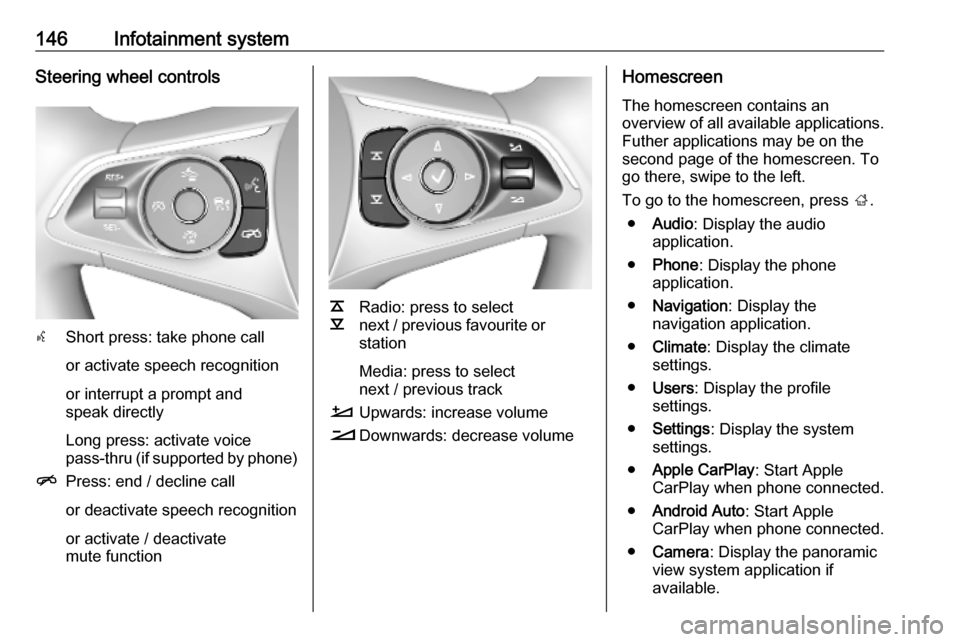
146Infotainment systemSteering wheel controls
sShort press: take phone call
or activate speech recognition
or interrupt a prompt and
speak directly
Long press: activate voice
pass-thru (if supported by phone)
n Press: end / decline call
or deactivate speech recognition
or activate / deactivate
mute function
k
l Radio: press to select
next / previous favourite or
station
Media: press to select
next / previous track
À Upwards: increase volume
Á Downwards: decrease volume
Homescreen
The homescreen contains an
overview of all available applications.
Futher applications may be on the
second page of the homescreen. To
go there, swipe to the left.
To go to the homescreen, press ;.
● Audio : Display the audio
application.
● Phone : Display the phone
application.
● Navigation : Display the
navigation application.
● Climate : Display the climate
settings.
● Users : Display the profile
settings.
● Settings : Display the system
settings.
● Apple CarPlay : Start Apple
CarPlay when phone connected.
● Android Auto : Start Apple
CarPlay when phone connected.
● Camera : Display the panoramic
view system application if
available.
Page 149 of 345
Infotainment system147●OnStar Services : Display the
OnStar Services screen if
available.
● Wi-Fi Hotspot : Display the Wi-Fi
hotspot settings if available.
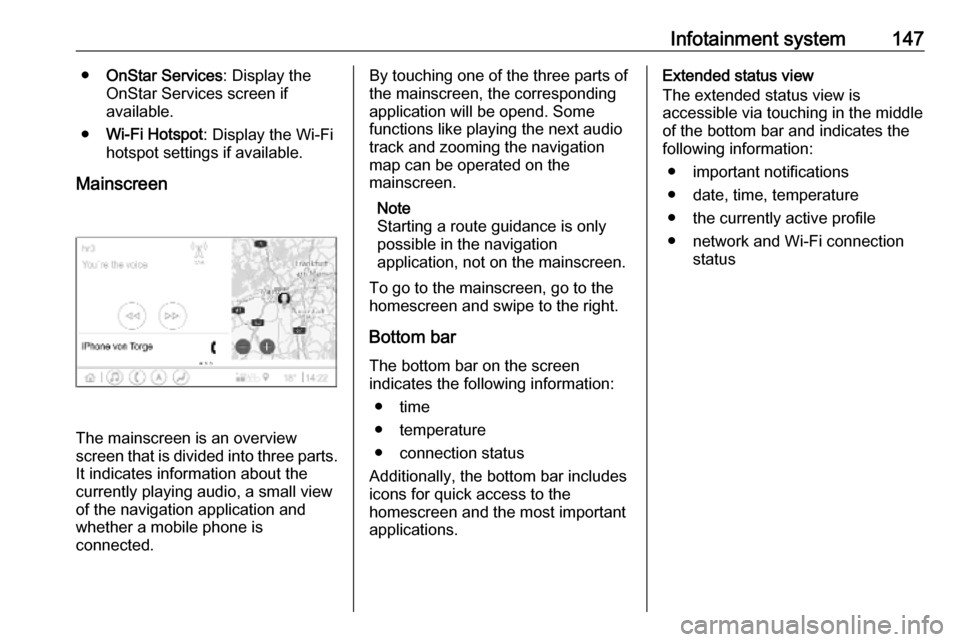
Mainscreen
The mainscreen is an overview
screen that is divided into three parts.
It indicates information about the
currently playing audio, a small view
of the navigation application and
whether a mobile phone is
connected.
By touching one of the three parts of the mainscreen, the corresponding
application will be opend. Some
functions like playing the next audio
track and zooming the navigation
map can be operated on the
mainscreen.
Note
Starting a route guidance is only possible in the navigation
application, not on the mainscreen.
To go to the mainscreen, go to the
homescreen and swipe to the right.
Bottom bar The bottom bar on the screen
indicates the following information:
● time
● temperature
● connection status
Additionally, the bottom bar includes
icons for quick access to the
homescreen and the most important
applications.Extended status view
The extended status view is
accessible via touching in the middle
of the bottom bar and indicates the
following information:
● important notifications
● date, time, temperature
● the currently active profile
● network and Wi-Fi connection status
Page 152 of 345

150Infotainment systemReturning to the homescreen
To return to the homescreen,
touch ;.
Wi-Fi connection
The Infotainment system can be
connected to a Wi-Fi network, e.g. the hotspot of a mobile phone, or activate
an own Wi-Fi hotspot if OnStar is
available.
Connecting to a Wi-Fi network
To connect to a Wi-Fi network, go to
the homescreen and select Settings.
Then go to the System tab and select
Wi-Fi Networks .
A list of all available Wi-Fi networks is displayed. After choosing a Wi-Fi
network, it might be necessary to log
in by entering a corresponding
password on the Info Display. In this
case, a corresponding window will
pop up.Activating the Wi-Fi hotspot
If OnStar is available, a Wi-Fi hotspot
can be activated. There are two ways
to go to the Wi-Fi hotspot menu:
● Go to the homescreen and select
the Wi-Fi Hotspot icon.
● Go to the homescreen and select
Settings . Then go to the System
tab and select Wi-Fi Hotspot.
In the Wi-Fi Hotspot menu, the Wi-Fi
hotspot can be activated or deactivated and the name and the
password of the Wi-Fi hotspot can be changed. Also the connected devicesare indicated.
System settings To go to the system settings menu, go
to the homescreen and select
Settings . The settings are divided into
System and Apps .
The following settings can be
changed under System:
● Time/Date
● Language
● Phones : Display connected / not
connected phones or add a
phone.● Wi-Fi Networks : Connect to an
available Wi-Fi network.
● Wi-Fi Hotspot : Activate /
deactivate Wi-Fi services and display name, password and
connected devices.
● Display : Select display mode,
calibrate touchscreen and turn
display off.
● Privacy : Activate / deactivate
location services and data
services.
● Sounds : Set maximum startup
volume, activate / deactivate audio cues and audible touch
feedback.
● Voice : Set prompt lenght, audio
feedback speed and activate /
deactivate tutorial mode.
● Favourites : Manage favourites
and set number of audio
favourites.
● About : Display information about
open soure software and device registration.
Page 153 of 345

Infotainment system151●Running Applications : Stop
applications, e.g. Climate or
Users .
● Restore Factory Settings : Reset
vehicle settings, delete settings
and personal data and clear
default applications
The following settings can be
changed under Apps:
● Android Auto : Activate /
deactivate the Android Auto
application.
● Apple CarPlay : Activate /
deactivate the Apple CarPlay
application.
● Audio (options depend on current
audio source): Change the tone
settings, auto volume, activate /
deactivate traffic programme,
DAB-FM linking, DAB
announcements, etc.
● Navigation : Change the
navigation settings.
● Phone : Sort contacts, re-
synchronise contacts, delete all
vehicle contacts, etc.Profiles
This application is only applicable toMultimedia Navi Pro.
Touch Users on the homescreen to
display a list of all available profiles:
Due to the option of creating profiles,
the Infotainment system can be fitted
to several drivers. Different settings
as well as favourite radio stations and destinations will be connected to aspecific profile. Thereby, the settings
and favourites don't need to be
adjusted every time another person is driving the vehicle.
A profile can be connected to a
specific vehicle key. While unlocking the vehicle, the corresponding profile
will be activated, if available.
Creating a profile 1. Select Users on the homescreen.
2. Select Add User Profile .
3. Select Create Profile .
4. Enter a profile name and select Next .5.If desired, choose a profile picture
and select Next. Otherwise, select
Skip .
6. If desired, choose a vehicle key which is intended to be connectedto the profile and select Next.
Otherwise, select Skip.
7. Select Done.
A new profile is created. The settings
of the profile can be changed at any
time.
Note
Whenever a new profile is created or the active profile is switched, the
audio application is paused and
restarted.
Creating a PIN for a profile
Every profile can be secured with a
PIN. After switching on the vehicle,
the PIN has to be entered.
To create a PIN, go to the
homescreen and select Settings, go
to the Personal tab and select
Security .
Page 158 of 345

156Infotainment systemmanoeuvres can be deleted bytouching /. The route will be
recalculated.
Stopping a route guidance To stop an active route guidance,touch & next to the green navigation
bar.
Connected navigation
The connected navigation function
includes live traffic information,
personalised search and routing,
predictive navigation as well as
parking and fuel price information.
Live traffic The connected navigation function
indicates real-time traffic information
like traffic jams and road works. To
display the traffic information list,
touch 7 on the navigation screen.
Traffic information along the route
and nearby will be displayed as a list.
On the navigation screen, road works
will be indicated by road signs and
traffic density will be indicated by
orange and red roads. Traffic densitywill also be indicated when the traffic
information list is empty due to no
incidents like road works or accidents.
Note
Using the connected navigation
function consumes OnStar data or
mobile data. Additional costs could
emerge.
Network connection
To use the connected navigation
function, a network connection is
necessary. OnStar or a mobile
hotspot, e.g. mobile phone, can be
used.
When connected to a hotspot, the Wi-
Fi symbol will appear in the bottom
bar. If a mobile phone is connected
via Bluetooth, the Wi-Fi symbol will
only appear for a few seconds but the Wi-Fi symbol will appear in the
extended status view.
Connected navigation will be
indicated by the word LIVE on the
traffic symbol 7 on the navigation
screen.Note
When no traffic information are
available although LIVE is indicated
on the traffic symbol 7, the network
connection might be interrupted.
Wait some minutes until the network
connection is built up again.
Personalised search and routing
The connected navigation function
includes personalised search and
routing. The system learns the
driver's pattern and suggests routes
and points of interest that fit the
driver's individual needs and
interests.
Predictive navigation
Predictive navigation is a
personalised and increasingly useful
function that detects common
destinations like home and work.
Additionally, the predictive navigation function understands the driver's
patterns and uses historical driving
and traffic data to predict usual traffic
conditions.
Page 159 of 345

Infotainment system157The predictive navigation function
can be activated or deactivated in the
Settings menu. To go to the Settings
menu, go to the Options menu % on
the navigation screen and select
Settings .
Parking information and fuel
prices
The connected navigation function
indicates parking and fuel price
information. When the vehicle is
reaching a densely populated
destination, and if the system
determines that parking may be
limited then it will attempt to display nearby parking destinations with price
information if available. The function
also indicates real-time fuel prices if
available.
To display the parking and fuel prices
as well as opening hours and
telephone numbers, if available,
touch the point of interest on the map or see the results of the points of
interest search.Online map updates
The navigation map can be updated
when a new version is available. The
updates are also based on the driver's driving patterns by considering
updates of typically driven places.
To update the navigation map, a
network connection is necessary.
Whether the map content is up to
date, is indicated in the Settings menu
in the Options menu %. If desired,
automatic map updates can be
activated. Additionally, a message
will be displayed if the update
exceeds 250 MB.Speech recognition
General information
Embedded speech recognition
This application is only applicable to
Multimedia Navi Pro.
The embedded speech recognition of the Infotainment system enables
operation of various functions of the
Infotainment system via voice input. It
recognises commands and numeric
sequences. The commands and
numeric sequences can be spoken
without a voice pause between the
individual words.
In the event of incorrect operation or
commands, the speech recognition
gives visual and / or acoustic
feedback and requests to re-enter the desired command. Apart from this,
the speech recognition
acknowledges important commands
and will enquire if necessary.
In general, there are different ways to
speak commands for performing the
desired actions.
Page 160 of 345

158Infotainment systemNote
To ensure that conversations inside
the vehicle do not lead to
unintentional triggering of the
system functions, the speech
recognition does not start until it has
been activated.
The system can only be operated by
the driver.
Important informationLanguage support ● Not all languages available for the Info Display are also
available for the speech
recognition.
● If the display language currently selected is not supported by the
speech recognition, speech
recognition is not available.
In such a case, selecting another language is necessary to control
the Infotainment system via voice
input.Address input of destination
Address input is only possible in the
language of the country of your
destination.E.g., for entering an address in
France, the display and the speech recognition must be set to French.
Note
For a multilingual country, several
languages can be used.
E.g. French, German or Italian can
be used for Switzerland.Input order for destination addresses
The order in which the parts of an
address need to be entered using the speech recognition system is
dependent on the country where the
destination is located.
Note
The system only works with
complete addresses. The city and the street need to be entered.
Setting up speech recognition
Several settings and adaptions for the embedded speech recognition of the
Infotainment system can be
performed, such as the frequency of
command confirmations by the user
or the level of detailed feedback given
by the system.
To set up speech recognition, select Settings on the homescreen and then
System I Voice .
Prompt Length
The prompt length can be set to either
Informative , Short or Auto . When set
to Auto , the system provides more
detailed feedback in the beginning of
its first usage. The system adjusts
automatically to your speech habits.
The more familiar you are with the
system, the less detailed feedback is
given by the system.
To set up the prompt length, select
Settings on the homescreen and then
System I Voice I Prompt Length .
Voice pass-thru application The voice pass-thru application of the
Infotainment system allows access to the speech recognition commands on
a smartphone.
To activate the speech recognition on a smartphone, press and hold w on
the steering wheel when phone
projection is active.
Page 161 of 345

Infotainment system159The availability of this function
depends on the smartphone. For more information on compatibility,
see our website.
Usage
Activating speech recognition Note
Speech recognition is not available
during an active phone call.
1. Press w on the steering wheel.
The audio system mutes, a voice
output message prompts you to
say a command, and help menus
with the most important
commands currently available are
shown on the Info Display. It is
highly recommended to follow the
wording suggestions of the
system.
Do not talk when the speech
recognition symbol is red and no
beep sound has been heard.2. As soon as the speech recognition is ready for voice
input, a beep is heard. The
speech recognition symbol
changes to green.
3. Start now with a voice command to initiate a system function (e.g.
playing a preset radio station).
Adjusting the volume of voice
prompts
Turn ) on the control panel or press
À or Á on the steering wheel
upwards or downwards during a voice prompt.
Interrupting a voice prompt
A voice prompt can be interrupted by
briefly pressing w on the steering
wheel.
A beep is heard immediately, the
speech recognition symbol changes
to green, and a command can be
stated without having to wait.Cancelling a dialogue sequence
There are various ways to cancel a
dialogue sequence and to deactivate
the speech recognition:
● Say " Cancel".
● Press n on the steering wheel.
● Press ; on the control panel.
● Select & or < in the help menu.
In the following situations, a dialogue sequence is automatically cancelled:
● If you do not say any command for a certain period of time.
● If you say commands that are not
recognised by the system.
Operation via speech commands The speech recognition can
understand direct commands stating
the application and the action.
For best results: ● Listen for the voice prompt and wait for the beep or the green
speech recognition symbol
before saying a command or
replying.
Page 162 of 345

160Infotainment system● Say "Help" or read the example
commands on the screen.
● The voice prompt can be interrupted by pressing w again.
● Wait for the beep and the green speech recognition symbol then
speak the command naturally,
not too fast, not too slow. Use short and direct commands.
Note
If the system provides several
suggestions, the selection is to be
done manually and the speech
recognition symbol flashes red and green when scrolling the list.
In case of complex commands or
when information is missing, the
system starts a dialogue sequence.
When searching for a "Point of
Interest", only major chains may be
selected by name. Chains are
businesses with at least 20 locations.
For other POIs, say the name of a
category, e.g. "Restaurants",
"Shopping centres", or "Hospitals".Help command
After saying " Help", the help prompt
for the current screen is read aloud.
Additionally, the prompt is displayed
on the screen.
To interrupt the help prompt, press w.
A beep is heard. A command can be
said again.
Voice pass-thru application
Activating speech recognition
Press and hold s on the steering
wheel until a speech recognition icon
is displayed.
Adjusting the volume of voice
prompts
Turn ) on the control panel or press
À or Á on the steering wheel
upwards or downwards during a voice prompt.
Deactivating speech recognition
Press n on the steering wheel. The
speech recognition session is ended.Phone
General information
Not every mobile phone fully supports
the phone function. Therefore,
deviations from the range of functions
described below are possible.
Phone main menu ● Favourites : List of favourite
contacts.
● Keypad : Phone numbers can be
entered and dialed.
● Recent : List of recent phone
calls.
● Contacts : List of contacts.
● Phones : Overview of connected
and disconnected phones.