brake light OPEL KARL 2019 Manual user
[x] Cancel search | Manufacturer: OPEL, Model Year: 2019, Model line: KARL, Model: OPEL KARL 2019Pages: 191, PDF Size: 5.51 MB
Page 114 of 191

112Driving and operatingBrakes
The brake system comprises two
independent brake circuits.
If a brake circuit fails, the vehicle can
still be braked using the other brake
circuit. However, braking effect is
achieved only when the brake pedal
is depressed firmly. Considerably
more force is needed for this. The
braking distance is extended. Seek the assistance of a workshop before
continuing the journey.
When the engine is not running, the
support of the brake servo unit
disappears once the brake pedal has been depressed once or twice.
Braking effect is not reduced, but
braking requires significantly greater
force. It is especially important to bear this in mind when being towed.
Control indicator R 3 71.
Antilock brake system
Antilock brake system (ABS)
prevents the wheels from locking.ABS starts to regulate brake pressure as soon as a wheel shows a tendency to lock. The vehicle remains
steerable, even during hard braking.
ABS control is made apparent
through a pulse in the brake pedal
and the noise of the regulation
process.
For optimum braking, keep the brake
pedal fully depressed throughout the
braking process, despite the fact that the pedal is pulsating. Do not reduce
the pressure on the pedal.
After starting-off the system performs
a self-test which may be audible.
Control indicator u 3 72.
Adaptive brake light
During full braking, all three brake
lights flash for the duration of ABS
control.Fault9 Warning
If there is a fault in the ABS, the
wheels may be liable to lock due
to braking that is heavier than
normal. The advantages of ABS are no longer available. During
hard braking, the vehicle can no longer be steered and may
swerve.
Have the cause of the fault remedied
by a workshop.
Page 115 of 191

Driving and operating113Parking brake
Manual parking brake9 Warning
Always apply parking brake firmly
without operating the release
button, and apply as firmly as
possible on a downhill or uphill
slope.
To release the parking brake, pull
the lever up slightly, press the
release button and fully lower the
lever.
To reduce the operating forces of
the parking brake, depress the
brake pedal at the same time.
Control indicator R 3 71.
Brake assist
If the brake pedal is depressed
quickly and forcefully, maximum
brake force is automatically applied
(full braking).
Maintain steady pressure on the
brake pedal for as long as full braking is required. Maximum brake force is
automatically reduced when the
brake pedal is released.
Hill start assist
The system helps prevent unintended movement when driving away on
inclines.
When releasing the brake pedal after
stopping on an incline, the brakes
remain on for a further 2 seconds. The brakes release automatically as soon
as the vehicle begins to accelerate or the 2 seconds holding time is over.
The hill start assist is only active when
the engine is running.
Page 123 of 191
Driving and operating121correct distance indication in the
upper part of these vehicles
cannot be guaranteed.
Objects with a very small reflection
cross-section, e.g. objects of
narrow size or soft materials, may
not be detected by the system.
Parking assist systems do not
detect objects outside the
detection range.
Lane departure warning
The lane departure warning system
observes the lane markings between
which the vehicle is driving via a front camera. The system detects lane
changes and warns the driver in the
event of an unintended lane change
via visual and acoustic signals.
Criteria for the detection of an
unintended lane change are:
● No operation of turn lights.
● No brake pedal operation.
● No active accelerator operation or speeding-up.
● No active steering.
If the driver is performing these
actions, no warning will be issued.
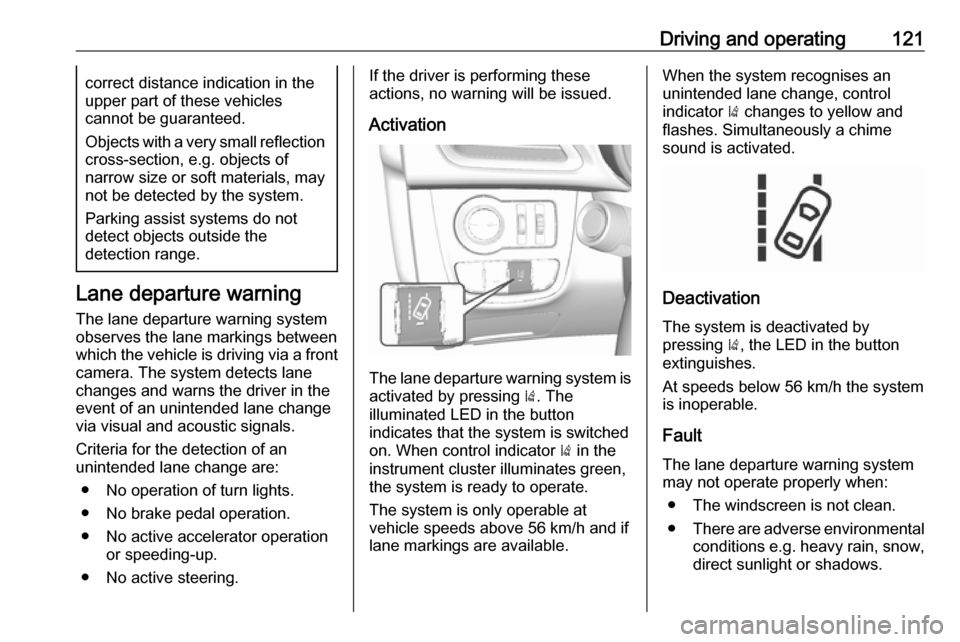
Activation
The lane departure warning system isactivated by pressing ). The
illuminated LED in the button
indicates that the system is switched
on. When control indicator ) in the
instrument cluster illuminates green, the system is ready to operate.
The system is only operable at
vehicle speeds above 56 km/h and if lane markings are available.
When the system recognises an
unintended lane change, control
indicator ) changes to yellow and
flashes. Simultaneously a chime
sound is activated.
Deactivation
The system is deactivated by
pressing ), the LED in the button
extinguishes.
At speeds below 56 km/h the system
is inoperable.
Fault
The lane departure warning system may not operate properly when:
● The windscreen is not clean.
● There are adverse environmental
conditions e.g. heavy rain, snow,
direct sunlight or shadows.
Page 128 of 191

126Vehicle careVehicle careGeneral Information...................126
Accessories and vehicle modifications .......................... 126
Vehicle storage ........................127
End-of-life vehicle recovery .....127
Vehicle checks ........................... 128
Performing work ......................128
Bonnet ..................................... 128
Engine oil ................................. 129
Engine coolant ......................... 130
Washer fluid ............................ 131
Brakes ..................................... 131
Brake fluid ............................... 131
Vehicle battery ......................... 131
Wiper blade replacement ........133
Bulb replacement .......................134
Halogen headlights ..................134
Front fog lights ......................... 136
Front turn lights .......................136
Tail lights ................................. 137
Side turn lights ......................... 138
Centre high-mounted brake light ......................................... 138
Number plate light ...................139Interior lights ............................ 139
Instrument panel illumination ...139
Electrical system ........................140
Fuses ....................................... 140
Engine compartment fuse box . 141
Instrument panel fuse box .......143
Vehicle tools .............................. 144
Tools ........................................ 144
Wheels and tyres .......................145
Winter tyres ............................. 145
Tyre designations ....................145
Tyre pressure .......................... 146
Tyre pressure monitoring
system .................................... 147
Tread depth ............................. 150
Changing tyre and wheel size . 150 Wheel covers ........................... 150
Tyre chains .............................. 151
Tyre repair kit .......................... 151
Wheel changing .......................154
Spare wheel ............................ 155
Jump starting ............................. 159
Towing ....................................... 160
Towing the vehicle ...................160
Appearance care .......................161
Exterior care ............................ 161
Interior care ............................. 163General Information
Accessories and vehiclemodifications
We recommend the use of genuine
parts and accessories and factory approved parts specific for your
vehicle type. We cannot assess or
guarantee reliability of other products
- even if they have a regulatory or
otherwise granted approval.
Any modification, conversion or other changes made to standard vehicle
specifications (including, without
limitation, software modifications,
modifications of the electronic control
units) may invalidate the warranty
offered by Opel. Furthermore, such
changes may affect driver assistance
systems, fuel consumption, CO 2
emissions and other emissions of the
vehicle. They may also invalidate the
vehicle operating permit.
Page 139 of 191
Vehicle care1372. Rotate bulb anticlockwise andremove from bulb holder.
3. Replace bulb.
4. Insert the bulb holder into the reflector and rotate clockwise.
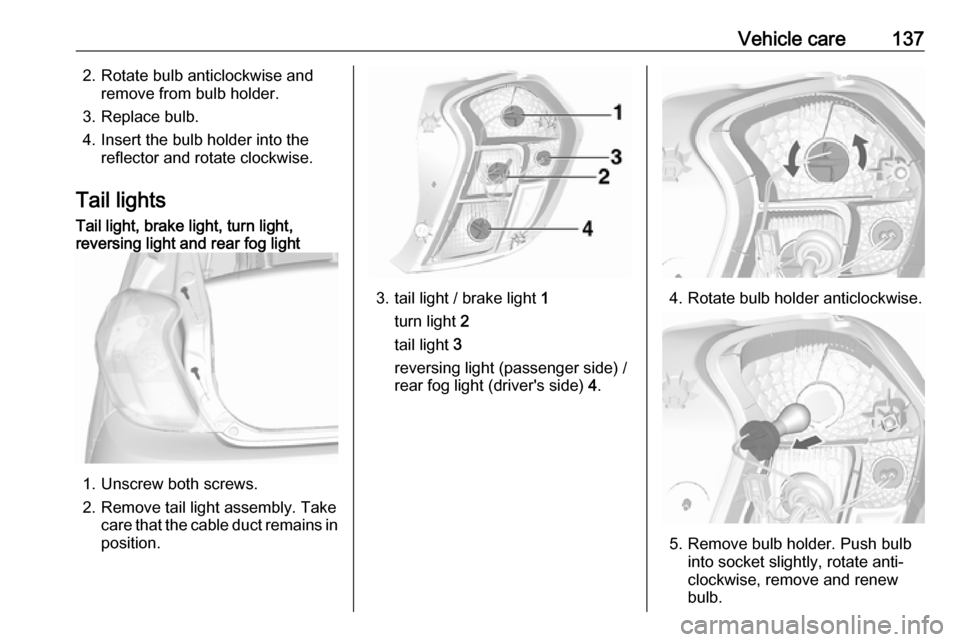
Tail lightsTail light, brake light, turn light,
reversing light and rear fog light
1. Unscrew both screws.
2. Remove tail light assembly. Take care that the cable duct remains in
position.
3. tail light / brake light 1
turn light 2
tail light 3
reversing light (passenger side) /
rear fog light (driver's side) 4.4. Rotate bulb holder anticlockwise.
5. Remove bulb holder. Push bulb
into socket slightly, rotate anti-
clockwise, remove and renew
bulb.
Page 140 of 191
138Vehicle care6.Insert bulb holder into the tail light
assembly and screw into place.
Connect wiring plug. Install tail
light assembly in body and tighten
screws. Close covers and
engage.
7. Switch on ignition, operate and check all lights.
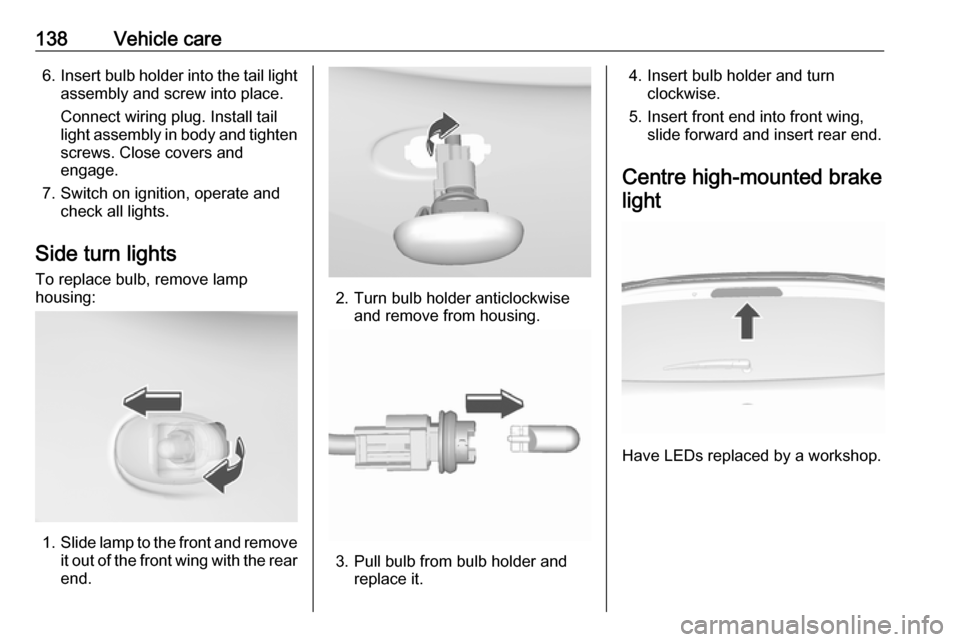
Side turn lights To replace bulb, remove lamp
housing:
1. Slide lamp to the front and remove
it out of the front wing with the rear
end.
2. Turn bulb holder anticlockwise and remove from housing.
3. Pull bulb from bulb holder andreplace it.
4. Insert bulb holder and turn clockwise.
5. Insert front end into front wing, slide forward and insert rear end.
Centre high-mounted brake light
Have LEDs replaced by a workshop.
Page 151 of 191

Vehicle care149
Select:● Lo for comfort pressure up to
3 people.
● Eco for Eco pressure up to
3 people.
● Hi for full loading.
Tyre pressure sensor matching
process
Each tyre pressure sensor has a
unique identification code. The
identification code must be matched
to a new tyre / wheel position after
rotating the tyres or exchanging the
complete wheel set and if one or more
tyre pressure sensors were replaced.
The tyre pressure sensor matching
process should also be performed
after replacing a spare tyre with a
road tyre containing the tyre pressure sensor.
The malfunction light w and the
warning message or code should go
off at the next ignition cycle. The
sensors are matched to the wheel
positions, using a relearn tool, in the
following order: left side front wheel,
right side front wheel, right side rear
wheel and left side rear wheel. The
turn light at the current active position
is illuminated until sensor is matched.
Consult a workshop for service. There
are 2 minutes to match the first wheel position, and 5 minutes overall to
match all four wheel positions. If it
takes longer, the matching process
stops and must be restarted.
The tyre pressure sensor matching
process is:
1. Apply the parking brake.
2. Turn the ignition on.
3. Select neutral.4. Use MENU on the stalk to select
the Vehicle Information Menu in
the Driver Information Centre.
5. Turn the adjuster wheel to scroll to
the tyre pressure menu.
6. Press SET/CLR to begin the
sensor matching process. A
message requesting acceptance
of the process should be
displayed.
7. Press SET/CLR again to confirm
the selection. The horn sounds
twice to indicate that the receiver
is in relearn mode.
8. Start with the left side front wheel.
9. Place the relearn tool against the tyre sidewall, near the valve stem.Then press the button to activatethe tyre pressure sensor. A horn
chirp confirms that the sensor
identification code has been
matched to this wheel position.
10. Proceed to the right side front wheel, and repeat the procedure
in Step 9.
11. Proceed to the right side rear wheel, and repeat the procedure
in Step 9.
Page 163 of 191

Vehicle care161
2. Screw in the towing eye as far asit will go until it stops in a
horizontal position.
3. Attach a tow rope – or better still a
tow rod – to the towing eye.
General
The towing eye must only be used for
towing and not for recovering the
vehicle.
Switch on ignition to release steering
wheel lock and to permit operation of
brake lights, horn and windscreen
wiper.
Switch the selector lever to neutral.
Release the parking brake.Caution
Drive slowly. Do not drive jerkily.
Excessive tractive force can
damage the vehicle.
When the engine is not running,
considerably more force is needed to
brake and steer.
To prevent the entry of exhaust gases from the towing vehicle, switch on the
air recirculation and close the
windows.
The vehicle must be towed facing
forward, not faster than 88 km/h. In all
other cases and when the
transmission is defective, the front
axle must be raised off the ground.
Seek the assistance of a workshop.
After towing, unscrew the towing eye.
Insert cap and engage in the front
bumper.
Appearance care
Exterior care
Locks The locks are lubricated at the factoryusing a high quality lock cylinder
grease. Use a de-icing agent only
when absolutely necessary, as this
has a degreasing effect and impairs
lock function. After using a de-icing
agent, have the locks regreased by a workshop.
Washing The paintwork of your vehicle is
exposed to environmental influences.
Wash and wax your vehicle regularly. When using automatic vehicle
washes, select a programme that
includes waxing.
Bird droppings, dead insects, resin,
pollen and the like should be cleaned
off immediately, as they contain
aggressive constituents which can
cause paint damage.
Page 183 of 191

Customer information181Depending on technical equipment
level, the data stored is as follows:
● system component operating states (e.g. fill level, tyre
pressure, battery status)
● faults and defects in important system components (e.g. lights,
brakes)
● system reactions in special driving situations (e.g. triggeringof an airbag, actuation of the
stability control systems)
● information on events damaging the vehicle
● for electric vehicles the amount of
charge in the high-voltage
battery, estimated range
In special cases (e.g. if the vehicle
has detected a malfunction), it may be
necessary to save data that would
otherwise just be volatile.
When you use services (e.g. repairs,
maintenance), the operating data
saved can be read together with the
vehicle identification number and
used when necessary. Staff working
for the service network ( e.g. garages,
manufacturers) or third parties (e.g.breakdown services) can read the
data from the vehicle. The same
applies to warranty work and quality
assurance measures.
Data is generally read via the OBD
(On-Board Diagnostics) port
prescribed by law in the vehicle. The operating data which is read out,
documents the technical condition of
the vehicle or individual components
and assists with fault diagnosis,
compliance with warranty obligations
and quality improvement. This data,
in particular information on
component stress, technical events,
operator errors and other faults, is
transmitted to the manufacturer
where appropriate, together with the
vehicle identification number. The
manufacturer is also subject to
product liability. The manufacturer
potentially also uses operating data
from vehicles for product recalls. This
data can also be used to check
customer warranty and guarantee
claims.
Fault memories in the vehicle can be
reset by a service company when
carrying out servicing or repairs or at
your request.Comfort and infotainment
functions
Comfort settings and custom settings can be stored in the vehicle and
changed or reset at any time.
Depending on the equipment level in
question, these include
● seat and steering wheel position settings
● chassis and air conditioning settings
● custom settings such as interior lighting
You can input your own data in the
infotainment functions for your
vehicle as part of the selected
features.
Depending on the equipment level in
question, these include
● multimedia data such as music, videos or photos for playback in
an integrated multimedia system
● address book data for use with an
integrated hands-free system or an integrated navigation system
Page 186 of 191

184IndexAAccessories and vehicle modifications .......................... 126
Adjustable air vents ...................102
Airbag and belt tensioners ...........70
Airbag deactivation ................45, 70
Airbag label................................... 40 Airbag system .............................. 40
Air conditioning regular operation ................................ 103
Air conditioning system ................ 97
Air intake .................................... 103
Air vents...................................... 102
Antilock brake system ................ 112
Antilock brake system (ABS) .......72
Anti-theft alarm system ................27
Appearance care ........................161
Ashtrays ....................................... 64
Autostop ..................................... 107
B Battery discharge protection ........95
Battery voltage ............................. 83
Belts.............................................. 38
Bonnet ....................................... 128
Bonnet open ................................. 74
Brake and clutch fluid .................165
Brake and clutch system .............71
Brake assist ............................... 113
Brake fluid .................................. 131Brakes ............................... 112, 131
Breakdown.................................. 160
Bulb replacement ....................... 134
C Catalytic converter .....................110
Central locking system ................22
Centre console storage ...............53
Centre high-mounted brake light 138
Changing tyre and wheel size ...150
Charging system .......................... 71
Child locks ................................... 24
Child restraint installation locations ................................... 49
Child restraints.............................. 46
Child restraint systems ................46
Cigarette lighter ........................... 64
City mode ................................... 115
Climate control ............................. 17
Climate control systems ...............96
Clock ............................................ 62
Code ............................................. 81
Control indicators.......................... 67
Control of the vehicle .................104
Controls ........................................ 60
Coolant and antifreeze ...............165
Cornering lights ............................ 91
Cruise control ...................... 74, 117
Cupholders .................................. 52
Curtain airbag system .................. 45