infotainment OPEL MERIVA 2009 User Guide
[x] Cancel search | Manufacturer: OPEL, Model Year: 2009, Model line: MERIVA, Model: OPEL MERIVA 2009Pages: 248, PDF Size: 4.46 MB
Page 101 of 248
95
Instruments, Controls
Automatic time synchronisation
3
The RDS signal of most VHF transmitters
automatically sets the time.
Some transmitters do not send a correct
time signal. In such cases, we recommend
that you switch off automatic time
synchronisation.
On infotainment systems with
navigation 3, time and date are also
harmonised upon receipt of a GPS satellite
signal.
The function is activated by ticking the field
in front of Synchron. clock automatical. in
the Time, Date menu.
Picture no: 16714t.tif
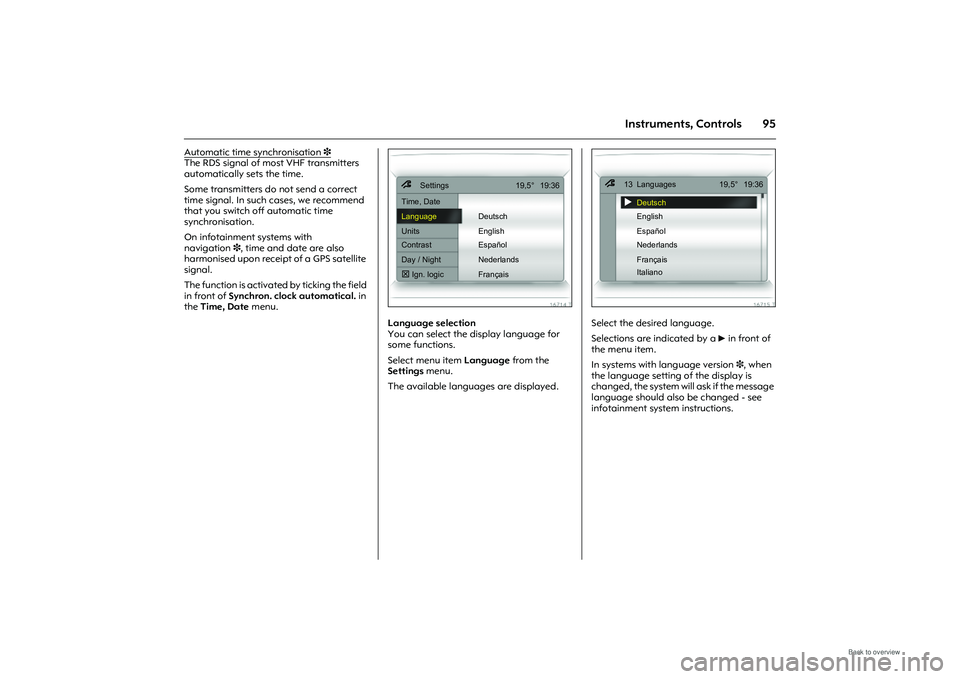
Language selection
You can select the display language for
some functions.
Select menu item Language from the
Settings menu.
The available langua ges are displayed.
Picture no: 16715t.tif
Select the desired language.
Selections are indicated by a 6 in front of
the menu item.
In systems with language version 3, when
the language setting of the display is
changed, the system will ask if the message
language should also be changed - see
infotainment system instructions.
7
Settings 19,5° 19:36
Time, Date
Language Deutsch
Units English
Contrast Español
Day / Night Nederlands
! Ign. logic Français
7
13 Languages 19,5° 19:36!
Deutsch
English
Español
Nederlands
Français
Italiano
Page 102 of 248
96 Instruments, Controls
Picture no: 16716t.tif
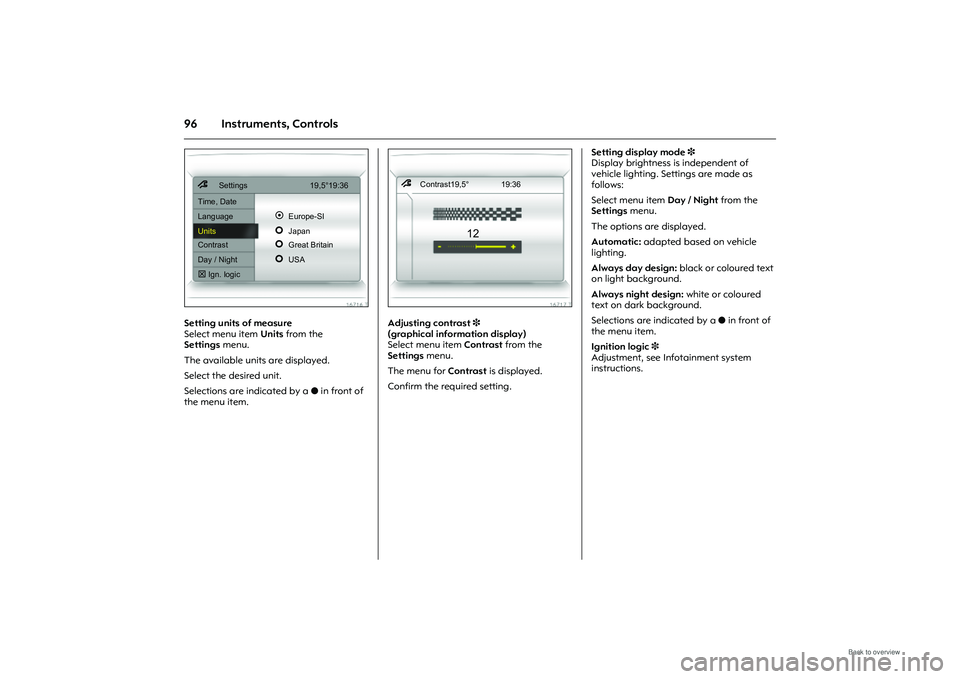
Setting units of measure
Select menu item Units from the
Settings menu.
The available units are displayed.
Select the desired unit.
Selections are indicated by a o in front of
the menu item.
Picture no: 16717t.tif
Adjusting contrast 3
(graphical information display)
Select menu item Contrast from the
Settings menu.
The menu for Contrast is displayed.
Confirm the required setting. Setting display mode
3
Display brightness is independent of
vehicle lighting. Settings are made as
follows:
Select menu item Day / Night from the
Settings menu.
The options are displayed.
Automatic: adapted based on vehicle
lighting.
Always day design: black or coloured text
on light background.
Always night design: white or coloured
text on dark background.
Selections are indicated by a o in front of
the menu item.
Ignition logic 3
Adjustment, see Infotainment system
instructions.
7
Settings 19,5°19:36
Time, Date
Language
!
Europe-SI
Units
"
Japan
Contrast
"
Great Britain
Day / Night
"
USA
! Ign. logic
7 Contrast19,5° 19:36
12
Page 103 of 248
97
Instruments, Controls
Picture no: 16719t.tif
Graphical information display
3
or Colour information display 3,
Trip computer
3
The trip computers provide information on
driving data, which is continually recorded
and evaluated electronically.
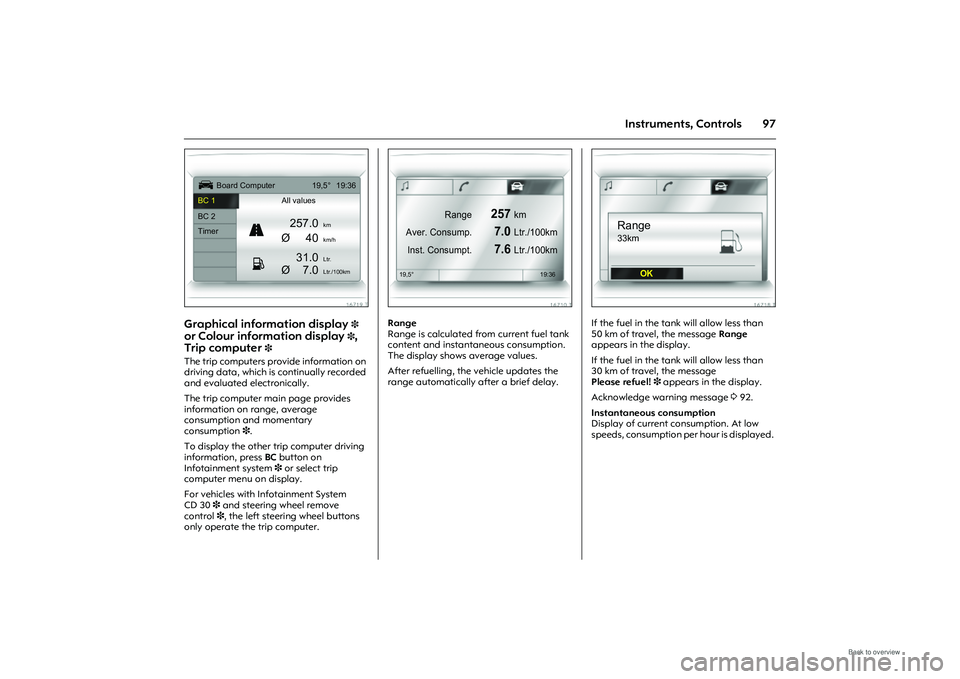
The trip computer main page provides
information on range, average
consumption and momentary
consumption 3.
To display the other trip computer driving
information, press BC button on
Infotainment system 3 or select trip
computer menu on display.
For vehicles with Infotainment System
CD 30 3 and steering wheel remove
control 3, the left steering wheel buttons
only operate the trip computer.
Picture no: 16710t.tif
Range
Range is calculated fr om current fuel tank
content and instantaneous consumption.
The display shows average values.
After refuelling, the vehicle updates the
range automatically after a brief delay.
Picture no: 16718t.tif
If the fuel in the tank will allow less than
50 km of travel, the message Range
appears in the display.
If the fuel in the tank will allow less than
30 km of travel, the message
Please refuel! 3 appears in the display.
Acknowledge warning message 392.
Instantaneous consumption
Display of current consumption. At low
speeds, consumption per hour is displayed.
Ü
Board Computer 19,5° 19:36
BC 1 All values
BC 2
257.0
km
Timer
Ø40
km/h
31.0
Ltr.
Ø
7.0
Ltr./100km
1
8
Range
257
km
Aver. Consump.
7.0
Ltr./100km
Inst. Consumpt.
7.6
Ltr./100km
19,5° 19:36
Range33km
OK
Page 117 of 248
111
Infotainment system
Infotainment system
Radio reception
3
Radio reception may be disrupted by
static, noise, distortion or loss of reception
due to
zchanges in dist ance from the
transmitter,
z multi-path reception due to reflection
and,
z shadowing. Infotainment system
3
The infotainment system is operated as
described in the operating instructions.
Picture no: 14034s.tif
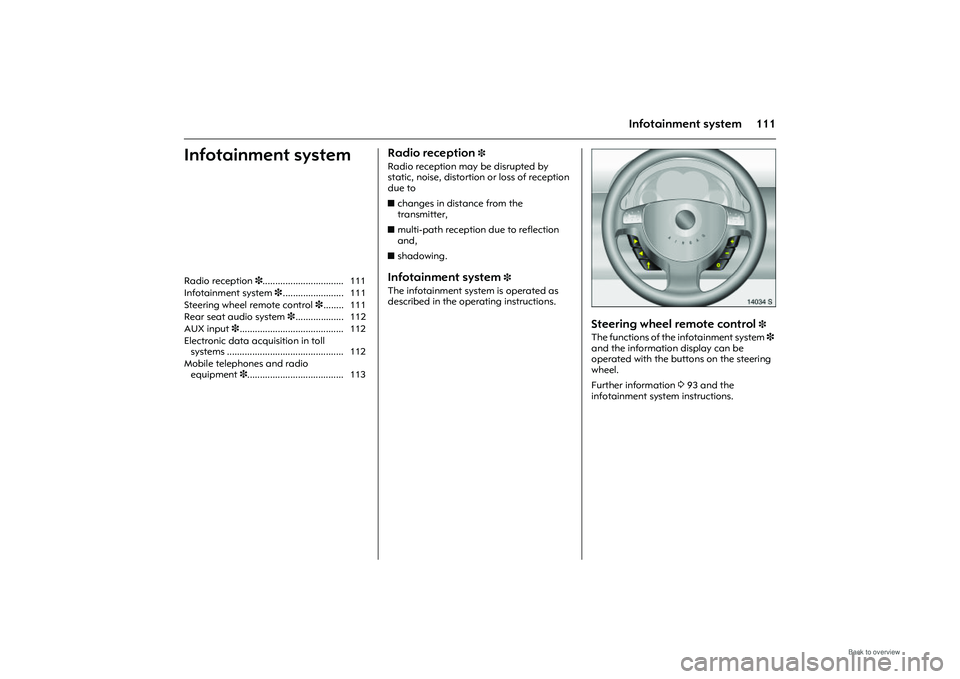
Steering wheel remote control
3
The functions of the infotainment system 3
and the information display can be
operated with the buttons on the steering
wheel.
Further information 393 and the
infotainment system instructions.
Radio reception
3................................ 111
Infotainment system 3........................ 111
Steering wheel remote control 3........ 111
Rear seat audio system 3................... 112
AUX input 3......................................... 112
Electronic data acquisition in toll systems .............................................. 112
Mobile telephones and radio equipment 3...................................... 113
Page 118 of 248
112 Infotainment system
Picture no: 14035s.tif
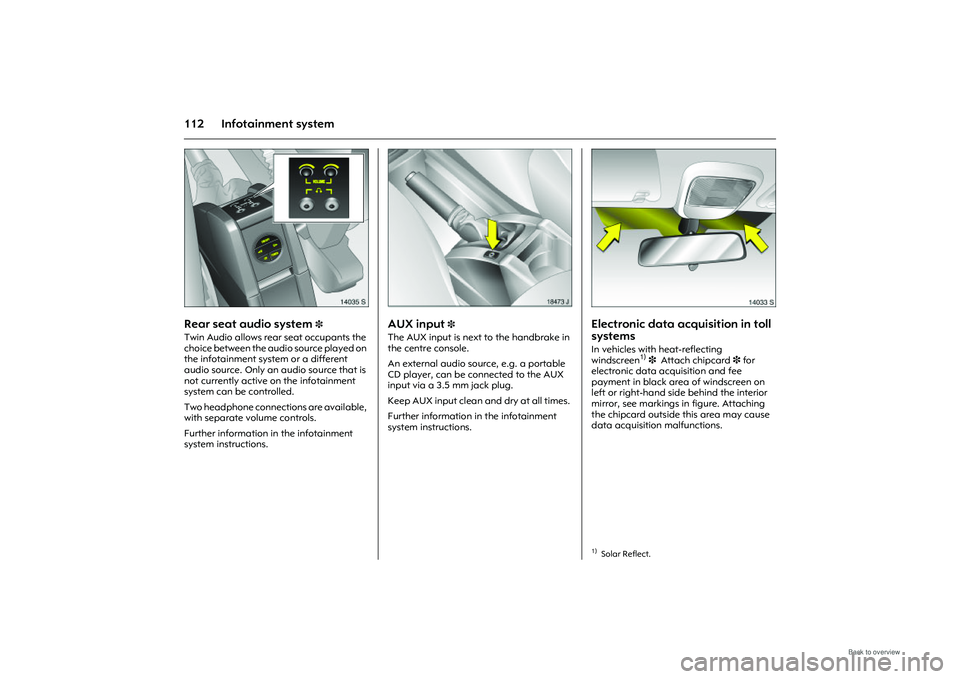
Rear seat audio system
3
Twin Audio allows rear seat occupants the
choice between the audio source played on
the infotainment system or a different
audio source. Only an audio source that is
not currently active on the infotainment
system can be controlled.
Two headphone connections are available,
with separate volume controls.
Further information in the infotainment
system instructions.
Picture no: 18473s.tif
AUX input
3
The AUX input is next to the handbrake in
the centre console.
An external audio source, e.g. a portable
CD player, can be connected to the AUX
input via a 3.5 mm jack plug.
Keep AUX input clean and dry at all times.
Further information in the infotainment
system instructions.
Picture no: 14033s.tif
Electronic data acquisition in toll
systems In vehicles with heat-reflecting
windscreen
1) 3 Attach chipcard 3 for
electronic data acquisition and fee
payment in black area of windscreen on
left or right-hand side behind the interior
mirror, see markings in figure. Attaching
the chipcard outside this area may cause
data acquisition malfunctions.
1)Solar Reflect.
Page 119 of 248
113
Infotainment system
Mobile telephones and radio
equipment
3
The Opel installation instructions and the
operating guidelines provided by the
telephone manufacturer must be followed
when fitting and op erating a mobile
telephone. Failure to do so could invalidate
the vehicle’s operating permit
(EU Directive 95/54/EG).
Recommended prerequisites for fault-free
operation:
z Professionally installed exterior antenna
to obtain the maximum range possible
z Maximum transmission power 10 Watt
z Installation of the telephone in a suitable
spot (see information 374)
Seek advice on predetermined installation
points for the external antenna or
equipment holder and ways of using
devices with a transmission power
exceeding 10 watts.
We recommend you contact your Opel
Service Partner who will have brackets and
various different accessory kits available
and can fit them correctly. Use of a handsfree
attachment without
external antenna with mobile telephone
standards GSM 900/1800/1900 and UMTS
is only permitted if the maximum
transmission power of the mobile
telephone is 2 watts for GSM 900 or 1 watt
for the other types.
For reasons of safety, we recommend that
you do not use the phone while driving.
Even use of a handsfree set can be a
distraction while driving. Be sure to observe
any country-specific regulations.
9 Warning
Mobile phones that do not comply with
the above-mentioned mobile phone
standard and radio equipment must
only be operated using an antenna that
is attached to the exterior of the vehicle.
Caution
Mobile phones and radio equipment
may cause malfunctions in the vehicle
electronics if they are operated in the
vehicle without the external antenna
unless the above-mentioned regulations
are complied with.
Page 189 of 248
183
Self-help, vehicle care
No. Circuit4 Infotainment system, diesel engine
5 –
6 –
7 Starter, diesel engine: engine
controller
8 Horn
9 Fuel injection system, fuel pump,
stationary heater
10 Turn signal lamps
11 Infotainment system, Information
display, Infotainment system
12 Heated rear window, exterior
mirrors
13 Central locking, anti-theft alarm
system
14 Engine control
Petrol engine:
Diesel engine:
15 Engine control unit,
Z 17 DTH engine
16 Accessory socket, cigarette lighter No. Circuit
17 –
18 Adaptive Forward Lighting
19 Central locking system
20 Interior lighting, reading lamp
21 Windscreen washer system
22 Rear electric window
23 Tilt/slide sun roof, skylight roof
24 Anti-theft alarm system
25 Rear window wiper
26 Ignition system, engine electronics
27 Engine control, airbag, ESP®
Plus
28 Air conditioning system
29 Front left electric window
30 –
31 Engine control,
Z 17 DTH engine
32 Front right electric window No. Circuit
33 Central control module,
immobiliser, control indicators
34 Windscreen wipers
35 Interior lighting, interior mirror,
information display
36 Brake light, ABS, ESP®
Plus
37Cigarette lighter, auxiliary heater
38 Seat heater (left)
39 Seat heater (right)
40 Adaptive Forward Lighting,
automatic headlamp range
adjustment
41 Reversing lamps
Page 242 of 248
236 IndexExterior lighting switch-off delay........... 107
Exterior mirrors..........................4, 36, 38, 41FFan ........................................................... 114
Fault........................................................... 41
Filling station Engine oil level .................................... 210
Fuel .............................................. 220, 221
Opening the bonnet ........................... 165
Tyre pressure ............................... 138, 228
Vehicle data ................................ 218, 219
Windscreen washer system ................ 215
First-aid kit .............................................. 171
Flat tyre ................................................... 178
FlexSpace .................................................. 52
Fog lamps ............................................... 103 Bulb replacement................................ 191
Fog tail lamp ........................................... 104 Bulb replacement................................ 191
Foot brake ....................................... 151, 153
Front passenger airbag ........................... 67
Fuel ......................................... 139, 220, 221
Fuel consumption ........................... 137, 224
Fuel filter.................................................. 212
Fuel gauge ................................................ 88
Fuel system, diesel .................................. 165
Fuses ........................................................ 181GGears ................................................. 14, 134
Generator, see Alternator ........................ 85
Glasses compartment .............................. 81
Glove compartment ................................. 80 Glove compartment lighting ................. 109
Bulb replacement ............................... 195
Graphical information display ................ 90
Gross vehicle weight............................... 226
Gross vehicle weight rating ................... 226
HHalogen headlamp system ................... 185 Bulb replacement ............................... 185
Driving abroad.................................... 110
Hand brake ....................................... 16, 153
Hazard warning lamps .................... 12, 104
Head restraints ............................. 21, 46, 47
Headlamp flash ........................................ 11
Headlamp range adjustment................ 104
Headlamp switch ............................. 11, 102
Headlamp washer system13, 100, 101, 215
Headlamps ............................................... 11 Daytime running lights ....................... 102
Driving abroad.................................... 110
Fog lamps ........................................... 103
Reversing lamps.................................. 104
Warning device ................................... 100
Headlights Changing bulbs .................................. 185
Heated exterior mirrors................ 13, 38, 41
Heated rear window .................... 13, 38, 41
Heated seats............................................. 46
Heating ........................................... 114, 117 Seats ...................................................... 46
With climate control system .............. 123
With the air conditioning system....... 114 Height adjustment
Seat belts .............................................. 63
Steering wheel .........................................5
High-pressure cleaners .......................... 198
Hill Start Assist ........................................ 153
Horn........................................................... 12
IIdentification plate ......................... 218, 219
Idling ....................................................... 134
Ignition switch..................................... 16, 27
Ignition system ............................... 209, 216
Immobiliser ............................................... 27
Information display .................................. 90
Infotainment system .............................. 111
Instrument display ................................... 87
Instrument illumin ation .......................... 108
Bulb replacement ............................... 196
Instrument pane l ...................................... 15
Instruments ................................... 15, 82, 87
Interior mirror.................................. 4, 38, 39
Interruption of po wer supply ................... 99
Easytronic............................................ 134
Electric sun roof .................................... 43
Electric windows ................................... 41
Electronic Stability Program .............. 147
ISOFIX ....................................................... 79JJack ................................................. 171, 176
Jump leads.............................................. 166