lock OPEL MERIVA 2017 Owner's Manual
[x] Cancel search | Manufacturer: OPEL, Model Year: 2017, Model line: MERIVA, Model: OPEL MERIVA 2017Pages: 251, PDF Size: 8.14 MB
Page 63 of 251
Storage61StorageStorage compartments................61
Glovebox ................................... 61
Cupholders ................................ 61
Front storage ............................. 63
Underseat storage .....................63
Armrest storage .........................63
Rear carrier system ...................64
Load compartment .......................73
Rear storage .............................. 74
Load compartment cover ...........74
Rear floor storage cover ............75
Lashing eyes ............................. 76
Safety net .................................. 76
Folding tray ................................ 78
Warning triangle ........................78
First aid kit ................................. 78
Roof rack system .........................79
Roof rack ................................... 79
Loading information .....................79Storage compartments9Warning
Do not store heavy or sharp
objects in the storage
compartments. Otherwise, the
storage compartment lid could
open and vehicle occupants could be injured by objects being thrown
around in the event of hard
braking, a sudden change in
direction or an accident.
Glovebox
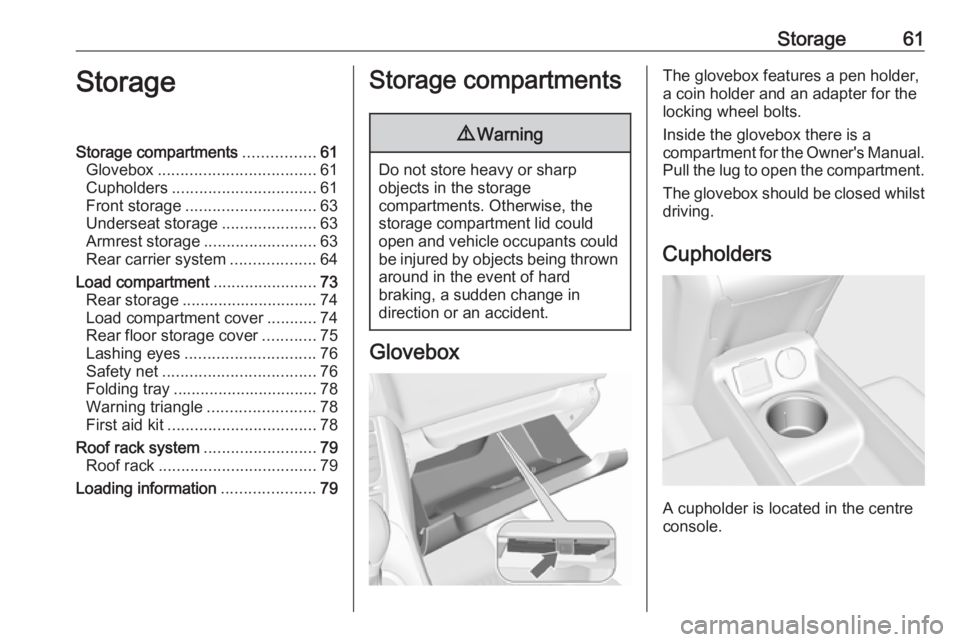
The glovebox features a pen holder,
a coin holder and an adapter for the
locking wheel bolts.
Inside the glovebox there is a
compartment for the Owner's Manual. Pull the lug to open the compartment.
The glovebox should be closed whilst driving.
Cupholders
A cupholder is located in the centre
console.
Page 68 of 251
66Storage
Check the cable and lamp position to
make sure these are correctly
installed and are securely located.
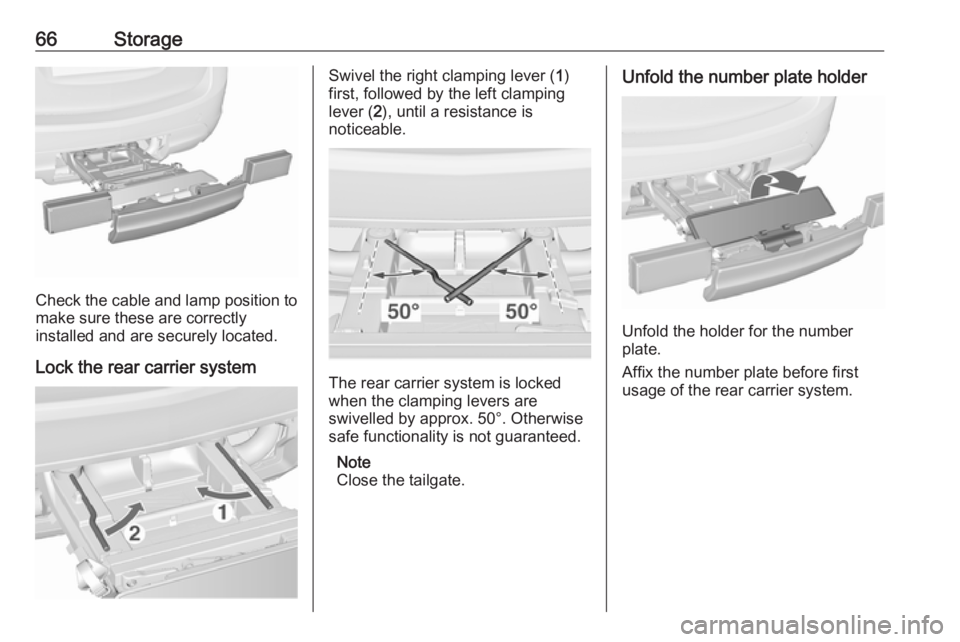
Lock the rear carrier system
Swivel the right clamping lever ( 1)
first, followed by the left clamping
lever ( 2), until a resistance is
noticeable.
The rear carrier system is locked
when the clamping levers are
swivelled by approx. 50°. Otherwise
safe functionality is not guaranteed.
Note
Close the tailgate.
Unfold the number plate holder
Unfold the holder for the number
plate.
Affix the number plate before first
usage of the rear carrier system.
Page 73 of 251
Storage71Hold on to the bicycle, loosen the
attachment screw for the pedal
bearing mount, then lift the pedal bearing mount to remove it.
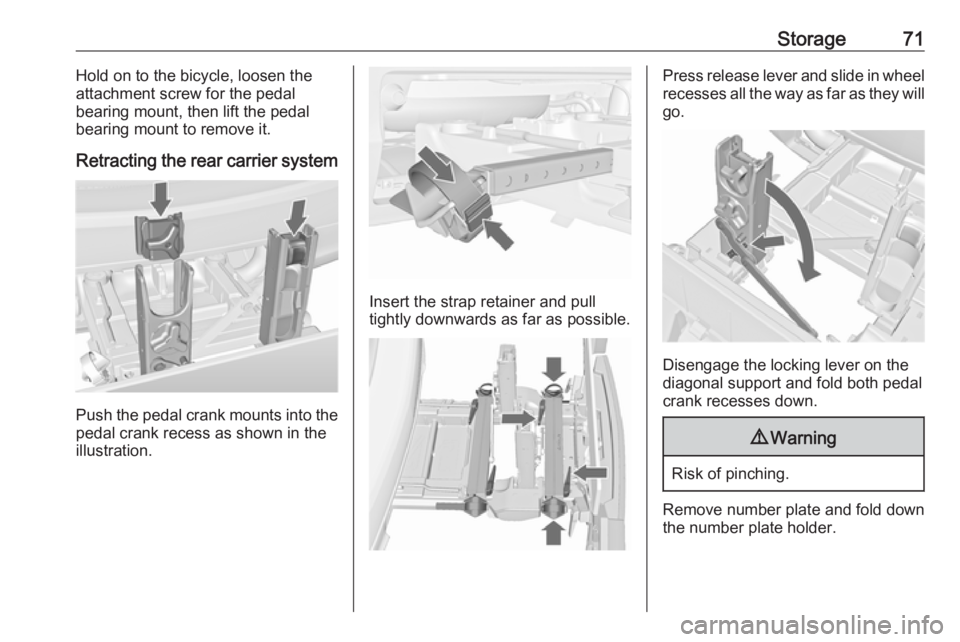
Retracting the rear carrier system
Push the pedal crank mounts into the
pedal crank recess as shown in the
illustration.
Insert the strap retainer and pull
tightly downwards as far as possible.
Press release lever and slide in wheel recesses all the way as far as they will
go.
Disengage the locking lever on the
diagonal support and fold both pedal crank recesses down.
9 Warning
Risk of pinching.
Remove number plate and fold down
the number plate holder.
Page 75 of 251
Storage73Load compartment
Folding down rear seat backrests
The rear seat backrest is divided into
three parts. All parts can be folded
down individually to increase the size of the load compartment.9 Warning
Do not stow objects under or
behind the seats. The objects
might be damaged and prevent
the guide rails from locking
properly.
A completely flat load bay is created if first the centre seat and then the
outer rear seat backrests are folded
down.
Caution
Do not fold the outer seat
backrests while the seats are in the inner position. The seats could be damaged.
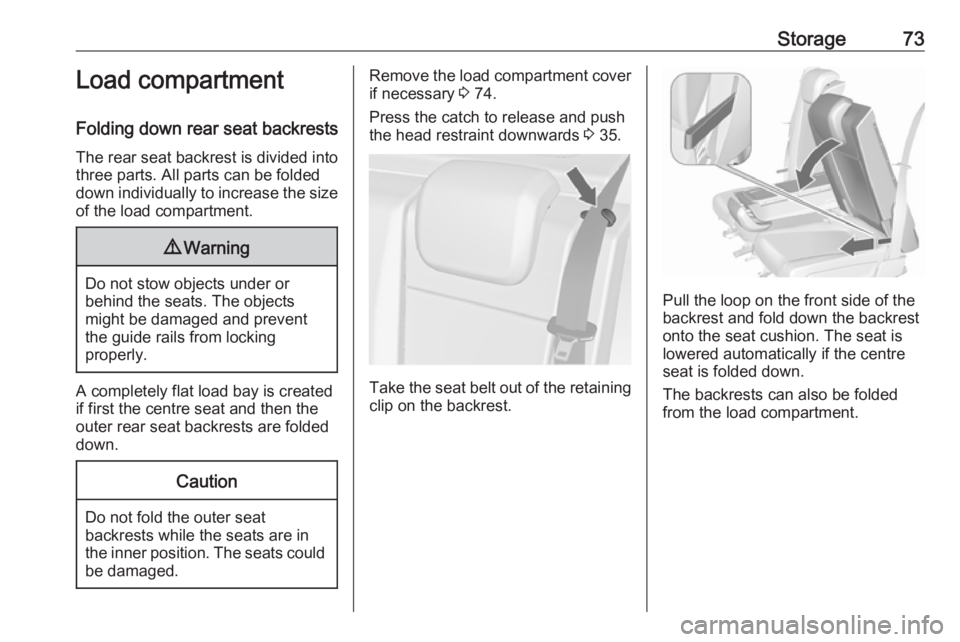
Remove the load compartment coverif necessary 3 74.
Press the catch to release and push
the head restraint downwards 3 35.
Take the seat belt out of the retaining
clip on the backrest.
Pull the loop on the front side of the
backrest and fold down the backrest
onto the seat cushion. The seat is
lowered automatically if the centre
seat is folded down.
The backrests can also be folded
from the load compartment.
Page 76 of 251
74Storage
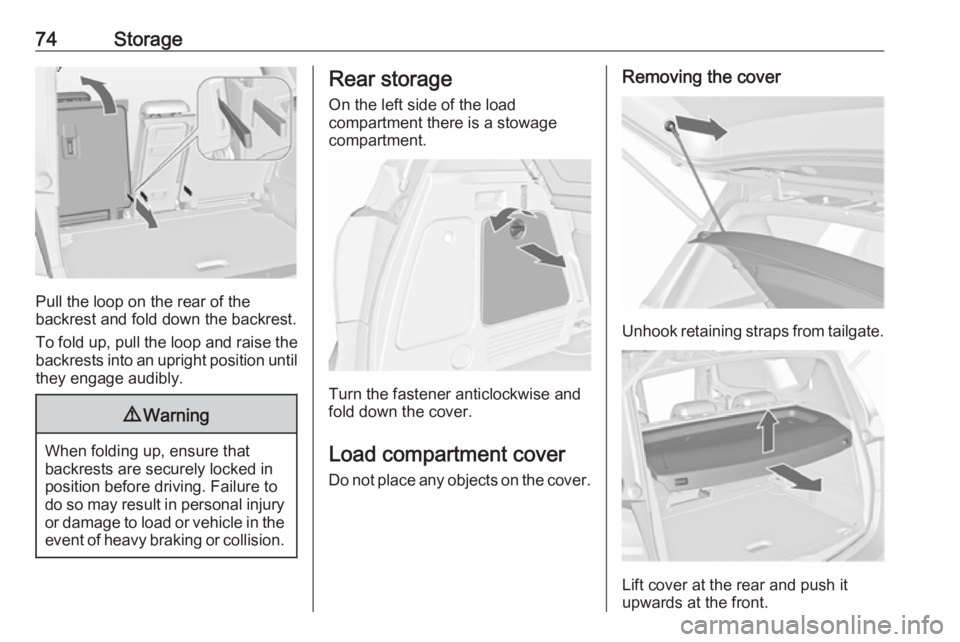
Pull the loop on the rear of the
backrest and fold down the backrest.
To fold up, pull the loop and raise the backrests into an upright position until
they engage audibly.
9 Warning
When folding up, ensure that
backrests are securely locked in
position before driving. Failure to
do so may result in personal injury or damage to load or vehicle in the event of heavy braking or collision.
Rear storage
On the left side of the load
compartment there is a stowage
compartment.
Turn the fastener anticlockwise and
fold down the cover.
Load compartment cover Do not place any objects on the cover.
Removing the cover
Unhook retaining straps from tailgate.
Lift cover at the rear and push it
upwards at the front.
Page 83 of 251
Instruments and controls81Instruments and
controlsControls ....................................... 82
Steering wheel adjustment ........82
Steering wheel controls .............82
Heated steering wheel ...............82
Horn ........................................... 83
Windscreen wiper/washer .........83
Rear window wiper/washer .......85
Outside temperature ..................85
Clock ......................................... 86
Power outlets ............................. 87
Cigarette lighter ......................... 88
Ashtrays .................................... 88
Warning lights, gauges and indi‐ cators ........................................... 89
Instrument cluster ......................89
Speedometer ............................. 89
Odometer .................................. 89
Trip odometer ............................ 89
Tachometer ............................... 89
Fuel gauge ................................ 90
Fuel selector .............................. 90
Engine coolant temperature gauge ....................................... 90
Service display .......................... 91Control indicators ......................92
Turn signal ................................. 94
Seat belt reminder .....................95
Airbag and belt tensioners .........95
Airbag deactivation ....................95
Charging system .......................96
Malfunction indicator light ..........96
Service vehicle soon .................96
Brake and clutch system ...........96
Operate pedal ............................ 96
Electric parking brake ................97
Electric parking brake fault ........97
Antilock brake system (ABS) .....97
Upshift ....................................... 97
Variable effort steering ..............97
Ultrasonic parking assist ...........97
Electronic Stability Control off ...98
Electronic Stability Control and Traction Control system ...........98
Traction Control system off .......98
Preheating ................................. 98
Diesel particle filter ....................98
Tyre pressure monitoring system ...................................... 98
Engine oil pressure ....................99
Low fuel ..................................... 99
Immobiliser ................................ 99
Reduced engine power .............99
Exterior light .............................. 99
High beam ............................... 100Adaptive forward lighting .........100
Fog light ................................... 100
Rear fog light ........................... 100
Cruise control .......................... 100
Door open ................................ 100
Automatic locking ....................100
Information displays ...................101
Driver Information Centre ........101
Graphic-Info-Display, Colour- Info-Display ............................ 104
Vehicle messages ......................106
Warning chimes .......................108
Battery voltage ........................ 109
Trip computer ............................. 109
Vehicle personalisation ..............112
OnStar ....................................... 116
Page 84 of 251
82Instruments and controlsControlsSteering wheel adjustment
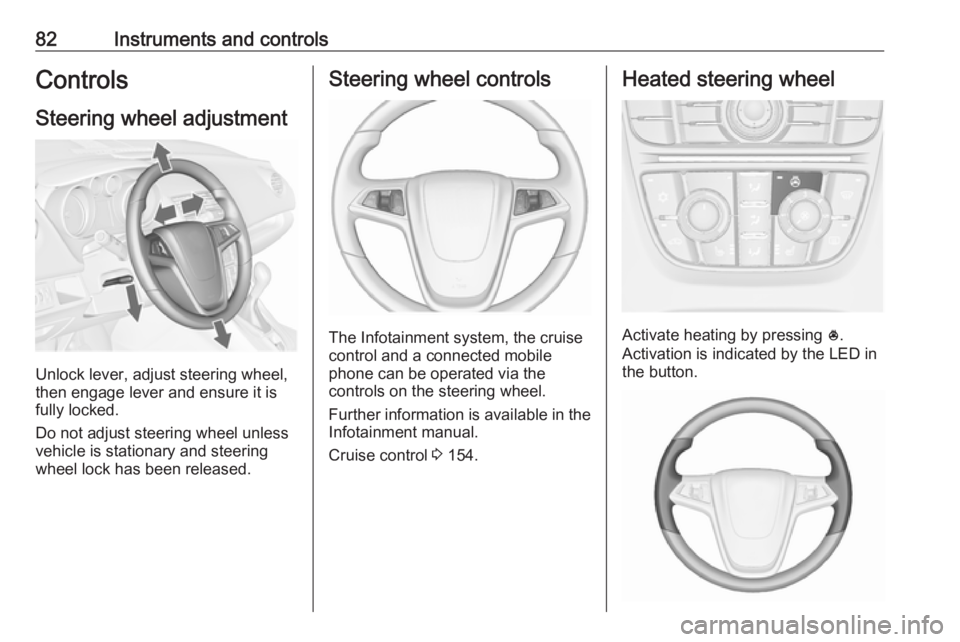
Unlock lever, adjust steering wheel,
then engage lever and ensure it is
fully locked.
Do not adjust steering wheel unless
vehicle is stationary and steering
wheel lock has been released.
Steering wheel controls
The Infotainment system, the cruise
control and a connected mobile
phone can be operated via the
controls on the steering wheel.
Further information is available in the
Infotainment manual.
Cruise control 3 154.
Heated steering wheel
Activate heating by pressing *.
Activation is indicated by the LED in
the button.
Page 88 of 251
86Instruments and controlsIf outside temperature drops to 3 °C,
a warning message is displayed in the
Driver Information Centre with
Uplevel-Display or
Uplevel-Combi-Display.9 Warning
The road surface may already be
icy even though the display
indicates a few degrees above
0 °C.
Clock
Date and time are shown in the
Info-Display.
Time and date settings
CD 300/CD 400/CD 400plus
Press CONFIG . The menu Settings is
displayed.
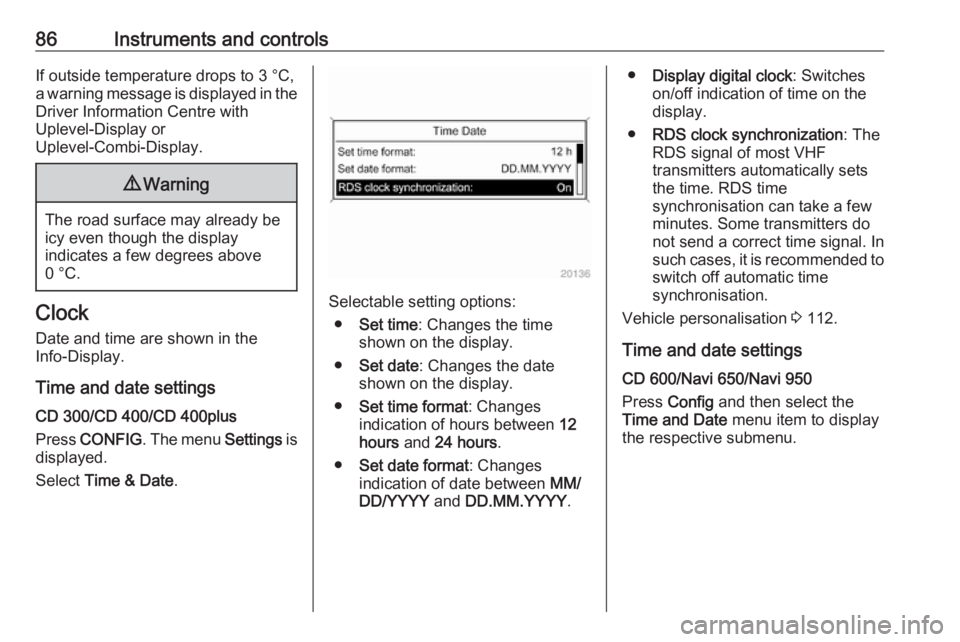
Select Time & Date .Selectable setting options:
● Set time : Changes the time
shown on the display.
● Set date : Changes the date
shown on the display.
● Set time format : Changes
indication of hours between 12
hours and 24 hours .
● Set date format : Changes
indication of date between MM/
DD/YYYY and DD.MM.YYYY .
●Display digital clock : Switches
on/off indication of time on the
display.
● RDS clock synchronization : The
RDS signal of most VHF
transmitters automatically sets
the time. RDS time
synchronisation can take a few
minutes. Some transmitters do not send a correct time signal. Insuch cases, it is recommended to switch off automatic time
synchronisation.
Vehicle personalisation 3 112.
Time and date settings
CD 600/Navi 650/Navi 950
Press Config and then select the
Time and Date menu item to display
the respective submenu.
Page 96 of 251
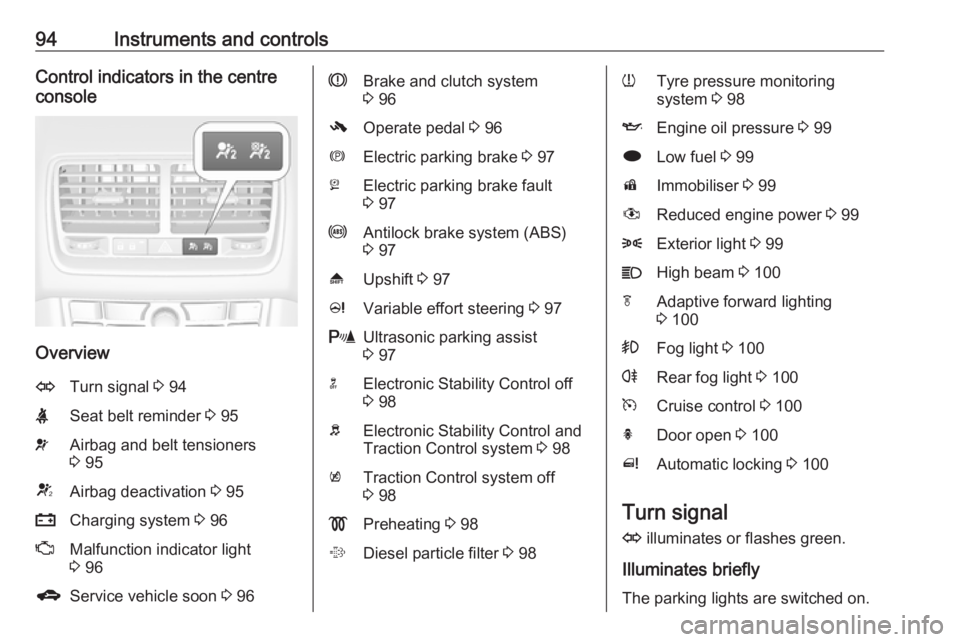
94Instruments and controlsControl indicators in the centre
console
Overview
OTurn signal 3 94XSeat belt reminder 3 95vAirbag and belt tensioners
3 95VAirbag deactivation 3 95pCharging system 3 96ZMalfunction indicator light
3 96gService vehicle soon 3 96RBrake and clutch system
3 96-Operate pedal 3 96mElectric parking brake 3 97jElectric parking brake fault
3 97uAntilock brake system (ABS)
3 97[Upshift 3 97cVariable effort steering 3 97rUltrasonic parking assist
3 97nElectronic Stability Control off
3 98bElectronic Stability Control and
Traction Control system 3 98kTraction Control system off
3 98!Preheating 3 98%Diesel particle filter 3 98wTyre pressure monitoring
system 3 98IEngine oil pressure 3 99iLow fuel 3 99dImmobiliser 3 99#Reduced engine power 3 998Exterior light 3 99CHigh beam 3 100fAdaptive forward lighting
3 100>Fog light 3 100rRear fog light 3 100mCruise control 3 100hDoor open 3 100^Automatic locking 3 100
Turn signal
O illuminates or flashes green.
Illuminates briefly
The parking lights are switched on.
Page 99 of 251
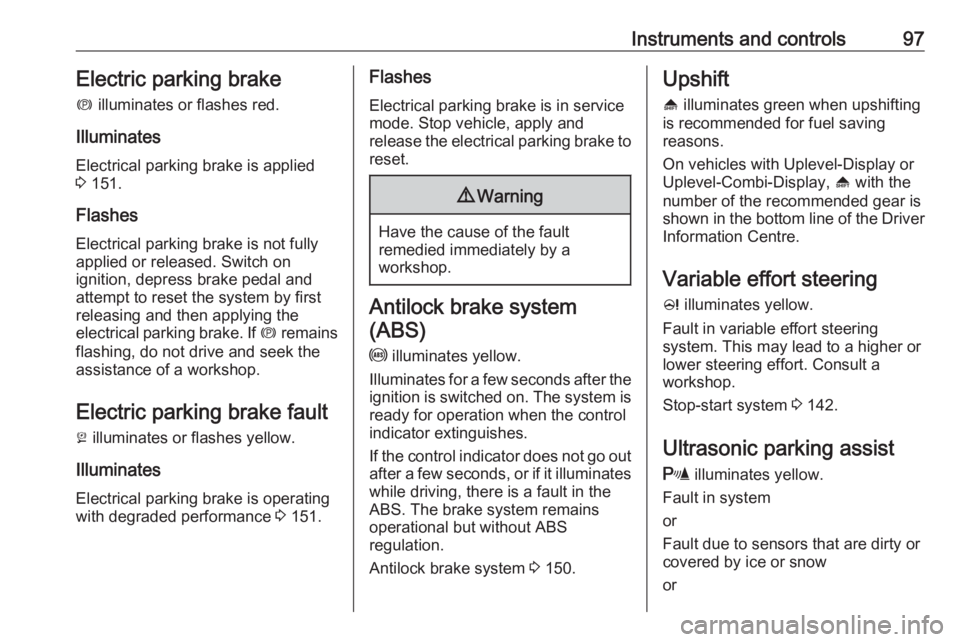
Instruments and controls97Electric parking brake
m illuminates or flashes red.
Illuminates
Electrical parking brake is applied
3 151.
Flashes
Electrical parking brake is not fully applied or released. Switch on
ignition, depress brake pedal and
attempt to reset the system by first
releasing and then applying the
electrical parking brake. If m remains
flashing, do not drive and seek the
assistance of a workshop.
Electric parking brake fault j illuminates or flashes yellow.
Illuminates Electrical parking brake is operating
with degraded performance 3 151.Flashes
Electrical parking brake is in service
mode. Stop vehicle, apply and
release the electrical parking brake to
reset.9 Warning
Have the cause of the fault
remedied immediately by a
workshop.
Antilock brake system
(ABS)
u illuminates yellow.
Illuminates for a few seconds after the ignition is switched on. The system is
ready for operation when the control
indicator extinguishes.
If the control indicator does not go out after a few seconds, or if it illuminates while driving, there is a fault in the
ABS. The brake system remains
operational but without ABS
regulation.
Antilock brake system 3 150.
Upshift
[ illuminates green when upshifting
is recommended for fuel saving
reasons.
On vehicles with Uplevel-Display or Uplevel-Combi-Display, [ with the
number of the recommended gear is
shown in the bottom line of the Driver
Information Centre.
Variable effort steeringc illuminates yellow.
Fault in variable effort steering
system. This may lead to a higher or
lower steering effort. Consult a
workshop.
Stop-start system 3 142.
Ultrasonic parking assist
r illuminates yellow.
Fault in system
or
Fault due to sensors that are dirty or
covered by ice or snow
or