display OPEL MOVANO_B 2020 Manual user
[x] Cancel search | Manufacturer: OPEL, Model Year: 2020, Model line: MOVANO_B, Model: OPEL MOVANO_B 2020Pages: 353, PDF Size: 9.4 MB
Page 217 of 353

Climate control215● After 5 seconds the preset dayflashes.
● Adjust the preset day using k or
l .
● The preset time and day are set once the display changes to the
current time.
Set time and weekday Þ
If the vehicle battery is disconnected
or its voltage is too low, the unit will
need to be reset.
● Press Þ until the time flashes.
● Press k or l to change the
current time.
● Time is stored when the display stops flashing.
● Wait for weekday to flash.
● Press k or l to change the
weekday.
● Weekday is stored when the display stops flashing.
Heating level
The preferred heating level for
programmed departure times can be set between 10 to 30 ℃.To adjust the temperature of theheating, turn the rotary knob located
on the control panel.turn clockwise:increase
temperatureturn anticlock‐
wise:decrease
temperature
Rear air conditioning
system
The rear air conditioning system is
activated in conjunction with the front
passenger compartment air
conditioning system.
Bus
Fan speed
Adjust the air flow to select the
desired speed.
turn clockwise:increase air flowturn anticlock‐
wise:decrease air flow
Note
Rear air conditioning cannot be
switched on during an Autostop.
Stop-start system 3 228.
Page 218 of 353
216Climate controlCombi
Additional air conditioning is supplied to the rear passenger compartment
via the air vents located above the
driver and front passenger
compartment.
With the front passenger
compartment air conditioning system
switched on, adjust the air flow to
select the desired speed.
Ensure the air vents are open when in use, to prevent ice forming in the
system due to lack of air movement.
Auxiliary heater Coolant heater
The engine-independent, fuel-
powered coolant heater provides rapid heating of the engine coolant to
enable heating of the vehicle interior
without the engine running.
Note
Depending on version, an additional
coolant heater may be switched on
automatically to speed up heating
when the ignition is on and the
outside temperature is below 5 ℃.9 Warning
Do not operate the system when
refuelling, when dust or
combustible vapours are present
or in enclosed spaces (e.g.
garage).
Before starting or programming the
system to start, turn the vehicle's
climate control system to heat, set the
air distribution to V and turn the fan
on.
Switch off when not required. Heating stops automatically after the
programmed runtime. It will also
cease to operate if the vehicle fuel
level drops too low.
During operation, power from the
vehicle battery is used. The driving
time should therefore be at least as
long as the heating time. For short
journey times, check the vehicle
battery regularly and recharge if
necessary.
To ensure efficient performance,
briefly operate the auxiliary heater
once a month.
Control units
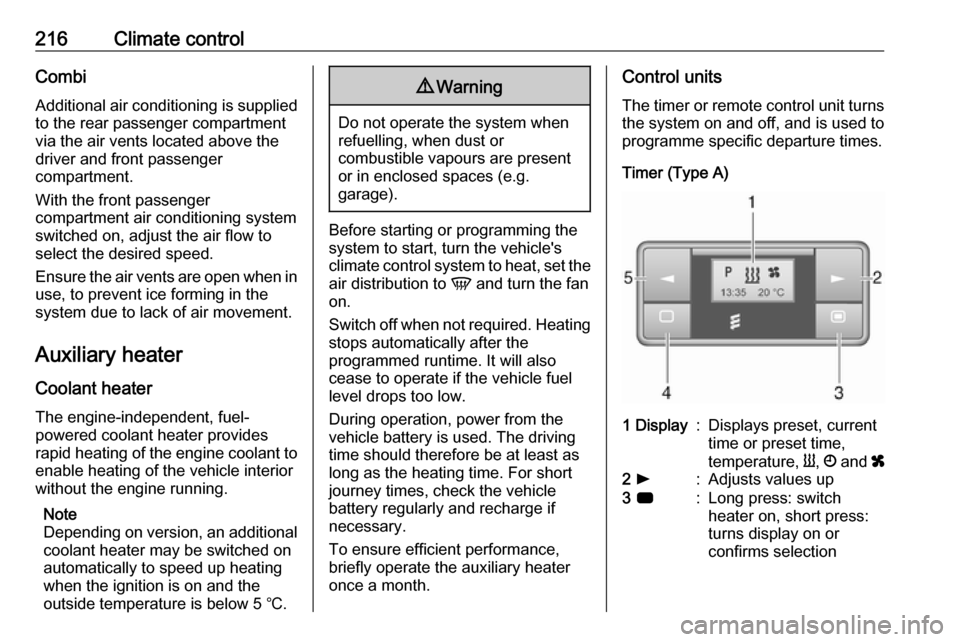
The timer or remote control unit turns the system on and off, and is used to
programme specific departure times.
Timer (Type A)1 Display:Displays preset, current
time or preset time,
temperature, Y, Ö and x2 l:Adjusts values up3 7:Long press: switch
heater on, short press:
turns display on or
confirms selection
Page 219 of 353
Climate control2174 k:Adjusts values down5 d:Long press: switch
heater off, short press:
turns display on or exit
menu
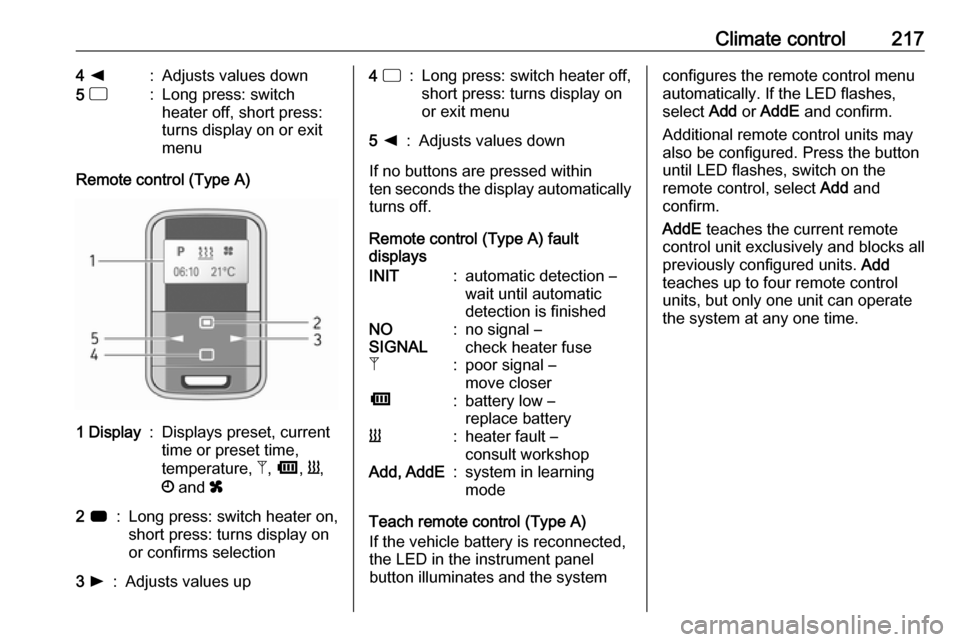
Remote control (Type A)
1 Display:Displays preset, current
time or preset time,
temperature, Z, Ü , Y ,
Ö and x2 7:Long press: switch heater on,
short press: turns display on
or confirms selection3 l:Adjusts values up4 d:Long press: switch heater off,
short press: turns display on
or exit menu5 k:Adjusts values down
If no buttons are pressed within
ten seconds the display automatically
turns off.
Remote control (Type A) fault
displays
INIT:automatic detection –
wait until automatic
detection is finishedNO
SIGNAL:no signal –
check heater fuseZ:poor signal –
move closerÜ:battery low –
replace batteryY:heater fault –
consult workshopAdd, AddE:system in learning
mode
Teach remote control (Type A)
If the vehicle battery is reconnected,
the LED in the instrument panel
button illuminates and the system
configures the remote control menu
automatically. If the LED flashes,
select Add or AddE and confirm.
Additional remote control units may
also be configured. Press the button
until LED flashes, switch on the
remote control, select Add and
confirm.
AddE teaches the current remote
control unit exclusively and blocks all
previously configured units. Add
teaches up to four remote control
units, but only one unit can operate
the system at any one time.
Page 220 of 353
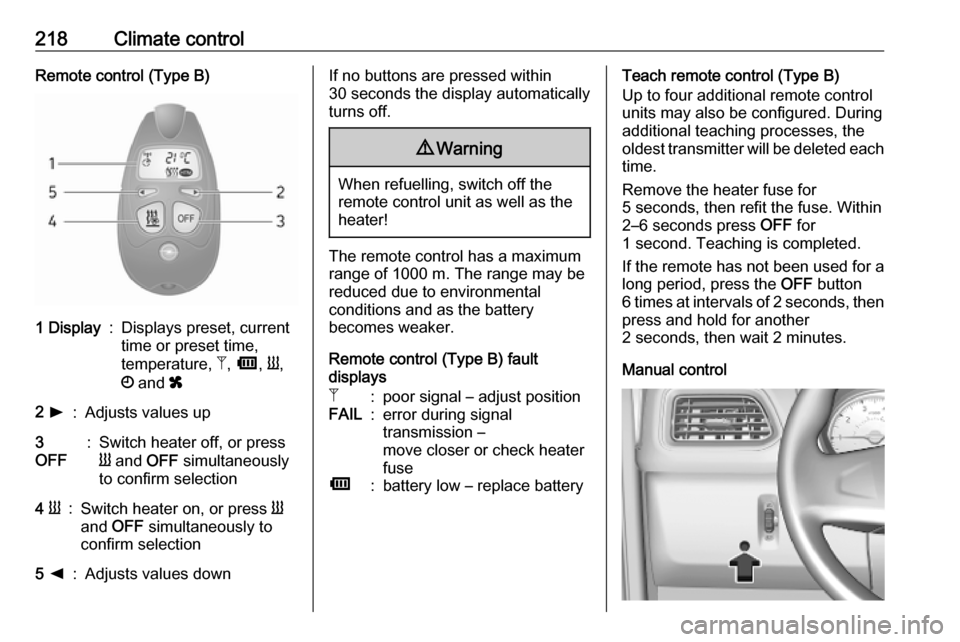
218Climate controlRemote control (Type B)1 Display:Displays preset, current
time or preset time,
temperature, Z, Ü , Y ,
Ö and x2 l:Adjusts values up3
OFF:Switch heater off, or press
Y and OFF simultaneously
to confirm selection4 Y:Switch heater on, or press Y
and OFF simultaneously to
confirm selection5 k:Adjusts values downIf no buttons are pressed within
30 seconds the display automatically
turns off.9 Warning
When refuelling, switch off the
remote control unit as well as the
heater!
The remote control has a maximum
range of 1000 m. The range may be
reduced due to environmental
conditions and as the battery
becomes weaker.
Remote control (Type B) fault
displays
Z:poor signal – adjust positionFAIL:error during signal
transmission –
move closer or check heater
fuseÜ:battery low – replace batteryTeach remote control (Type B)
Up to four additional remote control
units may also be configured. During
additional teaching processes, the
oldest transmitter will be deleted each
time.
Remove the heater fuse for
5 seconds, then refit the fuse. Within 2–6 seconds press OFF for
1 second. Teaching is completed.
If the remote has not been used for a long period, press the OFF button
6 times at intervals of 2 seconds, then
press and hold for another
2 seconds, then wait 2 minutes.
Manual control
Page 221 of 353

Climate control219Depending on version, the auxiliary
heater can also be switched on for the
last duration time or the default
duration 30 minutes, or cut-off
immediately, using the button on the
instrument panel. The LED in the
button confirms operation.
Battery replacement Replace the battery when the range
of the remote control is reduced or
when the battery charge symbol
flashes.
Open the cover and replace the
battery (Type A: CR 2430, Type B:
2CR 11108, or equivalent), ensuring
the new battery is correctly installed
with the positive ( <) side facing the
positive terminals. Replace the cover
securely.
Dispose of old batteries in
accordance with environmental
regulations.Batteries do not belong in household
waste. They must be disposed of at
an appropriate recycling collection
point.
Operation (Type A)
Heating Y
Select Y in the menu bar and press
G to confirm. The predetermined
heating duration, e.g. L 30, flashes in
the display. The factory setting is 30 minutes.
Adjust the heating duration using k
or l and confirm. The value can be
set from 10 to 120 minutes. Due to the
power consumption, note the heating duration.
To switch off, select Y in the menu bar
again and press d.
Ventilation x
Select x in the menu bar and press
G to confirm.
Adjust the ventilation duration using k or l and confirm. The value can
be set from 10 to 120 minutes. Due to the power consumption, note the
heating duration.To switch off, select x in the menu bar
again and press d.
Programming P
Up to three preset departure times
can be programmed, either during
one day or over one week.
● Select P in the menu bar and
press G to confirm.
● Select desired preset memory number P1, P2 or P3 and
confirm.
● Select F and confirm.
● Select weekday or weekday group and confirm.
● Select hour and confirm.
● Select minutes and confirm.
● Select Y or x and confirm.
● Select ECO or HIGH and confirm.
● Select duration and confirm.
● Press d to exit.
Repeat the procedure to programme
the other preset memory numbers if
required.
Page 222 of 353

220Climate controlTo activate a desired preset memory
number select P1, P2 or P3, then
select On and confirm.
When a program is activated P and
Y will be displayed together.
To deactivate a preset memory,
select P1, P2 or P3, then select Off
and confirm.
Heating stops automatically
5 minutes after the programmed
departure time.
Note
The remote control system features
a temperature sensor which
calculates the runtime according to
the ambient temperature and the
desired heating level (ECO or
HIGH). The system starts
automatically between
5 and 60 minutes prior to the
programmed departure time.
Set time and weekday Þ
If the vehicle battery is disconnected or its voltage is too low, the unit will
need to be reset.● Select F in the menu bar and
confirm.
● Select Þ in the menu bar and
confirm.
● Adjust using k or l to change
the hour and confirm.
● Adjust using k or l to change
the minutes and confirm.
● Press d to exit.
● Select F in the menu bar and
confirm.
● Select Mo in the menu bar and
confirm.
● Adjust using k or l to change
the weekday and confirm.
● Press d to exit.
Heating level
The preferred heating level for
programmed departure times can be
set to either ECO or HIGH.
● Select Y in the menu bar and
confirm.
● Select ECO or HIGH and confirm.
● Press d to exit.Operation (Type B)
Heating Y or Ventilation x
Select the operating mode Y or x, if
necessary.
● Press l three times.
● Press Y and OFF
simultaneously, Y or x flashes.
● Adjust using k or l to select Y
or x.
● Press Y and OFF simultaneously
to confirm.
To switch on, press Y for 1 second.
The predetermined heating duration,
e.g. 30, is displayed. The factory
setting is 30 minutes.
The heating duration can be set in
increments of 10 minutes. Due to the
power consumption, note the heating duration.
● Press l four times.
● Press Y and OFF
simultaneously, Y/x flashes.
● Adjust using k or l to select the
desired heating duration.
● Press Y and OFF simultaneously
to confirm.
Page 223 of 353

Climate control221To switch off, press OFF.
Programming y
The system calculates the operating
time of the heater depending on the
temperature inside the vehicle.
● Press k twice.
● Press Y and OFF
simultaneously, y flashes.
● Adjust using k or l to select the
departure time.
● Press Y and OFF simultaneously
to confirm.
To switch on, press Y for one second ,
HTM is displayed.
Heating stops automatically after the
programmed departure time, or can
be manually switched off.
● Press k twice.
● Press OFF for 1 second, HTM
goes out.
Set time
If the vehicle battery is disconnected
or its voltage is too low, the time will
need to be reset.● Press l once.
● Press Y and OFF
simultaneously, Ö flashes.
● Adjust using k or l to set the
time.
● Press Y and OFF simultaneously
to confirm.
Heating level
The preferred heating level for
programmed departure times can be set to between C1 and C5.
● Press k three times.
● Press Y and OFF
simultaneously, Y flashes.
● Adjust using k or l to set the
heating level.
● Press Y and OFF simultaneously
to confirm.
To display the passenger
compartment temperature, press l
twice.Air vents
Adjustable air vents At least one air vent must be open
while cooling is on in order to prevent
the evaporator from icing up due to lack of air movement.
Centre air vents
Direct the flow of air by tilting and
swivelling the slats.
To close the vent, swivel the slat
towards the outside of the vehicle.
Page 226 of 353

224Driving and operatingDriving and
operatingDriving hints ............................... 225
Driving economically ...............225
Control of the vehicle ...............225
Steering ................................... 225
Starting and operating ...............226
New vehicle running-in ............226
Ignition switch positions ...........226
Starting the engine ..................227
Idle speed control ....................228
Overrun cut-off ........................ 228
Stop-start system ....................228
Parking .................................... 231
Air suspension ......................... 231
Engine exhaust .......................... 233
Diesel particle filter ..................233
Catalytic converter ...................234
AdBlue ..................................... 234
Manual transmission ..................241
Manual transmission automa‐ ted .............................................. 241
Transmission display ...............241
Starting the engine ..................242
Selector lever .......................... 242Manual mode........................... 243
Electronic driving programmes 243
Fault ........................................ 244
Interruption of power supply ....244
Brakes ........................................ 244
Antilock brake system .............244
Parking brake .......................... 245
Brake assist ............................. 246
Hill start assist ......................... 246
Ride control systems .................247
Traction Control system ..........247
Electronic Stability Control ......248
Limited-slip rear axle ...............249
Driver assistance systems .........249
Cruise control .......................... 249
Speed limiter ........................... 251
Active emergency braking .......253
Parking assist .......................... 255
Side blind spot alert .................257
Rear view camera ...................259
Lane departure warning ..........261
Fuel ............................................ 262
Fuel for diesel engines ............262
Refuelling ................................ 263
Trailer hitch ................................ 265
General information .................265
Driving characteristics and towing tips .............................. 265
Trailer towing ........................... 265Towing equipment ...................266
Trailer stability assist ...............266
Auxiliary features .......................266
Power take-off ......................... 266
Page 237 of 353
Driving and operating235Caution
Avoid contact of the paintwork withAdBlue.
In case of contact, rinse off with water.
AdBlue freezes at a temperature of
approx. -11 °C. As the vehicle is
equipped with an AdBlue pre-heater,
the emissions reduction at low
temperatures is ensured. The AdBlue
pre-heater works automatically.
Level warnings
The AdBlue consumption is approx.
3.5 l per 1000 km and depends on the
driving behaviour.
AdBlue gauge 3 93.
Level warnings in the Driver
Information Centre
If the AdBlue level falls below a
certain value, a level warning will be
displayed in the Driver Information Centre 3 105.
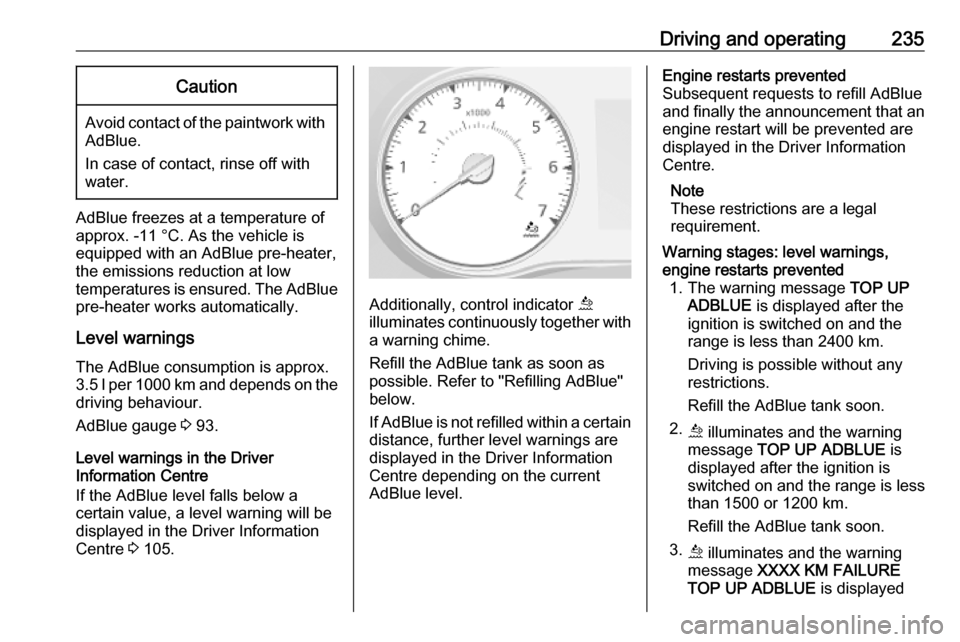
Additionally, control indicator ú
illuminates continuously together with a warning chime.
Refill the AdBlue tank as soon as
possible. Refer to "Refilling AdBlue"
below.
If AdBlue is not refilled within a certain distance, further level warnings are
displayed in the Driver Information
Centre depending on the current
AdBlue level.
Engine restarts prevented
Subsequent requests to refill AdBlue
and finally the announcement that an engine restart will be prevented are
displayed in the Driver Information
Centre.
Note
These restrictions are a legal
requirement.Warning stages: level warnings,
engine restarts prevented 1. The warning message TOP UP
ADBLUE is displayed after the
ignition is switched on and the
range is less than 2400 km.
Driving is possible without any
restrictions.
Refill the AdBlue tank soon.
2. ú illuminates and the warning
message TOP UP ADBLUE is
displayed after the ignition is
switched on and the range is less
than 1500 or 1200 km.
Refill the AdBlue tank soon.
3. ú illuminates and the warning
message XXXX KM FAILURE
TOP UP ADBLUE is displayed
Page 238 of 353

236Driving and operatingafter the ignition is switched on
and the range is less than 1000 or
800 km. The message is repeated
every 100 km. When the range is less than 200 km the message is
repeated every 50 km.
Vehicle speed may be limited to
20 km/h after switching the engine
off and on again until the range is
reduced to 0 km.
Refill the tank completely or with a volume of at least 10 l of AdBlue
(depending on AdBlue
consumption) as soon as
possible.
4. Y illuminates during driving with
warning message 0KM FAILURE
TOP UP ADBLUE :
The engine cannot be restarted
after switching off the ignition.
To allow the engine to be
restarted, refill the tank
completely or with a volume of at
least 10 l of AdBlue (depending on AdBlue consumption) as soon as
possible.
Illumination of control indicator Y may
be accompanied by a warning chime.Warning chimes 3 107.High emission warnings
If the exhaust emission rises above a certain value, warnings similar to therange warnings as described above
will be displayed in the Driver
Information Centre. Control indicator
ú illuminates continuously together
with j 3 99 and a warning chime.
Requests to have the exhaust system checked and finally the
announcement that an engine restart
will be prevented are displayed in the
Driver Information Centre.
Note
These restrictions are a legal
requirement.
Seek the assistance of a workshop as
soon as possible.Warning stages: high emission
warnings 1. ú and j illuminate with
warning message Check Anti-
Pollution System .
Fault in the system that may result in a loss of engine power.Seek the assistance of a
workshop as soon as possible.
2. ú and j illuminate with
warning message xxxKM failure
antipollution .
Indicates that in less than 1000 or 800 km an engine restart will be
prohibited after switching off the
ignition. This warning message
will be repeated every 100 km.
When the range is less than 200
km the message is repeated
every 50 km.
Vehicle speed may be limited to
20 km/h after switching the engine
off and on again until the range is
reduced to 0 km.
Seek the assistance of a
workshop as soon as possible.
3. ú and j illuminate with
warning message 0KM failure
antipollution .
The engine cannot be restarted
after switching off the ignition.
Seek the assistance of a
workshop.