infotainment OPEL MOVANO_B 2020 Manual user
[x] Cancel search | Manufacturer: OPEL, Model Year: 2020, Model line: MOVANO_B, Model: OPEL MOVANO_B 2020Pages: 353, PDF Size: 9.4 MB
Page 262 of 353
260Driving and operatingInfo Display
In vehicles without interior mirror
display, the rear view camera screen
is shown on the Info Display.
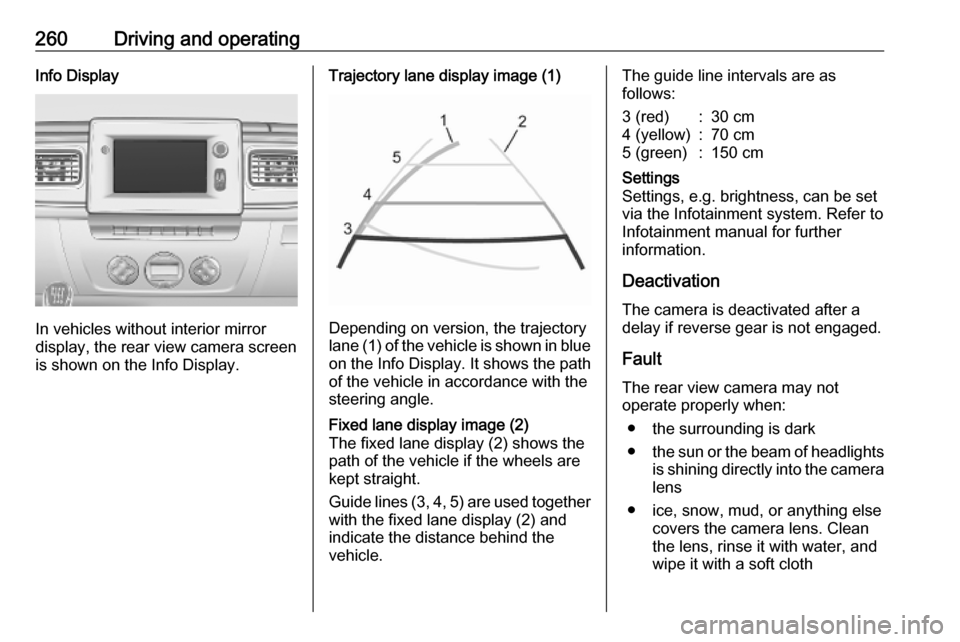
Trajectory lane display image (1)
Depending on version, the trajectory
lane (1) of the vehicle is shown in blue
on the Info Display. It shows the path of the vehicle in accordance with the
steering angle.
Fixed lane display image (2)
The fixed lane display (2) shows the
path of the vehicle if the wheels are
kept straight.
Guide lines (3, 4, 5) are used together
with the fixed lane display (2) and
indicate the distance behind the
vehicle.The guide line intervals are as
follows:3 (red):30 cm4 (yellow):70 cm5 (green):150 cmSettings
Settings, e.g. brightness, can be set
via the Infotainment system. Refer to
Infotainment manual for further
information.
Deactivation
The camera is deactivated after a
delay if reverse gear is not engaged.
Fault
The rear view camera may not
operate properly when:
● the surrounding is dark
● the sun or the beam of headlights
is shining directly into the camera lens
● ice, snow, mud, or anything else covers the camera lens. Clean
the lens, rinse it with water, and
wipe it with a soft cloth
Page 289 of 353

Vehicle care287SymbolCircuitWRight low beamaLeft low beam>Front fog lightsLLeft high beamNRight high beamuABSKWindscreen wiperQPneumatic suspension
Instrument panel fuse box
Located behind the trim panel. Pull
upper part of trim panel to remove.
Do not store any objects behind this
panel.
Some circuits may be protected by
several fuses.SymbolCircuitSRight-hand side lightTLeft-hand side lightxClimate control fan&TachographÍPreheatingZInfotainment system / Seat
heating / Driver Information
Centre / Audio connec‐
tions / AlarmlHands-free connectionADPAdditional adaptationsPTOPower take-offUHeated seatsMElectronic immobiliserSymbolCircuitRWindscreen washer,Power windows / Body
control modulenRight heated rear windowmLeft heated rear windowIBody control module /
Power windows / Heating
and ventilation system / Air
conditioningSTOPBrake lightZBody control moduledInterior lights / Brake lightsuABS / Electronic Stability
ControljHorn0Interior lightsOTurn lights / Rear fog light /
Body control moduleUCentral locking
Page 322 of 353

320Customer informationOhmstrasse 4, 85716
Unterschleissheim, Germany
Operation frequency: 125 kHz
Maximum output:
42 dBμA/m @ 10 m
Infotainment system NAVI 80
IntelliLink
TomTom Int’l BV
De Ruijterkade 154, 1011 AC
Amsterdam, The Netherlands
Operation frequency:
2400 - 2483.5 MHz
Maximum output: 100 mW EIRP
Infotainment system NAVI 50
IntelliLink
LG Electronics
LG Electronics European Shared
Service Center B.V., Krijgsman 1,
1186 DM Amstelveen, The
Netherlands
Operation frequency: 2.4 GHz
Maximum output: 100 mW EIRP
Infotainment system Radio 15
Visteon Electronics04 Rue Nelson Mandela, Zone
Industrielle Borj Cedria, 2055 Bir El
Bey, Tunisia
Operation frequency:
2400 – 2483,5 MHz
Maximum output: 100 mW EIRP
Parking heater remote control
receiver
Eberspaecher Climate Control
Systems GmbH & Co. KG
Eberspaecherstrasse 24, 73730
Esslingen, Germany
Operation frequency: N/A
Maximum output: N/A
Parking heater remote control
transmitter
Eberspaecher Climate Control
Systems GmbH & Co. KG
Eberspaecherstrasse 24, 73730
Esslingen, Germany
Operation frequency: 434,6 MHz
Maximum output: 10dBm
Telematics control unit
Continental Automotive1 Rue de Clairefontaine, 78120
Rambouillet, France
Operation frequency:
2400 – 2483,5 MHz
Maximum output: 100 mW EIRP
Telematics display
MASTERNAUT INTERNATIONAL
4 rue Charles Cros 27400 Louviers,
FranceOperation
frequency (MHz)Maximum output
(dBm)900 MHz33 dBm1800 MHz30 dBm
Tyre pressure monitoring receiver
Schrader Electronics
Trooperslane Industrial Estate, 2
Meadowbank Rd, Carrickfergus
BT38 8YF, United Kingdom
Operation frequency: N/A
Maximum output: N/A
Tyre pressure sensors
Schrader Electronics
Page 325 of 353

Customer information323REACH
Registration, Evaluation,
Authorisation and Restriction of
Chemicals (REACH) is a European
Union regulation adopted to improve
the protection of human health and
the environment from the risks that
can be posed by chemicals. Visit
www.opel.com/reach for further
information and for access to the
Article 33 communication.
Registered trademarksApple Inc.
Apple CarPlay™ is a trademark of Apple Inc.
App Store ®
and iTunes Store ®
are
registered trademarks of Apple Inc.
iPhone ®
, iPod ®
, iPod touch ®
, iPod
nano ®
, iPad ®
and Siri ®
are registered
trademarks of Apple Inc.Bluetooth SIG, Inc.
Bluetooth ®
is a registered trademark
of Bluetooth SIG, Inc.DivX, LLC
DivX ®
and DivX Certified ®
are
registered trademarks of DivX, LLC.EnGIS Technologies, Inc.
BringGo ®
is a registered trademark of
EnGIS Technologies, Inc.Google Inc.
Android™ and Google Play™ Store
are trademarks of Google Inc.Stitcher Inc.
Stitcher™ is a trademark of Stitcher,
Inc.Verband der Automobilindustrie e.V.
AdBlue ®
is a registered trademark of
the VDA.Vehicle data recording
and privacy
Event data recorders
Electronic control units are installed in
your vehicle. Control units process
data which is received by vehicle
sensors, for example, or which they
generate themselves or exchange
amongst themselves. Some control
units are necessary for the safe
functioning of your vehicle, others
assist you while you drive (driver
assistance systems), while others
provide comfort or infotainment
functions.
The following contains general
information about data processing in
the vehicle. You will find additional
information as to which specific data
is uploaded, stored and passed on to third parties and for what purpose in
your vehicle under the key word Data Protection closely linked to the
references for the affected functional
characteristics in the relevant owner's
manual or in the general terms of
sale. These are also available online.
Page 327 of 353

Customer information325Comfort and infotainment
functions
Comfort settings and custom settings
can be stored in the vehicle and
changed or reset at any time.
Depending on the equipment level in
question, these include
● seat and steering wheel position settings
● chassis and air conditioning settings
● custom settings such as interior lighting
You can input your own data in the
infotainment functions for your
vehicle as part of the selected
features.
Depending on the equipment level in
question, these include
● multimedia data such as music, videos or photos for playback in
an integrated multimedia system
● address book data for use with an
integrated hands-free system or an integrated navigation system● input destinations
● data on the use of online services
This data for comfort and
infotainment functions can be stored
locally in the vehicle or be kept on a
device that you have connected to the
vehicle ( e.g. a smartphone, USB stick
or MP3 player). Data that you have input yourself can be deleted at any
time.
This data can only be transmitted out
of the vehicle at your request,
particularly when using online
services in accordance with the
settings selected by you.
Smartphone integration, e.g.
Android Auto or Apple CarPlay
If your vehicle is equipped
accordingly, you can connect your
smartphone or another mobile device
to the vehicle so that you can control
it via the controls integrated in the
vehicle. The smartphone image and
sound can be output via the
multimedia system in this case. At the same time, specific information is
transmitted to your smartphone.
Depending on the type of integration,this includes data such as position
data, day / night mode and other
general vehicle information. For more
information, please see the operating
instructions for the vehicle /
infotainment system.
Integration allows selected
smartphone apps to be used, such as navigation or music playback. No
further integration is possible
between smartphone and vehicle, in
particular active access to vehicle
data. The nature of further data
processing is determined by the
provider of the app used. Whether
you can define settings, and if so
which ones, is dependent on the app
in question and your smartphone's
operating system.
Page 347 of 353

345Functions during a telephone call201
Fuse box ..................... 286, 287, 288
Fuses ......................................... 285
G Gauges ......................................... 91
Gear shifting ............................... 100
General information ...118, 151,
153, 156, 164, 191, 193, 265
Glass panel .................................. 44 Glovebox ..................................... 74
Glovebox cooler ......................... 222
GPS (Global Positioning System) 164
Grab handles ................................ 76
Ground clearance .......................231
Guidance ................................... 183
H Hand brake - see Parking brake. 245
Handsfree phone system ...........201
Hazard warning flashers ............113
HD Traffic ................................... 166
Headlight flash ........................... 112
Headlight range adjustment ......112
Headlights .................. 110, 111, 278
Headlights when driving abroad 112
Head restraint adjustment .............8
Head restraints ............................ 45
Heated exterior mirrors .................16
Heated mirrors ............................. 39
Heated rear window ...............16, 43Heating ........................................ 52
Heating and ventilation system . 208
Help! ................................... 183, 191
High beam ......................... 103, 111
High beam assist ................103, 111
Hill start assist ........................... 246
Home address ............................ 177
Home location............................. 166
Horn ....................................... 15, 85
Hub cap hook ............................. 290
Hydraulic oil level........................ 333
I
i-Announcement ......................... 148
Identification plate .....................316
Idle speed control .......................228
Ignition switch positions .............226
Image settings ............................ 129
Image viewer .............................. 166
Immobiliser .................................. 38
Indicators ...................................... 91
Inductive charging ........................90
i-News service ............................ 148
Info Display ................................. 105
Information displays.................... 105
Information on the display ..136, 166
Infotainment controls ..................129
Infotainment system ...................105
Switching on/off .......................129
Initial drive information.................... 6Instrument cluster ........................91
Instrument panel controls ...........122
Instrument panel fuse box .........287
Instrument panel illumination .....285
Instrument panel overview ........... 11
Instrument panel storage ..............73
Interior care ............................... 310
Interior lighting ....................114, 339
Interior lights ...................... 114, 284
Interior mirrors .............................. 40
Interruption of power supply ......244
Intersection view .........................166
Introduction .................................... 3
iPod .................................... 153, 154
ISOFIX .......................................... 65
Isolation switch ........................... 330
i-Traffic service ........................... 148
J
Jack ............................................ 290
Jack plug .................................... 152
Journey record............................ 105
Jump starting ............................. 304
K Keyboards in the display ....166, 193
Keys ..................................... 20, 336
Keys, locks ................................... 20
Page 351 of 353

349Step............................................ 337
Stop engine ................................ 100
Stop-start system.......... 18, 103, 228
Storage ................................. 73, 339
Storage compartments .................73
Storage net ............................. 74, 75
Stored stations............................ 145
Sun visors .................................... 43
Suspension height ......................231
Suspension seat ........................... 47
Switching on/off .......................... 129
Swivelling shelf ............................. 74
Symbols ......................................... 4
Symbols overview ...................... 190
System settings .......................... 139
T
Tachograph ........................ 104, 109
Tachometer ................................. 92
Tailboard..................................... 328
Tail lights ................................... 280
Technical data ............................ 335
Text information (Radio text) ......148
Theft-deterrent feature ..............120
Three-point seat belt .................... 56
Thumbnails ................................. 161
Time............................................ 129
Tipper operation ......................... 330
Tone settings .............................. 137
Toolbox ....................................... 334Tools .......................................... 290
Top-Tether .................................... 65
Touch operation overview ..........136
Touchscreen ............................... 105
Tow bar....................................... 265
Towing ........................................ 265
Towing another vehicle .............307
Towing a trailer ........................... 265
Towing equipment .....................266
Towing eye ................................. 306
Towing the vehicle .....................306
Traction Control system ............. 247
Traffic announcements (TA) .......148
Traffic announcement volume ....138
Traffic information .......................183
Traffic info service ......................164
Traffic safety ....................... 118, 193
Trailer coupling ........................... 265
Trailer stability assist .................266
Trailer towing ............................. 265
Transmission ............................... 17
Transmission display ...........94, 241
Tread depth ............................... 294
Treble ......................................... 137
Trip computer ....................108, 129
Trip odometer .............................. 92
Trip report ................................... 129
Turbo engine warm-up ...............227
Turn lights ............................ 98, 113
Tyre chains ................................ 295Tyre changing............................. 299
Tyre designations ......................291
Tyre pressure ............................ 291
Tyre pressure monitoring system ............................. 102, 292
Tyre pressures ........................... 318
Tyre repair kit ............................. 296
Tyres .......................................... 291
Tyres and wheel size, changing. 295
U Underseat storage .......................75
Unpairing a mobile phone ..........197
Update FM list ............................ 147
Updating stations list ..................147
Upholstery .................................. 310
Usage ................. 129, 144, 152, 166
USB drive ................................... 153
USB drives.................................. 154
USB memory stick ..............164, 166
USB port ..................................... 153
USB socket ........................... 88, 154
Using smartphone applications ..163
Using the display screen ............129
Using the Infotainment system ...129
Using this manual ..................3, 118
V
Variable effort steering ...............100
Vehicle battery ...................274, 304
Vehicle checks ...................270, 334