clock OPEL MOVANO_B 2020 Manual user
[x] Cancel search | Manufacturer: OPEL, Model Year: 2020, Model line: MOVANO_B, Model: OPEL MOVANO_B 2020Pages: 353, PDF Size: 9.4 MB
Page 66 of 353
64Seats, restraints
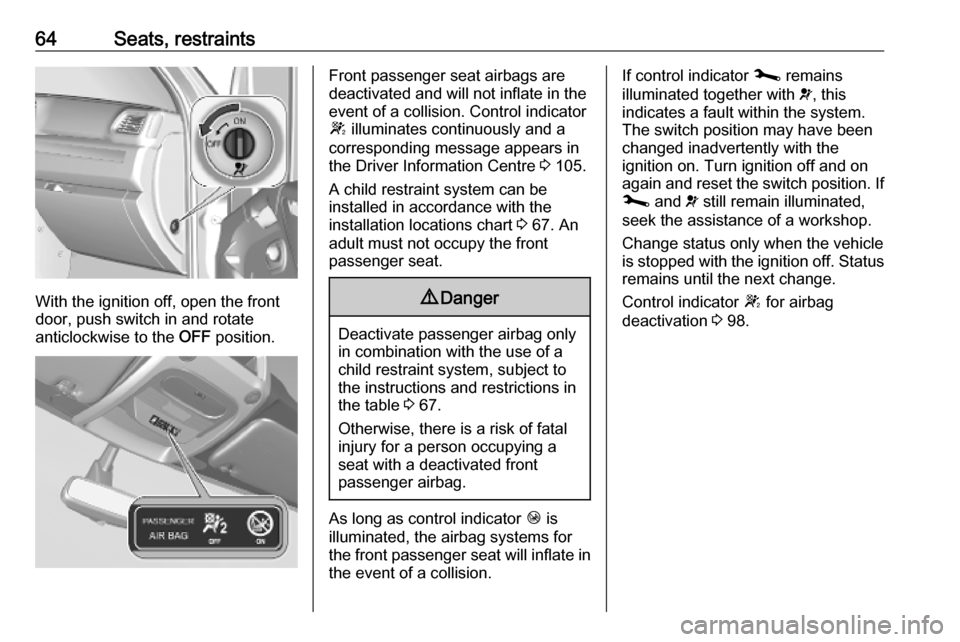
With the ignition off, open the front
door, push switch in and rotate
anticlockwise to the OFF position.
Front passenger seat airbags are
deactivated and will not inflate in the event of a collision. Control indicator
W illuminates continuously and a
corresponding message appears in
the Driver Information Centre 3 105.
A child restraint system can be
installed in accordance with the
installation locations chart 3 67. An
adult must not occupy the front
passenger seat.9 Danger
Deactivate passenger airbag only
in combination with the use of a
child restraint system, subject to
the instructions and restrictions in
the table 3 67.
Otherwise, there is a risk of fatal
injury for a person occupying a
seat with a deactivated front
passenger airbag.
As long as control indicator Ó is
illuminated, the airbag systems for the front passenger seat will inflate in the event of a collision.
If control indicator j remains
illuminated together with v, this
indicates a fault within the system.
The switch position may have been
changed inadvertently with the
ignition on. Turn ignition off and on
again and reset the switch position. If
j and v still remain illuminated,
seek the assistance of a workshop.
Change status only when the vehicle is stopped with the ignition off. Status remains until the next change.
Control indicator W for airbag
deactivation 3 98.
Page 86 of 353

84Instruments and controlsInstruments and
controlsControls ....................................... 85
Steering wheel adjustment ........85
Steering wheel controls .............85
Horn ........................................... 85
Steering column controls ...........85
Windscreen wiper and washer ..86
Outside temperature ..................87
Clock ......................................... 88
Power outlets ............................. 88
Inductive charging .....................90
Cigarette lighter ......................... 91
Ashtrays .................................... 91
Warning lights, gauges and indi‐ cators ........................................... 91
Instrument cluster ......................91
Speedometer ............................. 91
Odometer .................................. 92
Trip odometer ............................ 92
Tachometer ............................... 92
Fuel gauge ................................ 93
AdBlue gauge ............................ 93
Engine coolant temperature gauge ....................................... 93
Service display .......................... 94Transmission display .................94
Control indicators ......................95
Turn lights .................................. 98
Seat belt reminder .....................98
Airbag and belt tensioners .........98
Airbag deactivation ....................98
Charging system .......................99
Malfunction indicator light ..........99
Service vehicle soon .................99
Stop engine ............................. 100
Brake system ........................... 100
Parking brake .......................... 100
Antilock brake system (ABS) ...100
Gear shifting ............................ 100
Variable effort steering ............100
Lane departure warning ..........101
Electronic Stability Control ......101
Engine coolant temperature ....101
Preheating ............................... 101
AdBlue ..................................... 101
Tyre pressure monitoring system .................................... 102
Engine oil pressure ..................102
Low fuel ................................... 103
Stop-start system ....................103
Exterior light ............................ 103
Low beam ................................ 103
High beam ............................... 103
High beam assist .....................103
Front fog lights ......................... 103Rear fog light........................... 103
Cruise control .......................... 103
Active emergency braking .......104
Speed warning ........................ 104
Speed limiter ........................... 104
Tachograph ............................. 104
Door open ................................ 104
Displays ..................................... 105
Driver Information Centre ........105
Info Display .............................. 105
Vehicle messages ......................106
Warning chimes .......................107
Trip computer ............................. 108
Tachograph ................................ 109
Page 90 of 353
88Instruments and controls9Warning
The road surface may already be
icy even though the display
indicates a few degrees above
0 °C.
Clock
Depending on vehicle, the current
time and / or date may appear in the
Info Display 3 105 or the Driver
Information Centre 3 105.
Set time and date in information
display
Further information is available in the
Infotainment manual.
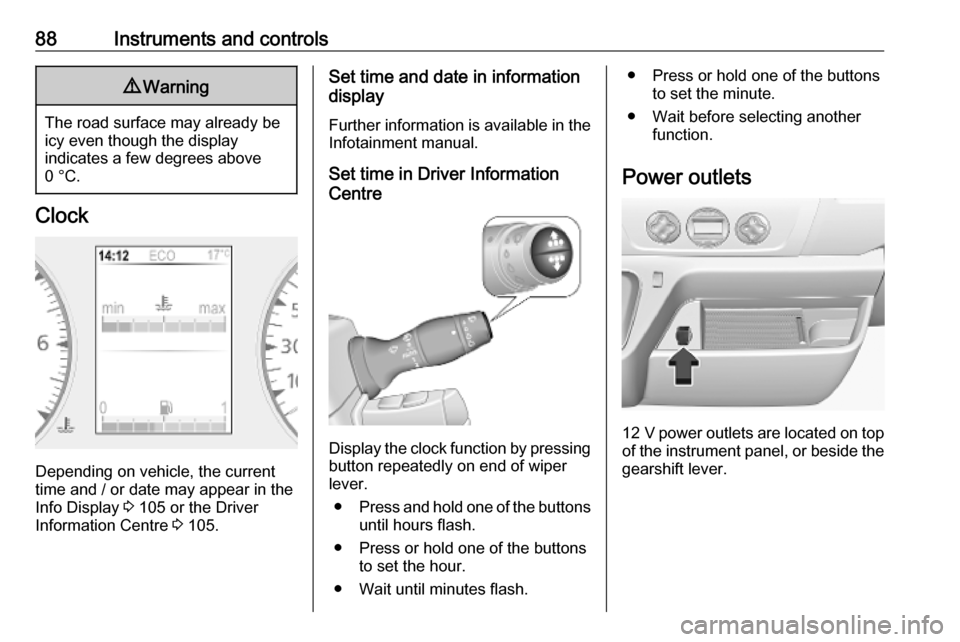
Set time in Driver Information
Centre
Display the clock function by pressing button repeatedly on end of wiper
lever.
● Press and hold one of the buttons
until hours flash.
● Press or hold one of the buttons to set the hour.
● Wait until minutes flash.
● Press or hold one of the buttons to set the minute.
● Wait before selecting another function.
Power outlets
12 V power outlets are located on top
of the instrument panel, or beside the gearshift lever.
Page 107 of 353
Instruments and controls105Displays
Driver Information Centre
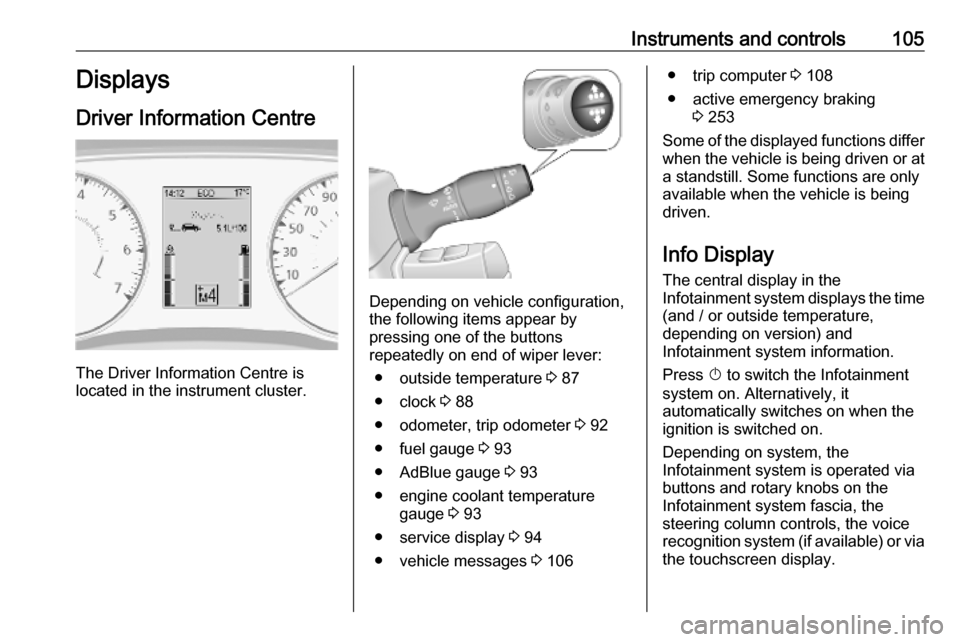
The Driver Information Centre is
located in the instrument cluster.
Depending on vehicle configuration,
the following items appear by
pressing one of the buttons
repeatedly on end of wiper lever:
● outside temperature 3 87
● clock 3 88
● odometer, trip odometer 3 92
● fuel gauge 3 93
● AdBlue gauge 3 93
● engine coolant temperature gauge 3 93
● service display 3 94
● vehicle messages 3 106
● trip computer 3 108
● active emergency braking 3 253
Some of the displayed functions differ
when the vehicle is being driven or at a standstill. Some functions are only
available when the vehicle is being
driven.
Info Display The central display in the
Infotainment system displays the time
(and / or outside temperature,
depending on version) and
Infotainment system information.
Press X to switch the Infotainment
system on. Alternatively, it automatically switches on when the
ignition is switched on.
Depending on system, the
Infotainment system is operated via buttons and rotary knobs on the
Infotainment system fascia, the
steering column controls, the voice
recognition system (if available) or via the touchscreen display.
Page 110 of 353

108Instruments and controlsTrip computerThe trip computer provides
information on driving data, which is
continually recorded and evaluated electronically.
Depending on vehicle, the following functions can be selected by pressing one of the buttons repeatedly on end
of wiper lever 3 105:
● odometer 3 92
● trip odometer 3 92
● average fuel consumption
● instantaneous fuel consumption
● fuel range
● distance travelled
● average speed
● digital speed
● engine coolent temperature 3 93
● clock 3 88
● distance before service 3 94
● tyre pressure reset 3 292
● settings● fault and information messages 3 106
● AdBlue range
Average fuel consumption The value is displayed after driving a
distance of 400 m.
Average fuel consumption is displayed, taking into consideration
the distance travelled and the fuel
used since the last reset.
Instantaneous fuel consumption
The value is displayed after reaching
a speed of 20 km/h.
Fuel range
The value is displayed after driving a distance of 400 m.
The fuel range is calculated from the
current contents of the fuel tank and
the average fuel consumption since
the last reset.
The fuel range will not display if control indicator Y is illuminated
3 103.Distance travelled
Displays the distance driven since the
last reset.
Average speed The value is displayed after driving a
distance of 400 m.
The average speed since the last
reset is displayed.
Interruptions in the journey with the
ignition off are not included in the
calculations.
Reset trip computer information
To reset the trip computer, select one of its functions then press and hold
one of the buttons on end of wiper
lever.
The following trip computer
information can be reset:
● average fuel consumption
● distance travelled
● average speed
The trip computer will reset
automatically when the maximum
value of any of the parameters is
exceeded.
Page 127 of 353

Infotainment system1251æ: Darken screen (only
clock and audio system
information are displayed) ..129
2 ñRadio : Change audio
source to radio ....................144
3 üMedia : Change audio
source - USB, iPod .............153
BT (Bluetooth) .....................156
AUX ..................................... 151
4 Outside temperature
(depending on version) .......129
5 yPhone : Telephone menu . 193
6 Clock ................................... 129
7 X: Switch on/off ..................129
Increase / decrease volume 129
8 M USB port .......................... 153
9 AUX input ............................ 151
10 ÿSettings : Audio settings,
e.g. Tone settings ...............137
Volume settings ..................138
Connectivity settings ...........129
Display settings ...................129
System settings ................... 13911 ýNav : Navigation menu ......164
12 _Map : Display the map ....164
Page 129 of 353
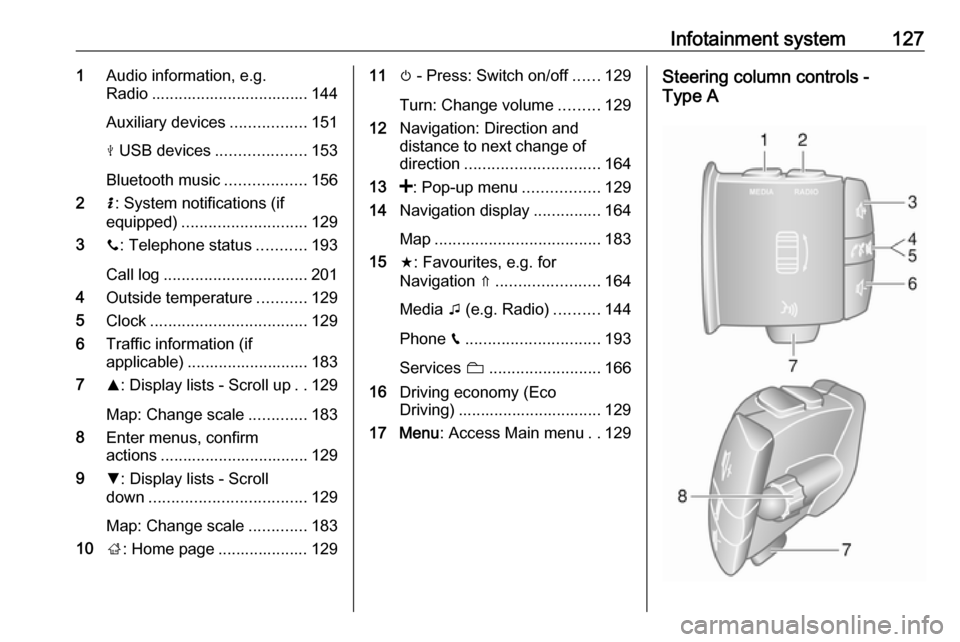
Infotainment system1271Audio information, e.g.
Radio ................................... 144
Auxiliary devices .................151
M USB devices ....................153
Bluetooth music ..................156
2 H: System notifications (if
equipped) ............................ 129
3 y: Telephone status ...........193
Call log ................................ 201
4 Outside temperature ...........129
5 Clock ................................... 129
6 Traffic information (if
applicable) ........................... 183
7 R: Display lists - Scroll up ..129
Map: Change scale .............183
8 Enter menus, confirm
actions ................................. 129
9 S: Display lists - Scroll
down ................................... 129
Map: Change scale .............183
10 ;: Home page .................... 12911 m - Press: Switch on/off ......129
Turn: Change volume .........129
12 Navigation: Direction and
distance to next change of
direction .............................. 164
13 <: Pop-up menu .................129
14 Navigation display ...............164
Map ..................................... 183
15 f: Favourites, e.g. for
Navigation ⇑ ....................... 164
Media t (e.g. Radio) ..........144
Phone g.............................. 193
Services N......................... 166
16 Driving economy (Eco
Driving) ................................ 129
17 Menu : Access Main menu ..129Steering column controls -
Type A
Page 131 of 353

Infotainment system129Note
If equipped, the voice recognition
button 5 may be located on the
steering column controls.
Usage
Infotainment controls The Infotainment system is operated
via buttons, rotary knobs and/or
display menus.
Inputs are made via:
● the central control unit in the instrument panel 3 122, or
● the controls on the steering column 3 122
● the voice recognition system (if available) 3 191
● the touchscreen (NAVI 50 IntelliLink,
NAVI 80 IntelliLink) 3 136
Note
Only the most direct ways for menu
operation are described in the
subsequent chapters. In some
cases, there may be other options.Switching the Infotainment
system on or off
Press X to switch the Infotainment
system on.
The previously used audio source is
active.
Press X (or, depending on
Infotainment system, press and hold)
to switch the Infotainment system off.
Note
The clock and/or outside
temperature may be displayed when
the Infotainment system is switched
off (depending on version).NAVI 50 IntelliLink:
The Infotainment system
automatically switches on/off when
the ignition is switched on/off. Press
X instead, if required.
Press and hold X for 5 seconds to
restart the system.NAVI 80 IntelliLink:
The Infotainment system switches on automatically when the ignition is
switched on (depending on version).
Press X instead, if required.The following options may be
displayed (depending on version):
● Change settings (to authorise or
reject data sharing)
The system displays a screen to
confirm the authorisation of data
sharing after touching Change
settings .
Note
When data sharing is switched off,
certain features may not operate
correctly.
● Language (to change the system
language)
● Done (to continue to the Home
page)
● Help (to see more detailed
information)
The Infotainment system
automatically switches off when the
ignition is switched off and the driver's door is opened. Press X instead, if
required.
Automatic switch-off
With the ignition off, if the
Infotainment system is switched on
with X, it will switch-off automatically
Page 132 of 353

130Infotainment systema short period after the last user input.
Depending on Infotainment system,
automatic switch-off occurs after approx. 5 to 20 minutes.
Pressing X again will allow the
Infotainment system to remain on for
a further 5 to 20 minutes, depending
on Infotainment system.
Setting the volumeTurn X / volume rotary knob.
Alternatively (with the steering
column controls), press ! or #.NAVI 50 IntelliLink:
Depending on version, it is possible to
set various volume levels individually
(including audio players, traffic
announcements, navigation
instructions, phone calls and
ringtone).
From the Home page, touch
ÿ Settings then Audio followed by
Sound .
Refer to (NAVI 50 IntelliLink) "Volume
settings" 3 138.NAVI 80 IntelliLink:
To set various volume levels
individually (e.g. navigation
instructions, traffic announcements, phone calls) from the Home page,
touch MENU then System followed by
Sound .
Refer to (NAVI 80 IntelliLink) "System settings" 3 139.
Stored volume
When the Infotainment system is
switched off, the current volume is
stored.
Speed dependent volume
When speed dependent volume
( 3 139) is activated, the volume is
adapted automatically to compensate
for road and wind noise.
Mute
To mute the current audio source
(depending on Infotainment system),
press X briefly or turn knob fully
anticlockwise.
Alternatively (with the steering
column controls), press @ or 8 or
press ! and # simultaneously.Unmute
To unmute (depending on
Infotainment system), briefly press
X again or turn clockwise.
Alternatively (with the steering
column controls): Press @ again or
press ! and # simultaneously again.
Note
When a traffic announcement is
broadcast, the system is
automatically unmuted.
For further information, refer to
"Radio data system" 3 148.
Display screen operation
Radio 15 USB ● To move up/down in the display: Turn OK.
● To confirm actions: Press OK.
● To cancel actions (and return to previous menu): Press /.
Page 133 of 353

Infotainment system131NAVI 50 IntelliLink
Use the touchscreen for the following
displayed menus as described in
each section:
● ñ Radio
Refer to "Radio" section 3 144.
● üMedia
Refer to "USB port" section
3 153.
● yPhone
Refer to "Phone" section 3 193.
● _Map
Refer to "Navigation" section
3 164.
● ýNav
Refer to "Navigation" section
3 164.
● ÿSettings
Refer to (NAVI 50 IntelliLink)
"Tone settings" 3 137, "Volume
settings" 3 138 and "System
settings" 3 139.Note
Depending on software version, the menus available on the display
screen may differ from those listed
above.
When the Home page 7 is displayed,
it is possible to hide these menus from the display (only clock and audio
system information may be shown) by
touching æ. Touch anywhere on the
screen to display these menus again.
NAVI 80 IntelliLink
Use the touchscreen for the following displayed menus as described in
each section.On the Home page, touch MENU to
access the Main menu. The following menus and controls are displayed:
● ⇑ Navigation
Refer to "Navigation" 3 164.
● ª Multimedia :
● Radio : Refer to "Radio"
3 144.
● Media :
USB : Refer to "USB port"
3 153.
Auxiliary : Refer to "AUX
input" 3 151.
Bluetooth : Refer to
"Bluetooth music" 3 156.
● Pictures : Refer to "Displaying
pictures" in the "External
devices" section 3 161.
● Video : Refer to "Playing
movies" in the "External
devices" section 3 161.
● Settings : Refer to
"Multimedia settings" in the
(NAVI 80 IntelliLink) "System
settings" section 3 139