instrument cluster OPEL MOVANO_B 2020 Manual user
[x] Cancel search | Manufacturer: OPEL, Model Year: 2020, Model line: MOVANO_B, Model: OPEL MOVANO_B 2020Pages: 353, PDF Size: 9.4 MB
Page 251 of 353

Driving and operating249Fault
If the system detects a fault, control indicator b 3 101 illuminates together
with j 3 99 in the instrument cluster
and a corresponding message
appears in the Driver Information
Centre 3 105.
The ESC is not operational. Have the cause of the fault remedied by a
workshop.
Vehicle messages 3 106.
Driver Information Centre 3 105.
Limited-slip rear axle
Rear-wheel drive vehicles may be
equipped with an automatic locking
rear differential which automatically
controls the torque transmitted to
each rear wheel, enhancing traction
in the event of soft ground, mud or
snow-covered road surfaces.9 Warning
Do not let this special safety
feature tempt you into taking risks
when driving.
Adapt speed to the road
conditions.
When vehicle speed reaches
30 km/h, or once the rear wheels
return to surfaces with normal grip,
e.g. paved roads, the system
automatically deactivates,
sometimes accompanied by a noise
(with no consequence to vehicle
behaviour).
The system can also be deactivated
manually once normal grip conditions have resumed by briefly releasing the
accelerator.
Driver assistance
systems9 Warning
Driver assistance systems are
developed to support the driver
and not to replace the driver's
attention.
The driver accepts full
responsibility when driving the
vehicle.
When using driver assistance
systems, always take care
regarding the current traffic
situation.
Cruise control
The cruise control can store and
maintain speeds of 30 km/h and
above. Deviations from the stored
speeds may occur when driving uphill or downhill. The stored speed will
flash in the Driver Information Centre
3 105.
Page 252 of 353
250Driving and operatingFor safety reasons the cruise control
cannot be activated until the brake
pedal has been operated once.
Do not use the cruise control if it is not advisable to maintain a constant
speed.
With manual transmission
automated, only activate cruise
control in automatic mode.
Control indicators m and U 3 103.
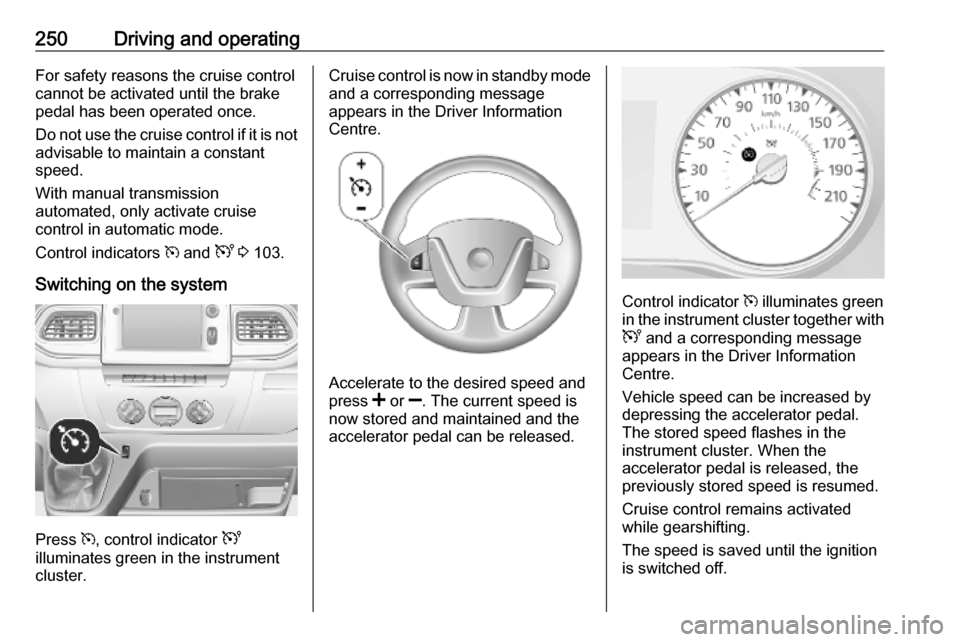
Switching on the system
Press m, control indicator U
illuminates green in the instrument
cluster.
Cruise control is now in standby mode
and a corresponding message
appears in the Driver Information
Centre.
Accelerate to the desired speed and
press < or ]. The current speed is
now stored and maintained and the
accelerator pedal can be released.
Control indicator m illuminates green
in the instrument cluster together with
U and a corresponding message
appears in the Driver Information
Centre.
Vehicle speed can be increased by
depressing the accelerator pedal.
The stored speed flashes in the
instrument cluster. When the
accelerator pedal is released, the
previously stored speed is resumed.
Cruise control remains activated
while gearshifting.
The speed is saved until the ignition
is switched off.
Page 253 of 353
Driving and operating251Increase speedWith cruise control active, the vehicle
speed can be increased continuously or in small increments by holding
down or tapping < repeatedly.
When the switch is released the
current speed is stored and
maintained.
Alternatively, accelerate to the
desired speed and store by pressing
< .
Reduce speed With cruise control active, the vehicle
speed can be decreased
continuously or in small increments
by holding down or tapping ]
repeatedly.
When the switch is released the
current speed is stored and
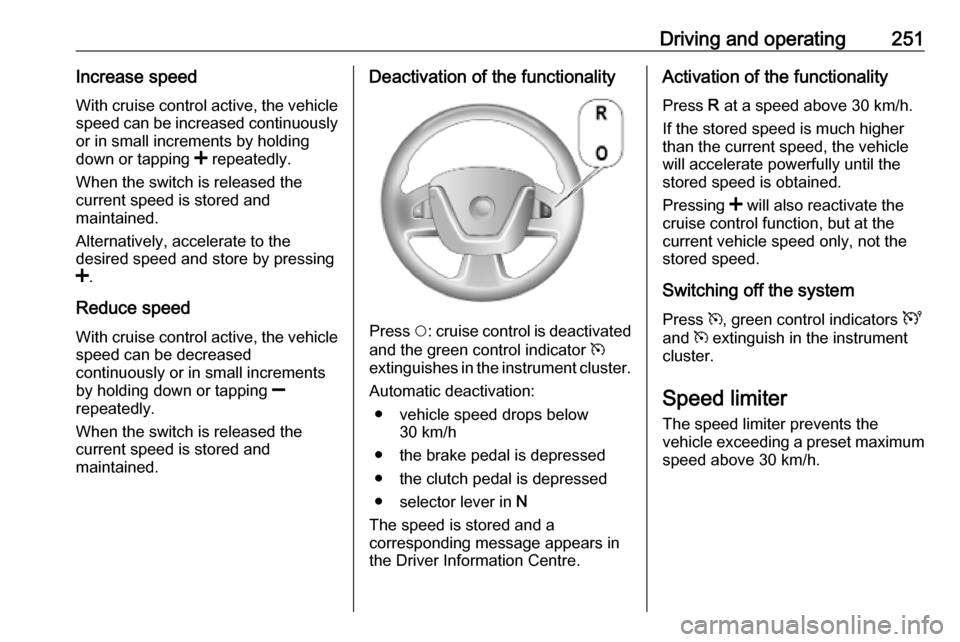
maintained.Deactivation of the functionality
Press $: cruise control is deactivated
and the green control indicator m
extinguishes in the instrument cluster.
Automatic deactivation: ● vehicle speed drops below 30 km/h
● the brake pedal is depressed
● the clutch pedal is depressed
● selector lever in N
The speed is stored and a
corresponding message appears in
the Driver Information Centre.
Activation of the functionality
Press R at a speed above 30 km/h.
If the stored speed is much higher
than the current speed, the vehicle
will accelerate powerfully until the
stored speed is obtained.
Pressing < will also reactivate the
cruise control function, but at the
current vehicle speed only, not the stored speed.
Switching off the system
Press m, green control indicators U
and m extinguish in the instrument
cluster.
Speed limiter
The speed limiter prevents the
vehicle exceeding a preset maximum
speed above 30 km/h.
Page 254 of 353
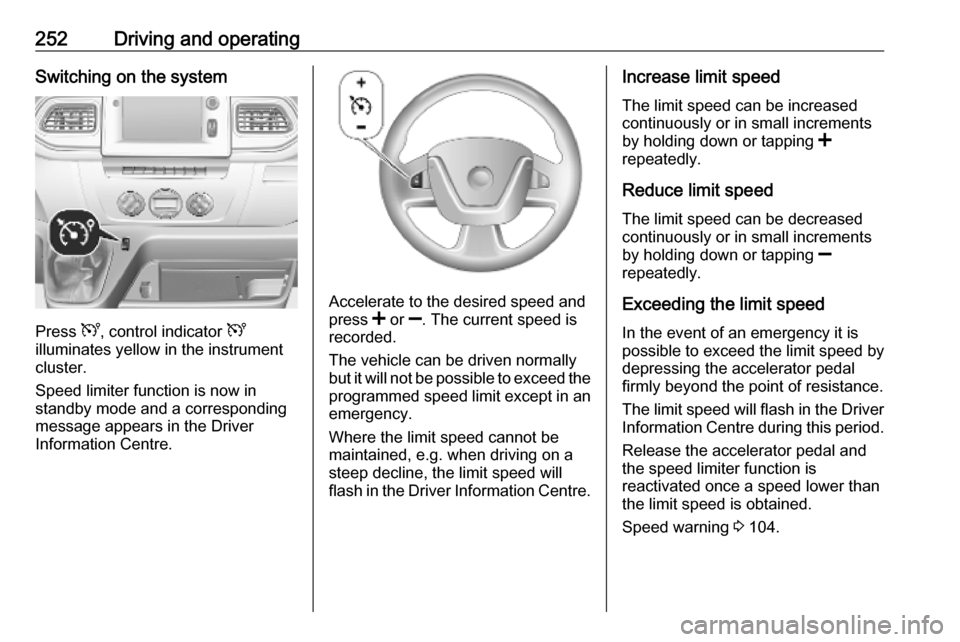
252Driving and operatingSwitching on the system
Press U, control indicator U
illuminates yellow in the instrument
cluster.
Speed limiter function is now in
standby mode and a corresponding
message appears in the Driver
Information Centre.
Accelerate to the desired speed and
press < or ]. The current speed is
recorded.
The vehicle can be driven normally
but it will not be possible to exceed the programmed speed limit except in an
emergency.
Where the limit speed cannot be
maintained, e.g. when driving on a
steep decline, the limit speed will
flash in the Driver Information Centre.
Increase limit speed
The limit speed can be increased
continuously or in small increments
by holding down or tapping <
repeatedly.
Reduce limit speed
The limit speed can be decreased continuously or in small increments
by holding down or tapping ]
repeatedly.
Exceeding the limit speed
In the event of an emergency it is
possible to exceed the limit speed by
depressing the accelerator pedal
firmly beyond the point of resistance.
The limit speed will flash in the Driver
Information Centre during this period.
Release the accelerator pedal andthe speed limiter function is
reactivated once a speed lower than
the limit speed is obtained.
Speed warning 3 104.
Page 255 of 353
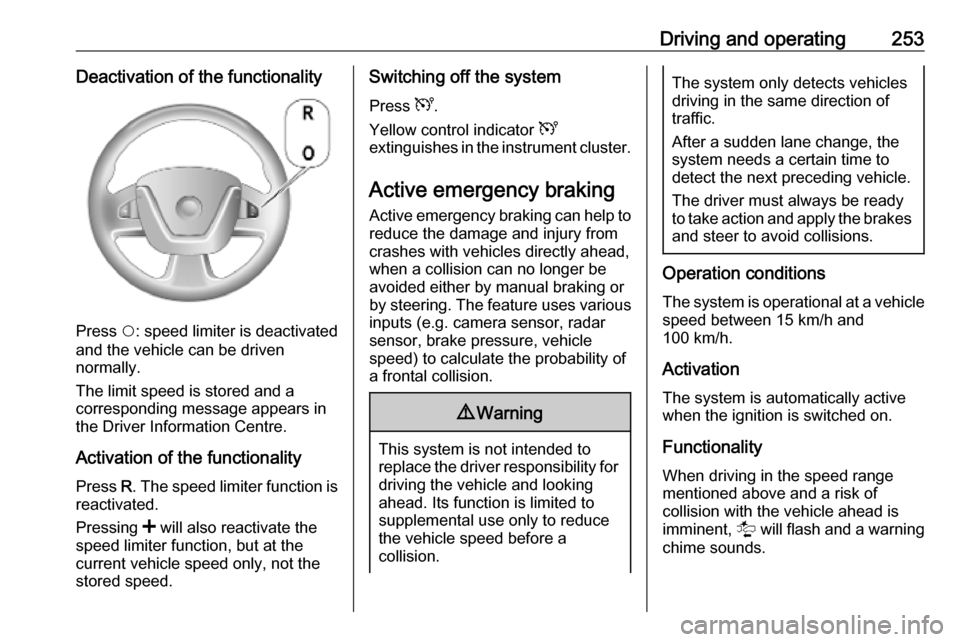
Driving and operating253Deactivation of the functionality
Press $: speed limiter is deactivated
and the vehicle can be driven
normally.
The limit speed is stored and a
corresponding message appears in
the Driver Information Centre.
Activation of the functionality Press R. The speed limiter function is
reactivated.
Pressing < will also reactivate the
speed limiter function, but at the
current vehicle speed only, not the
stored speed.
Switching off the system
Press U.
Yellow control indicator U
extinguishes in the instrument cluster.
Active emergency braking Active emergency braking can help toreduce the damage and injury from
crashes with vehicles directly ahead,
when a collision can no longer be
avoided either by manual braking or
by steering. The feature uses various
inputs (e.g. camera sensor, radar
sensor, brake pressure, vehicle
speed) to calculate the probability of
a frontal collision.9 Warning
This system is not intended to
replace the driver responsibility for driving the vehicle and looking
ahead. Its function is limited to
supplemental use only to reduce
the vehicle speed before a
collision.
The system only detects vehicles
driving in the same direction of
traffic.
After a sudden lane change, the
system needs a certain time to
detect the next preceding vehicle.
The driver must always be ready
to take action and apply the brakes and steer to avoid collisions.
Operation conditions
The system is operational at a vehicle
speed between 15 km/h and
100 km/h.
Activation The system is automatically activewhen the ignition is switched on.
Functionality
When driving in the speed range
mentioned above and a risk of
collision with the vehicle ahead is
imminent, l will flash and a warning
chime sounds.
Page 256 of 353
254Driving and operatingThe indicator light l and the chimes
stop when the system detects that a
collision is not imminent anymore.
Just before the imminent collision, the
system brakes automatically to
reduce the impact speed of the
collision or prohibit a crash.9 Warning
Do not rely on the system to brake
the vehicle. Active emergency
braking will not brake outside of its
operating speed range and only
responds to detected vehicles.
Deactivation and re-activation
Active emergency braking can be
deactivated with the vehicle
stationary and the ignition switched
on:
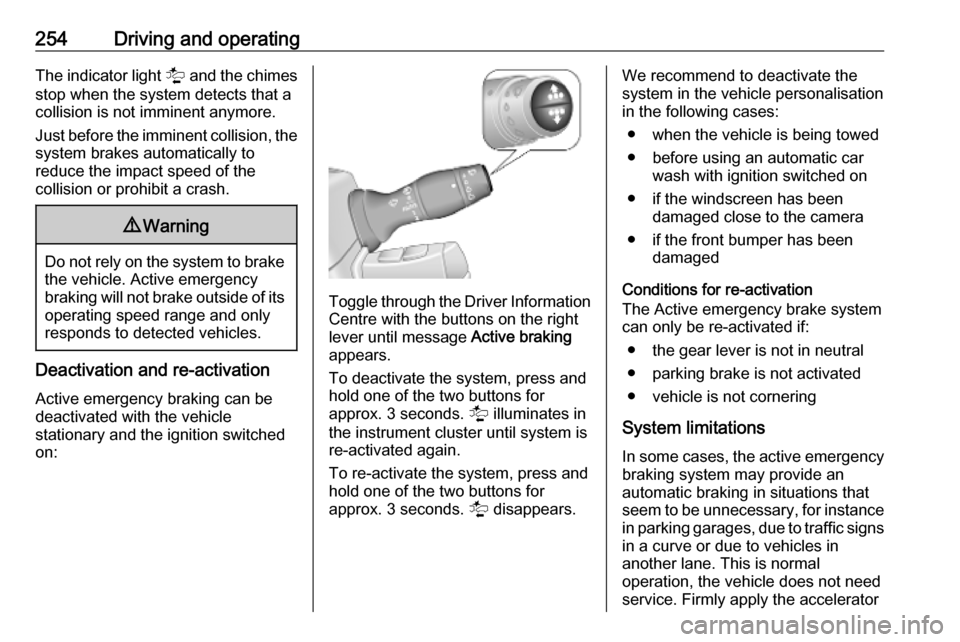
Toggle through the Driver Information
Centre with the buttons on the right
lever until message Active braking
appears.
To deactivate the system, press and
hold one of the two buttons for
approx. 3 seconds. l illuminates in
the instrument cluster until system is
re-activated again.
To re-activate the system, press and hold one of the two buttons for
approx. 3 seconds. l disappears.
We recommend to deactivate the
system in the vehicle personalisation
in the following cases:
● when the vehicle is being towed
● before using an automatic car wash with ignition switched on
● if the windscreen has been damaged close to the camera
● if the front bumper has been damaged
Conditions for re-activation
The Active emergency brake system
can only be re-activated if:
● the gear lever is not in neutral
● parking brake is not activated
● vehicle is not cornering
System limitations In some cases, the active emergency
braking system may provide an
automatic braking in situations that
seem to be unnecessary, for instance in parking garages, due to traffic signs
in a curve or due to vehicles in
another lane. This is normal
operation, the vehicle does not need
service. Firmly apply the accelerator
Page 261 of 353
Driving and operating259● driving on a winding road or asharp corner
● when passing or being passed by
a very long vehicle, e.g. lorry,
coach, which is at the same time
detected at the rear in the blind spot angle and present in the
driver's forward field of vision
● in very heavy traffic, vehicles detected in front and behind are
confused with a lorry or a
stationary object
● when passing too quickly
Fault
In the event of a fault, a
corresponding message will be
displayed in the instrument cluster.
Have the cause of the fault remedied
by a workshop.
Rear view camera The rear view camera assists the
driver when reversing by displaying a view of the area behind the vehicle in
either the interior mirror or the Info
Display.9 Warning
The rear view camera does not
replace driver vision. Note that
objects that are outside the
camera's field of view, e.g. below
the bumper or underneath the
vehicle, are not displayed.
Do not reverse the vehicle by only looking at the display and checkthe surrounding area behind and
around the vehicle before
reversing.
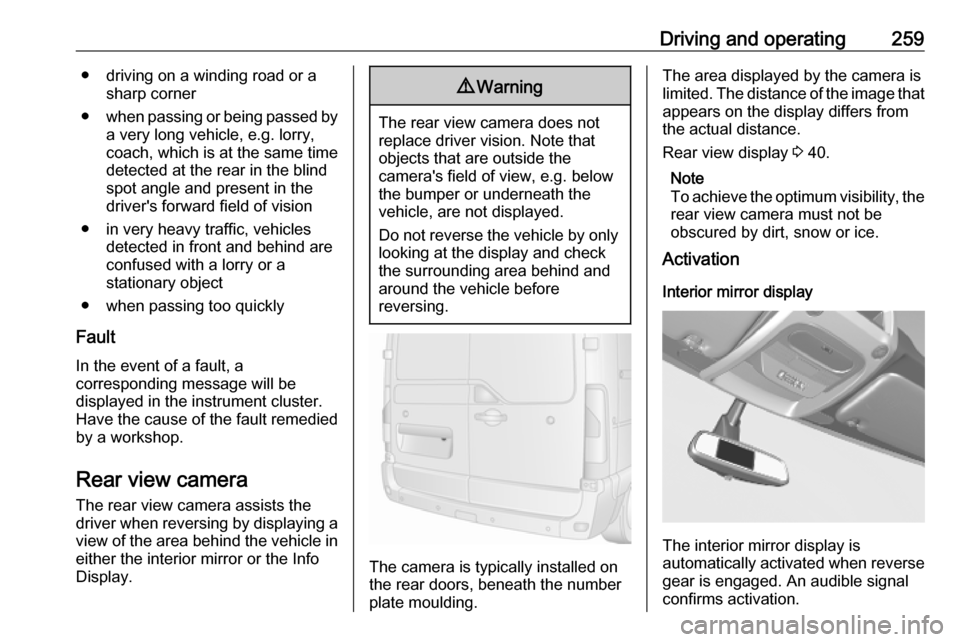
The camera is typically installed on
the rear doors, beneath the number
plate moulding.
The area displayed by the camera is
limited. The distance of the image that
appears on the display differs from
the actual distance.
Rear view display 3 40.
Note
To achieve the optimum visibility, the rear view camera must not be
obscured by dirt, snow or ice.
Activation
Interior mirror display
The interior mirror display is
automatically activated when reverse
gear is engaged. An audible signal
confirms activation.
Page 312 of 353

310Vehicle careUnderbody
Some areas of the vehicle underbody
have a PVC undercoating while other critical areas have a durable
protective wax coating.
After the underbody is washed, check
the underbody and have it waxed if
necessary.
Bitumen / rubber materials could
damage the PVC coating. Have
underbody work carried out by a
workshop.
Before and after winter, wash the
underbody and have the protective
wax coating checked.
Towing equipment
Do not clean the coupling ball bar with a steam-jet or high-pressure jet
cleaner.Interior care
Interior and upholstery Only clean the vehicle interior,
including the instrument panel fascia
and panelling, with a dry cloth or
interior cleaner.
Clean leather upholstery with clear
water and a soft cloth. In case of
heavy soiling, use leather care.
The instrument cluster and the
displays should only be cleaned using
a soft damp cloth. If necessary use a
weak soap solution.
Clean fabric upholstery with a
vacuum cleaner and brush. Remove
stains with an upholstery cleaner.
Clothing fabrics may not be
colourfast. This could cause visible discolourations, especially on light-
coloured upholstery. Removable
stains and discolourations should be
cleaned as soon as possible.
Clean seat belts with lukewarm water or interior cleaner.Caution
Close Velcro fasteners as open
Velcro fasteners on clothing could damage seat upholstery.
The same applies to clothing with
sharp-edged objects, like zips or
belts or studded jeans.
Plastic and rubber parts
Plastic and rubber parts can be
cleaned with the same cleaner as
used to clean the body. Use interior cleaner if necessary. Do not use any
other agent. Avoid solvents and petrol in particular. Do not use high-
pressure jet cleaners.
Page 347 of 353

345Functions during a telephone call201
Fuse box ..................... 286, 287, 288
Fuses ......................................... 285
G Gauges ......................................... 91
Gear shifting ............................... 100
General information ...118, 151,
153, 156, 164, 191, 193, 265
Glass panel .................................. 44 Glovebox ..................................... 74
Glovebox cooler ......................... 222
GPS (Global Positioning System) 164
Grab handles ................................ 76
Ground clearance .......................231
Guidance ................................... 183
H Hand brake - see Parking brake. 245
Handsfree phone system ...........201
Hazard warning flashers ............113
HD Traffic ................................... 166
Headlight flash ........................... 112
Headlight range adjustment ......112
Headlights .................. 110, 111, 278
Headlights when driving abroad 112
Head restraint adjustment .............8
Head restraints ............................ 45
Heated exterior mirrors .................16
Heated mirrors ............................. 39
Heated rear window ...............16, 43Heating ........................................ 52
Heating and ventilation system . 208
Help! ................................... 183, 191
High beam ......................... 103, 111
High beam assist ................103, 111
Hill start assist ........................... 246
Home address ............................ 177
Home location............................. 166
Horn ....................................... 15, 85
Hub cap hook ............................. 290
Hydraulic oil level........................ 333
I
i-Announcement ......................... 148
Identification plate .....................316
Idle speed control .......................228
Ignition switch positions .............226
Image settings ............................ 129
Image viewer .............................. 166
Immobiliser .................................. 38
Indicators ...................................... 91
Inductive charging ........................90
i-News service ............................ 148
Info Display ................................. 105
Information displays.................... 105
Information on the display ..136, 166
Infotainment controls ..................129
Infotainment system ...................105
Switching on/off .......................129
Initial drive information.................... 6Instrument cluster ........................91
Instrument panel controls ...........122
Instrument panel fuse box .........287
Instrument panel illumination .....285
Instrument panel overview ........... 11
Instrument panel storage ..............73
Interior care ............................... 310
Interior lighting ....................114, 339
Interior lights ...................... 114, 284
Interior mirrors .............................. 40
Interruption of power supply ......244
Intersection view .........................166
Introduction .................................... 3
iPod .................................... 153, 154
ISOFIX .......................................... 65
Isolation switch ........................... 330
i-Traffic service ........................... 148
J
Jack ............................................ 290
Jack plug .................................... 152
Journey record............................ 105
Jump starting ............................. 304
K Keyboards in the display ....166, 193
Keys ..................................... 20, 336
Keys, locks ................................... 20