ECU OPEL MOVANO_B 2020 Manual user
[x] Cancel search | Manufacturer: OPEL, Model Year: 2020, Model line: MOVANO_B, Model: OPEL MOVANO_B 2020Pages: 353, PDF Size: 9.4 MB
Page 84 of 353

82StorageRoof rack systemRoof rackFor safety reasons and to avoid
damage to the roof, the vehicle
approved roof rack system is
recommended.
Follow the installation instructions and remove the roof rack when not in
use.Loading information
● Heavy objects in the load compartment should be evenlydistributed and placed as far
forward as possible. If objects
can be stacked, the heavier
objects should be placed at the
bottom.
● Secure objects with lashing straps attached to lashing eyes
3 77.
● Secure objects into position or prevent loads from sliding
excessively by attaching optional cargo management features to
the load rails using removable
lashing eyes.
Cargo management system
3 78.
● Secure loose objects in load compartment to prevent them
from sliding.
● The load must not obstruct the operation of the pedals, parking
brake and gear selector lever, orhinder the freedom of movement
of the driver. Do not place any
unsecured objects in the interior.
● Do not drive with an open load compartment. In addition, the
number plate is only
distinguishable and illuminated correctly if the doors are closed.9 Warning
Always make sure that the load in
the vehicle is securely stowed.
Otherwise objects can be thrown
around inside the vehicle and
cause personal injury or damage
to the load or vehicle.
● The payload is the difference between the permitted gross
vehicle weight (see identification
plate 3 316) and the EC kerb
weight.
To calculate the payload, enter
the data for your vehicle in the
Weights table at the front of this
manual.
The EC kerb weight includes
weights for the driver (68 kg),
Page 85 of 353

Storage83luggage (7 kg) and all fluids (fuel
tank 90% full).
Optional equipment and
accessories increase the kerb
weight.
● Driving with a roof load increases
the sensitivity of the vehicle to
cross-winds and has a
detrimental effect on vehicle
handling due to the vehicle's
higher centre of gravity.
Distribute the load evenly and secure it properly with retaining
straps. Adjust the tyre pressure
and vehicle speed according to
the load conditions. Check and
retighten the straps frequently.
Do not drive faster than
120 km/h.
● The permissible roof load (which includes the weight of the roof
rack) is 200 kg for standard roof
variants. The roof load is the combined weight of the roof rack
and the load.
Page 122 of 353
120Infotainment systemWarnings and cautions9Warning
Text marked 9 Warning provides
information on risk of accident or
injury. Disregarding this
information may lead to injury.
Caution
Text marked Caution provides
information on possible damage to
the vehicle. Disregarding this
information may lead to vehicle
damage.
Symbols
Page references are indicated with 3.
3 means "see page".
Theft-deterrent feature
Depending on Infotainment system,
an electronic security system is
included for the purpose of theft
deterrence. The Infotainment system
functions only in your vehicle and is
therefore worthless to a thief.
The security code (supplied
separately) must be entered upon
first use of the system and after
prolonged interruptions to the power
supply.
Entering the security code
When first switching on the
Infotainment system, an enter
security code message, e.g. Radio
code followed by 0000 appears on the
display screen. Depending on
Infotainment system, the message
may only appear after a brief delay.
To enter first digit of security code,
press numbered button 1 on the unit
repeatedly until desired number is
displayed. Enter second, third and
fourth digits using buttons 2, 3 and 4
in the same way.
When the full code is displayed, press and hold button 6 until an audible
signal sounds. The system is
unlocked when the correct code has
been entered.
NAVI 50 IntelliLink,
NAVI 80 IntelliLink : Enter the security
code using numbered buttons 0 to 9on the touchscreen display. The
system is unlocked when the correct
code has been entered.
Incorrect code entered
Depending on Infotainment system,
when the security code has been
entered incorrectly, an incorrect code message, e.g. Error code followed by
a countdown value, e.g. Wait 100 is
displayed.
Wait until the countdown has expired, then enter the correct code. Each
time the code is entered incorrectly,
the countdown time may be doubled,
depending on Infotainment system.
Changing the geographical area When the security code is entered,
depending on Infotainment system it
will be necessary to choose a
geographical area, for example:
● Europe
● Asia
● Arabia
● America
Page 154 of 353

152Infotainment systemUsage
An audio source that is connected to the AUX input can only be operated
via the controls on the audio source,
i.e. not via the Infotainment system.
Only select a track directly on the
audio source when the vehicle is stationary.Caution
Before connecting or
disconnecting an auxiliary device,
e.g. a portable CD player, switch off the player and the Infotainment system, to avoid sound quality
issues and possible damage to the equipment.
Upon connection via the jack plug, thesystem detects the audio source
automatically. Depending on the
recording volume, there may be a
delay before the audio source is
heard.
The artist or track name are not
shown on the display screen.
Note
Ensure the auxiliary device is
securely stowed during driving.
Vehicle occupants could be injured
by objects being thrown around in
the event of hard braking, a sudden
change in direction or an accident.
Radio 15 USB
Press MEDIA to change the audio
source to AUX mode, then switch on
the auxiliary device. AUX appears on
the display screen.
AUX settings
Press SETUP to access the settings
menu.
Select AUX IN and turn OK until the
desired setting is selected from:
● HI (300 mV)
● MID (600 mV)
● LO (1200 mV)
NAVI 50 IntelliLink
To access the media menu at any
time, touch 7 followed by t/
ü MEDIA .To switch between auxiliary sources,
touch S in top left corner. The
following options are available:
● USB : Refer to
(NAVI 50 IntelliLink) "USB port"
3 153.
● iPod : Refer to
(NAVI 50 IntelliLink) "USB port" 3 153.
● BT: Refer to
(NAVI 50 IntelliLink) "Bluetooth music" 3 156.
● Video : Refer to
(NAVI 50 IntelliLink) "Video"
3 162.
● AUX : Select to change the audio
source to AUX mode, then switch
on the auxiliary device.
NAVI 80 IntelliLink
Change the audio source to AUX
mode to playback content from a
connected auxiliary device.
To access the media menu from the Home page, touch MENU then
Multimedia , followed by Media.
Page 167 of 353

Infotainment system165USB memory stick
(NAVI 50 IntelliLink)
A USB memory stick is required for the navigation system, to contain,
among other things, a digital map of
the towns and roads in your country.
Note
Use a USB memory stick, formatted to FAT32 format, with a minimum
4 GB and maximum 32 GB of
storage capacity.
After driving the first 100 km, it is
possible to check for free digital map
updates within a period of 90 days.
Note
To avoid possible technical issues,
only use a compatible USB memory
stick for operating and updating the
navigation system. Do not insert
USB memory stick in any other
device (e.g. digital camera, mobile
phone, etc.), or in another vehicle.
Software installation
To update the digital maps and to
benefit from exclusive downloadable
services, an account must be createdon the opel.naviextras.com website
and the free software must be
installed.Creating an account
Create your internet account via the
opel.naviextras.com website. Select
e.g., the "Register" option on the web
page and enter the appropriate
details.Installing the software
Install the software on your computer
by downloading from
opel.naviextras.com.
Follow the on-screen instructions to
install the software and launch the
online application.Registering the navigation system
The navigation system must be
registered with your new internet
account.
Insert an empty USB memory stick in the navigation system's USB slot.
Touch 7 then select ýNav , followed
by Options then Map update .To ensure all content is saved in the
navigation system's memory, select Options then Update . Wait for the
update to complete before ejecting the USB memory stick.
Then insert the USB memory stick in
your computer's USB slot while
connected to the Internet. When the
online application is launched and the
USB memory stick is recognised, the
system (or software) name appears in the application window. The
navigation system is registered into
your user profile.
After the initial set-up, the USB
memory stick is automatically
recognised by the navigation system
and by the online application.
Updating the USB memory stick and
navigation system
Updates are issued regularly, e.g. for
map and safety camera revisions.
Note
In certain countries it is illegal to
download and activate the camera
warning option and this could lead to prosecution.
Page 175 of 353

Infotainment system173Live servicesNAVI 80 IntelliLink
In addition to the navigation services
(e.g. traffic information, fixed speed
cameras), extra features can be
added by subscribing to LIVE
services.
LIVE services include up-to-date
traffic information with "HD Traffic™ ",
updates and locations of fixed and
mobile speed cameras, local search,
weather forecast and the "My
TomTom LIVE" subscription status.
Note
LIVE services are not available in
some countries or regions.
The first owner of the vehicle has to
activate this service within 14 days,
otherwise this service is disabled.
Touch Activate my services and then
accept the displayed terms and
conditions.
From the Home page, touch MENU
then Navigation , followed by
Navigation Services .The following menus are displayed:
● Traffic /HD Traffic
Select to receive up-to-date, real-
time traffic information.
Note
The HD Traffic service is named
Traffic if a subscription has not been
activated.
● Speed cameras
Displays alerts and location of
mobile speed cameras in real-
time, fixed speed cameras and accident blackspots.
Switch function off via the "Speed Cameras" menu in "LIVE
services", if required.
Report speed camera location, fixed or mobile.
Note
In certain countries it is illegal to
download and activate the camera warning option and this could lead to prosecution.
● Local search /TomTom places
This service allows you to use a keyword to quickly find any Pointof Interest (POI) and set it as a
destination.
● My TomTom LIVE
Displays expiry date of
subscribed services.
● Weather
The weather forecast service
provides up to five days of
weather reports for your current
location and your chosen
destination.
Setting up the navigation system
NAVI 50 IntelliLink
Touch 7 followed by yNAVI / ýNav
then Options . This menu screen
allows you to check and update the
following map and navigation
settings:
● Warnings
● Route settings
● Map settings
● Voice settings
● Coordinate format
● GPS
Page 221 of 353

Climate control219Depending on version, the auxiliary
heater can also be switched on for the
last duration time or the default
duration 30 minutes, or cut-off
immediately, using the button on the
instrument panel. The LED in the
button confirms operation.
Battery replacement Replace the battery when the range
of the remote control is reduced or
when the battery charge symbol
flashes.
Open the cover and replace the
battery (Type A: CR 2430, Type B:
2CR 11108, or equivalent), ensuring
the new battery is correctly installed
with the positive ( <) side facing the
positive terminals. Replace the cover
securely.
Dispose of old batteries in
accordance with environmental
regulations.Batteries do not belong in household
waste. They must be disposed of at
an appropriate recycling collection
point.
Operation (Type A)
Heating Y
Select Y in the menu bar and press
G to confirm. The predetermined
heating duration, e.g. L 30, flashes in
the display. The factory setting is 30 minutes.
Adjust the heating duration using k
or l and confirm. The value can be
set from 10 to 120 minutes. Due to the
power consumption, note the heating duration.
To switch off, select Y in the menu bar
again and press d.
Ventilation x
Select x in the menu bar and press
G to confirm.
Adjust the ventilation duration using k or l and confirm. The value can
be set from 10 to 120 minutes. Due to the power consumption, note the
heating duration.To switch off, select x in the menu bar
again and press d.
Programming P
Up to three preset departure times
can be programmed, either during
one day or over one week.
● Select P in the menu bar and
press G to confirm.
● Select desired preset memory number P1, P2 or P3 and
confirm.
● Select F and confirm.
● Select weekday or weekday group and confirm.
● Select hour and confirm.
● Select minutes and confirm.
● Select Y or x and confirm.
● Select ECO or HIGH and confirm.
● Select duration and confirm.
● Press d to exit.
Repeat the procedure to programme
the other preset memory numbers if
required.
Page 245 of 353

Driving and operating243warning may sound as a signal to
depress the brake pedal or apply the
parking brake.
Switch off engine if stopping for a lengthy period, e.g. in traffic jams.
When the vehicle is parked and the
driver's door is opened, a warning
chime will sound if neutral is not
selected or the brake pedal has not
been depressed.
Engine braking
Automatic mode
When driving downhill, the manual transmission automated does not shift into higher gears until a fairly
high engine speed has been reached. It shifts down in good time when
braking.
Manual mode
To utilise the engine braking effect, select a lower gear in good time when driving downhill.Rocking the vehicle
Rocking the vehicle is only
permissible if the vehicle is stuck in
sand, mud, snow or a hole. Move the
selector lever between R and D/M (or
between + and -) in a repeat pattern,
while applying light pressure to the
accelerator pedal. Do not race the
engine and avoid sudden
acceleration.
Parking
Apply the parking brake. The most recently engaged gear (see
transmission display) remains
engaged. With N, no gear is engaged.
When the ignition is switched off, the transmission no longer responds to
movement of the selector lever.
If the ignition is not switched off, or the parking brake has not been applied, a
warning chime will sound upon
opening the driver's door.
Manual mode If a higher gear is selected when the
engine speed is too low, or a lower
gear when the speed is too high, theshift is not executed. This prevents
the engine from running at too low or
too high an engine speed.
If engine speed is too low, the
transmission automatically shifts to a
lower gear.
If engine speed is too high, the
transmission only switches to a higher gear via kickdown.
Electronic driving programmes
Laden mode kg
Page 273 of 353
Vehicle care271
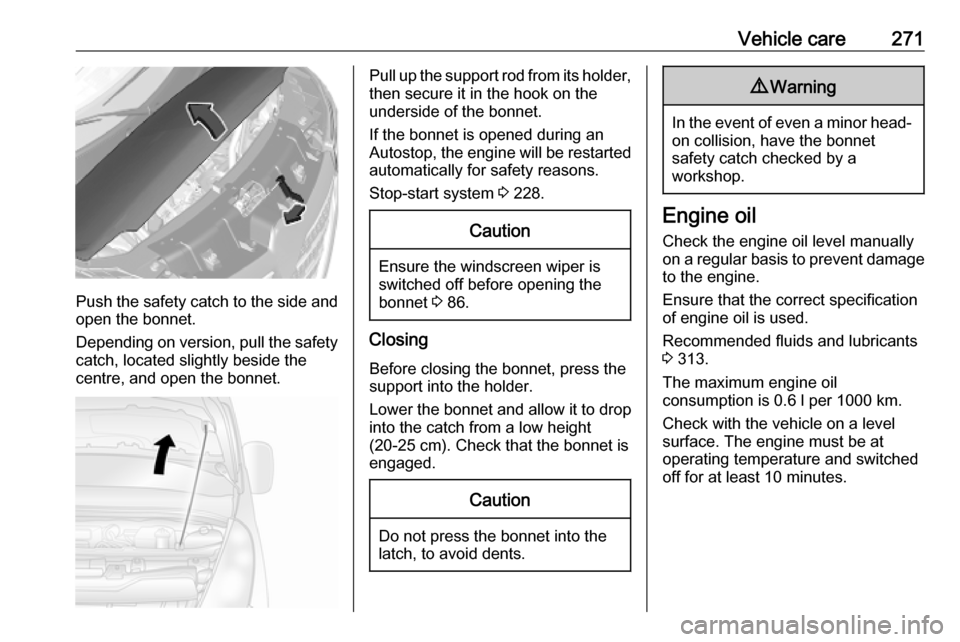
Push the safety catch to the side and
open the bonnet.
Depending on version, pull the safety catch, located slightly beside the
centre, and open the bonnet.
Pull up the support rod from its holder,
then secure it in the hook on the
underside of the bonnet.
If the bonnet is opened during an
Autostop, the engine will be restarted automatically for safety reasons.
Stop-start system 3 228.Caution
Ensure the windscreen wiper is
switched off before opening the
bonnet 3 86.
Closing
Before closing the bonnet, press the
support into the holder.
Lower the bonnet and allow it to drop into the catch from a low height
(20-25 cm). Check that the bonnet is
engaged.
Caution
Do not press the bonnet into the
latch, to avoid dents.
9 Warning
In the event of even a minor head-
on collision, have the bonnet
safety catch checked by a
workshop.
Engine oil
Check the engine oil level manually on a regular basis to prevent damage
to the engine.
Ensure that the correct specification
of engine oil is used.
Recommended fluids and lubricants
3 313.
The maximum engine oil
consumption is 0.6 l per 1000 km.
Check with the vehicle on a level
surface. The engine must be at
operating temperature and switched
off for at least 10 minutes.
Page 274 of 353
272Vehicle care
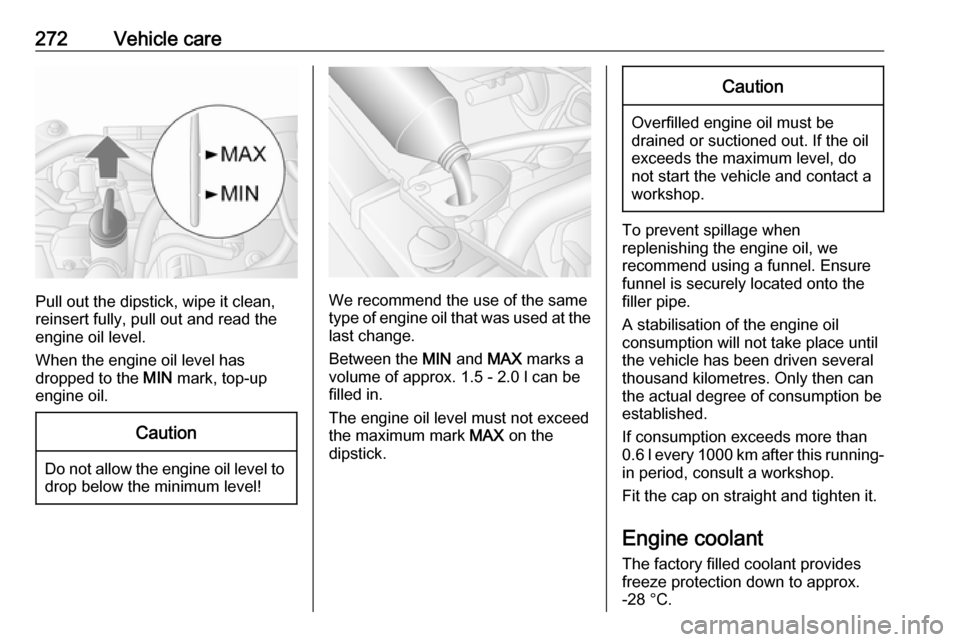
Pull out the dipstick, wipe it clean,
reinsert fully, pull out and read the
engine oil level.
When the engine oil level has
dropped to the MIN mark, top-up
engine oil.
Caution
Do not allow the engine oil level to drop below the minimum level!
We recommend the use of the same
type of engine oil that was used at the
last change.
Between the MIN and MAX marks a
volume of approx. 1.5 - 2.0 l can be
filled in.
The engine oil level must not exceed the maximum mark MAX on the
dipstick.
Caution
Overfilled engine oil must be
drained or suctioned out. If the oil exceeds the maximum level, do
not start the vehicle and contact a
workshop.
To prevent spillage when
replenishing the engine oil, we
recommend using a funnel. Ensure
funnel is securely located onto the
filler pipe.
A stabilisation of the engine oil
consumption will not take place until
the vehicle has been driven several
thousand kilometres. Only then can
the actual degree of consumption be
established.
If consumption exceeds more than
0.6 l every 1000 km after this running-
in period, consult a workshop.
Fit the cap on straight and tighten it.
Engine coolant
The factory filled coolant provides
freeze protection down to approx.
-28 °C.