audio OPEL MOVANO_B 2020 Manual user
[x] Cancel search | Manufacturer: OPEL, Model Year: 2020, Model line: MOVANO_B, Model: OPEL MOVANO_B 2020Pages: 353, PDF Size: 9.4 MB
Page 171 of 353
Infotainment system169
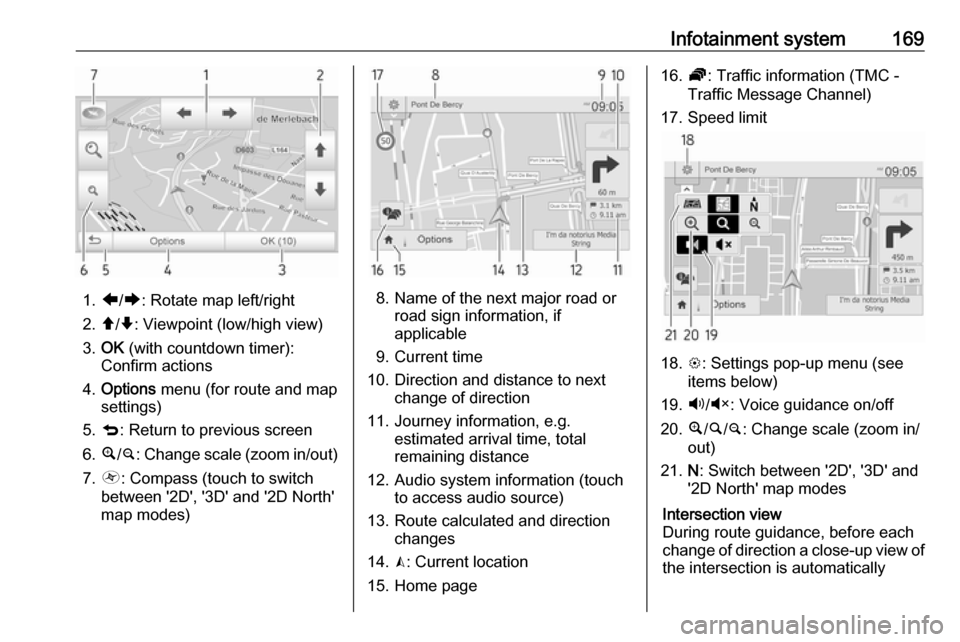
1.ä/å : Rotate map left/right
2. â/ã : Viewpoint (low/high view)
3. OK (with countdown timer):
Confirm actions
4. Options menu (for route and map
settings)
5. q : Return to previous screen
6. ¼/¾ : Change scale (zoom in/out)
7. Ô : Compass (touch to switch
between '2D', '3D' and '2D North' map modes)8. Name of the next major road or road sign information, if
applicable
9. Current time
10. Direction and distance to next change of direction
11. Journey information, e.g. estimated arrival time, total
remaining distance
12. Audio system information (touch to access audio source)
13. Route calculated and direction changes
14. K: Current location
15. Home page
16. Ö: Traffic information (TMC -
Traffic Message Channel)
17. Speed limit
18. L: Settings pop-up menu (see
items below)
19. Ù/Ú : Voice guidance on/off
20. ¼/½ /¾ : Change scale (zoom in/
out)
21. N: Switch between '2D', '3D' and
'2D North' map modes
Intersection view
During route guidance, before each
change of direction a close-up view of
the intersection is automatically
Page 174 of 353

172Infotainment system12.<: Pop-up menu
13. Direction and distance to next change of direction
14. Audio system information
15. K: Current location (cursor)
Route calculated and direction
changes
16. r: Return to previous screenLane images
During route guidance, before each
major road change, a 3D view of the
junction (with a turn arrow and road
signs) is automatically displayed. The
normal view is resumed after passing the junction.
To switch off the lane images view,
refer to (NAVI 80 IntelliLink)
"Advanced Settings" in "Setting up
the navigation system" below.Automatic zoom
During route guidance, before each
change of direction a close-up view of
the junction is automatically
displayed. The normal view is
resumed after passing the junction.To switch off the automatic zoom
feature, refer to (NAVI 80 IntelliLink)
"Advanced Settings" in "Setting up the navigation system" below.
Operating keyboards in the
display
NAVI 50 IntelliLink
To move within and to enter
characters in both the alphabetical and numerical keyboards, make the
appropriate selection by touching the
display screen.
● Select Options to change the
keyboard type (e.g. QWERTY,
ABC).
● Select 1^& to switch to numbers
and symbols.
● Select the drop down menu icon ó to display a list of results for the
current operation (e.g.
destination input).
● Entries can be corrected during input with the k keyboard
character.
● Touch r to stop using the
keyboard and return to the
previous screen.Note
When making an entry, certain
letters and numbers are unavailable for selection (greyed-out) based on
the information stored in the
navigation system.
For further information, refer to
"Touchscreen operation" 3 136.
NAVI 80 IntelliLink
To move within and to enter
characters in both the alphabetical and numerical keyboards, make the
appropriate selection by touching the
display screen.
● Entries can be corrected during input with the k keyboard
character.
● Touch r to stop using the
keyboard and return to the
previous screen.
For further information, refer to
"Touchscreen operation" 3 136.
Page 176 of 353

174Infotainment system●Map update
● Traffic (depending on version)Warnings
Select Warnings to access the
following settings (switch off if not
required):
● Warn when speeding (On/Off)
● Speed limit always visible (On/
Off)
● Alert point warnings (On/Off)
● Pre-alert distance (0 m/200 m/
500 m)
Available depending on version.
Warn when speeding : The digital map
contains speed limits for certain
roads. Audio and/or visual warnings
are given when the vehicle exceeds
the speed limit.
Speed limit always visible : The speed
limit for certain roads is always visible on the screen.
Alert point warnings : When the
vehicle passes an alert point
(permanent or temporary) - i.e. when
entering a hazardous section of road
requiring extra caution, or nearing aspeed camera location (depending on country) - audio and visual warnings
are given.
Pre-alert distance : Select a distance
from which notifications of alert point
warnings should be given.
Note
Warnings may not be available for
some roads and regions.Route settings
Select Route settings to update the
following settings for route
calculation:
● Route planning method (Fast/
Short/ECO)
● Motorways (On/Off)
● Period charge (On/Off)
● Per-use toll (On/Off)
● Ferries (On/Off)
● Carpool/HOV (On/Off)
● Unpaved roads (On/Off)
● Permits needed (On/Off)
(depending on version)If necessary, touch Options then
Reset to defaults to set each of these
options back to the factory default
settings.
Alternatively, when the map is
displayed (no route guidance is
active), the Route settings menu can
be accessed by touching Options.
Refer to (NAVI 50 IntelliLink)
"Information on the display", "Map
screen" above for further information.
Route planning method : Select Fast
to set the fastest route to the
destination entered. This method
assumes the vehicle travels at or near
the speed limit on all roads.
Select Short to set the shortest route
and minimise the total distance to
travel to the destination entered.
Select Eco to set a compromise
between the fastest and the shortest
route planning methods. The route
provided may be shorter than the
fastest method, but not significantly
slower.
Motorways : To include or exclude
motorways from the route plan.
Page 194 of 353

192Infotainment system● available functions anddescriptions
● conditions of use
NAVI 80 IntelliLink
The voice recognition function allows
to operate certain functions via voice
input, including:
● Navigation
Refer to "Navigation control" in
this section 3 192.
● Phone
Refer to "Phone control" in this section 3 193.
Press 5 on the column controls to
open the Voice control main menu.
After the tone, say the name of the
menu you wish to access.
When activated, the Voice control
main menu is displayed and the voice
recognition indicator in the top right
corner indicates system status and
optimisation levels:Green:optimal voice recognitionOrange:good voice recognitionRed:average voice recognitionMicrophone é:System is ready to
receive a voice
commandLoudspeaker
l:Voice instructions
are currently being
given by the systemLoading icon:Data currently
loading
Navigation control
NAVI 50 IntelliLink
Activating voice recognition
To activate the voice recognition
function during navigation:
Press 5 on the column controls; 5
appears, alongside the audio system
information, in the bottom right corner of the display.
Note
During use of the voice recognition
function, audio source playback is
interrupted.
For a guide to using voice commands,
refer to (NAVI 50 IntelliLink) "Help" in the "General information" section
3 191.
NAVI 80 IntelliLink
Activating voice recognition
To activate the voice recognition
function:
Press 5 on the column controls to
open the Voice control main menu.
After the tone, say " Destination" to
enter a new address. Say " Address"
then say the full destination of a new
address (number, street name,
destination town/city).
The address recognised by the
system is displayed. Confirm
destination when prompted to begin
guidance.
Alternatively, after the tone say
" Recent destinations " to access a list
of the most recent destinations
entered and select the desired
destination.
Page 233 of 353
Driving and operating231Restart of the engine by the stop-start system
If one of the conditions for an
Autostop is not fulfilled anymore or
the vehicle starts to move, the engine
may be restarted automatically by the
stop-start system.
An automatic engine restart may not
be possible if a door or the bonnet is
open.
If an electrical accessory, e.g. a
portable CD player, is connected to
the power outlet, a brief power drop
during restart might be noticeable.
If the Infotainment system is active,
audio sound may briefly be reduced
or interrupted during the restart.
Fault
If the LED illuminates in deactivation
button ) without first being pressed
to deactivate the system, there is a
fault in the stop-start system and it is
deactivated. A corresponding
message also appears in the Driver
Information Centre 3 105.
Seek the assistance of a workshop.Parking9 Warning
● Do not park the vehicle on an
easily ignitable surface. The
high temperature of the
exhaust system could ignite the
surface.
● Always apply parking brake without pressing release
button. Apply as firmly as
possible on a downhill slope or
uphill slope. Depress brake
pedal at the same time to
reduce operating force.
● Switch off the engine.
● If the vehicle is on a level surface or uphill slope, engage
first gear. On an uphill slope,
turn the front wheels away from
the kerb.
If the vehicle is on a downhill
slope, engage reverse gear.
Turn the front wheels towards the kerb.
● Close the windows.
● Turn the ignition key to position
0 and remove it. Turn the
steering wheel until the
steering wheel lock is felt to
engage.
Lock the vehicle 3 24 and activate the
anti-theft locking system 3 35 and
anti-theft alarm system 3 36.
Air suspension
Operates automatically when the
vehicle is driven. The air suspension
system constantly adjusts the ride
height according to the vehicle load.
Caution
To ensure safe operation of the air
suspension system, do not exceed the maximum permissible gross
vehicle weight rating. Refer to
identification plate 3 316 or the
vehicle documents.
Page 289 of 353
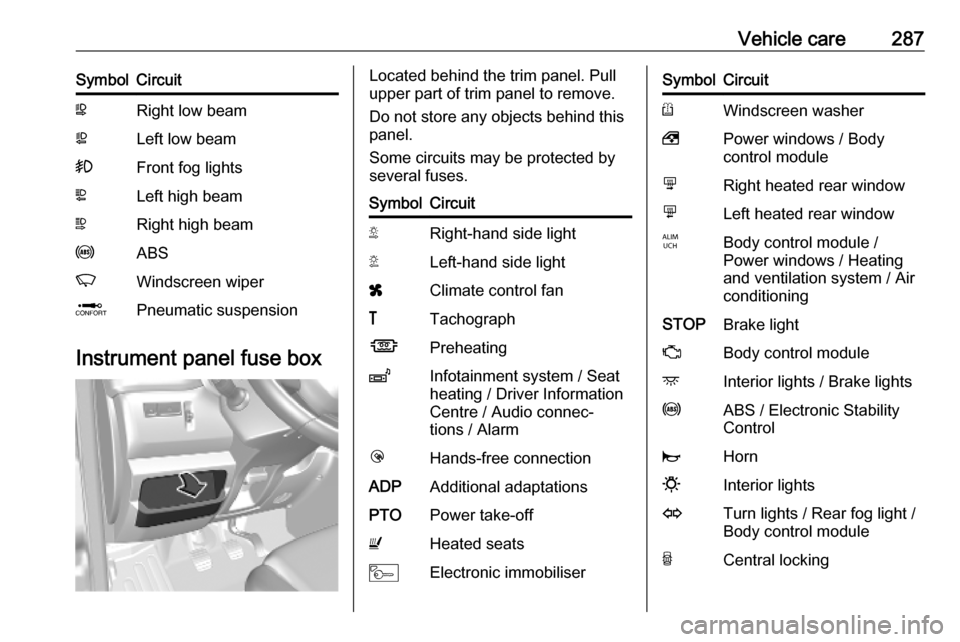
Vehicle care287SymbolCircuitWRight low beamaLeft low beam>Front fog lightsLLeft high beamNRight high beamuABSKWindscreen wiperQPneumatic suspension
Instrument panel fuse box
Located behind the trim panel. Pull
upper part of trim panel to remove.
Do not store any objects behind this
panel.
Some circuits may be protected by
several fuses.SymbolCircuitSRight-hand side lightTLeft-hand side lightxClimate control fan&TachographÍPreheatingZInfotainment system / Seat
heating / Driver Information
Centre / Audio connec‐
tions / AlarmlHands-free connectionADPAdditional adaptationsPTOPower take-offUHeated seatsMElectronic immobiliserSymbolCircuitRWindscreen washer,Power windows / Body
control modulenRight heated rear windowmLeft heated rear windowIBody control module /
Power windows / Heating
and ventilation system / Air
conditioningSTOPBrake lightZBody control moduledInterior lights / Brake lightsuABS / Electronic Stability
ControljHorn0Interior lightsOTurn lights / Rear fog light /
Body control moduleUCentral locking
Page 344 of 353

342IndexAAbsorptive Glass Mat battery .....274
Accessories and vehicle modifications .......................... 269
ACC files..................................... 153
Activating Bluetooth function ......197
Activating the navigation system 166
Activating voice recognition ........192
Active emergency braking ..104, 253
Adaptation volume km/h .............138
AdBlue ........................ 101, 234, 313
AdBlue gauge ............................... 93
AdBlue tank ................................ 317
Add a favourite destination .........177
Adding contacts to the phonebook .............................. 201
Adjustable air vents ...................221
AF (Alternative Frequency)......... 148
Airbag and belt tensioners ...........98
Airbag deactivation ................63, 98
Airbag label................................... 59 Airbag system .............................. 59
Air conditioning regular operation ................................ 223
Air conditioning system .............. 209
Air intake .................................... 223
Air suspension ........................... 231
Air suspension system................ 306
Air vents...................................... 221
Antifreeze ................................... 272Antilock brake system ................ 244
Antilock brake system (ABS) .....100
Anti-theft alarm system ................36
Anti-theft bolts............................. 299
Anti-theft locking system .............. 35
Anti-theft security lock ..................23
Appearance care ........................308
Armrest ........................................ 51
Ashtrays ....................................... 91
AST (Autostore list) ....................147
Audio players .............................. 129
Audio settings ............................. 137
Automatic call waiting .................201
Automatic light control ...............110
Automatic locking ...................24, 29
Automatic phone connection ......195
Automatic station search ............145
Automatic station storing ............147
Automatic switch-off ...................129
Automatic zoom .......................... 166
Autostop ....................... 18, 227, 228
Autostore lists ............................. 147
Auxiliary heater ........................... 216
AUX input ................................... 151
AUX input usage ........................152
Avoid part of route ......................183
B Balance....................................... 137
Bass............................................ 137
Page 345 of 353

343Battery.................... 21, 22, 216, 274
Battery discharge protection ......117
Battery, jump starting.................. 304
Battery replacement ...................166
Belts.............................................. 55 Bluetooth .................................... 193
Bluetooth connection ..........156, 197
Bluetooth device list ...................197
Bluetooth music .......................... 156
Bonnet ....................................... 270
Bottle holders................................ 74
Brake assist ............................... 246
Brake fluid .......................... 274, 313
Brakes ............................... 244, 274
Brake system ............................. 100
Breakdown.................................. 306
Browse map................................ 183
Bulb replacement ....................... 277
Bus Rear seats ................................. 52
C Cabin bulkhead grille ....................80
Call lists ...................................... 201
Call waiting ................................. 201
Capacities .................................. 317
Cargo management system ........78
Car Pass ...................................... 21
Catalytic converter .....................234
Central locking system ................24Centre high-mounted brake light 282
Change Home location ...............166
Change passkey for Bluetooth connection ............................... 197
Change system language ...129, 139
Changing tyre and wheel size ...295
Charging system .......................... 99
Child locks ................................... 29
Child restraint installation locations ................................... 67
Child restraints.............................. 65
Child restraint systems ........65, 339
Cigarette lighter ........................... 91
Cleaning ..................................... 334
Cleaning the vehicle ...................308
Climate control ............................. 16
Climate control systems .............208
Clock ................... 88, 129, 139, 166
Coat hooks ................................... 74
Compass .................................... 166
Connecting an audio device .......156
Connection ................................. 195
Control elements overview .........122
Control indicators.......................... 95
Control of the vehicle .................225
Controls ........................................ 85
Convex shape .............................. 38
Coolant ....................................... 272
Coolant and antifreeze ...............313
Coolant heater ............................ 216Co-ordinates....................... 166, 177
Country information ............183, 200
Cruise control ....................103, 249
Cupholders .................................. 74
D DAB ............................................ 151
Danger, Warnings and Cautions ...4
Dashboard .................................... 11
Data sharing settings ..................129
Daytime running lights ...............113
Daytime running lights setting ....129
Deactivating Bluetooth function ..197
Deactivating guidance ................183
Declaration of conformity ....319, 335
DEF ............................................ 234
Defining the priority phone .........195
Delete a favourite destination .....177
Delete device from Bluetooth device list ................................ 197
Demisting and defrosting ..............16
Destination.................................. 166
Destination input ........................177
Dialling a telephone number .......201
Diesel exhaust fluid ....................234
Diesel fuel ................................... 262
Diesel fuel system bleeding .......276
Diesel particle filter ....................233
Digital audio broadcasting ..........151
Disconnecting an audio device ...156
Page 349 of 353

347Oil pressure................................ 102
Onboard computer...................... 129
Operation ............................ 156, 201
Outside temperature ....................87
Overcab storage ..................76, 338
Overhead console .......................75
Overrun cut-off ........................... 228
P Pairing a mobile phone ...............197
Pairing an audio device ..............156
Park Assist.................................. 129
Parking ................................ 19, 231
Parking assist ............................ 255
Parking brake ..................... 100, 245
Parking distance control .............255
Parking ticket holder .....................43
Particulate filter ........................... 233
Pedals......................................... 225
Performing work ........................270
Phone ......................................... 193
Phonebook ................................. 201
Phone connection .......................195
Phone control ............................. 193
Phone controls............................ 193
Phone installation instructions ....207
Phone menu ............................... 201
Phone operating guidelines ........207
Phone projection ........................163
Phone settings ............................ 201Photos........................................ 161
Pictures....................................... 161
Planning preferences .................166
Playing movies ........................... 162
Playing music via Bluetooth .......156
Playing saved audio files ............154
POI categories ............................ 177
Points of interest .........................129
Points of Interest (POI) ...............177
POIs.................................... 129, 177
Portable CD players ...................152
Power door locks ..........................28
Power outlets ............................... 88
Power side step ............................ 30
Power sliding door ........................30
Power steering fluid ....................273
Power take-off ............................ 266
Power windows ............................ 41
Preheating ......................... 101, 227
Prepare route in advance ...........177
PTY (Program type).................... 148
Puncture ............................. 296, 299
Q
Quick menu ................................ 166
R
Radio .......................................... 144
DAB ......................................... 151
Digital Audio Broadcasting ......151
Radio controls............................. 144Radio data system (RDS) ..........148
Radio Frequency Identification (RFID) ..................................... 326
Radio functions ...................147, 148
Radio reception .......................... 144
Radio remote control ...................21
Radio station name search .........145
Radio text ................................... 148
Rain sensor .................................. 86
RDS ............................................ 148
REACH ....................................... 323
Reading lights ............................ 116
Rear air conditioning system .....215
Rear bench seat storage ..............75
Rear camera ............................... 129
Rear camera view settings .........129
Rear courtesy light...................... 114
Rear doors ................................... 33
Rear fog light .............103, 114, 280
Rear heating system .................. 213
Rear OFF.................................... 137
Rear reading light .......................116
Rear reversing lens ......................42
Rear seats ................................... 52
Bus ............................................ 52
Installing .................................... 52
Rear seat access ......................52
Removing .................................. 52
Rear storage ................................. 76
Rear view camera ...................... 259