infotainment OPEL MOVANO_B 2020 Manual user
[x] Cancel search | Manufacturer: OPEL, Model Year: 2020, Model line: MOVANO_B, Model: OPEL MOVANO_B 2020Pages: 353, PDF Size: 9.4 MB
Page 3 of 353

Introduction.................................... 2
In brief ............................................ 6
Keys, doors and windows ............20
Seats, restraints ........................... 45
Storage ........................................ 73
Instruments and controls .............84
Lighting ...................................... 110
Infotainment system ...................118
Climate control ........................... 208
Driving and operating .................224
Vehicle care ............................... 268
Service and maintenance ..........311
Technical data ........................... 315
Customer information ................319
Body conversions ......................327
Index .......................................... 342Contents
Page 14 of 353

12In brief1Side air vents ...................... 221
2 Light switch ........................ 110
Turn lights ........................... 113
Front / rear fog lights ..........113
Headlight flash ....................112
High beam ........................... 111
High beam assist ...............111
Exit lighting ......................... 116
3 Horn ..................................... 85
Driver airbag ......................... 62
4 Instruments .......................... 91
Driver Information Centre .... 105
5 Windscreen wiper and
washer, rear wiper and
washer ................................. 86
Buttons for Driver
Information Centre ..............105
6 Air vents ............................. 221
7 Info Display ........................ 105
8 USB socket, AUX socket,
SD card slot .......................... 88
9 Storage ................................. 7310Cupholder ............................. 74
11 Tray ....................................... 73
12 Glovebox .............................. 74
13 Parking assist ...................... 255
Lane departure warning ......261
Electronic Stability Control
and Traction Control ...........247
Hazard warning flashers ....113
Central locking system ..........24
Stop-start system ................228
Side blind spot alert ............257
ECO mode .......................... 225
14 Inductive charging .................90
15 Climate control system ........ 208
16 Power outlet .......................... 88
17 Cruise control .....................249
Speed limiter ....................... 251
18 Manual transmission ..........241
Manual transmission
automated .......................... 241
19 Ignition switch .....................22620Infotainment controls
21 Steering wheel adjustment ..85
22 Bonnet release lever ..........270
23 Fuse box ............................ 287
24 Headlight range
adjustment ......................... 112
25 Power take-off .....................266
Idle speed control ...............228
Laden mode kg ...................243
Page 87 of 353
Instruments and controls85Controls
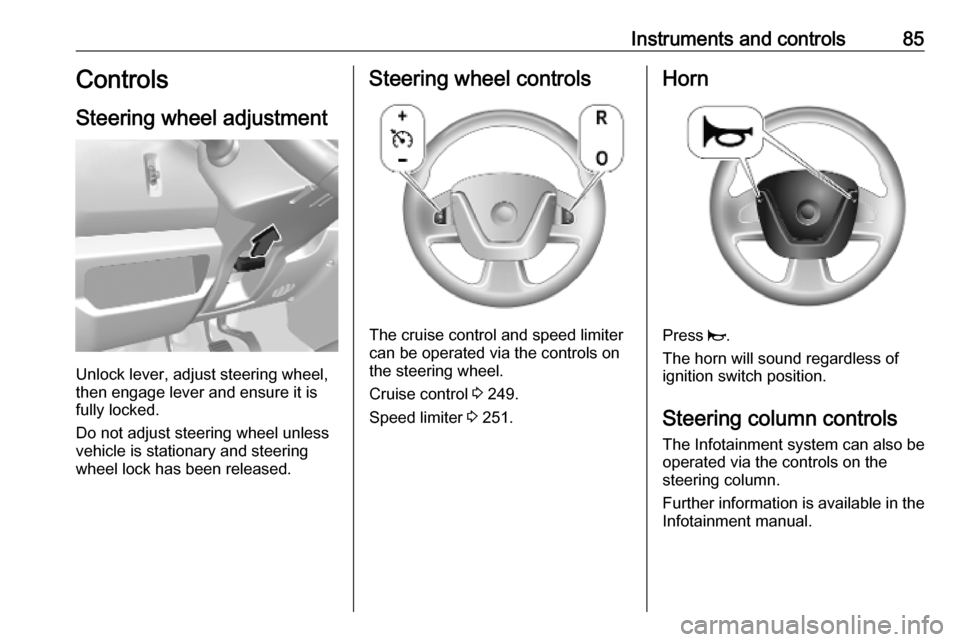
Steering wheel adjustment
Unlock lever, adjust steering wheel,
then engage lever and ensure it is
fully locked.
Do not adjust steering wheel unless
vehicle is stationary and steering
wheel lock has been released.
Steering wheel controls
The cruise control and speed limiter
can be operated via the controls on
the steering wheel.
Cruise control 3 249.
Speed limiter 3 251.
Horn
Press j.
The horn will sound regardless of
ignition switch position.
Steering column controls The Infotainment system can also be
operated via the controls on the
steering column.
Further information is available in the
Infotainment manual.
Page 90 of 353
88Instruments and controls9Warning
The road surface may already be
icy even though the display
indicates a few degrees above
0 °C.
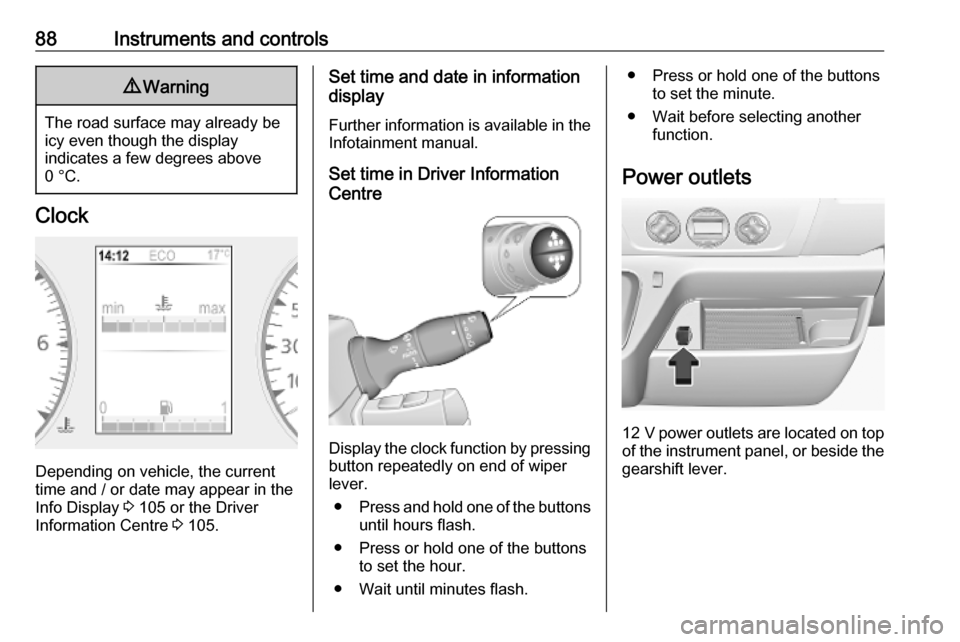
Clock
Depending on vehicle, the current
time and / or date may appear in the
Info Display 3 105 or the Driver
Information Centre 3 105.
Set time and date in information
display
Further information is available in the
Infotainment manual.
Set time in Driver Information
Centre
Display the clock function by pressing button repeatedly on end of wiper
lever.
● Press and hold one of the buttons
until hours flash.
● Press or hold one of the buttons to set the hour.
● Wait until minutes flash.
● Press or hold one of the buttons to set the minute.
● Wait before selecting another function.
Power outlets
12 V power outlets are located on top
of the instrument panel, or beside the gearshift lever.
Page 91 of 353
Instruments and controls89
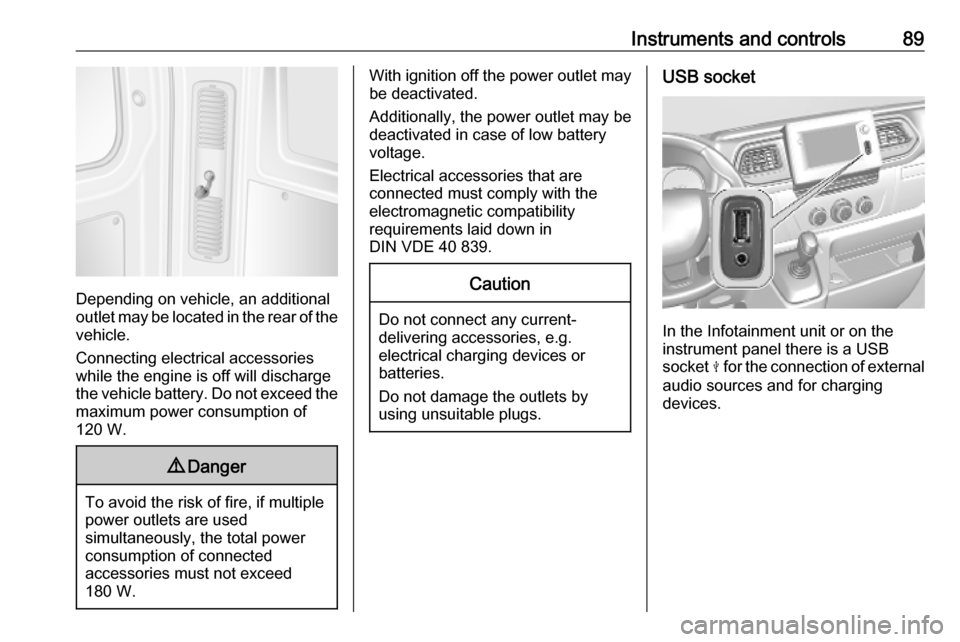
Depending on vehicle, an additional
outlet may be located in the rear of the
vehicle.
Connecting electrical accessories
while the engine is off will discharge
the vehicle battery. Do not exceed the
maximum power consumption of
120 W.
9 Danger
To avoid the risk of fire, if multiple
power outlets are used
simultaneously, the total power
consumption of connected
accessories must not exceed
180 W.
With ignition off the power outlet may
be deactivated.
Additionally, the power outlet may be
deactivated in case of low battery
voltage.
Electrical accessories that are
connected must comply with the
electromagnetic compatibility
requirements laid down in
DIN VDE 40 839.Caution
Do not connect any current- delivering accessories, e.g.
electrical charging devices or
batteries.
Do not damage the outlets by
using unsuitable plugs.
USB socket
In the Infotainment unit or on the
instrument panel there is a USB
socket M for the connection of external
audio sources and for charging
devices.
Page 92 of 353
90Instruments and controls
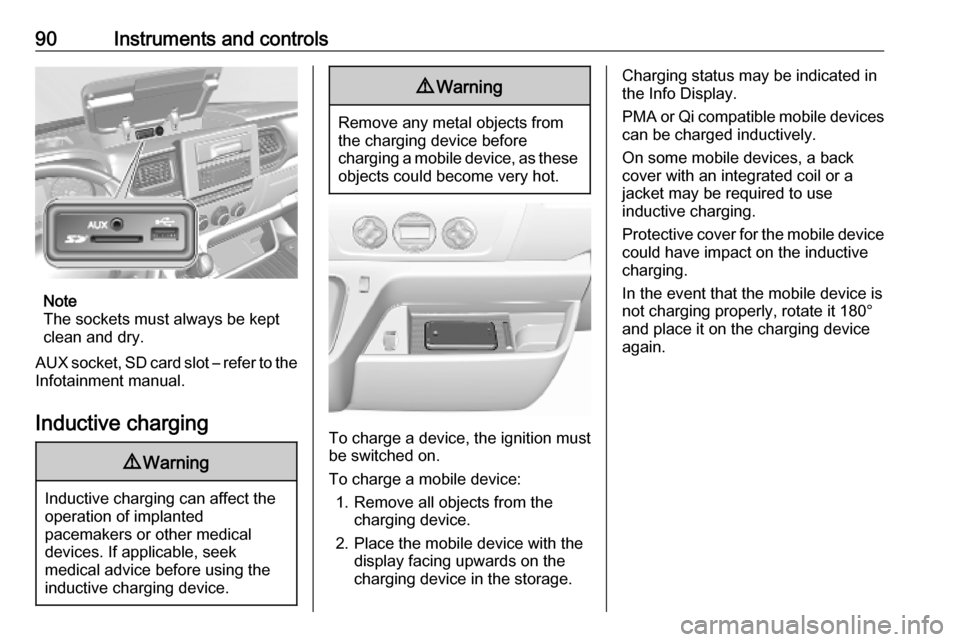
Note
The sockets must always be kept
clean and dry.
AUX socket, SD card slot – refer to the Infotainment manual.
Inductive charging
9 Warning
Inductive charging can affect the
operation of implanted
pacemakers or other medical
devices. If applicable, seek
medical advice before using the
inductive charging device.
9 Warning
Remove any metal objects from
the charging device before
charging a mobile device, as these objects could become very hot.
To charge a device, the ignition must
be switched on.
To charge a mobile device: 1. Remove all objects from the charging device.
2. Place the mobile device with the display facing upwards on the
charging device in the storage.
Charging status may be indicated in
the Info Display.
PMA or Qi compatible mobile devices can be charged inductively.
On some mobile devices, a back
cover with an integrated coil or a
jacket may be required to use
inductive charging.
Protective cover for the mobile device
could have impact on the inductive
charging.
In the event that the mobile device is
not charging properly, rotate it 180°
and place it on the charging device
again.
Page 107 of 353
Instruments and controls105Displays
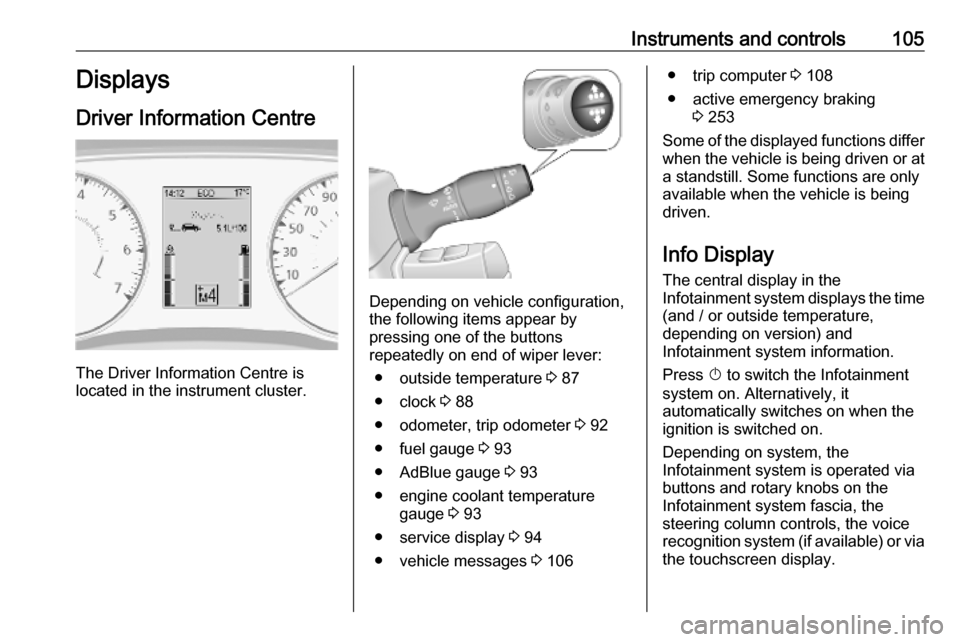
Driver Information Centre
The Driver Information Centre is
located in the instrument cluster.
Depending on vehicle configuration,
the following items appear by
pressing one of the buttons
repeatedly on end of wiper lever:
● outside temperature 3 87
● clock 3 88
● odometer, trip odometer 3 92
● fuel gauge 3 93
● AdBlue gauge 3 93
● engine coolant temperature gauge 3 93
● service display 3 94
● vehicle messages 3 106
● trip computer 3 108
● active emergency braking 3 253
Some of the displayed functions differ
when the vehicle is being driven or at a standstill. Some functions are only
available when the vehicle is being
driven.
Info Display The central display in the
Infotainment system displays the time
(and / or outside temperature,
depending on version) and
Infotainment system information.
Press X to switch the Infotainment
system on. Alternatively, it automatically switches on when the
ignition is switched on.
Depending on system, the
Infotainment system is operated via buttons and rotary knobs on the
Infotainment system fascia, the
steering column controls, the voice
recognition system (if available) or via the touchscreen display.
Page 108 of 353

106Instruments and controlsTouchscreen operationMake the appropriate selection from
the available menus and options by
touching the display screen with the
finger.
For further information, refer to the
Infotainment system manual.
Journey record
When the engine is switched off, a
record of the last journey may be
shown in the Info Display.
The following information is
displayed:
● average fuel consumption
● trip odometer
● fuel saved in km
If equipped, a rating of 0 to 100 is
shown in the Info Display, to help
evaluate fuel efficiency, based on
driving style. Higher ratings indicate
better fuel economy.
Tips to improve fuel economy are also given in the display. Journeys can be
saved in the system memory,enabling to compare performances. Refer to Infotainment manual for
further information.Vehicle messages
Messages are indicated in the Driver
Information Centre, in some cases
together with a warning chime. The
vehicle messages are displayed as
text. Follow the instructions given in
the messages.
Fault messages Displayed in combination with control indicator j. Drive with caution and
seek the assistance of a workshop.
To remove fault message, press a
button on end of wiper lever. After a
few seconds the message may
disappear automatically and j
remains illuminated. The fault will
then be stored in the on board
system.
Warning messages These may appear with control
indicator C or in combination with
other warning messages, control
indicators or an audible warning. Stop
engine immediately and seek the
assistance of a workshop.
Page 113 of 353
Lighting111Automatic headlight activation
During poor lighting conditions the
headlights are switched on.
Additionally, headlights are switched
on if the windscreen wiper has been
activated for several wipes.
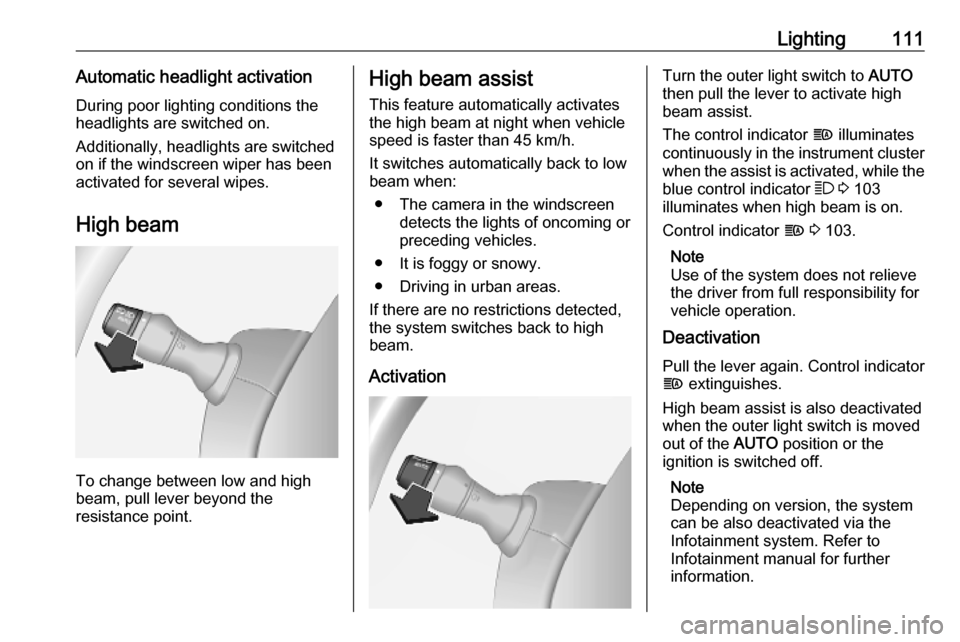
High beam
To change between low and high
beam, pull lever beyond the
resistance point.
High beam assist
This feature automatically activates
the high beam at night when vehicle
speed is faster than 45 km/h.
It switches automatically back to low
beam when:
● The camera in the windscreen detects the lights of oncoming or
preceding vehicles.
● It is foggy or snowy.
● Driving in urban areas.
If there are no restrictions detected, the system switches back to high
beam.
ActivationTurn the outer light switch to AUTO
then pull the lever to activate high
beam assist.
The control indicator f illuminates
continuously in the instrument cluster when the assist is activated, while the
blue control indicator 7 3 103
illuminates when high beam is on.
Control indicator f 3 103.
Note
Use of the system does not relieve
the driver from full responsibility for
vehicle operation.
Deactivation
Pull the lever again. Control indicator
f extinguishes.
High beam assist is also deactivated when the outer light switch is moved
out of the AUTO position or the
ignition is switched off.
Note
Depending on version, the system
can be also deactivated via the
Infotainment system. Refer to
Infotainment manual for further
information.
Page 120 of 353

118Infotainment systemInfotainment systemIntroduction................................ 118
General information .................118
Theft-deterrent feature ............120
Control elements overview ......122
Usage ...................................... 129
Touch operation overview .......136
Tone settings ........................... 137
Volume settings .......................138
System settings .......................139
Radio ......................................... 144
Usage ...................................... 144
Station search ......................... 145
Autostore lists .......................... 147
Radio data system (RDS) ........148
Digital audio broadcasting .......151
AUX input ................................... 151
General information .................151
Usage ...................................... 152
USB port .................................... 153
General information .................153
Playing saved audio files .........154
Bluetooth music .........................156
General information .................156
Operation ................................. 156External devices........................161
Displaying pictures ..................161
Playing movies ........................ 162
Using smartphone applications ............................ 163
Navigation .................................. 164
General information .................164
Usage ...................................... 166
Destination input ......................177
Guidance ................................. 183
Symbols overview ...................190
Voice recognition .......................191
General information .................191
Navigation control ....................192
Phone control .......................... 193
Phone ........................................ 193
General information .................193
Connection .............................. 195
Bluetooth connection ...............197
Emergency call ........................200
Operation ................................. 201
Mobile phones and CB radio equipment ............................... 207Introduction
General information
The Infotainment system provides
state-of-the-art in-car information and
entertainment.
The radio is equipped with assignable channel presets for FM, AM and also
DAB wavebands (depending on
version).
External data storage devices, e.g.
iPod, MP3 player or USB stick, or a
portable player can be connected to
the Infotainment system. External
audio sources can also be connected
via Bluetooth.
The digital sound processor provides
several preset equalizer modes for
sound optimisation.
The navigation system's dynamic
route planning will reliably guide to
the chosen destination and can help
avoid traffic jams and other traffic
problems.
Optionally, the Infotainment system
can be operated using controls on the steering column or via the voice
recognition system.