USB OPEL VIVARO B 2017 Infotainment system
[x] Cancel search | Manufacturer: OPEL, Model Year: 2017, Model line: VIVARO B, Model: OPEL VIVARO B 2017Pages: 129, PDF Size: 1.96 MB
Page 40 of 129

40IntroductionSelecting or activating a screenbutton or menu item
Touch a screen button or menu item. ● A short touch activates the selected item.
● Touch and hold to save a selected item.
The corresponding system function is activated, a message is shown, or a
submenu with further options is
displayed.
Note
In subsequent chapters, the
operating steps for selecting and
activating a screen button or menu
item via the touch screen will be
described as "...select
Scrolling lists
If there are more items available than
presentable on the screen, the list
must be scrolled.
To scroll through a list of menu items, touch S or R at the top and at the
bottom of the scroll bar.Touch and hold S or R to fast scroll
through a list.
Note
In subsequent chapters, the
operating steps for scrolling to a list
item via the touch screen will be described as "...scroll to
Scrolling within a map
Touch anywhere on the map. The
cursor indicates the current position.
To scroll within the map, drag the map
in the required direction.
Note
Constant pressure must be applied
and the finger must be moved at
constant speed.
Tone settings
R15 BT USB, R16 BT USB,
CD16 BT USB, CD18 BT USB -
Tone settings
In the audio settings menu, the tone characteristics can be set.
Press SETUP to access the settings
menu.Select Audio settings , then Sound
and turn OK until the desired setting
is selected from:
● BASS (bass)
● TREBLE (treble)
● FADER (front/rear balance)
● BALANCE (left/right balance)
The display indicates the type of
setting followed by the adjustment
value.
Set the desired value by turning OK
and press the knob to confirm
selections.
To exit the audio settings menu,
press /.
Note
If there is no activity, the system will
exit the audio settings menu
automatically.
Setting bass and treble
Select Bass or Treble .
Set the desired value by turning OK
and press the knob to confirm setting.
Depending on version,
BASS BOOST setting is also
available.
Page 42 of 129

42IntroductionNAVI 80 IntelliLink - Tone settingsRefer to (NAVI 80 IntelliLink) "System
settings" 3 43.
Volume settings
R15 BT USB, R16 BT USB,
CD16 BT USB, CD18 BT USB -
Volume settings
Press SETUP to access the settings
menu.
Select Audio settings , then Speed
vol. and turn OK until the desired
setting is selected.
NAVI 50 IntelliLink - Volume
settings
To access the settings menu at any
time, touch 7 followed by
ÿ Setting(s) .The following settings submenus are
displayed:
● Audio
See "Audio settings" below.
● Display
Refer to (NAVI 50 IntelliLink)
"System settings" 3 43.
● Bluetooth
Refer to (NAVI 50 IntelliLink)
"System settings" 3 43.
● System
Refer to (NAVI 50 IntelliLink)
"System settings" 3 43.Audio settings
Select Audio to display the following
options:
● Vol/Speed (Off/1/2/3/4/5)
The volume increases when
vehicle speed increases, to
compensate for wind and road
noise.
Speed compensated volume can
be switched off or the degree of
volume adaptation can be set.● Loudness (On/Off)
Switch loudness on to increase
bass and treble levels.
● BAL/FAD
Refer to (NAVI 50 IntelliLink)
"Tone settings" 3 40.
● Sound
Touch l to open the audio
preferences submenu.
Depending on version, the
volume of different audio types
can be set independently, e.g.
audio, traffic announcements,
navigation instructions,
handsfree phone system and
ringtone levels. Touch ]/< to
adjust volume of each audio type.
If required, touch Reset to
defaults to return all volumes to
the factory settings.
For other versions of the sound
submenu, refer to
(NAVI 50 IntelliLink) "Tone
settings" 3 40.
Page 43 of 129

Introduction43NAVI 80 IntelliLink - Volume
settings
Refer to (NAVI 80 IntelliLink) "System settings" 3 43.
System settings R15 BT USB, R16 BT USB,
CD16 BT USB, CD18 BT USB -
System settings
Press SETUP and access the
settings menu by turning and
pressing OK.
When system setting adjustments have been made, press SETUP to
exit the menu and save changes. The system also saves and exits
automatically after a delay.Set clock
To set the system clock and the time
display format, select Clock. Select
the required setting by turning and
pressing OK.Change system language
Change the display language by accessing the Language menu.
Select a language from the list by turning and pressing OK.Restore default system settings
To restore system settings to their
default values, select Default
settings by turning and pressing OK.
Confirm modification when prompted
by pressing OK again.
NAVI 50 IntelliLink - System
settings
To access the settings menu at any time, touch 7 followed by
ÿ Setting(s) .
The following settings submenus are displayed:
● Audio :
Refer to (NAVI 50 IntelliLink) "Tone settings" 3 40 and
"Volume settings" 3 42.
● Display : See below.
● Bluetooth : See below.
● System : See below.
Display
Select Display to display the following
options:
● Brightness (Low/Mid/High)
● Map mode (Auto/Day/Night)
● Auto : Day and night mode
are changed automatically.
● Day : The map screen is
always displayed with bright colours.
● Night : The map screen is
always displayed with dark
colours.
● Background (Dark/Light)
Available depending on version. Switch between a dark or light
display mode (available
depending on vehicle).Bluetooth
Select Bluetooth to display the
following options:
● View Bluetooth device list
● Search for Bluetooth device
● External device authorisation
Page 48 of 129

48RadioRadioUsage.......................................... 48
Station search .............................. 50
Autostore lists .............................. 52
Radio data system (RDS) ............53
Digital audio broadcasting ...........55Usage
Radio reception Radio reception may be disrupted by
static, noise, distortion or loss of
reception due to:
● changes in distance from the transmitter
● multi-path reception due to reflection
● shadowing
R15 BT USB, R16 BT USB,
CD16 BT USB, CD18 BT USB -
Controls
The most important buttons for
control of the radio are:
● RADIO : Activate radio, change
waveband
● 2 3 : Station search
● OK: Change frequency
● Station buttons 1...6: Preset station buttons●SETUP : System settings,
automatic station storing
● TEXT : Display radio text
information
Activating the radio
Press RADIO to switch the audio
source to radio.
The station previously selected will be
received.
Selecting the waveband
Press RADIO repeatedly to switch
between the available wavebands (e.g. FM1, FM2, AM).
The station previously selected in that waveband will be received.
NAVI 50 IntelliLink - Controls Use the touchscreen to operate the
radio.
The main controls are: ● FM/AM /DAB (depending on
version): Switch between FM and
AM wavebands.
● l/m : Start automatic search
for next/previous radio station.
Page 50 of 129

50RadioNote
Radio stations without RDS: Only
the frequency is displayed. These
stations appear at the end of the list.
● Frequency :
Search manually or automatically by scanning the selected range
of frequencies.
Selecting the waveband
Touch FM/AM /DR tab in top left
corner of the display to switch
between wavebands.
The station previously selected in that waveband will be received.
Station search Automatic station search
R15 BT USB, R16 BT USB,
CD16 BT USB, CD18 BT USB -
Automatic station search
Briefly press 2 or 3 to search for
the next receivable station in the
current waveband.
If no station is found, automatic
searching continues until 2 or 3 is
pressed again.NAVI 50 IntelliLink - Automatic station
search
Touch l or m to search for the next
receivable station in the current
waveband.
If no station is found, automatic
searching continues until l or m is
touched again.
NAVI 80 IntelliLink - Automatic station
search
Touch Y or Z to search for the next
receivable station in the current
waveband.
If no station is found, automatic
searching continues until Y or Z is
touched again.
Manual station search
R15 BT USB, R16 BT USB,
CD16 BT USB, CD18 BT USB -
Manual station search
Select the desired waveband then
press and hold 2 or 3 to scan the
selected waveband.Release the button when close to the
required frequency. An automatic
search is then made for the next
receivable station and it is played
automatically.
Turn OK to change the frequency in
increments.Stored station search
This allows you to recall radio stations that you have previously stored.
To store a station, select the desired
waveband and station then press
station button 1...6 until an audible
signal sounds, confirming that the
station has been stored to the
appropriate station button. Six
stations per waveband can be stored.Recalling a stored station
To recall a station, select the desired
waveband then briefly press station
button 1...6.Search radio station name (FM only)
Select the FM waveband then
highlight the station name in the
display using _ or 6.
Page 52 of 129

52RadioRecalling a stored station
To recall a station, select the desired
waveband then touch Preset to
display the stored favourites, then
select the desired favourite radio station.Search radio station name (FM only)
Select the FM waveband then touch
List to display an alphabetical list of
available radio stations.
Touch ↑/ 4 or ↓/ 1 to manually search
for the required station name. The
frequency may be displayed instead
if the station name is unavailable.
The alphabetical list contains up to
50 radio stations with the best
reception. This list can be updated at
any time, refer to "Autostore lists"
3 52.
Autostore lists
The stations with the best reception in
a waveband can be searched for and
stored automatically via the autostore
function.
Automatic station storing
R15 BT USB, R16 BT USB,
CD16 BT USB, CD18 BT USB -
Automatic station storing
The FM waveband has an autostore
list (AST), on which six stations can
be stored.
While listening to the radio, press and hold RADIO : The six stations with the
strongest reception will be
automatically stored on AST.
Note
Due to signal strength, it is possible
that less than six stations will be
stored.
Recalling a station
R15 BT USB, R16 BT USB,
CD16 BT USB, CD18 BT USB -
Recalling a station
Select the desired waveband, then
briefly press station button 1...6 to
recall a stored station.
To recall a station on the autostore list
(AST), while listening to the radio
briefly press SETUP to activate AST
mode. The station previously
selected will be received. Brieflypress station button 1...6 to recall
another stored station on the
autostore list.
Updating stations list manually
Stations can also be stored manually
in the autostore list.
Note
Only available with
NAVI 50 IntelliLink,
NAVI 80 IntelliLink.
To update the list of stations and
obtain the most recent ones, activate
the system update manually.
Depending on Infotainment system, the sound may be muted during a
manual update.
NAVI 50 IntelliLink - Updating stations list manually
Touch Options , scroll down to
Update List then select Start;
Updating ... appears on the display
until the update is complete.
Note
If DAB is available, it is
recommended to update the DAB
stations list manually when the
system is switched on.
Page 53 of 129

Radio53NAVI 80 IntelliLink - Updating stations
list manually
From the Home page, touch MENU
then Multimedia , followed by
Settings . Select Radio and scroll
down to Update radio list .
Alternatively (depending on version),
select Multimedia followed by Radio,
and choose any the following modes:
● Preset
● List
● Frequency
Then touch < to open a pop-up menu,
and select Update radio list .
Radio data system (RDS)
RDS is an FM station service that
helps you find the desired station and ensures its fault-free reception.Advantages of RDS
● The programme name of the chosen station appears on the
display screen instead of its
frequency.
● During an automatic station search, the Infotainment system
tunes into RDS stations only.
● The Infotainment system always tunes into the best receivable
broadcasting frequency of the
chosen station, by means of AF
(Alternative Frequency).
R15 BT USB, R16 BT USB, CD16 BT USB, CD18 BT USB -
RDS functions
Configuring RDS
Press SETUP and turn OK to access
the RDS menu. Press knob to select.
Turn the rotary knob to select RDS
SETUP .
Switching RDS on and off
Press Options on the display screen.
The following settings can be
changed:Switch on/off RDS-AF by pressing
OK . AF is shown on the display
screen when RDS is active.
Text information (Radio text)
Certain FM radio stations issue text
information relating to the broadcast
program (e.g. song name).
Press SETUP and turn OK to access
the Radio texts menu.
Turn the rotary knob to select Radio
and press the knob to see this
information.
NAVI 50 IntelliLink - RDS
functions
Configuring RDS
Select Options . The following settings
can be changed:
● RDS (On/Off)
Switch off if not required.
● TA (On/Off)
See below.
● Region /AF (On/Off)
See below.
Page 58 of 129

58CD Player●Protect CDs from heat and direct
sunlight.
● The following restrictions apply for MP3/WMA CDs:
Only MP3 files and WMA files
can be read.
Maximum folder structure depth:
11 levels.
Maximum number of MP3 and/or WMA files that can be saved:
1000 files.
Applicable playlist
extensions: .m3u, .pls.
Playlist entries must be in the
form of relative paths.
● The operation of MP3 and WMA files is identical. When a CD with
WMA files is loaded, MP3-related
menus are displayed.Usage
CD16 BT USB, CD18 BT USB -
CD player usage
Starting CD playback
Switch on the Infotainment system (by pressing m) and push the CD with
the printed side up into the CD slot
until it is pulled in: CD playback starts
automatically.
If there is already a CD in the unit,
press MEDIA repeatedly to select the
desired audio source: CD playback is started.
Note
Depending on the data stored on the audio CD or MP3 CD, differing
information about the CD and the
current music track will be shown on the display.
Selecting an album or track
Turn BROWSE to select an album or
track from the list.
Press the knob to select.Skipping to the next track or previous
track
Briefly press 2 or 3 once or
several times.
Fast forward or rewind
Press and hold 2 or 3 to fast
forward or rewind the current track.
Repeat
During CD playback, press and hold
the numbered button 1 (from the
Station buttons 1...6) to repeat the
current track.
RPT appears on the display when
repeat is active.
Press and hold the numbered button 1 again to deactivate.
RPT disappears from the display.
Random playback
During CD playback, press and hold
the numbered button 2 (from the
Station buttons 1...6) to activate
random playback.
MIX appears on the display when
random playback is active.
Page 62 of 129

62AUX inputNote
Ensure the auxiliary device is
securely stowed during driving.
Vehicle occupants could be injured
by objects being thrown around in
the event of hard braking, a sudden
change in direction or an accident.
R15 BT USB, R16 BT USB,
CD16 BT USB, CD18 BT USB-
AUX input usage
Press MEDIA or AUDIO/SOURCE to
change the audio source to AUX
mode, then switch on the auxiliary
device. AUX appears on the display
screen.
AUX settings
Press SETUP to access the settings
menu.
Select AUX IN and turn OK until the
desired setting is selected from:
● HI (300 mV)
● MID (600 mV)
● LO (1200 mV)NAVI 50 IntelliLink - AUX input
usage
To access the media menu at any
time, touch 7 followed by t/
ü MEDIA .
To switch between auxiliary sources,
touch S in top left corner. The
following options are available:
● USB : Refer to
(NAVI 50 IntelliLink) "USB port"
3 63.
● iPod : Refer to
(NAVI 50 IntelliLink) "USB port"
3 63.
● BT: Refer to
(NAVI 50 IntelliLink) "Bluetooth music" 3 67.
● Aha : AhaⓇ application for
smartphones (available
depending on version).
Refer to "Usage", Additional
features (NAVI 50 IntelliLink) in
the "Introduction" section 3 30.
● AUX : Select to change the audio
source to AUX mode, then switch
on the auxiliary device.NAVI 80 IntelliLink - AUX input
usage
Change the audio source to AUX
mode to playback content from a
connected auxiliary device.
To access the media menu from the
Home page, touch MENU then
Multimedia , followed by Media.
Touch < to open a pop-up menu
(depending on version). The following options are available:
● Auxiliary socket : Change the
audio source to AUX mode, then
switch on the auxiliary device.
● USB : Refer to
(NAVI 80 IntelliLink) "USB port"
3 63.
● Bluetooth connection : Refer to
(NAVI 80 IntelliLink) "Bluetooth
music" 3 67
● CD player : Refer to
(NAVI 80 IntelliLink) "CD player
usage" 3 58.
● SD card : Operation is similar to
those for the CD player 3 58.
Page 63 of 129
USB port63USB portGeneral information.....................63
Playing saved audio files .............64General information
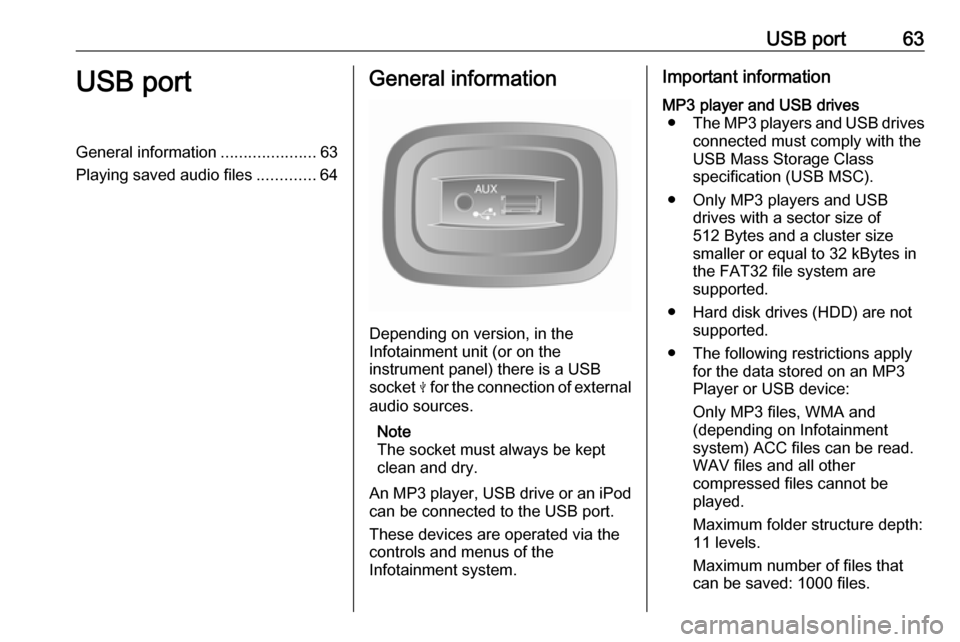
Depending on version, in the
Infotainment unit (or on the
instrument panel) there is a USB
socket M for the connection of external
audio sources.
Note
The socket must always be kept
clean and dry.
An MP3 player, USB drive or an iPod
can be connected to the USB port.
These devices are operated via the
controls and menus of the
Infotainment system.
Important informationMP3 player and USB drives ● The MP3 players and USB drives
connected must comply with the
USB Mass Storage Class
specification (USB MSC).
● Only MP3 players and USB drives with a sector size of
512 Bytes and a cluster size
smaller or equal to 32 kBytes in
the FAT32 file system are
supported.
● Hard disk drives (HDD) are not supported.
● The following restrictions apply for the data stored on an MP3
Player or USB device:
Only MP3 files, WMA and
(depending on Infotainment
system) ACC files can be read.
WAV files and all other
compressed files cannot be
played.
Maximum folder structure depth:
11 levels.
Maximum number of files that
can be saved: 1000 files.