infotainment OPEL ZAFIRA 2009 User Guide
[x] Cancel search | Manufacturer: OPEL, Model Year: 2009, Model line: ZAFIRA, Model: OPEL ZAFIRA 2009Pages: 228, PDF Size: 7.3 MB
Page 97 of 228
Instruments and controls
97
Select menu items via the menus and
using the infotainment system
buttons. The OK button is used to
select the highlighted item or confirm
a command.
To exit a menu, press the right or left
arrow button until Return or Main
appear and select.
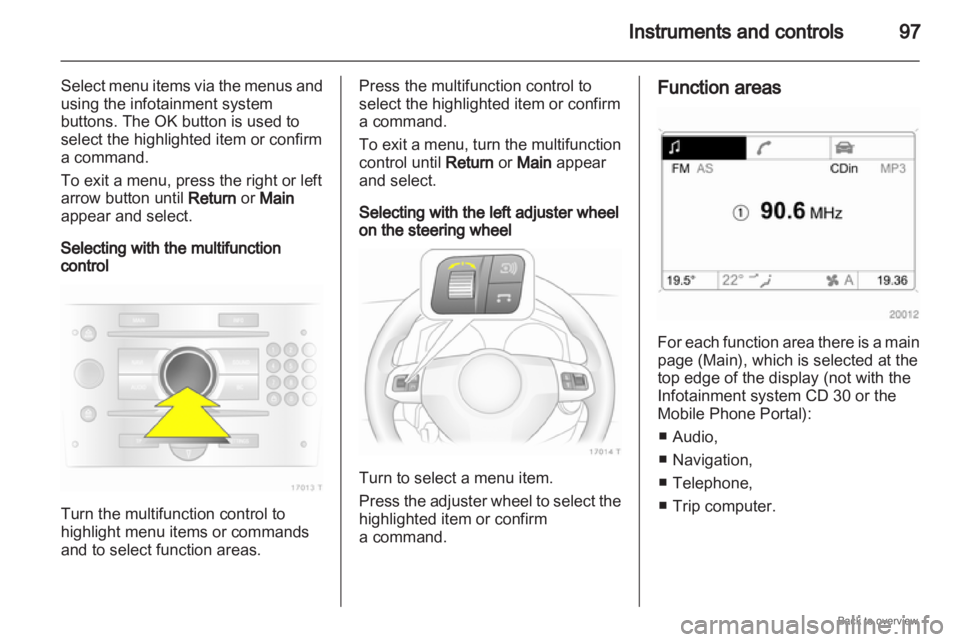
Selecting with the multifunction
control Turn the multifunction control to
highlight menu items or commands
and to select function areas. Press the multifunction control to
select the highlighted item or confirm
a command.
To
exit a menu, turn the multifunction
control until Return or Main appear
and select.
Selecting with the left adjuster wheel
on the steering wheel Turn to select a menu item.
Press
the adjuster wheel to select the
highlighted item or confirm
a command. Function areas
For each function area there is a main
page (Main), which is selected at the
top edge of the display (not with the
Infotainment system CD 30 or the
Mobile Phone Portal):
■
Audio,
■ Navigation,
■ Telephone,
■ Trip computer.
Page 98 of 228
98
Instruments and controls
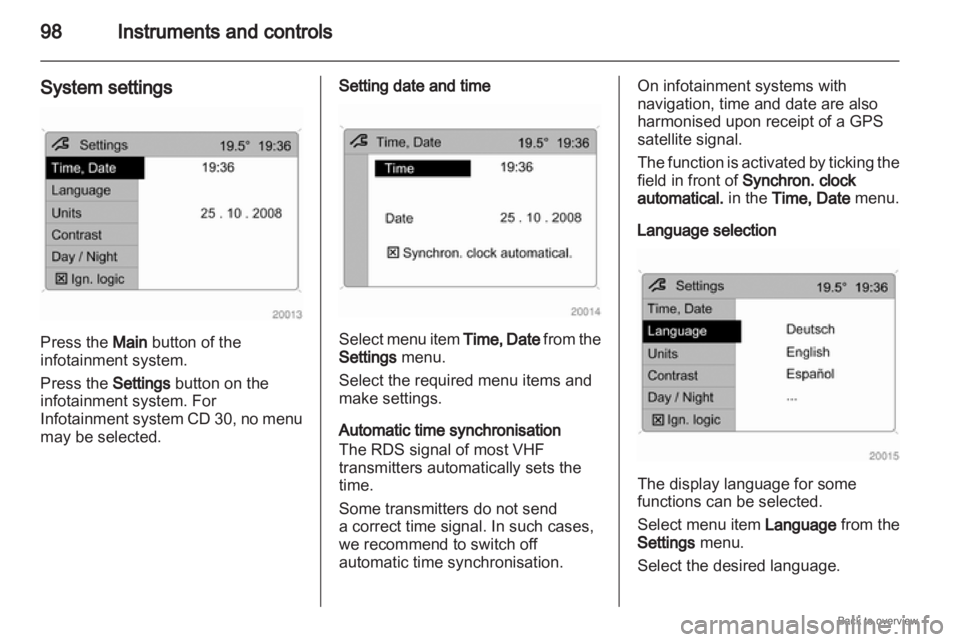
System settings Press the Main button of the
infotainment system.
Press the Settings button on the
infotainment system. For
Infotainment
system CD 30, no menu
may be selected. Setting date and time
Select menu item
Time, Date from the
Settings menu.
Select the required menu items and
make settings.
Automatic time synchronisation
The RDS signal of most VHF
transmitters automatically sets the
time.
Some transmitters do not send
a correct time signal. In such cases,
we recommend to switch off
automatic time synchronisation. On infotainment systems with
navigation, time and date are also
harmonised upon receipt of a GPS
satellite signal.
The
function is activated by ticking the
field in front of Synchron. clock
automatical. in the Time, Date menu.
Language selection The display language for some
functions can be selected.
Select
menu item Language from the
Settings menu.
Select the desired language.
Page 99 of 228
Instruments and controls
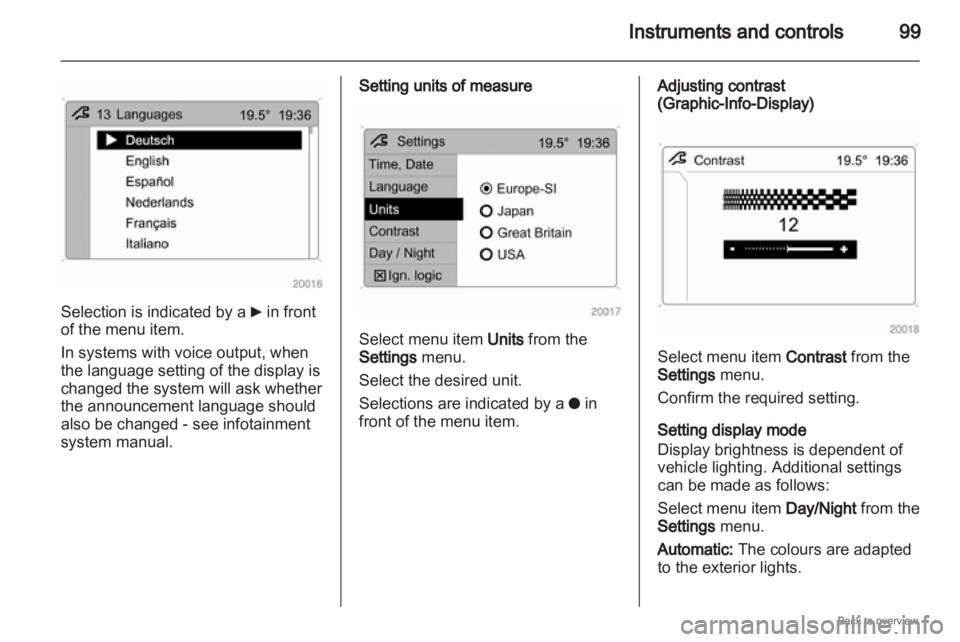
99Selection is indicated by a
6 in front
of the menu item.
In systems with voice output, when
the language setting of the display is
changed the system will ask whether
the announcement language should
also be changed - see infotainment
system manual. Setting units of measure
Select menu item Units from the
Settings menu.
Select the desired unit.
Selections are indicated by a
o in
front of the menu item. Adjusting contrast
(Graphic-Info-Display)
Select menu item Contrast from the
Settings menu.
Confirm the required setting.
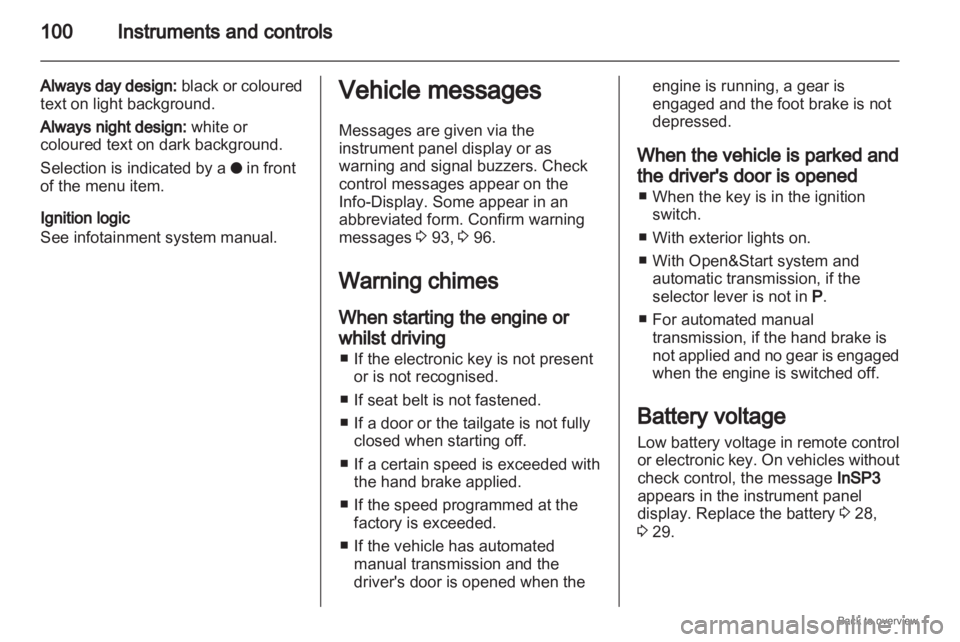
Setting display mode
Display brightness is dependent of
vehicle lighting. Additional settings
can be made as follows:
Select menu item
Day/Night from the
Settings menu.
Automatic: The colours are adapted
to the exterior lights.
Page 100 of 228
100
Instruments and controls
Always day design: black or coloured
text on light background.
Always night design: white or
coloured text on dark background.
Selection is indicated by a o in front
of the menu item.
Ignition logic
See infotainment system manual. Vehicle messages
Messages are given via the
instrument panel display or as
warning and signal buzzers. Check
control messages appear on the
Info-Display. Some appear in an
abbreviated form. Confirm warning
messages 3 93, 3 96.
Warning chimes
When starting the engine or
whilst driving
■
If the electronic key is not presentor is not recognised.
■ If seat belt is not fastened.
■ If a door or the tailgate is not fully closed when starting off.
■ If a certain speed is exceeded with the hand brake applied.
■ If the speed programmed at the factory is exceeded.
■ If the vehicle has automated manual transmission and the
driver's door is opened when the engine is running, a gear is
engaged and the foot brake is not
depressed.
When the vehicle is parked and
the driver's door is opened ■
When the key is in the ignition switch.
■ With exterior lights on.
■ With Open&Start system and automatic transmission, if the
selector lever is not in P.
■ For automated manual transmission, if the hand brake is
not applied and no gear is engaged
when the engine is switched off.
Battery voltage
Low battery voltage in remote control
or electronic key. On vehicles without
check control, the message InSP3
appears in the instrument panel
display. Replace the battery 3 28,
3 29.
Page 102 of 228
102
Instruments and controls
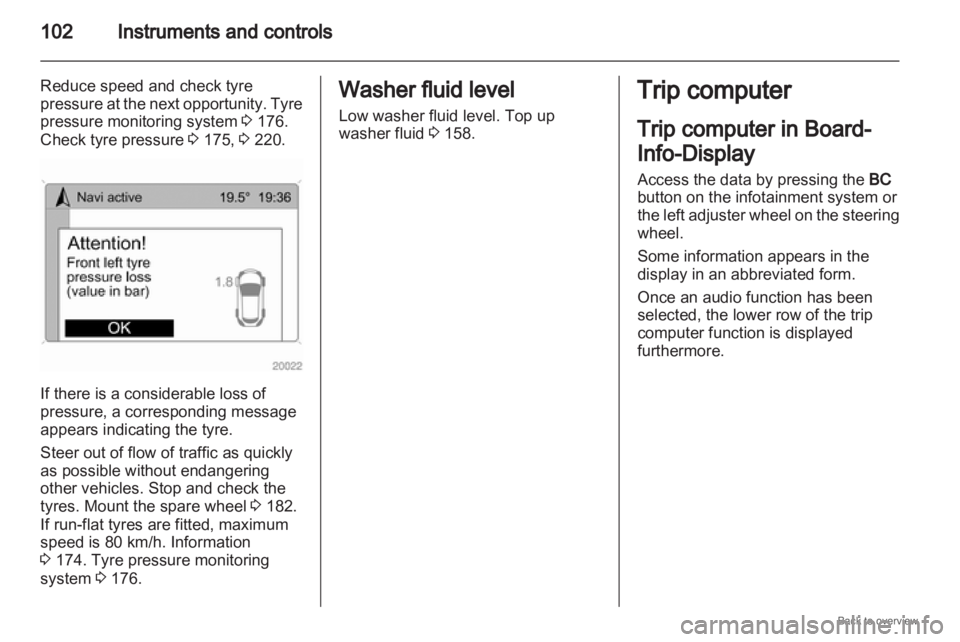
Reduce speed and check tyre
pressure at the next opportunity. Tyre
pressure monitoring system 3 176.
Check tyre pressure 3 175, 3 220.If there is a considerable loss of
pressure, a corresponding message
appears indicating the tyre.
Steer out of flow of traffic as quickly
as possible without endangering
other vehicles. Stop and check the
tyres. Mount the spare wheel
3 182.
If run-flat tyres are fitted, maximum
speed is 80 km/h. Information
3 174. Tyre pressure monitoring
system 3 176. Washer fluid level
Low washer fluid level. Top up
washer fluid
3 158. Trip computer
Trip computer in Board-
Info-Display
Access the data by pressing the
BC
button on the infotainment system or
the
left adjuster wheel on the steering
wheel.
Some information appears in the
display in an abbreviated form.
Once an audio function has been
selected, the lower row of the trip
computer function is displayed
furthermore.
Page 104 of 228
104
Instruments and controls
Select the function. Press the OK
button or the left adjuster wheel on the
steering wheel to start or stop the stop
watch.
Restart trip computer
The measurement or calculation of
the following trip computer
information can be restarted:
■ Average consumption,
■ Absolute consumption,
■ Average speed,
■ Distance,
■ Stop watch.
Select the desired trip computer
information 3 93. To restart, press the
OK button or the left adjuster wheel
on the steering wheel for approx.
2 seconds. Trip computer in Graphic-
Info-Display or Colour-
Info-Display
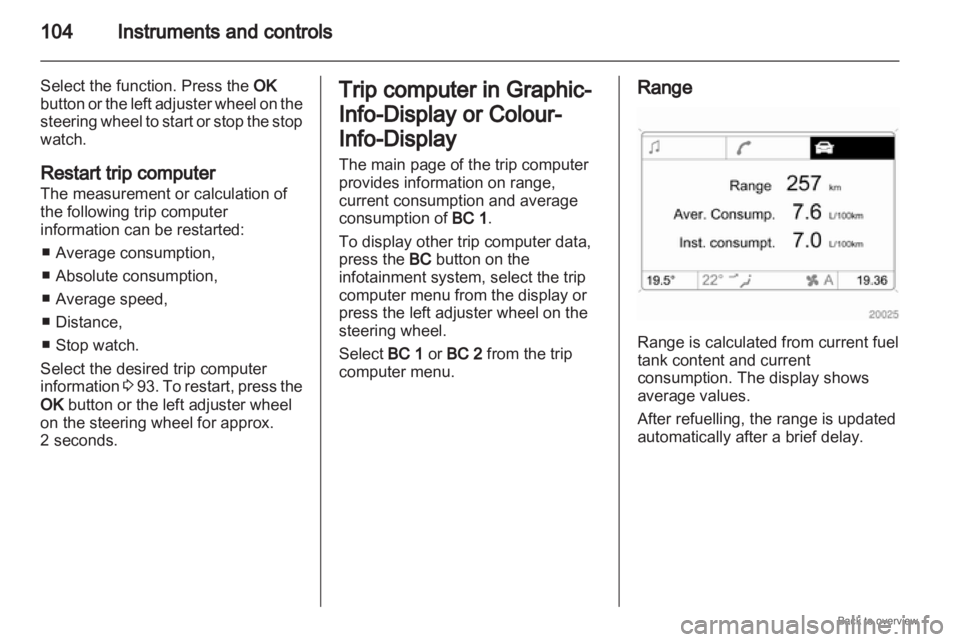
The main page of the trip computer
provides information on range,
current consumption and average
consumption of
BC 1.
To display other trip computer data,
press the BC button on the
infotainment system, select the trip
computer menu from the display or
press the left adjuster wheel on the
steering wheel.
Select BC 1 or BC 2 from the trip
computer menu. Range
Range is calculated from current fuel
tank content and current
consumption. The display shows
average values.
After refuelling, the range is updated
automatically after a brief delay.
Page 115 of 228
Infotainment system
115
Infotainment system
Introduction ................................ 115
Radio ......................................... 115
Audio players ............................. 116
Rear seat infotainment ..............116
Phone ........................................ 116 Introduction
Operation
The infotainment system is operated
as described in the infotainment
manual. Radio
Radio reception
Radio reception may be disrupted by
static, noise, distortion or loss of
reception due to
■
Changes in distance from thetransmitter,
■ multi-path reception due to reflection and
■ shadowing.
Page 116 of 228
116
Infotainment system
Audio players
Auxiliary devices An external audio source such as
portable
CD player can be connected
using a 3.5 mm jack plug via the AUX
input.
Always keep the AUX input clean and
dry. Rear seat infotainment
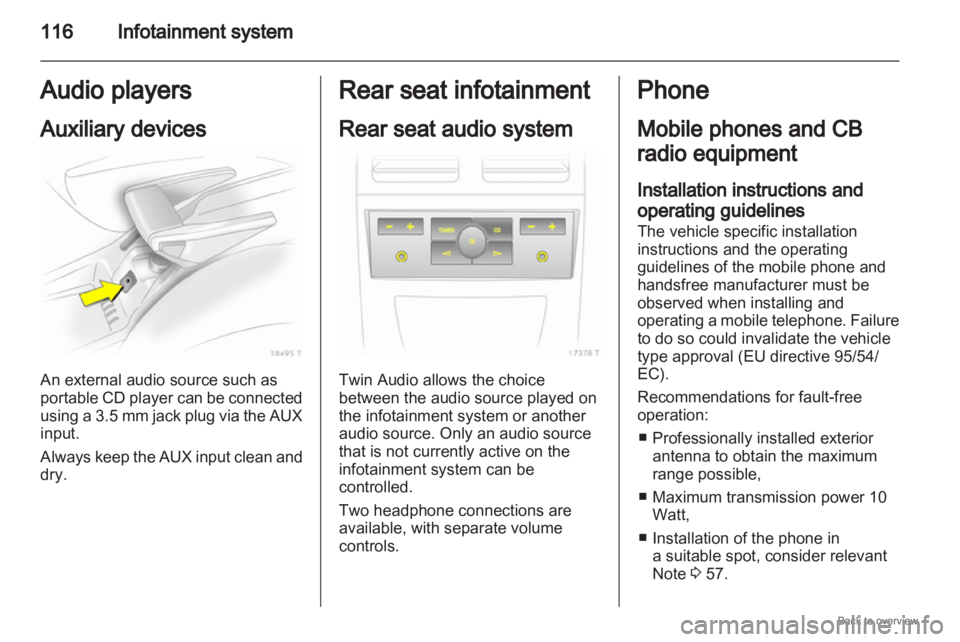
Rear seat audio system
Twin Audio allows the choice
between the audio source played on
the infotainment system or another
audio source. Only an audio source
that is not currently active on the
infotainment system can be
controlled.
Two headphone connections are
available, with separate volume
controls. Phone
Mobile phones and CB
radio equipment
Installation instructions and
operating guidelines
The vehicle specific installation
instructions and the operating
guidelines of the mobile phone and
handsfree manufacturer must be
observed when installing and
operating
a mobile telephone. Failure
to do so could invalidate the vehicle
type approval (EU directive 95/54/
EC).
Recommendations for fault-free
operation:
■ Professionally installed exterior antenna to obtain the maximum
range possible,
■ Maximum transmission power 10 Watt,
■ Installation of the phone in a suitable spot, consider relevant
Note 3 57.
Page 117 of 228
Infotainment system
117
Seek advice on predetermined
installation points for the external
antenna or equipment holder and
ways of using devices with
a transmission power exceeding 10
watts.
Use of a handsfree attachment
without external antenna with mobile
telephone standards GSM
900/1800/1900 and UMTS is only
permitted if the maximum
transmission power of the mobile
telephone is 2 watts for GSM 900 or
1 watt for the other types.
For reasons of safety, do not use the
phone while driving. Even use of
a handsfree set can be a distraction
while driving. 9
Warning Operate radio equipment and
mobile telephones which fail to
meet above mentioned mobile
telephone
standards only using an
antenna located outside of the
vehicle. Caution
Mobile telephones and radio
equipment may lead to
malfunctions in the vehicle
electronics when operated inside
the vehicle with no exterior aerial,
unless the above mentioned
regulations are observed.
Page 169 of 228
Vehicle care
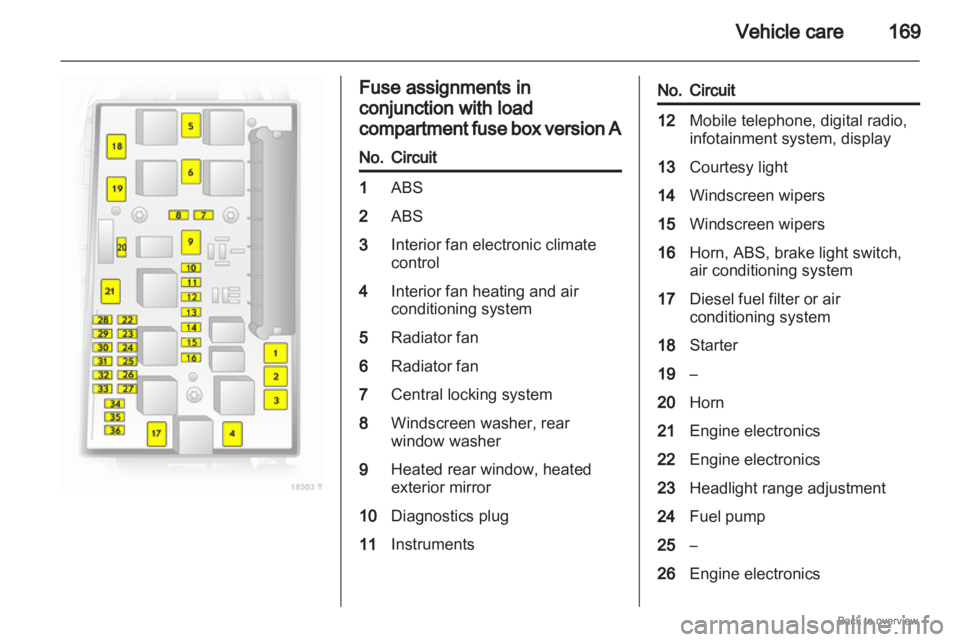
169 Fuse assignments in
conjunction with load
compartment
fuse box version A
No. Circuit
1
ABS
2 ABS
3 Interior fan electronic climate
control
4 Interior fan heating and air
conditioning system
5 Radiator fan
6 Radiator fan
7 Central locking system
8 Windscreen washer, rear
window washer
9 Heated rear window, heated
exterior mirror
10 Diagnostics plug
11 Instruments No. Circuit
12
Mobile telephone, digital radio,
infotainment system, display
13 Courtesy light
14 Windscreen wipers
15 Windscreen wipers
16 Horn, ABS, brake light switch,
air conditioning system
17 Diesel fuel filter or air
conditioning system
18 Starter
19 –
20 Horn
21 Engine electronics
22 Engine electronics
23 Headlight range adjustment
24 Fuel pump
25 –
26 Engine electronics