transmission OPEL ZAFIRA 2009 User Guide
[x] Cancel search | Manufacturer: OPEL, Model Year: 2009, Model line: ZAFIRA, Model: OPEL ZAFIRA 2009Pages: 228, PDF Size: 7.3 MB
Page 100 of 228
100
Instruments and controls
Always day design: black or coloured
text on light background.
Always night design: white or
coloured text on dark background.
Selection is indicated by a o in front
of the menu item.
Ignition logic
See infotainment system manual. Vehicle messages
Messages are given via the
instrument panel display or as
warning and signal buzzers. Check
control messages appear on the
Info-Display. Some appear in an
abbreviated form. Confirm warning
messages 3 93, 3 96.
Warning chimes
When starting the engine or
whilst driving
■
If the electronic key is not presentor is not recognised.
■ If seat belt is not fastened.
■ If a door or the tailgate is not fully closed when starting off.
■ If a certain speed is exceeded with the hand brake applied.
■ If the speed programmed at the factory is exceeded.
■ If the vehicle has automated manual transmission and the
driver's door is opened when the engine is running, a gear is
engaged and the foot brake is not
depressed.
When the vehicle is parked and
the driver's door is opened ■
When the key is in the ignition switch.
■ With exterior lights on.
■ With Open&Start system and automatic transmission, if the
selector lever is not in P.
■ For automated manual transmission, if the hand brake is
not applied and no gear is engaged
when the engine is switched off.
Battery voltage
Low battery voltage in remote control
or electronic key. On vehicles without
check control, the message InSP3
appears in the instrument panel
display. Replace the battery 3 28,
3 29.
Page 116 of 228
116
Infotainment system
Audio players
Auxiliary devices An external audio source such as
portable
CD player can be connected
using a 3.5 mm jack plug via the AUX
input.
Always keep the AUX input clean and
dry. Rear seat infotainment
Rear seat audio system
Twin Audio allows the choice
between the audio source played on
the infotainment system or another
audio source. Only an audio source
that is not currently active on the
infotainment system can be
controlled.
Two headphone connections are
available, with separate volume
controls. Phone
Mobile phones and CB
radio equipment
Installation instructions and
operating guidelines
The vehicle specific installation
instructions and the operating
guidelines of the mobile phone and
handsfree manufacturer must be
observed when installing and
operating
a mobile telephone. Failure
to do so could invalidate the vehicle
type approval (EU directive 95/54/
EC).
Recommendations for fault-free
operation:
■ Professionally installed exterior antenna to obtain the maximum
range possible,
■ Maximum transmission power 10 Watt,
■ Installation of the phone in a suitable spot, consider relevant
Note 3 57.
Page 117 of 228
Infotainment system
117
Seek advice on predetermined
installation points for the external
antenna or equipment holder and
ways of using devices with
a transmission power exceeding 10
watts.
Use of a handsfree attachment
without external antenna with mobile
telephone standards GSM
900/1800/1900 and UMTS is only
permitted if the maximum
transmission power of the mobile
telephone is 2 watts for GSM 900 or
1 watt for the other types.
For reasons of safety, do not use the
phone while driving. Even use of
a handsfree set can be a distraction
while driving. 9
Warning Operate radio equipment and
mobile telephones which fail to
meet above mentioned mobile
telephone
standards only using an
antenna located outside of the
vehicle. Caution
Mobile telephones and radio
equipment may lead to
malfunctions in the vehicle
electronics when operated inside
the vehicle with no exterior aerial,
unless the above mentioned
regulations are observed.
Page 127 of 228
Driving and operating
127
Driving and operating
Driving hints ............................... 127
Starting and operating ...............127
Engine exhaust .......................... 129
Automatic transmission
.............. 131
Manual transmission ..................136
Manual transmission
automated .................................. 136
Brakes ........................................ 140
Ride control systems .................142
Cruise control ............................. 144
Object detection systems ........... 145
Fuel ............................................ 146
Towing ....................................... 149 Driving hints
Control of the vehicle
Never coast with engine not
running
Many
systems will not function in this
situation (e.g. brake servo unit, power
steering). Driving in this manner is
a danger to yourself and others.
Pedals
To ensure the pedal travel is
uninhibited, there must be no mats in
the area of the pedals. Starting and operating
New vehicle running-in
Do not brake unnecessarily hard for
the first few journeys.
During the first drive, smoke may
occur because of wax and oil
evaporating off the exhaust system.
Park the vehicle in the open for
a while after the first drive and avoid
inhaling the fumes.
Fuel
and engine oil consumption may
be higher during the running-in
period.
Page 128 of 228
128
Driving and operating
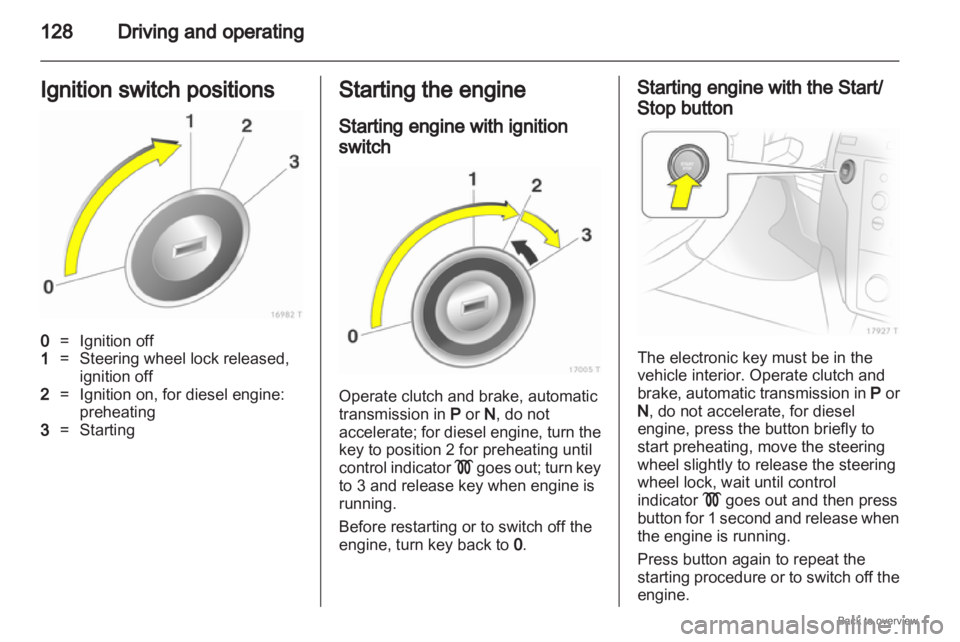
Ignition switch positions 0
= Ignition off
1 = Steering wheel lock released,
ignition off
2 = Ignition on, for diesel engine:
preheating
3 = Starting Starting the engine
Starting engine with ignition
switch
Operate clutch and brake, automatic
transmission in
P or N, do not
accelerate;
for diesel engine, turn the
key to position 2 for preheating until
control indicator ! goes out; turn key
to 3 and release key when engine is
running.
Before restarting or to switch off the
engine, turn key back to 0. Starting engine with the Start/
Stop button
The electronic key must be in the
vehicle interior. Operate clutch and
brake,
automatic transmission in P or
N , do not accelerate, for diesel
engine, press the button briefly to
start preheating, move the steering
wheel slightly to release the steering
wheel lock, wait until control
indicator ! goes out and then press
button for 1 second and release when
the engine is running.
Press button again to repeat the
starting procedure or to switch off the
engine.
Page 131 of 228

Driving and operating
131
can be continued for a short period,
keeping vehicle speed and engine
speed low. Automatic transmission
The automatic transmission makes
automatic shifting possible
(automatic mode) and the version
with
ActiveSelect also makes manual
shifting possible (manual mode).
Transmission display The mode or selected gear is shown
in the transmission display. On vehicles with the Open&Start
system,
P flashes in the transmission
display when the ignition is switched
off if P is not engaged or the hand
brake is not applied.
If Sport mode is activated, 1 is
illuminated.
If the Winter programme is activated,
T is illuminated.
Page 133 of 228
Driving and operating
133
Do not accelerate while engaging
a gear. Never depress the accelerator
pedal and brake pedal at the same
time.
When a gear is engaged, the vehicle
slowly begins to creep when the
brake is released.
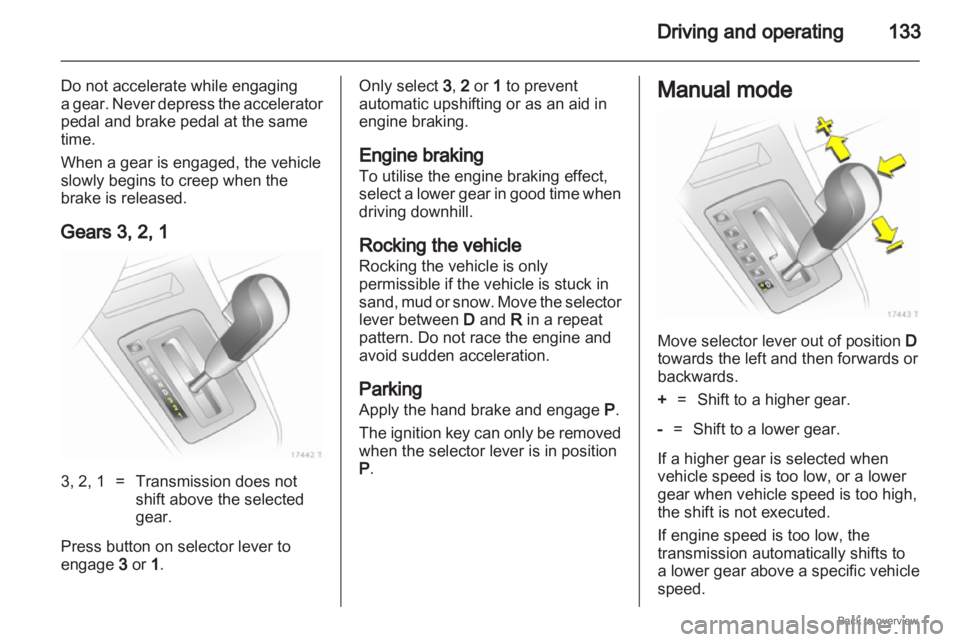
Gears 3, 2, 1 3, 2, 1 = Transmission does not
shift above the selected
gear.
Press button on selector lever to
engage 3 or 1 . Only select 3
, 2 or 1 to prevent
automatic upshifting or as an aid in
engine braking.
Engine braking
To utilise the engine braking effect,
select
a lower gear in good time when
driving downhill.
Rocking the vehicle
Rocking the vehicle is only
permissible if the vehicle is stuck in
sand, mud or snow. Move the selector
lever between D and R in a repeat
pattern. Do not race the engine and
avoid sudden acceleration.
Parking
Apply the hand brake and engage P.
The ignition key can only be removed
when the selector lever is in position
P. Manual mode
Move selector lever out of position
D
towards the left and then forwards or
backwards.
+ = Shift to a higher gear.
- = Shift to a lower gear.
If a higher gear is selected when
vehicle speed is too low, or a lower
gear when vehicle speed is too high,
the shift is not executed.
If engine speed is too low, the
transmission automatically shifts to
a lower gear above a specific vehicle
speed.
Page 134 of 228

134
Driving and operating
No automatic shifting to a higher gear
takes place at high engine revs.
For reasons of safety, kickdown is
also available in manual mode
3 134.
Electronic driving
programmes ■ Following
a cold start, the operating
temperature programme increases
engine speed to quickly bring the
catalytic converter to the required
temperature.
■ The automatic neutral shift function automatically shifts to idling when
the vehicle is stopped with
a forward gear engaged.
■ When Sport mode is engaged, the vehicle shifts at higher engine
speeds (unless cruise control is
on). Sport mode 3 143. Winter programme T
Activate the Winter programme to
assist starting off on a slippery road
surface.
Activation
on vehicles without manual
mode
Press the T button with P, R, N , D or
3 engaged. The vehicle starts off in
3rd gear. Activation on vehicles with manual
mode
In automatic mode, press the T
button. Depending on road
conditions, the vehicles starts off in
2nd or 3rd gear.
Deactivation
The
Winter programme is switched off
by:
■ pressing the T button again,
■ manually selecting 2 or 1 ,
■ changing to manual mode,
■ turning off the ignition,
■ or if the transmission oil temperature is too high.
Page 135 of 228
Driving and operating
135
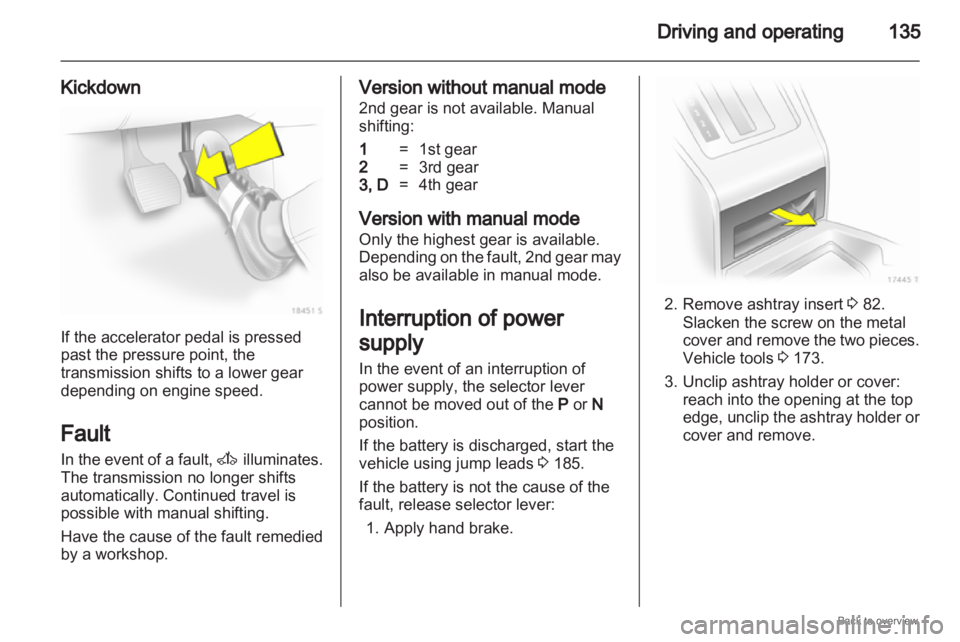
Kickdown If the accelerator pedal is pressed
past the pressure point, the
transmission shifts to a lower gear
depending on engine speed.
Fault
In
the event of a fault, A illuminates.
The transmission no longer shifts
automatically. Continued travel is
possible with manual shifting.
Have the cause of the fault remedied
by a workshop. Version without manual mode
2nd gear is not available. Manual
shifting:
1
= 1st gear
2 = 3rd gear
3, D =4th gear
Version with manual mode
Only the highest gear is available.
Depending
on the fault, 2nd gear may
also be available in manual mode.
Interruption of power
supply
In the event of an interruption of
power supply, the selector lever
cannot be moved out of the P or N
position.
If the battery is discharged, start the
vehicle using jump leads 3 185.
If the battery is not the cause of the
fault, release selector lever: 1. Apply hand brake. 2. Remove ashtray insert
3 82.
Slacken the screw on the metal
cover
and remove the two pieces.
Vehicle tools 3 173.
3. Unclip ashtray holder or cover: reach into the opening at the top
edge, unclip the ashtray holder or
cover and remove.
Page 136 of 228
136
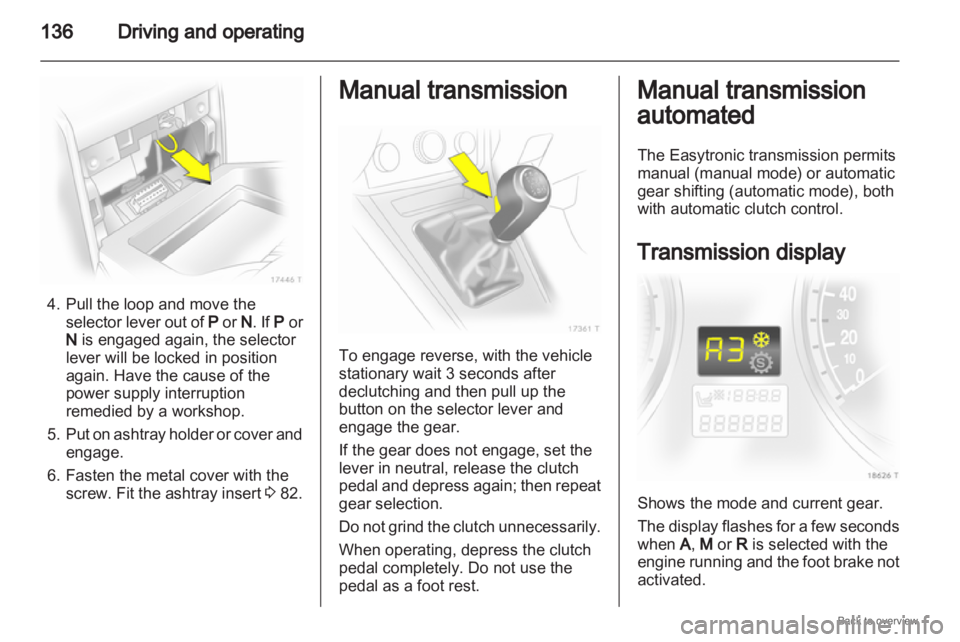
Driving and operating4. Pull the loop and move the
selector lever out of P or N. If P or
N is engaged again, the selector
lever will be locked in position
again. Have the cause of the
power supply interruption
remedied by a workshop.
5. Put on ashtray holder or cover and engage.
6. Fasten the metal cover with the screw. Fit the ashtray insert 3 82. Manual transmission
To engage reverse, with the vehicle
stationary wait 3 seconds after
declutching and then pull up the
button on the selector lever and
engage the gear.
If the gear does not engage, set the
lever in neutral, release the clutch
pedal
and depress again; then repeat
gear selection.
Do not grind the clutch unnecessarily.
When operating, depress the clutch
pedal completely. Do not use the
pedal as a foot rest. Manual transmission
automated
The Easytronic transmission permits
manual (manual mode) or automatic
gear shifting (automatic mode), both
with automatic clutch control.
Transmission display
Shows the mode and current gear.
The
display flashes for a few seconds
when A, M or R is selected with the
engine running and the foot brake not
activated.