key OPEL ZAFIRA 2009 Owner's Manual
[x] Cancel search | Manufacturer: OPEL, Model Year: 2009, Model line: ZAFIRA, Model: OPEL ZAFIRA 2009Pages: 228, PDF Size: 7.3 MB
Page 42 of 228
42
Keys, doors and windows
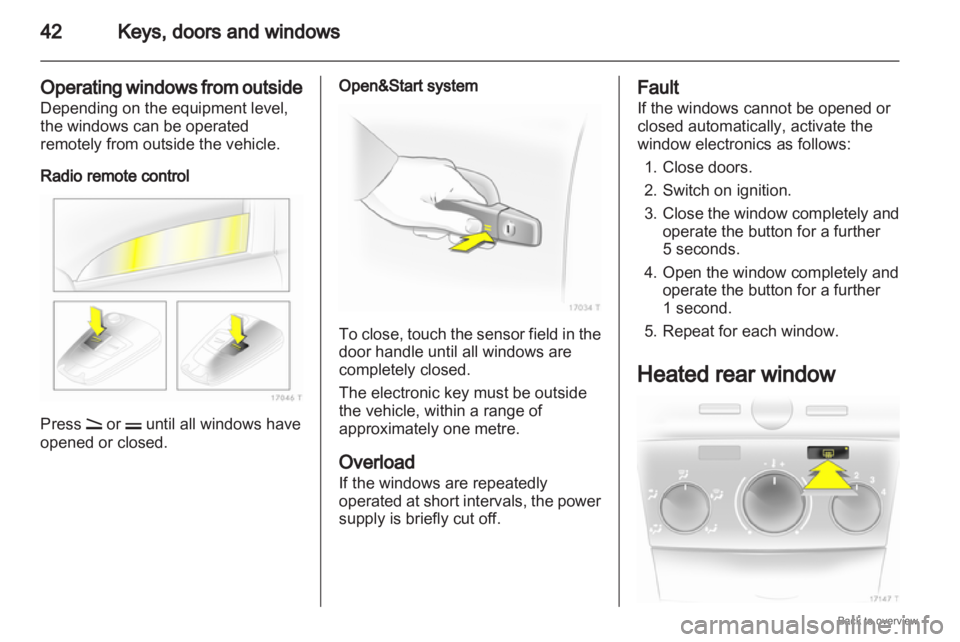
Operating windows from outside
Depending on the equipment level,
the windows can be operated
remotely from outside the vehicle.
Radio remote control Press q or p until all windows have
opened or closed. Open&Start system
To close, touch the sensor field in the
door handle until all windows are
completely closed.
The electronic key must be outside
the vehicle, within a range of
approximately one metre.
Overload
If the windows are repeatedly
operated
at short intervals, the power
supply is briefly cut off. Fault
If the windows cannot be opened or
closed automatically, activate the
window electronics as follows:
1.
Close doors.
2. Switch on ignition.
3. Close the window completely and operate the button for a further
5 seconds.
4. Open the window completely and operate the button for a further
1 second.
5. Repeat for each window.
Heated rear window
Page 43 of 228
Keys, doors and windows
43
Operated by pressing the Ü button.
Heating functions with the engine
running and is switched off
automatically after a short time.
Depending on the engine type, the
heated rear window comes on
automatically
when the diesel particle
filter is being cleaned.
Sun visors
The sun visors can be folded down or
swivelled to the side to prevent
dazzling.
If the sun visors have integral mirrors,
the mirror covers should be closed
when driving. Roof
Moonroof
Do
not affix any stickers to the middle
part of the roof. Do not cover the
vehicle using a tarpaulin.
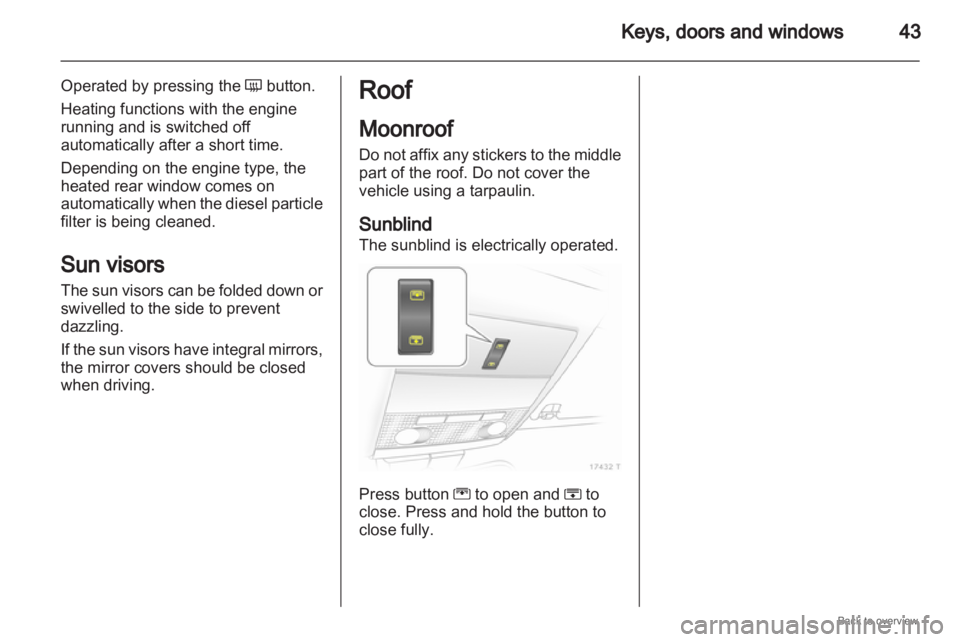
Sunblind
The sunblind is electrically operated. Press button G to open and H to
close. Press and hold the button to
close fully.
Page 91 of 228
Instruments and controls
91
Interactive Driving System,
Continuous Damping
Control, SPORT-mode
IDS+ illuminates yellow.
Illuminates for approximately 10
seconds after the driver's door is
opened. Illumination whilst driving
indicates a fault in the system. The
system
switches to the harder chassis
setting for reasons of safety. Have the
cause of the fault remedied by
a workshop.
IDS Plus
3 143, CDC 3 143, SPORT
mode 3 143.
Engine oil pressure
I illuminates red.
It illuminates when the ignition is
switched on and goes out shortly after
the engine starts. Illuminates when the engine is
running
Caution
Engine lubrication may be
interrupted. This may result in
damage to the engine and/or
locking of the drive wheels.
1. Depress clutch.
2.
Select neutral gear, set selectorlever to N .
3. Move out of the flow of traffic as quickly as possible without
impeding other vehicles.
4. Switch off ignition. 9
Warning When the engine is off,
considerably
more force is needed
to brake and steer.
Do not remove key until vehicle
has come to a standstill, otherwise
the steering column lock could
engage unexpectedly. Seek the assistance of a workshop.
Low engine oil level
S
illuminates yellow.
Engine oil level is checked
automatically.
Illuminates when the engine is
running
Low
engine oil level. Check engine oil
level and top up as necessary
3 156.
Low fuel
Y illuminates or flashes yellow.
Illuminated
Level in fuel tank too low.
Flashes
Fuel used up. Refuel immediately.
Never run the tank dry.
Catalytic converter 3 130.
Bleeding the diesel fuel system
3 159.
Page 92 of 228

92
Instruments and controls
When operating with natural gas, the
system automatically switches over to
petrol operation 3 84.
Open&Start system
0 illuminates or flashes yellow.
Flashes
The electronic key is no more within
the reception range of the vehicle
interior. The engine cannot be
started. Hold the Start/Stop button
depressed a bit longer to switch off
the ignition.
or
Failure of the electronic key.
Operation is yet only possible via
emergency operation.
Illuminated
Fault in system. Try to operate with
the spare key, the remote control or
through emergency operation. Hold
the Start/Stop button depressed a bit
longer to switch off the ignition. Seek
the assistance of a workshop.
or The steering wheel lock is still
engaged. Move the steering wheel
slightly and press the
Start/Stop
button.
Open&Start System 3 29.
Apply footbrake
j illuminates yellow.
The
engine with manual transmission
automated can only be started if the
foot brake is depressed. If the foot
brake is not depressed, the control
indicator illuminates 3 137.
Exterior light
8 illuminates green.
Illuminated when the exterior lights
are on 3 108.
High beam
C illuminates blue.
Illuminated when high beam is on and
during headlamp flash 3 109. Adaptive forward lighting
B
illuminates or flashes yellow.
Illuminated
Fault in system.
If the swivelling device for curve
lighting fails, the corresponding
dipped
beam lamp is deactivated and
the fog lamp is switched on.
Seek the assistance of a workshop.
Flashes
System switched to symmetrical
dipped beam.
Control indicator B flashes for
approximately 4 seconds after the
ignition is switched on as a reminder
that the system has been switched
3 109.
Adaptive Forward Lighting (AFL)
3 110.
Fog light
> illuminates green.
Illuminated when the fog lamps are on
3 111.
Page 100 of 228
100
Instruments and controls
Always day design: black or coloured
text on light background.
Always night design: white or
coloured text on dark background.
Selection is indicated by a o in front
of the menu item.
Ignition logic
See infotainment system manual. Vehicle messages
Messages are given via the
instrument panel display or as
warning and signal buzzers. Check
control messages appear on the
Info-Display. Some appear in an
abbreviated form. Confirm warning
messages 3 93, 3 96.
Warning chimes
When starting the engine or
whilst driving
■
If the electronic key is not presentor is not recognised.
■ If seat belt is not fastened.
■ If a door or the tailgate is not fully closed when starting off.
■ If a certain speed is exceeded with the hand brake applied.
■ If the speed programmed at the factory is exceeded.
■ If the vehicle has automated manual transmission and the
driver's door is opened when the engine is running, a gear is
engaged and the foot brake is not
depressed.
When the vehicle is parked and
the driver's door is opened ■
When the key is in the ignition switch.
■ With exterior lights on.
■ With Open&Start system and automatic transmission, if the
selector lever is not in P.
■ For automated manual transmission, if the hand brake is
not applied and no gear is engaged
when the engine is switched off.
Battery voltage
Low battery voltage in remote control
or electronic key. On vehicles without
check control, the message InSP3
appears in the instrument panel
display. Replace the battery 3 28,
3 29.
Page 114 of 228
114
Lighting
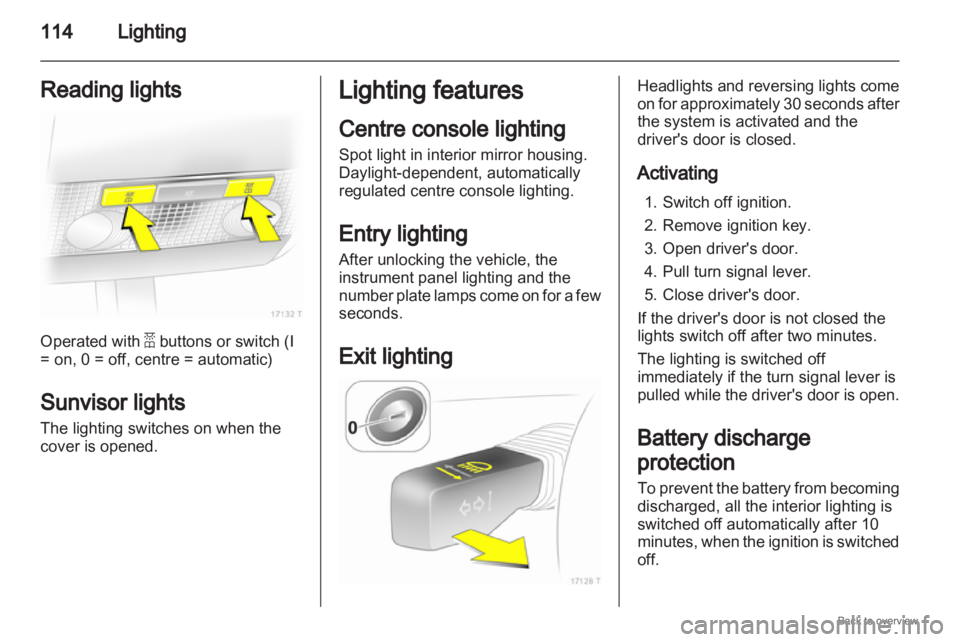
Reading lights Operated with a buttons or switch (I
= on, 0 = off, centre = automatic)
Sunvisor lights
The lighting switches on when the
cover is opened. Lighting features
Centre console lighting
Spot light in interior mirror housing.
Daylight-dependent, automatically
regulated centre console lighting.
Entry lighting
After unlocking the vehicle, the
instrument panel lighting and the
number
plate lamps come on for a few
seconds.
Exit lighting Headlights and reversing lights come
on
for approximately 30 seconds after
the system is activated and the
driver's door is closed.
Activating
1. Switch off ignition.
2. Remove ignition key.
3. Open driver's door.
4. Pull turn signal lever.
5. Close driver's door.
If the driver's door is not closed the
lights switch off after two minutes.
The lighting is switched off
immediately if the turn signal lever is
pulled while the driver's door is open.
Battery discharge
protection
To prevent the battery from becoming
discharged, all the interior lighting is
switched off automatically after 10
minutes, when the ignition is switched
off.
Page 128 of 228
128
Driving and operating
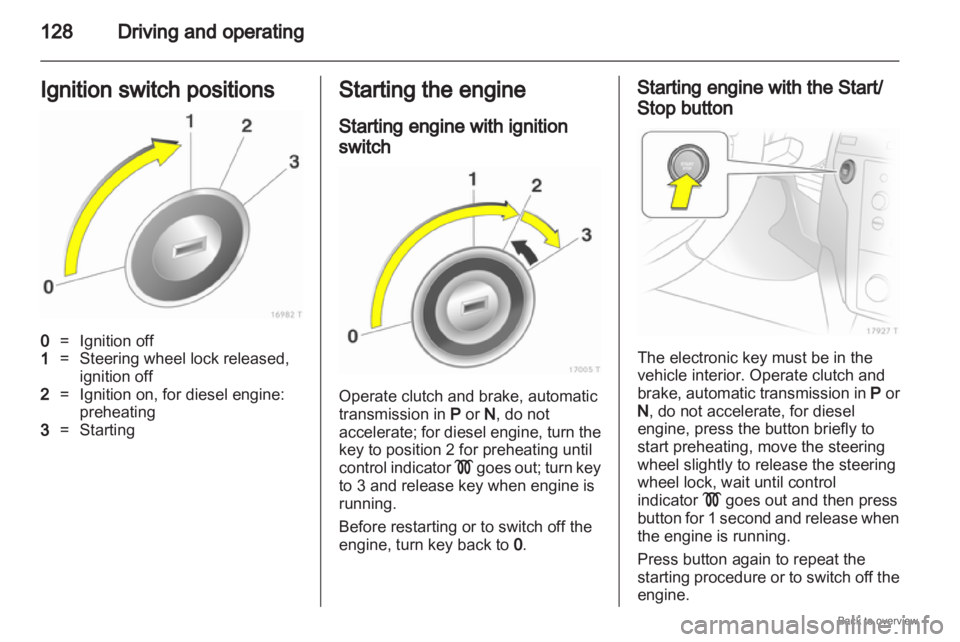
Ignition switch positions 0
= Ignition off
1 = Steering wheel lock released,
ignition off
2 = Ignition on, for diesel engine:
preheating
3 = Starting Starting the engine
Starting engine with ignition
switch
Operate clutch and brake, automatic
transmission in
P or N, do not
accelerate;
for diesel engine, turn the
key to position 2 for preheating until
control indicator ! goes out; turn key
to 3 and release key when engine is
running.
Before restarting or to switch off the
engine, turn key back to 0. Starting engine with the Start/
Stop button
The electronic key must be in the
vehicle interior. Operate clutch and
brake,
automatic transmission in P or
N , do not accelerate, for diesel
engine, press the button briefly to
start preheating, move the steering
wheel slightly to release the steering
wheel lock, wait until control
indicator ! goes out and then press
button for 1 second and release when
the engine is running.
Press button again to repeat the
starting procedure or to switch off the
engine.
Page 133 of 228
Driving and operating
133
Do not accelerate while engaging
a gear. Never depress the accelerator
pedal and brake pedal at the same
time.
When a gear is engaged, the vehicle
slowly begins to creep when the
brake is released.
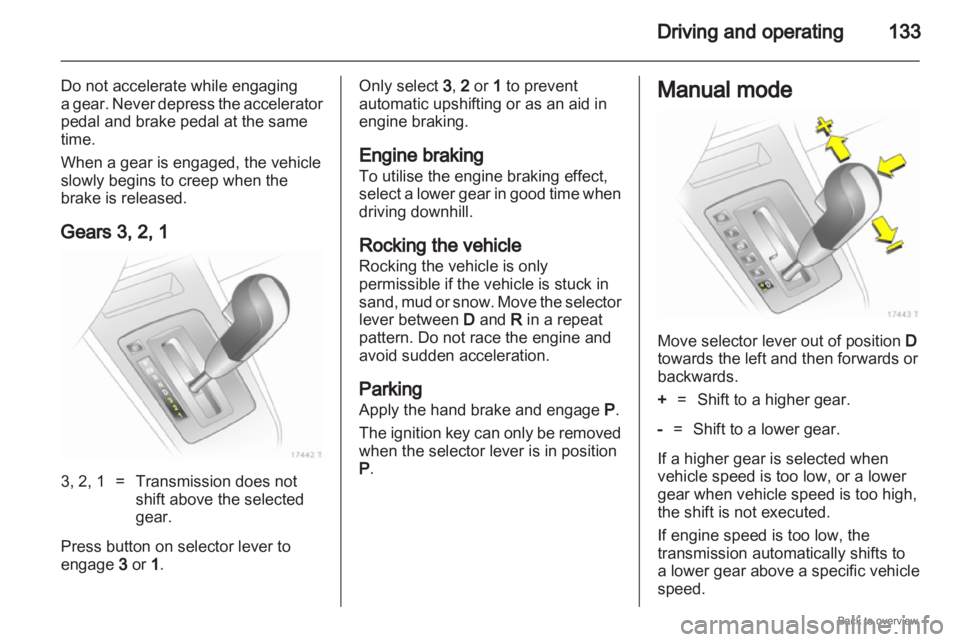
Gears 3, 2, 1 3, 2, 1 = Transmission does not
shift above the selected
gear.
Press button on selector lever to
engage 3 or 1 . Only select 3
, 2 or 1 to prevent
automatic upshifting or as an aid in
engine braking.
Engine braking
To utilise the engine braking effect,
select
a lower gear in good time when
driving downhill.
Rocking the vehicle
Rocking the vehicle is only
permissible if the vehicle is stuck in
sand, mud or snow. Move the selector
lever between D and R in a repeat
pattern. Do not race the engine and
avoid sudden acceleration.
Parking
Apply the hand brake and engage P.
The ignition key can only be removed
when the selector lever is in position
P. Manual mode
Move selector lever out of position
D
towards the left and then forwards or
backwards.
+ = Shift to a higher gear.
- = Shift to a lower gear.
If a higher gear is selected when
vehicle speed is too low, or a lower
gear when vehicle speed is too high,
the shift is not executed.
If engine speed is too low, the
transmission automatically shifts to
a lower gear above a specific vehicle
speed.
Page 151 of 228
Driving and operating
151
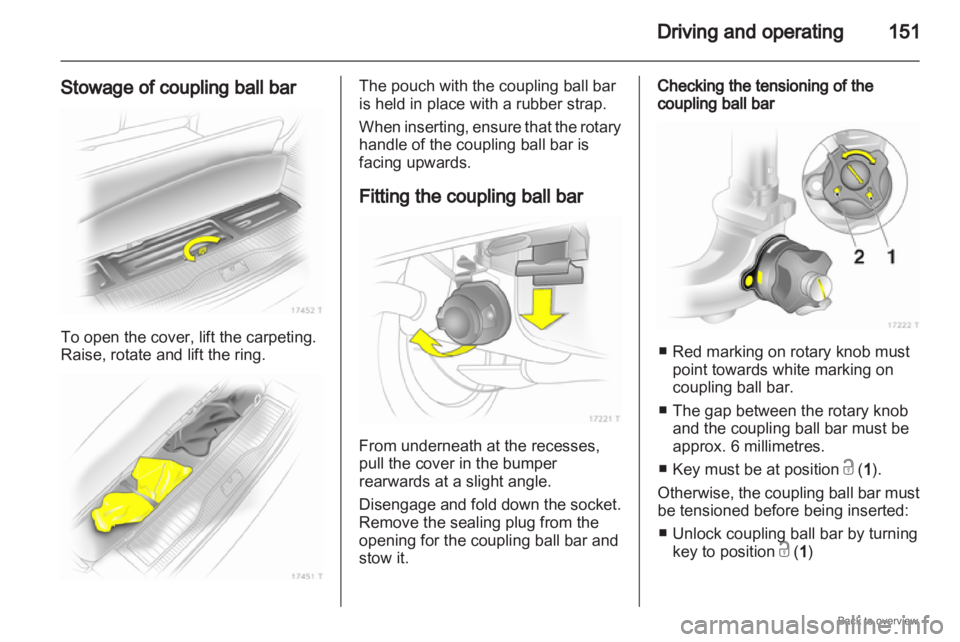
Stowage of coupling ball bar To open the cover, lift the carpeting.
Raise, rotate and lift the ring. The pouch with the coupling ball bar
is held in place with a rubber strap.
When
inserting, ensure that the rotary
handle of the coupling ball bar is
facing upwards.
Fitting the coupling ball bar From underneath at the recesses,
pull the cover in the bumper
rearwards at a slight angle.
Disengage
and fold down the socket.
Remove the sealing plug from the
opening for the coupling ball bar and
stow it. Checking the tensioning of the
coupling ball bar
■ Red marking on rotary knob must
point towards white marking on
coupling ball bar.
■
The gap between the rotary knoband the coupling ball bar must be
approx. 6 millimetres.
■ Key must be at position c (1 ).
Otherwise, the coupling ball bar must
be tensioned before being inserted: ■ Unlock coupling ball bar by turning key to position c (1 )
Page 152 of 228
152
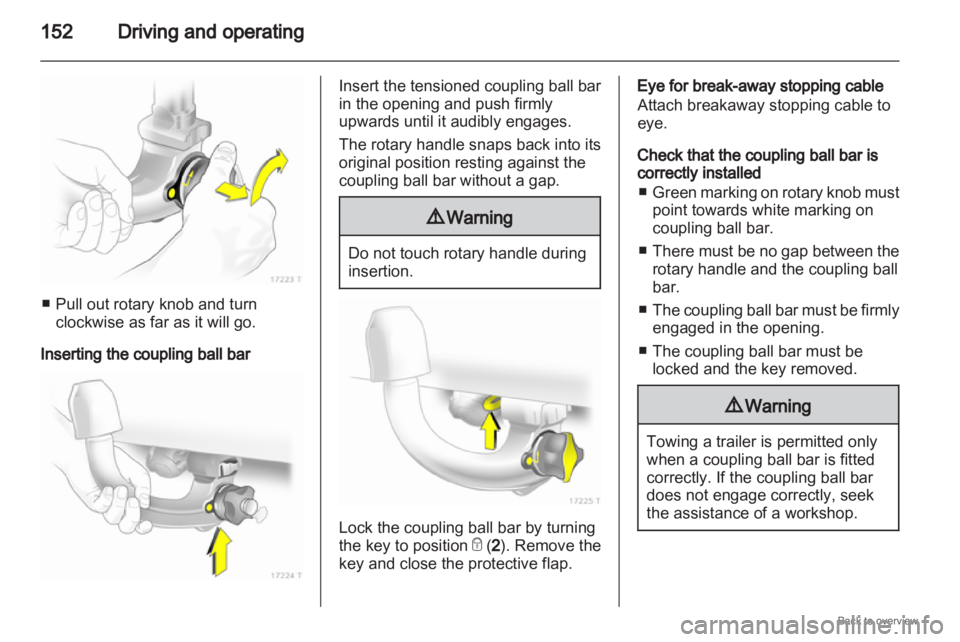
Driving and operating■ Pull out rotary knob and turn
clockwise as far as it will go.
Inserting the coupling ball bar Insert the tensioned coupling ball bar
in the opening and push firmly
upwards until it audibly engages.
The rotary handle snaps back into its
original position resting against the
coupling ball bar without a gap.
9
Warning Do not touch rotary handle during
insertion.
Lock the coupling ball bar by turning
the key to position
e (2). Remove the
key and close the protective flap. Eye for break-away stopping cable
Attach breakaway stopping cable to
eye.
Check that the coupling ball bar is
correctly installed
■ Green
marking on rotary knob must
point towards white marking on
coupling ball bar.
■ There must be no gap between the rotary handle and the coupling ball
bar.
■ The coupling ball bar must be firmly engaged in the opening.
■ The coupling ball bar must be locked and the key removed. 9
Warning Towing a trailer is permitted only
when a coupling ball bar is fitted
correctly. If the coupling ball bar
does not engage correctly, seek
the assistance of a workshop.