tailgate OPEL ZAFIRA 2009 Owners Manual
[x] Cancel search | Manufacturer: OPEL, Model Year: 2009, Model line: ZAFIRA, Model: OPEL ZAFIRA 2009Pages: 228, PDF Size: 7.3 MB
Page 6 of 228
6
In brief
In brief
Initial drive information Vehicle unlocking
Radio remote control
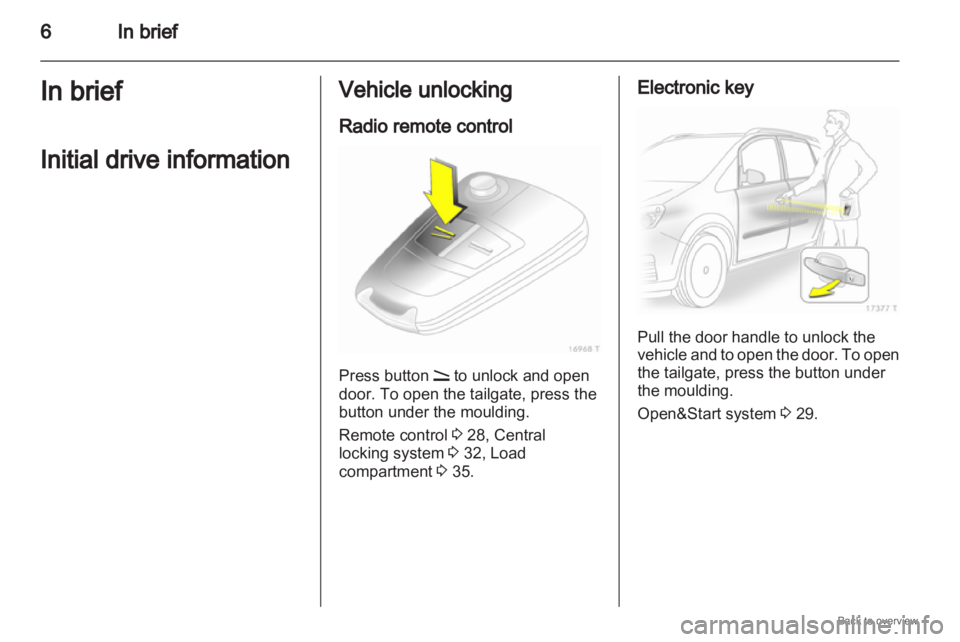
Press button q to unlock and open
door. To open the tailgate, press the
button under the moulding.
Remote control 3 28, Central
locking system 3 32, Load
compartment 3 35. Electronic key
Pull the door handle to unlock the
vehicle
and to open the door. To open
the tailgate, press the button under
the moulding.
Open&Start system 3 29.
Page 33 of 228
Keys, doors and windows
33
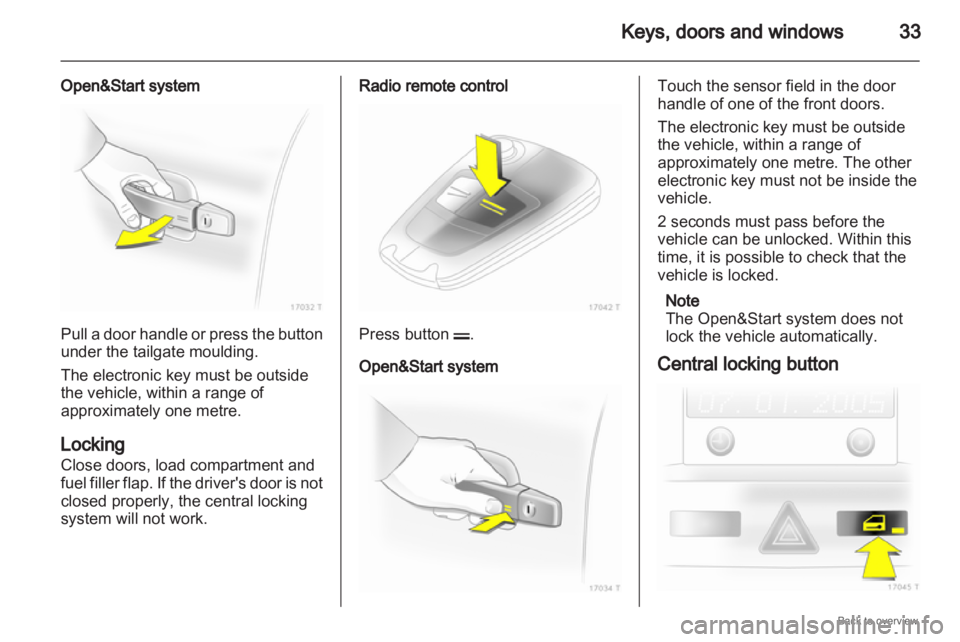
Open&Start system Pull a door handle or press the button
under the tailgate moulding.
The electronic key must be outside
the vehicle, within a range of
approximately one metre.
Locking
Close doors, load compartment and
fuel
filler flap. If the driver's door is not
closed properly, the central locking
system will not work. Radio remote control
Press button p.
Open&Start system Touch the sensor field in the door
handle of one of the front doors.
The electronic key must be outside
the vehicle, within a range of
approximately one metre. The other
electronic key must not be inside the
vehicle.
2 seconds must pass before the
vehicle can be unlocked. Within this
time, it is possible to check that the
vehicle is locked.
Note
The Open&Start system does not
lock the vehicle automatically.
Central locking button
Page 34 of 228
34
Keys, doors and windows
Press the m button: the doors are
locked or unlocked.
The LED in the button m illuminates
for
around 2 minutes after locking with
the remote control.
If the doors are locked from the inside
whilst driving, the LED remains lit.
If the key is in the ignition, locking is
only possible if all doors are closed.
Fault in remote control or
Open&Start system
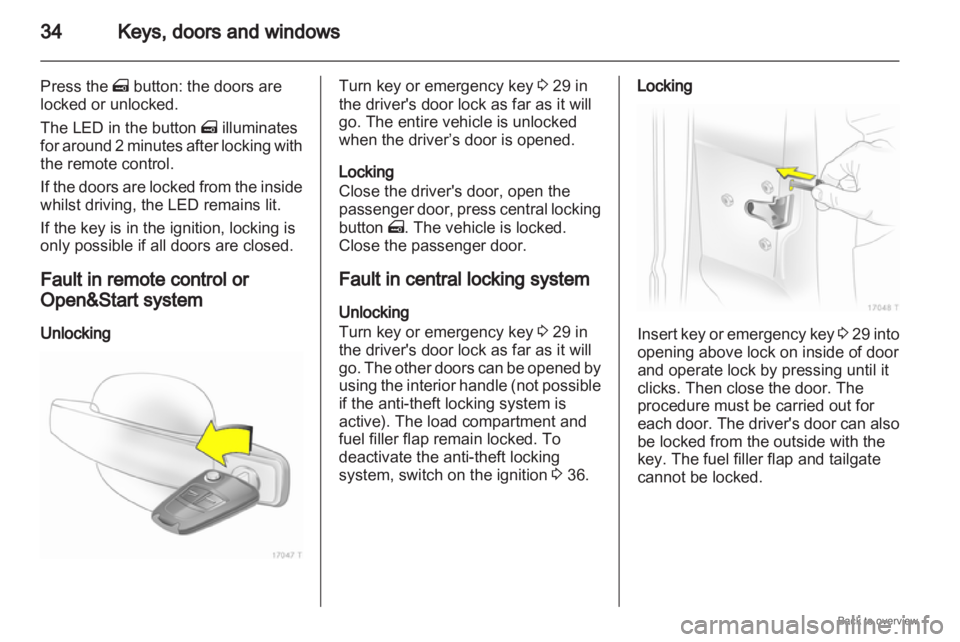
Unlocking Turn key or emergency key
3 29 in
the driver's door lock as far as it will
go. The entire vehicle is unlocked
when the driver’s door is opened.
Locking
Close the driver's door, open the
passenger
door, press central locking
button m. The vehicle is locked.
Close the passenger door.
Fault in central locking system
Unlocking
Turn key or emergency key 3 29 in
the driver's door lock as far as it will
go. The other doors can be opened by
using the interior handle (not possible
if the anti-theft locking system is
active). The load compartment and
fuel filler flap remain locked. To
deactivate the anti-theft locking
system, switch on the ignition 3 36. Locking
Insert key or emergency key
3 29
into
opening above lock on inside of door
and operate lock by pressing until it
clicks. Then close the door. The
procedure must be carried out for
each door. The driver's door can also
be locked from the outside with the
key. The fuel filler flap and tailgate
cannot be locked.
Page 35 of 228
Keys, doors and windows
35
Child locks 9
Warning Use the child locks whenever
children are occupying the rear
seats.
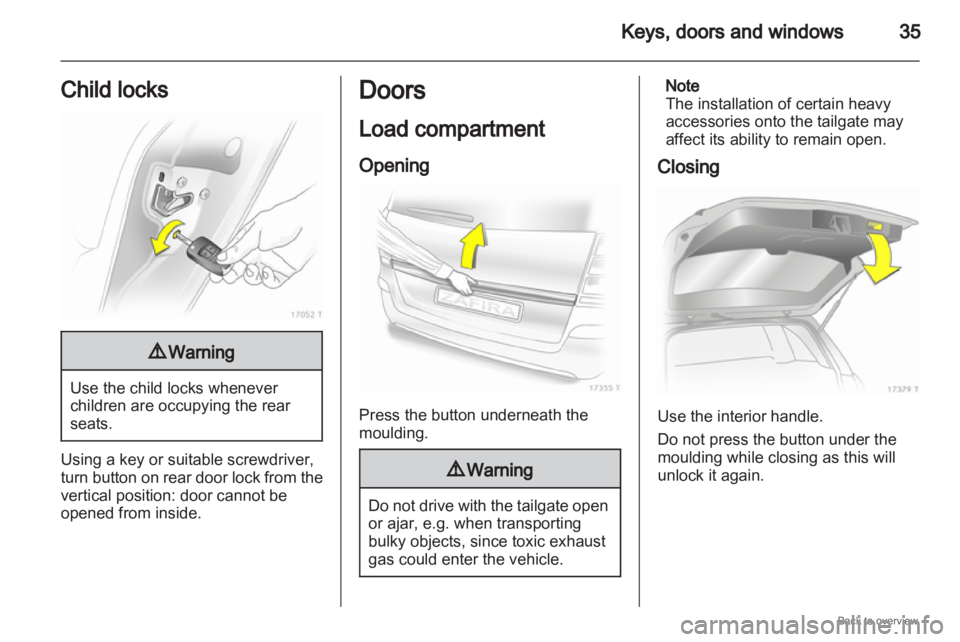
Using a key or suitable screwdriver,
turn
button on rear door lock from the
vertical position: door cannot be
opened from inside. Doors
Load compartment
Opening
Press the button underneath the
moulding.
9
Warning Do not drive with the tailgate open
or ajar, e.g. when transporting
bulky objects, since toxic exhaust
gas could enter the vehicle. Note
The installation of certain heavy
accessories onto the tailgate may
affect its ability to remain open.
Closing Use the interior handle.
Do not press the button under the
moulding while closing as this will
unlock it again.
Page 70 of 228
70
Storage
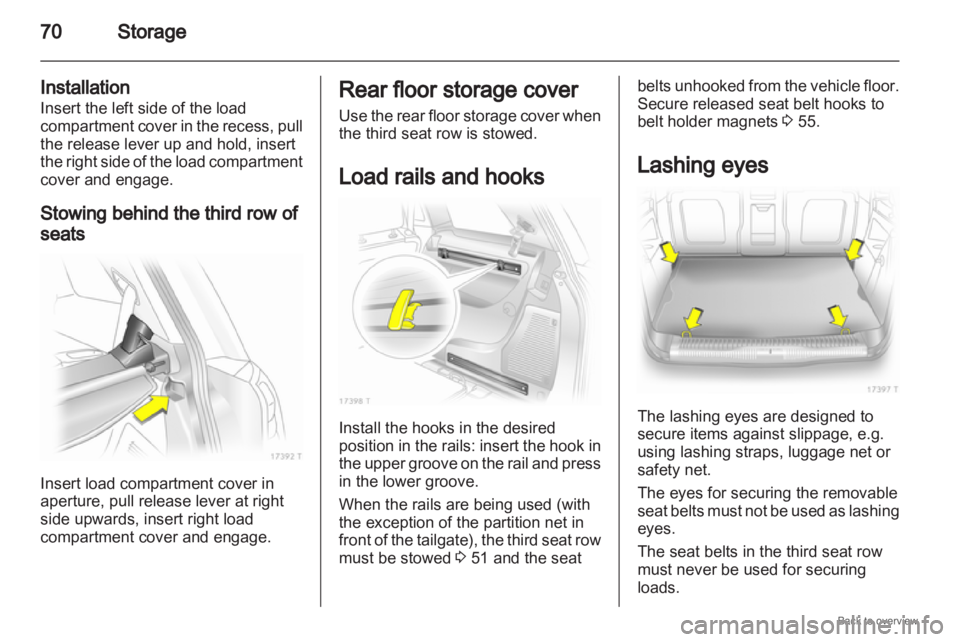
Installation
Insert the left side of the load
compartment cover in the recess, pull
the release lever up and hold, insert
the right side of the load compartment
cover and engage.
Stowing behind the third row of
seats Insert load compartment cover in
aperture, pull release lever at right
side upwards, insert right load
compartment cover and engage. Rear floor storage cover
Use
the rear floor storage cover when
the third seat row is stowed.
Load rails and hooks Install the hooks in the desired
position
in the rails: insert the hook in
the upper groove on the rail and press
in the lower groove.
When the rails are being used (with
the exception of the partition net in
front of the tailgate), the third seat row
must be stowed 3 51 and the seat belts unhooked from the vehicle floor.
Secure released seat belt hooks to
belt holder magnets
3 55.
Lashing eyes The lashing eyes are designed to
secure items against slippage, e.g.
using lashing straps, luggage net or
safety net.
The eyes for securing the removable
seat
belts must not be used as lashing
eyes.
The seat belts in the third seat row
must never be used for securing
loads.
Page 71 of 228
Storage
71
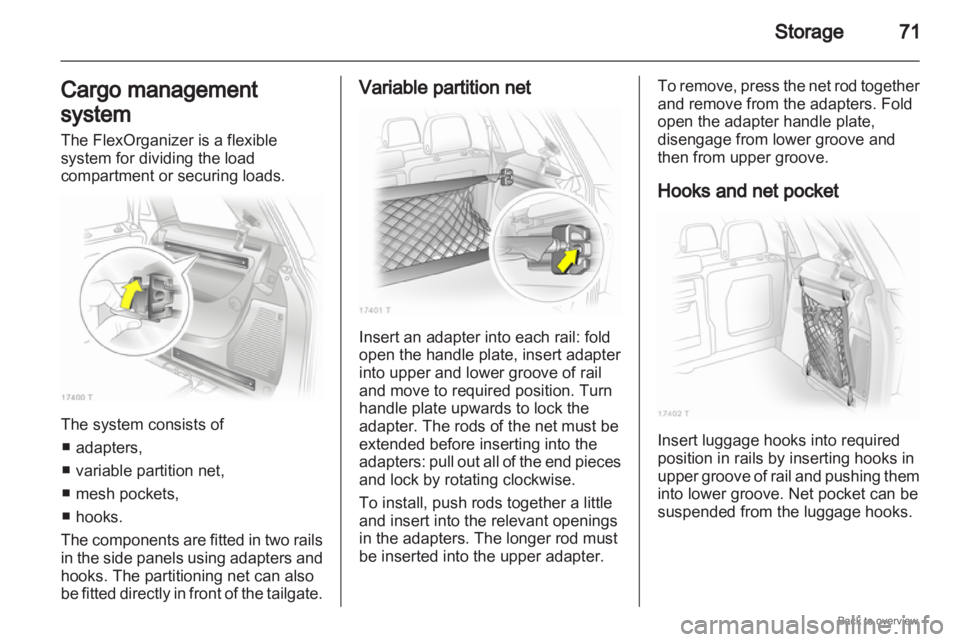
Cargo management
system
The FlexOrganizer is a flexible
system for dividing the load
compartment or securing loads. The system consists of
■ adapters,
■ variable partition net,
■ mesh pockets,
■ hooks.
The components are fitted in two rails
in the side panels using adapters and
hooks. The partitioning net can also
be fitted directly in front of the tailgate. Variable partition net
Insert an adapter into each rail: fold
open the handle plate, insert adapter
into upper and lower groove of rail
and move to required position. Turn
handle plate upwards to lock the
adapter. The rods of the net must be
extended before inserting into the
adapters:
pull out all of the end pieces
and lock by rotating clockwise.
To install, push rods together a little
and insert into the relevant openings
in the adapters. The longer rod must
be inserted into the upper adapter. To remove, press the net rod together
and remove from the adapters. Fold
open the adapter handle plate,
disengage from lower groove and
then from upper groove.
Hooks and net pocket
Insert luggage hooks into required
position in rails by inserting hooks in
upper
groove of rail and pushing them
into lower groove. Net pocket can be
suspended from the luggage hooks.
Page 72 of 228

72
Storage
Partitioning net in front of
tailgate The partitioning net can be installed
directly in front of the tailgate,
preventing the load from falling out
when the tailgate is opened.
The four end pieces of the net rod
must be pushed in before installation
by rotating each end piece
anticlockwise and pushing in.
To install, push the net rods together
a little and insert into the openings.
The
longer rod must be inserted at the
top. To remove, push the net rods
together and remove.
For easier loading with the third seat
row upright, first insert the rod, place
the
load in the load compartment and
then insert the upper rod.
Safety net
The safety net can be installed behind
the second seat row or the front seats.
Passengers must not be transported
behind the safety net.
Installation There are two installation openings in
the roof frame: suspend and engage
rod of net at one side, compress rod
and suspend and engage at other
side.
Behind the second seat row
Suspend hooks of net tensioning
belts in lashing eyes in floor and
tension.
Page 74 of 228
74
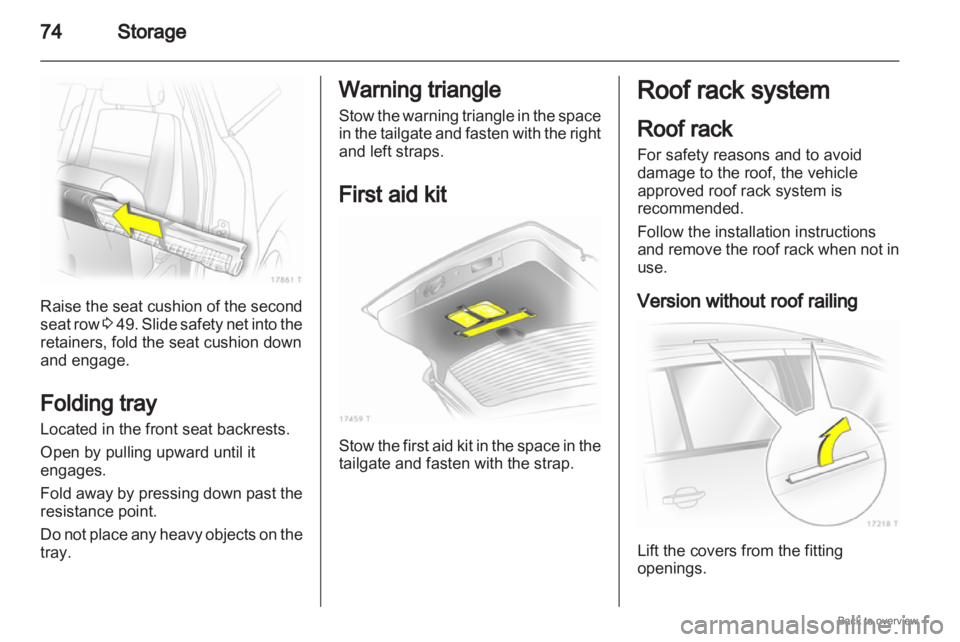
StorageRaise the seat cushion of the second
seat
row 3 49. Slide safety net into the
retainers, fold the seat cushion down
and engage.
Folding tray
Located in the front seat backrests.
Open by pulling upward until it
engages.
Fold away by pressing down past the
resistance point.
Do not place any heavy objects on the
tray. Warning triangle
Stow
the warning triangle in the space
in the tailgate and fasten with the right
and left straps.
First aid kit Stow the first aid kit in the space in the
tailgate and fasten with the strap. Roof rack system
Roof rack
For safety reasons and to avoid
damage to the roof, the vehicle
approved roof rack system is
recommended.
Follow the installation instructions
and
remove the roof rack when not in
use.
Version without roof railing Lift the covers from the fitting
openings.
Page 93 of 228

Instruments and controls
93
Rear fog light
r illuminates yellow.
Illuminated when the fog tail lamp is
on 3 112.
Cruise control
m illuminates green.
Illuminated when the system is on
3 144.
Door open
Q illuminates red.
It illuminates when a door or the
tailgate is open. Information displays
Triple-Info-Display
Display of time, outside temperature
and date or /infotainment system
when it is on.
When
the ignition is off, the time, date
and outside temperature can be
presented by briefly pressing one of
the two buttons below the display. Board-Info-Display
Display of time, outside temperature
and date or infotainment system
information.
Selecting functions
Functions and settings of the
infotainment
system can be accessed
via the board information display.
This is done using the menus and
buttons of the infotainment system.
If nothing is operated within
5 seconds, the menus are
automatically exited.
Page 100 of 228
100
Instruments and controls
Always day design: black or coloured
text on light background.
Always night design: white or
coloured text on dark background.
Selection is indicated by a o in front
of the menu item.
Ignition logic
See infotainment system manual. Vehicle messages
Messages are given via the
instrument panel display or as
warning and signal buzzers. Check
control messages appear on the
Info-Display. Some appear in an
abbreviated form. Confirm warning
messages 3 93, 3 96.
Warning chimes
When starting the engine or
whilst driving
■
If the electronic key is not presentor is not recognised.
■ If seat belt is not fastened.
■ If a door or the tailgate is not fully closed when starting off.
■ If a certain speed is exceeded with the hand brake applied.
■ If the speed programmed at the factory is exceeded.
■ If the vehicle has automated manual transmission and the
driver's door is opened when the engine is running, a gear is
engaged and the foot brake is not
depressed.
When the vehicle is parked and
the driver's door is opened ■
When the key is in the ignition switch.
■ With exterior lights on.
■ With Open&Start system and automatic transmission, if the
selector lever is not in P.
■ For automated manual transmission, if the hand brake is
not applied and no gear is engaged
when the engine is switched off.
Battery voltage
Low battery voltage in remote control
or electronic key. On vehicles without
check control, the message InSP3
appears in the instrument panel
display. Replace the battery 3 28,
3 29.