wheel OPEL ZAFIRA C 2014 Manual user
[x] Cancel search | Manufacturer: OPEL, Model Year: 2014, Model line: ZAFIRA C, Model: OPEL ZAFIRA C 2014Pages: 299, PDF Size: 9.03 MB
Page 75 of 299

Storage73
1. Rotate the pedals into position asshown in the illustration and put
the bicycle on the foremost wheel
recess.
Make sure that the bicycle stands centrally on the wheel recesses.
2. Attach the short mounting bracket
to the bicycle frame. Turn the
knob clockwise to fasten.
3. Secure both bicycle wheels to the
wheel recesses using the strap
retainers.
4. Check the bicycle to make sure it is secure.
Caution
Ensure gap between bicycle and
vehicle is at least 5 cm. If
necessary, loosen handlebar and swivel sideways.
Attaching the adapter
When carrying more than two
bicycles, the adapter must be fixed
before the second bicycle is attached.
1. Attach the adapter to the rear
carrier system as shown in the
illustration.
Page 76 of 299

74Storage
2. Turn the lever (1) forwards andhold, then lower the adapter (2) at
the rear.
3. Release lever and check if the adapter is engaged securely.4. Guide the strap attached to the adapter underneath the lever to
fold back the rear carrier system.
Fasten the strap.
Attaching further bicycles
The attachment of further bicycles is
similar to the attachment of the first
bicycle. Additionally some steps must be considered:
1. Before putting on the bicycle, always unfold the wheel recesses
for the next bicycle, if necessary.
2. Always rotate the pedals into an appropriate position before
putting on the bicycle.3. Position the bicycles on the rear carrier system alternately aligned
to the left and to the right.
4. Align the bicycles to the one attached before. The wheel hubsof the bicycles must not touch
each other.
5. Attach the bicycles with mounting brackets and strap retainers as
described for the first bicycle. The mounting brackets should be
fixed in parallel.
Use the long mounting bracket to
attach the second bicycle to the
rack.
Page 77 of 299

Storage75
Use the longer accessory
mounting bracket to attach the
third bicycle to the rack.
Use the short accessory mounting
bracket to attach the fourth
bicycle. The bracket must be fixed
between the frames of the third
and fourth bicycle.
6. Additionally secure both bicycle wheels of the fourth bicycle to thewheel recesses using the
tensioning straps.
It is recommended to attach a
warning sign to the rearmost bicycle
to increase visibility.
Fold the rear carrier system
backwards
The rear carrier system can be folded backwards to gain access to the load
compartment.
■ Without attached adapter:
Push the lever (1) to disengage and hold.
Pull the rack (2) backwards to fold
the rear carrier system.
■ With attached adapter:
9 Warning
Take care when disengaging the
rear carrier system as it will tilt
backwards. Risk of injury.
Page 78 of 299

76Storage
Hold frame (1) of rearmost bicyclewith one hand and pull the loop (2)
to disengage.
Hold rearmost bicycle with both
hands and fold the rear carrier
system backwards.
To increase visibility, the tail lights of
the vehicle are activated when the
rear carrier system is folded back.
9 Warning
When folding the rear carrier
system forwards again, take care
that the system is engaged
securely.
Removing bicycles
Undo strap retainers on bicycle tyres.
Turn knob anti-clockwise and remove
mounting brackets.
Detaching adapter
Detach the adapter before removing
the last bicycle remaining on the rear
carrier system.
1. Fold in wheel recesses.
2. Unbutton the strap.
3. Turn the lever (1) forwards and hold.
4. Lift the adapter (2) at the rear and
remove.
Page 79 of 299
Storage77
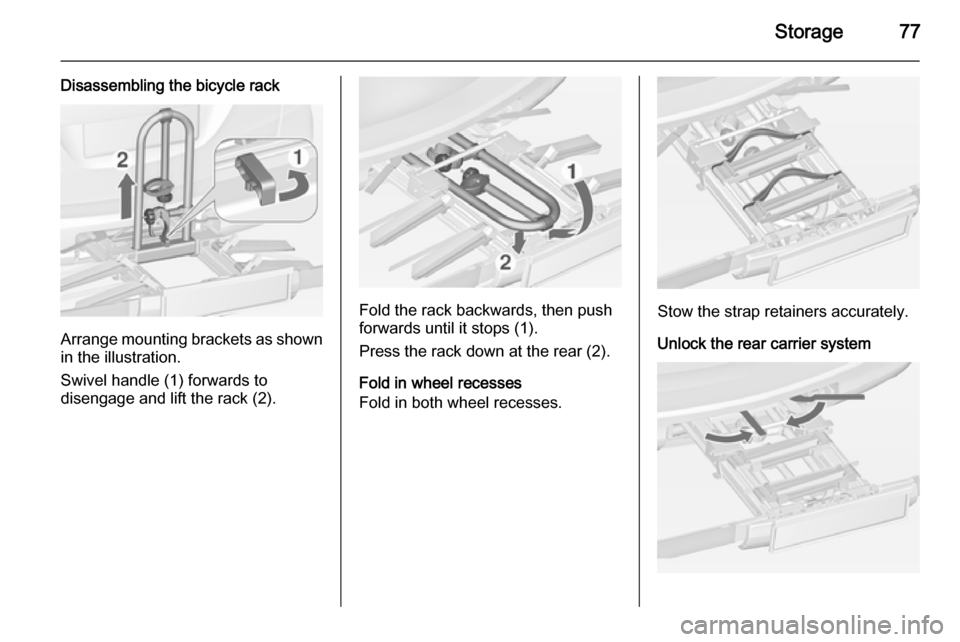
Disassembling the bicycle rack
Arrange mounting brackets as shownin the illustration.
Swivel handle (1) forwards to
disengage and lift the rack (2).
Fold the rack backwards, then push
forwards until it stops (1).
Press the rack down at the rear (2).
Fold in wheel recesses
Fold in both wheel recesses.Stow the strap retainers accurately.
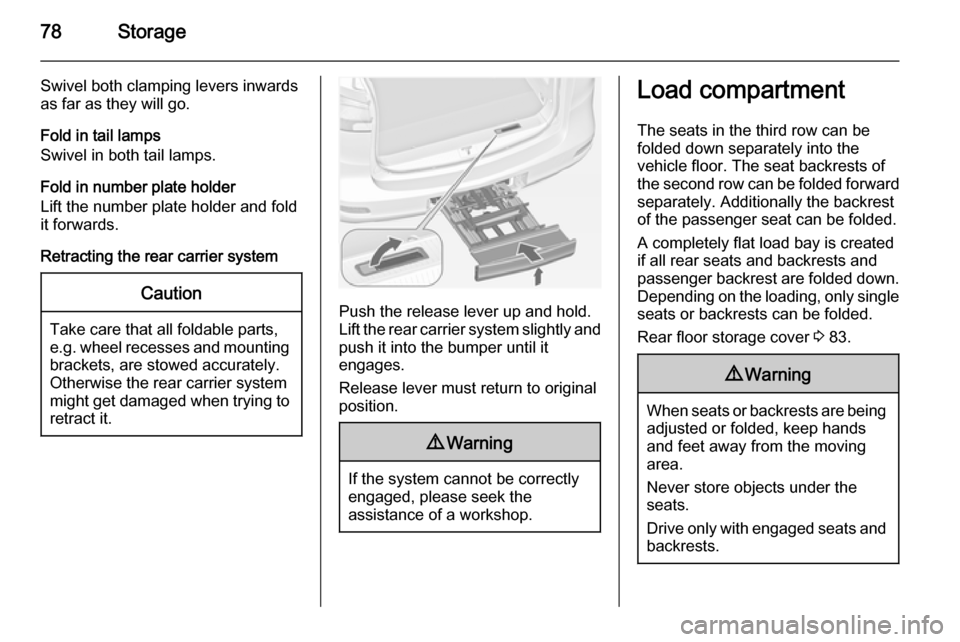
Unlock the rear carrier system
Page 80 of 299
78Storage
Swivel both clamping levers inwards
as far as they will go.
Fold in tail lamps
Swivel in both tail lamps.
Fold in number plate holder
Lift the number plate holder and fold
it forwards.
Retracting the rear carrier systemCaution
Take care that all foldable parts,
e.g. wheel recesses and mounting brackets, are stowed accurately.
Otherwise the rear carrier system might get damaged when trying to retract it.Push the release lever up and hold.
Lift the rear carrier system slightly and
push it into the bumper until it
engages.
Release lever must return to original
position.
9 Warning
If the system cannot be correctly
engaged, please seek the
assistance of a workshop.
Load compartment
The seats in the third row can be
folded down separately into the
vehicle floor. The seat backrests of the second row can be folded forward
separately. Additionally the backrest
of the passenger seat can be folded.
A completely flat load bay is created
if all rear seats and backrests and
passenger backrest are folded down.
Depending on the loading, only single seats or backrests can be folded.
Rear floor storage cover 3 83.9 Warning
When seats or backrests are being
adjusted or folded, keep hands
and feet away from the moving
area.
Never store objects under the
seats.
Drive only with engaged seats and
backrests.
Page 98 of 299
96Instruments and controlsInstruments and
controlsControls ....................................... 96
Warning lights, gauges and indi‐
cators ......................................... 104
Information displays ...................117
Vehicle messages ...................... 123
Trip computer ............................. 127
Vehicle personalisation ..............130Controls
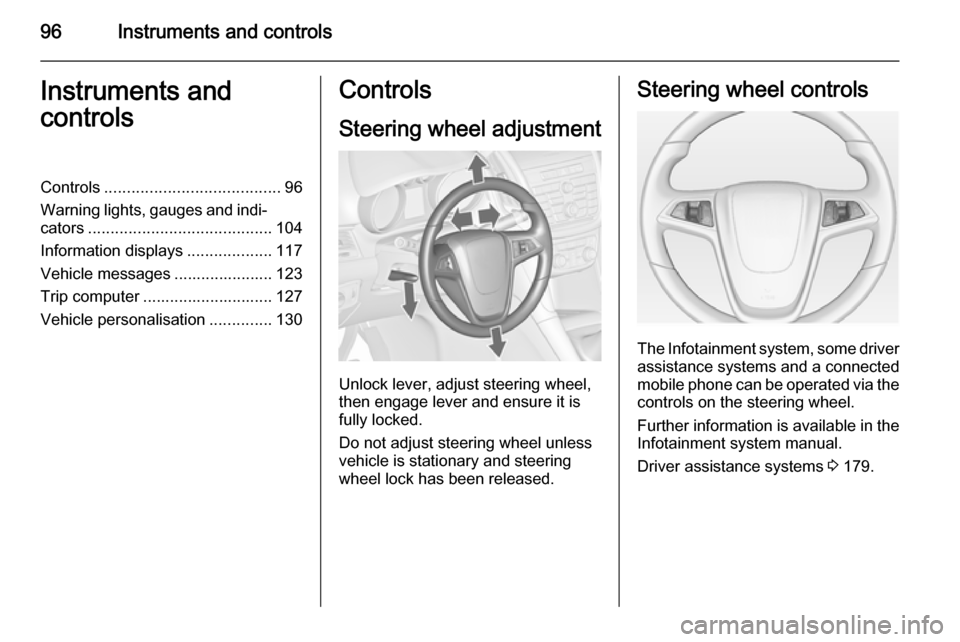
Steering wheel adjustment
Unlock lever, adjust steering wheel,
then engage lever and ensure it is fully locked.
Do not adjust steering wheel unless
vehicle is stationary and steering
wheel lock has been released.
Steering wheel controls
The Infotainment system, some driver assistance systems and a connected
mobile phone can be operated via the
controls on the steering wheel.
Further information is available in the
Infotainment system manual.
Driver assistance systems 3 179.
Page 99 of 299

Instruments and controls97Heated steering wheel
Activate heating by pressing *
button. Activation is indicated by the
LED in the button.
The recommended grip areas of the
steering wheel are heated quicker
and to a higher temperature than the
other areas.
Heating is operational when the
engine is running and during an
Autostop.
Stop-start system 3 162.
Horn
Press j.
Page 100 of 299

98Instruments and controlsWindscreen wiper/washer
Windscreen wiper2=fast1=slowP=interval wiping§=off
For a single wipe when the
windscreen wiper is off, press the
lever down.
Do not use if the windscreen is frozen.
Switch off in car washes.
Adjustable wiper interval
Wiper lever in position P.
Turn the adjuster wheel to adjust the
desired wipe interval:
short
interval=turn adjuster wheel
upwardslong
interval=turn adjuster wheel
downwardsAutomatic wiping with rain sensorP=automatic wiping with rain
sensor
The rain sensor detects the amount of water on the windscreen and
automatically regulates the frequency
of the windscreen wiper.
If the wiper frequency is above
20 seconds the wiper arm moves
slightly down to park position.
Page 101 of 299

Instruments and controls99
Adjustable sensitivity of the rain
sensor
Turn the adjuster wheel to adjust the
sensitivity:
low
sensi‐
tivity=turn adjuster wheel
downwardshigh
sensi‐
tivity=turn adjuster wheel
upwards
Keep the sensor free from dust, dirt
and ice.
Windscreen and headlight
washer
Pull lever. Washer fluid is sprayed
onto the windscreen and the wiper
wipes a few times.
If the headlights are on, washer fluid is also sprayed onto the headlights,
provided that the lever is pulled
sufficiently long. Afterwards the
headlight washer system is
inoperable for 5 wash cycles or until
engine or headlights have been
switched off and on again.