lock OPEL ZAFIRA C 2014 Manual user
[x] Cancel search | Manufacturer: OPEL, Model Year: 2014, Model line: ZAFIRA C, Model: OPEL ZAFIRA C 2014Pages: 299, PDF Size: 9.03 MB
Page 79 of 299
Storage77
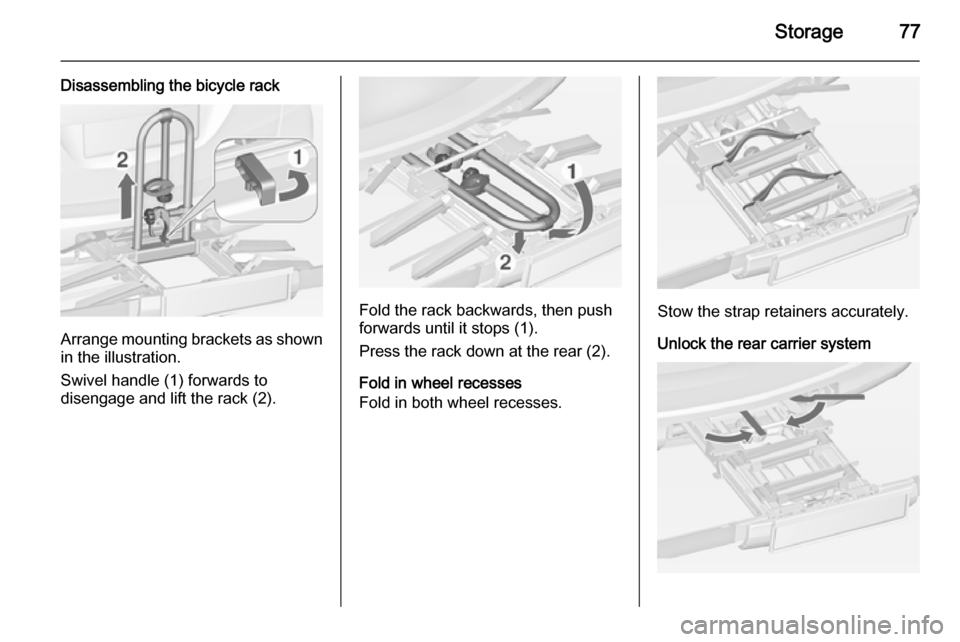
Disassembling the bicycle rack
Arrange mounting brackets as shownin the illustration.
Swivel handle (1) forwards to
disengage and lift the rack (2).
Fold the rack backwards, then push
forwards until it stops (1).
Press the rack down at the rear (2).
Fold in wheel recesses
Fold in both wheel recesses.Stow the strap retainers accurately.
Unlock the rear carrier system
Page 82 of 299
80Storage
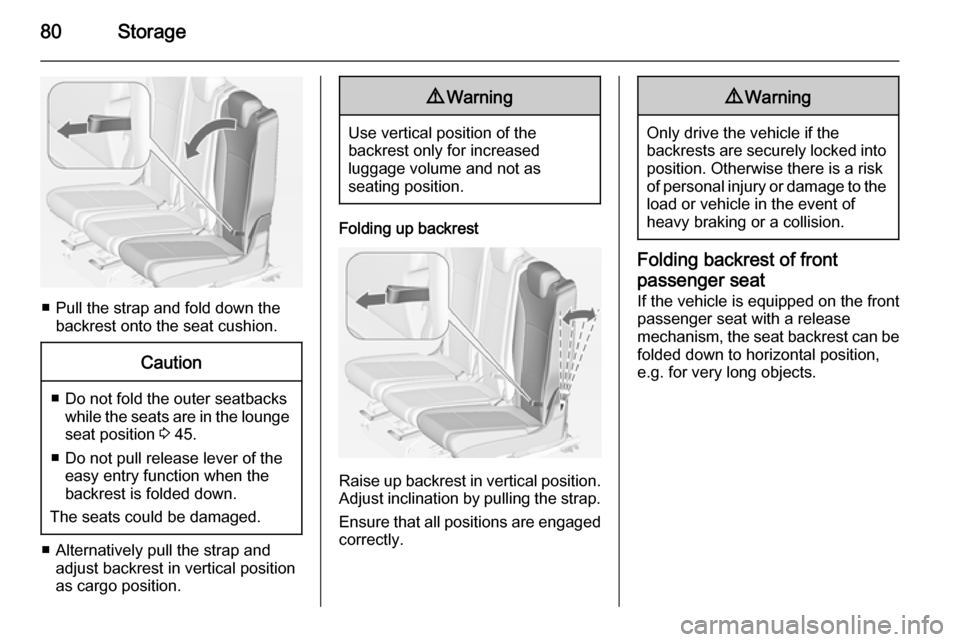
■ Pull the strap and fold down thebackrest onto the seat cushion.
Caution
■ Do not fold the outer seatbackswhile the seats are in the loungeseat position 3 45.
■ Do not pull release lever of the easy entry function when the
backrest is folded down.
The seats could be damaged.
■ Alternatively pull the strap and adjust backrest in vertical position
as cargo position.
9 Warning
Use vertical position of the
backrest only for increased
luggage volume and not as
seating position.
Folding up backrest
Raise up backrest in vertical position.
Adjust inclination by pulling the strap.
Ensure that all positions are engaged
correctly.
9 Warning
Only drive the vehicle if the
backrests are securely locked into position. Otherwise there is a risk
of personal injury or damage to the
load or vehicle in the event of
heavy braking or a collision.
Folding backrest of front
passenger seat
If the vehicle is equipped on the front
passenger seat with a release
mechanism, the seat backrest can be
folded down to horizontal position,
e.g. for very long objects.
Page 91 of 299

Storage89
■ hooks,
■ variable partition net.
The components are fitted in rails on
both side panels using adapters and hooks.
Installation of adapters in the
rails
Fold open the handle plate, insert the adapter into the upper and lower
groove of the rail and move to the
required position. Turn the handle
plate upwards to lock the adapter. To
remove, turn the handle plate down
and move out of the rail.
Variable partition net
Insert adapters into the required
position in the rails. Stick together the
halves of the net rods.
To install, push rods together a little
and insert into the relevant openings
in the adapters.
To remove, press the net rods
together and remove from the
adapters.
Net pocket
Insert adapters into the required
position in the rails. The net pocket
can be suspended from the adapters.
Page 92 of 299
90Storage
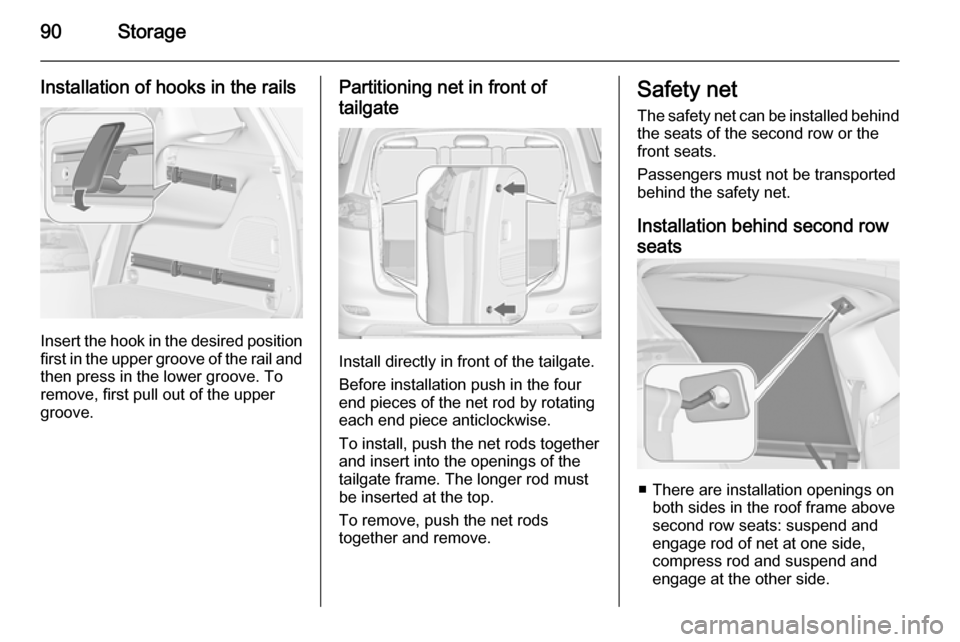
Installation of hooks in the rails
Insert the hook in the desired positionfirst in the upper groove of the rail and
then press in the lower groove. To
remove, first pull out of the upper
groove.
Partitioning net in front of
tailgate
Install directly in front of the tailgate.
Before installation push in the four
end pieces of the net rod by rotating
each end piece anticlockwise.
To install, push the net rods together
and insert into the openings of the
tailgate frame. The longer rod must
be inserted at the top.
To remove, push the net rods
together and remove.
Safety net
The safety net can be installed behind the seats of the second row or the
front seats.
Passengers must not be transported
behind the safety net.
Installation behind second row
seats
■ There are installation openings on both sides in the roof frame above
second row seats: suspend and
engage rod of net at one side,
compress rod and suspend and
engage at the other side.
Page 98 of 299
96Instruments and controlsInstruments and
controlsControls ....................................... 96
Warning lights, gauges and indi‐
cators ......................................... 104
Information displays ...................117
Vehicle messages ...................... 123
Trip computer ............................. 127
Vehicle personalisation ..............130Controls
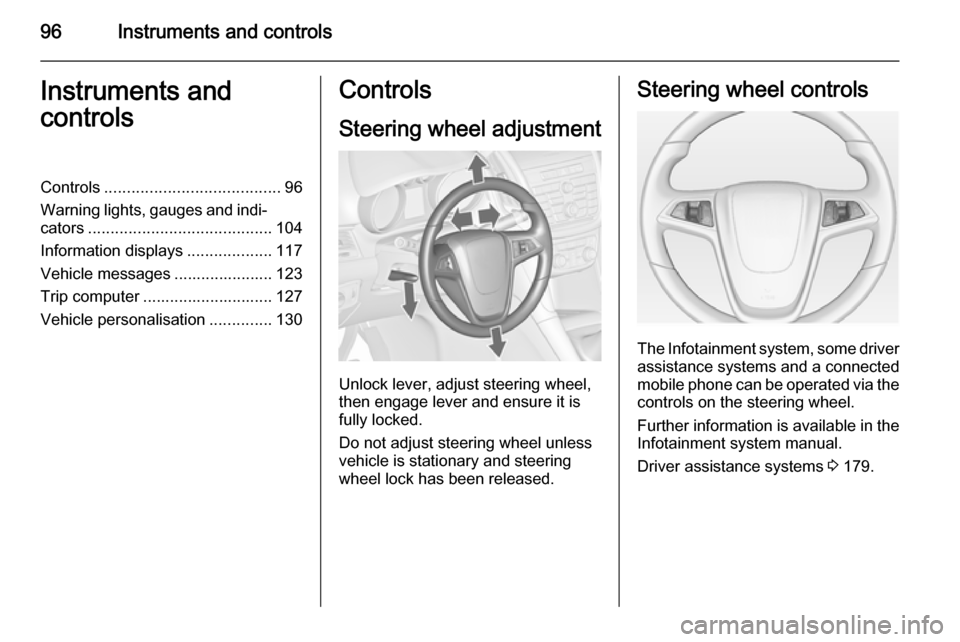
Steering wheel adjustment
Unlock lever, adjust steering wheel,
then engage lever and ensure it is fully locked.
Do not adjust steering wheel unless
vehicle is stationary and steering
wheel lock has been released.
Steering wheel controls
The Infotainment system, some driver assistance systems and a connected
mobile phone can be operated via the
controls on the steering wheel.
Further information is available in the
Infotainment system manual.
Driver assistance systems 3 179.
Page 103 of 299

Instruments and controls101
If outside temperature drops to 3 °C,
a warning message is displayed in the Driver Information Centre with
Uplevel-Display or Uplevel-Combi-
Display.
9 Warning
The road surface may already be
icy even though the display
indicates a few degrees above
0 °C.
Clock
Date and time are shown in the
Info-Display.
Time and date settings
CD 300 /CD 400 /CD400plus and Navi
600/Navi 900
Press the CONFIG button. The menu
Settings is displayed.
Select Time & Date .
Selectable setting options:
■ Set time : Changes the time shown
on the display.
■ Set date : Changes the date shown
on the display.
■ Set time format : Changes
indication of hours between 12
hours and 24 hours .
■Set date format : Changes
indication of date between MM/DD/
YYYY and DD.MM.YYYY .
■ Display digital clock : Switches on/
off indication of time on the display.
■ RDS clock synchronization : The
RDS signal of most VHF
transmitters automatically sets the time. RDS time synchronisation
can take a few minutes. Some
transmitters do not send a correct
time signal. In such cases, it is
recommended to switch off
automatic time synchronisation.
Vehicle personalisation 3 130.
Time and date settings
CD 600/Navi 650/Navi 950
Press the Config button and then
select the Time and Date menu item
to display the respective submenu.
Page 115 of 299

Instruments and controls1139Warning
Have the cause of the fault
remedied immediately by a
workshop.
Antilock brake system
(ABS) u illuminates yellow.
Illuminates for a few seconds after the ignition is switched on. The system is
ready for operation when the control
indicator extinguishes.
If the control indicator does not
extinguish after a few seconds, or if it illuminates while driving, there is a
fault in the ABS. The brake system
remains operational but without ABS
regulation.
Antilock brake system 3 173.
Upshift [ illuminates green as a control
indicator, or is shown as a symbol in
the Driver Information Centre with
Uplevel-Display or Uplevel-Combi-
Display, when upshifting is
recommended for fuel saving
reasons.
On some versions gear shift
indication is popped-up as a full page in the Driver Information Centre.
EcoFlex drive assistant 3 127.
Power steering
c illuminates yellow.
Illuminates with power steering
reduced Power steering is reduced due to
overheating of the system. Control
indicator extinguishes when the
system has cooled down.
Stop-start system 3 162.
Illuminates with power steering disabled
Failure in the power steering system.
Consult a workshop.
Lane departure warning
) illuminates green or flashes yellow.Illuminates green
System is switched on and ready to
operate.
Flashes yellow System recognizes an unintended
lane change.
Ultrasonic parking assist
r illuminates yellow.
Fault in system
or
Fault due to sensors that are dirty or
covered by ice or snow
or
Interference due to external sources of ultrasound. Once the source of
interference is removed, the system
will operate normally.
Have the cause of the fault in the
system remedied by a workshop.
Ultrasonic parking assist 3 194.
Page 117 of 299
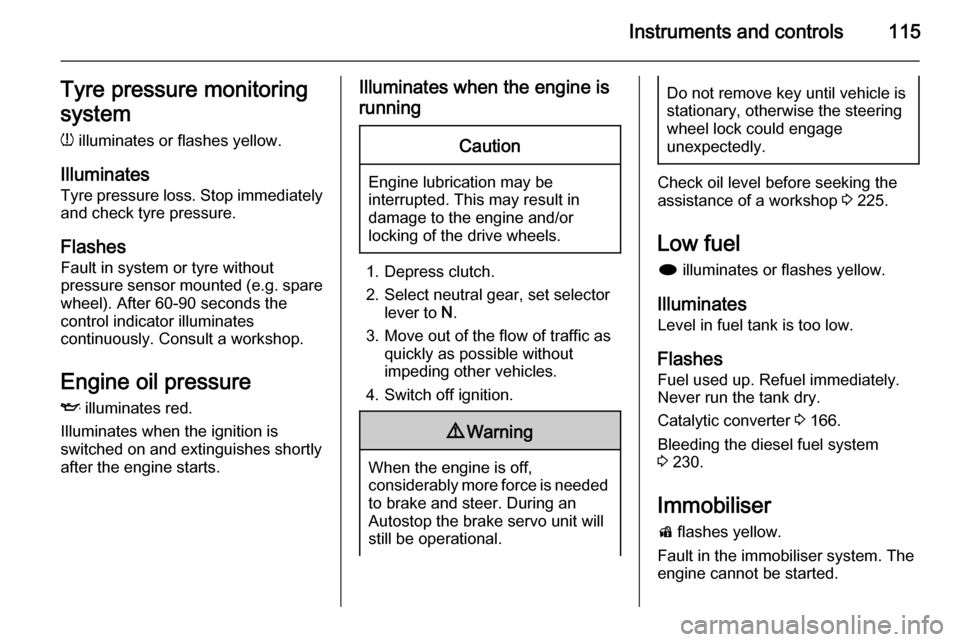
Instruments and controls115Tyre pressure monitoring
system
w illuminates or flashes yellow.
Illuminates Tyre pressure loss. Stop immediately
and check tyre pressure.
Flashes Fault in system or tyre without
pressure sensor mounted (e.g. spare
wheel). After 60-90 seconds the
control indicator illuminates
continuously. Consult a workshop.
Engine oil pressure
I illuminates red.
Illuminates when the ignition is
switched on and extinguishes shortly
after the engine starts.Illuminates when the engine is
runningCaution
Engine lubrication may be
interrupted. This may result in
damage to the engine and/or
locking of the drive wheels.
1. Depress clutch.
2. Select neutral gear, set selector lever to N.
3. Move out of the flow of traffic as quickly as possible without
impeding other vehicles.
4. Switch off ignition.
9 Warning
When the engine is off,
considerably more force is needed
to brake and steer. During an
Autostop the brake servo unit will still be operational.
Do not remove key until vehicle isstationary, otherwise the steeringwheel lock could engage
unexpectedly.
Check oil level before seeking the
assistance of a workshop 3 225.
Low fuel
i illuminates or flashes yellow.
Illuminates Level in fuel tank is too low.
Flashes
Fuel used up. Refuel immediately.
Never run the tank dry.
Catalytic converter 3 166.
Bleeding the diesel fuel system
3 230.
Immobiliser
d flashes yellow.
Fault in the immobiliser system. The
engine cannot be started.
Page 126 of 299

124Instruments and controls
Vehicle messages on theMidlevel-Display
The vehicle messages are displayed
as code numbers.
No.Vehicle message2No radio remote control
detected, depress clutch pedal
for a restart3Engine coolant level low4Air conditioning off5Steering wheel is lockedNo.Vehicle message6Depress brake pedal to release
electric parking brake7Turn steering wheel, switch
ignition off and then on9Turn steering wheel, start
engine again12Vehicle overloaded13Compressor overheated15Centre high-mounted brake
light failure16Brake light failure17Headlight levelling malfunction18Left low beam failure19Rear fog light failure20Right low beam failure21Left sidelight failure22Right sidelight failure23Reversing light failureNo.Vehicle message24Number plate light failure25Left front turn signal failure26Left rear turn signal failure27Right front turn signal failure28Right rear turn signal failure29Check trailer brake light30Check trailer reversing light31Check left trailer turn signal32Check right trailer turn signal33Check trailer rear fog light34Check trailer rear light35Replace battery in radio remote
control48Clean side blind zone alert
system49Lane departure warning
unavailable53Tighten gas cap
Page 127 of 299

Instruments and controls125
No.Vehicle message54Water in diesel fuel filter55Diesel particle filter is full
3 16556Tyre pressure imbalance on
front axle57Tyre pressure imbalance on
rear axle58Tyres without TPMS sensors
detected59Open and then close driver
window60Open and then close front
passenger window61Open and then close rear left
window62Open and then close rear right
window65Theft attempted66Service theft alarm system67Service steering wheel lockNo.Vehicle message68Service power steering69Service suspension system70Service level control system71Service rear axle74Service AFL75Service air conditioning76Service side blind zone alert
system77Service lane departure warning79Top up engine oil81Service transmission82Change engine oil soon83Service adaptive cruise control84Engine power is reduced89Service vehicle soon94Shift to park before exiting95Service airbagNo.Vehicle message128Bonnet open134Park assist fault, clean bumper136Service parking assist145Check washer fluid level174Low vehicle battery258Park assist off
Vehicle messages on the
Uplevel-Display or Uplevel- Combi-Display