ECU OPEL ZAFIRA TOURER 2017 User Guide
[x] Cancel search | Manufacturer: OPEL, Model Year: 2017, Model line: ZAFIRA TOURER, Model: OPEL ZAFIRA TOURER 2017Pages: 307, PDF Size: 9.35 MB
Page 73 of 307
Storage71the attachment of electrically-
powered bicycles to the pull-out
carrier. The maximum load per
bicycle on the adapter is 20 kg.
The wheelbase of a bicycle must not
exceed 1.15 metres. Otherwise the
secure fastening of a bicycle is not
possible.
If not in use, the rear carrier system
must be slid back into the vehicle
floor.
There must not be any objects on the
bicycles that could become loose
during transportation.Caution
If the rear carrier system is
extended and the vehicle is fully loaded, the chassis clearance will
be reduced.
Drive carefully whenever the road has a steep inclination or when
driving over a ramp, bump, etc.
Caution
Consult your bicycle dealer before
attaching bicycles with carbon
frames. The bicycles might get
damaged.
Extending
Open the tailgate.
9 Warning
No-one should be in the extension
zone of the rear carrier system,
risk of injury.
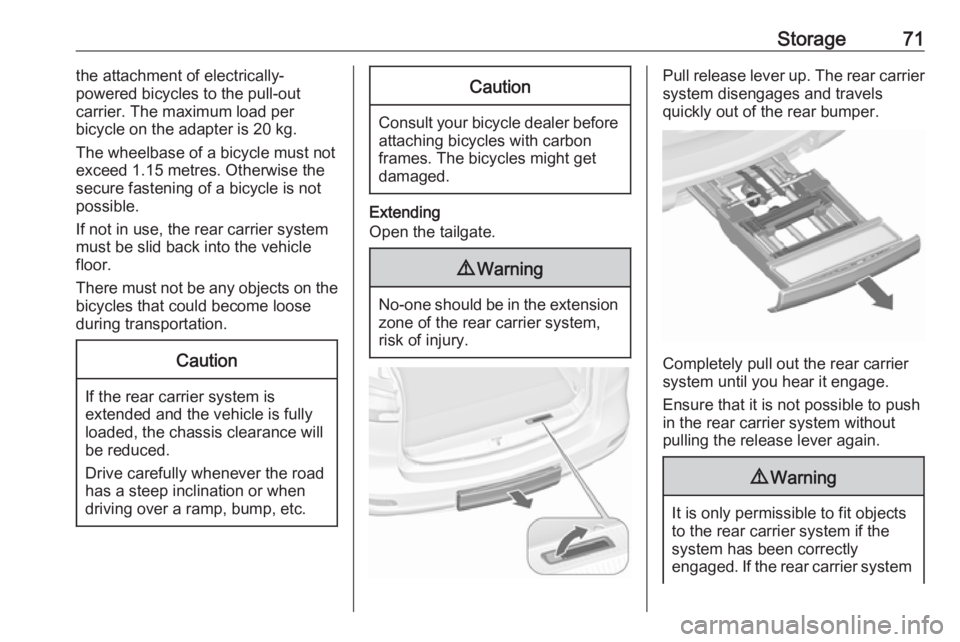
Pull release lever up. The rear carrier system disengages and travels
quickly out of the rear bumper.
Completely pull out the rear carrier
system until you hear it engage.
Ensure that it is not possible to push in the rear carrier system without
pulling the release lever again.
9 Warning
It is only permissible to fit objects
to the rear carrier system if the
system has been correctly
engaged. If the rear carrier system
Page 76 of 307
74Storage3.Secure both bicycle wheels to the
wheel recesses using the strap
retainers.
4. Check the bicycle to make sure it is secure.Caution
Ensure gap between bicycle and
vehicle is at least 5 cm. If
necessary, loosen handlebar and swivel sideways.
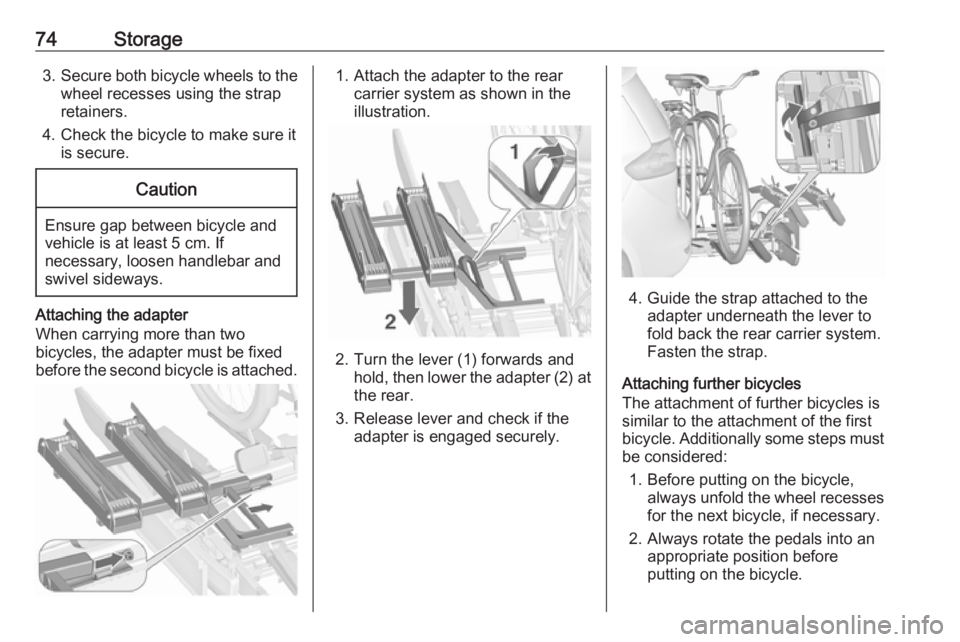
Attaching the adapter
When carrying more than two
bicycles, the adapter must be fixed
before the second bicycle is attached.
1. Attach the adapter to the rear carrier system as shown in the
illustration.
2. Turn the lever (1) forwards and hold, then lower the adapter (2) at
the rear.
3. Release lever and check if the adapter is engaged securely.
4. Guide the strap attached to the adapter underneath the lever to
fold back the rear carrier system.
Fasten the strap.
Attaching further bicycles
The attachment of further bicycles is
similar to the attachment of the first
bicycle. Additionally some steps must be considered:
1. Before putting on the bicycle, always unfold the wheel recesses
for the next bicycle, if necessary.
2. Always rotate the pedals into an appropriate position before
putting on the bicycle.
Page 77 of 307
Storage75
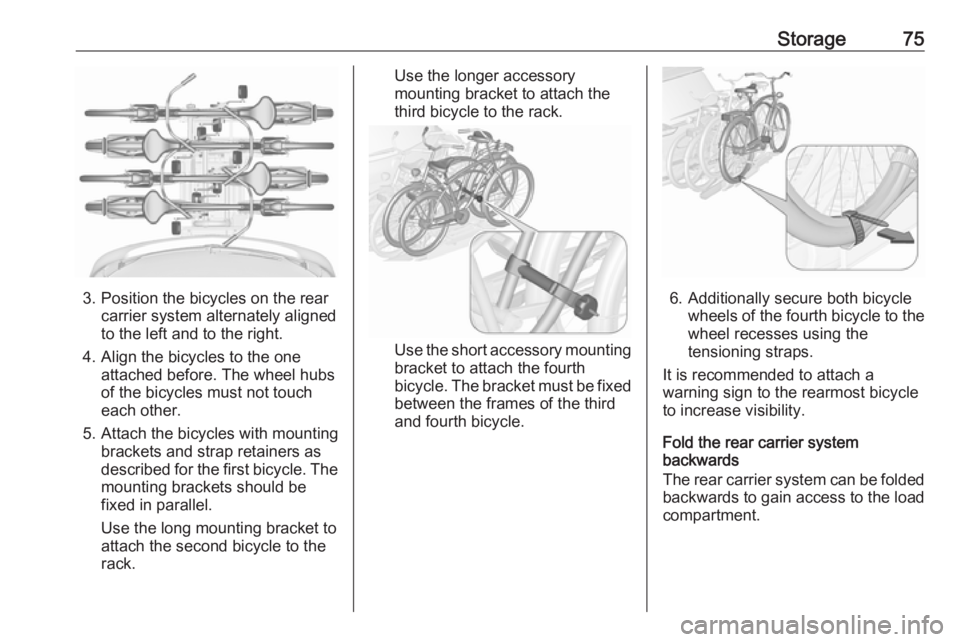
3. Position the bicycles on the rearcarrier system alternately aligned
to the left and to the right.
4. Align the bicycles to the one attached before. The wheel hubsof the bicycles must not touch
each other.
5. Attach the bicycles with mounting brackets and strap retainers as
described for the first bicycle. The
mounting brackets should be
fixed in parallel.
Use the long mounting bracket to
attach the second bicycle to the
rack.
Use the longer accessory
mounting bracket to attach the
third bicycle to the rack.
Use the short accessory mounting
bracket to attach the fourth
bicycle. The bracket must be fixed
between the frames of the third
and fourth bicycle.
6. Additionally secure both bicycle wheels of the fourth bicycle to thewheel recesses using the
tensioning straps.
It is recommended to attach a
warning sign to the rearmost bicycle
to increase visibility.
Fold the rear carrier system
backwards
The rear carrier system can be folded backwards to gain access to the load
compartment.
Page 78 of 307
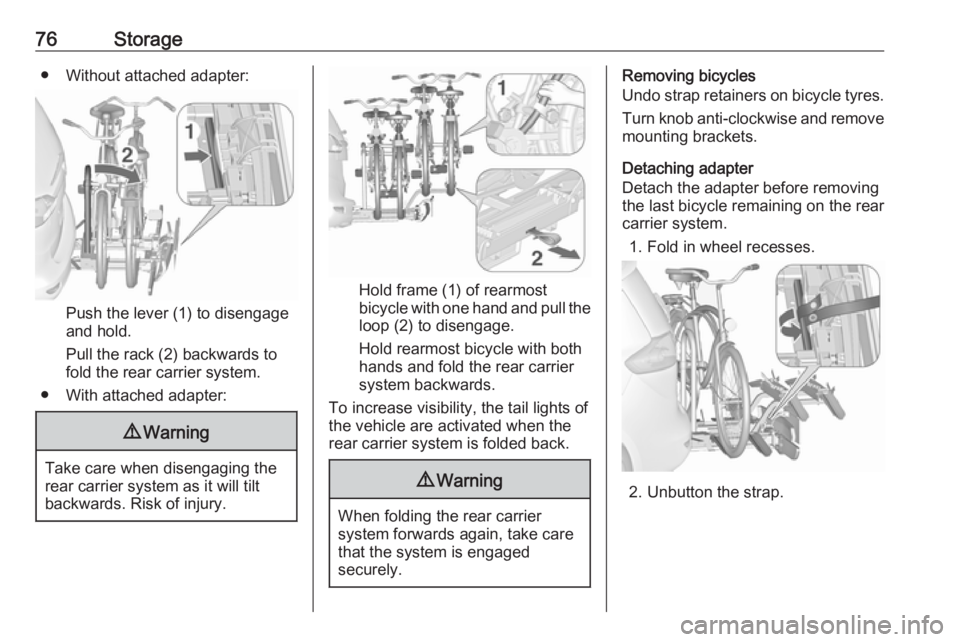
76Storage● Without attached adapter:
Push the lever (1) to disengage
and hold.
Pull the rack (2) backwards to
fold the rear carrier system.
● With attached adapter:
9 Warning
Take care when disengaging the
rear carrier system as it will tilt
backwards. Risk of injury.
Hold frame (1) of rearmost
bicycle with one hand and pull the
loop (2) to disengage.
Hold rearmost bicycle with both
hands and fold the rear carrier
system backwards.
To increase visibility, the tail lights of
the vehicle are activated when the
rear carrier system is folded back.
9 Warning
When folding the rear carrier
system forwards again, take care
that the system is engaged
securely.
Removing bicycles
Undo strap retainers on bicycle tyres.
Turn knob anti-clockwise and remove
mounting brackets.
Detaching adapter
Detach the adapter before removing
the last bicycle remaining on the rear
carrier system.
1. Fold in wheel recesses.
2. Unbutton the strap.
Page 83 of 307
Storage819Warning
Only drive the vehicle if the
backrests are securely locked into position. Otherwise there is a risk
of personal injury or damage to the
load or vehicle in the event of
heavy braking or a collision.
Folding backrest of front
passenger seat
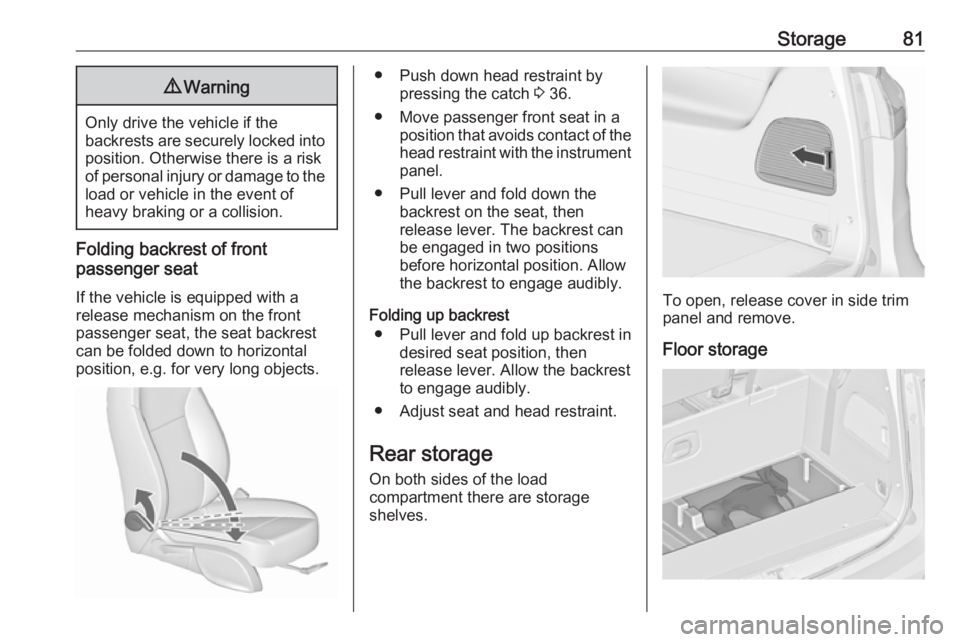
If the vehicle is equipped with a
release mechanism on the front
passenger seat, the seat backrest
can be folded down to horizontal
position, e.g. for very long objects.
● Push down head restraint by pressing the catch 3 36.
● Move passenger front seat in a position that avoids contact of the
head restraint with the instrument
panel.
● Pull lever and fold down the backrest on the seat, then
release lever. The backrest can
be engaged in two positions
before horizontal position. Allow the backrest to engage audibly.
Folding up backrest ● Pull lever and fold up backrest in desired seat position, then
release lever. Allow the backrest to engage audibly.
● Adjust seat and head restraint.
Rear storage
On both sides of the load
compartment there are storage
shelves.
To open, release cover in side trim
panel and remove.
Floor storage
Page 90 of 307
88Storage
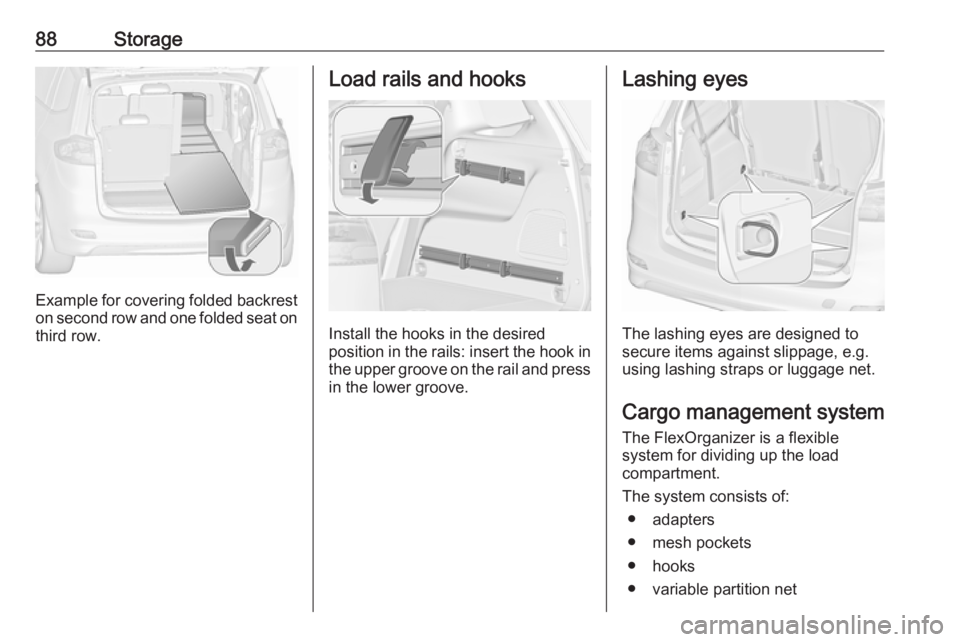
Example for covering folded backreston second row and one folded seat on
third row.
Load rails and hooks
Install the hooks in the desired
position in the rails: insert the hook in the upper groove on the rail and pressin the lower groove.
Lashing eyes
The lashing eyes are designed to
secure items against slippage, e.g.
using lashing straps or luggage net.
Cargo management system The FlexOrganizer is a flexible
system for dividing up the load
compartment.
The system consists of:
● adapters
● mesh pockets
● hooks
● variable partition net
Page 94 of 307
92StorageRemoval
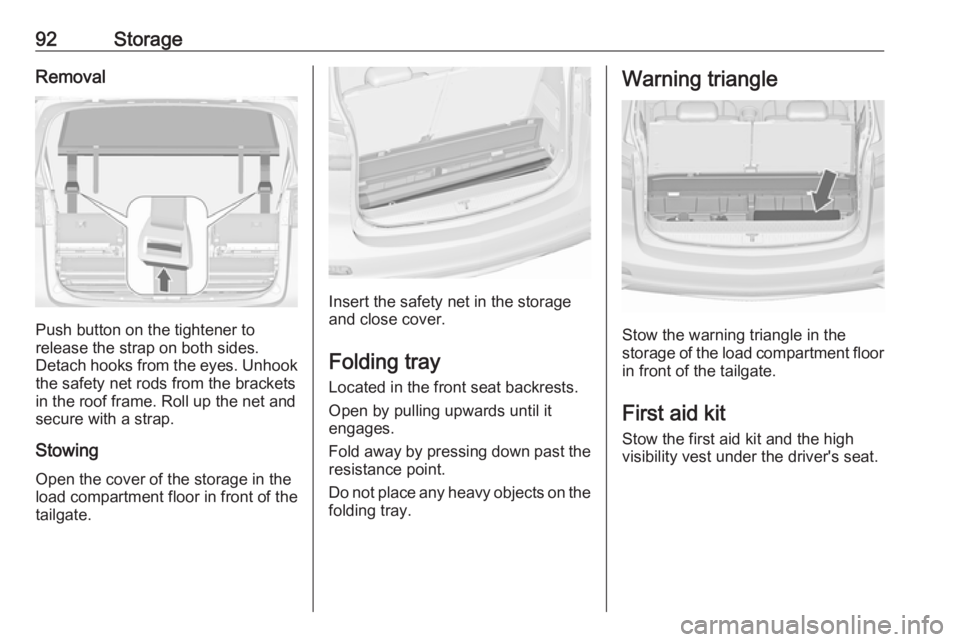
Push button on the tightener to
release the strap on both sides.
Detach hooks from the eyes. Unhook
the safety net rods from the brackets in the roof frame. Roll up the net and
secure with a strap.
Stowing Open the cover of the storage in the
load compartment floor in front of the
tailgate.
Insert the safety net in the storage
and close cover.
Folding tray Located in the front seat backrests.
Open by pulling upwards until it
engages.
Fold away by pressing down past the resistance point.
Do not place any heavy objects on the
folding tray.
Warning triangle
Stow the warning triangle in the
storage of the load compartment floor
in front of the tailgate.
First aid kit Stow the first aid kit and the high
visibility vest under the driver's seat.
Page 96 of 307
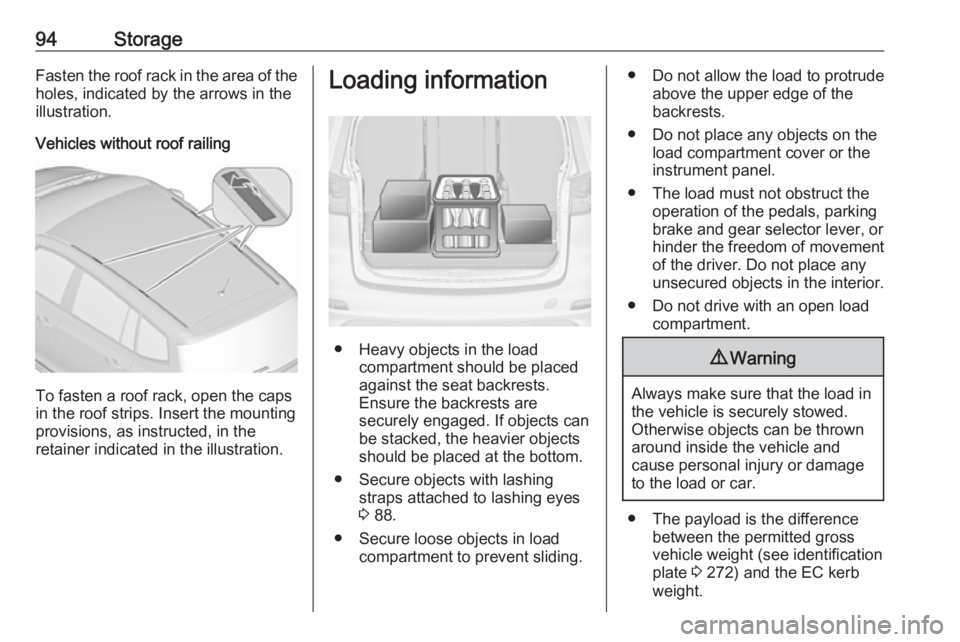
94StorageFasten the roof rack in the area of the
holes, indicated by the arrows in the
illustration.
Vehicles without roof railing
To fasten a roof rack, open the caps
in the roof strips. Insert the mounting
provisions, as instructed, in the
retainer indicated in the illustration.
Loading information
● Heavy objects in the load compartment should be placed
against the seat backrests.
Ensure the backrests are
securely engaged. If objects can
be stacked, the heavier objects should be placed at the bottom.
● Secure objects with lashing straps attached to lashing eyes
3 88.
● Secure loose objects in load compartment to prevent sliding.
● Do not allow the load to protrudeabove the upper edge of the
backrests.
● Do not place any objects on the load compartment cover or the
instrument panel.
● The load must not obstruct the operation of the pedals, parking
brake and gear selector lever, or
hinder the freedom of movement of the driver. Do not place any
unsecured objects in the interior.
● Do not drive with an open load compartment.9Warning
Always make sure that the load in
the vehicle is securely stowed.
Otherwise objects can be thrown
around inside the vehicle and
cause personal injury or damage
to the load or car.
● The payload is the difference between the permitted gross
vehicle weight (see identification
plate 3 272) and the EC kerb
weight.
Page 97 of 307
Storage95To calculate the payload, enter
the data for your vehicle in the
weights table at the front of this
manual.
The EC kerb weight includes
weights for the driver (68 kg),
luggage (7 kg) and all fluids (fuel
tank 90% full).
Optional equipment and
accessories increase the kerb
weight.
● Driving with a roof load increases
the sensitivity of the vehicle to
cross-winds and has a
detrimental effect on vehicle
handling due to the vehicle's
higher centre of gravity.
Distribute the load evenly and secure it properly with retaining
straps. Adjust the tyre pressure
and vehicle speed according to
the load conditions. Check and
retighten the straps frequently.
Do not drive faster than
120 km/h.
The permissible roof load is
75 kg for vehicles without roof
railing and 100 kg for vehicles
with roof railing. The roof load isthe combined weight of the roof
rack and the load.
Page 128 of 307
126Instruments and controlsWhen the vehicle is parked and/orthe driver's door is opened
● With exterior lights on.
During an Autostop ● If the driver's door is opened.
Battery voltage
When the vehicle battery voltage is
running low, a warning message or
warning code 174 will appear in the
Driver Information Centre.
1. Switch off immediately any electrical consumers which are
not required for a safe ride, e.g.
seat heating, heated rear window
or other main consumers.
2. Charge the vehicle battery by driving continuously for a while or
by using a charging device.
The warning message or warning
code will disappear after the engine
has been started two times
consecutively without a voltage drop.
If the vehicle battery cannot be
recharged, have the cause of the fault
remedied by a workshop.Trip computer
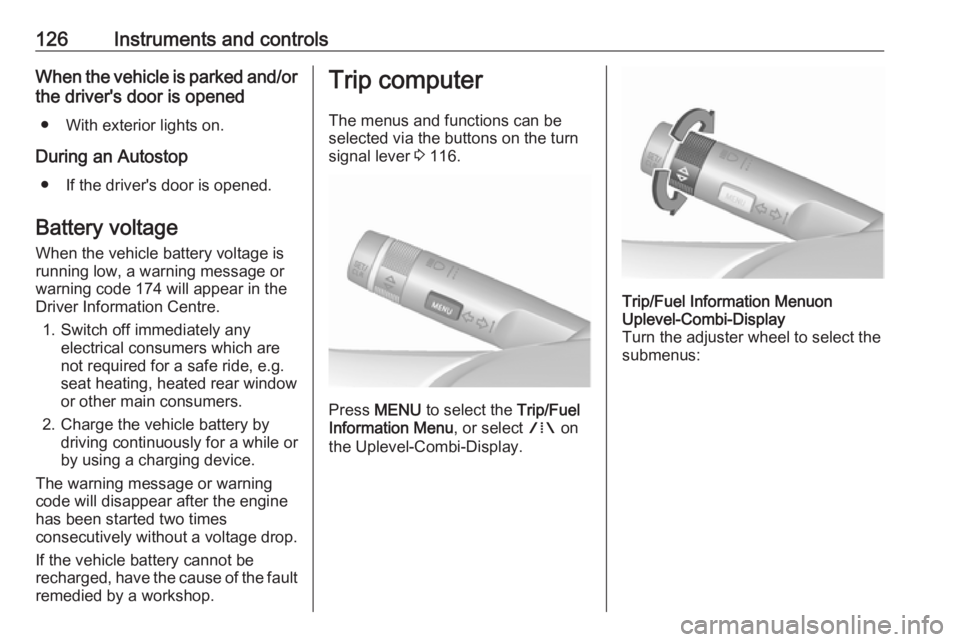
The menus and functions can be
selected via the buttons on the turn
signal lever 3 116.
Press MENU to select the Trip/Fuel
Information Menu , or select W on
the Uplevel-Combi-Display.
Trip/Fuel Information Menuon
Uplevel-Combi-Display
Turn the adjuster wheel to select the
submenus: