light PEUGEOT 1007 2008 Repair Manual
[x] Cancel search | Manufacturer: PEUGEOT, Model Year: 2008, Model line: 1007, Model: PEUGEOT 1007 2008Pages: 189, PDF Size: 10.54 MB
Page 124 of 189
9
118
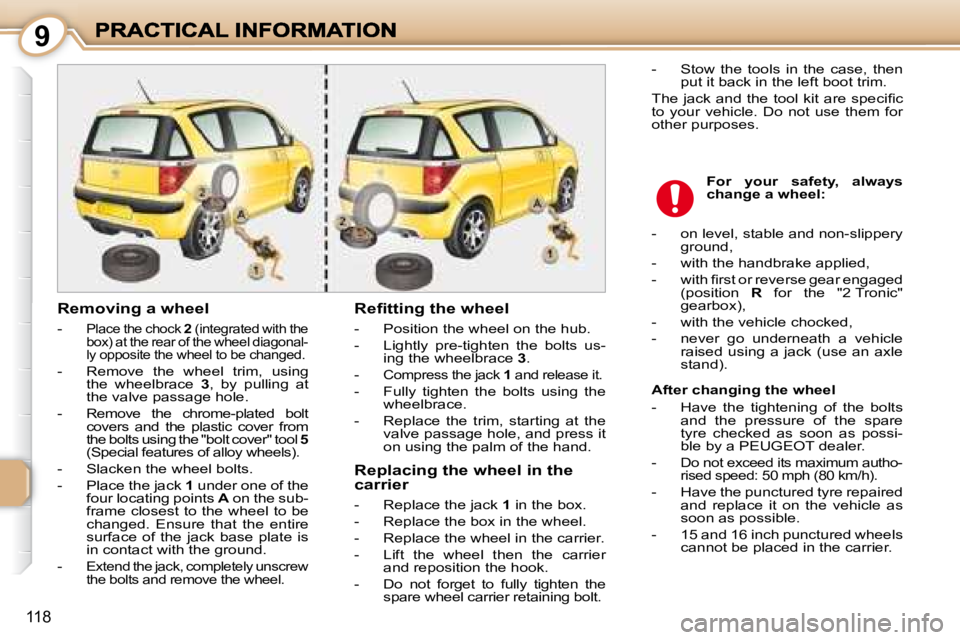
Removing a wheel
-
Place the chock 2 (integrated with the
box) at the rear of the wheel diagonal-
ly opposite the wheel to be changed.
- Remove the wheel trim, using the wheelbrace 3 , by pulling at
the valve passage hole.
-
Remove the chrome-plated bolt
covers and the plastic cover from
the bolts using the "bolt cover" tool 5
(Special features of alloy wheels).
- Slacken the wheel bolts.
- Place the jack 1 under one of the
four locating points A on the sub-
frame closest to the wheel to be
changed. Ensure that the entire
surface of the jack base plate is
in contact with the ground.
-
Extend the jack, completely unscrew
the bolts and remove the wheel.
Refitting the wheel
- Position the wheel on the hub.
- Lightly pre-tighten the bolts us- ing the wheelbrace 3 .
-
Compress the jack 1 and release it.
- Fully tighten the bolts using the
wheelbrace.
- Replace the trim, starting at the valve passage hole, and press it
on using the palm of the hand.
For your safety, always
change a wheel:
- Stow the tools in the case, then
put it back in the left boot trim.
The jack and the tool kit are specifi c
to your vehicle. Do not use them for
other purposes.
Replacing the wheel in the
carrier
- Replace the jack 1 in the box.
- Replace the box in the wheel.
- Replace the wheel in the carrier.
- Lift the wheel then the carrier and reposition the hook.
- Do not forget to fully tighten the spare wheel carrier retaining bolt. After changing the wheel
- Have the tightening of the bolts
and the pressure of the spare
tyre checked as soon as possi-
ble by a PEUGEOT dealer.
-
Do not exceed its maximum autho-
rised speed: 50 mph (80 km/h).
- Have the punctured tyre repaired and replace it on the vehicle as
soon as possible.
- 15 and 16 inch punctured wheels cannot be placed in the carrier.
- on level, stable and non-slippery
ground,
- with the handbrake applied,
- with fi rst or reverse gear engaged (position R for the "2 Tronic"
gearbox),
- with the vehicle chocked,
- never go underneath a vehicle raised using a jack (use an axle
stand).
Page 126 of 189
9
120
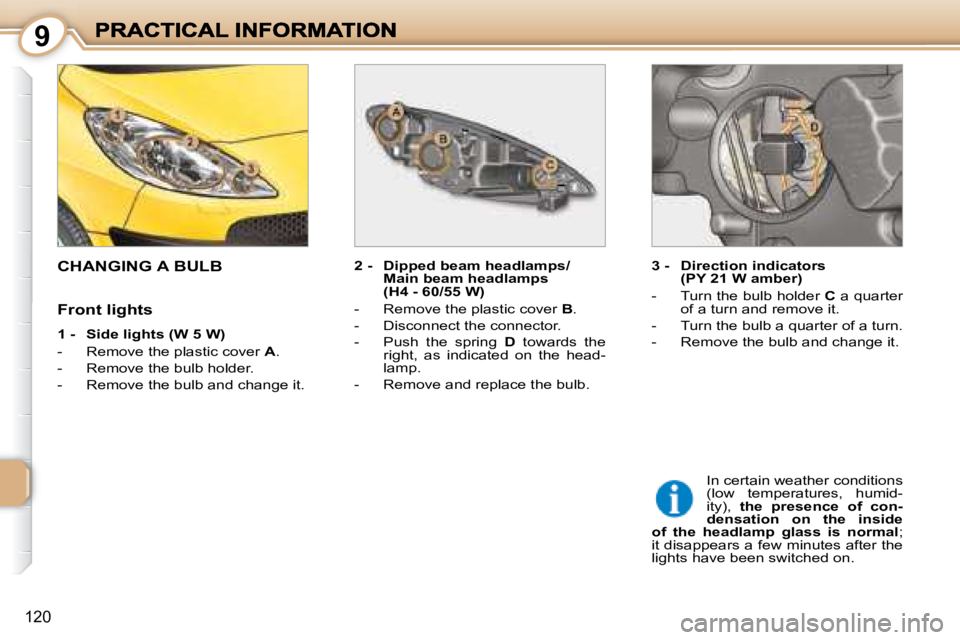
CHANGING A BULB 2 - Dipped beam headlamps/Main beam headlamps
(H4 - 60/55 W)
- Remove the plastic cover B .
- Disconnect the connector.
- Push the spring D towards the
right, as indicated on the head-
lamp.
- Remove and replace the bulb. 3 - Direction indicators
(PY 21 W amber)
- Turn the bulb holder C a quarter
of a turn and remove it.
- Turn the bulb a quarter of a turn.
- Remove the bulb and change it.
In certain weather conditions
(low temperatures, humid-
ity), the presence of con-
densation on the inside
of the headlamp glass is normal ;
it disappears a few minutes after the
lights have been switched on.
Front lights
1 - Side lights (W 5 W)
- Remove the plastic cover
A .
- Remove the bulb holder.
- Remove the bulb and change it.
Page 128 of 189
9
122
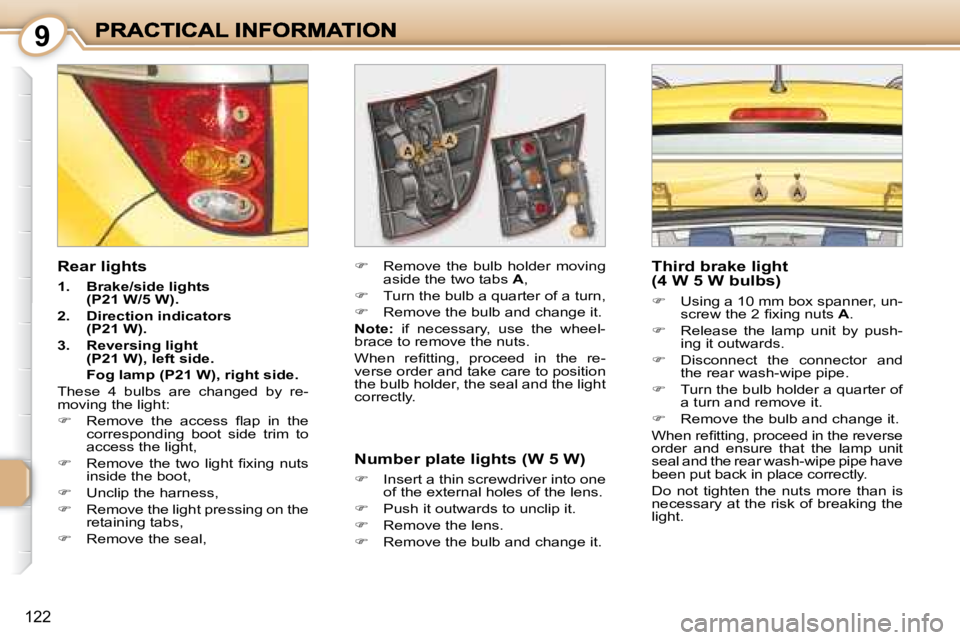
Rear lights
1. Brake/side lights
(P21 W/5 W).
2. Direction indicators
(P21 W).
3. Reversing light
(P21 W), left side.
Fog lamp (P21 W), right side.
These 4 bulbs are changed by re-
moving the light:
Remove the access fl ap in the
corresponding boot side trim to
access the light,
Remove the two light fi xing nuts
inside the boot,
Unclip the harness,
Remove the light pressing on the
retaining tabs,
Remove the seal,
Remove the bulb holder moving
aside the two tabs A ,
Turn the bulb a quarter of a turn,
Remove the bulb and change it.
Note: if necessary, use the wheel-
brace to remove the nuts.
When refi tting, proceed in the re-
verse order and take care to position
the bulb holder, the seal and the light
correctly. Third brake light
(4 W 5 W bulbs)
Using a 10 mm box spanner, un-
screw the 2 fi xing nuts A .
Release the lamp unit by push-
ing it outwards.
Disconnect the connector and
the rear wash-wipe pipe.
Turn the bulb holder a quarter of
a turn and remove it.
Remove the bulb and change it.
When refi tting, proceed in the reverse
order and ensure that the lamp unit
seal and the rear wash-wipe pipe have
been put back in place correctly.
Do not tighten the nuts more than is
necessary at the risk of breaking the
light.
Number plate lights (W 5 W)
Insert a thin screwdriver into one
of the external holes of the lens.
Push it outwards to unclip it.
Remove the lens.
Remove the bulb and change it.
Page 131 of 189
9
124
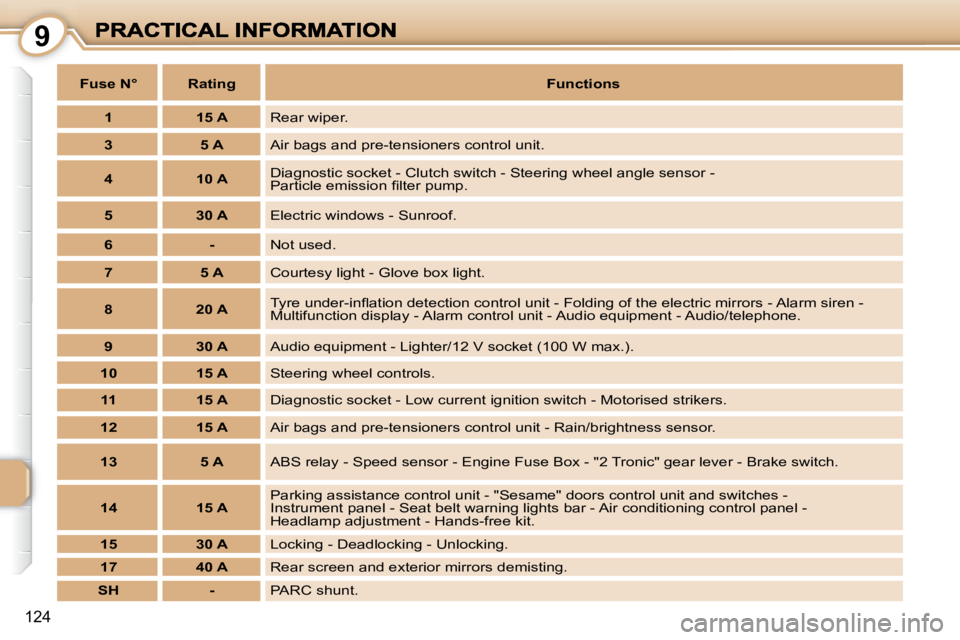
Fuse N° Rating
Functions
1 15 A Rear wiper.
3 5 A Air bags and pre-tensioners control unit.
4 10 A Diagnostic socket - Clutch switch - Steering wheel angle sensor
-
Particle emission fi lter pump.
5 30 A Electric windows - Sunroof.
6 - Not used.
7 5 A Courtesy light - Glove box light.
8 20 A Tyre under-infl ation detection control unit - Folding of t
he electric mirrors - Alarm siren -
Multifunction display - Alarm control unit - Audio equipment - Aud io/telephone.
9 30 A Audio equipment - Lighter/12 V socket (100 W max.).
10 15 A Steering wheel controls.
11 15 A Diagnostic socket - Low current ignition switch - Motorised strik ers.
12 15 A Air bags and pre-tensioners control unit - Rain/brightness sens or.
13 5 A ABS relay - Speed sensor - Engine Fuse Box - "2 Tronic" gear lever - Brake switch.
14 15 A Parking assistance control unit - "Sesame" doors control unit and swit
ches -
Instrument panel - Seat belt warning lights bar - Air condition ing control panel -
Headlamp adjustment - Hands-free kit.
15 30 A Locking - Deadlocking - Unlocking.
17 40 A Rear screen and exterior mirrors demisting.
SH - PARC shunt.
Page 134 of 189
9
127
CHANGING A WINDSCREEN WIPER BLADE
Changing a front wiper blade
Lift the wiper arm.
Unclip the blade and remove it.
Fit the new blade.
Push back the wiper arm.
Note: the shortest blade is fi tted on
the right-hand wiper arm.
Changing the rear wiper blade
Lift the wiper arm.
Unclip the blade and remove it.
Fit the new blade.
Push back the wiper arm.
ECONOMY MODE FUNCTION
After the engine has stopped, certain
functions (doors, windscreen wipers,
electric windows, courtesy light, audio
equipment, dipped headlamps, etc.)
can only be used for a cumulative
duration of thirty minutes, to prevent
discharging of the battery.
Once the thirty minutes are over, a
message informing you of the switch
to economy mode appears on the
multifunction display and the active
functions are put on standby.
These functions are reactivated auto-
matically next time the vehicle is driven.
To resume the use of these functions
immediately, start the engine and let
it run for a few minutes.
The time available to you will then be
double the duration for which the en-
gine is left running. However, this pe-
riod will always be between fi ve and
thirty minutes.
Note: if the telephone is being used
when economy mode starts, it will
still be possible to fi nish the call.
A fl at battery will prevent the
engine from starting.
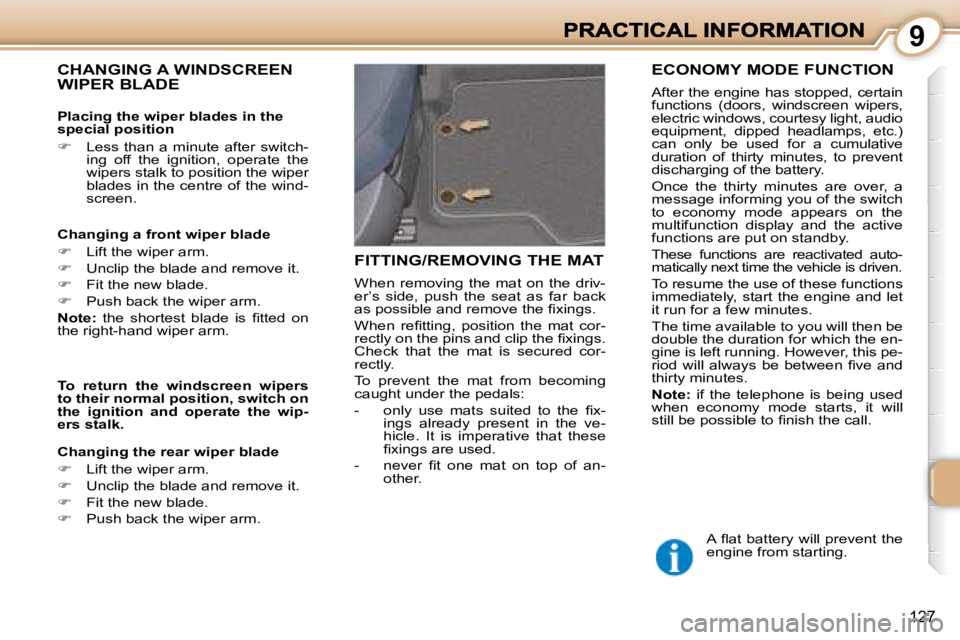
FITTING/REMOVING THE MAT
When removing the mat on the driv-
er’s side, push the seat as far back
as possible and remove the fi xings.
When refi tting, position the mat cor-
rectly on the pins and clip the fi xings.
Check that the mat is secured cor-
rectly.
To prevent the mat from becoming
caught under the pedals:
- only use mats suited to the fi x-ings already present in the ve-
hicle. It is imperative that these
fi xings are used.
- never fi t one mat on top of an- other.
Placing the wiper blades in the
special position
Less than a minute after switch-
ing off the ignition, operate the
wipers stalk to position the wiper
blades in the centre of the wind-
screen.
To return the windscreen wipers
to their normal position, switch on
the ignition and operate the wip-
ers stalk.
Page 137 of 189
9
130
TOWING A TRAILER, CARAVAN, BOAT, etc.
We recommend the use of original
PEUGEOT towbars and their har-
nesses that have been tested and
approved from the design stage of
your vehicle and that the fi tting of the
towbar is entrusted to a PEUGEOT
dealer.
If the towbar is not fi tted by a PEUGEOT
dealer, it is imperative that it is fi tted us-
ing the electrical pre-equipment installed
at the rear of the vehicle, in accordance
with the manufacturer’s instructions.
Your vehicle is primarily designed
for transporting people and luggage
but it may also be used for towing a
trailer.
Driving with a trailer subjects the tow-
ing vehicle to more signifi cant stress
and its driver must be particularly
careful.
Air density decreases with altitude,
thus reducing engine performance.
Above 1 000 metres, the maximum
towing load must be reduced by 10 %
and so on for every 1 000 metres of
altitude.
Cooling: Towing a trailer on a slope
increases the temperature of the
coolant.
As the fan is electrically controlled,
its cooling capacity is not dependent
on the engine speed.
On the contrary, use a high gear to
lower the engine speed and reduce
your speed.
The maximum towing load on a long
slope depends on the gradient and
the outside temperature.
In all cases, pay attention to the cool-
ant temperature.
In certain cases of particularly ardu-
ous use (towing the maximum load
on a steep gradient in high tempera-
tures), switching off the air condition-
ing permits the recovery of engine
power and therefore an increase in
the towing capacity.
If the warning light comes on, stop
the vehicle and switch off the engine
as soon as possible.
Tyres: Check the tyre pressures of
the towing vehicle and of the trailer,
observing the recommended pres-
sures.
Braking: Towing increases the brak-
ing distance.
Lights: Check the electrical signal-
ling on the trailer.
Side wind: Take into account the in-
creased sensitivity to side wind.
FITTING ROOF BARS
When fi tting transverse or longitudinal
roof bars, use the accessories recom-
mended by PEUGEOT and follow the
manufacturer’s fi tting instructions.
For further information, contact a
PEUGEOT dealer.
Maximum authorised weight on
the roof bars: 60 kg
Please refer to national legislation in
order to comply with the regulations
concerning the transportation of objects
which are longer than the vehicle.
Driving advice
Distribution of loads: Distribute the
load in the trailer so that the heaviest
items are as close as possible to the
axle and the nose weight approach-
es the maximum permitted without
exceeding it.
Page 170 of 189
MENUESCLIST
MENU
22
11
163
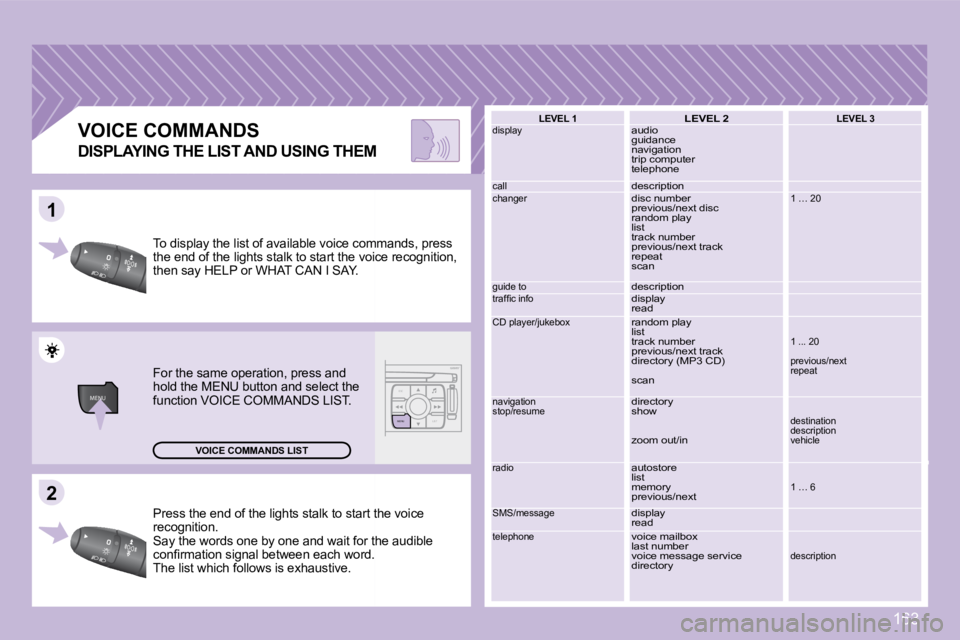
Press the end of the lights stalk to start the voi ce
recognition.
Say the words one by one and wait for the audible
confi rmation signal between each word.
The list which follows is exhaustive.
VOICE COMMANDS
To display the list of available voice commands, p ress
the end of the lights stalk to start the voice reco gnition,
then say HELP or WHAT CAN I SAY.
For the same operation, press and
hold the MENU button and select the
function VOICE COMMANDS LIST.
VOICE COMMANDS LIST LEVEL 1
display
call
changer
guide to
traffi c info
CD player/jukebox
navigation
stop/resume
radio
SMS/message
telephone
LEVEL 2
audio
guidance
navigation
trip computer
telephone
description
disc number
previous/next disc
random play
list
track number
previous/next track
repeat
scan
description
display
read
random play
list
track number
previous/next track
directory (MP3 CD)
scan
directory
show
zoom out/in
autostore
list
memory
previous/next
display
read
voice mailbox
last number
voice message service
directory LEVEL 3
1 … 20
1 ... 20
previous/next
repeat
destination
description
vehicle
1 … 6
description
DISPLAYING THE LIST AND USING THEM
Page 180 of 189
01
11
22
10101111
131314141515
33445566778899
1212
170
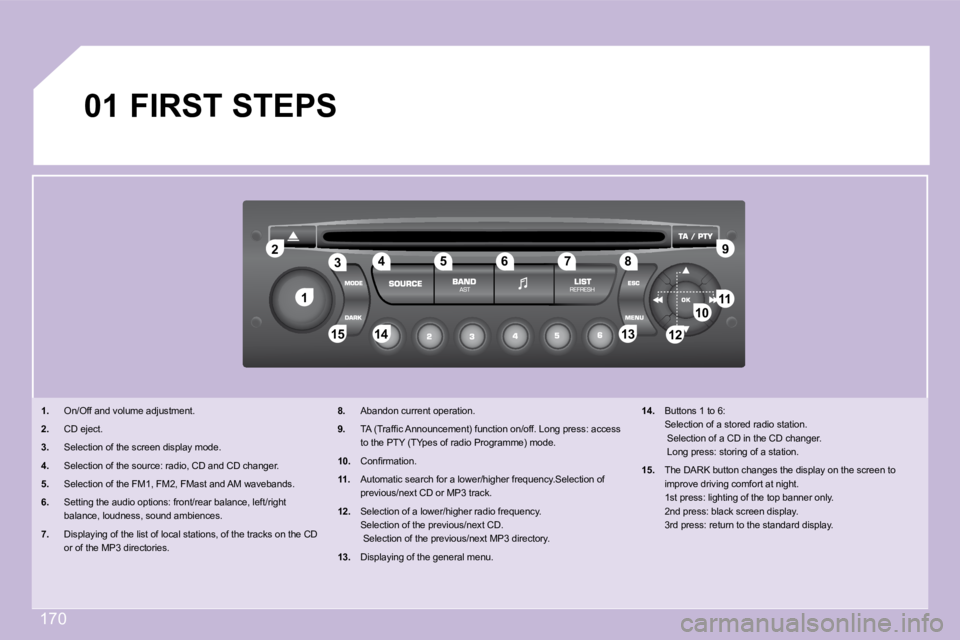
FIRST STEPS
1. On/Off and volume adjustment.
2. CD eject.
3. Selection of the screen display mode.
4. Selection of the source: radio, CD and CD changer .
5. Selection of the FM1, FM2, FMast and AM wavebands .
6. Setting the audio options: front/rear balance, l eft/right
balance, loudness, sound ambiences.
7. Displaying of the list of local stations, of the tracks on the CD
or of the MP3 directories.
8. Abandon current operation.
9. TA (Traffi c Announcement) function on/off. Long press: access
to the PTY (TYpes of radio Programme) mode.
10. Confi rmation.
11. Automatic search for a lower/higher frequency.Se lection of
previous/next CD or MP3 track.
12. Selection of a lower/higher radio frequency.
Selection of the previous/next CD.
Selection of the previous/next MP3 directory.
13. Displaying of the general menu.
14. Buttons 1 to 6:
Selection of a stored radio station.
Selection of a CD in the CD changer.
Long press: storing of a station.
15. The DARK button changes the display on the scree n to
improve driving comfort at night.
1st press: lighting of the top banner only.
2nd press: black screen display.
3rd press: return to the standard display.