steering PEUGEOT 108 2016 User Guide
[x] Cancel search | Manufacturer: PEUGEOT, Model Year: 2016, Model line: 108, Model: PEUGEOT 108 2016Pages: 268, PDF Size: 6.17 MB
Page 76 of 268
74
108_en_Chap04_conduite_ed01-2016
there is an audible signal when the driver's door
is opened and the vehicle is in "ACC" mode.
If the vehicle is not immobilised, the
engine will not stop.
Switching off using the
electronic key
F Immobilise the vehicle.
F
W ith a manual gearbox: put the gear lever
into neutral.
F
W
ith an etg gearbox: place the gear
selector at N .
F
W
ith the electronic key inside
the vehicle, press the " S
t
A R
t/
StoP " b
utton.
the
engine stops.
th
e steering locks when a door is opened or on
locking the vehicle.
F
P
ress the "S
t
A
R
t/
S to
P" b
utton
again to change to "
oFF " m
ode.
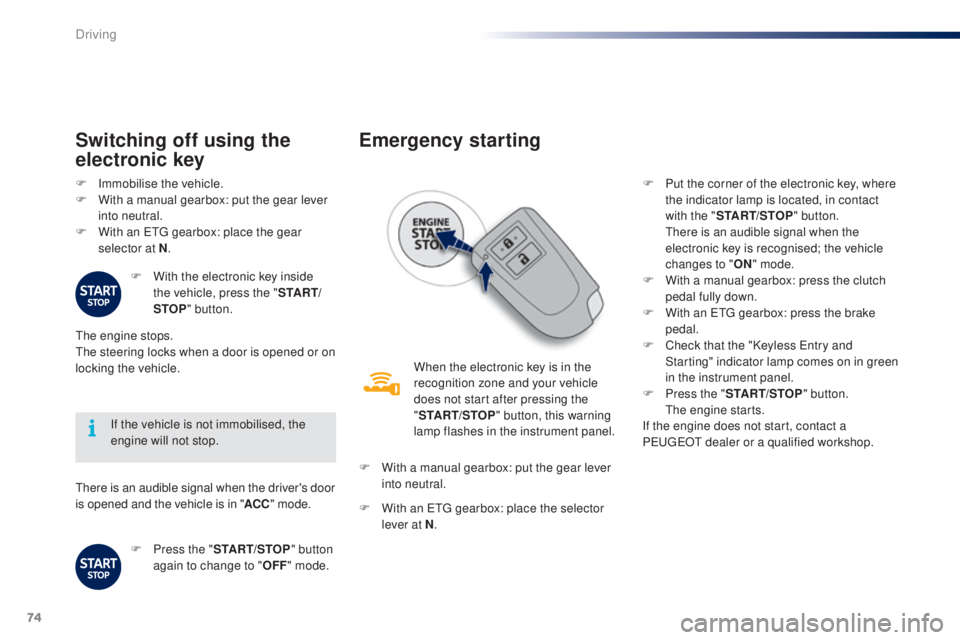
emergency starting
When the electronic key is in the
recognition zone and your vehicle
does not start after pressing the
"S
t
A
R
t/
S to
P" b
utton, this warning
lamp flashes in the instrument panel.
F
W
ith a manual gearbox: put the gear lever
into neutral.
F
W
ith an etg gearbox: place the selector
lever at N . F
P
ut the corner of the electronic key, where
the indicator lamp is located, in contact
with the " S t
A
R
t/
S to
P
" b
utton.
t
h
ere is an audible signal when the
electronic key is recognised; the vehicle
changes to "
oN " m
ode.
F
W
ith a manual gearbox: press the clutch
pedal fully down.
F
W
ith an etg gearbox: press the brake
pedal.
F
C
heck that the "Keyless e
n
try and
Starting" indicator lamp comes on in green
in the instrument panel.
F
P
ress the "S
t
A
R
t/
S to
P" b
utton.
t
h
e engine starts.
If the engine does not start, contact a
P
e
uge
Ot
dealer or a qualified workshop.
Driving
Page 77 of 268
75
108_en_Chap04_conduite_ed01-2016
emergency switch-off
In the event of an emergency only, the engine
can be switched of without conditions. to d o
this, press for more than 2 seconds, or make
a minimum of 3 successive presses on the
" S
t
A
R
t/
S to
P" b
utton.
In this case the steering column locks as soon
as the vehicle stops.
electronic key not
recognised
If the electronic key is no longer in the
recognition zone when driving or when you
(later) request switching off the engine, there is
an audible signal to warn you.
F
P
ress for more than 2 seconds,
or make a minimum of
3
successive presses on the
" S
t
A
R
t/
S to
P" b
utton if you
want to force switching off of the
engine ( note that restarting
will not be possible without
the
key).
electronic engine
immobiliser
this locks the engine management system as
soon as the ignition has been switched off and
therefore prevents starting of the vehicle by
anyone who does not have the key.
th
e ignition key has an electronic chip which
has a special code. When the ignition is
switched on, the code must be recognised for
starting to be possible.
In the event of a malfunction, your vehicle will
not start.
Contact a P
e
uge
Ot
dealer or a qualified
workshop.
Do not make any modifications to the
electronic immobiliser system.
4
Driving
Page 79 of 268
77
108_en_Chap04_conduite_ed01-2016
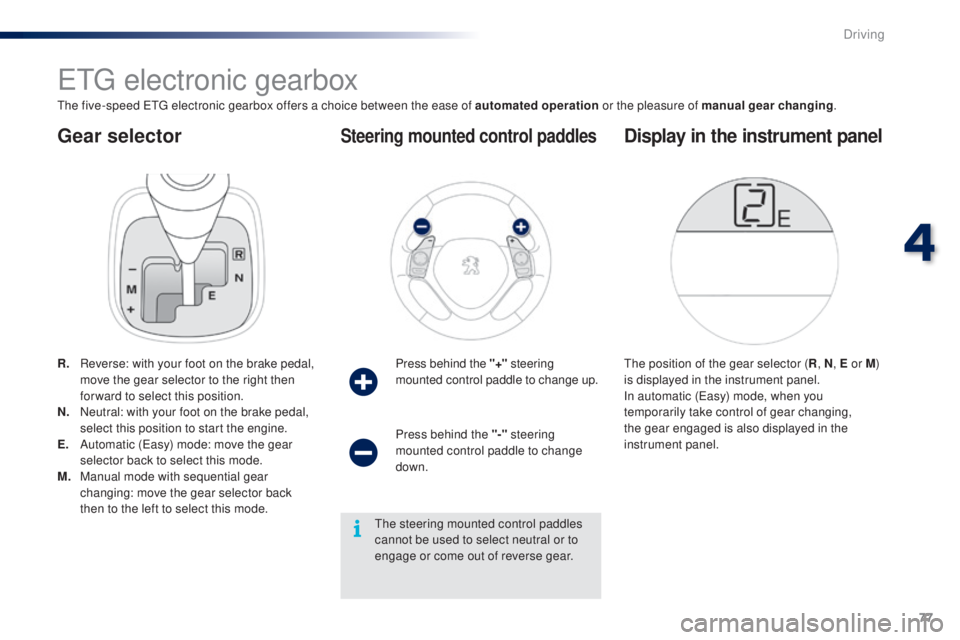
gear selector
etg electronic gearbox
the five-speed etg electronic gearbox offers a choice between the ease of automated operation or the pleasure of manual gear changing.
R.
R
everse: with your foot on the brake pedal,
move the gear selector to the right then
for ward to select this position.
N.
N
eutral: with your foot on the brake pedal,
select this position to start the engine.
e.
A
utomatic (
ea
sy) mode: move the gear
selector back to select this mode.
M.
M
anual mode with sequential gear
changing: move the gear selector back
then to the left to select this mode. Press behind the "+"
steering
mounted control paddle to change up.
Steering mounted control paddles
the position of the gear selector ( R, N , e or M)
is displayed in the instrument panel.
In automatic (
ea
sy) mode, when you
temporarily take control of gear changing,
the gear engaged is also displayed in the
instrument panel.
Display in the instrument panel
Press behind the "-" steering
mounted control paddle to change
down.
th
e steering mounted control paddles
cannot be used to select neutral or to
engage or come out of reverse gear.
4
Driving
Page 81 of 268
79
108_en_Chap04_conduite_ed01-2016
temporarily taking control of
gear changes
You can temporarily take control of gear
changes using the "+" and "-"
steering
mounted control paddles.
ge
ar change commands are only acted on if
the engine speed allows.
t
h
ere is an audible
signal if a command is not accepted.
th
e gear engaged is displayed in the
instrument panel.
th
is function allows you to anticipate certain
situations such as overtaking a vehicle or
approaching a corner.
After a few moments with no action on the
controls, the gearbox returns to automatic
control of the gears. It is possible to change mode at any time, by
moving the gear selector from position
e to
position M and the other way round.
Never select neutral N when the vehicle
is moving.
F
P
lace the gear selector in position M
.
F
C
hange up or down using:
- t he gear selector, pushing:
- back, "+" to change up,
-
for ward, "-" to change down.
-
o
r the "+" or "-" steering mounted
control paddle.
the
gear engaged is displayed.
ge
ar change commands are only acted on if
the engine speed allows.
It is not necessary to release the accelerator
peal during gear changes.
t
h
ere is an audible
signal if a command is not accepted.
When braking or slowing down, the gearbox
automatically changes down so that pick-up is
in the right gear.
Manual mode
under sharp acceleration, the gearbox will
not change up without action by the driver on
the gear selector or steering mounted control
paddles (unless the engine speed is close to
maximum).
to e
ngage reverse, the vehicle must be
stationary with your foot on the brake pedal.
F
Sel
ect position R .
Reverse
there is an audible signal on engaging reverse.
4
Driving
Page 85 of 268
83
108_en_Chap04_conduite_ed01-2016
Stop & Start (Vti 68 S&S engine)
operation
going into engine St oP
mode
this indicator lamp comes on in the
instrument panel and the engine
goes into standby automatically:
-
w
hen stationary, in neutral, and you
release the clutch pedal.
Never refuel with the engine in
S
tO
P mode; you must switch off the
ignition with the button. For smoother operation, during
parking manoeuvres StO P mode is
not available for a few seconds after
coming out of reverse gear.
th
e Stop & Start does not affect the
vehicle's systems, such as for example,
braking, power steering...
th
e Stop & Start
system puts the engine
temporarily into standby - S
tO
P mode - during
stops in the traffic (red lights, traffic jams, or
other...).
th
e engine restarts automatically -
StA
Rt
mode - as soon as you want to move
off.
t
h
e restart takes place instantly, quickly
and silently.
Per fect for urban use, the Stop & Start system
reduces fuel consumption and exhaust
emissions as well as the noise level when
stationary.
Stop & Start time counters
A partial time counter counts the periods in
StO P mode during a journey.
It is displayed in the trip computer once the
Stop & Start is operating.
Press one of the " DISP" buttons to return to the
previous display.
A global time counter counts the periods in
S
tO
P mode since the last reset.
When it is displayed, press one of the
" DISP "
buttons to reset the counter.
4
Driving
Page 88 of 268
86
108_en_Chap04_conduite_ed01-2016
the speed limiter cannot, in any
circumstances, replace the need to
observe speed limits, nor can it replace the
need for vigilance on the part of the driver.
Speed limiter (Puretech 82 engine)
the speed limiter is switched on manually:
this can be done whatever the speed of the
vehicle. However, if you are driving at less than
20 mph (30 km/h), the programmed speed will
be fixed at 20 mph (30 km/h).
th
e speed limiter is paused by operation of the
control.
th
e programmed speed can be exceeded
temporarily by pressing the accelerator firmly
beyond the point of resistance.
to r
eturn to the programmed speed, simply
release the accelerator pedal until the vehicle
returns to the programmed speed limit. System which prevents the vehicle from exceeding the speed programmed by the driver.Steering mounted controls
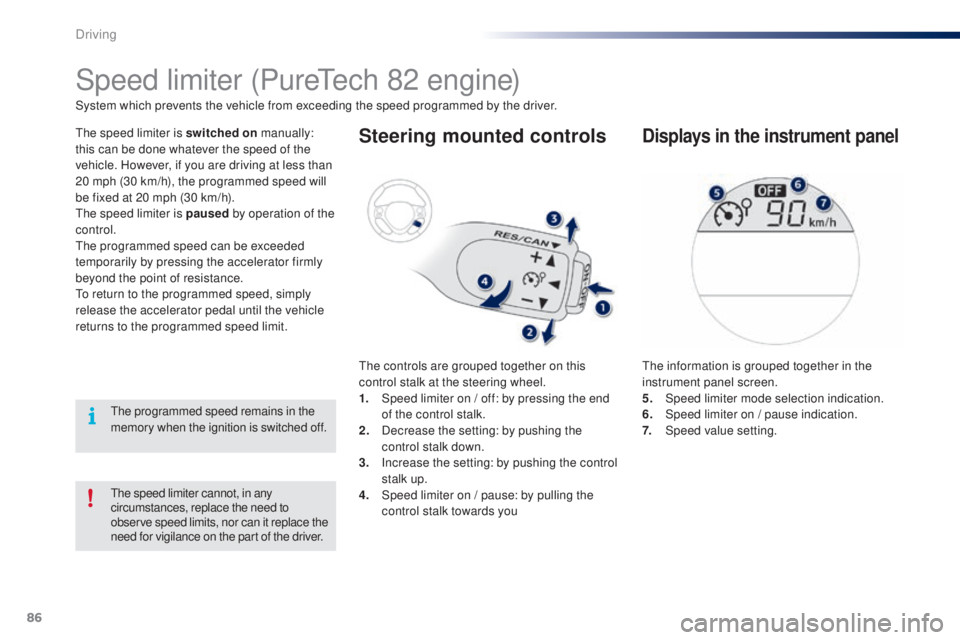
the controls are grouped together on this
control stalk at the steering wheel.
1.
S
peed limiter on / off: by pressing the end
of the control stalk.
2.
D
ecrease the setting: by pushing the
control stalk down.
3.
I
ncrease the setting: by pushing the control
stalk up.
4.
S
peed limiter on / pause: by pulling the
control stalk towards you
Displays in the instrument panel
the information is grouped together in the
instrument panel screen.
5.
Spe
ed limiter mode selection indication.
6.
S
peed limiter on / pause indication.
7.
Spe
ed value setting.
th
e programmed speed remains in the
memory when the ignition is switched off.
Driving
Page 91 of 268
89
108_en_Chap04_conduite_ed01-2016
Speed limiter (Vti 68 engine)
System which prevents the vehicle from exceeding the speed programmed by the driver.
th
e speed limiter is switched on manually:
this can be done whatever the speed of the
vehicle. However, if you are driving at less than
20 mph (30 km/h), the programmed speed will
be fixed at 20 mph (30 km/h).
th
e speed limiter is paused by operation of the
control.
th
e programmed speed can be exceeded
temporarily by pressing the accelerator firmly
beyond the point of resistance.
to r
eturn to the programmed speed, simply
release the accelerator pedal until the vehicle
returns to the programmed speed limit.
th
e programmed limit speed is erased
when switching off the ignition.
Steering mounted controls
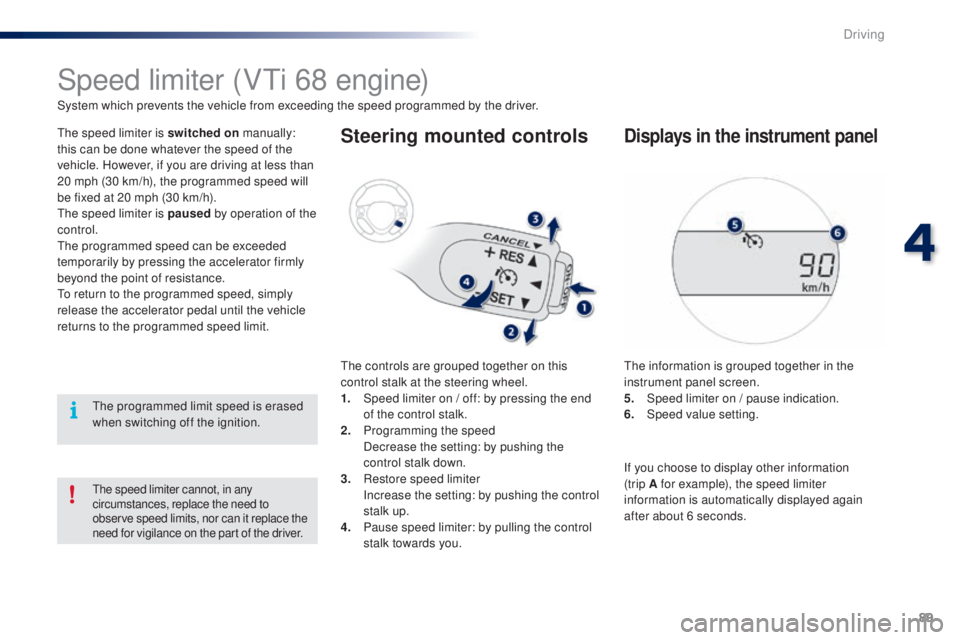
the controls are grouped together on this
control stalk at the steering wheel.
1.
S
peed limiter on / off: by pressing the end
of the control stalk.
2.
P
rogramming the speed
D
ecrease the setting: by pushing the
control stalk down.
3.
R
estore speed limiter
I
ncrease the setting: by pushing the control
stalk up.
4.
P
ause speed limiter: by pulling the control
stalk towards you.
Displays in the instrument panel
the information is grouped together in the
instrument panel screen.
5.
S
peed limiter on / pause indication.
6.
Spe
ed value setting.
the speed limiter cannot, in any
circumstances, replace the need to
observe speed limits, nor can it replace the
need for vigilance on the part of the driver.
If you choose to display other information
(trip A for example), the speed limiter
information is automatically displayed again
after about 6 seconds.
4
Driving
Page 95 of 268
93
108_en_Chap04_conduite_ed01-2016
Lane departure warning system
System which detects the unintended crossing of longitudinal traffic lane markings on the ground, using a camera that recognises both solid and
broken lines.
to i
mprove your safety, the camera analyses the image and then triggers a warning if the vehicle wanders over a lane marking (speed higher than
30
mph (50 km/h)).
th
is system is particularly suitable for motorways and dual carriageways.
th
e lane departure warning system
cannot in any circumstances replace
the need for vigilance on the part of
the
driver.
It is necessary to observe driving
regulations and take a break every
two
hours.
Activation
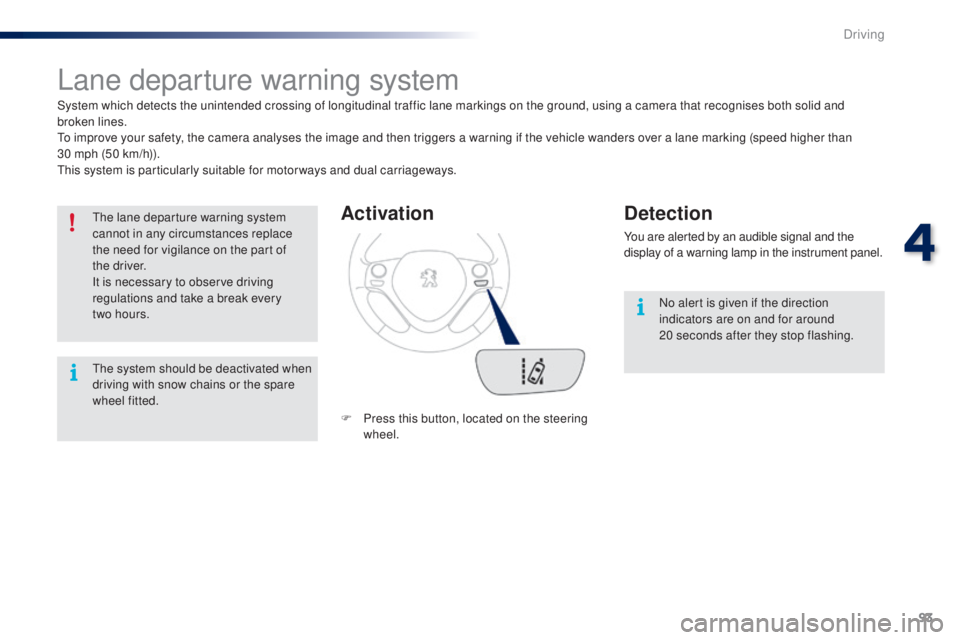
F Press this button, located on the steering wheel.
Detection
You are alerted by an audible signal and the
display of a warning lamp in the instrument panel.
No alert is given if the direction
indicators are on and for around
20
seconds after they stop flashing.
th
e system should be deactivated when
driving with snow chains or the spare
wheel fitted.
4
Driving
Page 98 of 268
96
108_en_Chap04_conduite_ed01-2016
under-inflation alert
this is given by fixed illumination of
this warning lamp, accompanied by
an audible signal.
F
R
educe speed immediately, avoid
excessive steering movements and sudden
braking.
F
S
top the vehicle as soon as it is safe to
do
so.
th
e loss of pressure detected does not
always cause visible bulging of the tyre.
Do not satisfy yourself with just a visual
check.
F
I
f you have a compressor (such as the one
in the temporary puncture repair kit) check
the pressures of the four tyres when cold.
I
f it is not possible to carry out this check
straight away, drive carefully at reduced
speed.
or
F
I
n the event of a puncture, use the
temporary puncture repair kit or the spare
wheel (depending on equipment).
th
e alert is maintained until the system
is reinitialised.
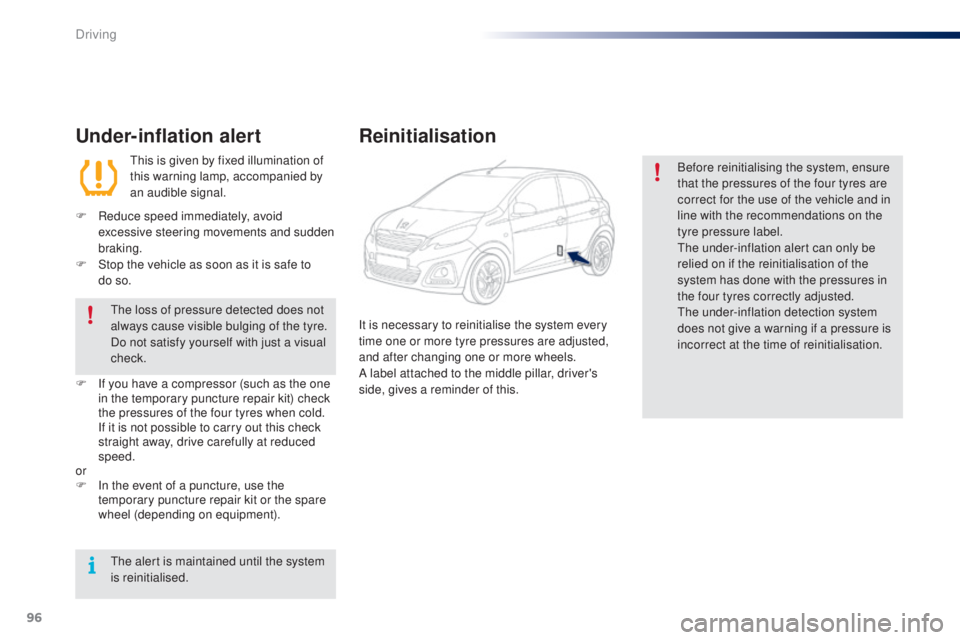
Reinitialisation
Before reinitialising the system, ensure
that the pressures of the four tyres are
correct for the use of the vehicle and in
line with the recommendations on the
tyre pressure label.
th
e under-inflation alert can only be
relied on if the reinitialisation of the
system has done with the pressures in
the four tyres correctly adjusted.
th
e under-inflation detection system
does not give a warning if a pressure is
incorrect at the time of reinitialisation.
It is necessary to reinitialise the system every
time one or more tyre pressures are adjusted,
and after changing one or more wheels.
A label attached to the middle pillar, driver's
side, gives a reminder of this.
Driving
Page 108 of 268
106
108_en_Chap06_securite_ed01-2016
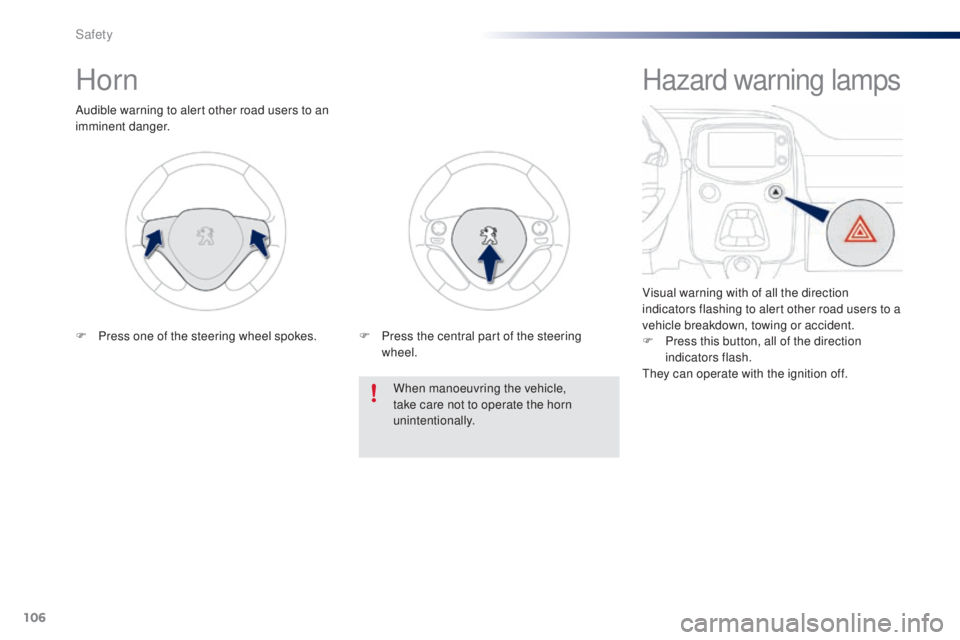
Horn
Audible warning to alert other road users to an
imminent danger.When manoeuvring the vehicle,
take care not to operate the horn
unintentionally.
F
P
ress one of the steering wheel spokes. F
P
ress the central part of the steering
wheel.
Hazard warning lamps
Visual warning with of all the direction
indicators flashing to alert other road users to a
vehicle breakdown, towing or accident.
F
P
ress this button, all of the direction
indicators flash.
th
ey can operate with the ignition off.
Safety