audio PEUGEOT 108 2016 Manual PDF
[x] Cancel search | Manufacturer: PEUGEOT, Model Year: 2016, Model line: 108, Model: PEUGEOT 108 2016Pages: 268, PDF Size: 6.17 MB
Page 247 of 268
245
108_en_Chap10b_Autoradio-toyota-2_ed01-2016
Media
uSB player
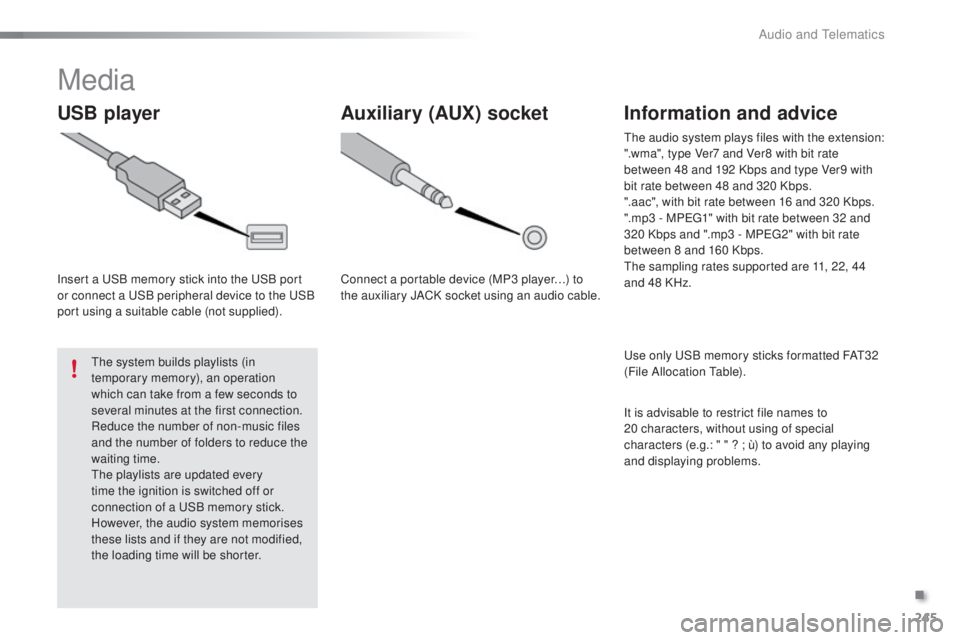
Insert a uSB memory stick into the uS B port
or connect a uS B peripheral device to the uS B
port using a suitable cable (not supplied).
th
e system builds playlists (in
temporary memory), an operation
which can take from a few seconds to
several minutes at the first connection.
Reduce the number of non-music files
and the number of folders to reduce the
waiting time.
th
e playlists are updated every
time the ignition is switched off or
connection of a
u
S
B memory stick.
However, the audio system memorises
these lists and if they are not modified,
the loading time will be shorter.
Auxiliary (AuX ) socket
Connect a portable device (MP3 player…) to
the auxiliary JACK socket using an audio cable.
Information and advice
use only uS B memory sticks formatted FAt3 2
(File Allocation ta ble).
th
e audio system plays files with the extension:
".wma", type Ver7 and Ver8 with bit rate
between 48 and 192 Kbps and type Ver9 with
bit rate between 48 and 320 Kbps.
".aac", with bit rate between 16 and 320 Kbps.
".mp3 - MP
e
g
1
" with bit rate between 32 and
320 Kbps and ".mp3 - MP
e
g
2
" with bit rate
between 8 and 160 Kbps.
th
e sampling rates supported are 11, 22, 44
and 48 KHz.
It is advisable to restrict file names to
20
characters, without using of special
characters (e.g.: " " ?
; ù) to avoid any playing
and displaying problems.
.
Audio and telematics
Page 248 of 268
246
108_en_Chap10b_Autoradio-toyota-2_ed01-2016
Audio streaming Connecting Apple® players
Streaming allows audio files on your telephone
to be played via the vehicle's speakers.
You can also view, activate or deactivate
system settings related to the Bluetooth
function.Select "Bluetooth", then "
Pairing".
Press on " M
eN
u
" t
o display the list.
tu
rn the knob to select "Bluetooth",
press to display the list.
Once connected for streaming, the
telephone is considered as a media
source.
If play does not start automatically, it
may be necessary to start audio play
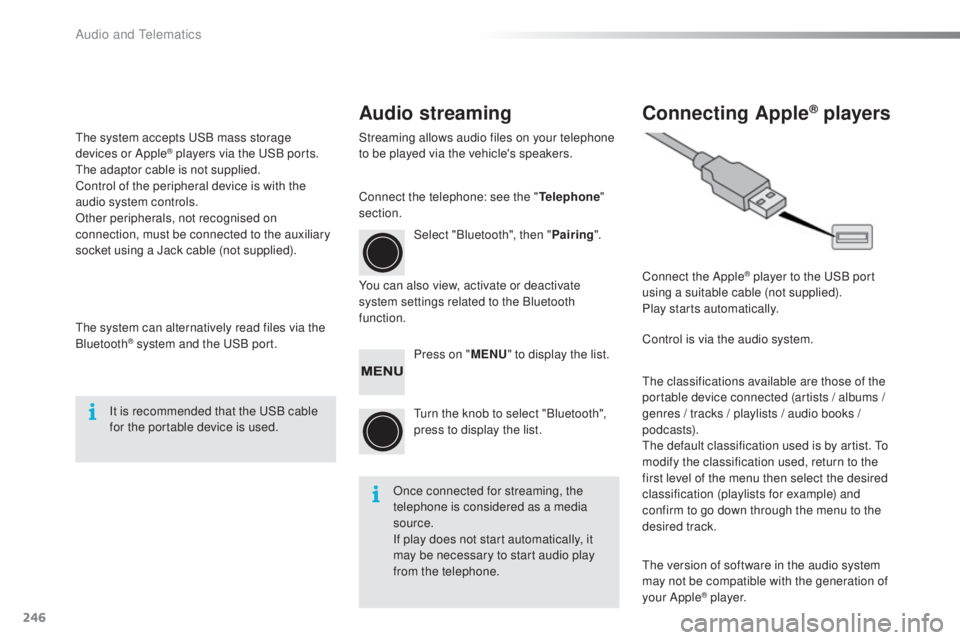
from the telephone. Connect the Apple
® player to the uS
B port
using a suitable cable (not supplied).
Play starts automatically.
Control is via the audio system.
th
e classifications available are those of the
portable device connected (artists / albums
/
genres / tracks / playlists / audio books
/
podcasts).
th
e default classification used is by artist. t
o
m
odify the classification used, return to the
first level of the menu then select the desired
classification (playlists for example) and
confirm to go down through the menu to the
desired track.
th
e version of software in the audio system
may not be compatible with the generation of
your Apple
® p l aye r.
Connect the telephone: see the "
tel
ephone
"
section.
th
e system accepts
u
S
B mass storage
devices or Apple
® players via the uS B ports. th
e adaptor cable is not supplied.
Control of the peripheral device is with the
audio system controls.
Other peripherals, not recognised on
connection, must be connected to the auxiliary
socket using a Jack cable (not supplied).
th
e system can alternatively read files via the
Bluetooth
® system and the uS B port.
It is recommended that the u
S
B cable
for the portable device is used.
Audio and telematics
Page 249 of 268
247
108_en_Chap10b_Autoradio-toyota-2_ed01-2016
telephone
Pairing a Bluetooth® telephone
As a safety measure and because they
require prolonged attention on the part
of the driver, the operations for pairing
the Bluetooth mobile telephone to the
hands-free system of the audio system
must be carried out with the vehicle
stationary.
Switch on the Bluetooth function of your
telephone and ensure that it is "visible to all"
(telephone configuration). If the operation fails, we recommend
switching the Bluetooth function of your
telephone off and then on again.
* If your telephone is fully compatible.
Information on progress is displayed during the
operation.
Once the procedure has been successfully
completed, a list appears with the "
t
e
L"
option.
You can then enter the settings for each of
these functions*.
us
ing the telephone's keypad, enter the PIN
displayed in the screen of the system or
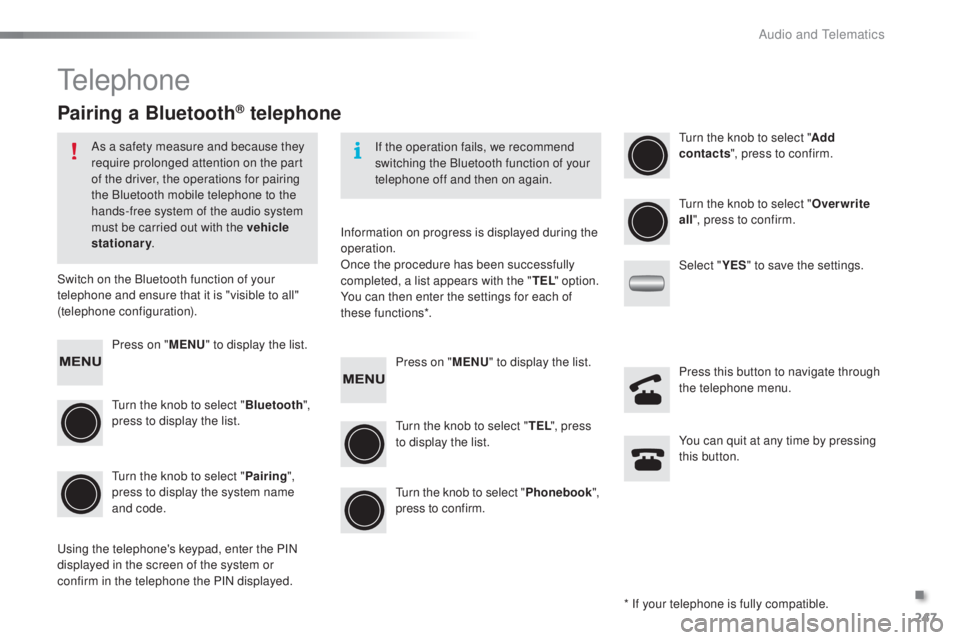
confirm in the telephone the PIN displayed. Press on "
M
eN
u
" t
o display the list.
tu
rn the knob to select " Bluetooth",
press to display the list.
tu
rn the knob to select " Pairing",
press to display the system name
and code. Press on "
M
eN
u
" t
o display the list.
tu
rn the knob to select "
t
e
L"
, press
to display the list.tu rn the knob to select "
Add
contacts ", press to confirm.
tu
rn the knob to select "Phonebook",
press to confirm.
tu
rn the knob to select "
ov
erwrite
all ", press to confirm.
Select " Y
e
S" to save the settings.
You can quit at any time by pressing
this button. Press this button to navigate through
the telephone menu.
.
Audio and telematics
Page 250 of 268
248
108_en_Chap10b_Autoradio-toyota-2_ed01-2016
Receiving a call List of telephone menus
An incoming call is announced by a ring and a
superimposed display in the screen.
Press this button to accept the
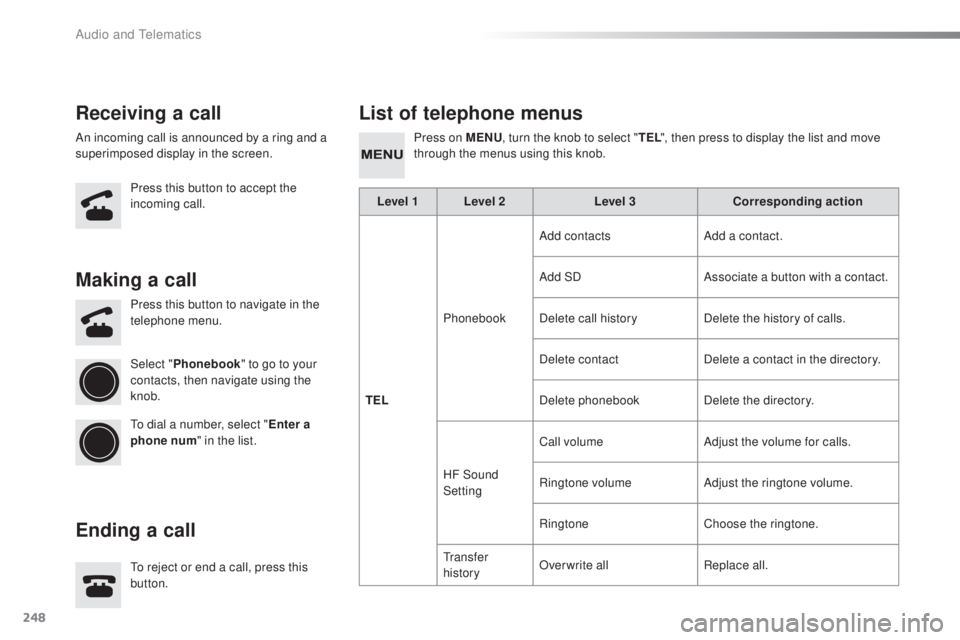
incoming call. Press on MeN
u, t urn the knob to select "t eL
" , then press to display the list and move
through the menus using this knob.
to r
eject or end a call, press this
button. Press this button to navigate in the
telephone menu.
Making a call
endi
ng a call
Select " Phonebook " to go to your
contacts, then navigate using the
knob.
to d
ial a number, select "
en
ter a
phone num " in the list. Level 1 Level 2
Level 3Corresponding action
t
e
LP
honebookAdd contacts
Add a contact.
Add SD Associate a button with a contact.
Delete call history Delete the history of calls.
Delete contact Delete a contact in the directory.
Delete phonebook Delete the directory.
HF Sound
Setting Call volume
Adjust the volume for calls.
Ringtone volume Adjust the ringtone volume.
Ringtone Choose the ringtone.
t
r a n s f e r
history Overwrite all
Replace all.
Audio and telematics
Page 251 of 268
249
108_en_Chap10b_Autoradio-toyota-2_ed01-2016
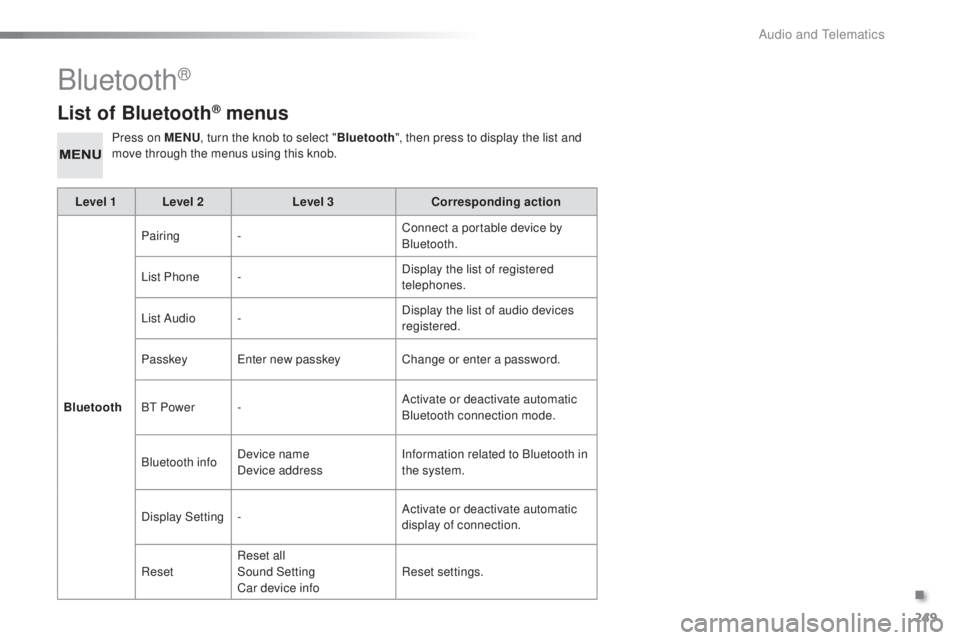
List of Bluetooth® menus
Press on MeNu, t urn the knob to select " Bluetooth", then press to display the list and
move through the menus using this knob.
Level 1 Level 2 Level 3Corresponding action
Bluetooth Pairing
- Connect a portable device by
Bluetooth.
List Phone - Display the list of registered
telephones.
List Audio - Display the list of audio devices
registered.
Passkey
en
ter new passkey Change or enter a password.
B
t
Power - Activate or deactivate automatic
Bluetooth connection mode.
Bluetooth info Device name
Device address Information related to Bluetooth in
the system.
Display Setting - Activate or deactivate automatic
display of connection.
Reset Reset all
Sound Setting
Car device info Reset settings.
Bluetooth®
.
Audio and telematics
Page 252 of 268
250
108_en_Chap10b_Autoradio-toyota-2_ed01-2016
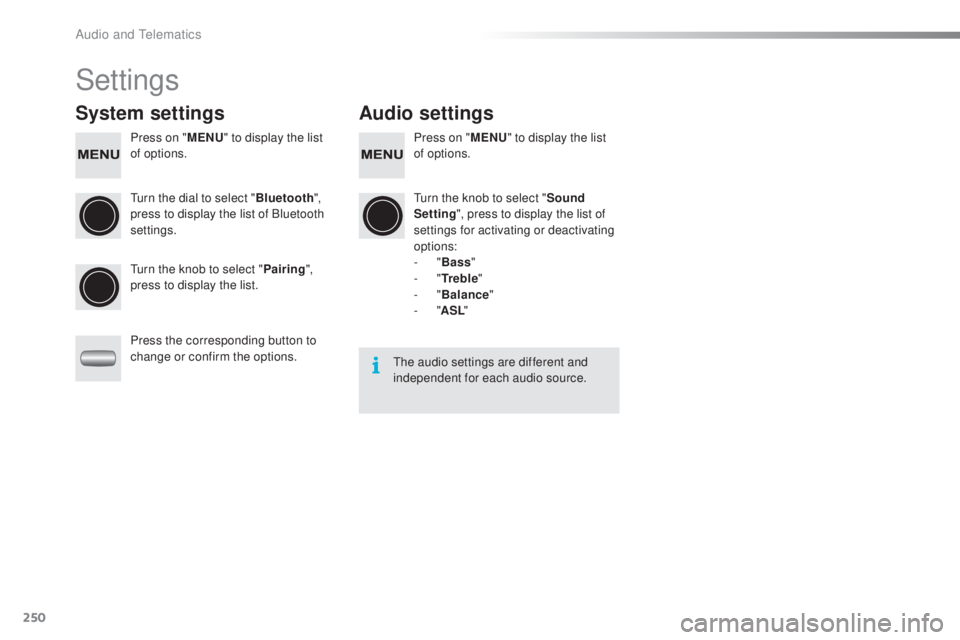
Settings
System settings Audio settings
Press on "MeN u" t o display the list
of options. Press on "
MeN u" t o display the list
of options.
tu
rn the dial to select " Bluetooth",
press to display the list of Bluetooth
settings.
tu
rn the knob to select "Sound
Setting ", press to display the list of
settings for activating or deactivating
options:
-
"Bass "
-
"
tr
e b l e"
-
"Balance "
-
"ASL "
tu
rn the knob to select " Pairing",
press to display the list.
Press the corresponding button to
change or confirm the options.
the
audio settings are different and
independent for each audio source.
Audio and telematics
Page 253 of 268
251
108_en_Chap10b_Autoradio-toyota-2_ed01-2016
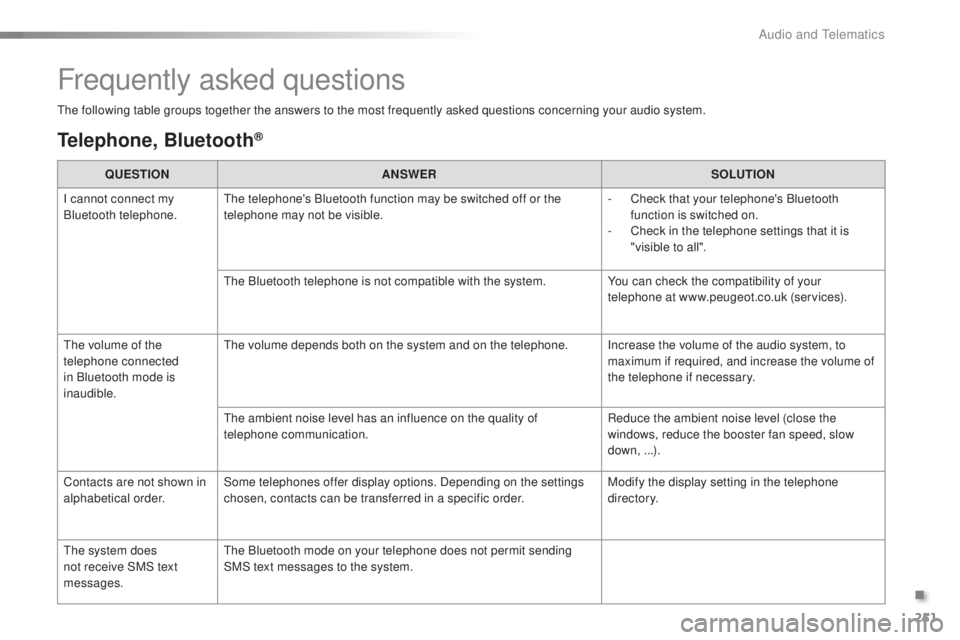
the following table groups together the answers to the most frequently asked questions concerning your audio system.
Frequently asked questions
telephone, Bluetooth®
QueStIoN A NSWeRS oLutIoN
I c
annot connect my
Bluetooth telephone.
th
e telephone's Bluetooth function may be switched off or the
telephone may not be visible. -
C
heck that your telephone's Bluetooth
function is switched on.
-
C
heck in the telephone settings that it is
"visible to all".
th
e Bluetooth telephone is not compatible with the system. You can check the compatibility of your
telephone at www.peugeot.co.uk (services).
th
e volume of the
telephone connected
in Bluetooth mode is
inaudible.
th
e volume depends both on the system and on the telephone. Increase the volume of the audio system, to maximum if required, and increase the volume of
the telephone if necessary.
th
e ambient noise level has an influence on the quality of
telephone communication. Reduce the ambient noise level (close the
windows, reduce the booster fan speed, slow
down, ...).
Contacts are not shown in
alphabetical order. Some telephones offer display options. Depending on the settings
chosen, contacts can be transferred in a specific order. Modify the display setting in the telephone
di r e c to r y.
th
e system does
not receive SMS text
messages.
th
e Bluetooth mode on your telephone does not permit sending
SMS text messages to the system.
.
Audio and telematics
Page 254 of 268
252
108_en_Chap10b_Autoradio-toyota-2_ed01-2016
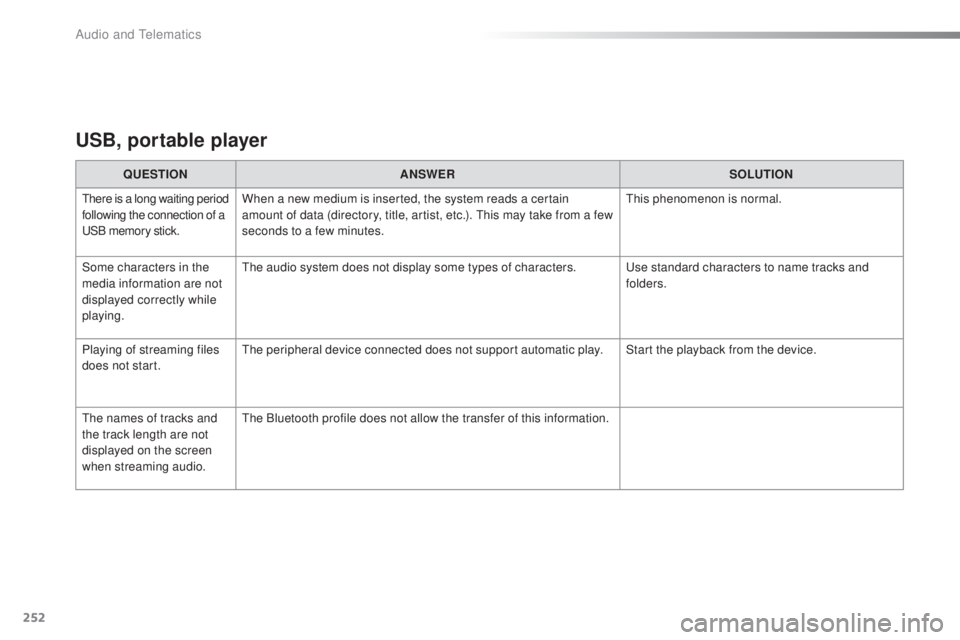
uSB, portable player
QueStIoN A NSWeRS oLutIoN
there is a long waiting period
following the connection of a
uS
B memory stick.When a new medium is inserted, the system reads a certain
amount of data (directory, title, artist, etc.). th is may take from a few
seconds to a few minutes.th is phenomenon is normal.
Some characters in the
media information are not
displayed correctly while
playing.
th
e audio system does not display some types of characters.
u
se standard characters to name tracks and
folders.
Playing of streaming files
does not start.
th
e peripheral device connected does not support automatic play. Start the playback from the device.
th
e names of tracks and
the track length are not
displayed on the screen
when streaming audio.
th
e Bluetooth profile does not allow the transfer of this information.
Audio and telematics
Page 255 of 268
253
108_en_Chap10b_Autoradio-toyota-2_ed01-2016
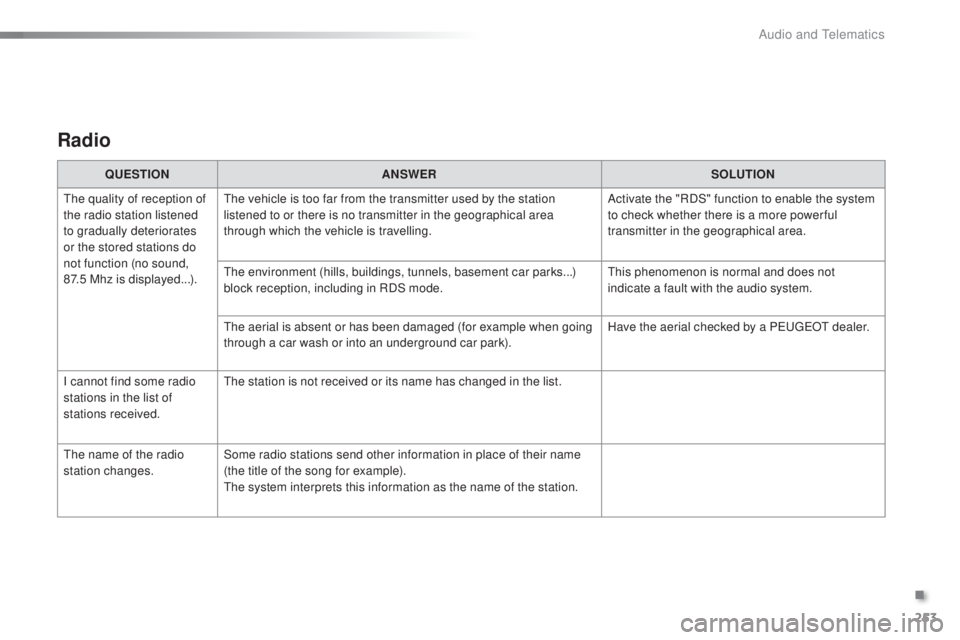
Radio
QueStIoN A NSWeRS oLutIoN
th
e quality of reception of
the radio station listened
to gradually deteriorates
or the stored stations do
not function (no sound,
87.5
Mhz is displayed...).
th
e vehicle is too far from the transmitter used by the station
listened to or there is no transmitter in the geographical area
through which the vehicle is travelling. Activate the "RDS" function to enable the system
to check whether there is a more power ful
transmitter in the geographical area.
th
e environment (hills, buildings, tunnels, basement car parks...)
block reception, including in RDS mode.
th
is phenomenon is normal and does not
indicate a fault with the audio system.
th
e aerial is absent or has been damaged (for example when going
through a car wash or into an underground car park). Have the aerial checked by a P
e
uge
Ot
dealer.
I cannot find some radio
stations in the list of
stations received.
th
e station is not received or its name has changed in the list.
th
e name of the radio
station changes. Some radio stations send other information in place of their name
(the title of the song for example).
th
e system interprets this information as the name of the station.
.
Audio and telematics
Page 256 of 268
254
108_en_Chap10b_Autoradio-toyota-2_ed01-2016
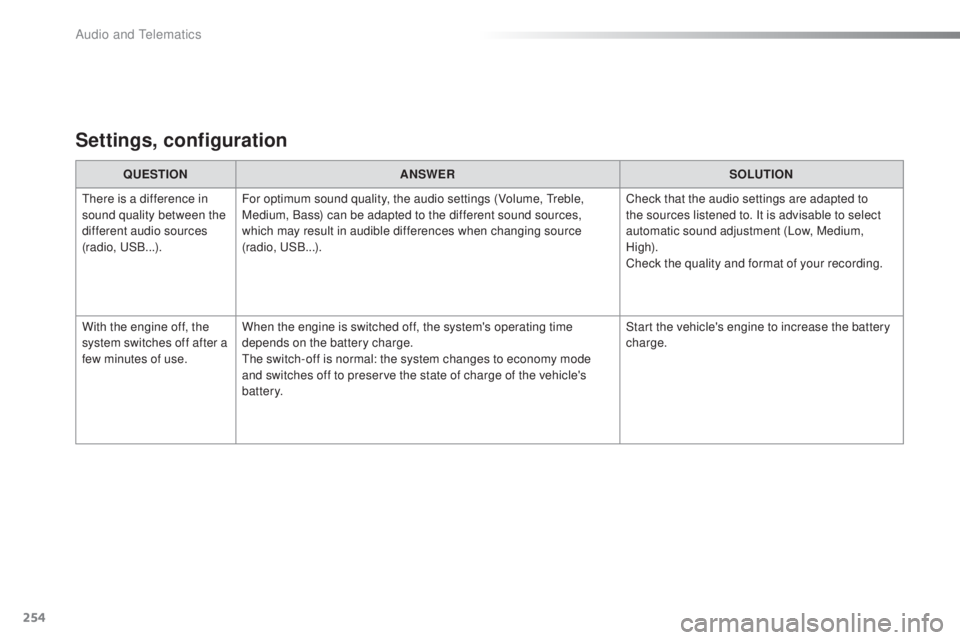
Settings, configuration
QueStIoN A NSWeRS oLutIoN
th
ere is a difference in
sound quality between the
different audio sources
(radio,
u
S
B...). For optimum sound quality, the audio settings (Volume,
t
r
eble,
Medium, Bass) can be adapted to the different sound sources,
which may result in audible differences when changing source
(radio,
u
S
B...). Check that the audio settings are adapted to
the sources listened to. It is advisable to select
automatic sound adjustment (Low, Medium,
High).
Check the quality and format of your recording.
With the engine off, the
system switches off after a
few minutes of use. When the engine is switched off, the system's operating time
depends on the battery charge.
th
e switch-off is normal: the system changes to economy mode
and switches off to preserve the state of charge of the vehicle's
battery. Start the vehicle's engine to increase the battery
charge.
Audio and telematics