navigation PEUGEOT 108 2016 Owners Manual
[x] Cancel search | Manufacturer: PEUGEOT, Model Year: 2016, Model line: 108, Model: PEUGEOT 108 2016Pages: 268, PDF Size: 6.17 MB
Page 144 of 268
142
108_en_Chap07_info-pratiques_ed01-2016
Accessories
A wide range of accessories and genuine parts is available from the PeugeOt dealer network.th
ese accessories and parts are all suitable for your vehicle and benefit from Pe ugeOt' s recommendation and warranty.
"
tr
ansport solutions":
boot carpet, boot liner,
transverse roof bars, bicycle carrier, ski carrier,
roof boxes, boot dividers, ...
"Style":
ligne S body kit, ligne S personalised
mats, aluminium gear lever knob, alloy wheels,
exterior and interior personalisation stickers,
chrome side mouldings, chrome mirror shells,
door sill finishers, personalised remote control
shells, ... "Comfort":
air deflectors, insulated module,
sun blinds, scented air freshener, portable
ashtray, reading lamp, front and rear parking
sensors, centre armrest, cigarette lighter... "Security and safety":
anti-theft alarm,
vehicle tracking system, snow chains, wheel
non-slip covers, wheel security bolts, child
seats, first aid kit, warning triangle, high
visibility vest, breathalyzer, fire extinguisher,
pet seat belt, foglamp kit, seat belt cutter/glass
hammer, ...
"Protection": mats, mud flaps, vehicle cover,
seat covers, bumper protectors, black grained
side mouldings, ...
to p
revent the mat from becoming caught
under the pedals:
-
e
nsure that the mat is secured correctly,
-
n
ever fit one mat on top of another."Multimedia":
audio system, speaker, semi-
integral navigation systems, hands-free kit,
driving assistance systems, 230 V socket,
portable satellite navigation system, telephone/
smartphone support, digital radio, ...
Practical information
Page 187 of 268
185
108_en_Chap10a_Autoradio-toyota-tactile-1_ed01-2016
7-inch touch screen
Multimedia system - Bluetooth® telephone - Mirror Screen® - gPS navigation
First steps 1 86
Steering mounted controls
1
88
Menus
189
Audio source
1
90
Radio
19 4
DAB (Digital Audio Broadcasting) radio
1
96
Media
19
8
te
lephone
202
Configuration
20
8
Mirror Screen
® - Connexions iPhone® 212
Mirror Screen® - MirrorLinktM connections 2 16
Navigation
2
20
Frequently asked questions
23
1
As a safety measure, the driver must carry out operations which
require prolonged attention while the vehicle is stationary.
to p
revent discharging of the battery, the system cuts off
following activation of energy economy mode, 20 minutes after
switching off the engine on vehicles fitted with the Keyless
e
n
try
and Starting system. Contents
th
e temperature of a telephone may increase when connected
by MirrorLink
tM. In this case, the telephone battery discharges as
a safety measure.
.
Audio and telematics
Page 191 of 268
189
108_en_Chap10a_Autoradio-toyota-tactile-1_ed01-2016
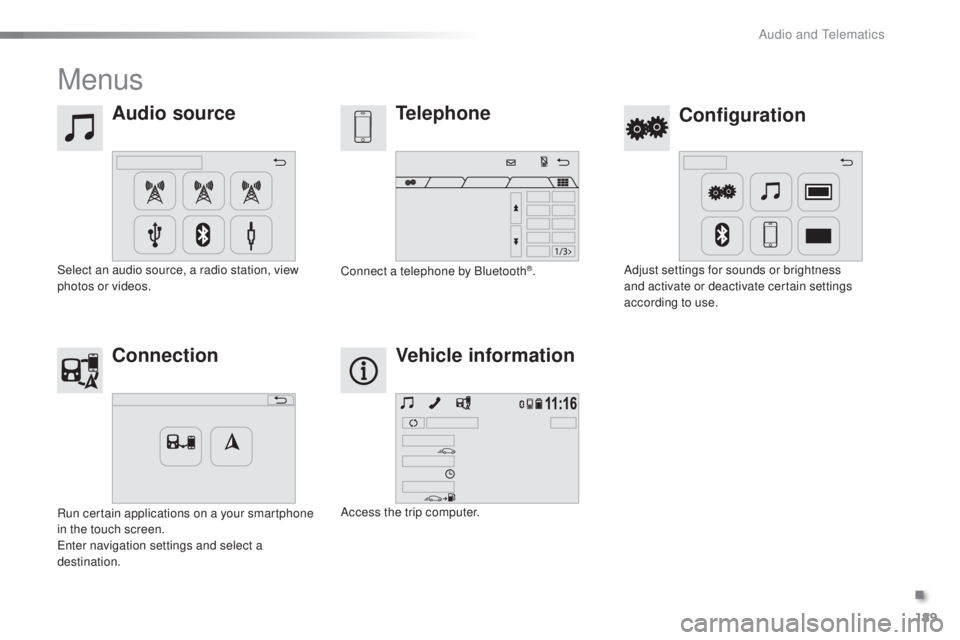
Menus
Audio source
Configurationtelephone
Connection Vehicle information
Select an audio source, a radio station, view
photos or videos. Adjust settings for sounds or brightness
and activate or deactivate certain settings
according to use.
Connect a telephone by Bluetooth®.
Run certain applications on a your smartphone
in the touch screen.
en
ter navigation settings and select a
destination. Access the trip computer.
.
Audio and telematics
Page 222 of 268
17/08/15
14:48
68
km/h
25m
220
108_en_Chap10a_Autoradio-t
oyota-tactile-1_ed01-2016
Navigation
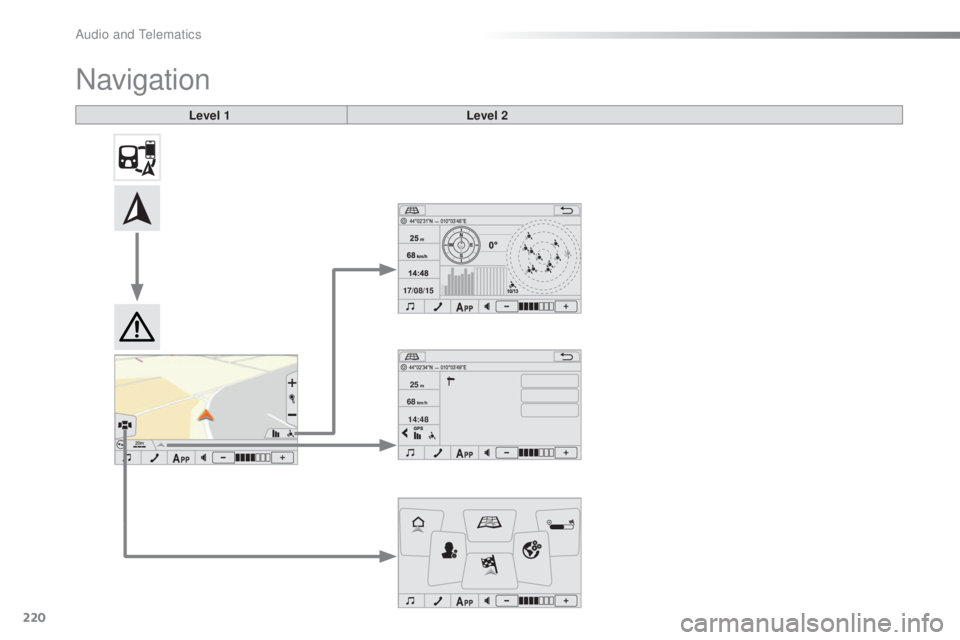
Level 1 Level 2
Audio and telematics
Page 223 of 268

221
108_en_Chap10a_Autoradio-toyota-tactile-1_ed01-2016
Level 1 Level 2 Comments
Connection
gPS
th
e compass is available only with a fixed position.
th
e direction is available only with a fixed position.
th
e representation of the sky is facing north, as for the compass.
th
e satellite icons are represented in yellow for a weak signal and in
green for a strong signal.
th
e satellite signal levels are represented in yellow for a weak signal
and in green for a strong signal.
Connection Page info Search for P
oI
nearbyDisplay the information on your current position and select the desired
settings.
Add to favorites
Set as home
gPS
C
onnection
Navigation Return home
Create a route to a place set as "Home".
Map
go d
irectly to the map page.
Route overview Display an overview of your route.
u
ser settings Display the system preferences (language, units, ...).
go t
o Search for and set a destination.
Map settings Display the route and map display preferences.
.
Audio and telematics
Page 225 of 268
223
108_en_Chap10a_Autoradio-toyota-tactile-1_ed01-2016
Level 1Level 2 Level 3 Comments
Navigation
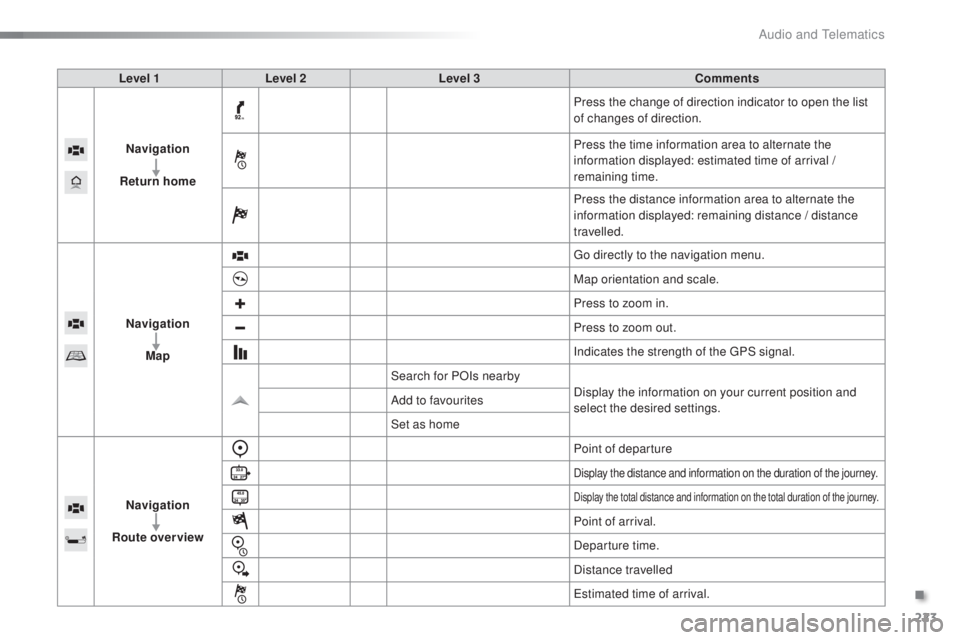
Return home Press the change of direction indicator to open the list
of changes of direction.
Press the time information area to alternate the
information displayed: estimated time of arrival /
remaining time.
Press the distance information area to alternate the
information displayed: remaining distance / distance
travelled.
Navigation Map
go d
irectly to the navigation menu.
Map orientation and scale.
Press to zoom in.
Press to zoom out.
Indicates the strength of the
g
P
S signal.
Search for POIs nearby Display the information on your current position and
select the desired settings.
Add to favourites
Set as home
Navigation
Route overview Point of departure
Display the distance and information on the duration of the journey.
Display the total distance and information on the total duration of the journey.
Point of arrival.
Departure time.
Distance travelled
es
timated time of arrival.
.
Audio and telematics
Page 227 of 268
225
108_en_Chap10a_Autoradio-toyota-tactile-1_ed01-2016
Level 1 Level 2 Comments
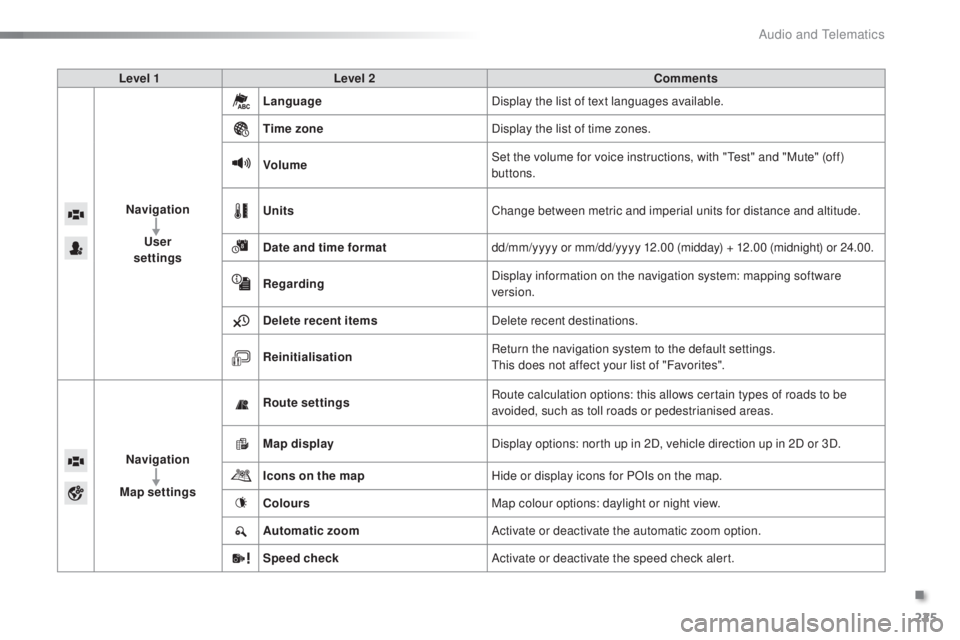
Navigation
u
ser
settings Language
Display the list of text languages available.
ti
me zone Display the list of time zones.
Volume Set the volume for voice instructions, with "
te
st" and "Mute" (off)
buttons.
u
nits Change between metric and imperial units for distance and altitude.
Date and time format dd/mm/yyyy or mm/dd/yyyy 12.00 (midday) + 12.00 (midnight) or 24.00.
Regarding Display information on the navigation system: mapping software
version.
Delete recent items Delete recent destinations.
Reinitialisation Return the navigation system to the default settings.
th
is does not affect your list of "Favorites".
Navigation
Map settings Route settings
Route calculation options: this allows certain types of roads to be
avoided, such as toll roads or pedestrianised areas.
Map display Display options: north up in 2D, vehicle direction up in 2D or 3D.
Icons on the map Hide or display icons for POIs on the map.
Colours Map colour options: daylight or night view.
Automatic zoom Activate or deactivate the automatic zoom option.
Speed check Activate or deactivate the speed check alert.
.
Audio and telematics
Page 229 of 268
227
108_en_Chap10a_Autoradio-toyota-tactile-1_ed01-2016
Level 1 Level 2 Level 3 Comments
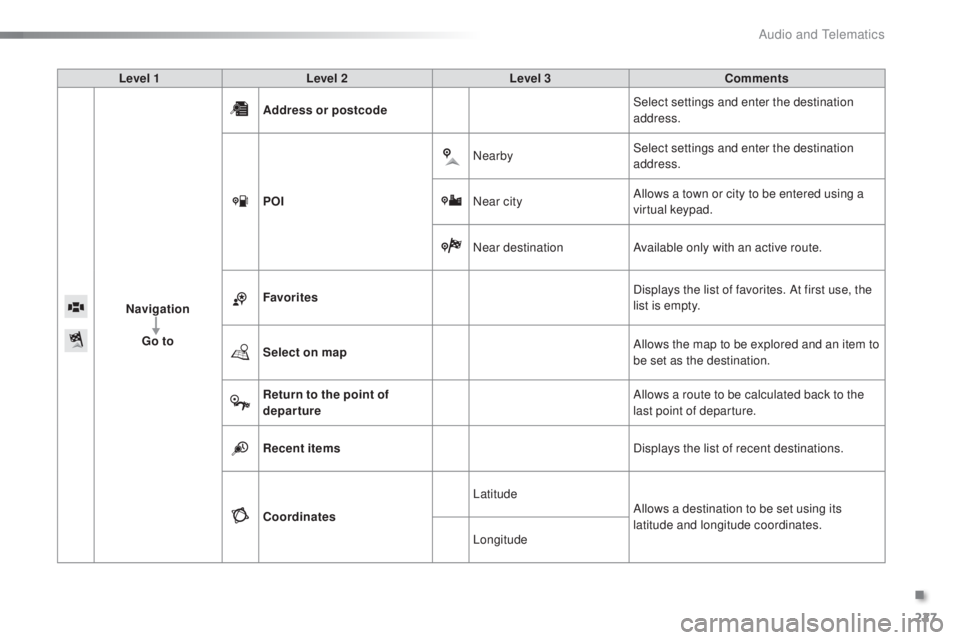
Navigation
go t
o Address or postcode
Select settings and enter the destination
address.
P
o
I N
earbySelect settings and enter the destination
address.
Near city Allows a town or city to be entered using a
virtual keypad.
Near destination Available only with an active route.
Favorites Displays the list of favorites. At first use, the
list is empty.
Select on map Allows the map to be explored and an item to
be set as the destination.
Return to the point of
departure Allows a route to be calculated back to the
last point of departure.
Recent items Displays the list of recent destinations.
Coordinates Latitude
Allows a destination to be set using its
latitude and longitude coordinates.
Longitude
.
Audio and telematics
Page 230 of 268
228
108_en_Chap10a_Autoradio-toyota-tactile-1_ed01-2016
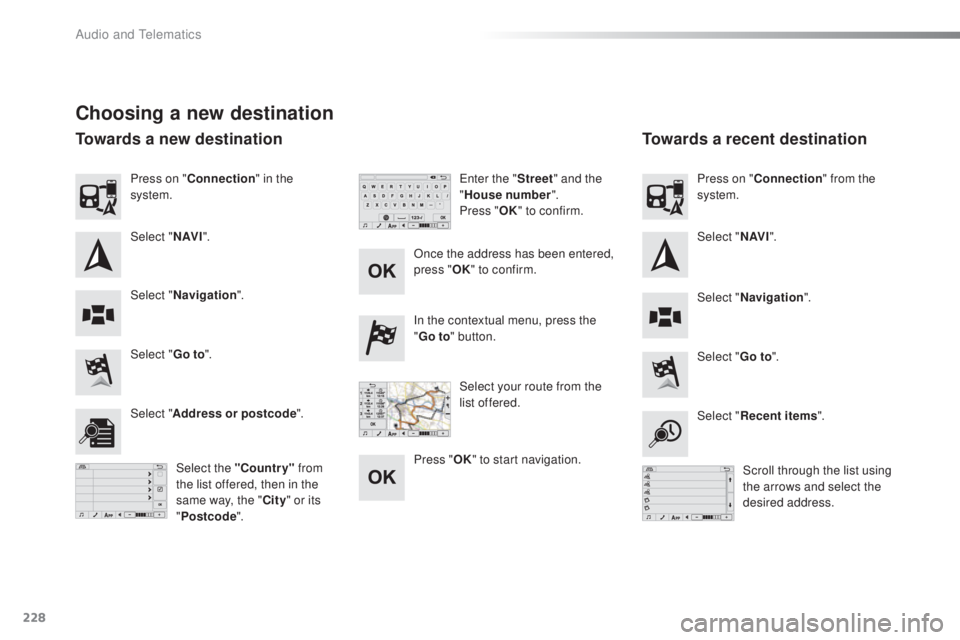
Choosing a new destination
Select "go to".
Select "go t o".
In the contextual menu, press the
"
go t
o
" button.
Select " Address or postcode ".
Select "Recent items ".
Select the "Country" from
the list offered, then in the
same way, the " City" or its
" Postcode ". Scroll through the list using
the arrows and select the
desired address.
Once the address has been entered,
press "
oK
"
to confirm.
Press "
oK " t
o start navigation.
en
ter the "
Street" and the
" House number ".
Press "
oK "
to confirm.
Select your route from the
list offered.
Press on "
Connection " in the
system.
Select " N AV I". Select "N AV I".
Press on "
Connection " from the
system.
Select " Navigation ".
Select "Navigation ".
towards a new destinationto wards a recent destination
Audio and telematics
Page 231 of 268
229
108_en_Chap10a_Autoradio-toyota-tactile-1_ed01-2016
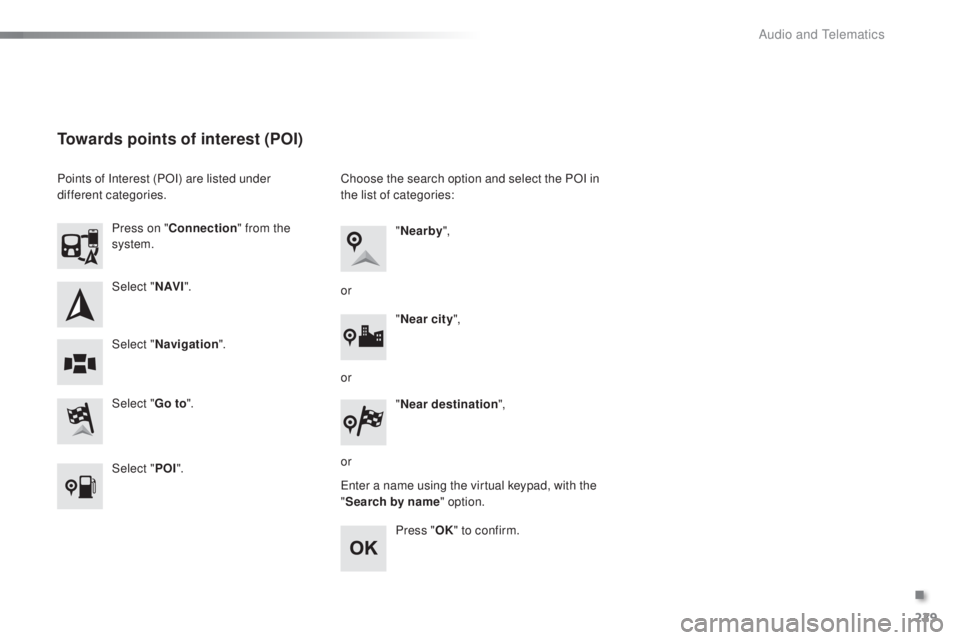
Select "N AV I".
Select "
go t
o".
Press on "
Connection " from the
system.
Select " Navigation ".
towards points of interest (PoI)
Points of Interest (POI) are listed under
different categories.
Select "P
o
I". C
hoose the search option and select the POI in
the list of categories:
en
ter a name using the virtual keypad, with the
" Search by name" option.
Press "
oK"
to confirm.
"
Nearby ",
" Near city ",
or
or
or "
Near destination ",
.
Audio and telematics