reset PEUGEOT 108 2016 Owners Manual
[x] Cancel search | Manufacturer: PEUGEOT, Model Year: 2016, Model line: 108, Model: PEUGEOT 108 2016Pages: 268, PDF Size: 6.17 MB
Page 29 of 268
27
108 _en_Chap01_instrument- de-bord_ed01-2016
tr i p c o m p u t e r
System that gives you information on the journey in progress (range, fuel consumption…).
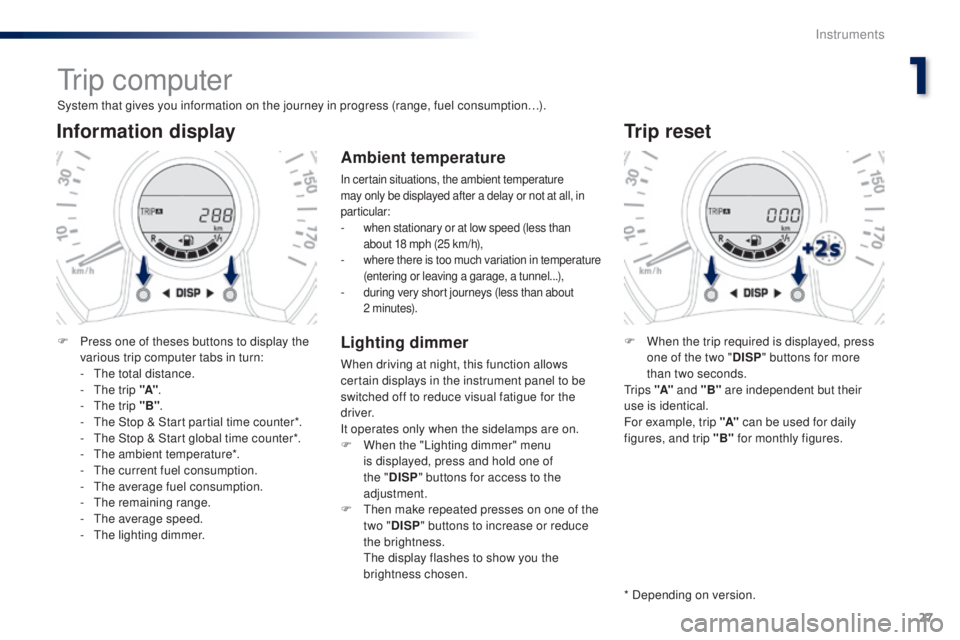
Information display
F Press one of theses buttons to display the various trip computer tabs in turn:
-
t
h
e total distance.
-
t
h
e trip "A".
-
t
h
e trip "B" .
-
t
h
e Stop & Start partial time counter*.
-
t
h
e Stop & Start global time counter*.
-
t
h
e ambient temperature*.
-
t
h
e current fuel consumption.
-
t
h
e average fuel consumption.
-
t
he
remaining range.
-
t
h
e average speed.
-
t
h
e lighting dimmer.
trip reset
F When the trip required is displayed, press one of the two " DISP" buttons for more
than two seconds.
t
r i p s "A" and "B" are independent but their
use is identical.
For example, trip "A" can be used for daily
figures, and trip "B" for monthly figures.
* Depending on version.
Ambient temperature
In certain situations, the ambient temperature
may only be displayed after a delay or not at all, in
particular:
- when stationary or at low speed (less than about 18 mph (25 km/h),
- where there is too much variation in temperature (entering or leaving a garage, a tunnel...),
- during very short journeys (less than about 2 minutes).
Lighting dimmer
When driving at night, this function allows
certain displays in the instrument panel to be
switched off to reduce visual fatigue for the
driver.
It operates only when the sidelamps are on.
F
W
hen the "Lighting dimmer" menu
is displayed, press and hold one of
the " DISP " buttons for access to the
adjustment.
F
t
h
en make repeated presses on one of the
two " DISP " buttons to increase or reduce
the brightness.
t
h
e display flashes to show you the
brightness chosen.
1
Instruments
Page 30 of 268
28
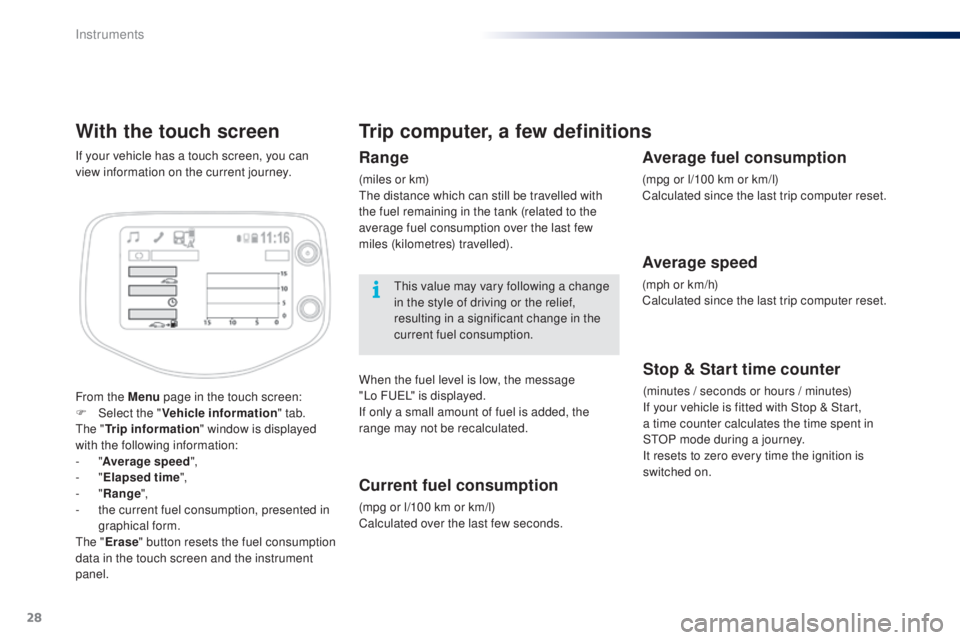
With the touch screen
From the Menu page in the touch screen:
F Sel ect the " Vehicle information " tab.
th
e "
tr
ip information " window is displayed
with the following information:
-
"Average speed ",
-
"
ela
psed time ",
-
"Range ",
-
t
he current fuel consumption, presented in
graphical form.
th
e "
er
ase" button resets the fuel consumption
data in the touch screen and the instrument
panel. If your vehicle has a touch screen, you can
view information on the current journey.
trip computer, a few definitions
Range
(miles or km)th e distance which can still be travelled with
the fuel remaining in the tank (related to the
average fuel consumption over the last few
miles (kilometres) travelled).
th
is value may vary following a change
in the style of driving or the relief,
resulting in a significant change in the
current fuel consumption.
When the fuel level is low, the message
"Lo
F
u
e
L
" is displayed.
If only a small amount of fuel is added, the
range may not be recalculated.
Current fuel consumption
(mpg or l/100 km or km/l)
Calculated over the last few seconds.
Stop & Start time counter
(minutes / seconds or hours / minutes)
If your vehicle is fitted with Stop & Start,
a
time counter calculates the time spent in
S
tO
P mode during a journey.
It resets to zero every time the ignition is
switched on.
Average fuel consumption
(mpg or l/100 km or km/l)
Calculated since the last trip computer reset.
Average speed
(mph or km/h)
Calculated since the last trip computer reset.
Instruments
Page 85 of 268
83
108_en_Chap04_conduite_ed01-2016
Stop & Start (Vti 68 S&S engine)
operation
going into engine St oP
mode
this indicator lamp comes on in the
instrument panel and the engine
goes into standby automatically:
-
w
hen stationary, in neutral, and you
release the clutch pedal.
Never refuel with the engine in
S
tO
P mode; you must switch off the
ignition with the button. For smoother operation, during
parking manoeuvres StO P mode is
not available for a few seconds after
coming out of reverse gear.
th
e Stop & Start does not affect the
vehicle's systems, such as for example,
braking, power steering...
th
e Stop & Start
system puts the engine
temporarily into standby - S
tO
P mode - during
stops in the traffic (red lights, traffic jams, or
other...).
th
e engine restarts automatically -
StA
Rt
mode - as soon as you want to move
off.
t
h
e restart takes place instantly, quickly
and silently.
Per fect for urban use, the Stop & Start system
reduces fuel consumption and exhaust
emissions as well as the noise level when
stationary.
Stop & Start time counters
A partial time counter counts the periods in
StO P mode during a journey.
It is displayed in the trip computer once the
Stop & Start is operating.
Press one of the " DISP" buttons to return to the
previous display.
A global time counter counts the periods in
S
tO
P mode since the last reset.
When it is displayed, press one of the
" DISP "
buttons to reset the counter.
4
Driving
Page 190 of 268
188
108_en_Chap10a_Autoradio-toyota-tactile-1_ed01-2016
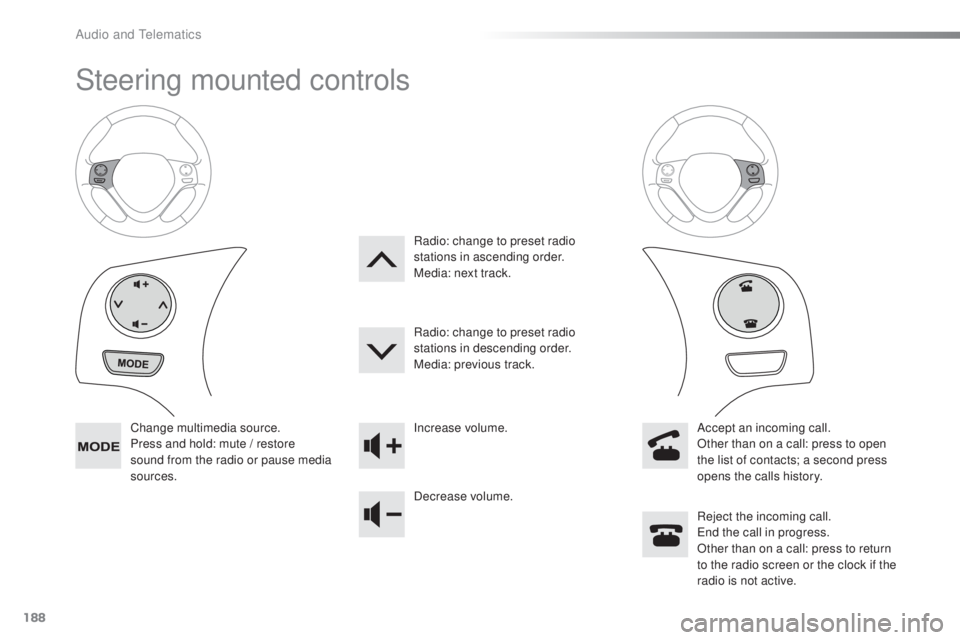
Steering mounted controls
Change multimedia source.
Press and hold: mute / restore
sound from the radio or pause media
sources. Increase volume.
Decrease volume.
Reject the incoming call.
en
d the call in progress.
Other than on a call: press to return
to the radio screen or the clock if the
radio is not active.
Radio: change to preset radio
stations in ascending order.
Media: next track.
Radio: change to preset radio
stations in descending order.
Media: previous track.
Accept an incoming call.
Other than on a call: press to open
the list of contacts; a second press
opens the calls history.
Audio and telematics
Page 193 of 268
191
108_en_Chap10a_Autoradio-toyota-tactile-1_ed01-2016
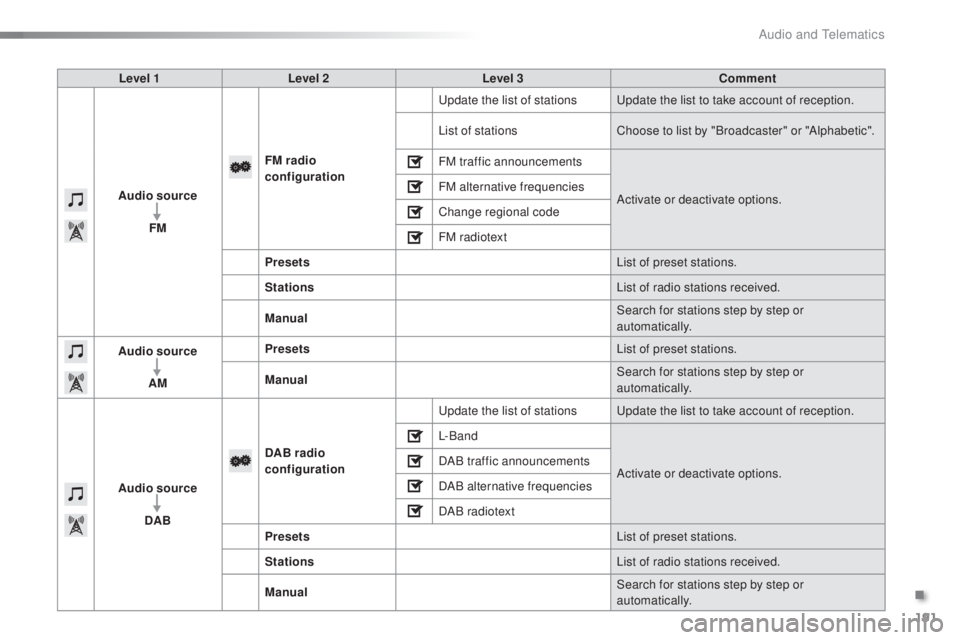
Level 1 Level 2 Level 3 Comment
Audio source FM FM
radio
configuration
up
date the list of stations
up
date the list to take account of reception.
List of stations Choose to list by "Broadcaster" or "Alphabetic".
FM traffic announcements
Activate or deactivate options.
FM alternative frequencies
Change regional code
FM radiotext
Presets List of preset stations.
Stations List of radio stations received.
Manual Search for stations step by step or
automatically.
Audio source
AM Presets
List of preset stations.
Manual Search for stations step by step or
automatically.
Audio source DAB DAB radio
configuration
up
date the list of stations
up
date the list to take account of reception.
L- B a n d
Activate or deactivate options.
DAB traffic announcements
DAB alternative frequencies
DAB radiotext
Presets List of preset stations.
Stations List of radio stations received.
Manual Search for stations step by step or
automatically.
.
Audio and telematics
Page 197 of 268
195
108_en_Chap10a_Autoradio-toyota-tactile-1_ed01-2016
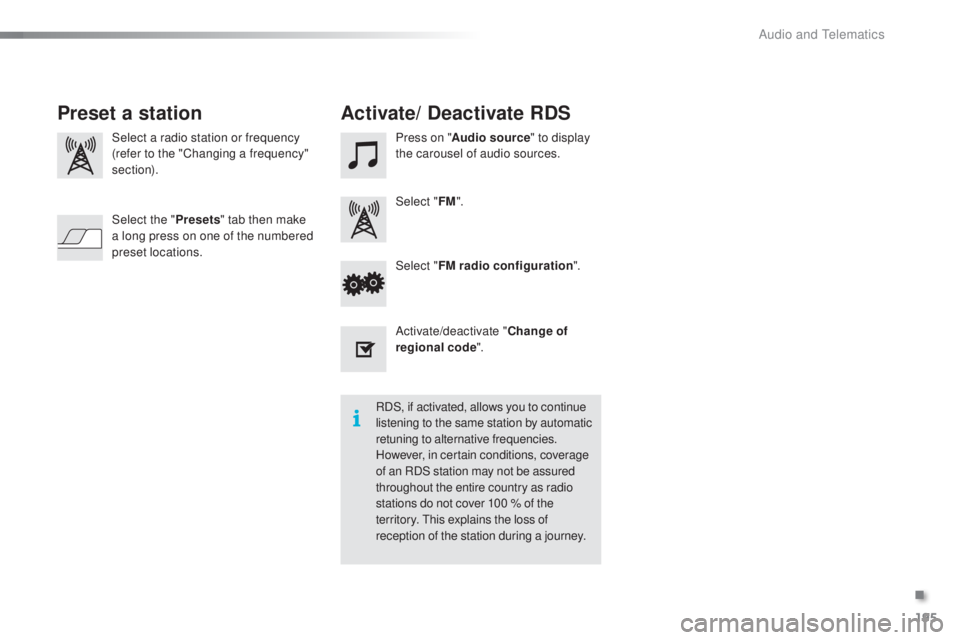
Select a radio station or frequency
(refer to the "Changing a frequency"
section). Press on "
Audio source " to display
the carousel of audio sources.
Select " FM".
Select " FM radio configuration ".
Activate/deactivate " Change of
regional code ".
Select the "
Presets" tab then make
a long press on one of the numbered
preset locations.
Preset a station Activate/ Deactivate RDS
RDS, if activated, allows you to continue
listening to the same station by automatic
retuning to alternative frequencies.
However, in certain conditions, coverage
of an RDS station may not be assured
throughout the entire country as radio
stations do not cover 100 % of the
territory.
t
h
is explains the loss of
reception of the station during a journey.
.
Audio and telematics
Page 198 of 268
196
108_en_Chap10a_Autoradio-toyota-tactile-1_ed01-2016
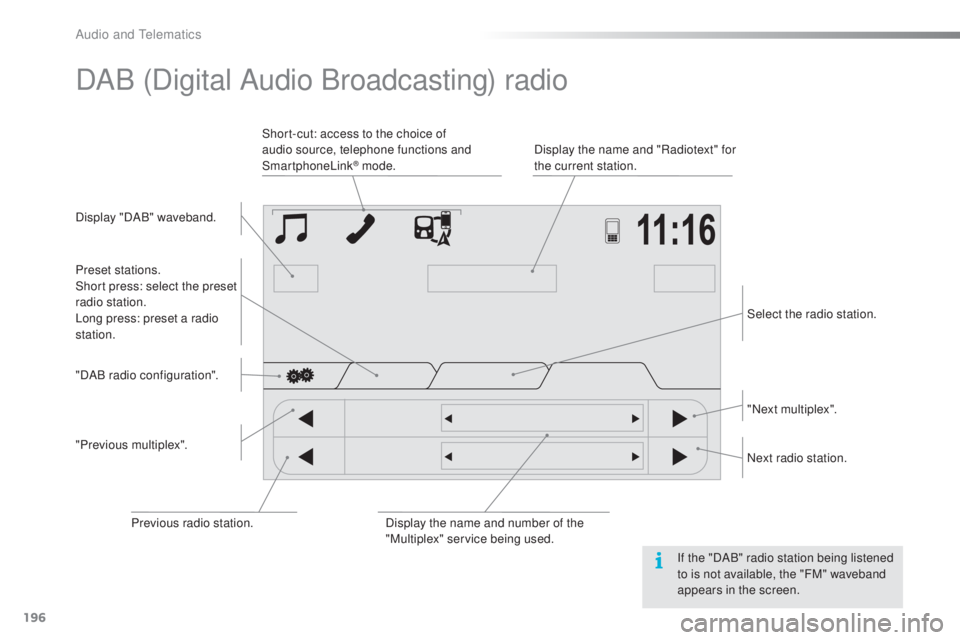
DAB (Digital Audio Broadcasting) radio
Display "DAB" waveband. Display the name and "Radiotext" for
the current station.
Short-cut: access to the choice of
audio source, telephone functions and
SmartphoneLink
® mode.
Select the radio station.
Preset stations.
Short press: select the preset
radio station.
Long press: preset a radio
station.
"Next multiplex".
Next radio station.
Display the name and number of the
"Multiplex" service being used.
"Previous multiplex". "DAB radio configuration".
Previous radio station. If the "DAB" radio station being listened
to is not available, the "FM" waveband
appears in the screen.
Audio and telematics
Page 240 of 268
238
108_en_Chap10b_Autoradio-toyota-2_ed01-2016
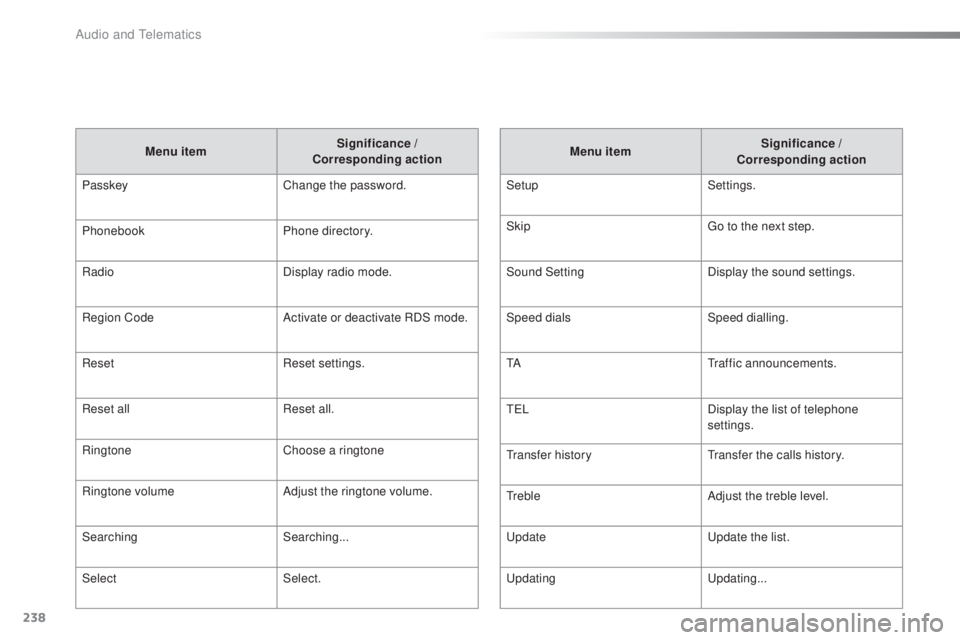
Menu item Significance /
Corresponding action
Passkey Change the password.
Phonebook Phone directory.
Radio Display radio mode.
Region Code Activate or deactivate RDS mode.
Reset Reset settings.
Reset all Reset all.
Ringtone Choose a ringtone
Ringtone volume Adjust the ringtone volume.
Searching Searching...
Select Select. Menu item
Significance /
Corresponding action
Setup Settings.
Skip
go t
o the next step.
Sound Setting Display the sound settings.
Speed dials Speed dialling.
t
A
tr
affic announcements.
t
e LDisplay the list of telephone
settings.
tr
ansfer history
tr
ansfer the calls history.
tr
ebleAdjust the treble level.
up
date
up
date the list.
upd
ating
up
dating...
Audio and telematics
Page 241 of 268
MODE
239
108_en_Chap10b_Autoradio-toyota-2_ed01-2016
First steps
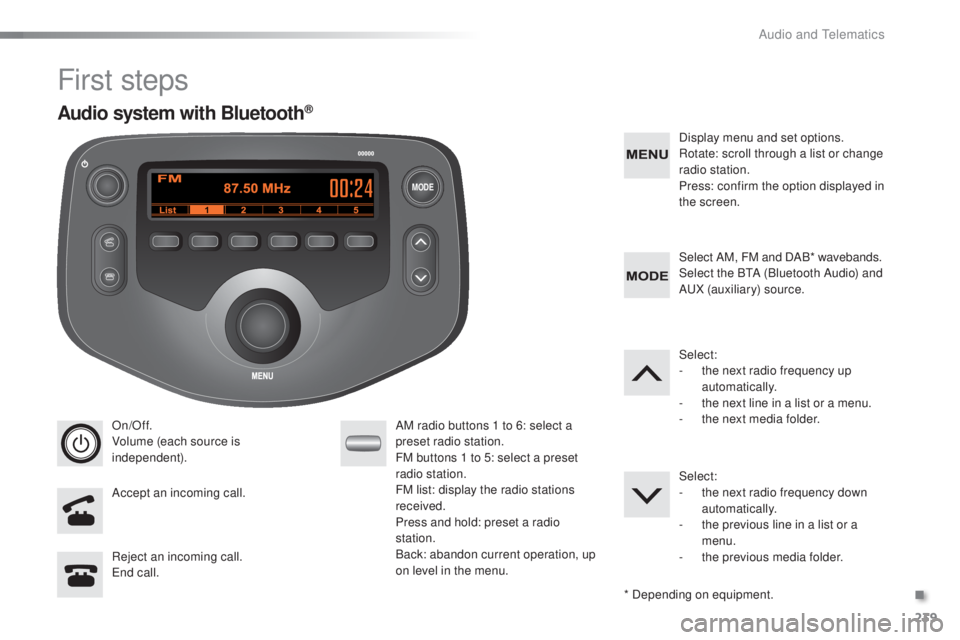
On/Off.
Volume (each source is
independent).
Accept an incoming call. AM radio buttons 1 to 6: select a
preset radio station.
FM buttons 1 to 5: select a preset
radio station.
FM list: display the radio stations
received.
Press and hold: preset a radio
station.
Back: abandon current operation, up
on level in the menu.Display menu and set options.
Rotate: scroll through a list or change
radio station.
Press: confirm the option displayed in
the screen.
Reject an incoming call.
en
d call. Select AM, FM and DAB* wavebands.
Select the B
tA (
Bluetooth Audio) and
A
uX
(auxiliary) source.
Select:
-
t
he next radio frequency up
automatically.
-
t
he next line in a list or a menu.
- t he next media folder.
Select:
-
t
he next radio frequency down
automatically.
-
t
he previous line in a list or a
menu.
-
t
he previous media folder.
* Depending on equipment.
Audio system with Bluetooth®
.
Audio and telematics
Page 242 of 268
MODE
240
108_en_Chap10b_Autoradio-toyota-2_ed01-2016
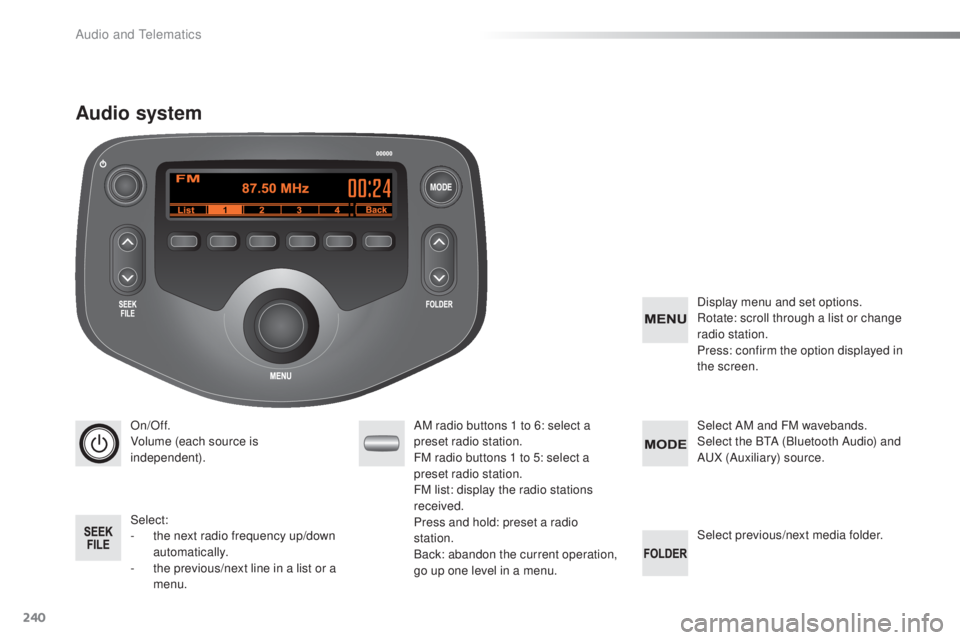
On/Off.
Volume (each source is
independent).
Select:
-
t
he next radio frequency up/down
automatically.
-
t
he previous/next line in a list or a
menu. AM radio buttons 1 to 6: select a
preset radio station.
FM radio buttons 1 to 5: select a
preset radio station.
FM
list: display the radio stations
received.
Press and hold: preset a radio
station.
Back: abandon the current operation,
go up one level in a menu. Display menu and set options.
Rotate: scroll through a list or change
radio station.
Press: confirm the option displayed in
the screen.
Select AM and FM
wavebands.
Select the BtA ( Bluetooth Audio) and
A
uX
(Auxiliary) source.
Select previous/next media folder.
Audio system
Audio and telematics