door lock PEUGEOT 108 2018 Owners Manual
[x] Cancel search | Manufacturer: PEUGEOT, Model Year: 2018, Model line: 108, Model: PEUGEOT 108 2018Pages: 180, PDF Size: 7.14 MB
Page 4 of 180
2
.
.
Instrument panels 8
D isplays 9
Warning and indicator lamps
9
I
ndic ators
18
Trip computer
1
8
Adjusting the time
2
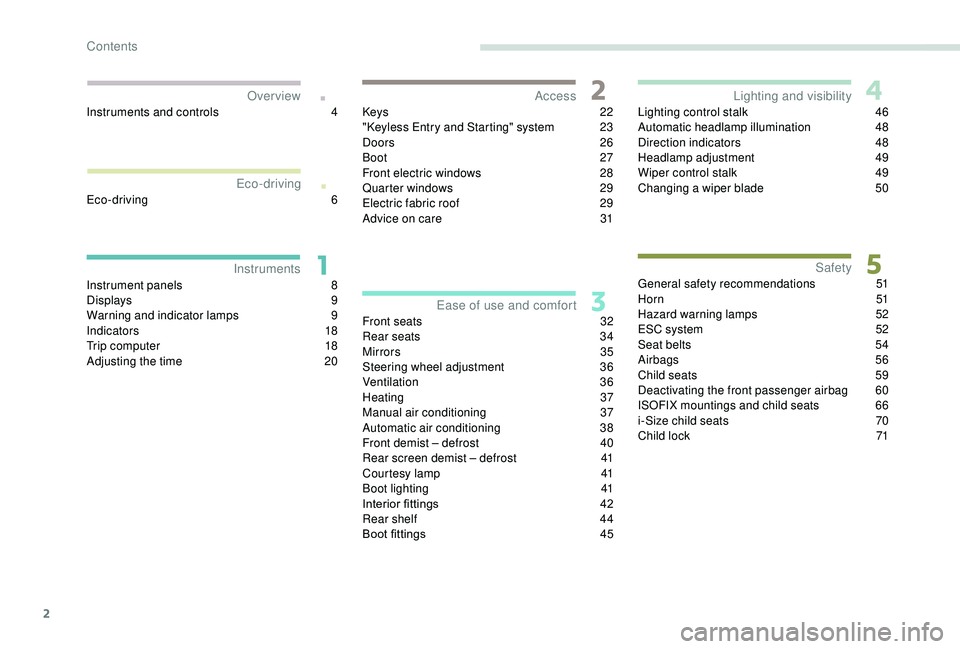
0Keys
22
"
K
eyless Entry and Starting" system
2
3
Doors 26
Boot
27
Front electric windows
2
8
Quarter windows
2
9
Electric fabric roof
2
9
Advice on care
3
1
Front seats
3
2
Rear seats
3
4
Mirrors
35
Steering wheel adjustment
3
6
Ventilation
3
6
Heating
3
7
Manual air conditioning
3
7
Automatic air conditioning
3
8
Front demist – defrost
4
0
Rear screen demist – defrost
4
1
Courtesy lamp
4
1
Boot lighting
4
1
Interior fittings
4
2
Rear shelf
4
4
Boot fittings
4
5Lighting control stalk
4
6
Automatic headlamp illumination
4
8
Direction indicators
4
8
Headlamp adjustment
4
9
Wiper control stalk
4
9
Changing a
wiper blade
5
0
General safety recommendations 5 1
H o r n 51
Hazard warning lamps
5
2
ESC system
5
2
Seat belts
5
4
Airbags
56
Child seats
5
9
Deactivating the front passenger airbag
6
0
ISOFIX mountings and child seats
6
6
i-Size child seats
7
0
Child lock
7
1
InstrumentsAccess
Over view
Ease of use and comfort Lighting and visibility
Safety
Eco-driving
Instruments and controls 4
E co-driving
6
Contents
Page 6 of 180
4
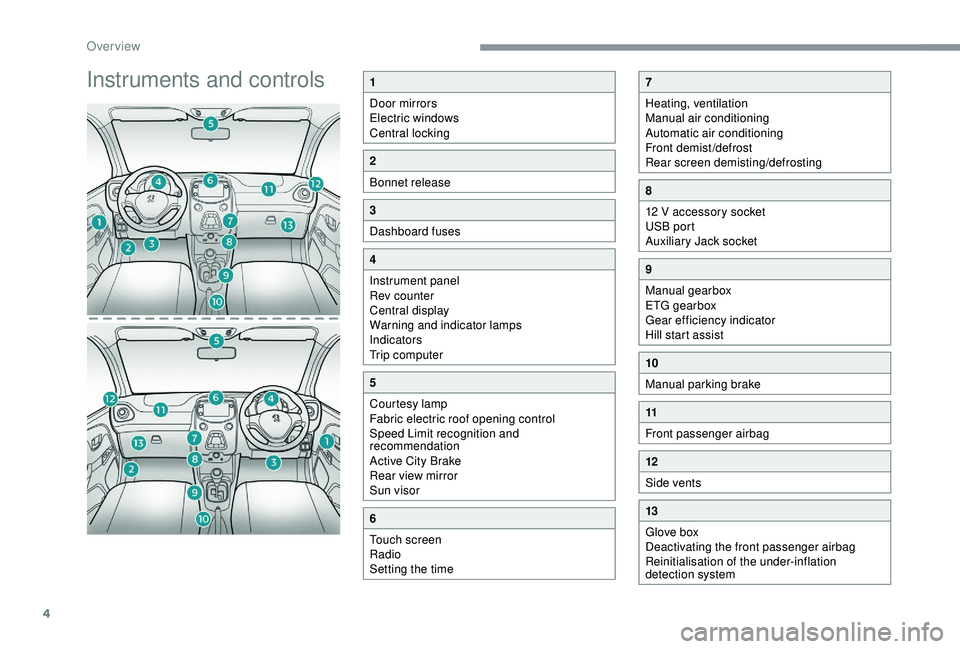
Instruments and controls1
Door mirrors
Electric windows
Central locking
2
Bonnet release
3
Dashboard fuses
4
Instrument panel
Rev counter
Central display
Warning and indicator lamps
Indicators
Trip computer
5
Courtesy lamp
Fabric electric roof opening control
Speed Limit recognition and
recommendation
Active City Brake
Rear view mirror
Sun visor
6
Touch screen
Radio
Setting the time
7
Heating, ventilation
Manual air conditioning
Automatic air conditioning
Front demist/defrost
Rear screen demisting/defrosting
8
12 V accessory socket
USB port
Auxiliary Jack socket
9
Manual gearbox
ETG gearbox
Gear efficiency indicator
Hill start assist
10
Manual parking brake
11
Front passenger airbag
12
Side vents
13
Glove box
Deactivating the front passenger airbag
Reinitialisation of the under-inflation
detection system
Over view
Page 24 of 180
22
Keys
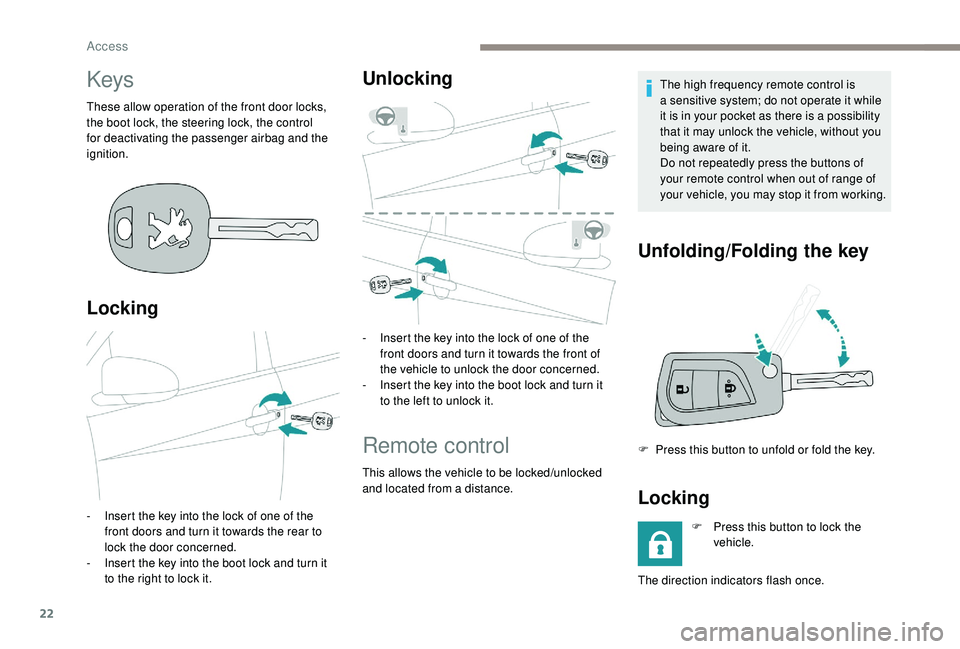
These allow operation of the front door locks,
the boot lock, the steering lock, the control
for deactivating the passenger airbag and the
ignition.
Locking
- Insert the key into the lock of one of the front doors and turn it towards the rear to
lock the door concerned.
-
I
nsert the key into the boot lock and turn it
to the right to lock it.
Unlocking
- Insert the key into the lock of one of the front doors and turn it towards the front of
the vehicle to unlock the door concerned.
-
I
nsert the key into the boot lock and turn it
to the left to unlock it.
Remote control
This allows the vehicle to be locked/unlocked
and located from a distance. The high frequency remote control is
a
sensitive system; do not operate it while
it is in your pocket as there is a possibility
that it may unlock the vehicle, without you
being aware of it.
Do not repeatedly press the buttons of
your remote control when out of range of
your vehicle, you may stop it from working.
Unfolding/Folding the key
F Press this button to unfold or fold the key.
Locking
F Press this button to lock the vehicle.
The direction indicators flash once.
Access
Page 25 of 180
23
If you find that a door is not properly
c losed after locking, close it again and
then relock the vehicle.
Unlocking
F Press this button to unlock the vehicle.
The direction indicators flash twice.
Locating your vehicle
F Press this button to locate your locked vehicle in a car park.
This is signalled by the lighting up of the
direction indicators for a
few seconds.
Changing the remote
control battery
Battery type: CR 2016/3 volts.
F U nclip the cover by inserting a small
screwdriver in the slot.
F
R
emove the cover.
F
R
emove the dead battery from its
compartment.
F
F
it the new battery into its compartment
observing the original fitting direction.
F
C
lip the cover into place.Do not throw remote control batteries
away, they contain metals which are
harmful to the environment.
Take them to a
PEUGEOT dealer or to
any other approved collection point.
" Keyless Entry and
Starting" system
System that allows the unlocking, locking
and starting of the vehicle while keeping the
electronic key on your person.
Electronic key
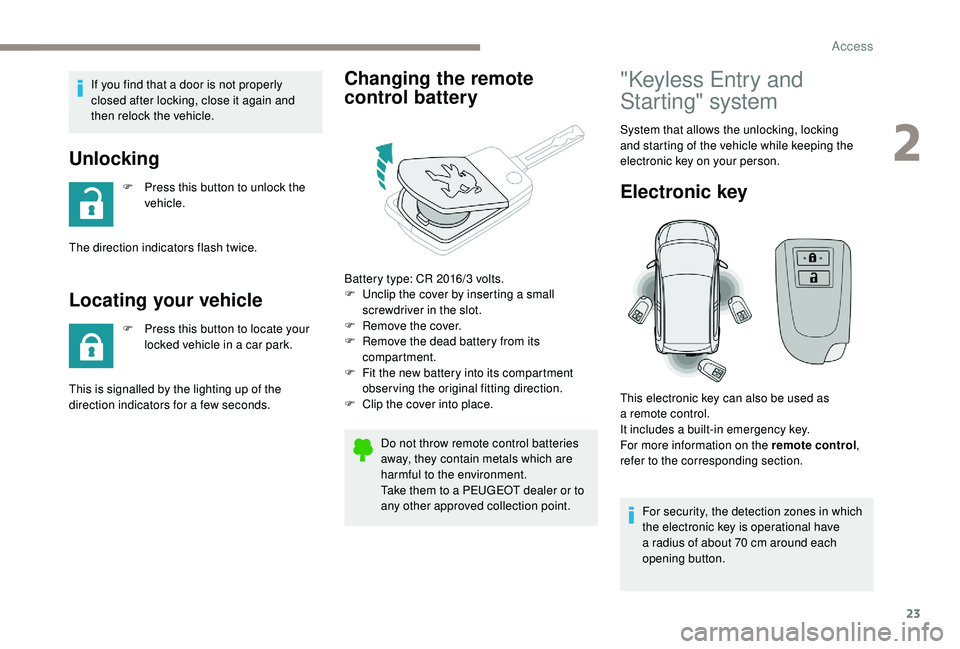
For security, the detection zones in which
the electronic key is operational have
a
radius of about 70 cm around each
opening button.
This electronic key can also be used as
a
remote control.
It includes a built-in emergency key.
For more information on the remote control ,
refer to the corresponding section.
2
Access
Page 26 of 180
24
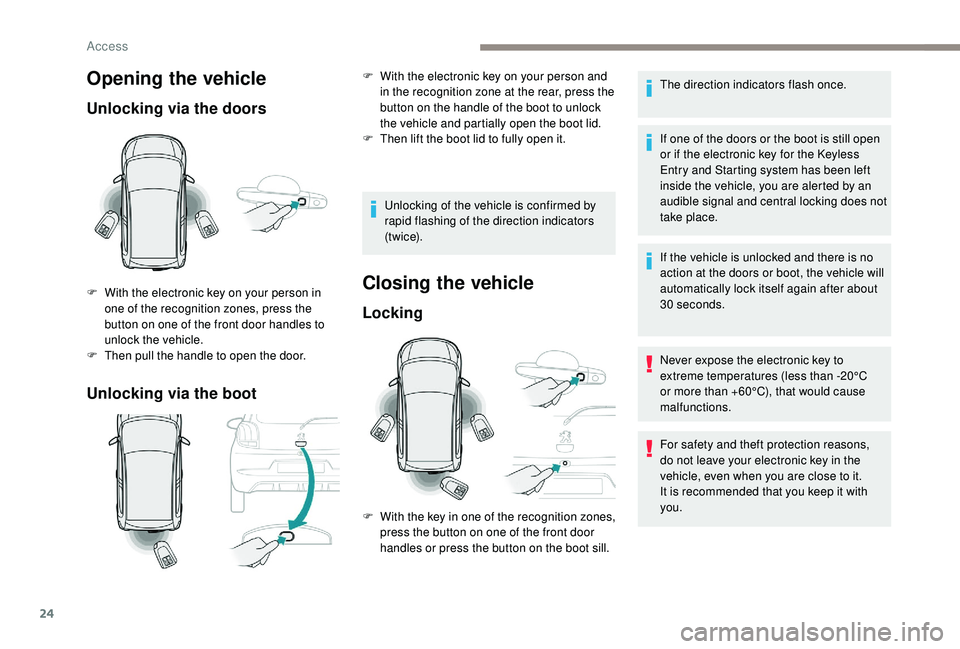
Opening the vehicle
Unlocking via the doors
Unlocking via the boot
F With the electronic key on your person in one of the recognition zones, press the
button on one of the front door handles to
unlock the vehicle.
F
T
hen pull the handle to open the door. Unlocking of the vehicle is confirmed by
rapid flashing of the direction indicators
(t w i c e).Closing the vehicle
Locking
The direction indicators flash once.
If one of the doors or the boot is still open
or if the electronic key for the
K
eyless
Entry and Starting system has been left
inside the vehicle, you are alerted by an
audible signal and central locking does not
take place.
If the vehicle is unlocked and there is no
action at the doors or boot, the vehicle will
automatically lock itself again after about
30
seconds.
Never expose the electronic key to
extreme temperatures (less than -20°C
or more than +60°C), that would cause
malfunctions.
F
W
ith the electronic key on your person and
in the recognition zone at the rear, press the
button on the handle of the boot to unlock
the vehicle and partially open the boot lid.
F
T
hen lift the boot lid to fully open it.
F
W
ith the key in one of the recognition zones,
press the button on one of the front door
handles or press the button on the boot sill. For safety and theft protection reasons,
do not leave your electronic key in the
vehicle, even when you are close to it.
It is recommended that you keep it with
you.
Access
Page 28 of 180
26
Check that the light on the electronic key
flashes 4 times.
While this function is activated, the "
K
eyless
Entry and Starting" system is inoperative.
To reactivate the electronic key, press one of
the buttons (open or closed padlock).
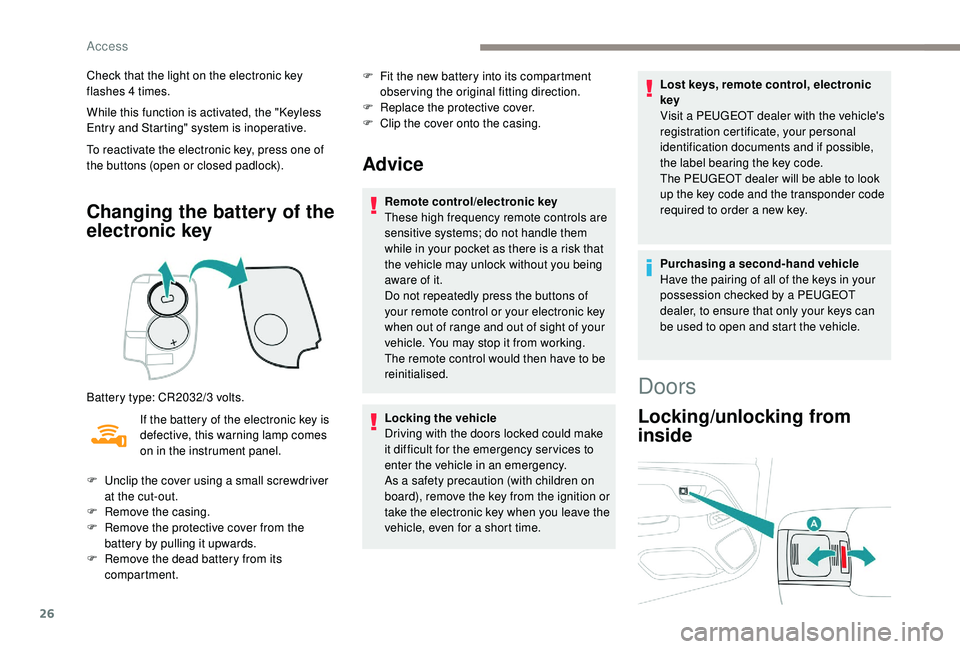
Changing the battery of the
electronic key
Battery type: CR2032/3 volts.
I f the battery of the electronic key is
defective, this warning lamp comes
on in the instrument panel. F
F
it the new battery into its compartment
observing the original fitting direction.
F
R
eplace the protective cover.
F
C
lip the cover onto the casing.
Advice
Remote control/electronic key
These high frequency remote controls are
sensitive systems; do not handle them
while in your pocket as there is a
risk that
the vehicle may unlock without you being
aware of it.
Do not repeatedly press the buttons of
your remote control or your electronic key
when out of range and out of sight of your
vehicle. You may stop it from working.
The remote control would then have to be
reinitialised.
Locking the vehicle
Driving with the doors locked could make
it difficult for the emergency ser vices to
enter the vehicle in an emergency.
As a
safety precaution (with children on
board), remove the key from the ignition or
take the electronic key when you leave the
vehicle, even for a
short time. Lost keys, remote control, electronic
key
Visit a
PEUGEOT dealer with the vehicle's
registration certificate, your personal
identification documents and if possible,
the label bearing the key code.
The PEUGEOT dealer will be able to look
up the key code and the transponder code
required to order a new key.
Purchasing a
second-hand vehicle
Have the pairing of all of the keys in your
possession checked by a
PEUGEOT
dealer, to ensure that only your keys can
be used to open and start the vehicle.
F
U
nclip the cover using a
small screwdriver
at the cut-out.
F
R
emove the casing.
F
R
emove the protective cover from the
battery by pulling it upwards.
F
R
emove the dead battery from its
compartment.
Doors
Locking/unlocking from
inside
Access
Page 29 of 180
27
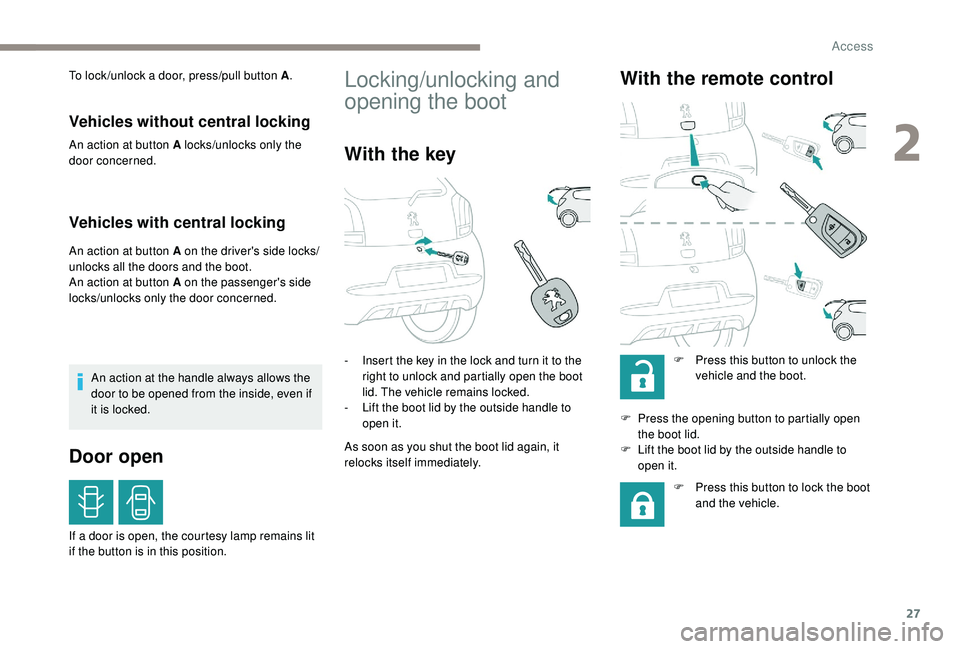
To lock /unlock a door, press/pull button A.
Vehicles without central locking
An action at button A locks/unlocks only the
door concerned.
Vehicles with central locking
An action at button A on the driver's side locks/
unlocks all the doors and the boot.
An action at button A on the passenger's side
locks/unlocks only the door concerned.
An action at the handle always allows the
door to be opened from the inside, even if
it is locked.
Door open
If a door is open, the courtesy lamp remains lit
i f the button is in this position.
Locking/unlocking and
opening the boot
With the key
- Insert the key in the lock and turn it to the right to unlock and partially open the boot
lid. The vehicle remains locked.
-
L
ift the boot lid by the outside handle to
open it.
As soon as you shut the boot lid again, it
relocks itself immediately.
With the remote control
F Press this button to unlock the vehicle and the boot.
F
P
ress the opening button to partially open
the boot lid.
F
L
ift the boot lid by the outside handle to
open it.
F
P
ress this button to lock the boot
and the vehicle.
2
Access
Page 30 of 180
28
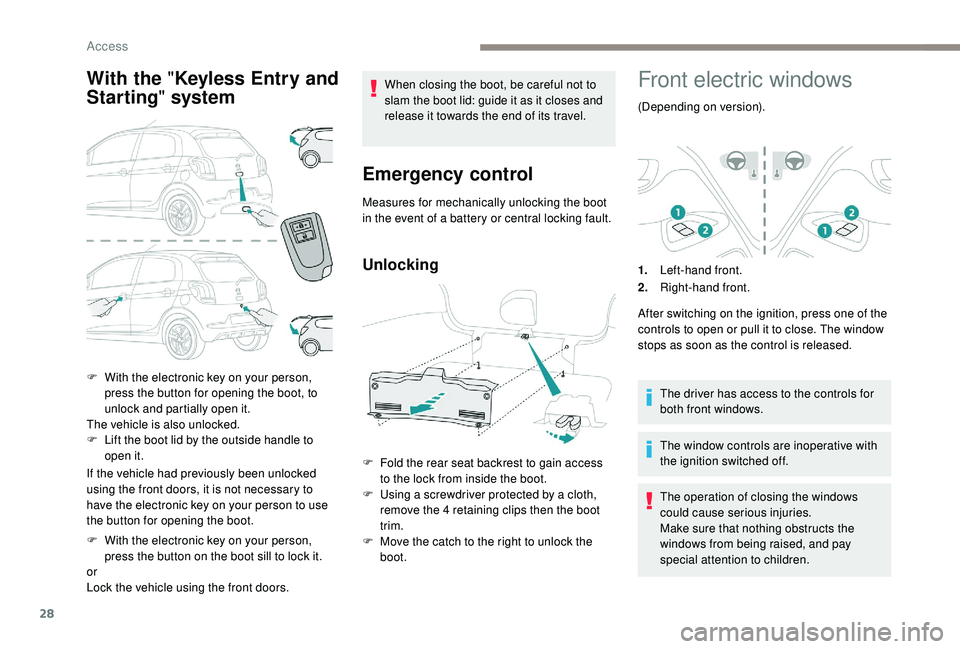
With the " Keyless Entry and
Starting " system
If the vehicle had previously been unlocked
using the front doors, it is not necessary to
have the electronic key on your person to use
the button for opening the boot.
F
W
ith the electronic key on your person,
press the button on the boot sill to lock it.
or
Lock the vehicle using the front doors. When closing the boot, be careful not to
slam the boot lid: guide it as it closes and
release it towards the end of its travel.
Emergency control
Measures for mechanically unlocking the boot
in the event of a
battery or central locking fault.
Unlocking
F Fold the rear seat backrest to gain access to the lock from inside the boot.
F
U
sing a screwdriver protected by a cloth,
remove the 4
retaining clips then the boot
trim.
F
M
ove the catch to the right to unlock the
boot.
Front electric windows
(Depending on version).
1. Left-hand front.
2. Right-hand front.
After switching on the ignition, press one of the
controls to open or pull it to close. The window
stops as soon as the control is released.
The driver has access to the controls for
both front windows.
The window controls are inoperative with
the ignition switched off.
The operation of closing the windows
could cause serious injuries.
Make sure that nothing obstructs the
windows from being raised, and pay
special attention to children.
F
W
ith the electronic key on your person,
press the button for opening the boot, to
unlock and partially open it.
The vehicle is also unlocked.
F
L
ift the boot lid by the outside handle to
open it.
Access
Page 35 of 180
33
With the engine running, the front seats can be
heated separately.
F
P
ress the switch. The indicator lamp comes
on.
F
P
ressing a
second time stops operation.
The temperature is controlled automatically.
The heated seat function is deactivated
approximately two minutes after the ignition is
switched off. To reactivate the function, switch
on the ignition and press the control again.
Switch off the heated seats as soon as
you consider it necessary, as reducing
the consumption of electrical current
reduces fuel consumption.
Do not use the function when the seat is
not occupied.
Reduce the intensity of the heating as
soon as possible.
When the seat and passenger
compartment have reached an
adequate temperature, you can stop
the function; reducing the consumption
of electrical current reduces fuel
consumption. Prolonged use at the highest setting is
not recommended for those with sensitive
skin.
There is a
risk of burns for people whose
perception of heat is impaired (illness,
taking medication, for example).
There is a
risk of overheating the system if
material with insulating properties is used,
such as cushions or seat covers.
Do not use the function:
-
i
f wearing damp clothing,
-
i
f child seats are fitted.
To avoid breaking the heating element in
the seat:
-
d
o not place heavy objects on the seat,
-
d
o not kneel or stand on the seat,
-
d
o not place sharp objects on the seat,
-
d
o not spill liquids onto the seat.
To avoid the risk of short-circuit:
-
d
o not use liquid products for cleaning
the seat,
-
n
ever use the heating function when
the seat is damp.Access to rear seats
(3-door)
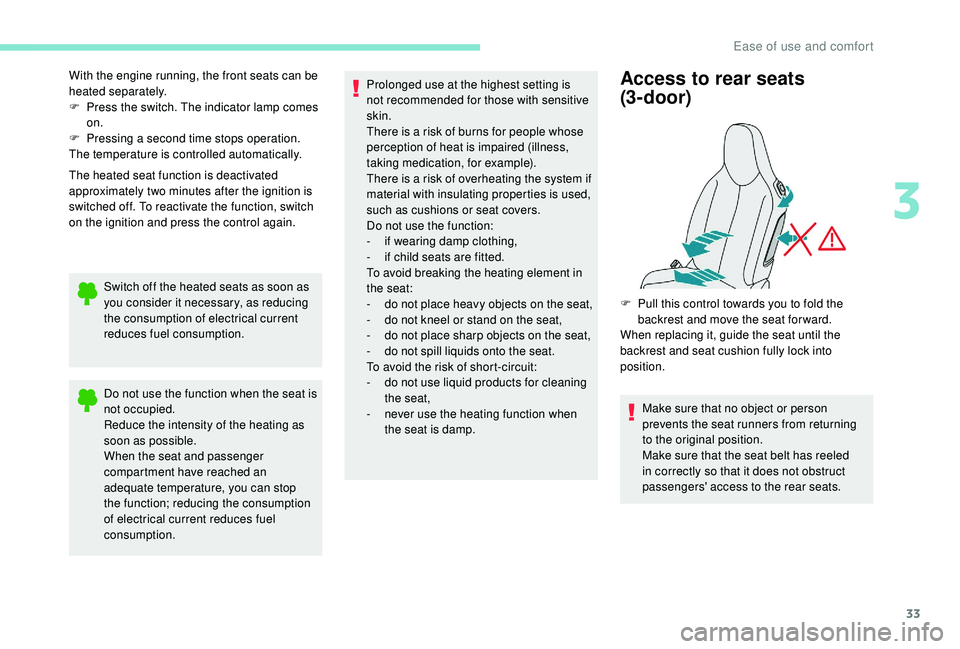
F Pull this control towards you to fold the backrest and move the seat for ward.
When replacing it, guide the seat until the
backrest and seat cushion fully lock into
position.
Make sure that no object or person
prevents the seat runners from returning
to the original position.
Make sure that the seat belt has reeled
in correctly so that it does not obstruct
passengers' access to the rear seats.
3
Ease of use and comfort
Page 36 of 180
34
Rear seats
Your vehicle is equipped with a rear bench
s eat that has a fixed one-piece cushion and,
depending on version:
-
a f
olding backrest in two halves (50/50),
-
a f
olding one-piece backrest.
Storage of belts
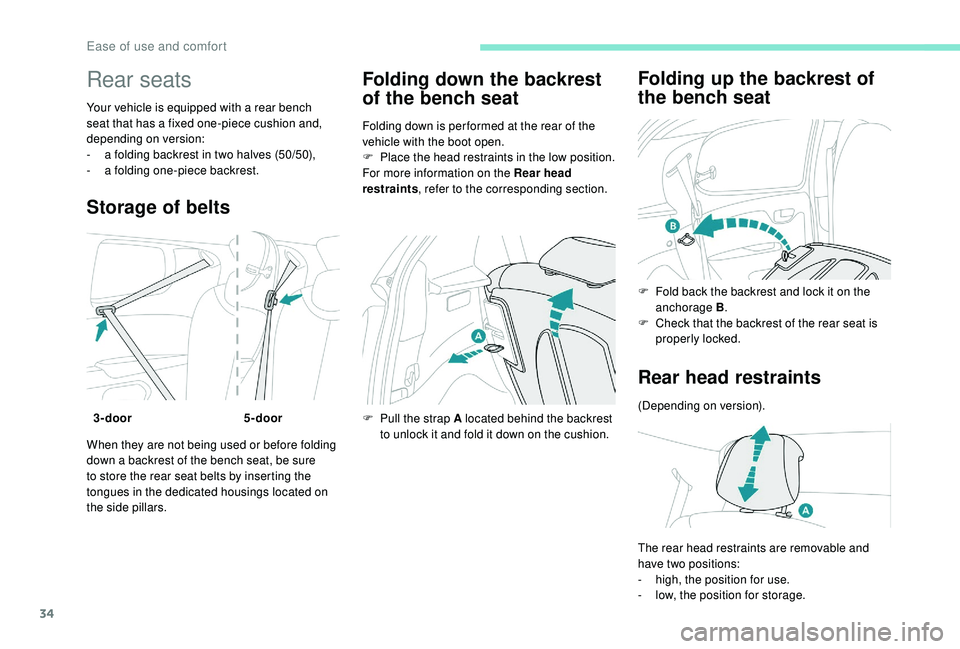
When they are not being used or before folding
down a backrest of the bench seat, be sure
to store the rear seat belts by inserting the
tongues in the dedicated housings located on
the side pillars.
Folding down the backrest
of the bench seat
Folding down is per formed at the rear of the
vehicle with the boot open.
F
P
lace the head restraints in the low position.
For more information on the Rear head
restraints , refer to the corresponding section.
F
P
ull the strap A located behind the backrest
to unlock it and fold it down on the cushion.
Folding up the backrest of
the bench seat
3-door 5-door F
F
old back the backrest and lock it on the
anchorage B .
F
C
heck that the backrest of the rear seat is
properly locked.
Rear head restraints
(Depending on version).
The rear head restraints are removable and
have two positions:
-
h
igh, the position for use.
-
l
ow, the position for storage.
Ease of use and comfort