navigation PEUGEOT 2008 2013 Owner's Manual
[x] Cancel search | Manufacturer: PEUGEOT, Model Year: 2013, Model line: 2008, Model: PEUGEOT 2008 2013Pages: 324, PDF Size: 8.39 MB
Page 230 of 324
05
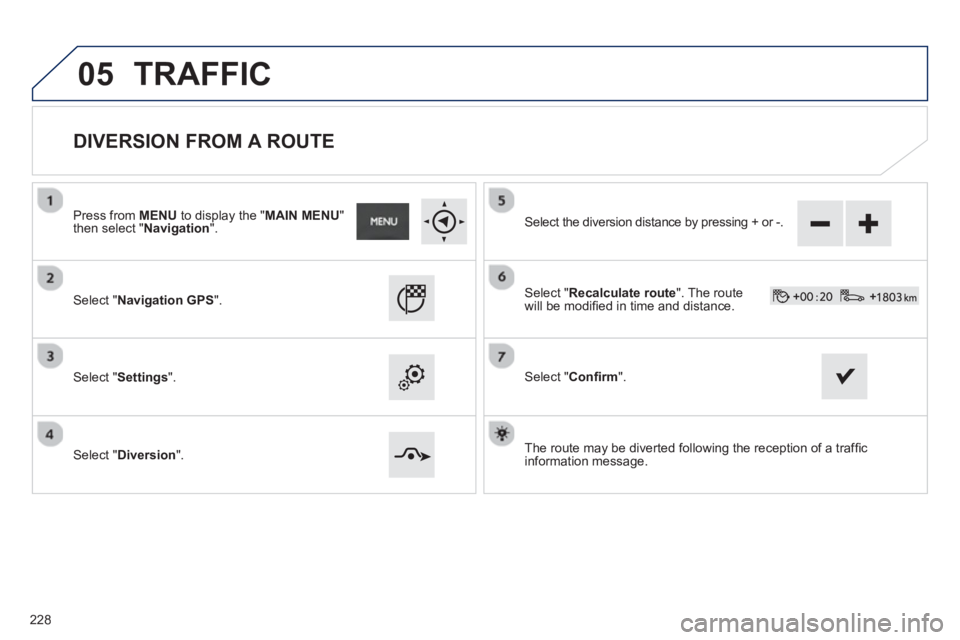
DIVERSION FROM A ROUTE
Press from MENU
to display the " MAIN MENU
"
then select " Navigation".
Select "Navigation GPS
".
Select "Settings".
Select "Diversion".
Select the diversion distance by pressing + or -.
Select " Recalculate route". The route
will be modifi ed in time and distance.
Select " Confi rm".
The route ma
y be diverted following the reception of a traffi c
information message.
TRAFFIC
228
Page 231 of 324
05
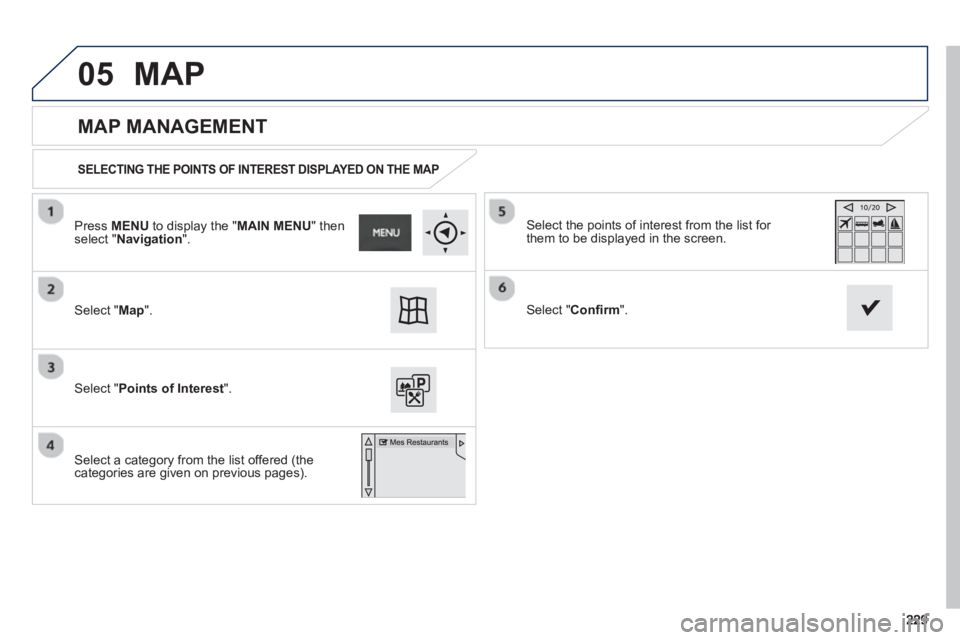
MAP MANAGEMENT
SELECTING THE POINTS OF INTEREST DISPLAYED ON THE MAP
Select "Map".
Select "Points of Interest".
Select the points of interest from the list for
them to be displayed in the screen.
Select a category from the list offered (thecategories are given on previous pages).
Select " Confi rm". Pr
ess MENUto display the " MAIN MENU
" then select " Navigation".
MAP
Page 232 of 324
05
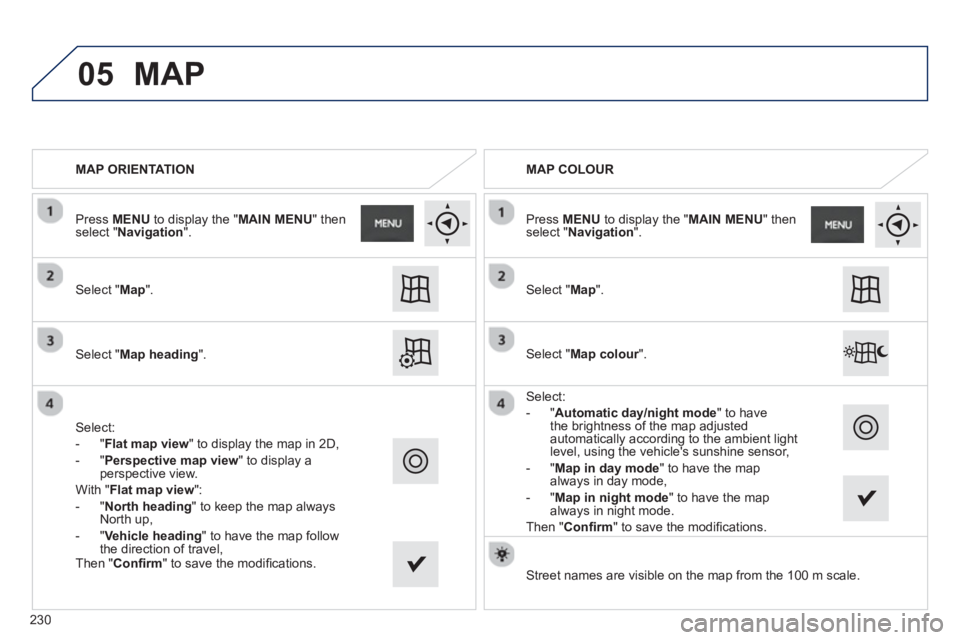
MAP ORIENTATION
Select " Map
".
Select " Map heading
".
Select:
-
"Flat map view" to display the map in 2D,
-
" Perspective map view" to display a perspective view.
With " Flat ma
p view
":
- " North headin
g
" to keep the map always
North up,
-"
Vehicle heading " to have the map follow
the direction of travel,
Street names are visible on the map from the 100 m scale.
MAP COLOUR
Select "Map colour". r
Select:
- "Automatic da
y/night mode
" to have
the brightness of the map adjusted
automatically according to the ambient lightlevel, using the vehicle's sunshine sensor,
-
"Map in day mode " to have the map
always in day mode,
- "
Map in night mode" to have the map
always in night mode.
Th
en " Confi rm" to save the modifi cations. Pr
ess MENU to display the "MAIN MENU" thenselect "Navigation
".
Select "Map
".
Pr
ess MENUto display the " MAIN MENU
" then select " Navigation".
MAP
Then "Confi rm
" to save the modifi cations.
2
30
Page 233 of 324
05
231
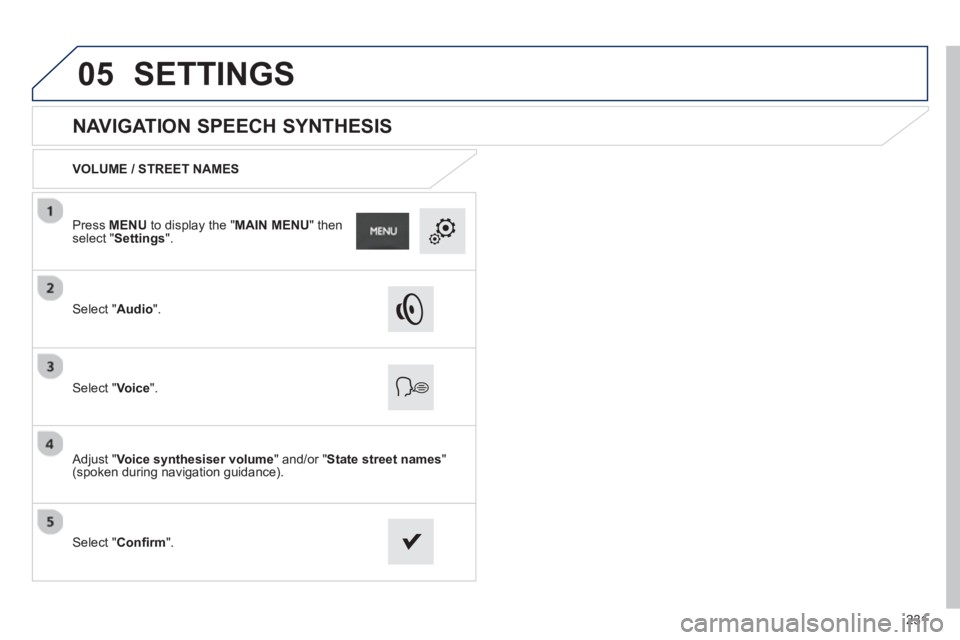
NAVIGATION SPEECH SYNTHESIS
VOLUME / STREET NAMES
Select " Audio".
Select " Voice".
Adjust " Voice synthesiser volume
" and/or " State street names"(spoken during navigation guidance).
Select " Confi rm
". Pr
ess MENU to display the "MAIN MENU" thenselect "Settings".
SETTINGS
Page 249 of 324
247
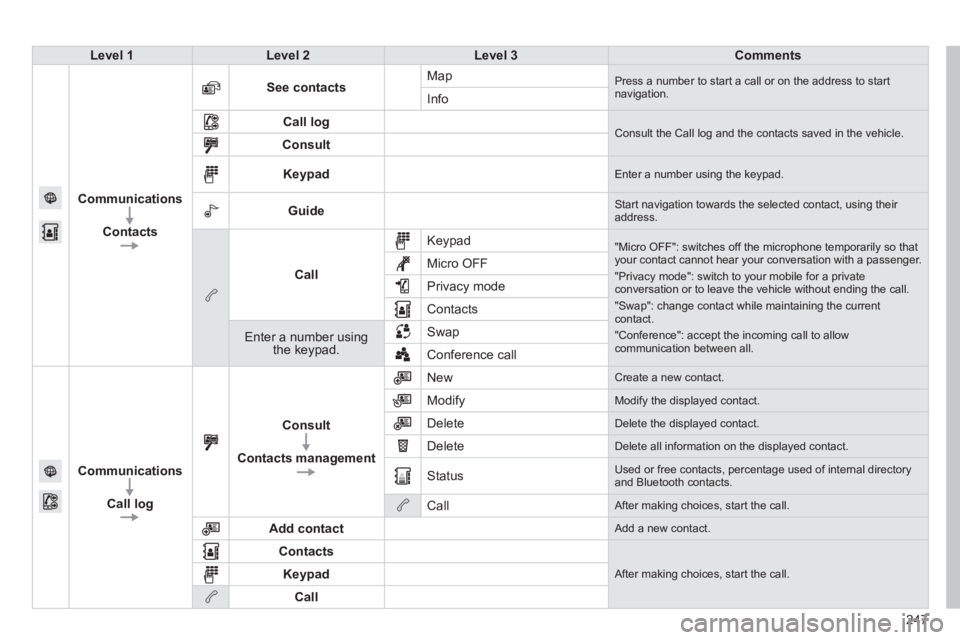
Level 1Level 2Level 3Comments
Communications
Contacts
See contactsMap Press a number to start a call or on the address to startnavigation.Info
Call log Consult the Call log and the contacts saved in the vehicle. Consult
Keypad Enter a number using the keypad.
Guide Start navigation towards the selected contact, using their address.
Call
Keypad
"Micro OFF": switches off the microphone temporarily so thatyour contact cannot hear your conversation with a passenger.
"Privacy mode": switch to your mobile for a privateconversation or to leave the vehicle without ending the call.
"Swap": change contact while maintaining the currentcontact.
"Conference": accept the incoming call to allow communication between all.
Micro OFF
Privac
y mode
Contacts
Enter a number using the keypad.SwapConference call
Communications
Call lo
g
Consult
Contacts management
New Create a new contact.
Modify
Modify the displayed contact.
Delete
Delete the displayed contact.
Delete
Delete all information on the displayed contact.
Status
Used or free contacts, percentage used of internal directory and Bluetooth contacts.
Call
After making choices, start the call.
Add contact
Add a new contact.
Contacts
After making choices, start the call. Keypad
Call
Page 264 of 324
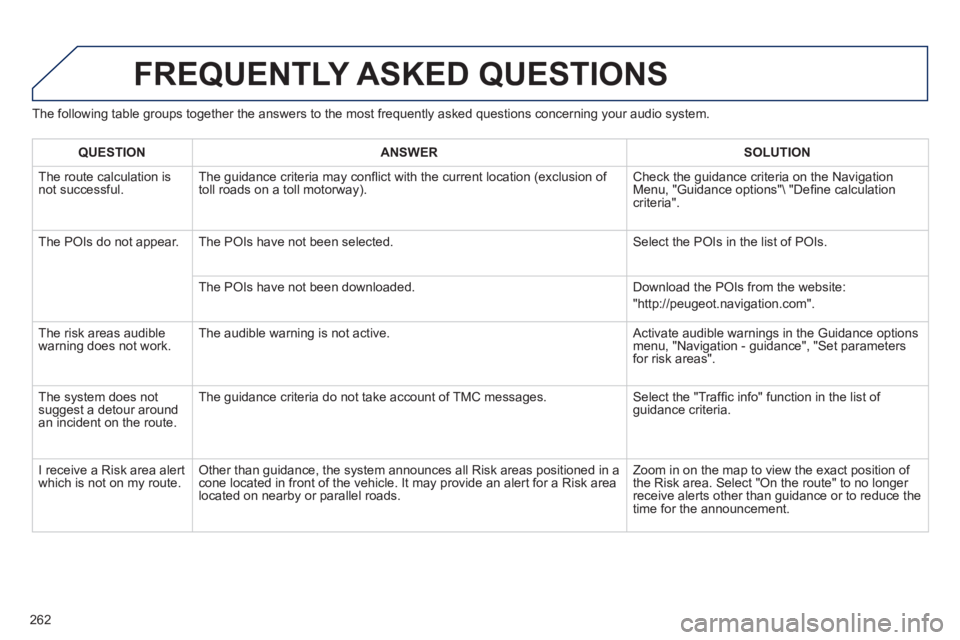
The following table groups together the answers to the most frequently asked questions concerning your audio system.
FREQUENTLY ASKED QUESTIONS
262
QUESTIONANSWER SOLUTION
The route calculation is not successful. The guidance criteria may confl ict with the current location (exclusion of
toll roads on a toll motorway). Check the guidance criteria on the Navigation Menu, "Guidance options"\ "Defi ne calculation criteria".
The P
OIs do not appear. The POIs have not been selected. Select the POIs in the list of POIs.
Th
e POIs have not been downloaded. Download the POIs from the website:
"http://peugeot.navigation.com".
The risk areas audiblewarning does not work. The audible warning is not active. Activate audible warnings in the Guidance options menu, "Navigation - guidance", "Set parameters for risk areas".
The s
ystem does notsuggest a detour around an incident on the route. The
guidance criteria do not take account of TMC messages. Select the "Traffi c info" function in the list of guidance criteria.
I receive a Risk area alert
which is not on my route. Other than guidance, the system announces all Risk areas positioned in a cone located in front of the vehicle. It may provide an alert for a Risk area located on nearby or parallel roads. Zoom in on the map to view the exact position o
f
the Risk area. Select "On the route" to no longer receive alerts other than guidance or to reduce the
time for the announcement.
Page 272 of 324
01
270
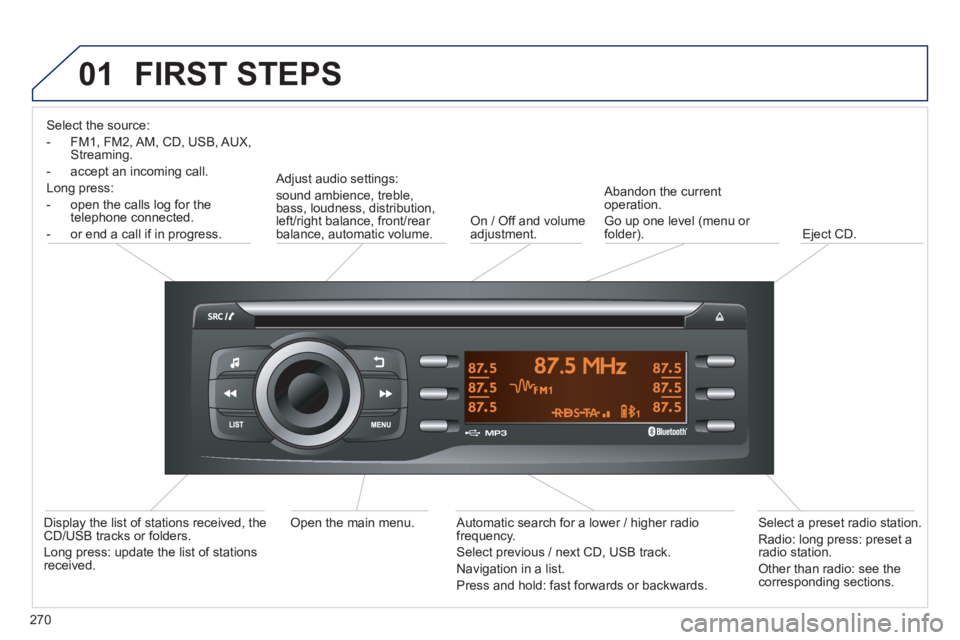
FIRST STEPS
Select the source:
- FM1, FM2, AM, CD, USB, AUX,
Streaming.
- accept an
incoming call.
Long press:
- open the calls lo
g for the
telephone connected.
- or end a call i
f in progress.
Adjust audio settings:
sound ambience, treble,
bass, loudness, distribution,
left/right balance, front/rear balance, automatic volume. On / Off and volume
adjustment.
A
bandon the current
operation.
Go up one level (menu or folder).
Eject CD.
Select a
preset radio station.
Radio: long press: preset a
radio station.
Other than radio: see the corresponding sections.
Automatic search for a lower / higher radio
frequency.
Select previous / next CD, USB track.
Navigation in a list.
Pr
ess and hold: fast forwards or backwards.
Open the main menu.
Display the list of stations received, theCD/USB tracks or folders.
Lon
g press: update the list of stationsreceived.
Page 286 of 324
05
284
USING THE TELEPHONE
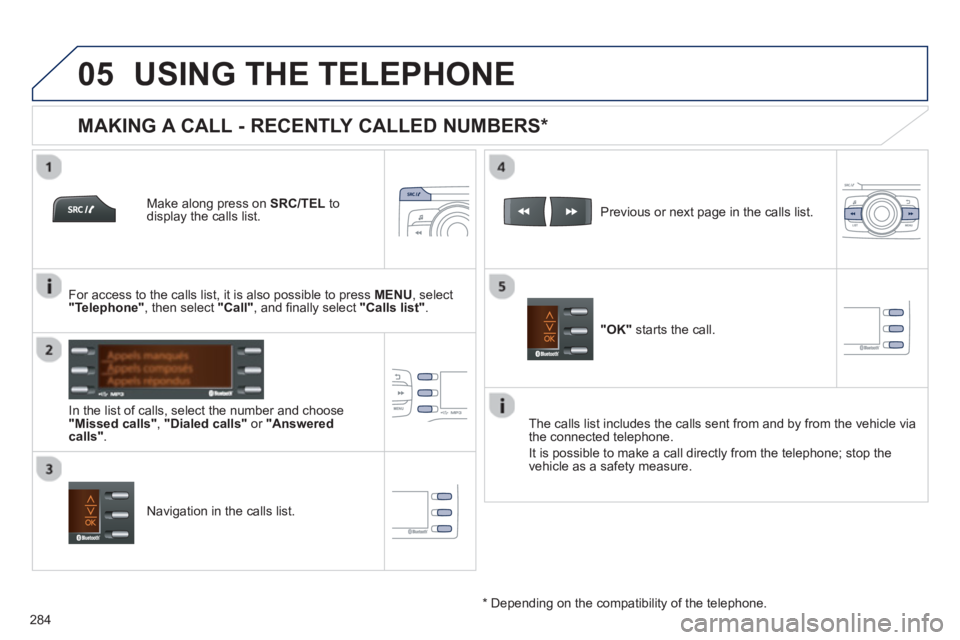
Make along press on SRC/TEL
to display the calls list.
In the list o
f calls, select the number and choose "Missed calls","Dialed calls"or "Answered calls".
Previous or next page in the calls list.
"OK"
starts the call.
MAKING A CALL - RECENTLY CALLED NUMBERS *
Navigation in the calls list. The calls list includes the calls sent from and b
y from the vehicle via
the connected telephone.
It is possible to make a call directl
y from the telephone; stop the
vehicle as a safety measure.
*
Depending on the compatibility of the telephone.
For access to the calls list, it is also
possible to press MENU, select "Telephone"
, then select "Call"
, and fi nally select "Calls list".