navigation PEUGEOT 2008 2013 User Guide
[x] Cancel search | Manufacturer: PEUGEOT, Model Year: 2013, Model line: 2008, Model: PEUGEOT 2008 2013Pages: 324, PDF Size: 8.39 MB
Page 219 of 324
217217
Level 1Level 2Level 3Comments
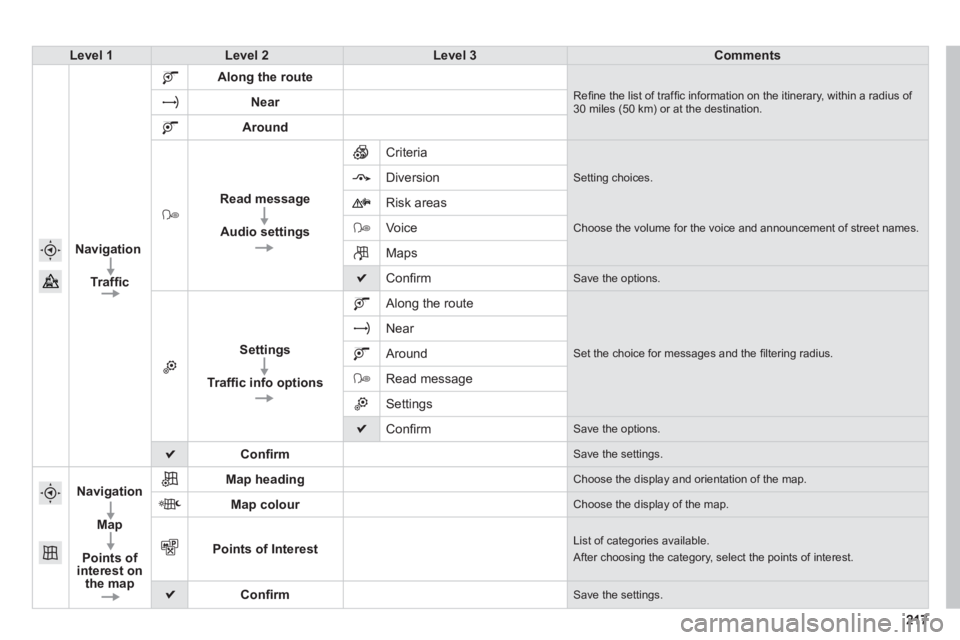
Navi
gation
Traffi c
Along the route
Refi ne the list of traffi c information on the itinerary, within a radius of 30 miles (50 km) or at the destination. Near
Around
Read message
Audio settings
Criteria
Setting choices.
Diversion
Ri
sk areas
V
oice Choose the volume for the voice and announcement of street names.
Maps
Confi rm Save the options.
Settings
Traffi c info options
Along the route
Set the choice for messages and the fi ltering radius.
Near
Around
Read message
Settings
Confi rm Save the options.
Confi rmSave the settings.
Navigation
Map
Points of interest on
the map
Map headingChoose the display and orientation of the map.
Map colourChoose the display of the map.
Points of InterestList of categories available.
After choosing the category, select the points of interest.
Confi rmSave the settings.
Page 220 of 324
05
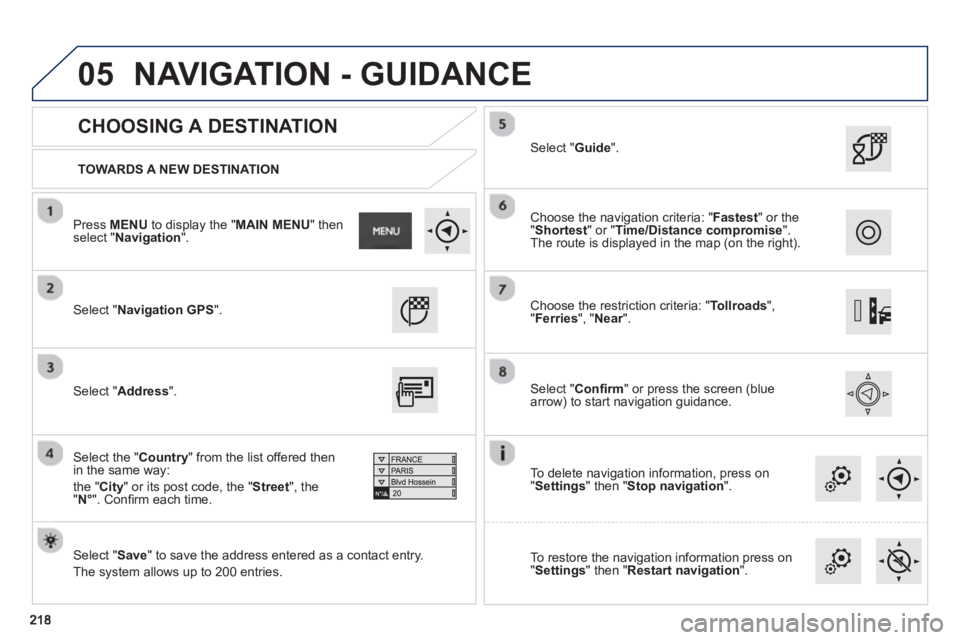
TOWARDS A NEW DESTINATION
CHOOSING A DESTINATION
Select "Navigation GPS
".
Select "Save
" to save the address entered as a contact entry.
The s
ystem allows up to 200 entries.
Select "Confi rm" or press the screen (blue
arrow) to start navigation guidance.
Select "Address
".
Select the " Country
" from the list offered then in the same way:
th
e " City" or its post code, the "Street", the
" N°
". Confi rm each time.
Select "Guide ".
Choose the restriction criteria: "Tollroads",
" Ferries", " Near".
r
Choose the navigation criteria: " Fastest
" or the
"Shortest
" or " Time/Distance compromise".The route is displayed in the map (on the right).
To delete navi
gation information, press on
" Settings
" then " Stop navigation
".
To restore the navi
gation information press on
"Settings
" then " Restart navigation".
Press MENUto display the " MAIN MENU " then select " Navigation".
NAVIGATION - GUIDANCE
Page 221 of 324
05
219
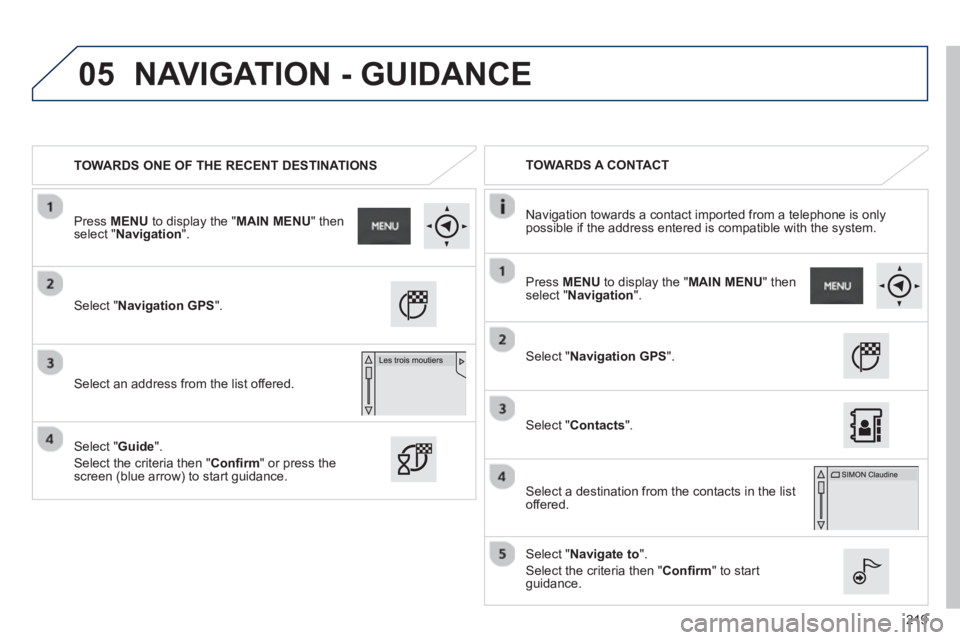
TOWARDS ONE OF THE RECENT DESTINATIONS
TOWARDS A CONTACT
Navi
gation towards a contact imported from a telephone is only
possible if the address entered is compatible with the system.
Select " Navigation GPS".
Select an address from the list offered.
Select "Navigation GPS ".
Select "Contacts".
Select a destination from the contacts in the listoffered.
Select "Navigate to".
Select the criteria then "Confi rm " to start guidance.
Select " Guide".
Select the criteria then "Confi rm " or press thescreen (blue arrow) to start guidance.
Pr
ess MENUto display the "MAIN MENU" thenselect "Navigation
".
Press MENUto display the "MAIN MENU " thenselect " Navigation".
NAVIGATION - GUIDANCE
Page 222 of 324
05
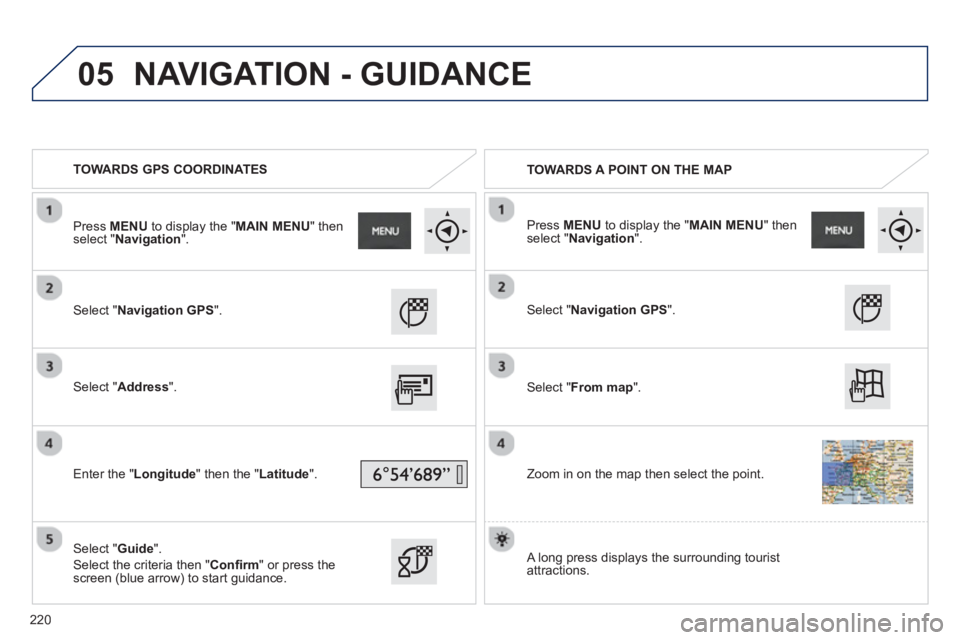
TOWARDS GPS COORDINATES
TOWARDS A POINT ON THE MAP
Select "Navigation GPS".
Select "Address
".
Enter the "Longitude " then the "
Latitude ".
Select "Guide
".
Select the criteria then "Confi rm
" or press thescreen (blue arrow) to start guidance.
Select "Navigation GPS
".
Select "From map
".
Zoom in on the map then select the point.
Pr
ess MENUto display the " MAIN MENU
" then select " Navigation".
Press MENUto display the "MAIN MENU " thenselect " Navigation".
A lon
g press displays the surrounding touristattractions.
NAVIGATION - GUIDANCE
220
Page 223 of 324
05
221
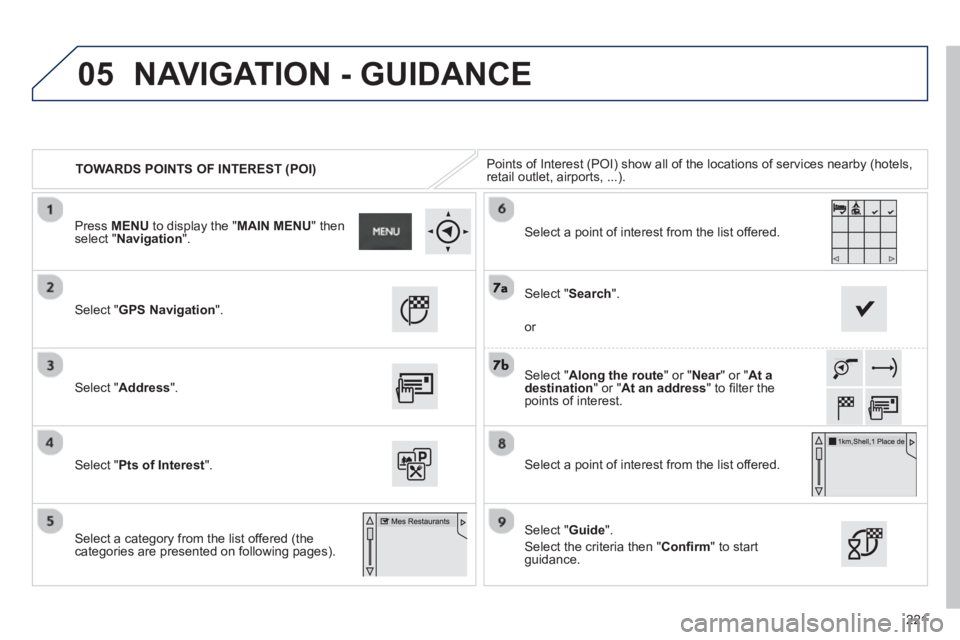
TOWARDS POINTS OF INTEREST (POI)Points of Interest (POI) show all of the locations of services nearby (hotels, retail outlet, airports, ...).
Select " GPS Navigation".
Select " Address".
Select " Pts of Interest".
Select a cate
gory from the list offered (the categories are presented on following pages).
Select "Along the route
" or " Near" or " rAt adestination
" or "At an address
" to fi lter the points of interest.
Select a point of interest from the list offered.
Select "Guide".
Select the criteria then " Confi rm
" to start guidance.
Select "Search".
or
Select a point of interest from the list offered.
Press MENU
to display the "MAIN MENU" thenselect "Navigation ".
NAVIGATION - GUIDANCE
Page 224 of 324
05
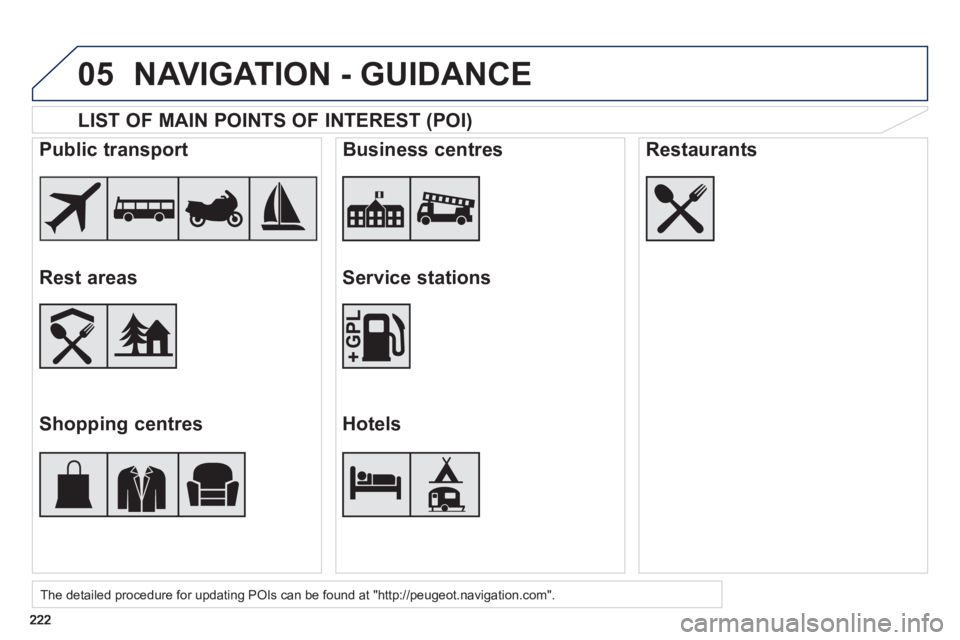
LIST OF MAIN POINTS OF INTEREST (POI)
The detailed procedure for updating POIs can be found at "http://peugeot.navigation.com".
Public transport
Rest areas
Shopping centres
Business centres
Service stations
Hotels
Restaurants
NAVIGATION - GUIDANCE
Page 225 of 324
05
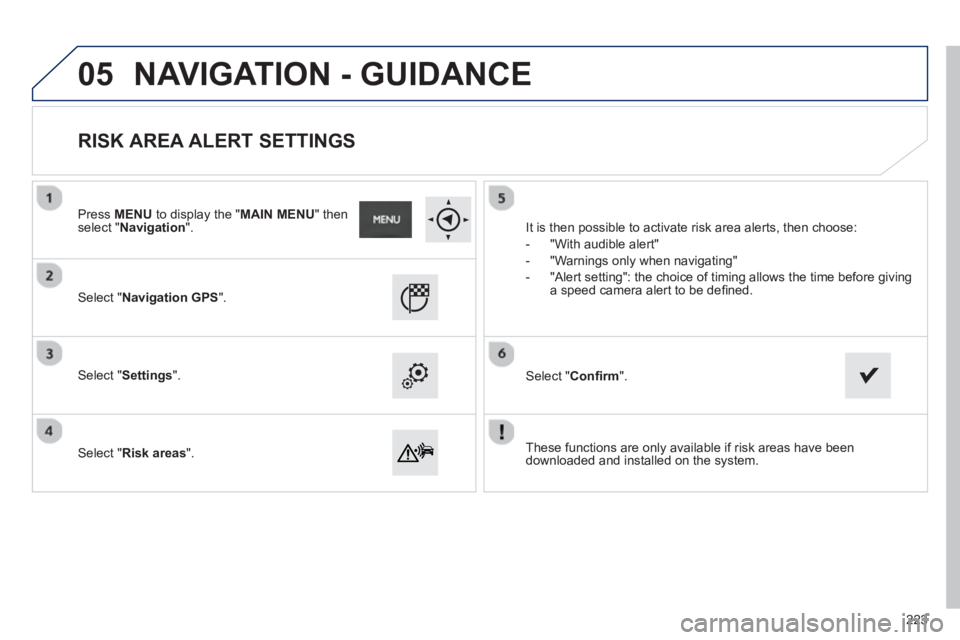
These functions are only available if risk areas have been
downloaded and installed on the system.
Select "Navigation GPS".
Select "Settings".
Select "Risk areas".
RISK AREA ALERT SETTINGS
It is then possible to activate risk area alerts, then choose:
-
"With audible alert"
- "Warnin
gs only when navigating"
- "Alert settin
g": the choice of timing allows the time before giving
a speed camera alert to be defi ned.
Select "Confi rm".
Press MENUto display the " MAIN MENU
" then select " Navigation".
NAVIGATION - GUIDANCE
223
Page 226 of 324
05
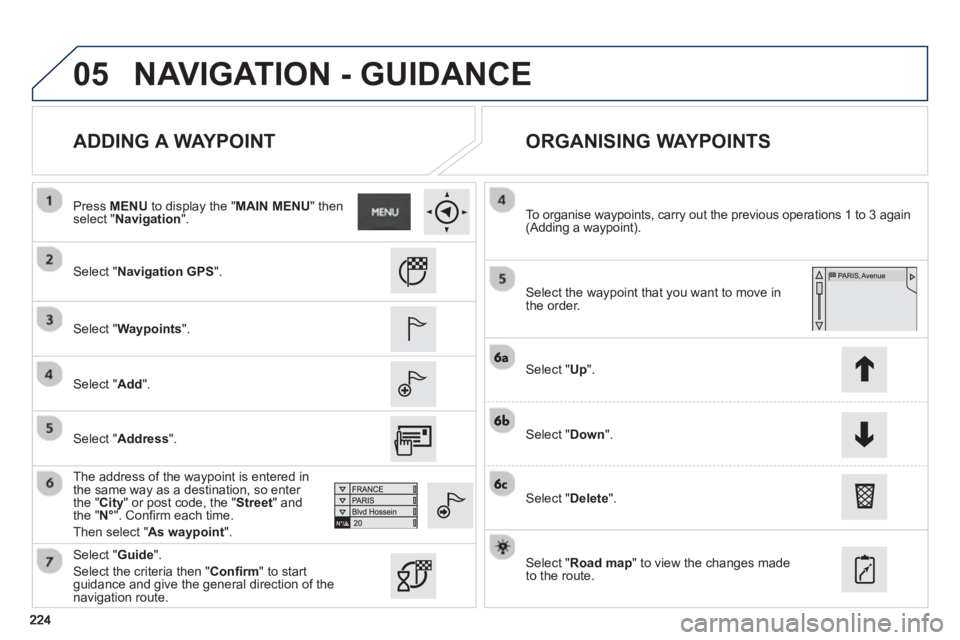
ADDING A WAYPOINT
ORGANISING WAYPOINTS
Select "Navigation GPS ".
Select "Waypoints
".
Select "Add
".
The address of the wa
ypoint is entered in
the same way as a destination, so enter
the " City" or post code, the "Street" andthe " N°". Confi rm each time.
Th
en select " As waypoint
".
Select the wa
ypoint that you want to move in
the order.
To or
ganise waypoints, carry out the previous operations 1 to 3 again(Adding a waypoint).
Select "Up
".
Select "Down".
Select "Delete
".
Select "Road map
" to view the changes made
to the route.
Select "Guide
".
Select the criteria then "Confi rm
" to start guidance and give the general direction of the navigation route.
Pr
ess MENUto display the " MAIN MENU
" then select " Navigation".
NAVIGATION - GUIDANCE
Select "Address
".
Page 227 of 324
05
225
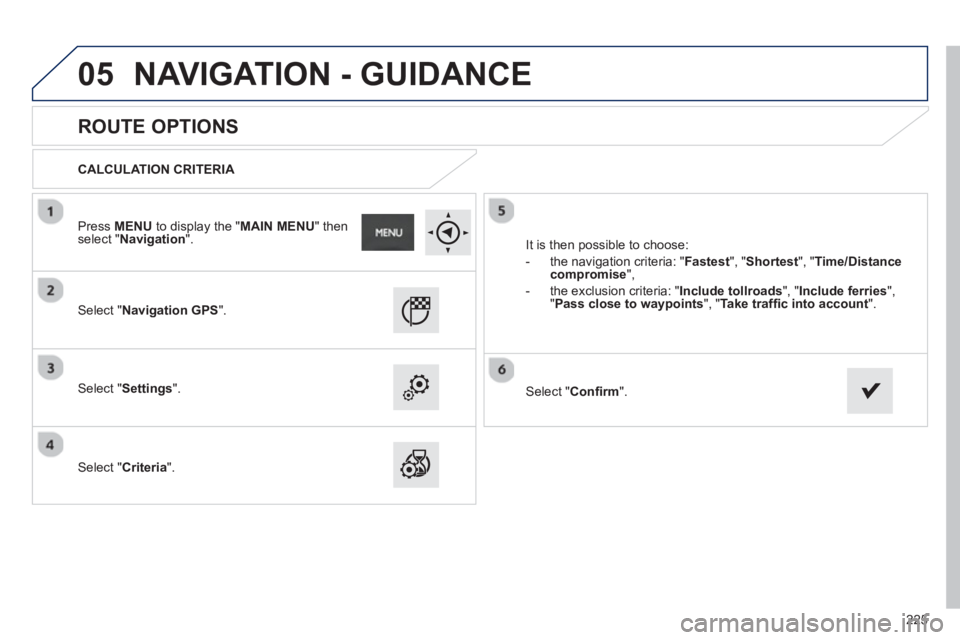
ROUTE OPTIONS
CALCULATION CRITERIA
Select "Navigation GPS".
Select "Settings".
Select "Criteria". It is then
possible to choose:
- the navi
gation criteria: " Fastest
", "Shortest", " Time/Distance
compromise",
- t
he exclusion criteria: "Include tollroads ", "Include ferries ", "Pass close to waypoints", " Take traffi c into account".
Select "Confi rm".
Press MENUto display the " MAIN MENU
" then select " Navigation".
NAVIGATION - GUIDANCE
Page 228 of 324
05
226
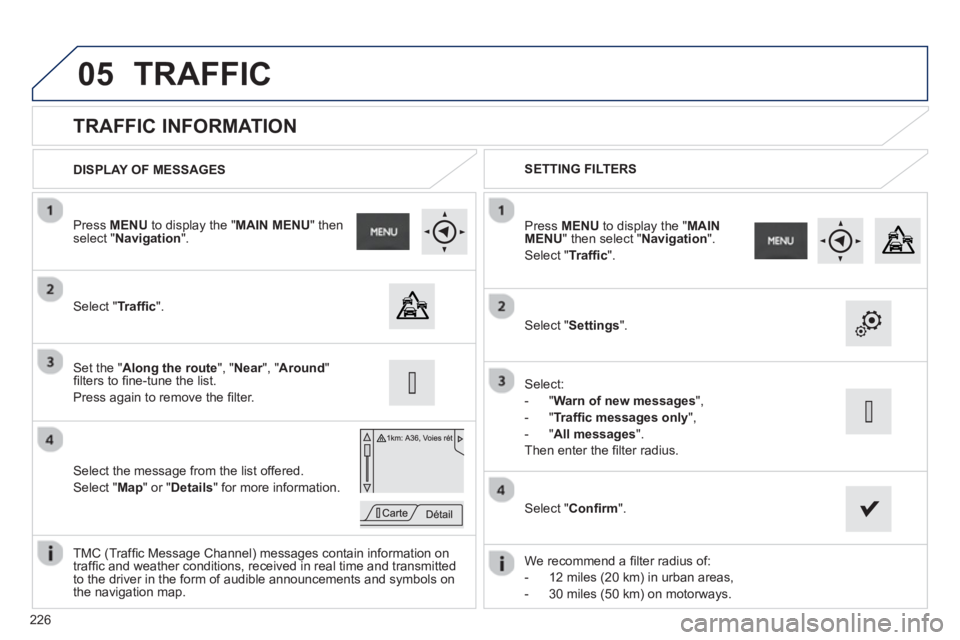
TRAFFIC INFORMATION
Select "Traffi c".
Press MENUto display the " MAIN MENU " then select " Navigation".
Select the message from the list offered.
Select "Map
" or "Details
" for more information.
Set the " Along the route
", " Near", " rAround"
fi lters to fi ne-tune the list.
Press a
gain to remove the fi lter.
Select " Settings".
Select:
- "
Warn of new messages
",
-"
Traffi c messages only
",
-"
All messages".
Then enter the fi lter radius.
Press MENU
to display the "MAINMENU" then select " Navigation".
Select " Traffi c
".
DISPLAY OF MESSAGES SETTING FILTERS
W
e recommend a fi lter radius of:
- 12 miles
(20 km) in urban areas,
- 30 miles
(50 km) on motorways.
TM
C (Traffi c Message Channel) messages contain information on
traffi c and weather conditions, received in real time and transmitted
to the driver in the form of audible announcements and symbols on
the navigation map.
Select " Confi rm".
TRAFFIC