ignition PEUGEOT 2008 2013 Workshop Manual
[x] Cancel search | Manufacturer: PEUGEOT, Model Year: 2013, Model line: 2008, Model: PEUGEOT 2008 2013Pages: 324, PDF Size: 8.39 MB
Page 195 of 324
193
8
Checks
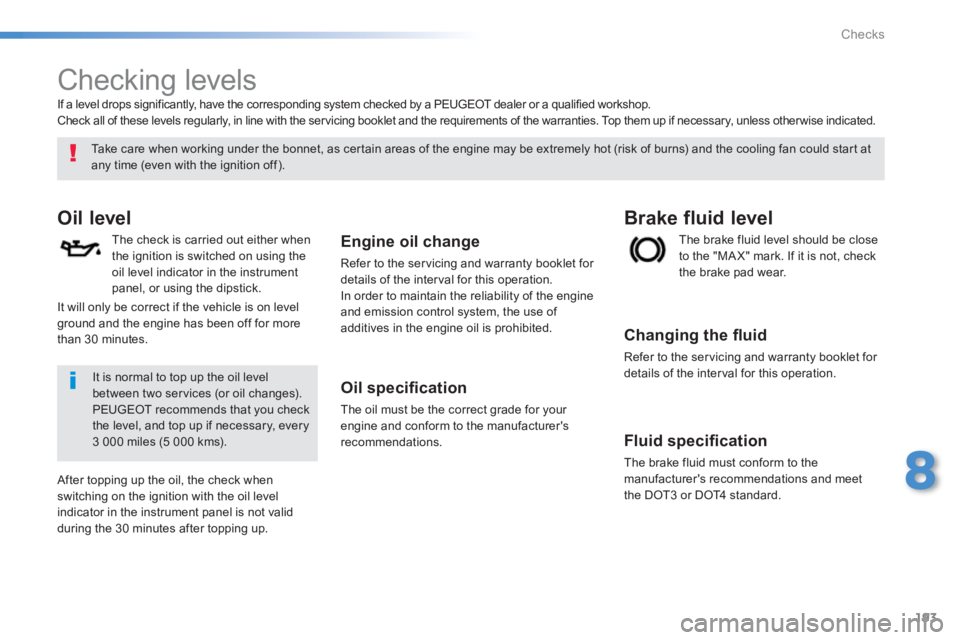
Checking levels
Oil level
The check is carried out either when
the ignition is switched on using theoil level indicator in the instrumentpanel, or using the dipstick.
Engine oil change
Refer to the servicing and warranty booklet for
details of the inter val for this operation.
In order to maintain the reliabilit
y of the engine and emission control system, the use of additives in the engine oil is prohibited.
Oil specifi cation
The oil must be the correct grade for your
engine and conform to the manufacturer'srecommendations.
Th
e brake fluid level should be close
to the "MA X" mark. If it is not, check
the brake pad wear.
Brake fluid level
Changing the fl uid
Refer to the ser vicing and warranty booklet for
details of the interval for this operation.
Fluid specifi cation
The brake fluid must conform to themanufacturer's recommendations and meet
the DOT3 or DOT4 standard.
Take care when working under the bonnet, as certain areas of the engine may be extremely hot (risk of burns) and the cooling fan could star t at
any time (even with the ignition off).
If a level drops si
gnificantly, have the corresponding system checked by a PEUGEOT dealer or a qualified workshop.
Check all of these levels regularly, in line with the ser vicing booklet and the requirements of the warranties. Top them up if necessary, unless other wise indicated.
It is normal to top up the oil levelbetween two ser vices (or oil changes).PEUGEOT recommends that you check the level, and top up if necessary, every
3 000 miles (5 000 kms).
After topping up the oil, the check when switching on the ignition with the oil level
indicator in the instrument panel is not valid
durin
g the 30 minutes after topping up. It will onl
y be correct if the vehicle is on level ground and the engine has been off for more
than 30 minutes.
Page 210 of 324
208
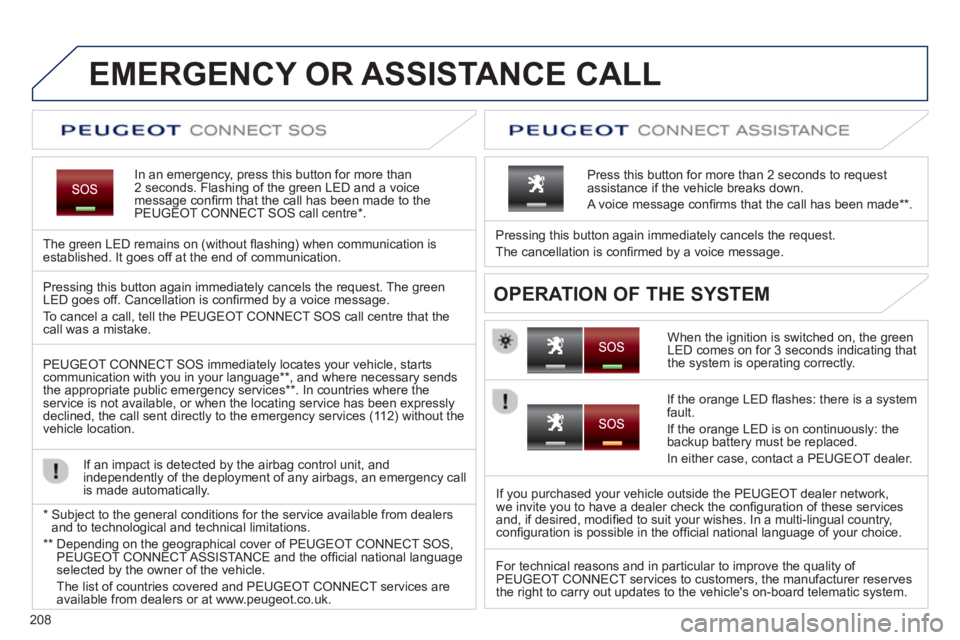
EMERGENCY OR ASSISTANCE CALL
In an emergency, press this button for more than2 seconds. Flashing of the green LED and a voice
message confi rm that the call has been made to the
PEUGEOT CONNECT SOS call centre * .
The
green LED remains on (without fl ashing) when communication is established. It goes off at the end of communication.
When the ignition is switched on, the green
LED comes on for 3 seconds indicating that
the system is operating correctly. Pressin
g this button again immediately cancels the request.
The cancellation is confi rmed b
y a voice message.
Press this button for more than 2 seconds to request
assistance if the vehicle breaks down.
A voice message confi rms that the call has been made **
.
OPERATION OF THE SYSTEM Pressing this button again immediately cancels the request. The green LED goes off. Cancellation is confi rmed by a voice message .
To cancel a call, tell the PEUGE
OT CONNECT SOS call centre that thecall was a mistake.
PEUGE
OT CONNECT SOS immediately locates your vehicle, starts communication with you in your language ** , and where necessary sends
the appropriate public emergency services ** . In countries where theservice is not available, or when the locating service has been expresslydeclined, the call sent directly to the emergency services (11 2) without the
vehicle location.
If an impact is detected b
y the airbag control unit, and
independently of the deployment of any airbags, an emergency call
is made automatically.
*
Sub
ject to the general conditions for the service available from dealersand to technological and technical limitations.
**
Depending on the geographical cover of PEUGEOT CONNECT SOS,
PEUGEOT CONNECT ASSISTA NCE and the offi cial national languageselected by the owner of the vehicle.
Th
e list of countries covered and PEUGEOT CONNECT services are available from dealers or at www.peugeot.co.uk.
If the oran
ge LED fl ashes: there is a system
fault.
If the oran
ge LED is on continuously: the backup battery must be replaced.
In either case, contact a PEU
GEOT dealer.
I
f you purchased your vehicle outside the PEUGEOT dealer network,
we invite you to have a dealer check the confi guration of these services
and, if desired, modifi ed to suit your wishes. In a multi-lingual country,confi guration is possible in the offi cial national language of your choice.
For technical reasons and in particular to improve the qualit
y of PEUGEOT CONNECT services to customers, the manufacturer reserves
the right to carry out updates to the vehicle's on-board telematic system.
Page 242 of 324
06
240
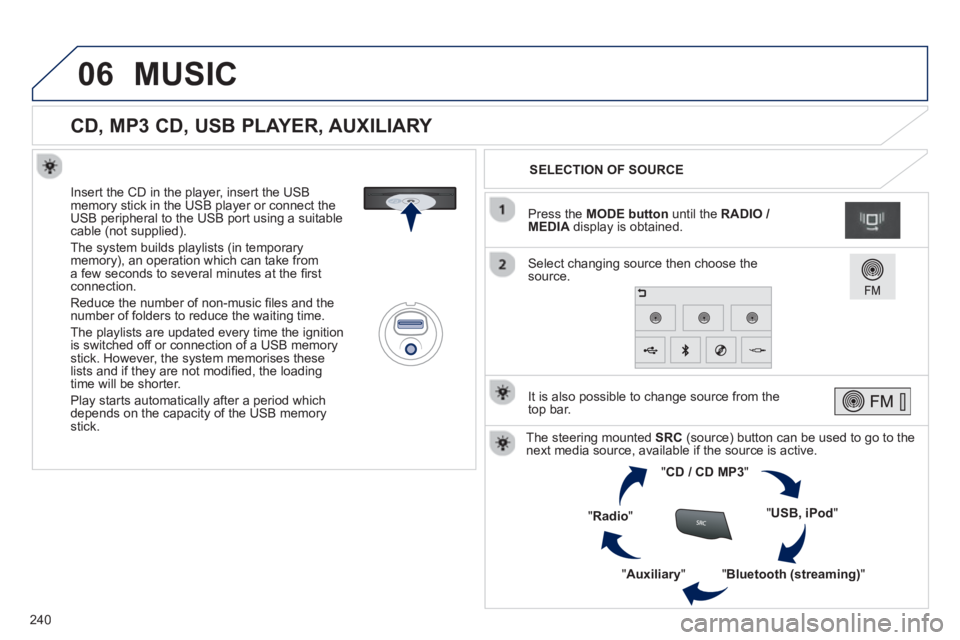
CD, MP3 CD, USB PLAYER, AUXILIARY
Insert the CD in the player, insert the USBmemory stick in the USB player or connect theUSB peripheral to the USB port using a suitablecable (not supplied).
The s
ystem builds playlists (in temporarymemory), an operation which can take froma few seconds to several minutes at the fi rstconnection.
R
educe the number of non-music fi les and the number of folders to reduce the waiting time.
The pla
ylists are updated every time the ignition
is switched off or connection of a USB memory stick. However, the system memorises these
lists and if they are not modifi ed, the loadingtime will be shorter.
Pla
y starts automatically after a period which
depends on the capacity of the USB memory stick.SELECTION OF SOURCE
The steering mounted SRC(source) button can be used to go to thenext media source, available if the source is active.
"CD / CD MP
3"
"
USB, iPod
"
"
Bluetooth (streaming)
"
"Auxiliary
"
"Radio"
Select changing source then choose thesource. Pr
ess the MODE button
until the RADIO / MEDIA
display is obtained.
It is also possible to chan
ge source from the
top bar.
MUSIC
Page 253 of 324
07
251
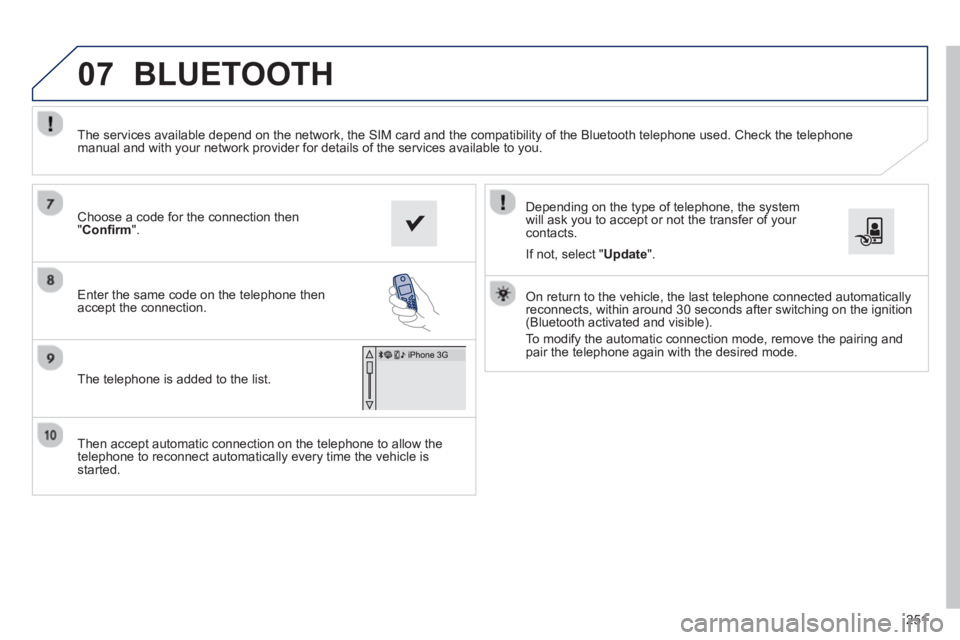
Then accept automatic connection on the telephone to allow the
telephone to reconnect automatically every time the vehicle is started.
Dependin
g on the type of telephone, the system
will ask you to accept or not the transfer of your contacts.
The services available depend on the network, the
SIM card and the compatibility of the Bluetooth telephone used. Check the telephone
manual and with your network provider for details of the services available to you.
On return to the vehicle, the last telephone connected automaticallyreconnects, within around 30 seconds after switching on the ignition (Bluetooth activated and visible).
To modif
y the automatic connection mode, remove the pairing and
pair the telephone again with the desired mode.
Choose a code for the connection then
"Confi rm".
Enter the same code on the telephone then
accept the connection.
The telephone is added to the list.
BLUETOOTH
If not, select " Update".
Page 279 of 324
04
277
CD, USB
AUDIO
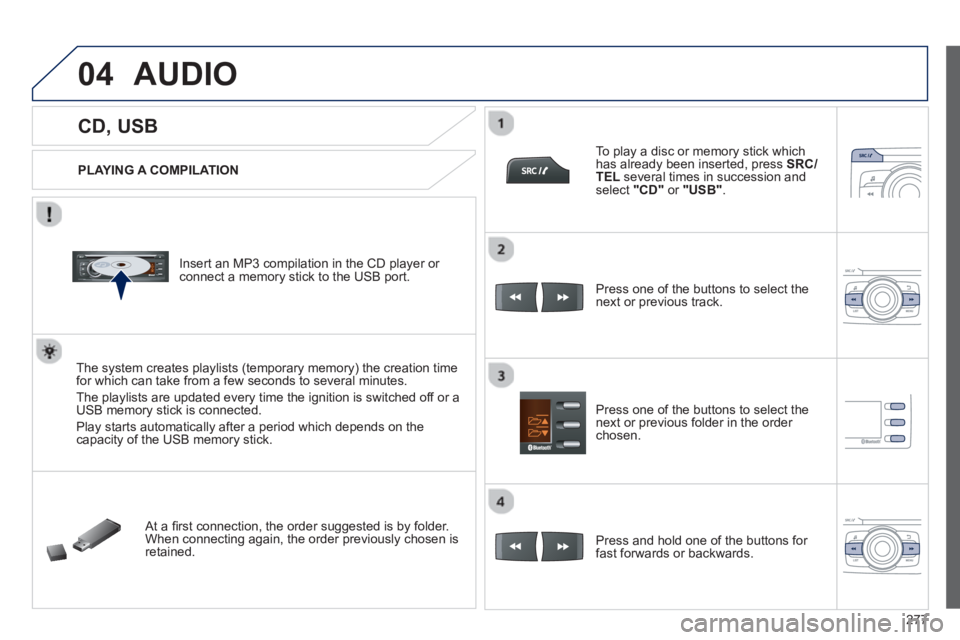
PLAYING A COMPILATION
Insert an MP3 compilation in the CD pla
yer or connect a memory stick to the USB port.
The system creates playlists
(temporary memory) the creation timefor which can take from a few seconds to several minutes.
The pla
ylists are updated every time the ignition is switched off or aUSB memory stick is connected.
Pla
y starts automatically after a period which depends on the capacity of the USB memory stick.
At a fi rst connection, the order suggested is by folder.When connecting again, the order previously chosen is retained.
To pla
y a disc or memory stick whichhas already been inserted, press SRC/TELseveral times in succession and select" CD "or "
USB ".
Press one of the buttons to select the next or previous track.
Pr
ess one of the buttons to select the next or previous folder in the order chosen.
Pr
ess and hold one of the buttons for
fast forwards or backwards.
Page 283 of 324
05
281
USING THE TELEPHONE
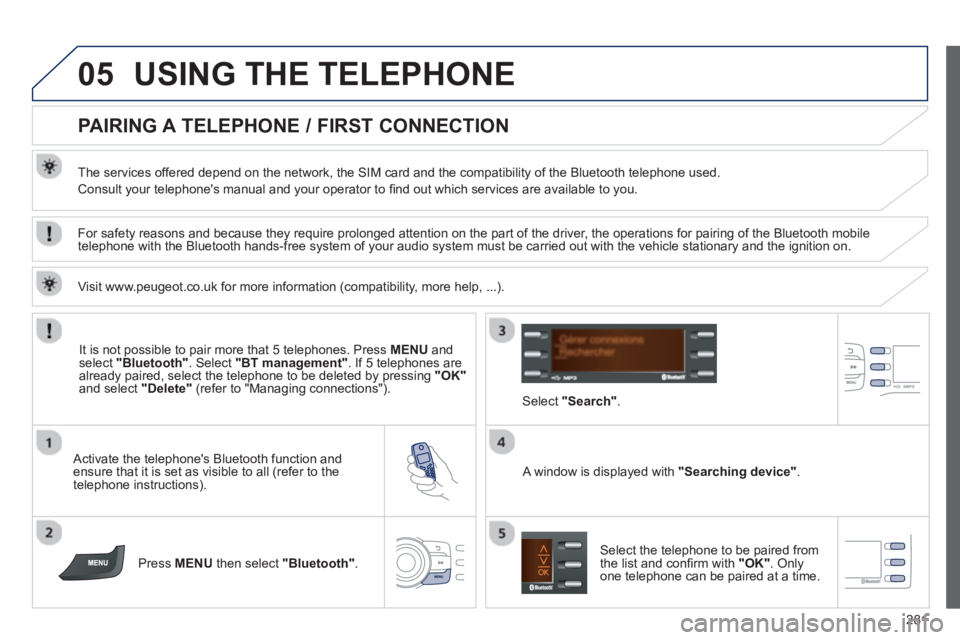
PAIRING A TELEPHONE / FIRST CONNECTION
The services offered depend on the network, the SIM card and the compatibility of the Bluetooth telephone used.
Consult your telephone's manual and your operator to fi nd out which services are available to you.
Activate the telephone's Bluetooth function andensure that it is set as visible to all (refer to the
telephone instructions).
Press MENU
then select "Bluetooth".
A window is displayed with"
Searching device ".
Select the telephone to be paired from
the list and confi rm with "OK". Onlyone telephone can be paired at a time.
Select"
Search ".
For safety reasons and because they require prolonged attention on the part of the driver, the operations for pairing of the Bluetooth mobile
telephone with the Bluetooth hands-free system of your audio system must be carried out with the vehicle stationary and the ignition on.
It is not possible to pair more that 5 telephones. Press MENUand select "Bluetooth"
. Select "BT management"
. If 5 telephones are
already paired, select the telephone to be deleted by pressing "OK"and select "Delete"
(refer to "Managing connections").
Visit www.peu
geot.co.uk for more information (compatibility, more help, ...).
Page 288 of 324
05
286
USING THE TELEPHONE
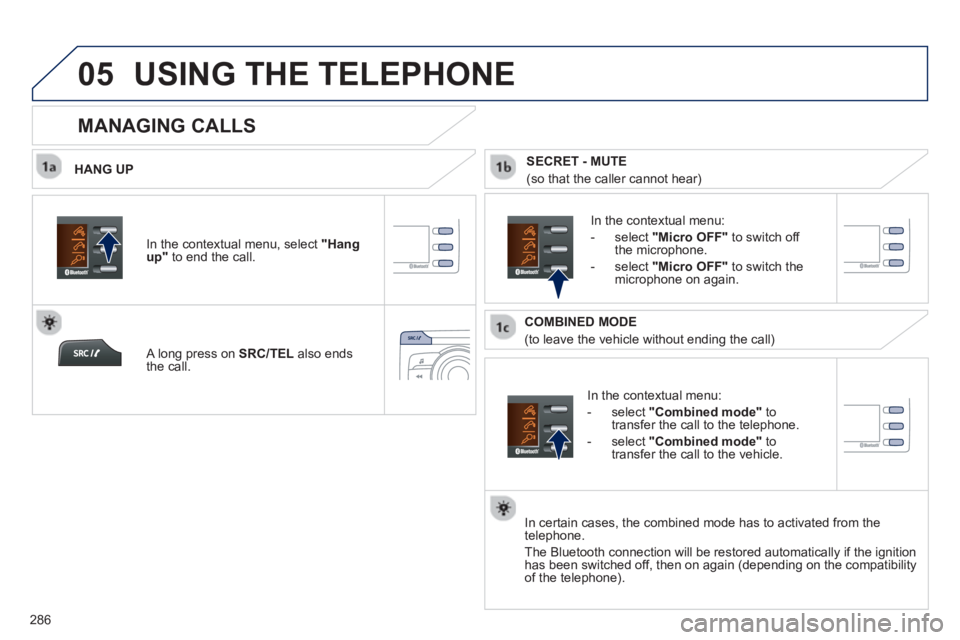
HANG UP
In the contextual menu:
-
select "Combined mode"to
transfer the call to the telephone.
-
select "Combined mode"to
transfer the call to the vehicle.
In the contextual menu:
-
select" Micro OFF " to switch off
the microphone.
-
select" Micro OFF " to switch the
microphone on again.
In certain cases, the combined mode has to activated
from the
telephone.
The Bluetooth connection will be restored automaticall
y if the ignition
has been switched off, then on again (depending on the compatibility
of the telephone).
MANAGING CALLS
A long press on SRC/TELalso ends
the call. In the contextual menu, select
"Hang up"
to end the call.
SECRET - MUTE
(so that the caller cannot hear)
COMBINED MODE
(to leave the vehicle without ending the call)
Page 320 of 324
318
Alphabetical index
Jack...............................................151, 152,244Jack cable.....................................................244JACK socket ............................................73,244
Keepin
g children safe ....................131, 13 6-144
Key............................................................44-50Key in ignition warning....................................78Key with remote control .............................47-50
Labels, identification.....................................206Lamps, warning and indicator...................r23-32
LED daytime running lamps...........111, 159,161Level, brake fluid...........................................193Levels and checks..................................185 -197Lighting, guide-me home .................47, 112,113Lighting, interior....................................r120, 121Lighting bulbs (replacement) .................159-165Lighting control stalk..............................107,112Lighting on reminder.....................................r110Loading....................................................19,181Load reduction mode....................................175
L
Emergency starting ....................................... 173Emergency warning lamps .....................77,122Energy economy mode.................................175Engine, Diesel ............... 187,191, 192, 200, 201Engine, petrol ................................186,191, 198Engine compartment.............................186, 187Engine compar tment fusebox....................... 171Engine oil level indicator.........................r37, 193Environment..................19,49, 64, 70, 174, 195Equipment settings .......................................260
Filling with fuel..............................188, 190, 191Fitting a wheel...............................................156Fitting roof bars ............................................. 181Fittings, boot ...................................................75Flashing indicators................112, 122, 160, 16 4Foglamp, rear................................r109,163, 165Foglamps, front .....................109, 115,159,162Frequency (radio)..................................237, 239Front seats ......................................................57Fuel..........................................................19, 191Fuel consumption............................................19Fuel filler flap.........................................188, 190Fuel gauge ..............................................15, 188Fuel tank................................................188, 190Fusebox, dashboard..................................... 168Fuses .............................................................166
Halogen headlamps......................................159Hands-free kit........................................250,281Hazard warning lamps ............................77, 122Head restraints, front......................................58Head restraints, rear.......................................r60Heated seats...................................................58Heating................................................14, 19, 65Height and reach adjustment,steering wheel..............................................60Hill start assist.................................................95
Identification plates.......................................206Ignition .............................................................78Indicators, direction..............................122,160Inflating accessories (using the kit)..............................................145Inflating tyres..................................................19Inputs for audio system.................................305Instrument panels ...........................................21Instrument panel screen.................................91
Gearbox, manual..............................80, 92,197Gear lever, automatic gearbox .......................88Gear lever, electronic gear control gearbox...................................................81,84Gear lever, manual gearbox...........................80Gear shift indicator..........................................91Glove box........................................................72Grip control ...................................................127Guidance .......................................................214Guide-me-home...............................47, 112,113
Interior fittings...........................................71,72Interior mood lighting....................................121ISOFIX child seats.................................141-143ISOFIX mountings.........................................141
H
I
F
J
K
Gearbox, automatic........................88,174,197Gearbox, electronicgear control.......................81, 84, 92,174,197
G