display PEUGEOT 2008 2013 Manual PDF
[x] Cancel search | Manufacturer: PEUGEOT, Model Year: 2013, Model line: 2008, Model: PEUGEOT 2008 2013Pages: 324, PDF Size: 8.39 MB
Page 249 of 324
247
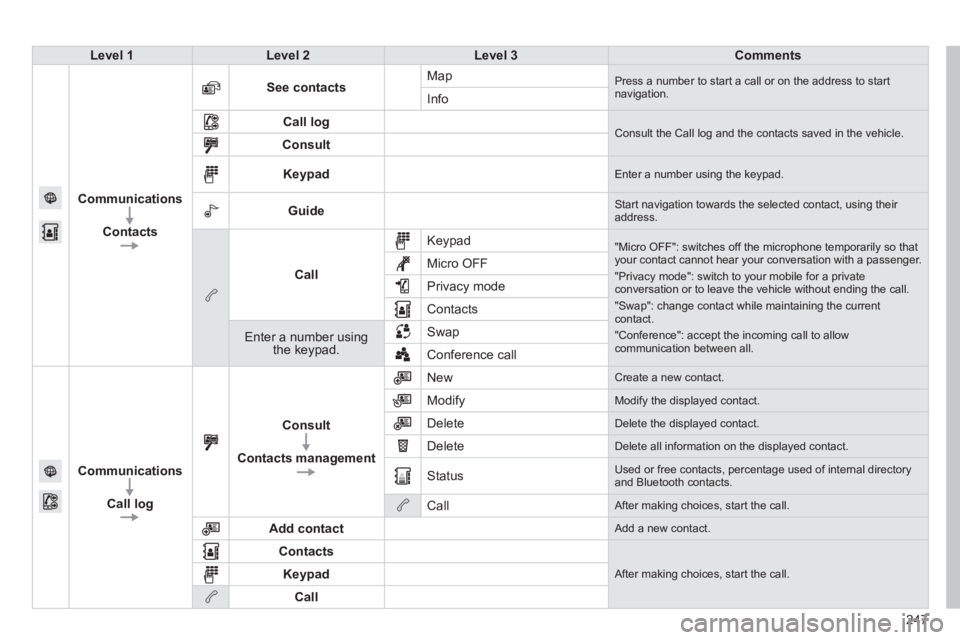
Level 1Level 2Level 3Comments
Communications
Contacts
See contactsMap Press a number to start a call or on the address to startnavigation.Info
Call log Consult the Call log and the contacts saved in the vehicle. Consult
Keypad Enter a number using the keypad.
Guide Start navigation towards the selected contact, using their address.
Call
Keypad
"Micro OFF": switches off the microphone temporarily so thatyour contact cannot hear your conversation with a passenger.
"Privacy mode": switch to your mobile for a privateconversation or to leave the vehicle without ending the call.
"Swap": change contact while maintaining the currentcontact.
"Conference": accept the incoming call to allow communication between all.
Micro OFF
Privac
y mode
Contacts
Enter a number using the keypad.SwapConference call
Communications
Call lo
g
Consult
Contacts management
New Create a new contact.
Modify
Modify the displayed contact.
Delete
Delete the displayed contact.
Delete
Delete all information on the displayed contact.
Status
Used or free contacts, percentage used of internal directory and Bluetooth contacts.
Call
After making choices, start the call.
Add contact
Add a new contact.
Contacts
After making choices, start the call. Keypad
Call
Page 252 of 324
07
250
The " Hands-free" profi le should be used in preference if "Streaming"
is not desired.
The abilit
y of the system to connect with only one profi le depends on
the telephone. The two profi les may both connect by default.
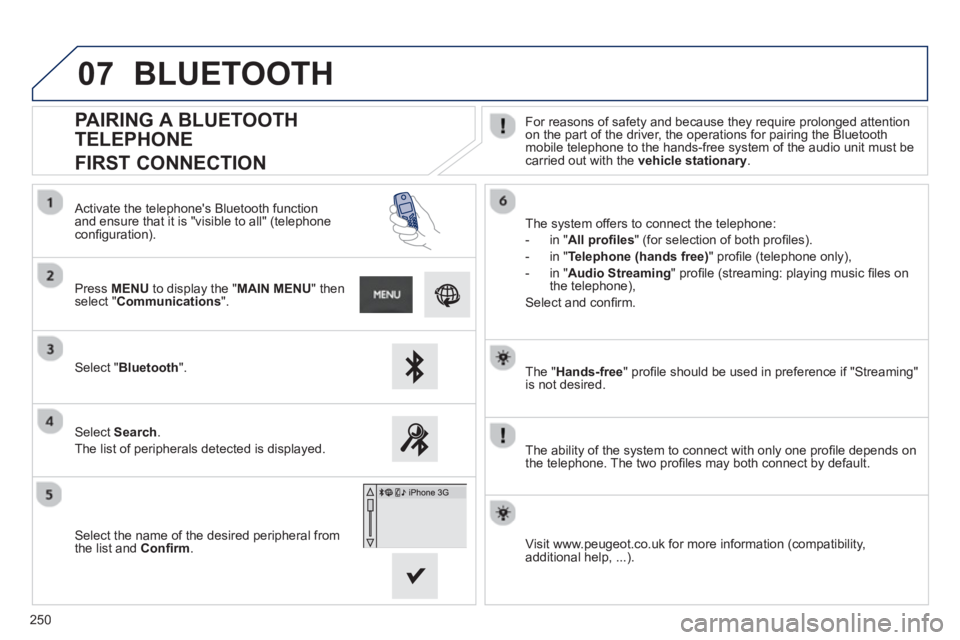
PAIRING A BLUETOOTH
TELEPHONE
FIRST CONNECTION
For reasons of safety and because they require prolonged attention on the part of the driver, the operations for pairing the Bluetooth
mobile telephone to the hands-free system of the audio unit must becarried out with the vehicle stationary
.
Select " Bluetooth".
Press MENU
to display the "MAIN MENU" thenselect "Communications".
Select Search.
The list of peripherals detected is displayed.
Activate the telephone's Bluetooth
function and ensure that it is "visible to all" (telephoneconfi guration).
The system offers to connect the telephone:
-
in"All profi les" (for selection of both profi les).
-
in "Telephone (hands free)" profi le (telephone only),
-
in "Audio Streaming
" profi le (streaming: playing music fi les on
the telephone),
Select and confi rm.
Select the name of the desired peripheral from
t
he list and Confi rm.
Visit www.peugeot.co.uk for more information (compatibility,
additional help, ...).
BLUETOOTH
Page 254 of 324
07
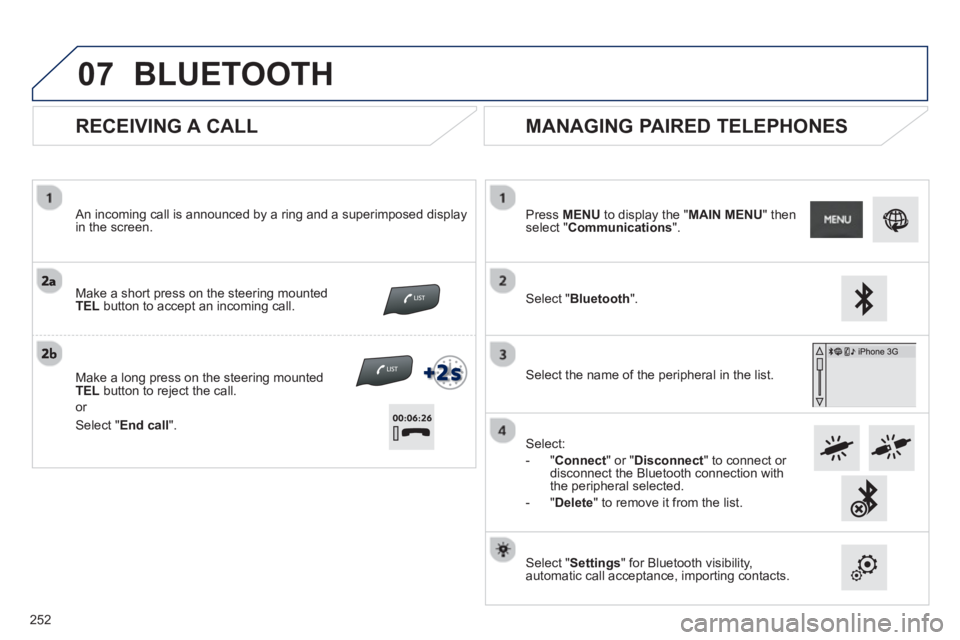
RECEIVING A CALL
An incoming call is announced by a ring and a superimposed displayin the screen.
Make a short press on the steering mounted
TELbutton to accept an incoming call.
Make a lon
g press on the steering mounted TELbutton to reject the call.
or
MANAGING PAIRED TELEPHONES
Press MENUto display the "MAIN MENU" thenselect "Communications".
Select " Bluetooth".
Select the name of the
peripheral in the list.
Select:
- "
Connect
" or " Disconnect
" to connect or disconnect the Bluetooth connection with
the peripheral selected.
- "
Delete" to remove it from the list.
Select " Settings
" for Bluetooth visibility,automatic call acceptance, importing contacts.
BLUETOOTH
Select " End call
".
2
52
Page 255 of 324
07
253
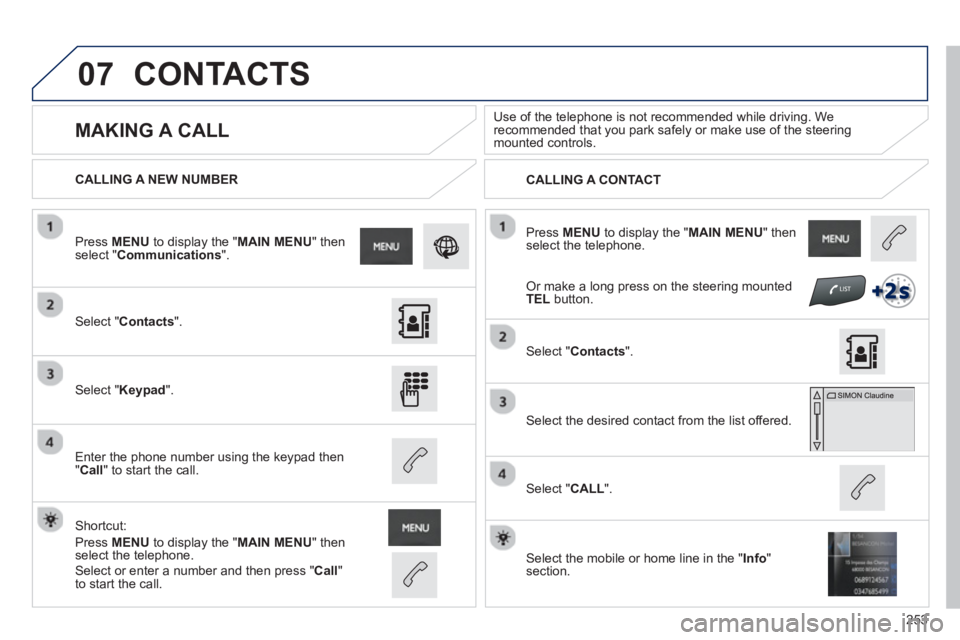
Press MENUto display the " MAIN MENU " then select the telephone.
CALLING A NEW NUMBER
CALLING A CONTACT
MAKING A CALL
Use of the telephone is not recommended while driving. Werecommended that you park safely or make use of the steering mounted controls.
Select "Contacts".
Press MENUto display the " MAIN MENU
" then select " Communications".
Select "Keypad ".
Enter the phone number using the keypad then"Call " to start the call.
Shortcut:
Press MENUto display the " MAIN MENU " then select the telephone.
Select "Contacts
".
Select the desired contact from the list offered.
Select the mobile or home line in the "Info " section.
Select "CALL
".
CONTACTS
Select or enter a number and then press "Call"
to start the call.
Or make a long press on the steering mountedTEL button.
Page 256 of 324
07
254
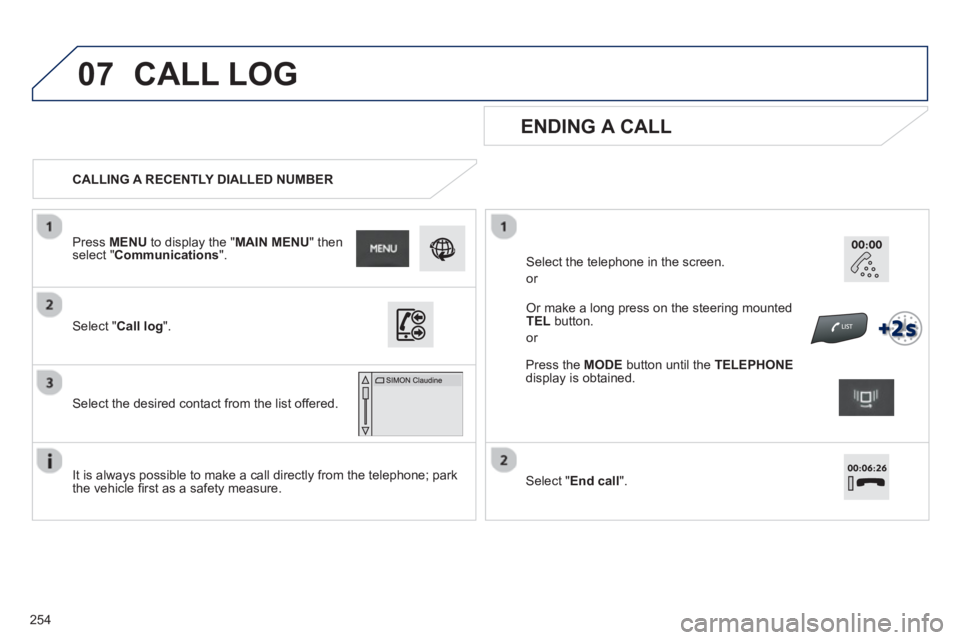
CALLING A RECENTLY DIALLED NUMBER
ENDING A CALL
It is always possible to make a call directly from the telephone; park
the vehicle fi rst as a safety measure.
Select "Call log".
Press MENU
to display the " MAIN MENU " then select " Communications
".
Select the desired contact from the list offered.
Or make a long press on the steering mounted TEL
button.
or
Select the telephone in the screen.
or
CALL LOG
Press the MODEbutton until the TELEPHONE
display is obtained.
Select "End call".
Page 257 of 324
07
255
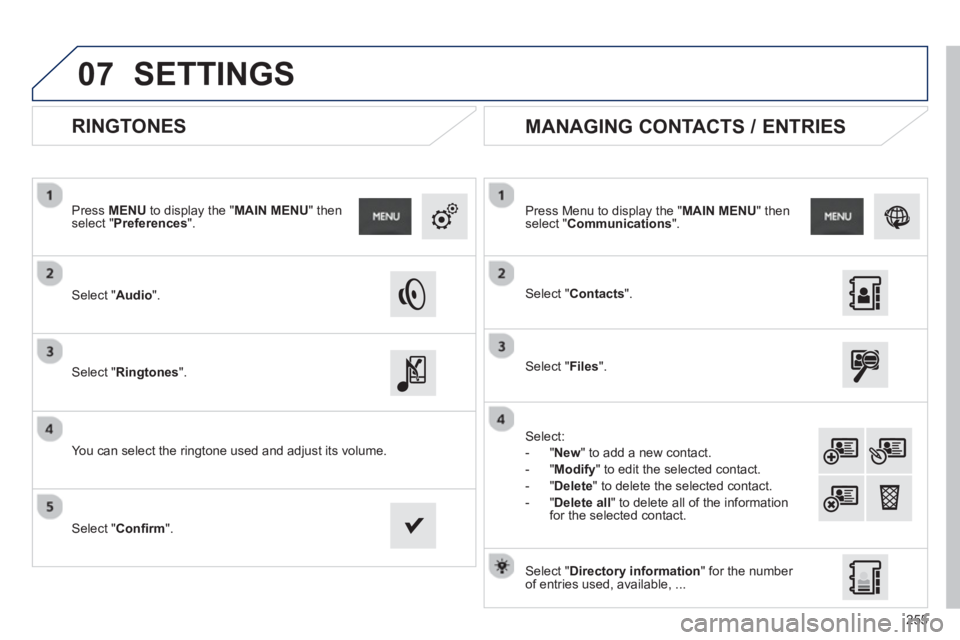
RINGTONES
Select "Audio".
Press MENU
to display the " MAIN MENU " then select " Preferences".
Select "Ringtones".
You can select the ringtone used and adjust its volume.
Select " Contacts".
Press Menu to display the " MAIN MENU
" then select " Communications
".
Select " Files".
Select:
-
"New" to add a new contact.
-
"Modify" to edit the selected contact.
- "
Delete
" to delete the selected contact.
- "
Delete all
" to delete all of the informationfor the selected contact.
Select "Confi rm
".
Select " Directory information
" for the number
of entries used, available, ...
MANAGING CONTACTS / ENTRIES
SETTINGS
Page 259 of 324
257
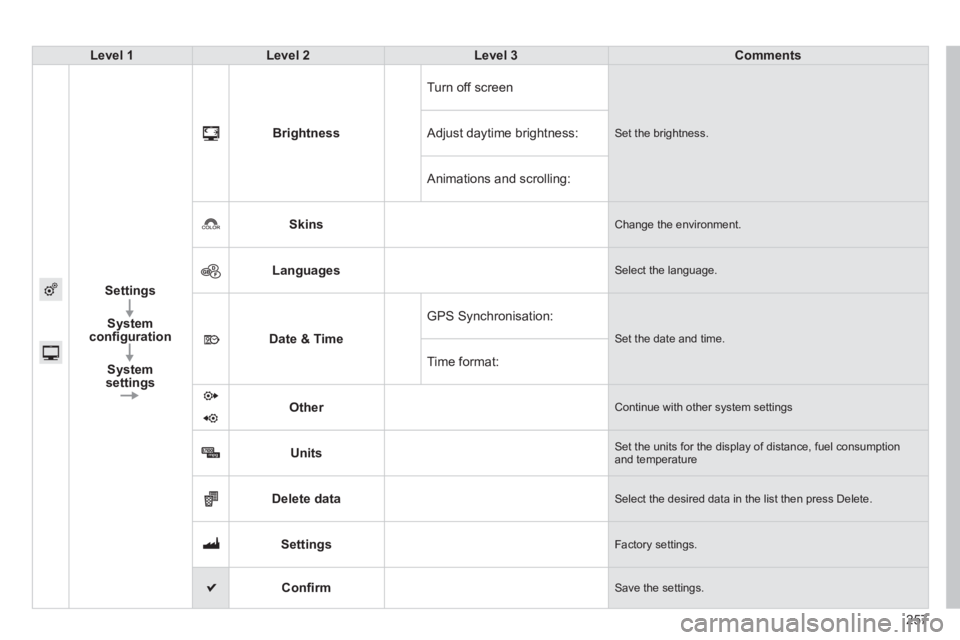
Level 1Level 2Level 3Comments
Settings
S
ystem confi guration
S
ystem
settingsBri
ghtnessT
urn off screen
Set the brightness. Adjust daytime brightness:
Animations and scrolling:
Skin
s Change the environment.
Languages Select the language.
Date & Time
GPS Synchronisation:
Set the date and time.
Time format:
Other
Continue with other system settings
Units Set the units for the display of distance, fuel consumptionand temperature
Delete data Select the desired data in the list then press Delete.
Settings Factory settings.
Confi rm
Save the settings.
Page 261 of 324
259
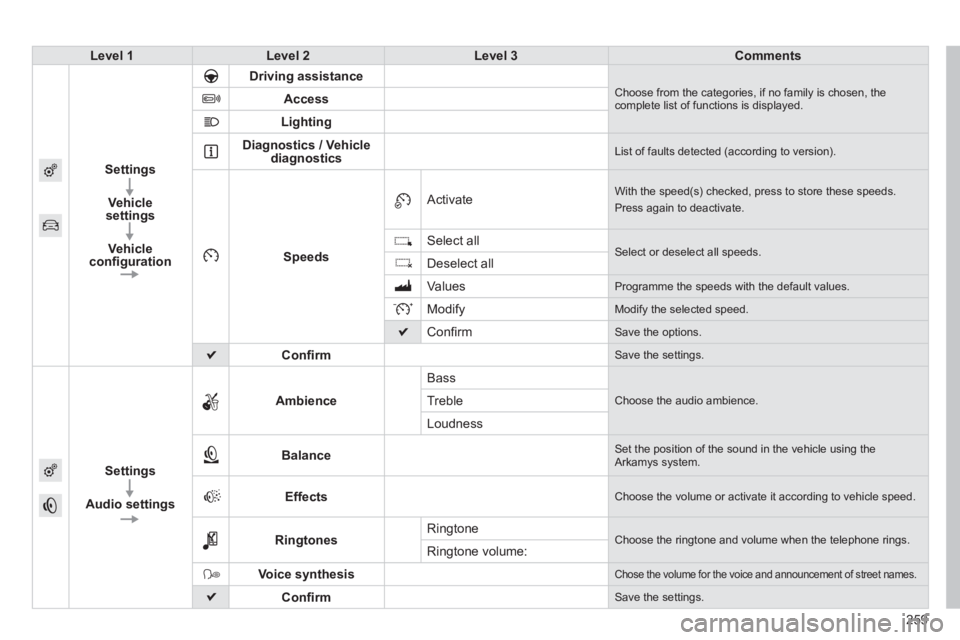
Level 1Level 2Level 3Comments
Settings
Vehicle
settin
gs
Vehicleconfi guration
Driving assistance Choose from the categories, if no family is chosen, thecomplete list of functions is displayed. Access
Lighting
Diagnostics / Vehicle
diagnostics List of faults detected (according to version).
Speeds
Activate With the speed(s) checked, press to store these speeds.
Press again to deactivate.
Select all
Select or deselect all speeds.Deselect all
V
alues Programme the speeds with the default values.
Modify
Modify the selected speed.
Confi rm
Save the options.
Confi rm
Save the settings.
Settings
Audio settin
gsAmbienc
e
Bass
Choose the audio ambience.Treble
Loudness
Balance Set the position of the sound in the vehicle using the Arkamys system.
Effects Choose the volume or activate it according to vehicle speed.
RingtonesRingtone Choose the ringtone and volume when the telephone rings. Ringtone volume:
Voice synthesis Chose the volume for the voice and announcement of street names.
Confi rm Save the settings.
Page 262 of 324
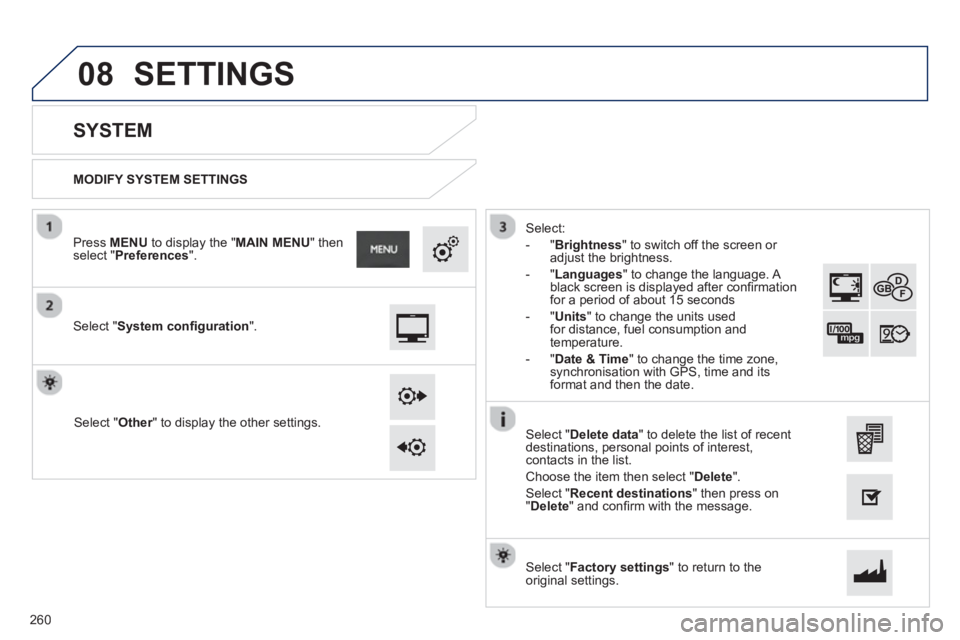
08
MODIFY SYSTEM SETTINGS
SYSTEM
Select "System confi guration".
Press MENUto display the " MAIN MENU
" then select " Preferences".
Select " Other" to display the other settings.r
Select:
- "
Brightness
" to switch off the screen or
adjust the brightness.
- "
Languages
" to change the language. A
black screen is displayed after confi rmation
for a period of about 15 seconds
-
"Units" to change the units used for distance, fuel consumption andtemperature.
- "
Date & Time" to change the time zone,synchronisation with GPS, time and its
format and then the date.
Select "Factory settings " to return to theoriginal settings.
Select "Delete data
" to delete the list of recent
destinations, personal points of interest,contacts in the list.
Choose the item then select " Delete".
Select "Recent destinations" then press on"Delete
" and confi rm with the message.
SETTINGS
260
Page 263 of 324
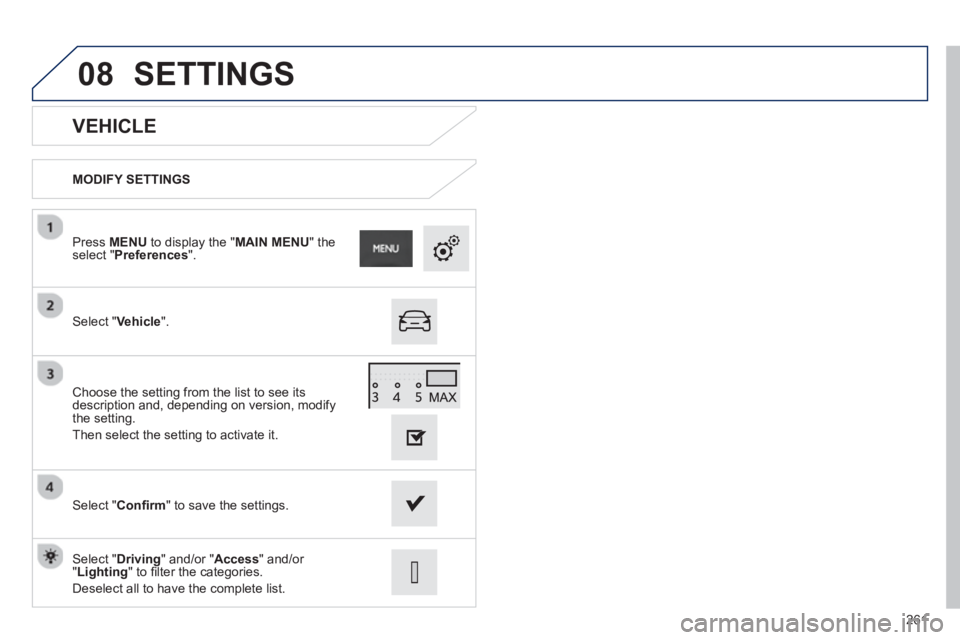
08
261
VEHICLE
MODIFY SETTINGS
Select " Vehicle
".
Press MENUto display the "MAIN MENU" the select "Preferences ".
Select " Confi rm" to save the settings. Choose the settin
g from the list to see its
description and, depending on version, modify
the setting.
Then select the setting to activate it.
Select " Driving" and/or "Access" and/or "Lighting" to fi lter the categories.
Deselect all to have the com
plete list.
SETTINGS