radio PEUGEOT 2008 2014 Owner's Manual
[x] Cancel search | Manufacturer: PEUGEOT, Model Year: 2014, Model line: 2008, Model: PEUGEOT 2008 2014Pages: 336, PDF Size: 9.35 MB
Page 280 of 336
01
278
FIRST STEPS
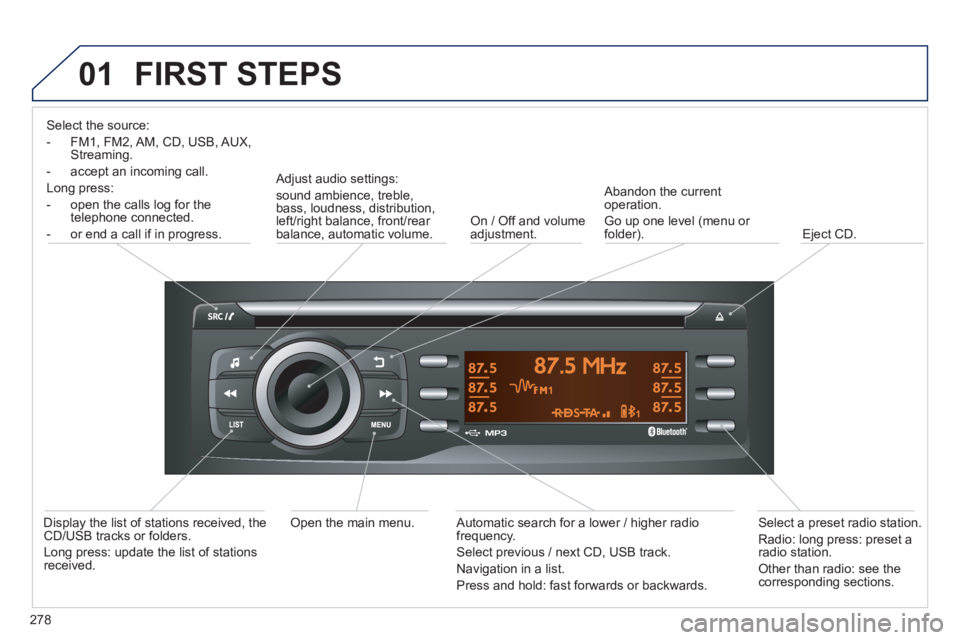
Select the source:
- FM1, FM2, AM, CD, USB, AUX, Streaming.
- accept an incoming call.
Long press:
- open the calls log for the telephone connected.
- or end a call if in progress.
Adjust audio settings:
sound ambience, treble, bass, loudness, distribution, left/right balance, front/rear balance, automatic volume. On / Off and volume adjustment.
Abandon the current operation.
Go up one level (menu or folder). Eject CD.
Select a preset radio station.
Radio: long press: preset a radio station.
Other than radio: see the corresponding sections.
Automatic search for a lower / higher radio frequency.
Select previous / next CD, USB track.
Navigation in a list.
Press and hold: fast forwards or backwards.
Open the main menu. Display the list of stations received, the CD/USB tracks or folders.
Long press: update the list of stations received.
Page 281 of 336
02 STEERING MOUNTED CONTROLS
279
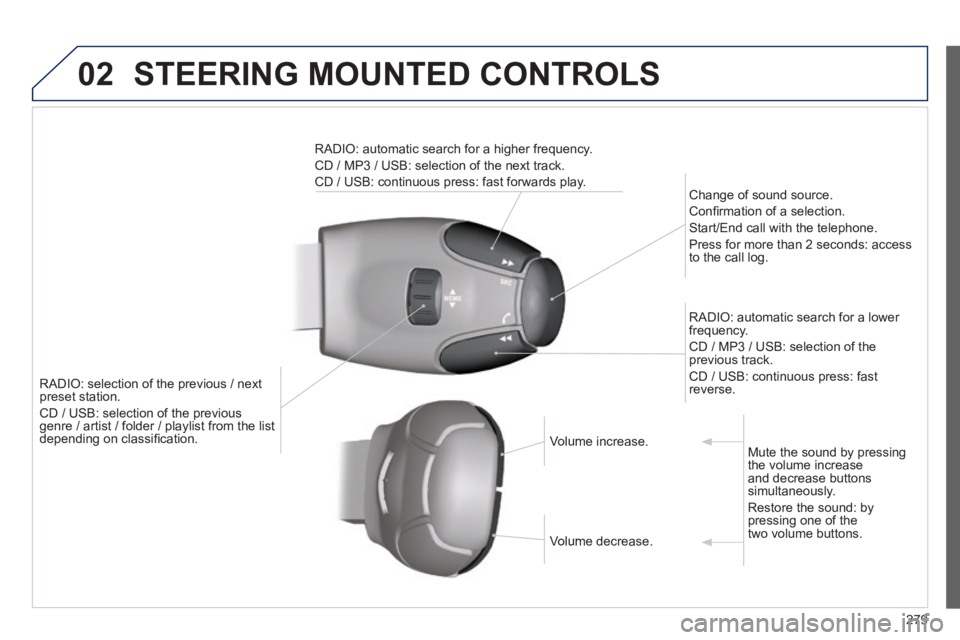
RADIO: selection of the previous / next preset station.
CD / USB: selection of the previous genre / artist / folder / playlist from the list genre / artist / folder / playlist from the list depending on classifi cation.
Change of sound source.
Confi rmation of a selection.
Start/End call with the telephone.
Press for more than 2 seconds: access to the call log.
RADIO: automatic search for a lower frequency.
CD / MP3 / USB: selection of the previous track.
CD / USB: continuous press: fast reverse.
RADIO: automatic search for a higher frequency.
CD / MP3 / USB: selection of the next track.
CD / USB: continuous press: fast forwards play.
Volume increase. Volume increase.
Volume decrease. Volume decrease.
Mute the sound by pressing the volume increase and decrease buttons simultaneously.
Restore the sound: by pressing one of the two volume buttons.
Page 282 of 336
03
280
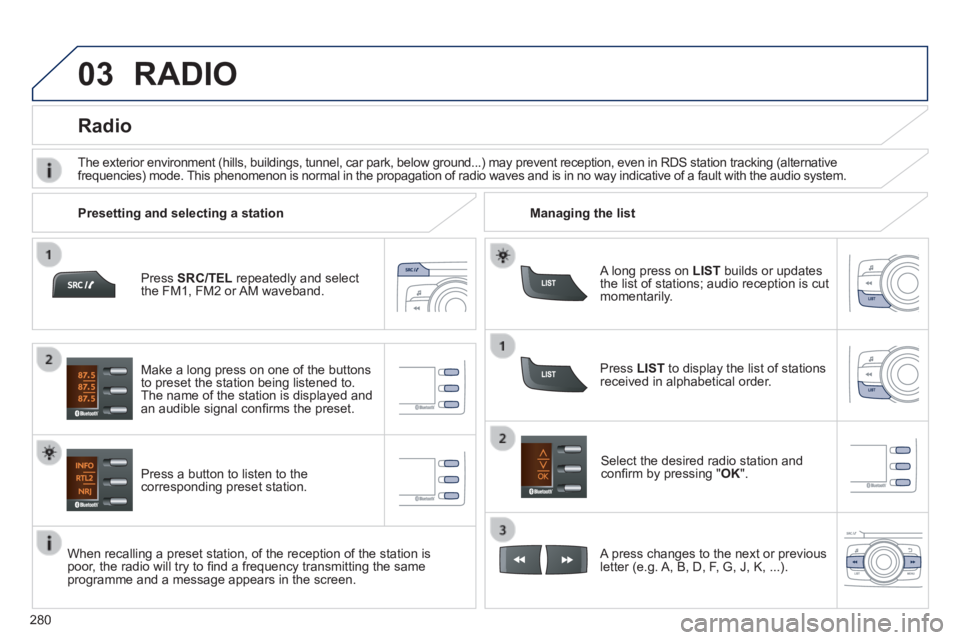
Press SRC/TEL repeatedly and select the FM1, FM2 or AM waveband.
Press a button to listen to the corresponding preset station.
Select the desired radio station and confi rm by pressing " OK ".
Radio
Press LIST to display the list of stations received in alphabetical order.
The exterior environment (hills, buildings, tunnel, car park, below gro\
und...) may prevent reception, even in RDS station tracking (alternative frequencies) mode. This phenomenon is normal in the propagation of radio waves and is in no\
way indicative of a fault with the audio system.
A long press on LIST builds or updates the list of stations; audio reception is cut momentarily.
Make a long press on one of the buttons to preset the station being listened to. The name of the station is displayed and an audible signal confi rms the preset.
A press changes to the next or previous letter (e.g. A, B, D, F, G, J, K, ...).
Managing the list Presetting and selecting a station
When recalling a preset station, of the reception of the station is poor, the radio will try to fi nd a frequency transmitting the same programme and a message appears in the screen.
RADIO
Page 283 of 336
03
281
RDS, if displayed, enables you to continue listening to the same station by automatic retuning to alternative frequencies. However, in certain conditions, coverage of an RDS station may not be assured throughout the country as radio stations do not cover 100 % of the territory. This explains the loss of reception of the station during a journey.
RDS
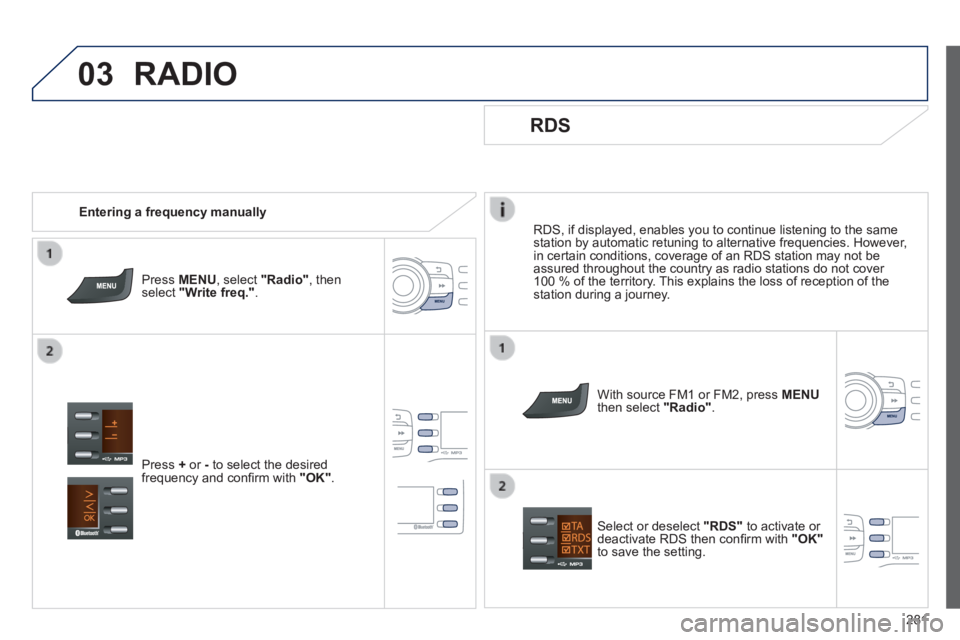
With source FM1 or FM2, press MENUthen select "Radio" .
Select or deselect "RDS" to activate or deactivate RDS then confi rm with "OK"to save the setting.
Entering a frequency manually
Press MENU , select "Radio" , then select "Write freq." .
Press + or - to select the desired frequency and confi rm with "OK" .
RADIO
Page 284 of 336
03
282
RADIO
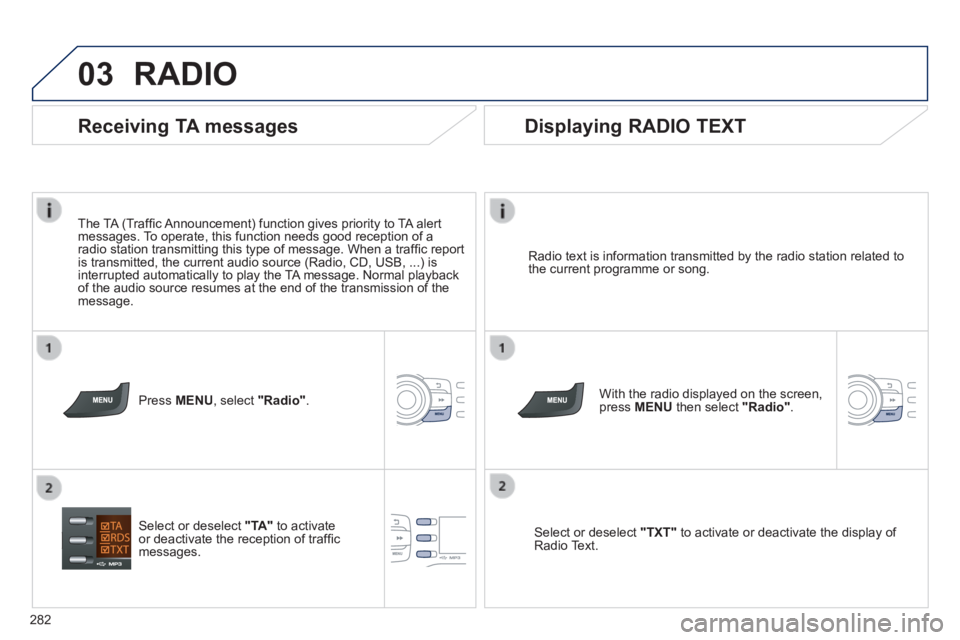
Radio text is information transmitted by the radio station related to the current programme or song.
With the radio displayed on the screen, press MENU then select "Radio" .
Select or deselect "TXT" to activate or deactivate the display of Radio Text.
Displaying RADIO TEXT
Receiving TA messages
The TA (Traffi c Announcement) function gives priority to TA alert messages. To operate, this function needs good reception of a radio station transmitting this type of message. When a traffi c report is transmitted, the current audio source (Radio, CD, USB, ...) is interrupted automatically to play the TA message. Normal playback of the audio source resumes at the end of the transmission of the message.
Press MENU , select "Radio" .
Select or deselect "TA" to activate or deactivate the reception of traffi c messages.
Page 299 of 336
08
297
SCREEN MENU MAP(S)
1
2
2
2
2
1
2
2
2
1
2
2
2
2
3
3
1
2
2
4
4
4
1
2
3
2
3
3
3
3
3
3
3
2
2
3
3
3
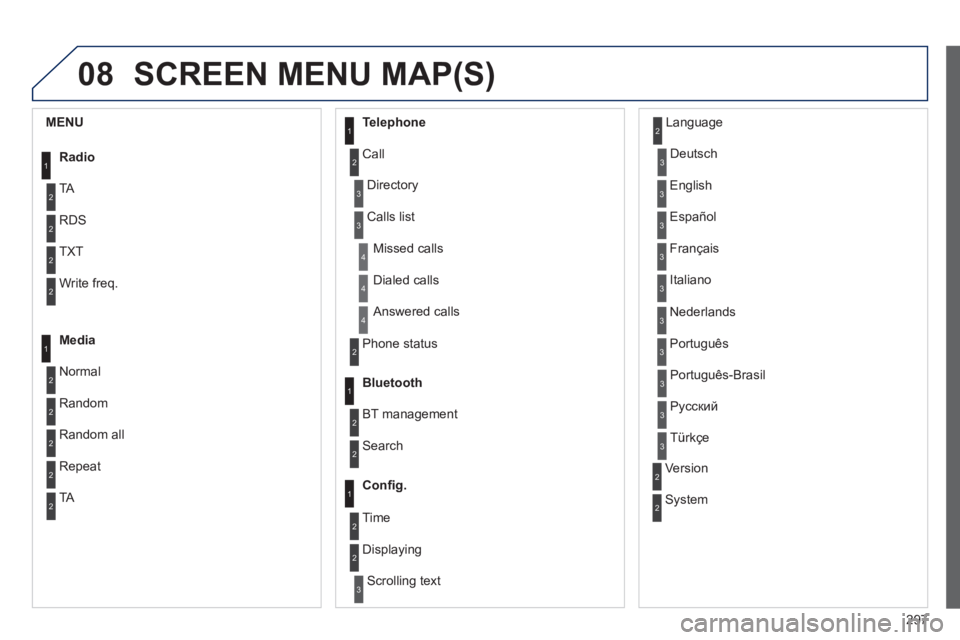
MENU
Radio
TA
RDS
TXT
Write freq.
Media
Normal
Random
Random all
Telephone
Call
Repeat
TA
Phone status
Directory
Calls list
Bluetooth
BT management
Search
Missed calls
Dialed calls
Answered calls
Confi g.
Displaying
Scrolling text
Language
Deutsch
English
Español
Français
Italiano
Nederlands
Português
Version
System
Português-Brasil
Русский
Türkçe
2 Time
Page 300 of 336
298
FREQUENTLY ASKED QUESTIONS
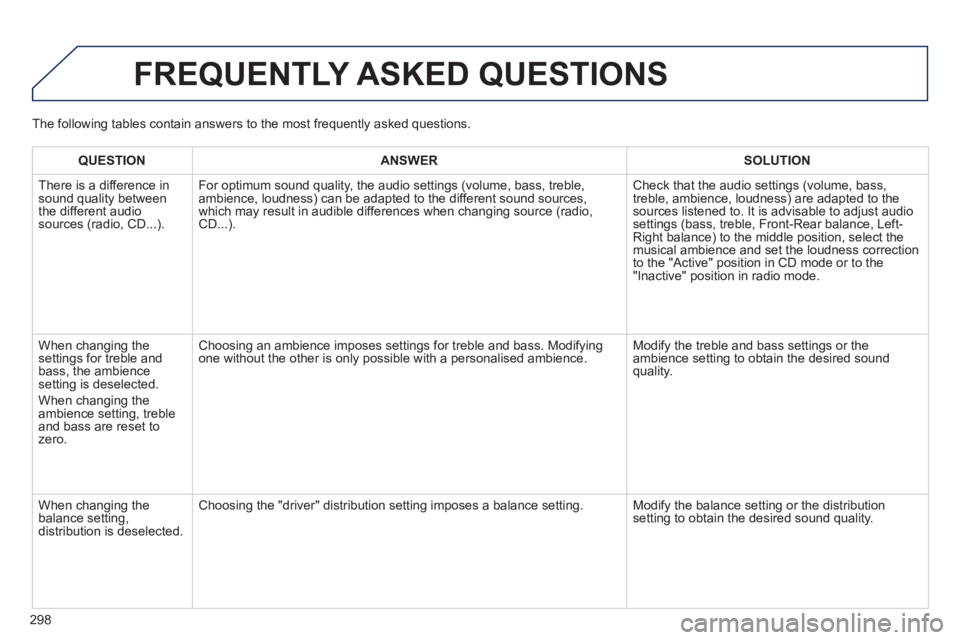
QUESTIONANSWERSOLUTION
There is a difference in sound quality between the different audio sources (radio, CD...).
For optimum sound quality, the audio settings (volume, bass, treble, ambience, loudness) can be adapted to the different sound sources, which may result in audible differences when changing source (radio, CD...).
Check that the audio settings (volume, bass, treble, ambience, loudness) are adapted to the sources listened to. It is advisable to adjust audio settings (bass, treble, Front-Rear balance, Left-Right balance) to the middle position, select the musical ambience and set the loudness correction to the "Active" position in CD mode or to the "Inactive" position in radio mode.
When changing the settings for treble and bass, the ambience setting is deselected.
When changing the ambience setting, treble and bass are reset to zero.
Choosing an ambience imposes settings for treble and bass. Modifying one without the other is only possible with a personalised ambience. Modify the treble and bass settings or the ambience setting to obtain the desired sound quality.
When changing the balance setting, distribution is deselected.
Choosing the "driver" distribution setting imposes a balance setting. Modify the balance setting or the distribution setting to obtain the desired sound quality.
The following tables contain answers to the most frequently asked questi\
ons.
Page 301 of 336
299
FREQUENTLY ASKED QUESTIONS
QUESTIONANSWERSOLUTION
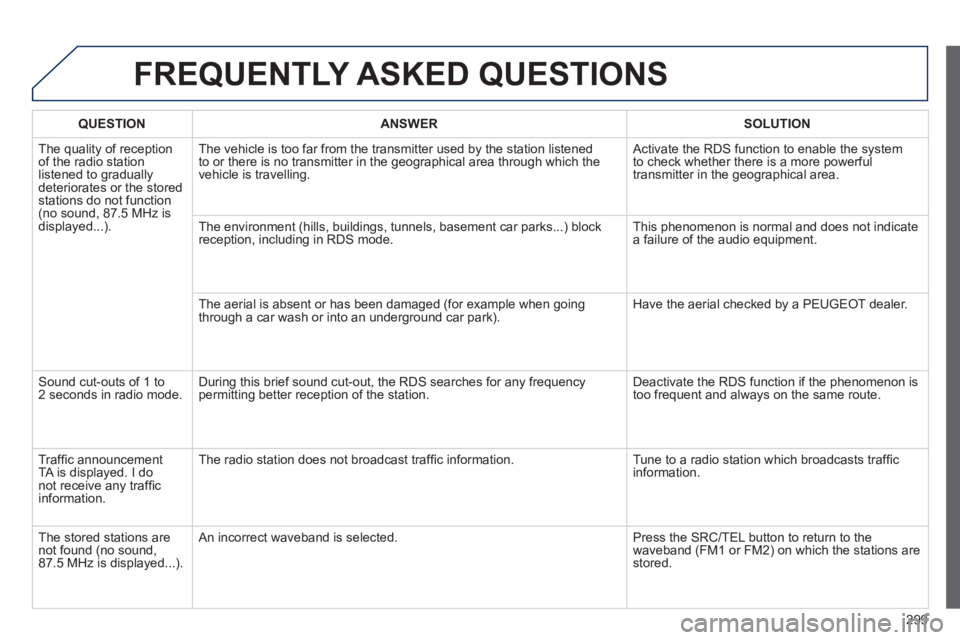
The quality of reception of the radio station listened to gradually deteriorates or the stored stations do not function (no sound, 87.5 MHz is displayed...).
The vehicle is too far from the transmitter used by the station listened\
to or there is no transmitter in the geographical area through which the\
vehicle is travelling.
Activate the RDS function to enable the system to check whether there is a more powerful transmitter in the geographical area.
The environment (hills, buildings, tunnels, basement car parks...) blo\
ck reception, including in RDS mode. This phenomenon is normal and does not indicate a failure of the audio equipment.
The aerial is absent or has been damaged (for example when going through a car wash or into an underground car park). Have the aerial checked by a PEUGEOT dealer.
Sound cut-outs of 1 to 2 seconds in radio mode. During this brief sound cut-out, the RDS searches for any frequency permitting better reception of the station. Deactivate the RDS function if the phenomenon is too frequent and always on the same route.
Traffi c announcement TA is displayed. I do not receive any traffi c information.
The radio station does not broadcast traffi c information. Tune to a radio station which broadcasts traffi c information.
The stored stations are not found (no sound, 87.5 MHz is displayed...).
An incorrect waveband is selected. Press the SRC/TEL button to return to the waveband (FM1 or FM2) on which the stations are stored.
Page 306 of 336
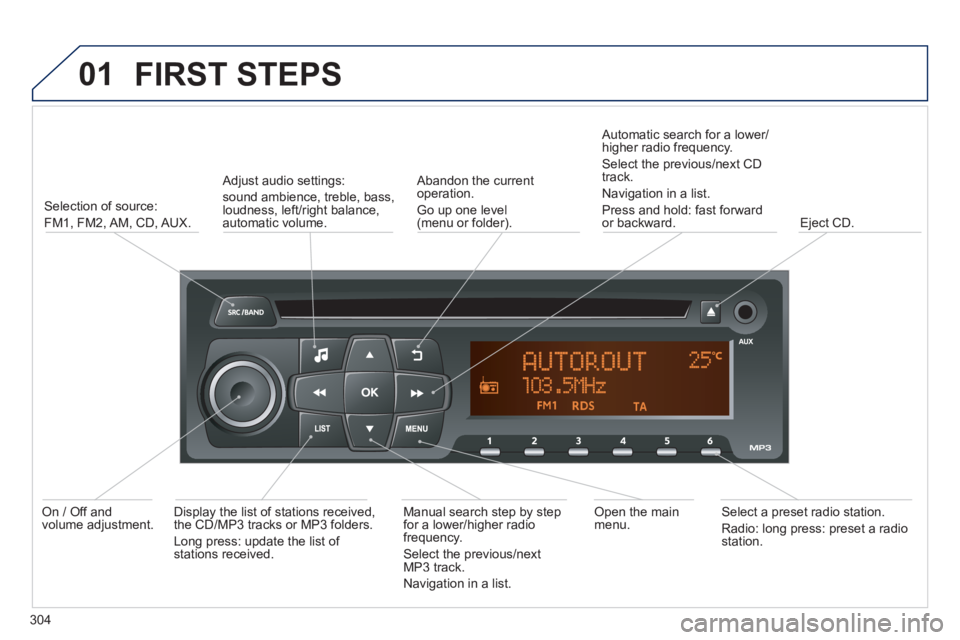
01 FIRST STEPS
304
Selection of source:
FM1, FM2, AM, CD, AUX.
Adjust audio settings:
sound ambience, treble, bass, loudness, left/right balance, automatic volume.
Abandon the current operation.
Go up one level(menu or folder).
Automatic search for a lower/higher radio frequency.
Select the previous/next CD track.
Navigation in a list.
Press and hold: fast forward or backward. Eject CD.
Manual search step by step for a lower/higher radio frequency.
Select the previous/next MP3 track.
Navigation in a list.
Open the main menu. Select a preset radio station.
Radio: long press: preset a radio station.
Display the list of stations received, the CD/MP3 tracks or MP3 folders.
Long press: update the list of stations received.
On / Off and volume adjustment.
Page 307 of 336
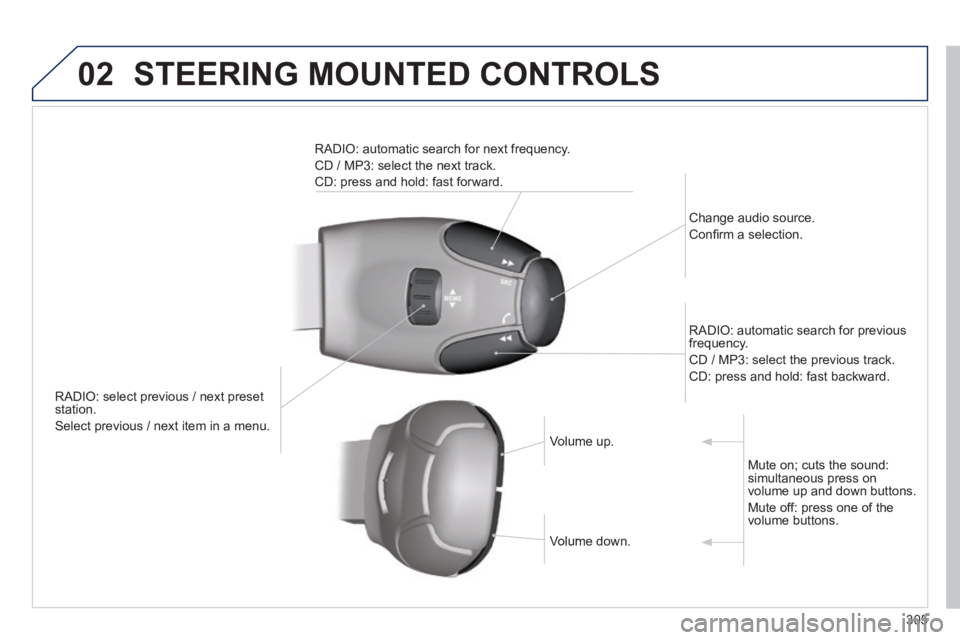
02 STEERING MOUNTED CONTROLS
305
RADIO: select previous / next preset station.
Select previous / next item in a menu.
Change audio source.
Confi rm a selection.
RADIO: automatic search for previous frequency.
CD / MP3: select the previous track.
CD: press and hold: fast backward.
RADIO: automatic search for next frequency.
CD / MP3: select the next track.
CD: press and hold: fast forward.
Volume up. Volume up.
Volume down. Volume down.
Mute on; cuts the sound: simultaneous press on volume up and down buttons.
Mute off: press one of the volume buttons.