tow PEUGEOT 2008 2014 Service Manual
[x] Cancel search | Manufacturer: PEUGEOT, Model Year: 2014, Model line: 2008, Model: PEUGEOT 2008 2014Pages: 336, PDF Size: 9.35 MB
Page 207 of 336
9
205
Technical data
* The kerb weight is equal to the unladen weight + driver (75 kg). ** The weight of the braked trailer can be increased, within the GTW limit, if the GV W of the towing vehicle is reduced by an equal amount; warning, towing using a lightly loaded towing vehicle may have an adverse effect on its road holding.
The GTW and towed load values indicated are valid up to a maximum altitude of 1 000 metres; the towed load mentioned must be reduced by 10 % for
each additional 1 000 metres of altitude. The speed of a towing vehicle must not exceed 60 mph (100 km/h) (comply with the legislation in force in your country). High ambient temperatures may result in a reduction in the per formance of the vehicle to protect the engine; if the ambient temperature is above 37 °C, limit the towed load.
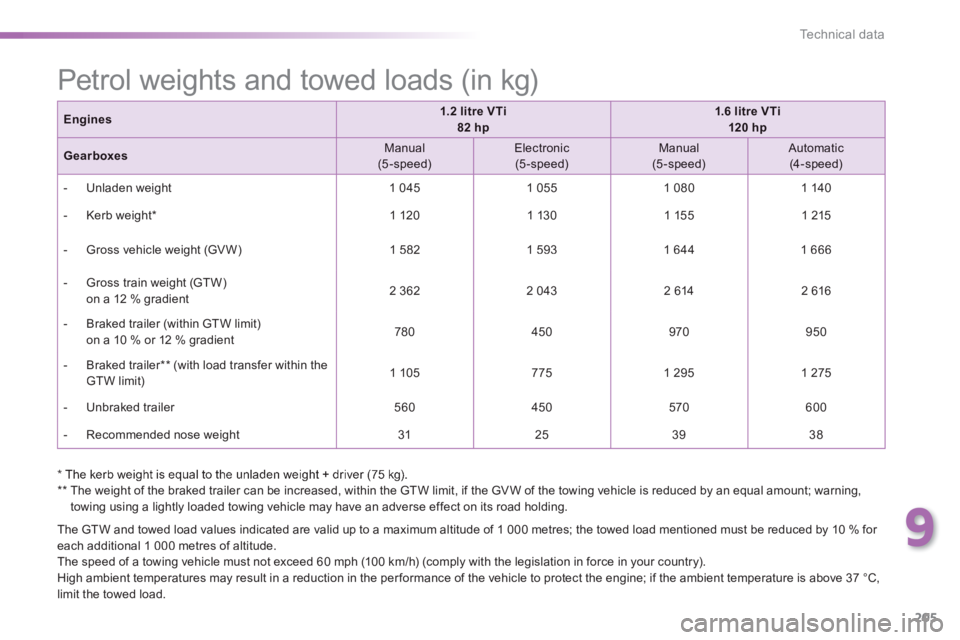
Petrol weights and towed loads (in kg)
Engines1.2 litre VTi 82 hp1.6 litre VTi 120 hp
Gearboxes Manual (5-speed) Electronic (5-speed) Manual (5-speed) Automatic (4-speed)
- Unladen weight 1 045 1 055 1 080 1 140
- Kerb weight * 1 120 1 130 1 155 1 215
- Gross vehicle weight (GV W) 1 582 1 593 1 644 1 666
- Gross train weight (GTW) on a 12 % gradient 2 362 2 043 2 614 2 616
- Braked trailer (within GTW limit) on a 10 % or 12 % gradient 780 450 970 950
- Braked trailer ** (with load transfer within the GTW limit) 1 105 775 1 295 1 275
- Unbraked trailer 560 450 570 600
- Recommended nose weight 31 25 39 38
Page 210 of 336
208
Technical data
* The kerb weight is equal to the unladen weight + driver (75 kg). ** The weight of the braked trailer can be increased, within the GTW limit, if the GV W of the towing vehicle is reduced by an equal amount; warning, towing using a lightly loaded towing vehicle may have an adverse effect on its road holding.
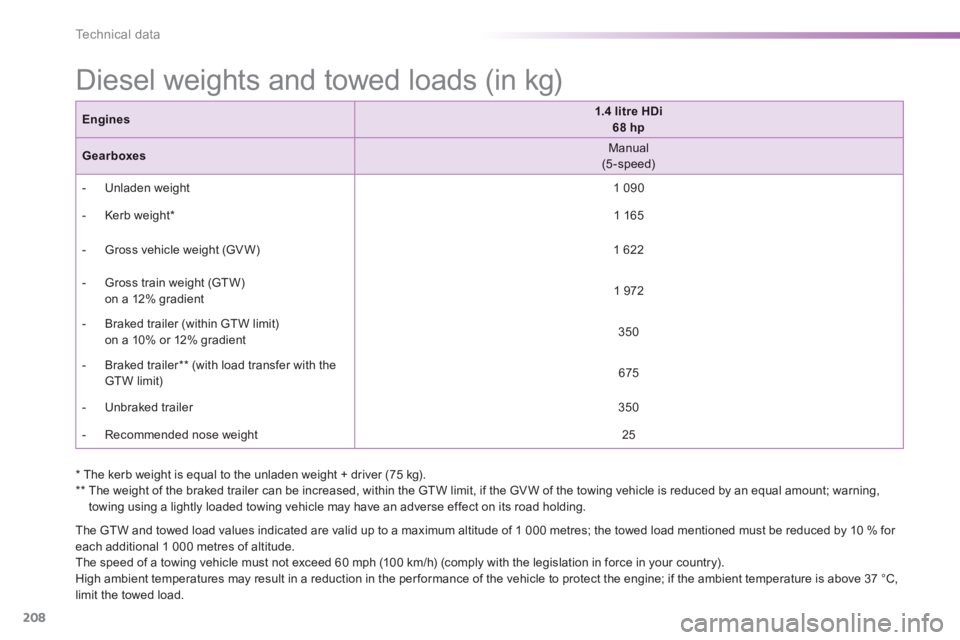
Diesel weights and towed loads (in kg)
Engines1.4 litre HDi 68 hp
Gearboxes Manual (5-speed)
- Unladen weight 1 090
- Kerb weight * 1 165
- Gross vehicle weight (GV W) 1 622
- Gross train weight (GTW) on a 12% gradient 1 972
- Braked trailer (within GTW limit) on a 10% or 12% gradient 350
- Braked trailer ** (with load transfer with the GTW limit) 675
- Unbraked trailer 350
- Recommended nose weight 25
The GTW and towed load values indicated are valid up to a maximum altitude of 1 000 metres; the towed load mentioned must be reduced by 10 % for each additional 1 000 metres of altitude. The speed of a towing vehicle must not exceed 60 mph (100 km/h) (comply with the legislation in force in your country). High ambient temperatures may result in a reduction in the per formance of the vehicle to protect the engine; if the ambient temperature is above 37 °C, limit the towed load.
Page 211 of 336
9
209
Technical data
The GTW and towed load values indicated are valid up to a maximum altitude of 1 000 metres; the towed load mentioned must be reduced by 10 % for each additional 1 000 metres of altitude. The speed of a towing vehicle must not exceed 60 mph (100 km/h) (comply with the legislation in force in your country). High ambient temperatures may result in a reduction in the per formance of the vehicle to protect the engine; if the ambient temperature is above 37 °C, limit the towed load.
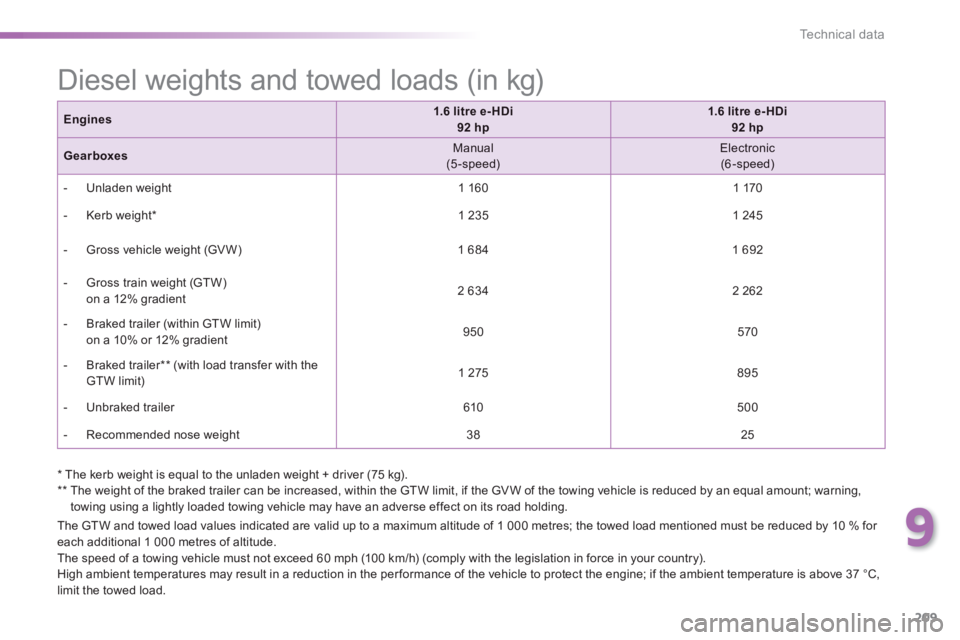
Engines1.6 litre e- HDi 92 hp1.6 litre e- HDi 92 hp
Gearboxes Manual (5-speed) Electronic (6-speed)
- Unladen weight 1 160 1 170
- Kerb weight * 1 235 1 245
- Gross vehicle weight (GV W) 1 684 1 692
- Gross train weight (GTW) on a 12% gradient 2 634 2 262
- Braked trailer (within GTW limit) on a 10% or 12% gradient 950 570
- Braked trailer ** (with load transfer with the GTW limit) 1 275 895
- Unbraked trailer 610 500
- Recommended nose weight 38 25
Diesel weights and towed loads (in kg)
* The kerb weight is equal to the unladen weight + driver (75 kg). ** The weight of the braked trailer can be increased, within the GTW limit, if the GV W of the towing vehicle is reduced by an equal amount; warning, towing using a lightly loaded towing vehicle may have an adverse effect on its road holding.
Page 212 of 336
210
Technical data
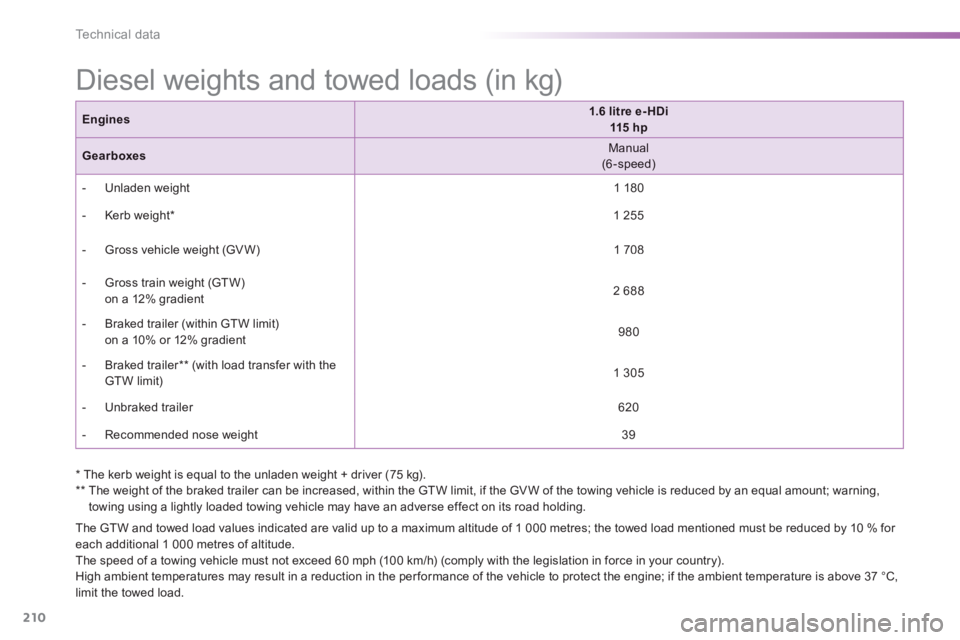
Diesel weights and towed loads (in kg)
The GTW and towed load values indicated are valid up to a maximum altitude of 1 000 metres; the towed load mentioned must be reduced by 10 % for each additional 1 000 metres of altitude. The speed of a towing vehicle must not exceed 60 mph (100 km/h) (comply with the legislation in force in your country). High ambient temperatures may result in a reduction in the per formance of the vehicle to protect the engine; if the ambient temperature is above 37 °C, limit the towed load.
Engines1.6 litre e- HDi 115 h p
Gearboxes Manual (6-speed)
- Unladen weight 1 180
- Kerb weight * 1 255
- Gross vehicle weight (GV W) 1 708
- Gross train weight (GTW) on a 12% gradient 2 688
- Braked trailer (within GTW limit) on a 10% or 12% gradient 980
- Braked trailer ** (with load transfer with the GTW limit) 1 305
- Unbraked trailer 620
- Recommended nose weight 39
* The kerb weight is equal to the unladen weight + driver (75 kg). ** The weight of the braked trailer can be increased, within the GTW limit, if the GV W of the towing vehicle is reduced by an equal amount; warning, towing using a lightly loaded towing vehicle may have an adverse effect on its road holding.
Page 223 of 336
221
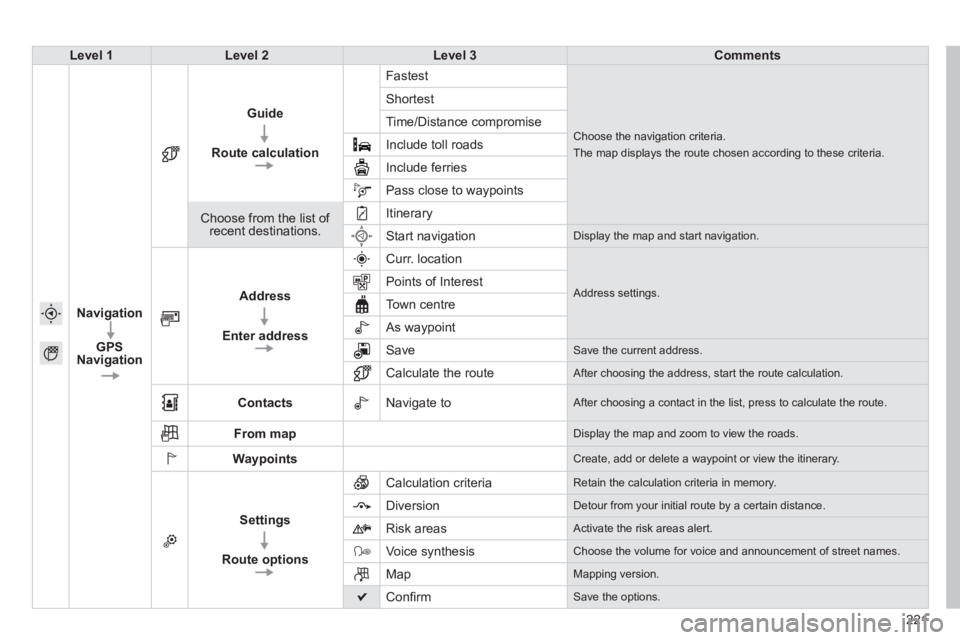
Level 1Level 2Level 3Comments
Navigation
GPS Navigation
Guide
Route calculation
Fastest
Choose the navigation criteria.
The map displays the route chosen according to these criteria.
Shortest
Time/Distance compromise
Include toll roads
Include ferries
Pass close to waypoints
Choose from the list of recent destinations.
Itinerary
Start navigation Display the map and start navigation.
Address
Enter address
Curr. location
Address settings. Points of Interest
Town centre
As waypoint
Save Save the current address.
Calculate the route After choosing the address, start the route calculation.
Contacts Navigate to After choosing a contact in the list, press to calculate the route.
From map Display the map and zoom to view the roads.
Waypoints Create, add or delete a waypoint or view the itinerary.
Settings
Route options
Calculation criteria Retain the calculation criteria in memory.
Diversion Detour from your initial route by a certain distance.
Risk areas Activate the risk areas alert.
Voice synthesis Choose the volume for voice and announcement of street names.
Map Mapping version.
Confi rm Save the options.
Page 226 of 336
05
224
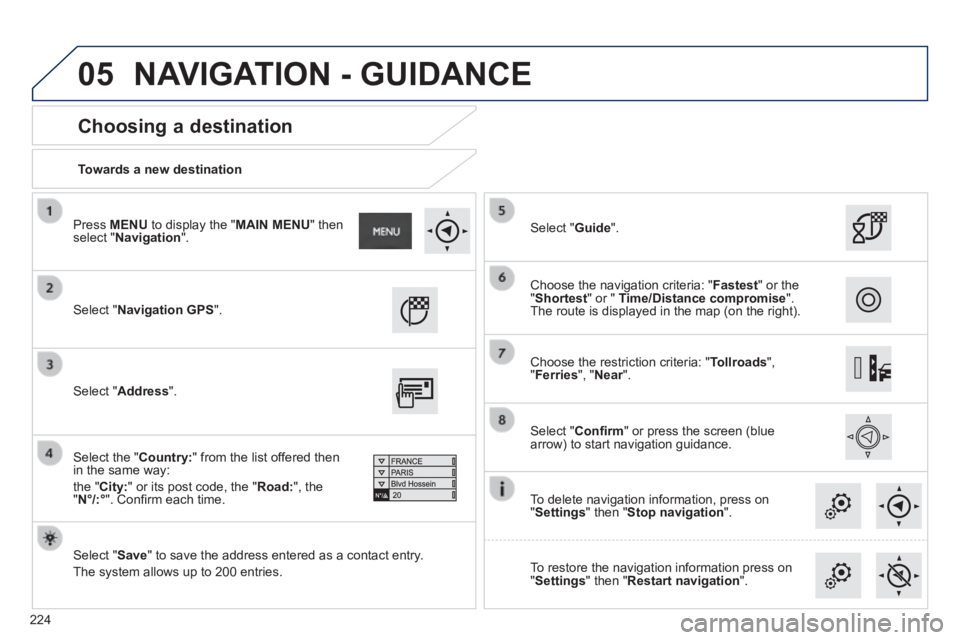
Towards a new destination
Choosing a destination
Select " Navigation GPS ".
Select " Save " to save the address entered as a contact entry.
The system allows up to 200 entries.
Select " Confi rm " or press the screen (blue arrow) to start navigation guidance.
Select " Address ".
Select the " Country: " from the list offered then in the same way:
the " City: " or its post code, the " Road: ", the " N°/:° ". Confi rm each time.
Select " Guide ".
Choose the restriction criteria: " Tollroads ", " Ferries ", " Near ". Near ". Near
Choose the navigation criteria: " Fastest " or the " Shortest " or " Time/Distance compromise ". The route is displayed in the map (on the right).
To delete navigation information, press on " Settings " then " Stop navigation ".
To restore the navigation information press on " Settings " then " Restart navigation ".
Press MENU to display the " MAIN MENU " then select " Navigation ".
NAVIGATION - GUIDANCE
Page 227 of 336
05
225
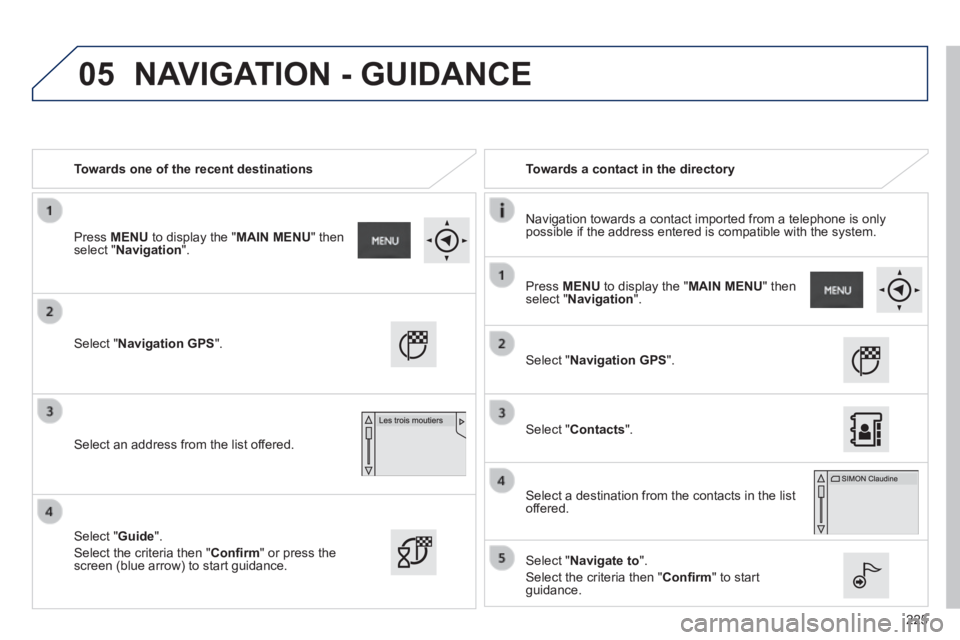
Towards one of the recent destinations Towards a contact in the directory
Navigation towards a contact imported from a telephone is only possible if the address entered is compatible with the system.
Select " Navigation GPS ".
Select an address from the list offered.
Select " Navigation GPS ".
Select " Contacts ".
Select a destination from the contacts in the list offered.
Select " Navigate to ".
Select the criteria then " Confi rm " to start guidance.
Select " Guide ".
Select the criteria then " Confi rm " or press the screen (blue arrow) to start guidance.
Press MENU to display the " MAIN MENU " then select " Navigation ".
Press MENU to display the " MAIN MENU " then select " Navigation ".
NAVIGATION - GUIDANCE
Page 228 of 336
05
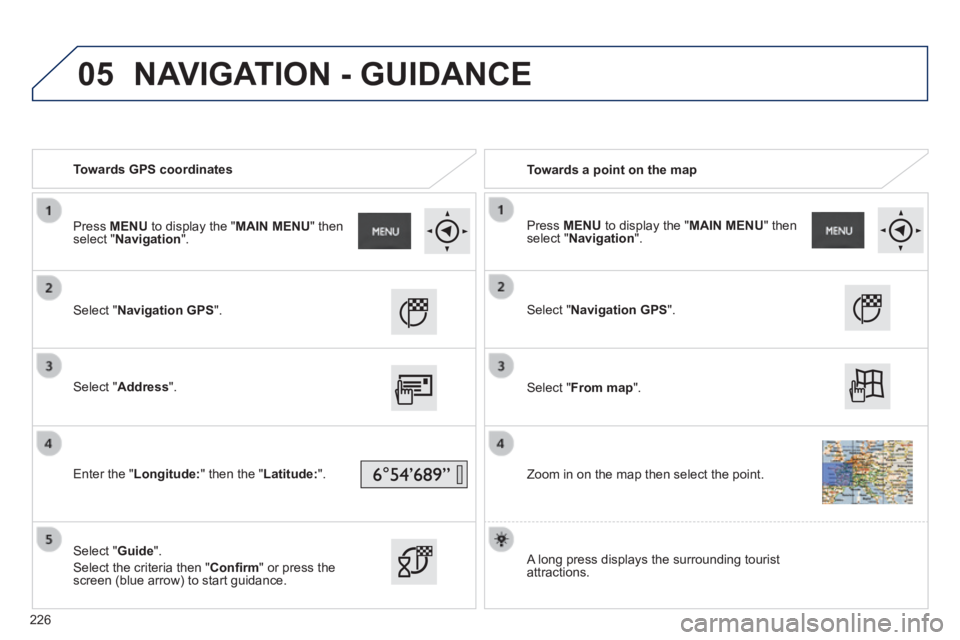
Towards GPS coordinates Towards a point on the map
Select " Navigation GPS ".
Select " Address ".
Enter the " Longitude: " then the " Latitude: ".
Select " Guide ".
Select the criteria then " Confi rm " or press the screen (blue arrow) to start guidance.
Select " Navigation GPS ".
Select " From map ".
Zoom in on the map then select the point.
Press MENU to display the " MAIN MENU " then select " Navigation ". Press MENU to display the " MAIN MENU " then select " Navigation ".
A long press displays the surrounding tourist attractions.
NAVIGATION - GUIDANCE
226
Page 229 of 336
 Points of Interest (POI) show all of the locations of services nearby \
(hotels, retail outlet, airports, ...).
Select \" GPS Navigation \".
Select")
05
227
Towards points of interest (POI) Points of Interest (POI) show all of the locations of services nearby \
(hotels, retail outlet, airports, ...).
Select " GPS Navigation ".
Select " Address ".
Select " Pts of Interest ".
Select a category from the list offered (the categories are presented on following pages).
Select " Along the route " or " Near " or " Near " or " NearAt a destination " or " At an address " to fi lter the points of interest.
Select a point of interest from the list offered.
Select " Guide ".
Select the criteria then " Confi rm " to start guidance.
Select " Search ".
or
Select a point of interest from the list offered.
Press MENU to display the " MAIN MENU " then select " Navigation ".
NAVIGATION - GUIDANCE
Page 257 of 336
255
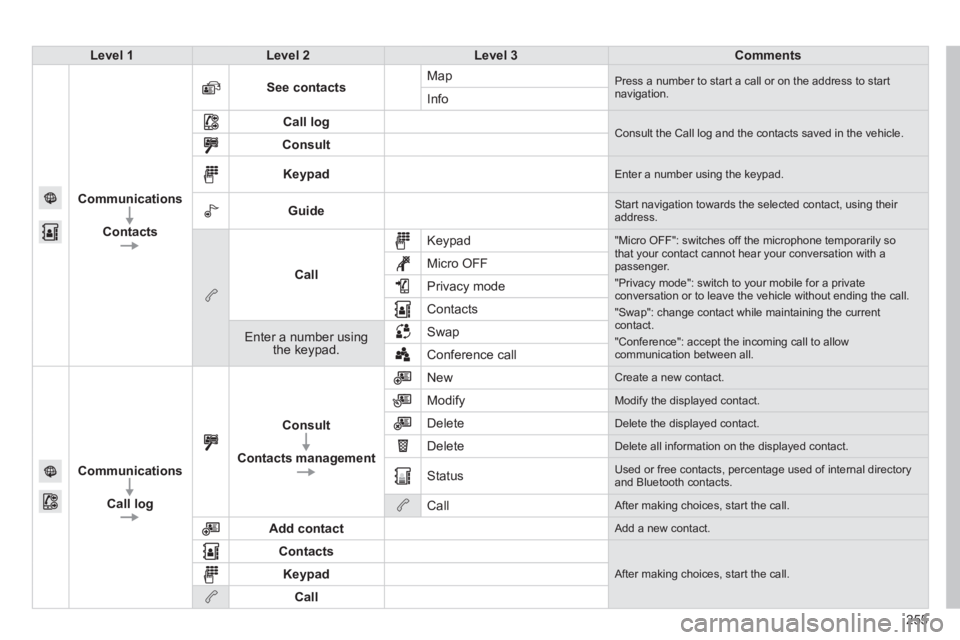
Level 1Level 2Level 3Comments
Communications
Contacts
See contacts Map Press a number to start a call or on the address to start navigation. Info
Call log Consult the Call log and the contacts saved in the vehicle. Consult
Keypad Enter a number using the keypad.
Guide Start navigation towards the selected contact, using their address.
Call
Keypad "Micro OFF": switches off the microphone temporarily so that your contact cannot hear your conversation with a passenger.
"Privacy mode": switch to your mobile for a private conversation or to leave the vehicle without ending the call.
"Swap": change contact while maintaining the current contact.
"Conference": accept the incoming call to allow communication between all.
Micro OFF
Privacy mode
Contacts
Enter a number using the keypad.
Swap
Conference call
Communications
Call log
Consult
Contacts management
New Create a new contact.
Modify Modify the displayed contact.
Delete Delete the displayed contact.
Delete Delete all information on the displayed contact.
Status Used or free contacts, percentage used of internal directory and Bluetooth contacts.
Call After making choices, start the call.
Add contact Add a new contact.
Contacts
After making choices, start the call. Keypad
Call