wheel PEUGEOT 2008 2015 User Guide
[x] Cancel search | Manufacturer: PEUGEOT, Model Year: 2015, Model line: 2008, Model: PEUGEOT 2008 2015Pages: 340, PDF Size: 8.4 MB
Page 81 of 340
79
2008_en_Chap05_conduite_ed01-2015
Starting - Stopping the engine
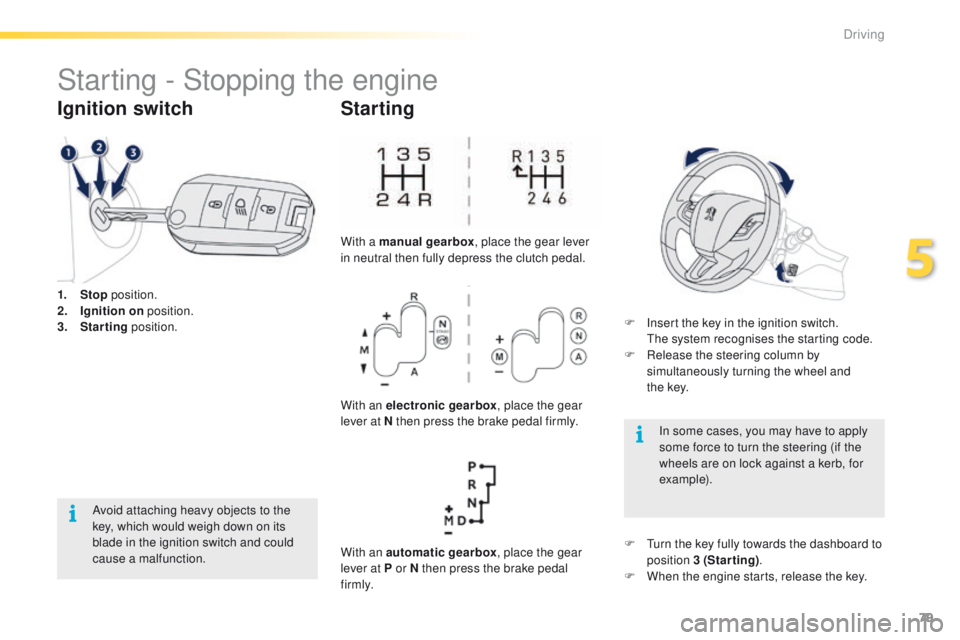
1. Stop position.
2. I gnition on position.
3.
S
tarting position.
Ignition switch
Avoid attaching heavy objects to the
key, which would weigh down on its
blade in the ignition switch and could
cause a malfunction.
Starting
With a manual gearbox , place the gear lever
in neutral then fully depress the clutch pedal.
With an electronic gearbox , place the gear
lever at N then press the brake pedal firmly.
With an automatic gearbox , place the gear
lever at P or N then press the brake pedal
f i r m l y. F
I
nsert the key in the ignition switch.
T
he system recognises the starting code.
F
R
elease the steering column by
simultaneously turning the wheel and
t h e
key.
In some cases, you may have to apply
some force to turn the steering (if the
wheels are on lock against a kerb, for
example).
F
T
urn the key fully towards the dashboard to
position 3 (Starting) .
F
W
hen the engine starts, release the key.
5
Driving
Page 82 of 340

80
2008_en_Chap05_conduite_ed01-2015
Key left in the "Ignition on"
position
On opening the driver's door, an alert
message is displayed, accompanied by an
audible signal, to remind you that the key is
still in the ignition switch at position 1 (Stop).
F Immobilise the vehicle.
F
T urn the key fully towards you to position 1
(Stop) .
F
R
emove the key from the ignition switch.
F
T
o lock the steering column, turn the wheel
until the lock engages.
Switching off
If the key has been left in the ignition
switch at position 2 (Ignition on) ,
the ignition will be switched off
automatically after one hour.
To switch the ignition back on, turn the
key to position 1 (Stop) , then back to
position 2 (Ignition on) .
Free-wheeling
For safety reasons, do not free-wheel.
Other wise, some vehicle functions will
no longer be active.
Switching off the engine leads to a loss
of braking assistance.
To facilitate unlocking of the steering
wheel, it is recommended that you
place the wheels in the straight ahead
position before switching off the engine.
Driving
Page 83 of 340
81
2008_en_Chap05_conduite_ed01-2015
Manual parking brake
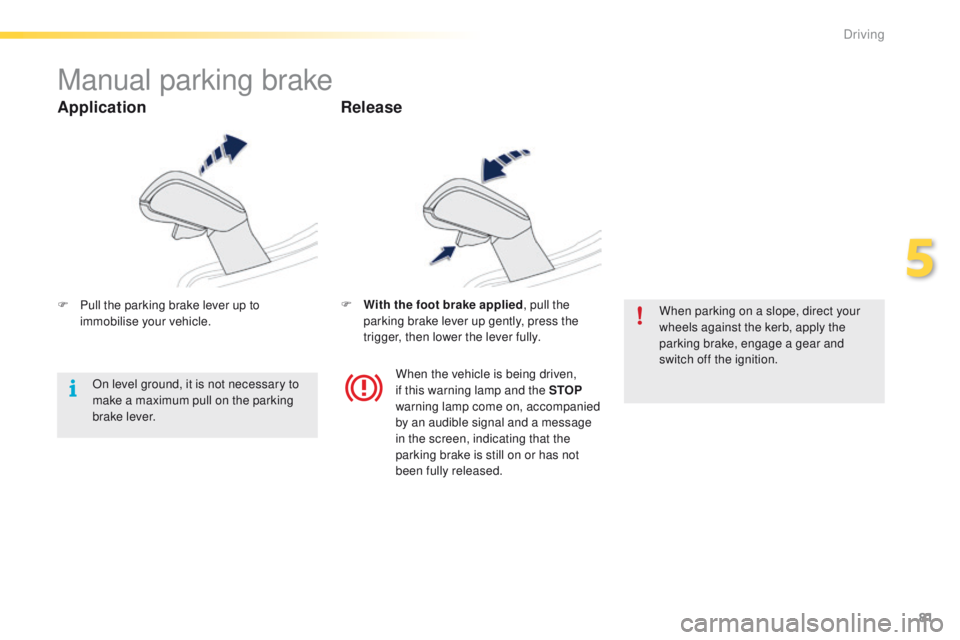
F Pull the parking brake lever up to immobilise your vehicle. F
W ith the foot brake applied
, pull the
parking brake lever up gently, press the
trigger, then lower the lever fully. When parking on a slope, direct your
wheels against the kerb, apply the
parking brake, engage a gear and
switch off the ignition.
When the vehicle is being driven,
if this warning lamp and the STOP
warning lamp come on, accompanied
by an audible signal and a message
in the screen, indicating that the
parking brake is still on or has not
been fully released.
On level ground, it is not necessary to
make a maximum pull on the parking
brake lever.
Application
Release
5
Driving
Page 85 of 340

83
2008_en_Chap05_conduite_ed01-2015
Five-speed electronically controlled gearbox
which offers a choice between the comfort of
automatic operation or the pleasure of manual
gear changing.
Three driving modes are offered:
-
a
utomated mode for automatic control
of the gears by the gearbox, without ant
action by the driver.
-
m
anual mode for sequential changing of
the gears by the driver, using the gear lever
or the steering mounted control paddles
-
a
uto sequential mode for overtaking, for
example, remaining in the automated mode
while using the functions of the sequential
mode.
5-speed electronic gearbox
Gear lever
R. Reverse
F W ith your foot on the brake, move the lever
for wards to select this position.
N.
Neutral.
F
W
ith your foot on the brake, select this
position to start the engine.
A.
A
utomated mode.
F
M
ove the lever backwards to select this
mode.
M. + / -
M
anual mode with sequential gear
changing.
F
M
ove the lever backwards, then to the left
to select this mode, then:
-
p
ush for wards to change up a gear,
-
o
r push backwards to change down a gear.
Steering mounted controls
+. Change up paddle.
F P ress the back of the steering wheel "+"
paddle to change up a gear.
-.
C
hange down paddle.
F
P
ress the back of the steering wheel "-"
paddle to change down a gear.
The steering mounted paddles do not
permit the selection of neutral or the
engaging and disengaging of reverse
g e a r.
Do not drive with your hand resting
on the gear lever, as there is a risk of
damaging the gearbox.
5
Driving
Page 102 of 340
100
2008_en_Chap05_conduite_ed01-2015
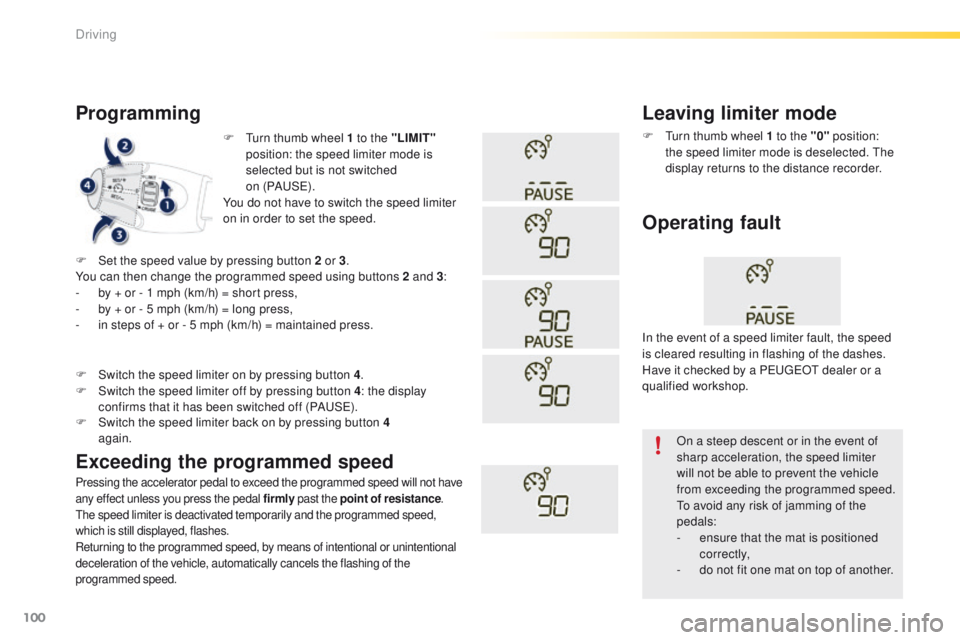
F Turn thumb wheel 1 to the "LIMIT"
position: the speed limiter mode is
selected but is not switched
on (PAUS E).
You do not have to switch the speed limiter
on in order to set the speed.
Programming
Pressing the accelerator pedal to exceed the programmed speed will not have
any effect unless you press the pedal firmly past the point of resistance.
The speed limiter is deactivated temporarily and the programmed speed,
which is still displayed, flashes.
Returning to the programmed speed, by means of intentional or unintentional
deceleration of the vehicle, automatically cancels the flashing of the
programmed speed.
Leaving limiter mode
F Turn thumb wheel 1 to the "0" position:
the speed limiter mode is deselected. The
display returns to the distance recorder.
Operating fault
F Set the speed value by pressing button 2 or 3 .
You can then change the programmed speed using buttons 2 and 3 :
-
b
y + or - 1 mph (km/h) = short press,
-
b
y + or - 5 mph (km/h) = long press,
-
i
n steps of + or - 5 mph (km/h) = maintained press.
Exceeding the programmed speed
F Switch the speed limiter back on by pressing button 4 again.
F
S
witch the speed limiter on by pressing button 4
.
F
S
witch the speed limiter off by pressing button 4
: the display
confirms that it has been switched off (PAUSE). In the event of a speed limiter fault, the speed
is cleared resulting in flashing of the dashes.
Have it checked by a PEUGEOT dealer or a
qualified workshop.
On a steep descent or in the event of
sharp acceleration, the speed limiter
will not be able to prevent the vehicle
from exceeding the programmed speed.
To avoid any risk of jamming of the
pedals:
-
e
nsure that the mat is positioned
c o r r e c t l y,
-
d
o not fit one mat on top of another.
Driving
Page 104 of 340
102
2008_en_Chap05_conduite_ed01-2015
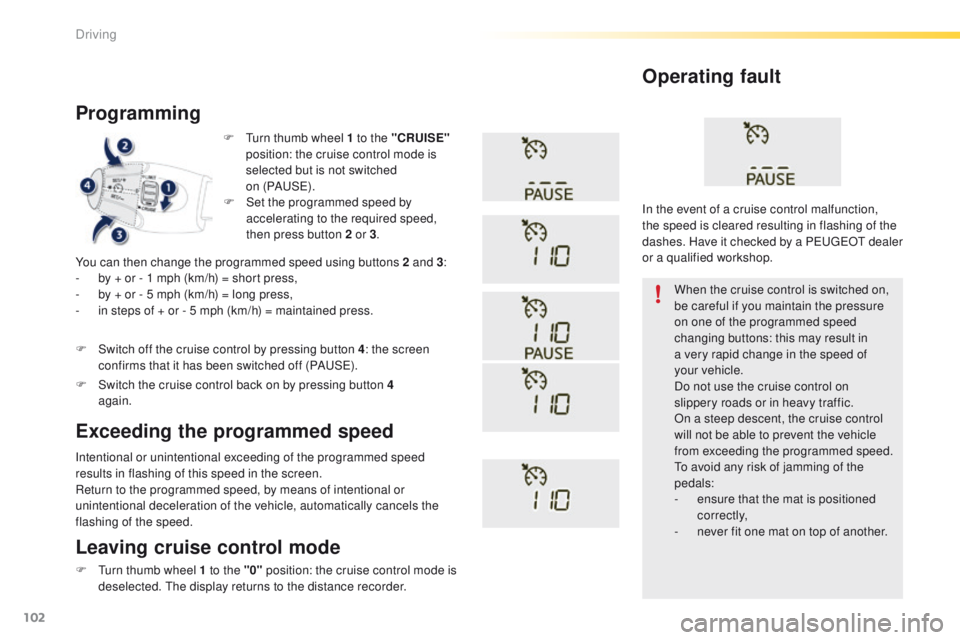
F Turn thumb wheel 1 to the "CRUISE"
position: the cruise control mode is
selected but is not switched
on (PAUS E).
Programming
You can then change the programmed speed using buttons 2 and 3 :
- b y + or - 1 mph (km/h) = short press,
-
b
y + or - 5 mph (km/h) = long press,
-
i
n steps of + or - 5 mph (km/h) = maintained press.
Intentional or unintentional exceeding of the programmed speed
results in flashing of this speed in the screen.
Return to the programmed speed, by means of intentional or
unintentional deceleration of the vehicle, automatically cancels the
flashing of the speed. When the cruise control is switched on,
be careful if you maintain the pressure
on one of the programmed speed
changing buttons: this may result in
a very rapid change in the speed of
your
vehicle.
Do not use the cruise control on
slippery roads or in heavy traffic.
On a steep descent, the cruise control
will not be able to prevent the vehicle
from exceeding the programmed speed.
To avoid any risk of jamming of the
pedals:
-
e
nsure that the mat is positioned
c o r r e c t l y,
-
n
ever fit one mat on top of another.
Operating fault
Leaving cruise control mode
F Turn thumb wheel 1 to the "0" position: the cruise control mode is
deselected. The display returns to the distance recorder.
Exceeding the programmed speed
F Set the programmed speed by accelerating to the required speed,
then press button 2 or 3 .
F
S
witch off the cruise control by pressing button 4 : the screen
confirms that it has been switched off (PAUSE).
F
S
witch the cruise control back on by pressing button 4
again. In the event of a cruise control malfunction,
the speed is cleared resulting in flashing of the
dashes. Have it checked by a PEUGEOT dealer
or a qualified workshop.
Driving
Page 109 of 340
107
2008_en_Chap05_conduite_ed01-2015
Park Assist
This system provides active assistance with parking, detecting a parking space then controlling the steering to park in the space.
It controls the steering while the driver manages the accelerator, brakes, gears and clutch (manual gearbox). During phases of entry into and exit from
a parking space, the system provides visual and audible information to the driver in order to make the manoeuvre safe. It may be necessary to move
forwards and backwards more than once.The Park Assist system cannot in any
circumstances replace the care and
responsibility of the driver.
The driver must remain in control of
their vehicle ensuring that the space
remains clear during the manoeuvre.
In some circumstances, the sensors
may not detect small obstacles located
in their blind spots.
Changing tyre sizes (out-size tyres,
winter tyres, ...) can inter fere with
the correct operation of the parking
assistance system.
During a manoeuvre the steering wheel
turns quickly: do not hold the steering
wheel, do not place your hand between
the spokes of the steering wheel and
take care with loose and bulky clothing,
scarves, handbags... There is a risk of
injury. For entry into a parking space (parallel
parking) the system does not detect
spaces which are clearly much smaller
or larger than the size of the vehicle.
This "parking assistance" system
is activated automatically during
manoeuvres; it is therefore possible
that a symbol comes on in the screen,
accompanied by an audible signal,
without affecting the manoeuvre.
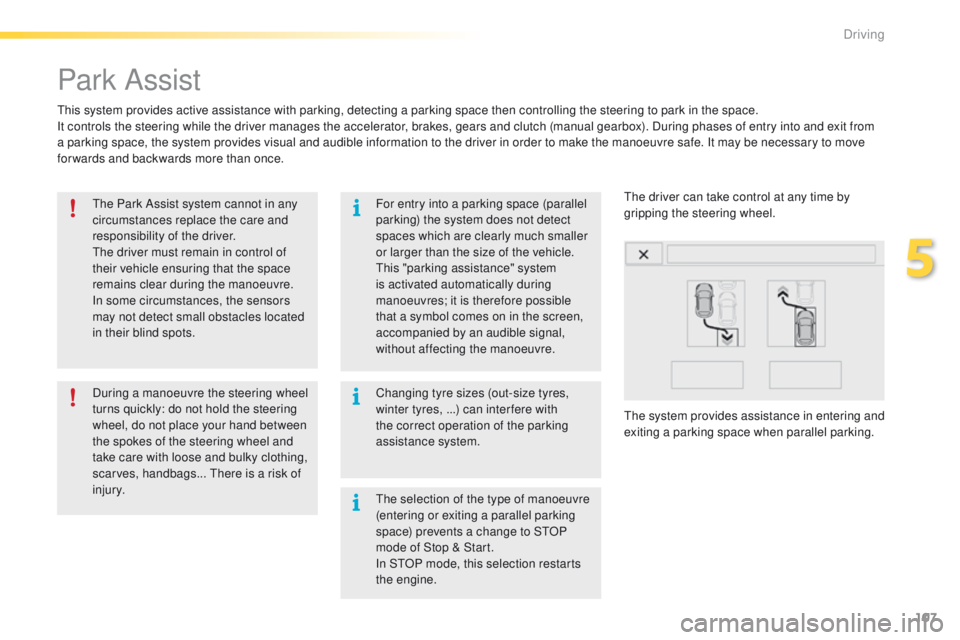
The system provides assistance in entering and
exiting a parking space when parallel parking. The driver can take control at any time by
gripping the steering wheel.
The selection of the type of manoeuvre
(entering or exiting a parallel parking
space) prevents a change to STOP
mode of Stop & Start.
In STOP mode, this selection restarts
the engine.
5
Driving
Page 110 of 340
108
2008_en_Chap05_conduite_ed01-2015
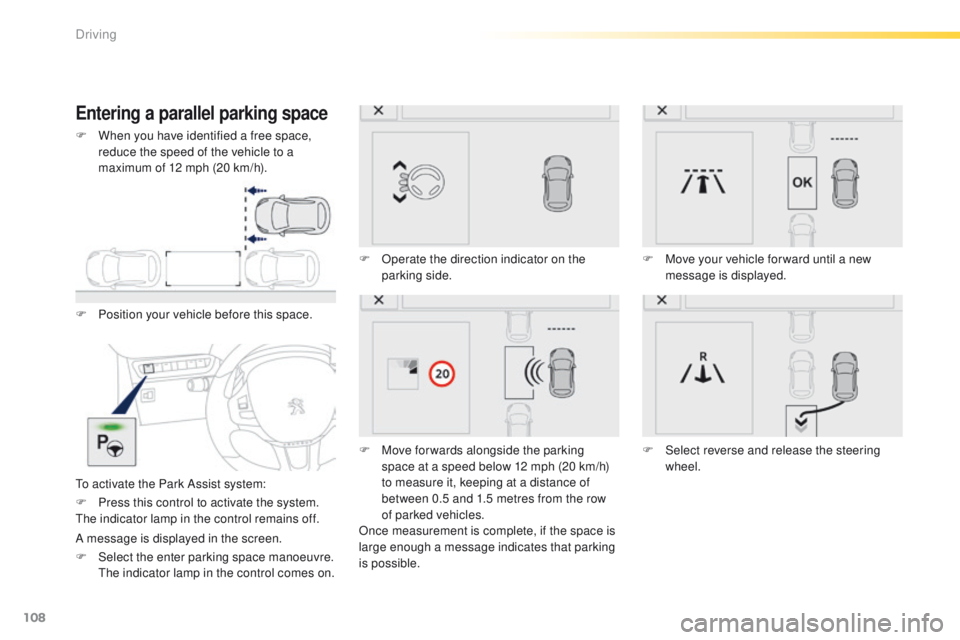
Entering a parallel parking space
F Position your vehicle before this space.
To activate the Park Assist system:F
O
perate the direction indicator on the
parking side.
F
M
ove for wards alongside the parking
space at a speed below 12 mph (20 km/h)
to measure it, keeping at a distance of
between 0.5 and 1.5 metres from the row
of parked vehicles.
Once measurement is complete, if the space is
large enough a message indicates that parking
is possible. F
M
ove your vehicle for ward until a new
message is displayed.
F
S
elect reverse and release the steering
wheel.
F
P
ress this control to activate the system.
The indicator lamp in the control remains off.
A message is displayed in the screen.
F
S
elect the enter parking space manoeuvre.
T
he indicator lamp in the control comes on.
F
W
hen you have identified a free space,
reduce the speed of the vehicle to a
maximum of 12 mph (20 km/h).
Driving
Page 111 of 340
109
2008_en_Chap05_conduite_ed01-2015
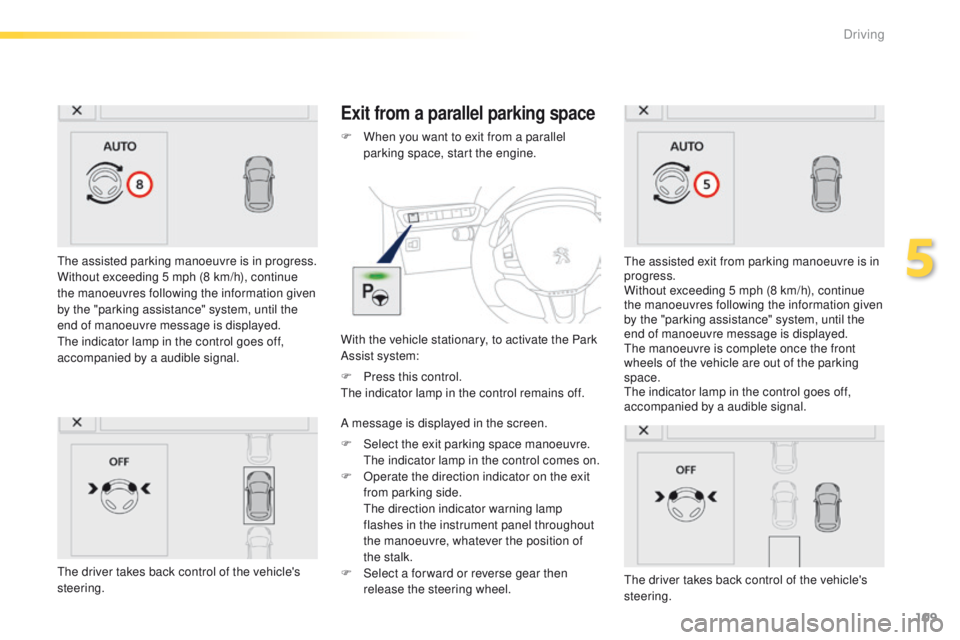
The assisted parking manoeuvre is in progress.
Without exceeding 5 mph (8 km/h), continue
the manoeuvres following the information given
by the "parking assistance" system, until the
end of manoeuvre message is displayed.
The indicator lamp in the control goes off,
accompanied by a audible signal.
Exit from a parallel parking space
With the vehicle stationary, to activate the Park
Assist system: F
W
hen you want to exit from a parallel
parking space, start the engine.
The assisted exit from parking manoeuvre is in
progress.
Without exceeding 5 mph (8 km/h), continue
the manoeuvres following the information given
by the "parking assistance" system, until the
end of manoeuvre message is displayed.
The manoeuvre is complete once the front
wheels of the vehicle are out of the parking
space.
The indicator lamp in the control goes off,
accompanied by a audible signal.
The driver takes back control of the vehicle's
steering.
F
P
ress this control.
The indicator lamp in the control remains off.
A message is displayed in the screen.
F
S
elect the exit parking space manoeuvre.
T
he indicator lamp in the control comes on.
F
O
perate the direction indicator on the exit
from parking side.
T
he direction indicator warning lamp
flashes in the instrument panel throughout
the manoeuvre, whatever the position of
the stalk.
F
S
elect a for ward or reverse gear then
release the steering wheel.
The driver takes back control of the vehicle's
steering.
5
Driving
Page 112 of 340
110
2008_en_Chap05_conduite_ed01-2015
In bad weather and in winter, ensure
that the sensors are not covered by
road dirt, ice or snow.
In the event of a fault, have the system
checked by a PEUGEOT dealer or a
qualified workshop.
If the system is deactivated during a
manoeuvre, the drive should reactivate
it manually to repeat the measurement. If the lateral distance between your vehicle
and the space is too great, the system may
not be able to measure the space.
Anything projecting beyond the envelope
of the vehicle (long or wide load) is not
taken into account by the Park Assist
system during a manoeuvre.
Deactivation
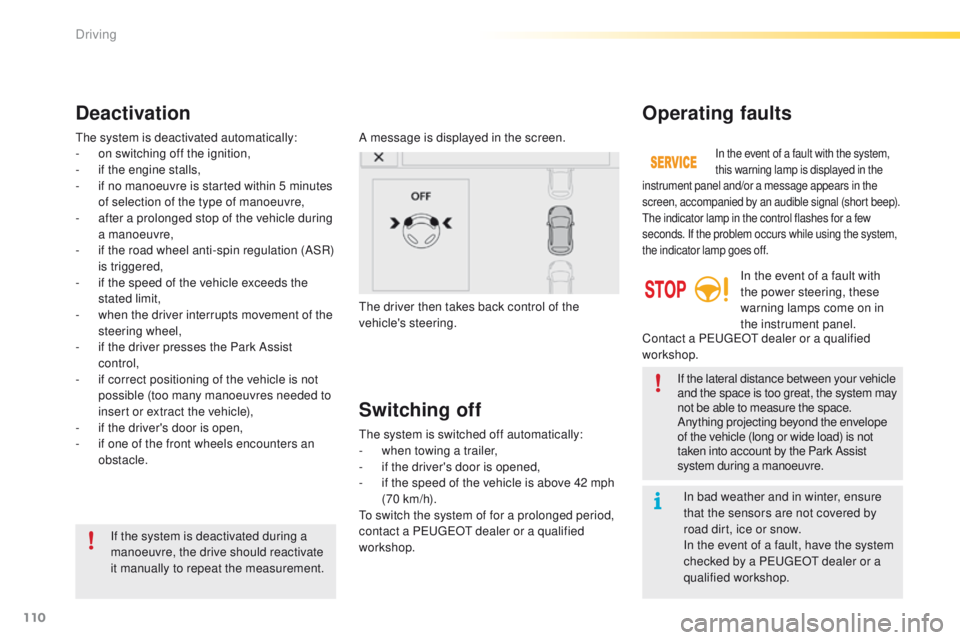
A message is displayed in the screen.
The driver then takes back control of the
vehicle's steering.
The system is deactivated automatically:
-
o
n switching off the ignition,
-
i
f the engine stalls,
-
i
f no manoeuvre is started within 5 minutes
of selection of the type of manoeuvre,
-
a
fter a prolonged stop of the vehicle during
a manoeuvre,
-
i
f the road wheel anti-spin regulation (ASR)
is triggered,
-
i
f the speed of the vehicle exceeds the
stated limit,
-
w
hen the driver interrupts movement of the
steering wheel,
-
i
f the driver presses the Park Assist
control,
-
i
f correct positioning of the vehicle is not
possible (too many manoeuvres needed to
insert or extract the vehicle),
-
i
f the driver's door is open,
-
i
f one of the front wheels encounters an
obstacle.
Switching off
The system is switched off automatically:
- w hen towing a trailer,
-
i
f the driver's door is opened,
-
i
f the speed of the vehicle is above 42 mph
(70 km/h).
To switch the system of for a prolonged period,
contact a PEUGEOT dealer or a qualified
workshop.
Operating faults
In the event of a fault with the system,
this warning lamp is displayed in the
instrument panel and/or a message appears in the
screen, accompanied by an audible signal (short beep).
The indicator lamp in the control flashes for a few
seconds. If the problem occurs while using the system,
the indicator lamp goes off.
In the event of a fault with
the power steering, these
warning lamps come on in
the instrument panel.
Contact a PEUGEOT dealer or a qualified
workshop.
Driving