navigation PEUGEOT 2008 2015 Owner's Manual
[x] Cancel search | Manufacturer: PEUGEOT, Model Year: 2015, Model line: 2008, Model: PEUGEOT 2008 2015Pages: 340, PDF Size: 8.4 MB
Page 255 of 340
253
2008_en_Chap12b_SMEGplus_ed01-2015
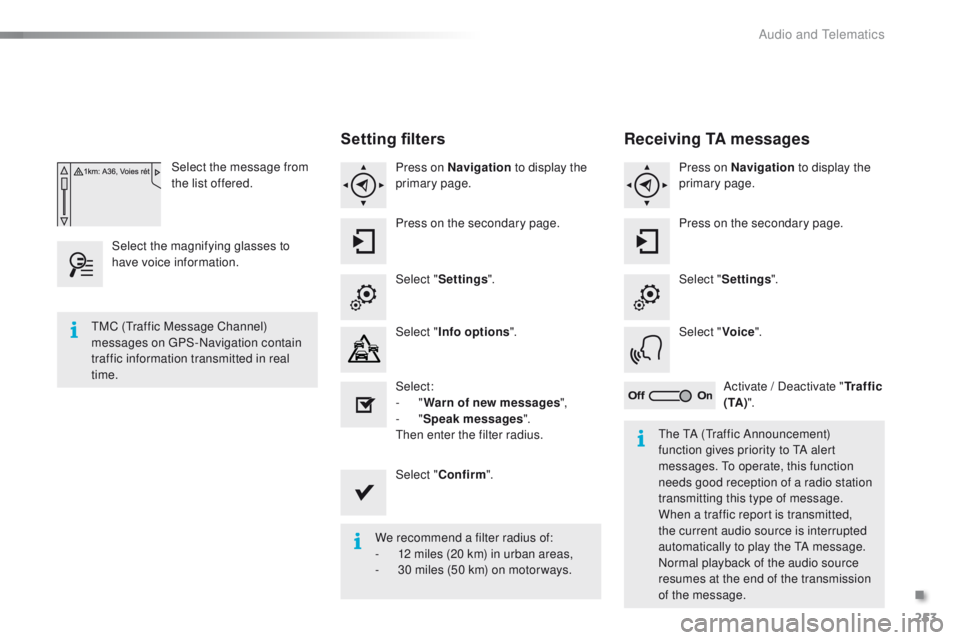
Select the message from
the list offered.
Select the magnifying glasses to
have voice information.
Setting filters
Press on Navigation to display the
primary page.
Press on the secondary page.
Select " Settings ".
Select " Info options ".
Select:
-
"Warn of new messages ",
-
"Speak messages ".
Then enter the filter radius.
Select " Confirm ".
We recommend a filter radius of:
-
1
2 miles (20 km) in urban areas,
-
3
0 miles (50 km) on motor ways.
TMC (Traffic Message Channel)
messages on GPS-Navigation contain
traffic information transmitted in real
time.
The TA (Traffic Announcement)
function gives priority to TA alert
messages. To operate, this function
needs good reception of a radio station
transmitting this type of message.
When a traffic report is transmitted,
the current audio source is interrupted
automatically to play the TA message.
Normal playback of the audio source
resumes at the end of the transmission
of the message.
Receiving TA messages
Press on Navigation to display the
primary page.
Press on the secondary page.
Select " Settings ".
Select " Voice".
Activate / Deactivate " Tr a f f i c
( TA ) ".
.
Audio and Telematics
Page 271 of 340
269
2008_en_Chap12b_SMEGplus_ed01-2015
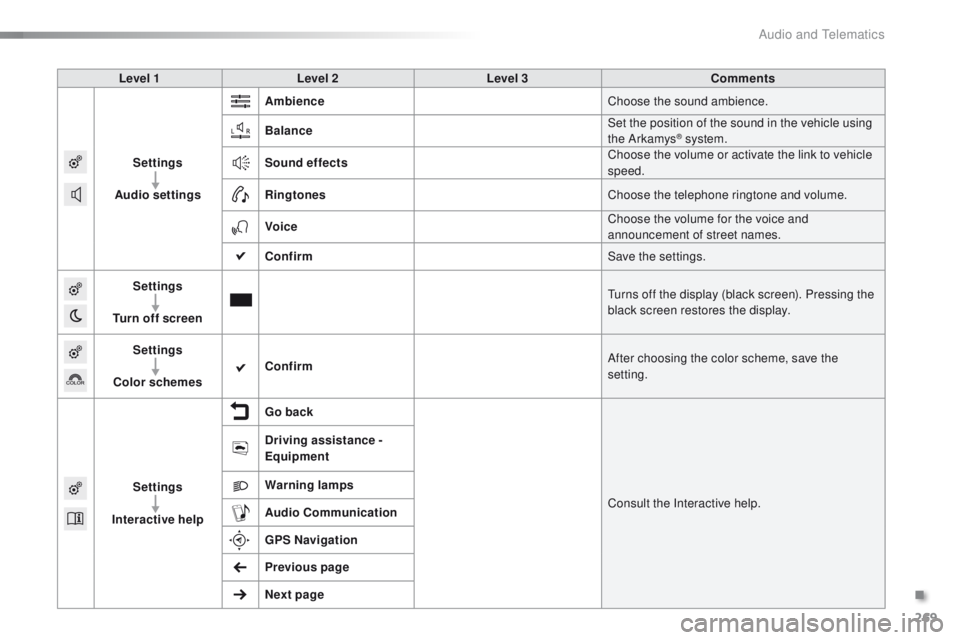
Level 1Level 2 Level 3 Comments
Settings
Audio settings Ambience
Choose the sound ambience.
Balance Set the position of the sound in the vehicle using
the Arkamys
® system.
Sound effects Choose the volume or activate the link to vehicle
speed.
Ringtones Choose the telephone ringtone and volume.
Voice Choose the volume for the voice and
announcement of street names.
Confirm Save the settings.
Settings
Turn off screen Turns off the display (black screen). Pressing the
black screen restores the display.
Settings
Color schemes Confirm
After choosing the color scheme, save the
setting.
Settings
Interactive help Go back
Consult the Interactive help.
Driving assistance -
Equipment
Warning lamps
Audio
Communication
GPS Navigation
Previous page
Next page
.
Audio and Telematics
Page 280 of 340
278
2008_en_Chap12b_SMEGplus_ed01-2015
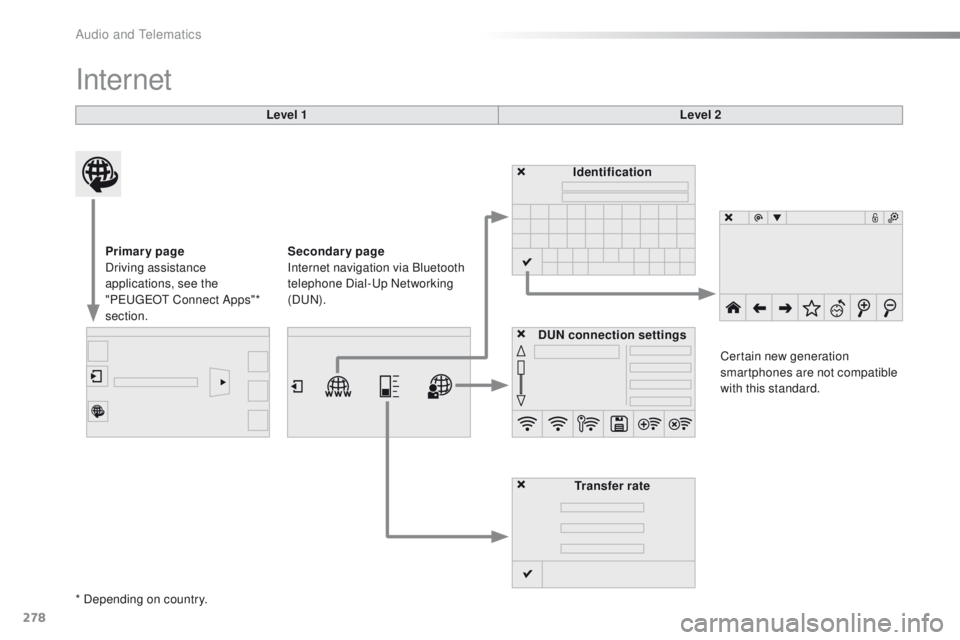
Internet
Level 1Level 2
Primary page
Driving assistance
applications, see the
"PEUGEOT Connect Apps"*
section. Identification
DUN connection settings Transfer rate Certain new generation
smartphones are not compatible
with this standard.
Secondary page
Internet navigation via Bluetooth
telephone Dial-Up Networking
(DUN).
* Depending on country.
Audio and Telematics
Page 290 of 340

288
2008_en_Chap12b_SMEGplus_ed01-2015
Frequently asked questions
The following table groups together the answers to the most frequently asked questions concerning your audio system.QUESTION ANSWER SOLUTION
The route calculation is
not successful. The route settings may conflict with the current location (exclusion
of toll roads on a toll motor way). Check the route settings in the "Navigation"
menu.
The POIs do not appear. The POIs have not been selected. Select the POIs in the list of POIs.
The Hazard zone audible
warning does not work. The audible warning is not active.
Activate audible warnings in the "Navigation"
menu.
The system does not
suggest a detour around
an incident on the route. The guidance criteria do not take account of TMC messages. Select the "Traffic info" function in the list of route
settings.
I receive an Accident-
prone area alert which is
not on my route. Other than guidance, the system announces all Hazard zones
positioned in a cone located in front of the vehicle. It may provide
an alert for a Hazard zone located on nearby or parallel roads.
Zoom in on the map to view the exact position of the
Accident-prone area. Select "On the route" to no
longer receive alerts other than navigation instructions
or to reduce the time for the announcement.
Navigation
Audio and Telematics
Page 300 of 340
298
2008_en_Chap12c_RDE2_ed01-2015
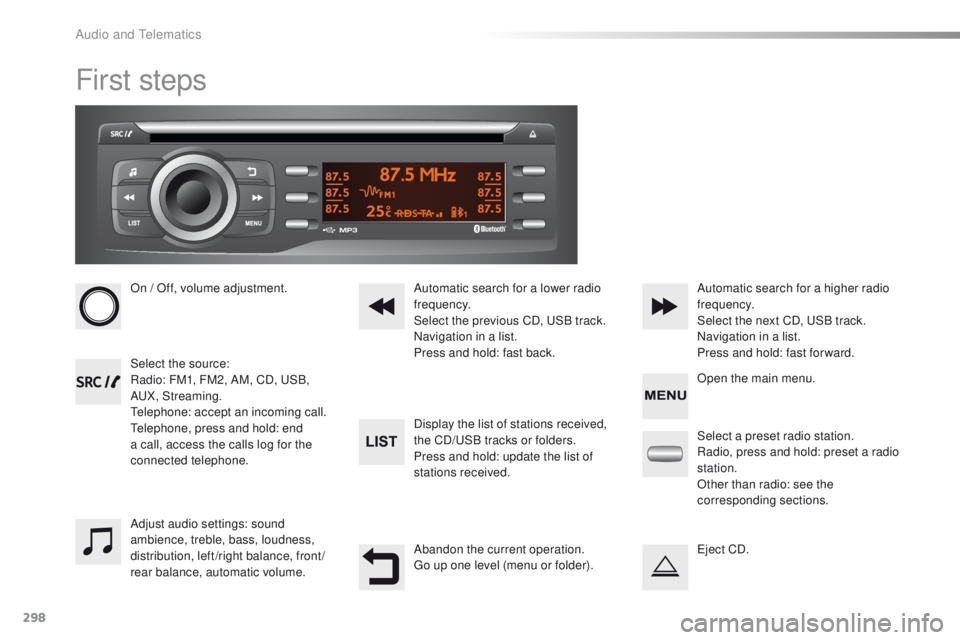
First steps
On / Off, volume adjustment.
Select the source:
Radio: FM1, FM2, AM, CD, USB,
AUX, Streaming.
Telephone: accept an incoming call.
Telephone, press and hold: end
a call, access the calls log for the
connected telephone.Display the list of stations received,
the CD/USB tracks or folders.
Press and hold: update the list of
stations received. Automatic search for a lower radio
frequency.
Select the previous CD, USB track.
Navigation in a list.
Press and hold: fast back.Automatic search for a higher radio
frequency.
Select the next CD, USB track.
Navigation in a list.
Press and hold: fast for ward.
Adjust audio settings: sound
ambience, treble, bass, loudness,
distribution, left/right balance, front/
rear balance, automatic volume. Abandon the current operation.
Go up one level (menu or folder).Select a preset radio station.
Radio, press and hold: preset a radio
station.
Other than radio: see the
corresponding sections.
Eject CD. Open the main menu.
Audio and Telematics
Page 320 of 340
318
2008_en_Chap12d_RDE1_ed01-2015
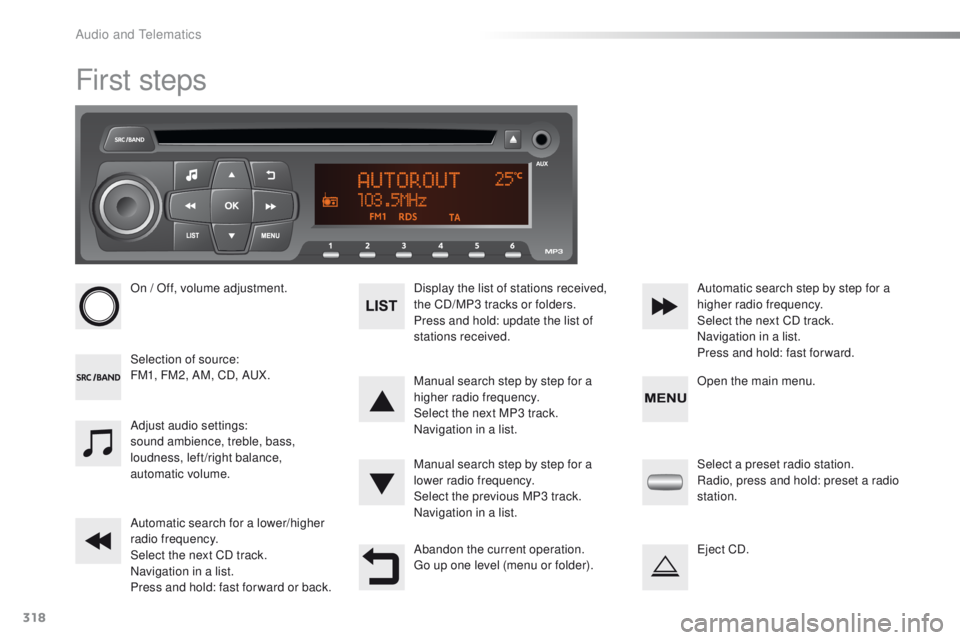
First steps
On / Off, volume adjustment.
Selection of source:
FM1, FM2, AM, CD, AUX.Display the list of stations received,
the CD/MP3 tracks or folders.
Press and hold: update the list of
stations received.
Manual search step by step for a
higher radio frequency.
Select the next MP3 track.
Navigation in a list.
Manual search step by step for a
lower radio frequency.
Select the previous MP3 track.
Navigation in a list.
Automatic search for a lower/higher
radio frequency.
Select the next CD track.
Navigation in a list.
Press and hold: fast for ward or back. Automatic search step by step for a
higher radio frequency.
Select the next CD track.
Navigation in a list.
Press and hold: fast for ward.
Adjust audio settings:
sound ambience, treble, bass,
loudness, left/right balance,
automatic volume.
Abandon the current operation.
Go up one level (menu or folder).Select a preset radio station.
Radio, press and hold: preset a radio
station.
Eject CD. Open the main menu.
Audio and Telematics