AUX PEUGEOT 2008 2016 User Guide
[x] Cancel search | Manufacturer: PEUGEOT, Model Year: 2016, Model line: 2008, Model: PEUGEOT 2008 2016Pages: 450, PDF Size: 14.16 MB
Page 291 of 450
289
2008_en_Chap12b_SMEGplus_ed01-2016
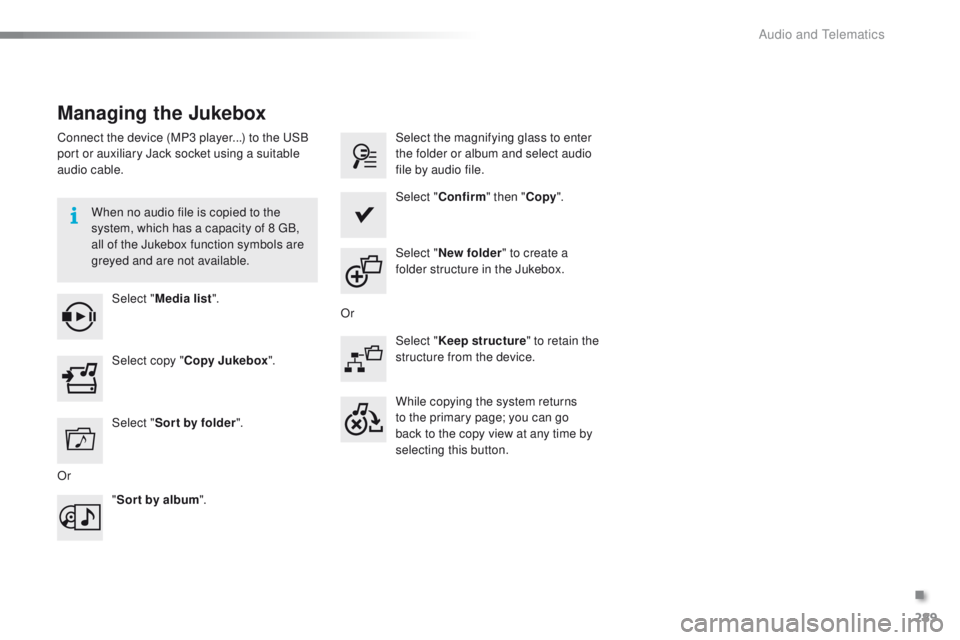
Managing the Jukebox
Connect the device (MP3 player...) to the USB
port or auxiliary Jack socket using a suitable
audio cable.When no audio file is copied to the
system, which has a capacity of 8 GB,
all of the Jukebox function symbols are
greyed and are not available.Select " Media list ". Select the magnifying glass to enter
the folder or album and select audio
file by audio file.
Select copy " Copy Jukebox ". Select "
Confirm " then "Copy".
Select " Sor t by folder ". Select "
New folder " to create a
folder structure in the Jukebox.
" Sor t by album ". Select "
Keep structure " to retain the
structure from the device.
While copying the system returns
to the primary page; you can go
back to the copy view at any time by
selecting this button.
Or Or
.
Audio and Telematics
Page 330 of 450
328
2008_en_Chap12c_RDE2_ed01-2016
First steps
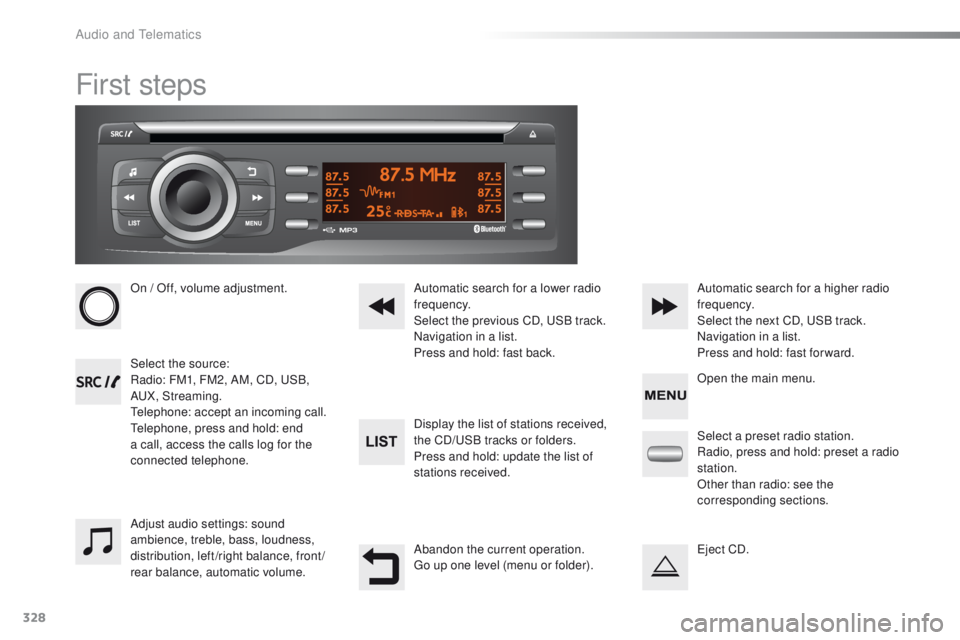
On / Off, volume adjustment.
Select the source:
Radio: FM1, FM2, AM, CD, USB,
AUX, Streaming.
Telephone: accept an incoming call.
Telephone, press and hold: end
a call, access the calls log for the
connected telephone.Display the list of stations received,
the CD/USB tracks or folders.
Press and hold: update the list of
stations received. Automatic search for a lower radio
frequency.
Select the previous CD, USB track.
Navigation in a list.
Press and hold: fast back.Automatic search for a higher radio
frequency.
Select the next CD, USB track.
Navigation in a list.
Press and hold: fast for ward.
Adjust audio settings: sound
ambience, treble, bass, loudness,
distribution, left/right balance, front/
rear balance, automatic volume. Abandon the current operation.
Go up one level (menu or folder).Select a preset radio station.
Radio, press and hold: preset a radio
station.
Other than radio: see the
corresponding sections.
Eject CD. Open the main menu.
Audio and Telematics
Page 334 of 450
332
2008_en_Chap12c_RDE2_ed01-2016
Media
USB player
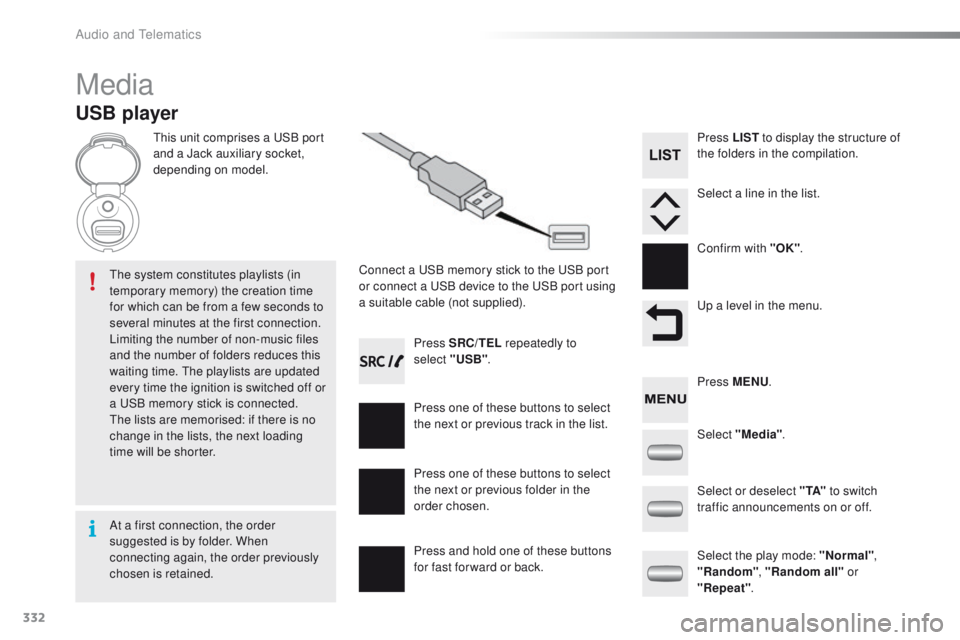
This unit comprises a USB port
and a Jack auxiliary socket,
depending on model.Connect a USB memory stick to the USB port
or connect a USB device to the USB port using
a suitable cable (not supplied).
The system constitutes playlists (in
temporary memory) the creation time
for which can be from a few seconds to
several minutes at the first connection.
Limiting the number of non-music files
and the number of folders reduces this
waiting time. The playlists are updated
every time the ignition is switched off or
a USB memory stick is connected.
The lists are memorised: if there is no
change in the lists, the next loading
time will be shorter. Press SRC/TEL
repeatedly to
select "USB" .
Press one of these buttons to select
the next or previous track in the list.
Press and hold one of these buttons
for fast for ward or back. Press one of these buttons to select
the next or previous folder in the
order chosen. Press LIST
to display the structure of
the folders in the compilation.
Select a line in the list.
Confirm with "OK" .
Up a level in the menu.
Select "Media" .
Select the play mode: "Normal" ,
"Random" , "Random all" or
"Repeat" .
Select or deselect " TA"
to switch
traffic announcements on or off. Press MENU .
At a first connection, the order
suggested is by folder. When
connecting again, the order previously
chosen is retained.
Audio and Telematics
Page 335 of 450
333
2008_en_Chap12c_RDE2_ed01-2016
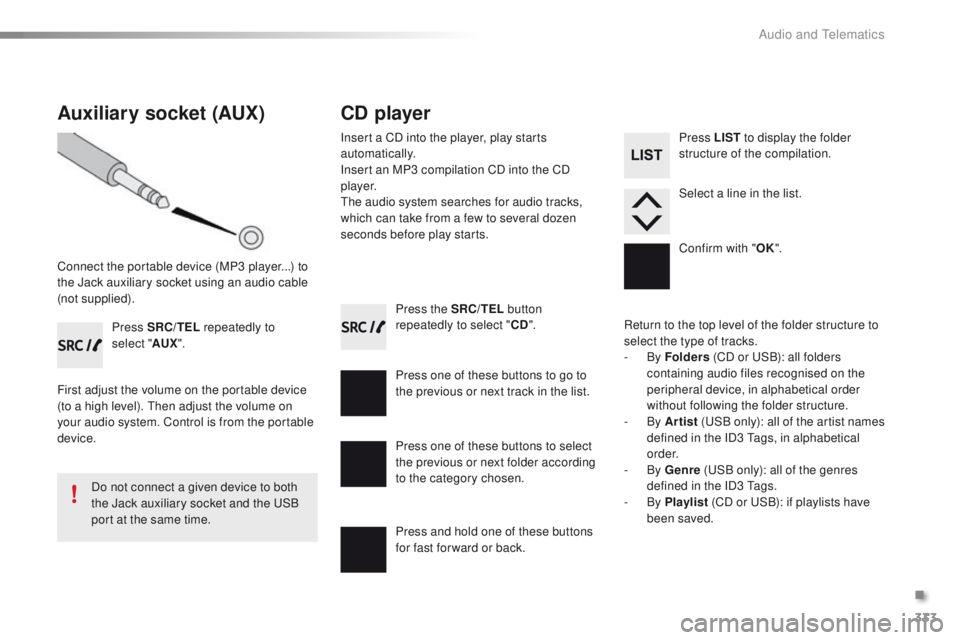
Press the SRC/TEL button
repeatedly to select " CD".
Press one of these buttons to go to
the previous or next track in the list.
Press and hold one of these buttons
for fast for ward or back.
Auxiliary socket (AUX)
Connect the portable device (MP3 player...) to
the Jack auxiliary socket using an audio cable
(not supplied). Press SRC/TEL repeatedly to
select " AUX".
First adjust the volume on the portable device
(to a high level). Then adjust the volume on
your audio system. Control is from the portable
device.
Do not connect a given device to both
the Jack auxiliary socket and the USB
port at the same time.
CD player
Insert a CD into the player, play starts
automatically.
Insert an MP3 compilation CD into the CD
p l aye r.
The audio system searches for audio tracks,
which can take from a few to several dozen
seconds before play starts.
Press one of these buttons to select
the previous or next folder according
to the category chosen. Press LIST
to display the folder
structure of the compilation.
Select a line in the list.
Confirm with " OK".
Return to the top level of the folder structure to
select the type of tracks.
-
By Folders (CD or USB): all folders
containing audio files recognised on the
peripheral device, in alphabetical order
without following the folder structure.
-
By Artist (USB only): all of the artist names
defined in the ID3 Tags, in alphabetical
o r d e r.
-
By Genre (USB only): all of the genres
defined in the ID3 Tags.
-
By Playlist (CD or USB): if playlists have
been saved.
.
Audio and Telematics
Page 350 of 450
348
2008_en_Chap12d_RDE1_ed01-2016
First steps
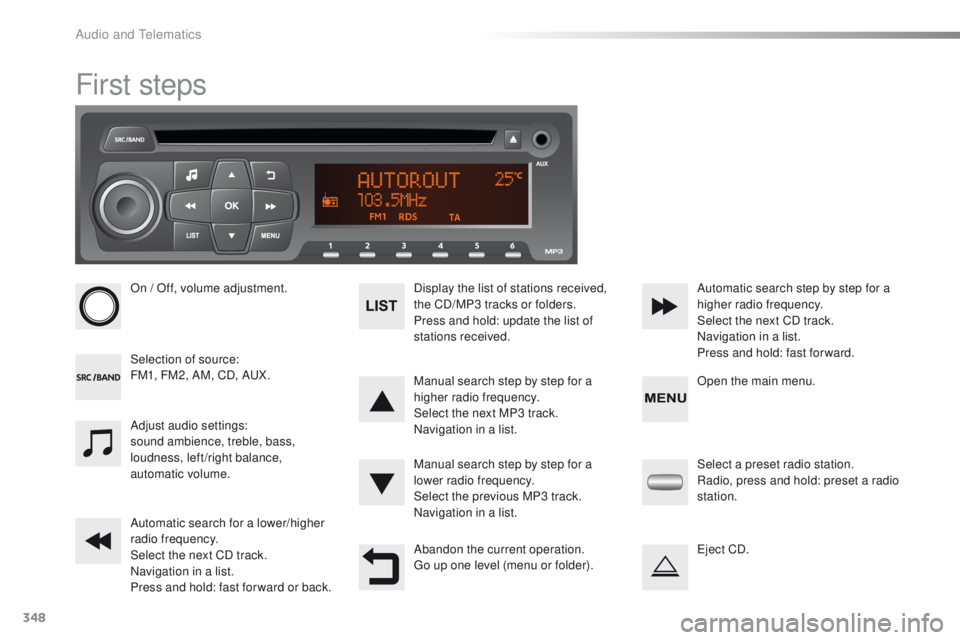
On / Off, volume adjustment.
Selection of source:
FM1, FM2, AM, CD, AUX.Display the list of stations received,
the CD/MP3 tracks or folders.
Press and hold: update the list of
stations received.
Manual search step by step for a
higher radio frequency.
Select the next MP3 track.
Navigation in a list.
Manual search step by step for a
lower radio frequency.
Select the previous MP3 track.
Navigation in a list.
Automatic search for a lower/higher
radio frequency.
Select the next CD track.
Navigation in a list.
Press and hold: fast for ward or back. Automatic search step by step for a
higher radio frequency.
Select the next CD track.
Navigation in a list.
Press and hold: fast for ward.
Adjust audio settings:
sound ambience, treble, bass,
loudness, left/right balance,
automatic volume.
Abandon the current operation.
Go up one level (menu or folder).Select a preset radio station.
Radio, press and hold: preset a radio
station.
Eject CD. Open the main menu.
Audio and Telematics
Page 354 of 450
352
2008_en_Chap12d_RDE1_ed01-2016
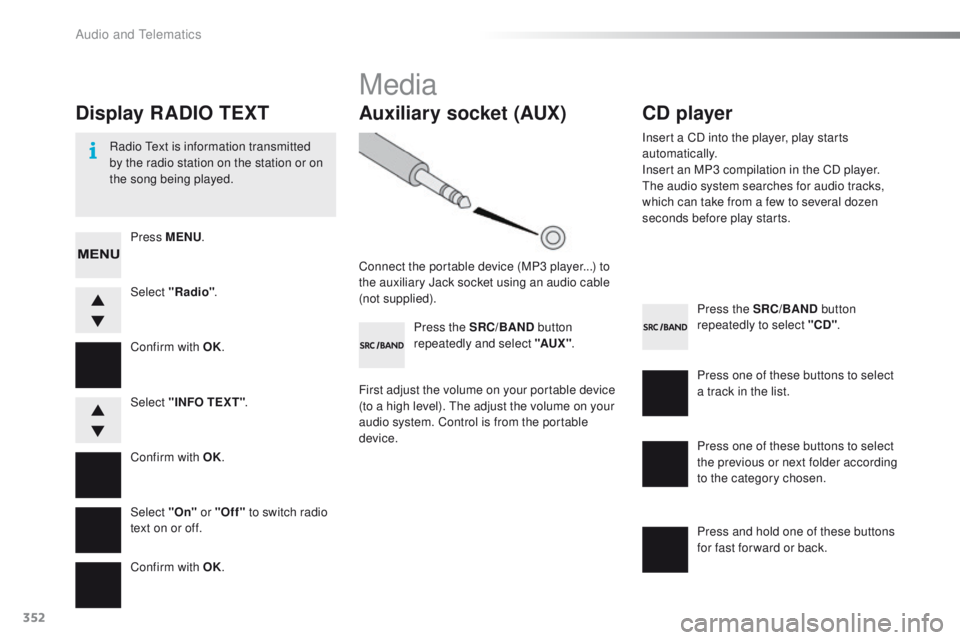
Press the SRC/BAND button
repeatedly to select "CD" .
Press one of these buttons to select
a track in the list.
Press and hold one of these buttons
for fast for ward or back.
Auxiliary socket (AUX)
Connect the portable device (MP3 player...) to
the auxiliary Jack socket using an audio cable
(not supplied). Press the SRC/BAND button
repeatedly and select "AUX " .
First adjust the volume on your portable device
(to a high level). The adjust the volume on your
audio system. Control is from the portable
device.
CD player
Insert a CD into the player, play starts
automatically.
Insert an MP3 compilation in the CD player.
The audio system searches for audio tracks,
which can take from a few to several dozen
seconds before play starts.
Press one of these buttons to select
the previous or next folder according
to the category chosen.
Display RADIO TEXT
Radio Text is information transmitted
by the radio station on the station or on
the song being played.Select "Radio" .
Select "On" or "Off" to switch radio
text on or off. Select "INFO TEXT" .
Press MENU
.
Confirm with OK.
Confirm with OK.
Confirm with OK.
Media
Audio and Telematics
Page 361 of 450
359
2008_en_Chap13_index-alpha_ed01-2016
Accessories .......................................... 13 4, 231
Active City Brake ........................................... 14
5
AdBlue
® ............................... ............24, 175, 180
Adjusting headlamps .................................... 124
Adjusting head restraints
................................ 57
Adjusting seats
................................................ 56
Adjusting the air distribution
.....................66, 69
Adjusting the air flow
................................. 65, 69
Adjusting the date
........................................... 42
Adjusting the height and reach of the steering wheel
.......................... 59
A
djusting the seat
belt height
...............................
....................149
Adjusting the temperature
........................ 6
5, 68
Adjusting the time
........................................... 42
Advice on care and maintenance
............................................... 23
0
Advice on driving
.................................... 79, 224
Airbags
.................................................... 27, 152
Airbags, curtain
..................................... 15
4, 155
Airbags, front ......................................... 152, 155
Airbags, lateral
...................................... 15 4, 155
Air conditioning
............................................... 12
Air conditioning, digital
............................. 67, 70
Air conditioning, manual
........................... 65, 70
Air filter
.......................................................... 240
Air intake
................................................... 66, 69
Air vents
.......................................................... 62
Alarm
......................................................... 43, 52
Anti-lock braking system (ABS)
.............................................. 14
0
Anti-theft
................................................... 45, 47
Armrest, front
.................................................. 72
Assistance call
...................................... 13 6, 25 5
Assistance, emergency braking
...............
......................................... 140
Audible warning
............................................ 13 6
Audio streaming (Bluetooth)
........ 2
86, 288, 335Battery
...................................................214, 240
Battery, charging
...........................................216
Battery, remote control
............................. 4
6, 47
Blind
..............................................................13 3
BlueHDi
.........................................................175
Bluetooth (telephone)
............................314, 3 3 6
Bonnet
...........................................................234
Boot
...........................................................50, 75
Brake discs
.................................................... 2
41
Brake lamps
...............................
...................206
Brake pads
....................................................2 41
Brake warning lamp
........................................22
Braking assistance system
...........................14
0
Bulbs (changing)
...............................
............202
A
B
CarPlay connection ....................................... 307
CD ................................................ 286, 332, 352
Central locking
.......................................... 4 3 , 51
Changing a bulb
................................... 202, 206
Changing a fuse
............................................ 208
Changing a wheel
................................. 19 4, 195
Changing a wiper blade
........................129, 2 20
Changing the remote control battery ............................................... 46
Checking levels
...................................... 23
7-239
Checking the engine oil level
..................31, 237
Checking tyre pressures (using the kit)
..............................
........18 6, 193
Checks
...............
................................... 2 3 5 - 2 41
Child lock
...............................
........................169
Children (safety)
..................... 15
1, 153, 15 6 -16 0
Child seats
..............................
..............161-168
Child seats, conventional
..............................161
Child seats, ISOFIX
...................................... 16
7
Cleaning (advice)
.......................................... 23
0
Closing the boot
.............................................. 50
Closing the doors
............................................ 48
Connected services
...................................... 29
8
Connection, Bluetooth
..................300, 314, 335
Connection, MirrorLink
.................................302
Connection, Wi-Fi network
...........................300
Control, electric windows
................................54
Control, emergency boot release
...................50
Control, heated seats
...................................... 57
Controls, at steering..................... 260, 329, 349
Control stalk, lighting
.................................... 11
7
Control stalk, wipers
..................................... 127
Coolant level
................................................. 238
Courtesy lamps
............................................. 131
Cover, load space
............................................................ 77
Cruise control
........................................ 10
6, 108
Cup holder
...............................
........................71
Audio system
(r adi o)
.................................................. 327, 347
Automatic illumination of headlamps
.............................................. 118
Auxiliary socket
...................... 73, 286, 333, 352
Cable, audio
................................. 286, 333, 352
Capacity, fuel tank
..............................
.......... 170
C
.
Alphabetical index
Page 363 of 450
361
2008_en_Chap13_index-alpha_ed01-2016
Labels, identification .....................................25 3
LED daytime running lamps .........................204Level, brake fluid
...........................................
2
37
Level, Diesel additive
....................................
239
Level, engine coolant
..............................
33, 238
Level, engine oil
...............................
.......
31, 237
Levels and checks ................................
235-239
Light-emitting diodes - LEDs
........................
206
Lighting control stalk
.....................................
12 2
Lighting dimmer
..............................
..............
13 0
Lighting, guide-me home
................
4 5, 12 2, 123
Lighting, interior
............................................
131
Lighting, mood
..............................................
132
Loading
...................................................
12, 23 0
Load reduction mode
....................................
219
Locating your vehicle
...................................... 45
Lo
cking
............................................................
43
Locking the boot.............................................. 50
Low fuel level ..........................................
26, 170
Luggage retaining strap
..................................
75Navigation
.....................................................
262
Net, high load retaining
...................................
76
Net, storage ..................................................... 75
Number plate lamps
...................................... 2
07
Oil filter
...............
...........................................
240
Oil level .......................................................... 237
Opening the bonnet
...................................... 23
4
Opening the boot
..............................
..............
50
Opening the doors
...............................
...........
48
Opening the fuel filler flap
.............................
17
0
Opening the roof blind
..................................
13 3
K
L
M
N
Keeping children safe ............15 1, 153, 15 6 -16 0
Key with remote control ..................................43
Kit, hands-free
...................................... 314, 3 3 6
Kit, temporary puncture repair
..............183, 188 Maintenance (advice)
....................................
230
Maintenance, routine ..............................
12, 23 5
Map reading lamps .......................................131
Markings, identification
.................................253
Mat
..................................................................74
Menu (touch screen)
............261, 262, 264, 268,
276, 278, 280, 290, 292, 294, 310, 312
Mirror, rear view
..............................................61
Mirrors, door .................................................... 60
Misfuel prevention
...............................
..........172
Mountings, Isofix
...........................................165
MP3 CD
.................................................332, 352
Indicators, direction
.....................
135, 203, 206
Inflating tyres
..........................................
12, 25 3
Inflating tyres and accessories (using the kit)
..............................
........
18 6, 193
Input, auxiliary
........................ 7
3, 286, 333, 352
Instrument panels
.....................................
14, 15
Instrument panel screen
............... 1
4, 15, 38, 99
Internet browser
............................................
299
ISOFIX child seats
...............................
.........
167
Isofix mountings
...............................
.............
165
Jack
........
.......................................................
19 4
Jukebox
.........................................................
289
Jump starting
..............................
..................
215
J
O
P
Pads, brake ................................................... 2 41
Paint colour code .......................................... 253
Panoramic glass sunroof
..............................13 3
Park Assist
.................................................... 113
Parking brake
.......................................... 8 2 , 2 41
Parking lamps
............................................... 12 2
Parking sensors, front
...................................111
Parking sensors, rear .................................... 11 0
Passenger compartment filter
......................240
.
Alphabetical index
Page 389 of 450
15
2008-additif_en_Chap12b_SMEGplus_ed01-2016
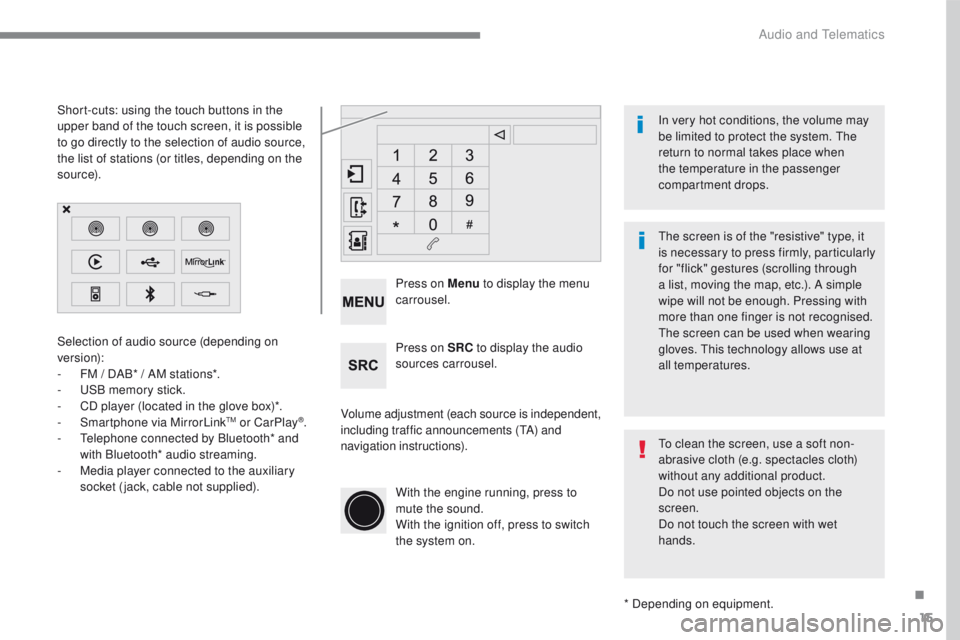
Selection of audio source (depending on
version):
-
FM / D
AB* / AM stations*.
-
US
B memory stick.
-
CD p
layer (located in the glove box)*.
-
Sm
artphone via MirrorLink
TM or CarPlay®.
- Te
lephone connected by Bluetooth* and
with Bluetooth* audio streaming.
-
Me
dia player connected to the auxiliary
socket (jack, cable not supplied).
* Depending on equipment.
Short-cuts: using the touch buttons in the
upper
b
and of the touch screen, it is possible
to go directly to the selection of audio source,
the list of stations (or titles, depending on the
s o u r c e).
The screen is of the "resistive" type, it
is necessary to press firmly, particularly
for "flick" gestures (scrolling through
a list, moving the map, etc.). A simple
wipe will not be enough. Pressing with
more than one finger is not recognised.
The screen can be used when wearing
gloves. This technology allows use at
all temperatures. In very hot conditions, the volume may
be limited to protect the system. The
return to normal takes place when
the temperature in the passenger
compartment drops.
To clean the screen, use a soft non-
abrasive cloth (e.g. spectacles cloth)
without any additional product.
Do not use pointed objects on the
screen.
Do not touch the screen with wet
hands.
Volume adjustment (each source is independent,
including traffic announcements (
TA) and
navigation instructions). Press on Menu
to display the menu
carrousel.
Press on SRC to display the audio
sources carrousel.
With the engine running, press to
mute the sound.
With the ignition off, press to switch
the system on.
.
Audio and Telematics
Page 407 of 450
33
2008-additif_en_Chap12b_SMEGplus_ed01-2016
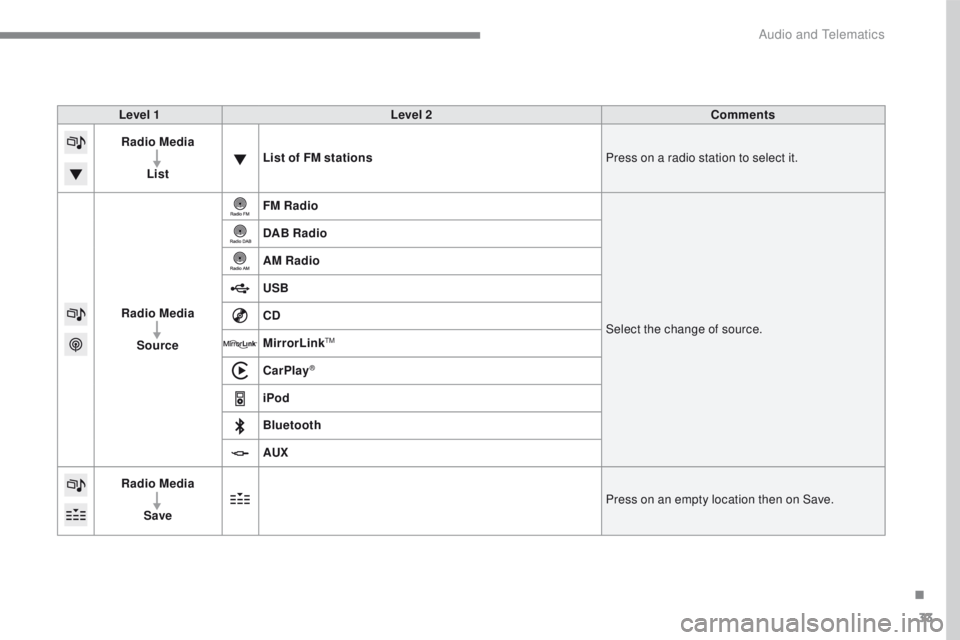
Level 1Level 2 Comments
Radio Media
List List of FM stations
Press on a radio station to select it.
Radio Media Source FM Radio
Select the change of source.
DAB Radio
AM Radio
USB
CD
MirrorLink
TM
CarPlay®
iPod
Bluetooth
AUX
Radio Media
Save Press on an empty location then on Save.
.
Audio and Telematics