reset PEUGEOT 2008 2016 Owner's Manual
[x] Cancel search | Manufacturer: PEUGEOT, Model Year: 2016, Model line: 2008, Model: PEUGEOT 2008 2016Pages: 450, PDF Size: 14.16 MB
Page 364 of 450
362
2008_en_Chap13_index-alpha_ed01-2016
Table of weights ....................................24 5, 249
Tables of engines .................................. 243, 247
Tables of fuses
.............................................. 208
Ta n k , f u e l
............................................... 170, 172
Technical data
....................................... 243-249
Telephone
............................................. 310, 33 6
Temperature, coolant
...................................... 33
T
S
Selector, gear .......................... 83, 84, 87, 91, 95
Serial number, vehicle .................................. 25
3
Service indicator
............................................. 28
Servicing
...............................
..........................12
Settings
...............
.........................290, 339, 354
Sidelamps
..................... 117, 121, 122, 204, 206
Side repeater
..............................
..................205
Snow chains
.......................................... 13
9, 201
Socket, 12 V accessory
..................................72
So
ckets, audio
.......................73, 286, 333, 352
Speed limiter
......................................... 104, 108
Starting the engine
......................................... 80
Starting using another battery
...................... 2
15
Station, radio
................................ 2
82, 330, 350
Stay, bonnet
.................................................. 234
Steering mounted controls, audio
.......................................... 260, 329, 349
Steering wheel, adjustment
............................59
Stop & Start
........................ 19, 40, 70, 100, 113,
170, 214, 218, 234, 240
Storage
...................................................... 71, 72
Stowing rings
.................................................. 75
Switching off the engine
................................. 80
S
ynchronising the remote control
...................46
Reminder, lighting on
.................................... 120
Remote control .......................................... 4
3 - 47
Removing a wheel
........................................ 197
Removing the mat
........................................... 74
Replacing bulbs
............................................ 202
Replacing fuses
..............................
.............. 208
Replacing the air filter
................................... 240
Replacing the oil filter
................................... 24
0
Replacing the passenger compartment filter
.... 240
Resetting the service indicator
....................... 30
Resetting the trip recorder
.............................. 41
Reversing camera
......................................... 112
Reversing lamp
..................................... 2
06, 207
Risk areas (update)
....................................... 273
Roof bars
....................................................... 23
0
Routine checks
..................................... 240, 241
Running out of fuel (Diesel)
.......................... 1
74
Petrol
............................................................. 173
PE
UGEOT C
onnect Assistance
................... 255
P
E
UGEOT
C
onnect Packs
........................... 255
P
E
UGEOT
C
onnect SOS
............................. 25
4
Player, Apple
® .............................. ........288, 335
Player, MP3 CD ............................ 286, 332, 352
Port, USB
....................................... 7
3, 286, 332
Pre-heater, Diesel
........................................... 18
Pressures, tyres
............................................ 253
Pre-tensioning seat belts
.............................. 151
Priming the fuel system
................................ 174
Protecting children
................. 151, 153, 15 6 -16 0
Puncture
........................................................ 183
Radio
............................................ 282, 330, 350
Radio, digital (Digital Audio Broadcasting - DAB)
................................... 284
Range, AdBlue
.............................................. 176
Range, fuel
...................................................... 40
RDS
............................................... 283, 331, 350
Rear foglamp ................................. 119, 206, 207
Rear screen, demisting
................................... 70
Recharging the battery
................................. 2
16
Recirculation, air
....................................... 66, 69
Reduction of electrical load
.......................... 219
Regeneration of the particle filter
.................24
0
Reinitialisation of the under-inflation detection system
......................................... 13 8
Reinitialising the remote control
..................... 46
R
eminder, key in ignition ................................. 81Safety, children
......................
15
1, 153, 15 6 -16 0
Screen, instrument panel
....................14, 15, 38
Screen menu map
...............262, 264, 268, 276,
278, 280, 290, 292, 294, 310, 312, 341, 355
Screenwash
..................................................126
Screenwash fluid level
..................................238
Screenwash, rear
..........................................127
SCR (Selective Catalytic Reduction)
............175
Seat belts
....................................... 1
4 9 -151, 161
Seats, front
...............................
.......................56
Seats, heated
..................................................57
Seats, rear
.......................................................58
R
Alphabetical index
Page 390 of 450
16
2008-additif_en_Chap12b_SMEGplus_ed01-2016
Steering mounted controls
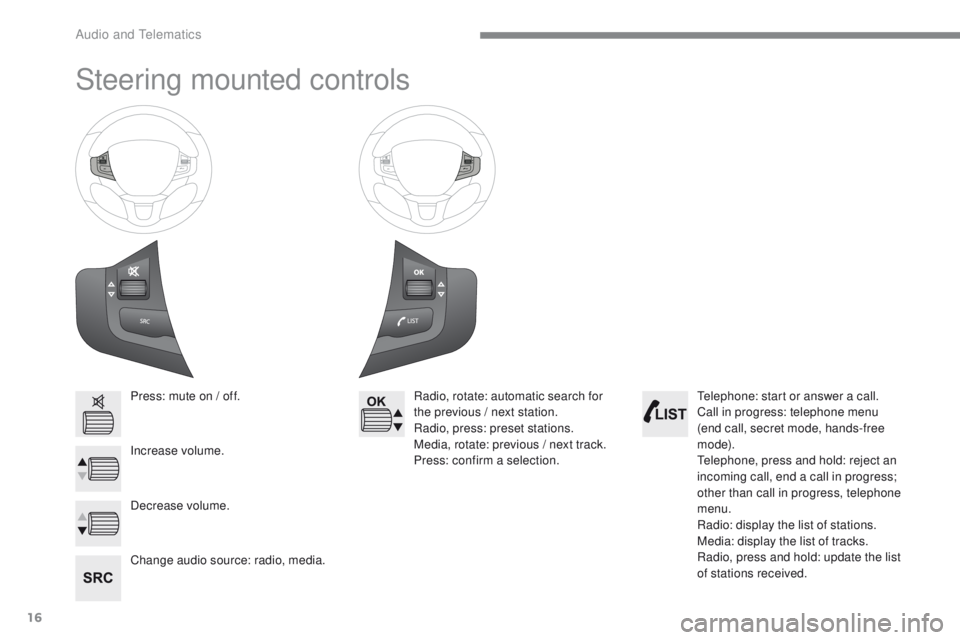
Press: mute on / off.
Increase volume.
Change audio source: radio, media.Radio, rotate: automatic search for
the previous / next station.
Radio, press: preset stations.
Media, rotate: previous / next track.
Press: confirm a selection.
Decrease volume. Telephone: start or answer a call.
Call in progress: telephone menu
(end call, secret mode, hands-free
m o d e).
Telephone, press and hold: reject an
incoming call, end a call in progress;
other than call in progress, telephone
menu.
Radio: display the list of stations.
Media: display the list of tracks.
Radio, press and hold: update the list
of stations received.
Audio and Telematics
Page 412 of 450
38
2008-additif_en_Chap12b_SMEGplus_ed01-2016
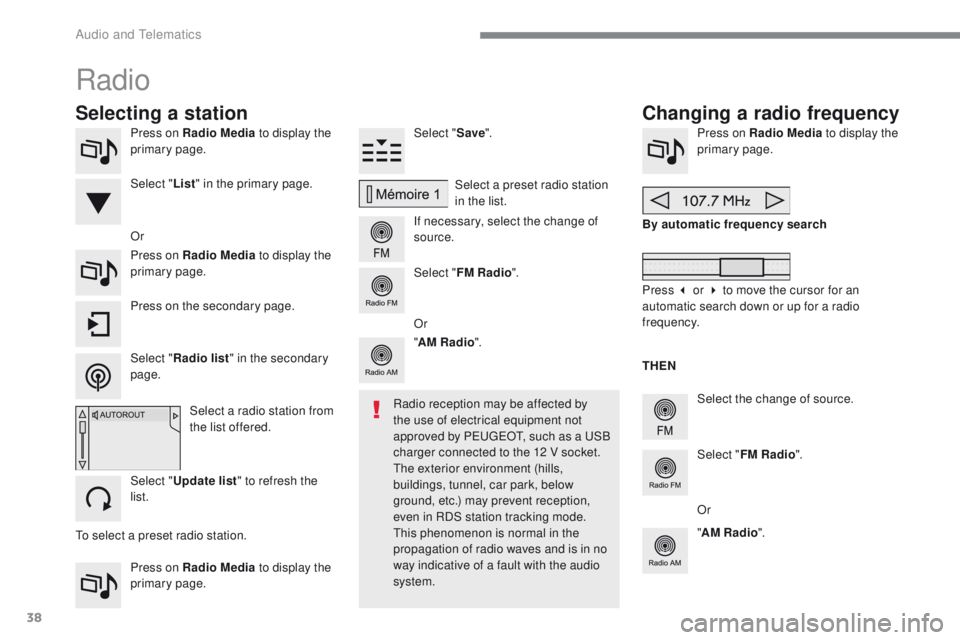
Press on Radio Media to display the
primary page.
Press on Radio Media to display the
primary page. Select "
Save".
If necessary, select the change of
source. Press on Radio Media
to display the
primary page.
Select the change of source.
"
AM Radio ". By automatic frequency search
Select "FM Radio ".
" AM Radio ".
Press on the secondary page. Or
Select a preset radio station
in the list.
Select " FM Radio ".
Select a radio station from
the list offered.
Select " Update list " to refresh the
list. Select " List" in the primary page.
Press on Radio Media to display the
primary page.
Radio
Changing a radio frequency
Selecting a station
THEN
Radio reception may be affected by
the use of electrical equipment not
approved by PEUGEOT, such as a USB
charger connected to the 12 V socket.
The exterior environment (hills,
buildings, tunnel, car park, below
ground, etc.) may prevent reception,
even in RDS station tracking mode.
This phenomenon is normal in the
propagation of radio waves and is in no
way indicative of a fault with the audio
system.
Select "
Radio list " in the secondary
page. Or
Press 3 or 4 to move the cursor for an
automatic search down or up for a radio
frequency.
Or
To select a preset radio station.
Audio and Telematics
Page 413 of 450
39
2008-additif_en_Chap12b_SMEGplus_ed01-2016
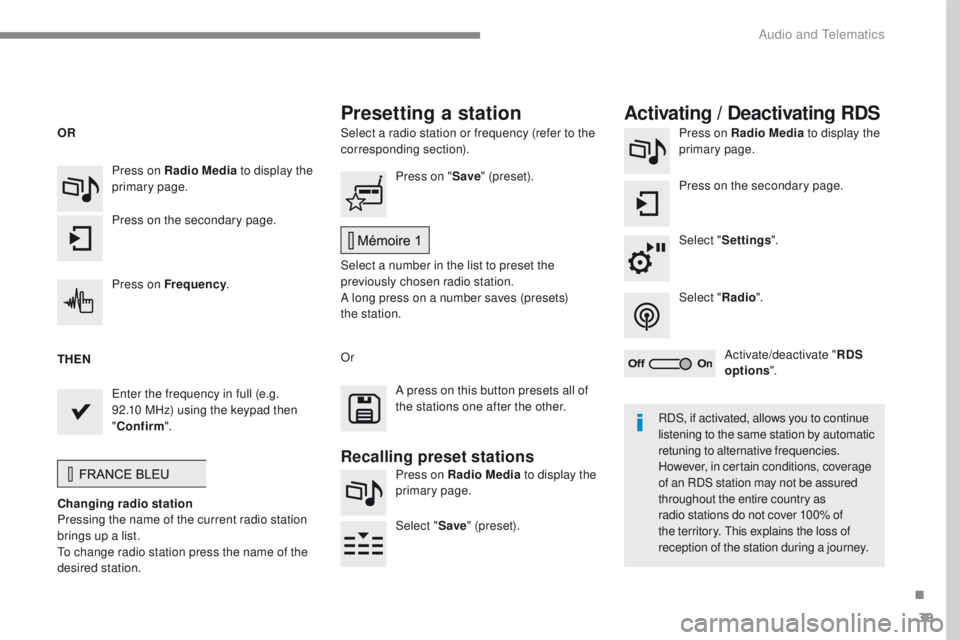
Select a radio station or frequency (refer to the
corresponding section).Press on Radio Media
to display the
primary page.
Press on the secondary page.
Select " Settings ".
Select " Radio".
Activate/deactivate " RDS
options ".
Press on Radio Media
to display the
primary page.
Press on the secondary page. Press on "
Save" (preset).
Select a number in the list to preset the
previously chosen radio station.
A long press on a number saves (presets)
the station.
Press on Frequency
.
Enter the frequency in full (e.g.
92.10 MHz) using the keypad then
" Confirm ".
Changing radio station
Pressing the name of the current radio station
brings up a list.
To change radio station press the name of the
desired station. Or
Press on Radio Media to display the
primary page.
Select " Save" (preset).
Presetting a station Activating / Deactivating RDS
OR
THEN
A press on this button presets all of
the stations one after the other.
Recalling preset stations
RDS, if activated, allows you to continue
listening to the same station by automatic
retuning to alternative frequencies.
However, in certain conditions, coverage
of an RDS station may not be assured
throughout the entire country as
radio stations do not cover 100% of
the territory. This explains the loss of
reception of the station during a journey.
.
Audio and Telematics
Page 414 of 450
40
2008-additif_en_Chap12b_SMEGplus_ed01-2016
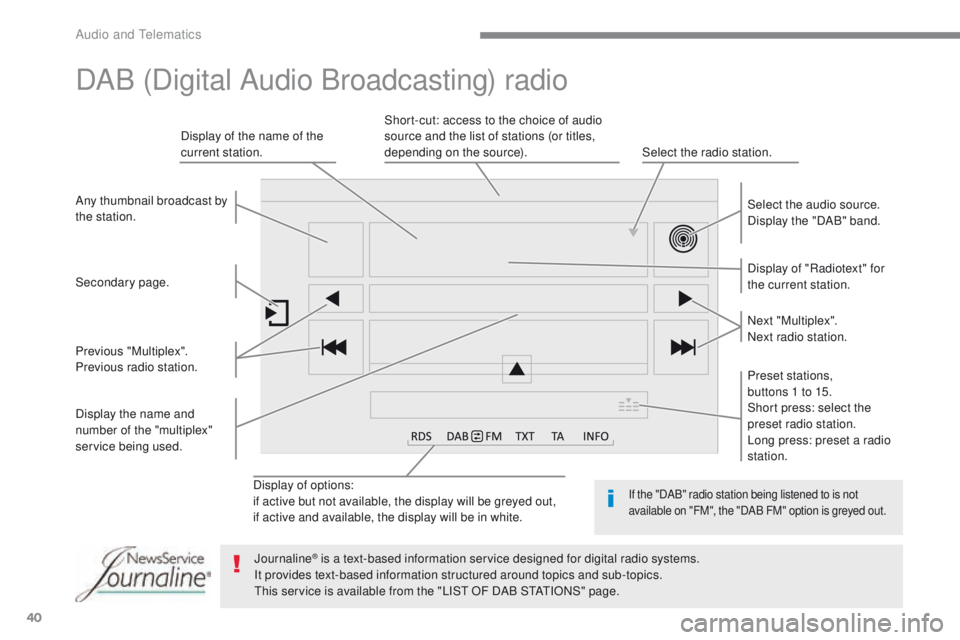
Display of options:
if active but not available, the display will be greyed out,
if active and available, the display will be in white.Display of "Radiotext" for
the current station. Select the audio source.
Display the "DAB" band.
Display of the name of the
current station.
Short-cut: access to the choice of audio
source and the list of stations (or titles,
depending on the source).
Select the radio station.
Any thumbnail broadcast by
the station.
Preset stations,
buttons 1 to 15.
Short press: select the
preset radio station.
Long press: preset a radio
station. Next "Multiplex".
Next radio station.
Secondary page.
Display the name and
number of the "multiplex"
service being used. Previous "Multiplex".
Previous radio station.
DAB (Digital Audio Broadcasting) radio
If the "DAB" radio station being listened to is not
available on "FM", the "DAB FM" option is greyed out.
Journaline® is a text-based information service designed for digital radio systems.
It p
rovides text-based information structured around topics and sub-topics.
This service is available from the "LIST OF DAB STATIONS" page.
Audio and Telematics