lock PEUGEOT 2008 2016 Workshop Manual
[x] Cancel search | Manufacturer: PEUGEOT, Model Year: 2016, Model line: 2008, Model: PEUGEOT 2008 2016Pages: 450, PDF Size: 14.16 MB
Page 363 of 450
361
2008_en_Chap13_index-alpha_ed01-2016
Labels, identification .....................................25 3
LED daytime running lamps .........................204Level, brake fluid
...........................................
2
37
Level, Diesel additive
....................................
239
Level, engine coolant
..............................
33, 238
Level, engine oil
...............................
.......
31, 237
Levels and checks ................................
235-239
Light-emitting diodes - LEDs
........................
206
Lighting control stalk
.....................................
12 2
Lighting dimmer
..............................
..............
13 0
Lighting, guide-me home
................
4 5, 12 2, 123
Lighting, interior
............................................
131
Lighting, mood
..............................................
132
Loading
...................................................
12, 23 0
Load reduction mode
....................................
219
Locating your vehicle
...................................... 45
Lo
cking
............................................................
43
Locking the boot.............................................. 50
Low fuel level ..........................................
26, 170
Luggage retaining strap
..................................
75Navigation
.....................................................
262
Net, high load retaining
...................................
76
Net, storage ..................................................... 75
Number plate lamps
...................................... 2
07
Oil filter
...............
...........................................
240
Oil level .......................................................... 237
Opening the bonnet
...................................... 23
4
Opening the boot
..............................
..............
50
Opening the doors
...............................
...........
48
Opening the fuel filler flap
.............................
17
0
Opening the roof blind
..................................
13 3
K
L
M
N
Keeping children safe ............15 1, 153, 15 6 -16 0
Key with remote control ..................................43
Kit, hands-free
...................................... 314, 3 3 6
Kit, temporary puncture repair
..............183, 188 Maintenance (advice)
....................................
230
Maintenance, routine ..............................
12, 23 5
Map reading lamps .......................................131
Markings, identification
.................................253
Mat
..................................................................74
Menu (touch screen)
............261, 262, 264, 268,
276, 278, 280, 290, 292, 294, 310, 312
Mirror, rear view
..............................................61
Mirrors, door .................................................... 60
Misfuel prevention
...............................
..........172
Mountings, Isofix
...........................................165
MP3 CD
.................................................332, 352
Indicators, direction
.....................
135, 203, 206
Inflating tyres
..........................................
12, 25 3
Inflating tyres and accessories (using the kit)
..............................
........
18 6, 193
Input, auxiliary
........................ 7
3, 286, 333, 352
Instrument panels
.....................................
14, 15
Instrument panel screen
............... 1
4, 15, 38, 99
Internet browser
............................................
299
ISOFIX child seats
...............................
.........
167
Isofix mountings
...............................
.............
165
Jack
........
.......................................................
19 4
Jukebox
.........................................................
289
Jump starting
..............................
..................
215
J
O
P
Pads, brake ................................................... 2 41
Paint colour code .......................................... 253
Panoramic glass sunroof
..............................13 3
Park Assist
.................................................... 113
Parking brake
.......................................... 8 2 , 2 41
Parking lamps
............................................... 12 2
Parking sensors, front
...................................111
Parking sensors, rear .................................... 11 0
Passenger compartment filter
......................240
.
Alphabetical index
Page 365 of 450
363
2008_en_Chap13_index-alpha_ed01-2016
Under-inflation (detection) ....................1 37, 187
Unlocking .............................. ..........................43
Unlocking the boot
.......................................... 50
Updating risk areas
....................................... 2
73
Updating the date
............................................ 42
Updating the time
............................................ 42
USB
................................................ 73, 286, 332Vehicle identification
.....................................
253
Ventilation
..............................
...................
62- 64
Voice recognition
.................................
303, 307
Warning and indicator lamps
....................
16 -27
Warning lamp, braking system
.......................
22
Warning lamp, Diesel engine pre-heater
.......
18
Warning lamps
................................................
21
Warning lamp, SCR emissions control system
..............................................
25
W
ashing (advice)
........................................... 230
Weights
.................................................
245, 249
Wheel, spare
.........................................
19 4, 195
Window controls
.............................................
54
Wiper blades (changing)
....................... 12
9, 2 20
Wiper control stalk ........................................
126
Wiper, rear ..................................................... 127
Wipers, automatic rain sensitive
.....
19, 126, 128
U
Third brake lamp ........................................... 207
Three flashes (direction indicators) ..............13 5
Time (setting)
..............................
....................42
TMC (Traffic info)
.......................................... 2
74
To o l s
......................................................19 4, 208
Total distance recorder
...................................41
Touch screen ............................. 34, 39, 139, 257
Touch screen (Menus)
..................................261
To w b a r
................................................... 223, 224
Towbar with quickly detachable towball
.......225
Towed loads
.......................................... 245, 249
Towing another vehicle
................................. 2
22
Towing eye
.................................................... 221
Traction control (ASR)
............................23, 140
Traffic information (TA)
.........................275, 331
Traffic information (TMC)
.............................. 2
74
Tr a i l e r
.................................................... 223, 224
Trajectory control systems
............................140
Triangle, warning ............................................. 78
Trip computer
............................................ 38-40
Trip distance recorder
..................................... 41
Tyre pressures
.............................................. 253
Ty r e s
................................................................ 12
Tyre under-inflation detection
...............137, 187
V
W
.
Alphabetical index
Page 373 of 450
170
Practical information
2008-add_en_Chap09_info-pratiques_ed01-2016
Low fuel level
When the low fuel level is reached this warning lamp comes on in the instrument panel. There remains approximately 5 litres of fuel in the tank. When the warning lamp flashes, there is ver y little fuel left .
The key cannot be removed from the lock until the cap is refitted. Removing the filler cap may cause an inrush of air. This vacuum is per fectly normal and results from the sealing of the system.
Fuel tank
Fuel tank capacity: approximately 50 litres ( 45 litres for the BlueHDi Diesel engine).
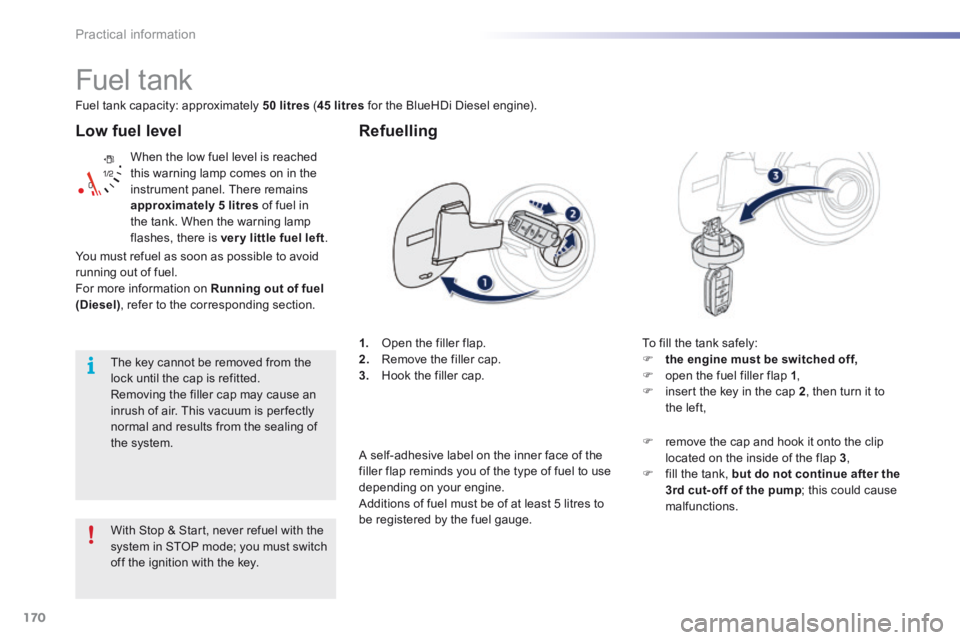
1. Open the filler flap. 2. Remove the filler cap. 3. Hook the filler cap.
Refuelling
To fill the tank safely: the engine must be switched off, open the fuel filler flap 1 , insert the key in the cap 2 , then turn it to the left,
With Stop & Start, never refuel with the
system in STOP mode; you must switch off the ignition with the key.
remove the cap and hook it onto the clip located on the inside of the flap 3 , fill the tank, but do not continue after the 3rd cut- off of the pump ; this could cause malfunctions.
You must refuel as soon as possible to avoid running out of fuel. For more information on Running out of fuel (Diesel) , refer to the corresponding section.
A self-adhesive label on the inner face of the filler flap reminds you of the type of fuel to use depending on your engine. Additions of fuel must be of at least 5 litres to be registered by the fuel gauge.
Page 379 of 450
4
Practical information
2008-additif_en_Chap09_info-pratiques_ed01-2016
Low fuel level
When the low fuel level is reached, this warning lamp comes on in the instrument panel. There remains approximately 5 litres of fuel in the tank. When the warning lamp flashes, there is ver y little fuel left .
The key cannot be removed from the lock until the cap is refitted. Removing the filler cap may cause an inrush of air. This vacuum is per fectly normal and results from the sealing of the system.
Fuel tank
Fuel tank capacity: approximately 50 litres ( 45 litres for the BlueHDi Diesel engine).
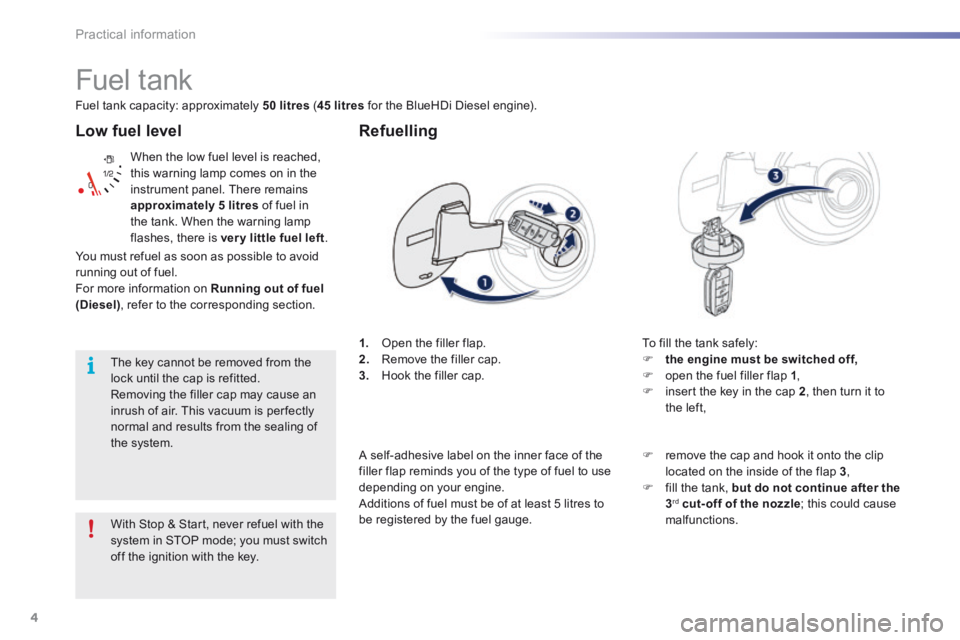
1. Open the filler flap. 2. Remove the filler cap. 3. Hook the filler cap.
Refuelling
To fill the tank safely: the engine must be switched off, open the fuel filler flap 1 , insert the key in the cap 2 , then turn it to the left,
With Stop & Start, never refuel with the system in STOP mode; you must switch off the ignition with the key.
remove the cap and hook it onto the clip located on the inside of the flap 3 , fill the tank, but do not continue after the3 rd cut-off of the nozzle ; this could cause malfunctions.
You must refuel as soon as possible to avoid running out of fuel. For more information on Running out of fuel (Diesel) , refer to the corresponding section.
A self-adhesive label on the inner face of the filler flap reminds you of the type of fuel to use depending on your engine. Additions of fuel must be of at least 5 litres to be registered by the fuel gauge.
Page 429 of 450
55
2008-additif_en_Chap12b_SMEGplus_ed01-2016
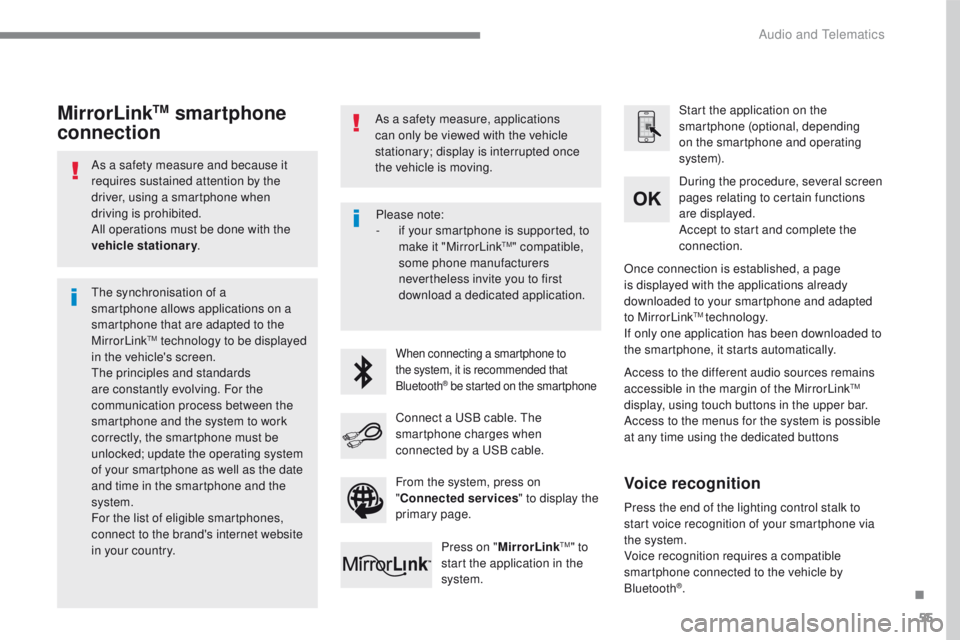
As a safety measure and because it
requires sustained attention by the
driver, using a smartphone when
driving is prohibited.
All operations must be done with the
vehicle stationary.
The synchronisation of a
smartphone allows applications on a
smartphone that are adapted to the
MirrorLink
TM technology to be displayed
in t
he vehicle's screen.
The principles and standards
are constantly evolving. For the
communication process between the
smartphone and the system to work
correctly, the smartphone must be
unlocked; update the operating system
of your smartphone as well as the date
and time in the smartphone and the
system.
For the list of eligible smartphones,
connect to the brand's internet website
in your country. As a safety measure, applications
can only be viewed with the vehicle
stationary; display is interrupted once
the vehicle is moving.When connecting a smartphone to
the system, it is recommended that
Bluetooth
® be started on the smartphone
Start the application on the
smartphone (optional, depending
on the smartphone and operating
syste m).
Access to the different audio sources remains
accessible in the margin of the MirrorLink
TM
display, using touch buttons in the upper bar.
Access to the menus for the system is possible
at any time using the dedicated buttons During the procedure, several screen
pages relating to certain functions
are displayed.
Accept to start and complete the
connection.
Connect a USB cable. The
smartphone charges when
connected by a USB cable. Press on " MirrorLink
TM" to
start the application in the
system. Once connection is established, a page
is displayed with the applications already
downloaded to your smartphone and adapted
to MirrorLink
TM technology.
If only one application has been downloaded to
the smartphone, it starts automatically.
MirrorLinkTM smartphone
connection
Press the end of the lighting control stalk to
start voice recognition of your smartphone via
the system.
Voice recognition requires a compatible
smartphone connected to the vehicle by
Bluetooth
®.
Voice recognition
Please note:
- if y
our smartphone is supported, to
make it "MirrorLink
TM" compatible,
some phone manufacturers
nevertheless invite you to first
download a dedicated application.
From the system, press on
" Connected services " to display the
primary page.
.
Audio and Telematics
Page 444 of 450
70
2008-additif_en_Chap12b_SMEGplus_ed01-2016
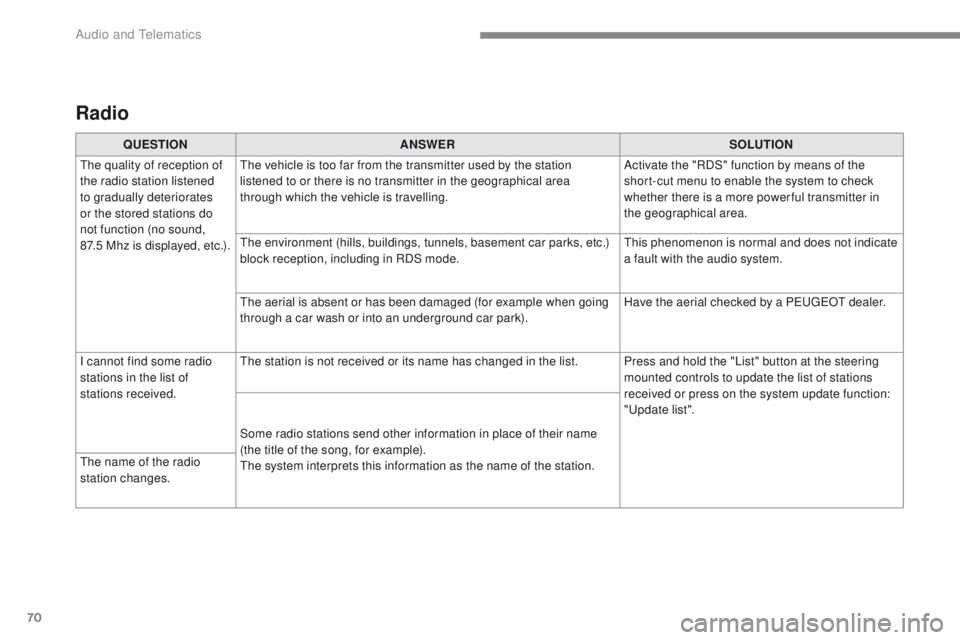
Radio
QUESTIONANSWER SOLUTION
The quality of reception of
the radio station listened
to gradually deteriorates
or the stored stations do
not function (no sound,
87.5
M
hz is displayed, etc.). The vehicle is too far from the transmitter used by the station
listened to or there is no transmitter in the geographical area
through which the vehicle is travelling.
Activate the "RDS" function by means of the
short-cut menu to enable the system to check
whether there is a more power ful transmitter in
the geographical area.
The environment (hills, buildings, tunnels, basement car parks, etc.)
block reception, including in RDS mode. This phenomenon is normal and does not indicate
a fault with the audio system.
The aerial is absent or has been damaged (for example when going
through a car wash or into an underground car park). Have the aerial checked by a PEUGEOT dealer.
I cannot find some radio
stations in the list of
stations received. The station is not received or its name has changed in the list. Press and hold the "List" button at the steering
mounted controls to update the list of stations
received or press on the system update function:
"Update list".
Some radio stations send other information in place of their name
(the title of the song, for example).
The system interprets this information as the name of the station.
The name of the radio
station changes.
Audio and Telematics