light PEUGEOT 206 2003 Owner's Manual
[x] Cancel search | Manufacturer: PEUGEOT, Model Year: 2003, Model line: 206, Model: PEUGEOT 206 2003Pages: 171, PDF Size: 2.12 MB
Page 91 of 171
26-05-2003
SPECIAL FEATURES
156
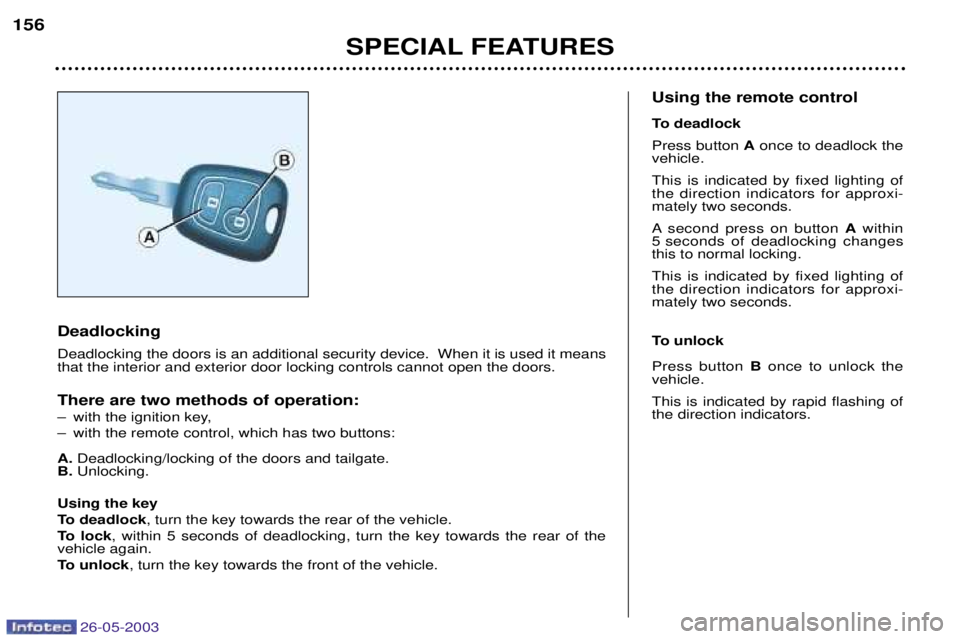
Deadlocking Deadlocking the doors is an additional security device. When it is used it means that the interior and exterior door locking controls cannot open the doors. There are two methods of operation:
Ð with the ignition key,
Ð with the remote control, which has two buttons: A.
Deadlocking/locking of the doors and tailgate.
B. Unlocking.
Using the key
To deadlock , turn the key towards the rear of the vehicle.
To lock , within 5 seconds of deadlocking, turn the key towards the rear of the
vehicle again.
To unlock , turn the key towards the front of the vehicle. Using the remote control
To deadlock Press button
Aonce to deadlock the
vehicle.This is indicated by fixed lighting of the direction indicators for approxi-mately two seconds.
A second press on button Awithin
5 seconds of deadlocking changes this to normal locking. This is indicated by fixed lighting of the direction indicators for approxi-mately two seconds.
To unlock Press button Bonce to unlock the
vehicle. This is indicated by rapid flashing of the direction indicators.
Page 93 of 171

26-05-2003
SPECIAL FEATURES
158
THE ALARM* Setting and deactivating the alarm system Switching off the siren The alarm completes the security
equipment for your vehicle. It offerstwo types of protection. Ð
external protection: when it is set,
the alarm sounds if one of the doors, the boot or the bonnet is opened;
Ð internal protection: when it is set,
the alarm sounds if the sensorsdetect air movement in the passen-ger compartment (a broken window)
or movement within the car.
The alarm also has an anti-tamperfunction. If there is an attempt to tamper with the wires to the siren, control unit or
the battery, the siren sounds and thedirection indicators light.
* According to destination. Setting the alarm (external and internal protection)
Switch the ignition off and get out of the vehicle. Deadlock the vehicle.The doors lock.The direction indicators light for two seconds. The red light on the switch flashes once a second.
5 seconds later, internal protection is set.
45 seconds later, external protection is set. Note:
when the alarm is triggered, the
siren sounds for thirty seconds. After the thirty seconds it stops, but thealarm remains set.
Warning
When the alarm is set, if a door, the tailgate or bonnet are not closed cor-
rectly, the siren sounds for a moment.If the vehicle is closed correctly in thefollowing 45 seconds, the alarm isactivated and the direction indicatorsremain on for two seconds. In all
cases, the alarm is activated after45 seconds. Disarming the alarm(internal and external protection) Press the release button of the remote
control key. The doors unlock.The direction indicators flash for two seconds. The red light on the switch goes out. Note:
if the warning light continues to
flash after de-activation of the alarm, it is a sign that the alarm has been
triggered. The flashing will stop whenthe ignition is switched ON.
Page 94 of 171
26-05-2003
YOUR 206 IN DETAIL89
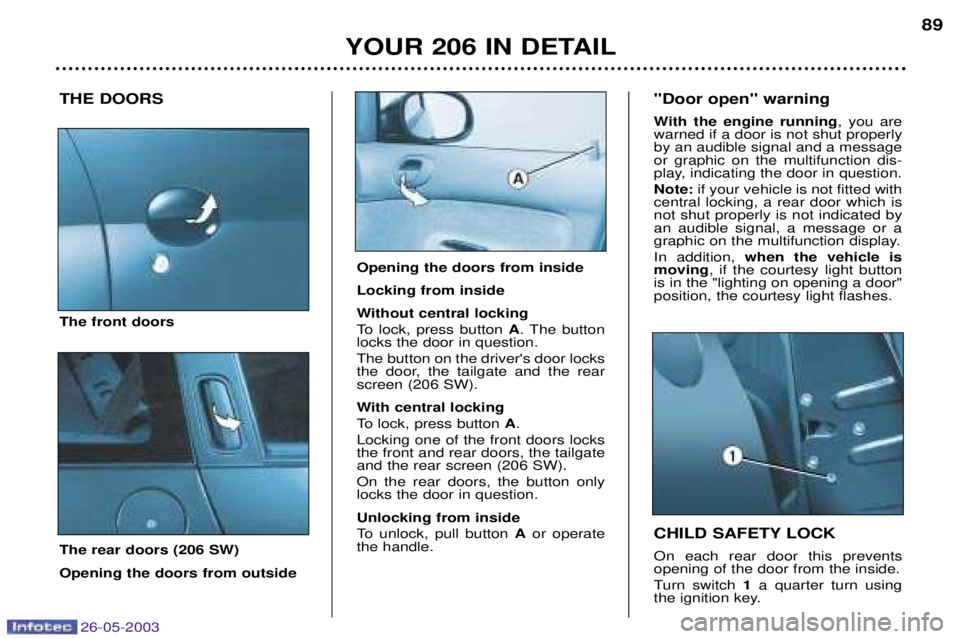
THE DOORS The front doors The rear doors (206 SW) Opening the doors from outside CHILD SAFETY LOCK On each rear door this prevents opening of the door from the inside.
Turn switch
1a quarter turn using
the ignition key.
"Door open" warning
With the engine running
, you are
warned if a door is not shut properly by an audible signal and a messageor graphic on the multifunction dis-
play, indicating the door in question. Note: if your vehicle is not fitted with
central locking, a rear door which is not shut properly is not indicated byan audible signal, a message or a
graphic on the multifunction display. In addition, when the vehicle is
moving , if the courtesy light button
is in the "lighting on opening a door" position, the courtesy light flashes.
Opening the doors from inside Locking from inside
Without central locking
To lock, press button A. The button
locks the door in question. The button on the driver's door locks
the door, the tailgate and the rearscreen (206 SW).
With central locking
To lock, press button A.
Locking one of the front doors locks the front and rear doors, the tailgateand the rear screen (206 SW). On the rear doors, the button only locks the door in question. Unlocking from inside
To unlock, pull button Aor operate
the handle.
Page 95 of 171
26-05-2003
YOUR 206 IN DETAIL
90
LOCKING/UNLOCKING OF
THE TAILGATE
(saloon and 206 GTi 180)
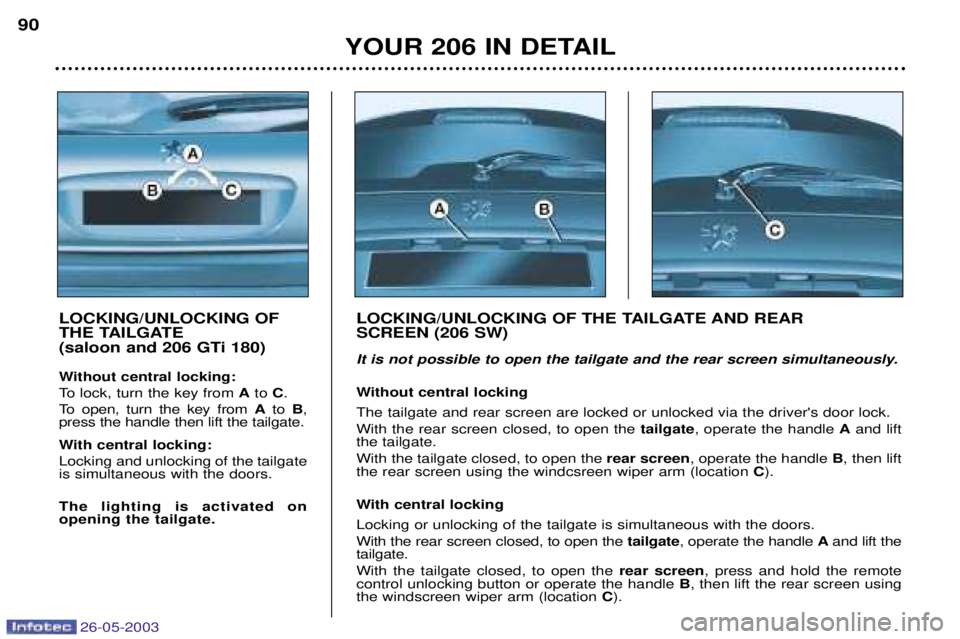
Without central locking:
To lock, turn the key from Ato C.
To open, turn the key from Ato B,
press the handle then lift the tailgate.
With central locking: Locking and unlocking of the tailgate is simultaneous with the doors. The lighting is activated on opening the tailgate. LOCKING/UNLOCKING OF THE TAILGATE AND REAR SCREEN (206 SW)
It is not possible to open the tailgate and the rear screen simultaneously.
Without central locking The tailgate and rear screen are locked or unlocked via the driver's door lock. With the rear screen closed, to open the
tailgate, operate the handle Aand lift
the tailgate.With the tailgate closed, to open the rear screen, operate the handle B, then lift
the rear screen using the windcsreen wiper arm (location C).
With central locking Locking or unlocking of the tailgate is simultaneous with the doors. With the rear screen closed, to open the tailgate, operate the handle Aand lift the
tailgate.With the tailgate closed, to open the rear screen, press and hold the remote
control unlocking button or operate the handle B, then lift the rear screen using
the windscreen wiper arm (location C).
Page 96 of 171
26-05-2003
YOUR 206 IN DETAIL91
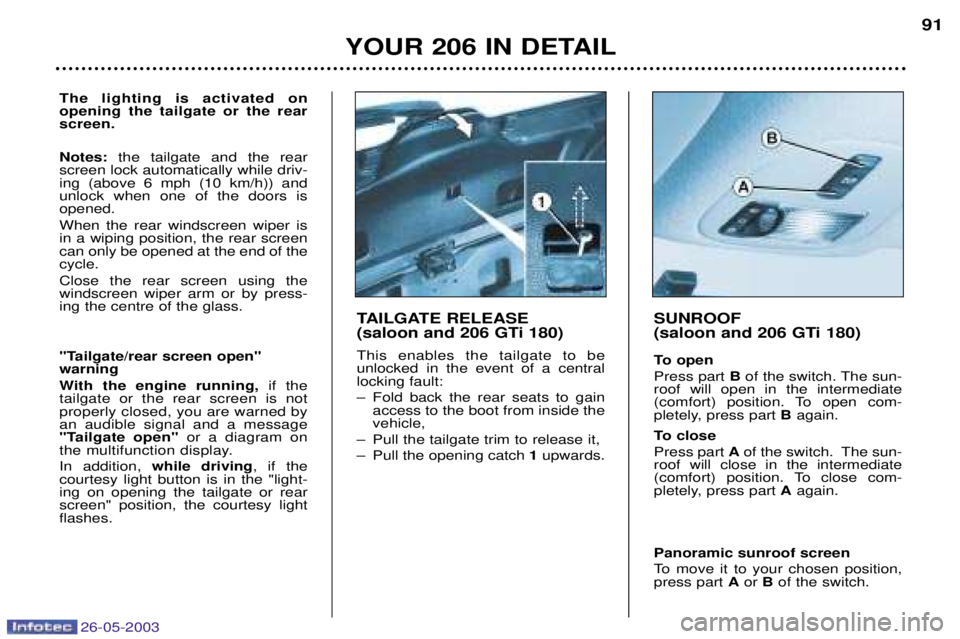
TAILGATE RELEASE
(saloon and 206 GTi 180) This enables the tailgate to be unlocked in the event of a centrallocking fault:
Ð Fold back the rear seats to gain access to the boot from inside the vehicle,
Ð Pull the tailgate trim to release it,
Ð Pull the opening catch 1upwards.
SUNROOF
(saloon and 206 GTi 180)
To open Press part Bof the switch. The sun-
roof will open in the intermediate
(comfort) position. To open com-
pletely, press part Bagain.
To close Press part Aof the switch. The sun-
roof will close in the intermediate
(comfort) position. To close com-
pletely, press part Aagain.
Panoramic sunroof screen
To move it to your chosen position, press part Aor Bof the switch.
The lighting is activated on opening the tailgate or the rearscreen. Notes: the tailgate and the rear
screen lock automatically while driv- ing (above 6 mph (10 km/h)) andunlock when one of the doors isopened. When the rear windscreen wiper is in a wiping position, the rear screencan only be opened at the end of thecycle. Close the rear screen using the windscreen wiper arm or by press-ing the centre of the glass.
"Tailgate/rear screen open" warning
With the engine running, if the
tailgate or the rear screen is not properly closed, you are warned byan audible signal and a message
"Tailgate open" or a diagram on
the multifunction display. In addition, while driving , if the
courtesy light button is in the "light- ing on opening the tailgate or rearscreen" position, the courtesy lightflashes.
Page 97 of 171
26-05-2003
YOUR 206 IN DETAIL91
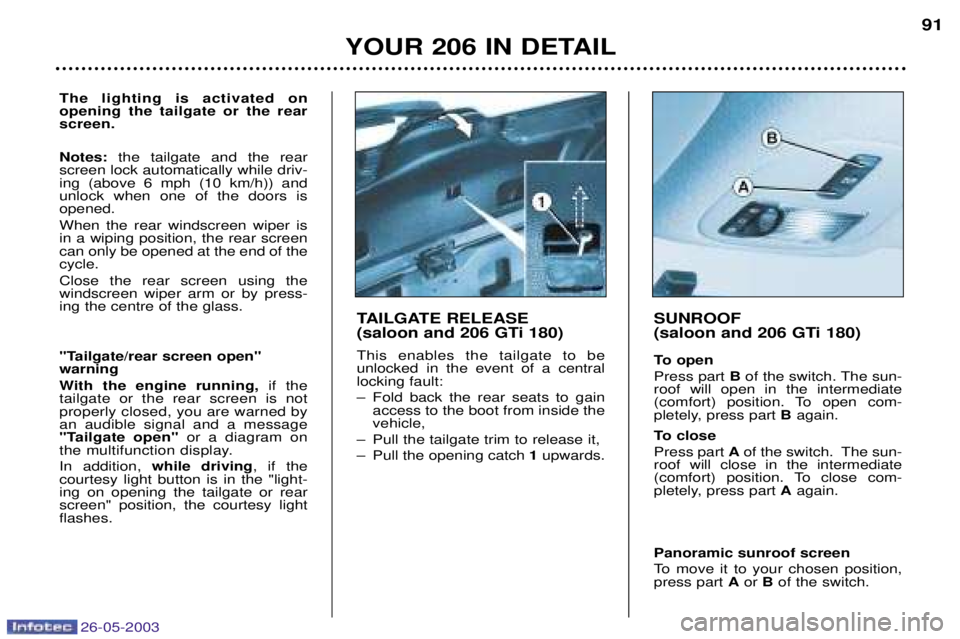
TAILGATE RELEASE
(saloon and 206 GTi 180) This enables the tailgate to be unlocked in the event of a centrallocking fault:
Ð Fold back the rear seats to gain access to the boot from inside the vehicle,
Ð Pull the tailgate trim to release it,
Ð Pull the opening catch 1upwards.
SUNROOF
(saloon and 206 GTi 180)
To open Press part Bof the switch. The sun-
roof will open in the intermediate
(comfort) position. To open com-
pletely, press part Bagain.
To close Press part Aof the switch. The sun-
roof will close in the intermediate
(comfort) position. To close com-
pletely, press part Aagain.
Panoramic sunroof screen
To move it to your chosen position, press part Aor Bof the switch.
The lighting is activated on opening the tailgate or the rearscreen. Notes: the tailgate and the rear
screen lock automatically while driv- ing (above 6 mph (10 km/h)) andunlock when one of the doors isopened. When the rear windscreen wiper is in a wiping position, the rear screencan only be opened at the end of thecycle. Close the rear screen using the windscreen wiper arm or by press-ing the centre of the glass.
"Tailgate/rear screen open" warning
With the engine running, if the
tailgate or the rear screen is not properly closed, you are warned byan audible signal and a message
"Tailgate open" or a diagram on
the multifunction display. In addition, while driving , if the
courtesy light button is in the "light- ing on opening the tailgate or rearscreen" position, the courtesy lightflashes.
Page 100 of 171
26-05-2003
YOUR 206 IN DETAIL93
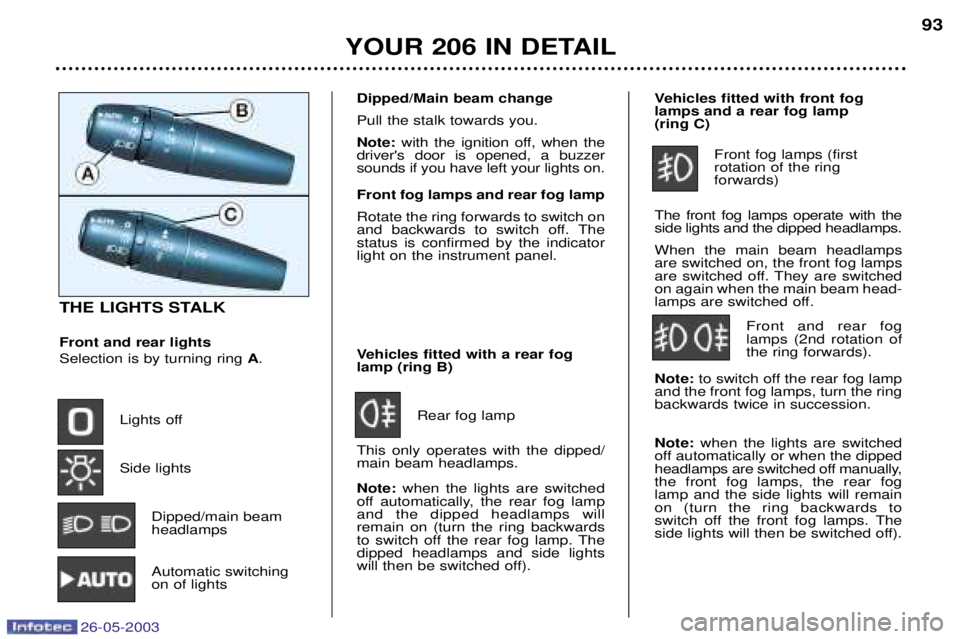
THE LIGHTS STALK Front and rear lights Selection is by turning ring
A.
Lights off Side lights Dipped/main beam headlamps
Automatic switchingon of lights Vehicles fitted with a rear foglamp (ring B)
Rear fog lamp
This only operates with the dipped/main beam headlamps. Note: when the lights are switched
off automatically, the rear fog lamp and the dipped headlamps willremain on (turn the ring backwards
to switch off the rear fog lamp. Thedipped headlamps and side lights
will then be switched off). Vehicles fitted with front foglamps and a rear fog lamp (ring C)
Front fog lamps (first rotation of the ring forwards)
The front fog lamps operate with theside lights and the dipped headlamps. When the main beam headlamps are switched on, the front fog lamps
are switched off. They are switchedon again when the main beam head-
lamps are switched off. Front and rear foglamps (2nd rotation ofthe ring forwards).
Note: to switch off the rear fog lamp
and the front fog lamps, turn the ringbackwards twice in succession. Note: when the lights are switched
off automatically or when the dipped
headlamps are switched off manually,the front fog lamps, the rear foglamp and the side lights will remainon (turn the ring backwards to
switch off the front fog lamps. The
side lights will then be switched off).
Dipped/Main beam change Pull the stalk towards you.Note: with the ignition off, when the
driver's door is opened, a buzzer sounds if you have left your lights on. Front fog lamps and rear fog lamp Rotate the ring forwards to switch on
and backwards to switch off. Thestatus is confirmed by the indicatorlight on the instrument panel.
Page 101 of 171

26-05-2003
YOUR 206 IN DETAIL
94
AUTOMATIC SWITCHING ON OF LIGHTS Side lights and dipped beam head- lamps switch on automatically if thelight is poor and when the wind-
screen wipers operate continuously.
They switch off at the same time when the light becomes brightenough or the windscreen wipers
are switched off. Note:In foggy weather or in snow
the brightness sensor can detect
sufficient light. As a result, the lights
will not come on automatically. This function is active when the
vehicle is supplied to the customer.
To disarm or activate the function:
Ð Place the key in the accessories position (1st notch),
Ð Press the end of the lights stalk for more than four seconds.
The brightness sensor, coupled
with the rain sensor, is locatedin the centre of the windscreen,
behind the interior mirror. It isused for automatic switching onof the lights. Operating check Activation Activation of this function is accom- panied by an audible signal and themessage
"Automatic lighting
active'' on the multifunction display.
Disarming Disarming of the function is accom- panied by an audible signal. Note: the function is temporarily
disarmed when the driver uses the manual lighting controls. If the brightness sensor does not function correctly , the system acti-
vates the function (the lights come
on). The driver is alerted by an audi-ble signal, accompanied by the mes-sage "Auto lighting fault" on the
multifunction display.
Contact a PEUGEOT dealer to have the system checked.
Direction indicators (flashers)
Left:downwards.
Right: upwards.
"Follow me home" lighting In poor light or at night, if you leave your vehicle, the side lights anddipped headlamps can be left on forapproximately one minute.
To do this:
Ð place the key in the
STOPposition,
Ð place the lights stalk in the 0 position,
Ð flash the headlamps,
Ð get out of the vehicle and lock it.
In good or rainy weather, both day and night, thefront fog lamps and therear fog lamp are dazzling
and are prohibited. Do not forget to switch them off when they are no longer needed.
Page 102 of 171

26-05-2003
YOUR 206 IN DETAIL
94
AUTOMATIC SWITCHING ON OF LIGHTS Side lights and dipped beam head- lamps switch on automatically if thelight is poor and when the wind-
screen wipers operate continuously.
They switch off at the same time when the light becomes brightenough or the windscreen wipers
are switched off. Note:In foggy weather or in snow
the brightness sensor can detect
sufficient light. As a result, the lights
will not come on automatically. This function is active when the
vehicle is supplied to the customer.
To disarm or activate the function:
Ð Place the key in the accessories position (1st notch),
Ð Press the end of the lights stalk for more than four seconds.
The brightness sensor, coupled
with the rain sensor, is locatedin the centre of the windscreen,
behind the interior mirror. It isused for automatic switching onof the lights. Operating check Activation Activation of this function is accom- panied by an audible signal and themessage
"Automatic lighting
active'' on the multifunction display.
Disarming Disarming of the function is accom- panied by an audible signal. Note: the function is temporarily
disarmed when the driver uses the manual lighting controls. If the brightness sensor does not function correctly , the system acti-
vates the function (the lights come
on). The driver is alerted by an audi-ble signal, accompanied by the mes-sage "Auto lighting fault" on the
multifunction display.
Contact a PEUGEOT dealer to have the system checked.
Direction indicators (flashers)
Left:downwards.
Right: upwards.
"Follow me home" lighting In poor light or at night, if you leave your vehicle, the side lights anddipped headlamps can be left on forapproximately one minute.
To do this:
Ð place the key in the
STOPposition,
Ð place the lights stalk in the 0 position,
Ð flash the headlamps,
Ð get out of the vehicle and lock it.
In good or rainy weather, both day and night, thefront fog lamps and therear fog lamp are dazzling
and are prohibited. Do not forget to switch them off when they are no longer needed.
Page 108 of 171
26-05-2003
YOUR 206 IN DETAIL99
REAR QUARTER LIGHTS (3 DOOR)
To partially open the rear windows,
tilt lever then push the window.
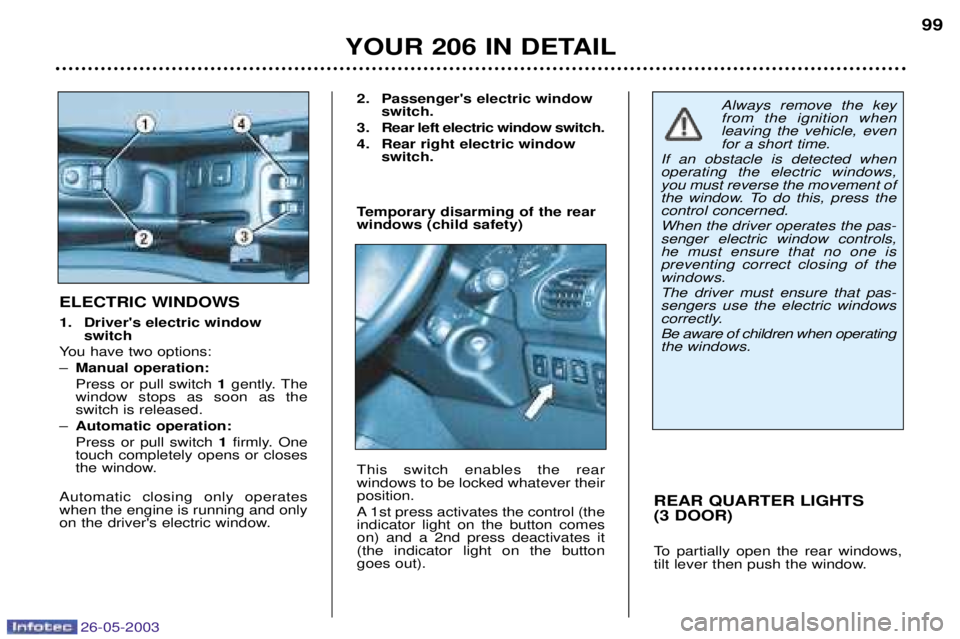
ELECTRIC WINDOWS
1. Driver's electric window switch
You have two options: Ð Manual operation:Press or pull switch 1gently. The
window stops as soon as the switch is released.
Ð Automatic operation: Press or pull switch 1firmly. One
touch completely opens or closes
the window.
Automatic closing only operateswhen the engine is running and only
on the driver's electric window. 2. Passenger's electric window
switch.
3. Rear left electric window switch.
4. Rear right electric window switch.
Temporary disarming of the rear windows (child safety) This switch enables the rear windows to be locked whatever theirposition.
A 1st press activates the control (the indicator light on the button comeson) and a 2nd press deactivates it(the indicator light on the buttongoes out).
Always remove the key from the ignition whenleaving the vehicle, evenfor a short time.
If an obstacle is detected whenoperating the electric windows,you must reverse the movement of
the window. To do this, press thecontrol concerned. When the driver operates the pas- senger electric window controls,he must ensure that no one ispreventing correct closing of thewindows. The driver must ensure that pas- sengers use the electric windows
correctly. Be aware of children when operating the windows.