change time PEUGEOT 207 2008 User Guide
[x] Cancel search | Manufacturer: PEUGEOT, Model Year: 2008, Model line: 207, Model: PEUGEOT 207 2008Pages: 255, PDF Size: 13.06 MB
Page 204 of 255
191
11
SOURCE
22
S
O S SOURCE
MODE BAND TPT
A Y
DARKSOURCE
2
abc
5
jkl
8
tuv 3
def
6
mno
9
wxyz
1 4
ghi
7
pqrs
0 #
2
abc
5
jkl
8
tuv
3
def
6
mno
9
wxyz
1 4
ghi
r
7
pq s0 #
S
O S SOURCE
MODE BAND TPT
A Y
DARKSOURCESOURCE
ESC
MENU LIST
11
33
22
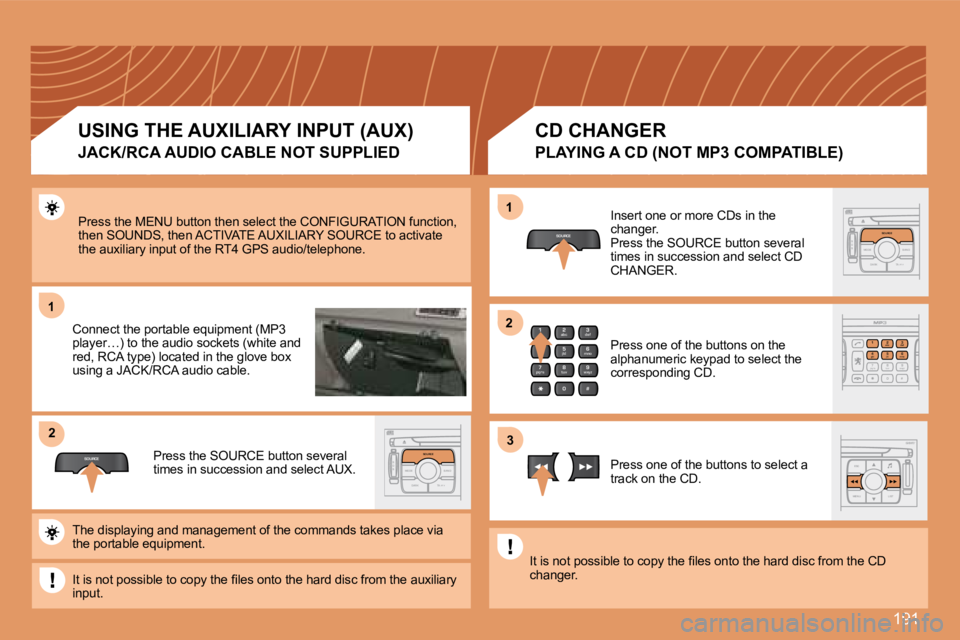
Press the MENU button then select the CONFIGURATIO N function, then SOUNDS, then ACTIVATE AUXILIARY SOURCE to acti vate the auxiliary input of the RT4 GPS audio/telephone.
Connect the portable equipment (MP3 player…) to the audio sockets (white and red, RCA type) located in the glove box using a JACK/RCA audio cable.
Press the SOURCE button several times in succession and select AUX.
Insert one or more CDs in the changer. Press the SOURCE button several times in succession and select CD CHANGER.
Press one of the buttons on the alphanumeric keypad to select the corresponding CD.
Press one of the buttons to select a track on the CD.
The displaying and management of the commands take s place via the portable equipment.
It is not possible to copy the fi les onto the hard disc from the auxiliary input.
It is not possible to copy the fi les onto the hard disc from the CD changer.
USING THE AUXILIARY INPUT (AUX)
JACK/RCA AUDIO CABLE NOT SUPPLIED
CD CHANGER
PLAYING A CD (NOT MP3 COMPATIBLE)
Page 214 of 255
201
1
2
3
3
3
3
2
3
3
4
4
1
3
2
3
1
2
3
3
2
2
2
1
2
2
2
1
1
1
MENU
4
3
2
2
3
3
6text message ring
call diversion to mailbox n°
delete calls log* The parameters vary according to vehicle (refer to the "Operation warning lights" chapter).
CONFIGURATION
VIDEO
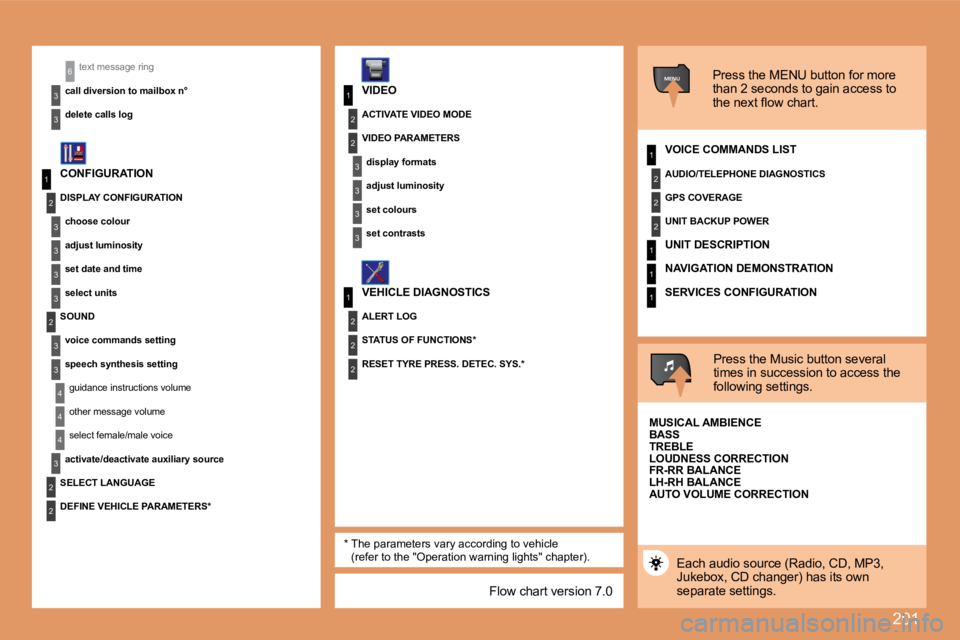
VEHICLE DIAGNOSTICS Press the MENU button for more
than 2 seconds to gain access to
the next flow chart.
VOICE COMMANDS LIST
Press the Music button several
times in succession to access the
following settings.
AUTO VOLUME CORRECTION
SELECT LANGUAGE
Each audio source (Radio, CD, MP3,
Jukebox, CD changer) has its own
separate settings.
DISPLAY CONFIGURATION
choose colour
adjust luminosity
set date and time
select units
SOUND voice commands setting
speech synthesis settingguidance instructions volume
other message volume
select female/male voice
activate/deactivate auxiliary source
DEFINE VEHICLE PARAMETERS* RESET TYRE PRESS. DETEC. SYS.*
ACTIVATE VIDEO MODE
VIDEO PARAMETERS
display formats
adjust luminosity
set colours
set contrasts
ALERT LOG
STATUS OF FUNCTIONS* AUDIO/TELEPHONE DIAGNOSTICS
GPS COVERAGE
UNIT BACKUP POWER
UNIT DESCRIPTION
NAVIGATION DEMONSTRATION
SERVICES CONFIGURATION
MUSICAL AMBIENCE
BASS
TREBLE
LOUDNESS CORRECTION
FR-RR BALANCE
LH-RH BALANCE
Flow chart version 7.0
Page 222 of 255
206
11
22
33
11
22
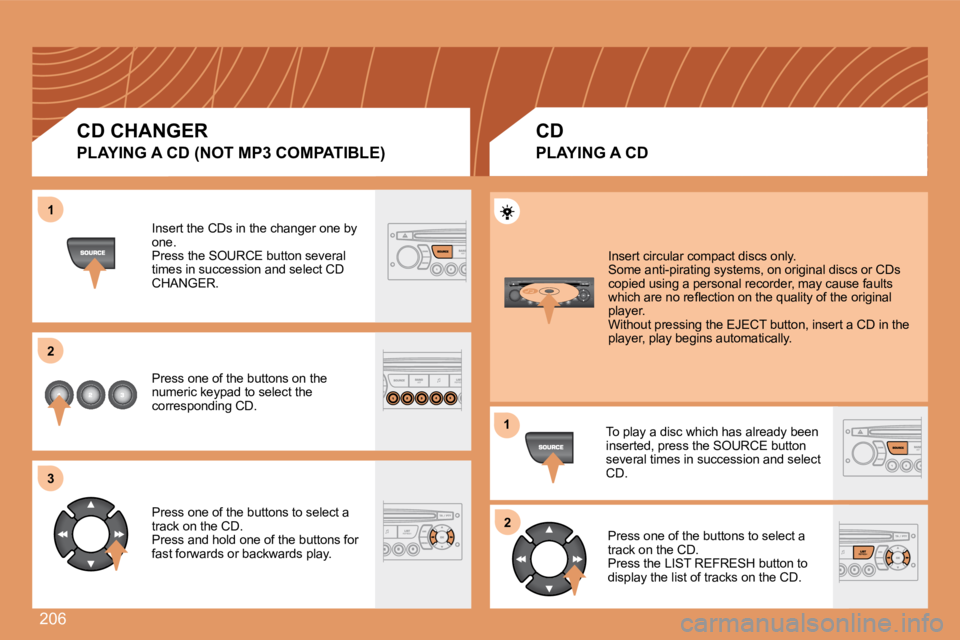
Insert the CDs in the changer one by one. Press the SOURCE button several times in succession and select CD CHANGER.
Press one of the buttons on the numeric keypad to select the corresponding CD.
Press one of the buttons to select a track on the CD. Press and hold one of the buttons for fast forwards or backwards play.
Insert circular compact discs only. Some anti-pirating systems, on original discs or CDs copied using a personal recorder, may cause faults which are no refl ection on the quality of the original player. Without pressing the EJECT button, insert a CD in the player, play begins automatically.
To play a disc which has already been inserted, press the SOURCE button several times in succession and select CD.
Press one of the buttons to select a track on the CD. Press the LIST REFRESH button to display the list of tracks on the CD.
CD CHANGER
PLAYING A CD (NOT MP3 COMPATIBLE)
CD
PLAYING A CD
Page 227 of 255
211
1
1
2
3
4
3
4
3
4
2
3
4
3
4
2
3
4
2
4
4
3
4
4
4
3
4
4
1
2
3
2
3
3
2
2
1
2
3
3
3
4
4
4
2
3
4
3
4
3
4
2
3
3
3
4
07
STATUS OF FUNCTIONS
functions activated or deactivated AUDIO FUNCTIONS
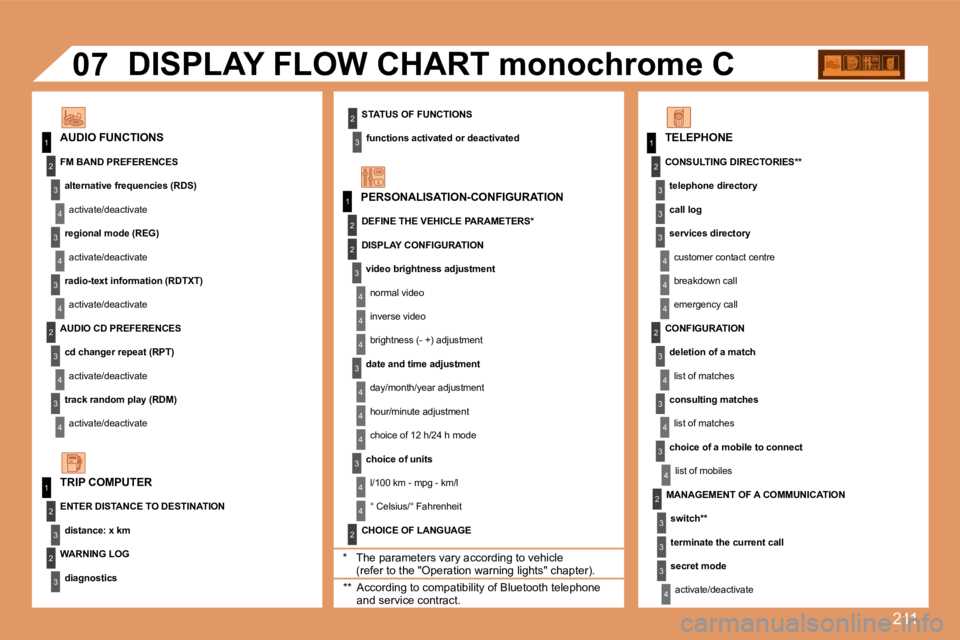
DISPLAY FLOW CHART monochrome C
* The parameters vary according to vehicle (refer to the "Operation warning lights" chapter).
WARNING LOG
diagnostics
TRIP COMPUTER
FM BAND PREFERENCES
alternative frequencies (RDS)
activate/deactivate
regional mode (REG)
activate/deactivate
radio-text information (RDTXT)
activate/deactivate
AUDIO CD PREFERENCES
cd changer repeat (RPT)
activate/deactivate
track random play (RDM)
activate/deactivate
ENTER DISTANCE TO DESTINATION
distance: x km
PERSONALISATION-CONFIGURATION
DEFINE THE VEHICLE PARAMETERS *
CHOICE OF LANGUAGE
TELEPHONE
CONSULTING DIRECTORIES **
telephone directory
call log
services directory
customer contact centre
breakdown call
emergency call
DISPLAY CONFIGURATION
video brightness adjustment
normal video
inverse video
brightness (- +) adjustment
date and time adjustment
day/month/year adjustment
hour/minute adjustment
choice of 12 h/24 h mode
choice of units
l/100 km - mpg - km/l
° Celsius/° Fahrenheit
** According to compatibility of Bluetooth telephone and service contract.
MANAGEMENT OF A COMMUNICATION
switch **
terminate the current call
secret mode
activate/deactivate
CONFIGURATION
deletion of a match
list of matches
consulting matches
list of matches
choice of a mobile to connect
list of mobiles