warning lights PEUGEOT 207 2008 User Guide
[x] Cancel search | Manufacturer: PEUGEOT, Model Year: 2008, Model line: 207, Model: PEUGEOT 207 2008Pages: 255, PDF Size: 13.06 MB
Page 114 of 255
!
i
!
SAFETY
102
BRAKING ASSISTANCE
SYSTEMS *
Group of supplementary systems which
help you to obtain optimum braking in
complete safety in emergency situations:
- the anti-lock braking system (ABS),
- the electronic brake force distribution (EBFD),
- the emergency braking assistance (EBA).
Anti-lock braking system and
electronic brake force distribution
Linked systems which improve the stability
and manoeuvrability of your vehicle when
braking, in particular on poor or slippery
surfaces.
When braking in an emergency,
press very fi rmly without releasing
the pressure. When replacing wheels (tyres and
rims), ensure that they conform to the
manufacturer’s recommendations.
Operating fault
If this warning light comes on,
accompanied by an audible sig-
nal and a message on the multi-
function display, it indicates a
malfunction of the anti-lock braking sys-
tem which could result in loss of control of
the vehicle when braking.
If this warning light comes on,
together with the STOP and
ABS warning lights, accompa-
nied by an audible signal and a
message on the multifunction display, it
indicates a malfunction of the electron-
ic brake force distribution which could
result in loss of control of the vehicle
when braking.
You MUST stop as soon as it is safe
to do so. Emergency braking assistance
System which, in an emergency, ena-
bles you to obtain the optimum braking
pressure more quickly, thus reducing
the stopping distance.
Activation
The anti-lock braking system comes
into operation automatically when there
is a risk of wheel lock.
Normal operation of the ABS may make
itself felt by slight vibration of the brake
pedal. Activation
It is triggered by the speed at which the
brake pedal is pressed.
The effect of this is a reduction in the
resistance of the pedal and an increase
in braking effi ciency.
* According to country.
In both cases, contact a PEUGEOT
dealer.
When braking in an emergency,
press fi rmly without releasing the
pressure.
Page 117 of 255
SAFETY
105
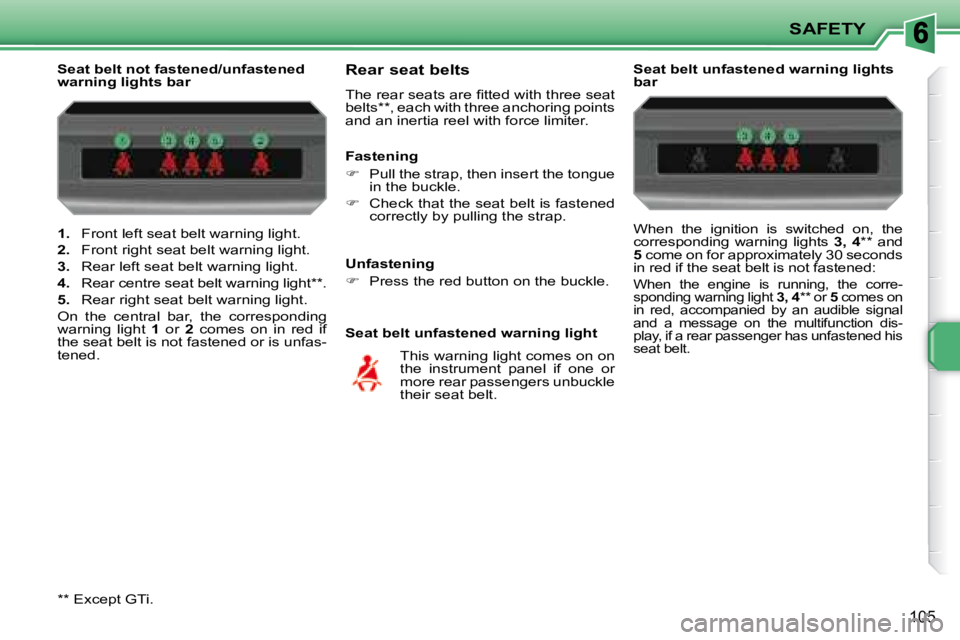
1. Front left seat belt warning light.
2. Front right seat belt warning light.
3. Rear left seat belt warning light.
4. Rear centre seat belt warning light ** .
5. Rear right seat belt warning light.
On the central bar, the corresponding
warning light 1 or 2 comes on in red if
the seat belt is not fastened or is unfas-
tened.
Seat belt not fastened/unfastened
warning lights bar
Rear seat belts
The rear seats are fi tted with three seat
belts ** , each with three anchoring points
and an inertia reel with force limiter.
Seat belt unfastened warning light
This warning light comes on on
the instrument panel if one or
more rear passengers unbuckle
their seat belt.
Fastening
Pull the strap, then insert the tongue
in the buckle.
Check that the seat belt is fastened
correctly by pulling the strap. Seat belt unfastened warning lights
bar
When the ignition is switched on, the
corresponding warning lights
3, 4 ** and
5 come on for approximately 30 seconds
in red if the seat belt is not fastened:
When the engine is running, the corre-
sponding warning light 3, 4 ** or 5 comes on
in red, accompanied by an audible signal
and a message on the multifunction dis-
play, if a rear passenger has unfastened his
seat belt
.
Unfastening
Press the red button on the buckle.
**
Except GTi.
Page 120 of 255
!
!
SAFETY
108
If both air bag warning lights come
on continuously, do not install a
"rear facing" child seat on the front
passenger seat.
Have the system checked by a
PEUGEOT dealer.
Operating fault
If this warning light comes on on
the instrument panel, accompa-
nied by an audible warning and
a message on the multifunction
display, contact a PEUGEOT dealer to
have the system checked.
To guarantee the safety of your
child, it is imperative that the pas-
senger air bag is disarmed when
you install a "rear facing" child seat
on the front passenger seat.
Otherwise, the child would risk being
seriously injured or killed if the air bag
were triggered.
According to version, this warning
light comes on either on the instru-
ment panel or on the central bar
when the ignition is on and until
the air bag is re-armed.
Reactivation
When you remove the child seat, turn
switch
1 to the "ON" position to re-arm
the air bag and so guarantee the safety
of your front passenger in the event of
an impact.
Deactivation
Only the front passenger’s air bag can
be disarmed:
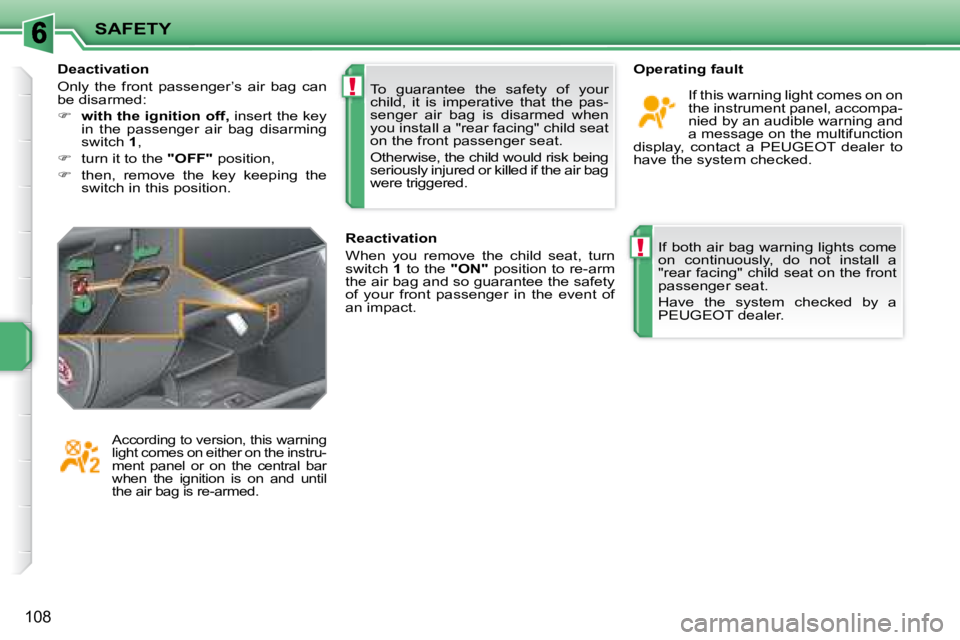
with the ignition off, insert the key
in the passenger air bag disarming
switch 1 ,
turn it to the "OFF" position,
then, remove the key keeping the
switch in this position.
Page 156 of 255
144
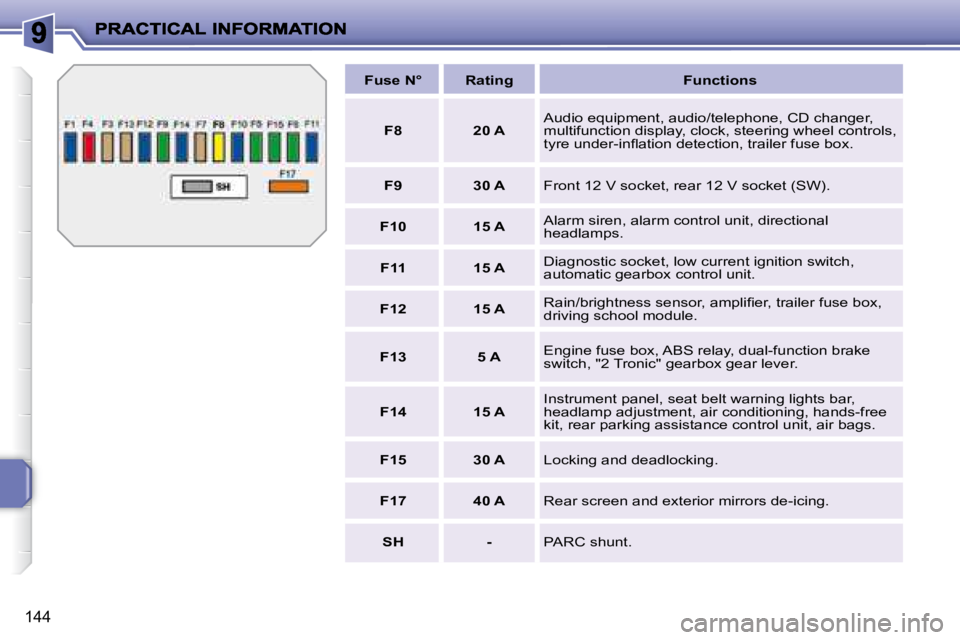
Fuse N° Rating Functions
F8 20 A Audio equipment, audio/telephone, CD changer,
multifunction display, clock, steering wheel controls,
tyre under-infl ation detection, trailer fuse box.
F9 30 A Front 12 V socket, rear 12 V socket (SW).
F10 15 A Alarm siren, alarm control unit, directional
headlamps.
F11 15 A Diagnostic socket, low current ignition switch,
automatic gearbox control unit.
F12 15 A Rain/brightness sensor, amplifi er, trailer fuse box,
driving school module.
F13 5 A Engine fuse box, ABS relay, dual-function brake
switch, "2 Tronic" gearbox gear lever.
F14 15 A Instrument panel, seat belt warning lights bar,
headlamp adjustment, air conditioning, hands-free
kit, rear parking assistance control unit, air bags.
F15 30 A Locking and deadlocking.
F17 40 A Rear screen and exterior mirrors de-icing.
SH - PARC shunt.
Page 163 of 255
!i
150
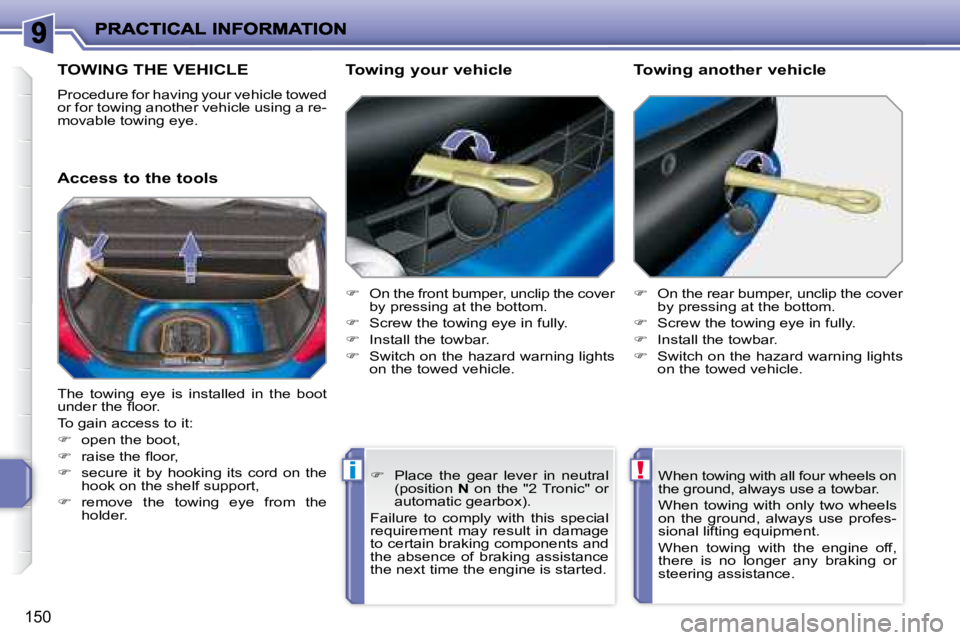
TOWING THE VEHICLE
Procedure for having your vehicle towed
or for towing another vehicle using a re-
movable towing eye.
Access to the tools Towing your vehicle
On the front bumper, unclip the cover
by pressing at the bottom.
Screw the towing eye in fully.
Install the towbar.
Switch on the hazard warning lights
on the towed vehicle.
On the rear bumper, unclip the cover
by pressing at the bottom.
Screw the towing eye in fully.
Install the towbar.
Switch on the hazard warning lights
on the towed vehicle.
Towing another vehicle
The towing eye is installed in the boot
under the fl oor.
To gain access to it:
open the boot,
raise the fl oor,
secure it by hooking its cord on the
hook on the shelf support,
remove the towing eye from the
holder. When towing with all four wheels on
the ground, always use a towbar.
When towing with only two wheels
on the ground, always use profes-
sional lifting equipment.
When towing with the engine off,
there is no longer any braking or
steering assistance.
Place the gear lever in neutral
(position N on the "2 Tronic" or
automatic gearbox).
Failure to comply with this special
requirement may result in damage
to certain braking components and
the absence of braking assistance
the next time the engine is started.
Page 164 of 255
i
i
151
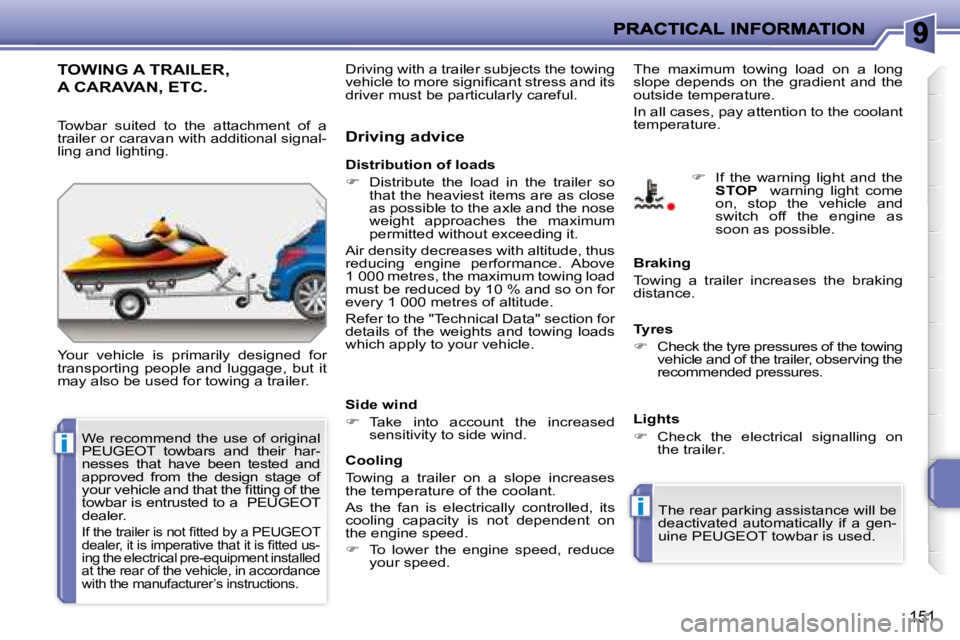
TOWING A TRAILER,
A CARAVAN, ETC.
Your vehicle is primarily designed for
transporting people and luggage, but it
may also be used for towing a trailer. Driving advice
The maximum towing load on a long
slope depends on the gradient and the
outside temperature.
In all cases, pay attention to the coolant
temperature.
Distribution of loads
Distribute the load in the trailer so
that the heaviest items are as close
as possible to the axle and the nose
weight approaches the maximum
permitted without exceeding it.
Air density decreases with altitude, thus
reducing engine performance. Above
1 000 metres, the maximum towing load
must be reduced by 10 % and so on for
every 1 000 metres of altitude.
Refer to the "Technical Data" section for
details of the weights and towing loads
which apply to your vehicle.
Side wind
Take into account the increased
sensitivity to side wind. Braking
Towing a trailer increases the braking
distance.
Tyres
Check the tyre pressures of the towing
vehicle and of the trailer, observing the
recommended pressures.
Lights
Check the electrical signalling on
the trailer.
The rear parking assistance will be
deactivated automatically if a gen-
uine PEUGEOT towbar is used.
If the warning light and the
STOP warning light come
on, stop the vehicle and
switch off the engine as
soon as possible.
Towbar suited to the attachment of a
trailer or caravan with additional signal-
ling and lighting.
Cooling
Towing a trailer on a slope increases
the temperature of the coolant.
As the fan is electrically controlled, its
cooling capacity is not dependent on
the engine speed.
To lower the engine speed, reduce
your speed.
We recommend the use of original
PEUGEOT towbars and their har-
nesses that have been tested and
approved from the design stage of
your vehicle and that the fi tting of the
towbar is entrusted to a PEUGEOT
dealer.
If the trailer is not fi tted by a PEUGEOT
dealer, it is imperative that it is fi tted us-
ing the electrical pre-equipment installed
at the rear of the vehicle, in accordance
with the manufacturer’s instructions.
Driving with a trailer subjects the towing
vehicle to more signifi cant stress and its
driver must be particularly careful.
Page 214 of 255
201
1
2
3
3
3
3
2
3
3
4
4
1
3
2
3
1
2
3
3
2
2
2
1
2
2
2
1
1
1
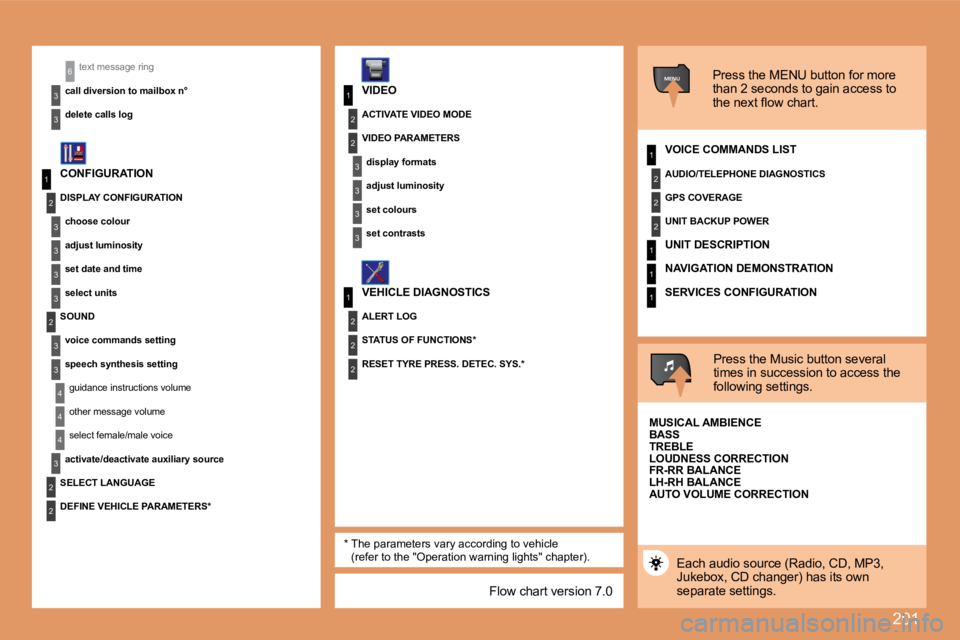
MENU
4
3
2
2
3
3
6text message ring
call diversion to mailbox n°
delete calls log* The parameters vary according to vehicle (refer to the "Operation warning lights" chapter).
CONFIGURATION
VIDEO
VEHICLE DIAGNOSTICS Press the MENU button for more
than 2 seconds to gain access to
the next flow chart.
VOICE COMMANDS LIST
Press the Music button several
times in succession to access the
following settings.
AUTO VOLUME CORRECTION
SELECT LANGUAGE
Each audio source (Radio, CD, MP3,
Jukebox, CD changer) has its own
separate settings.
DISPLAY CONFIGURATION
choose colour
adjust luminosity
set date and time
select units
SOUND voice commands setting
speech synthesis settingguidance instructions volume
other message volume
select female/male voice
activate/deactivate auxiliary source
DEFINE VEHICLE PARAMETERS* RESET TYRE PRESS. DETEC. SYS.*
ACTIVATE VIDEO MODE
VIDEO PARAMETERS
display formats
adjust luminosity
set colours
set contrasts
ALERT LOG
STATUS OF FUNCTIONS* AUDIO/TELEPHONE DIAGNOSTICS
GPS COVERAGE
UNIT BACKUP POWER
UNIT DESCRIPTION
NAVIGATION DEMONSTRATION
SERVICES CONFIGURATION
MUSICAL AMBIENCE
BASS
TREBLE
LOUDNESS CORRECTION
FR-RR BALANCE
LH-RH BALANCE
Flow chart version 7.0
Page 227 of 255
211
1
1
2
3
4
3
4
3
4
2
3
4
3
4
2
3
4
2
4
4
3
4
4
4
3
4
4
1
2
3
2
3
3
2
2
1
2
3
3
3
4
4
4
2
3
4
3
4
3
4
2
3
3
3
4
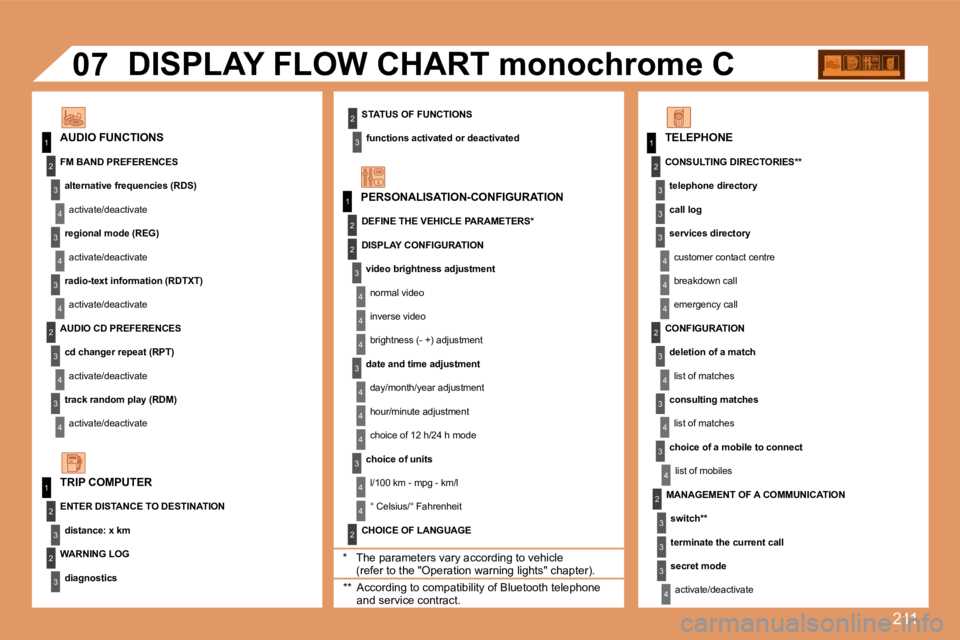
07
STATUS OF FUNCTIONS
functions activated or deactivated AUDIO FUNCTIONS
DISPLAY FLOW CHART monochrome C
* The parameters vary according to vehicle (refer to the "Operation warning lights" chapter).
WARNING LOG
diagnostics
TRIP COMPUTER
FM BAND PREFERENCES
alternative frequencies (RDS)
activate/deactivate
regional mode (REG)
activate/deactivate
radio-text information (RDTXT)
activate/deactivate
AUDIO CD PREFERENCES
cd changer repeat (RPT)
activate/deactivate
track random play (RDM)
activate/deactivate
ENTER DISTANCE TO DESTINATION
distance: x km
PERSONALISATION-CONFIGURATION
DEFINE THE VEHICLE PARAMETERS *
CHOICE OF LANGUAGE
TELEPHONE
CONSULTING DIRECTORIES **
telephone directory
call log
services directory
customer contact centre
breakdown call
emergency call
DISPLAY CONFIGURATION
video brightness adjustment
normal video
inverse video
brightness (- +) adjustment
date and time adjustment
day/month/year adjustment
hour/minute adjustment
choice of 12 h/24 h mode
choice of units
l/100 km - mpg - km/l
° Celsius/° Fahrenheit
** According to compatibility of Bluetooth telephone and service contract.
MANAGEMENT OF A COMMUNICATION
switch **
terminate the current call
secret mode
activate/deactivate
CONFIGURATION
deletion of a match
list of matches
consulting matches
list of matches
choice of a mobile to connect
list of mobiles