service PEUGEOT 207 2008 Owner's Manual
[x] Cancel search | Manufacturer: PEUGEOT, Model Year: 2008, Model line: 207, Model: PEUGEOT 207 2008Pages: 255, PDF Size: 13.06 MB
Page 213 of 255
200
4
3
4
5
5
5
5
4
4
4
3
4
3
4
4
3
3
3
3
2
5
5
1
2
3
4
3
3
3
3
3
2
3
3
3
2
4
4
2
4
3
4
4
4
3
4
4
3
3
4
4
4
4
4
4
5
5
5
5
2
3
5
5
5
3
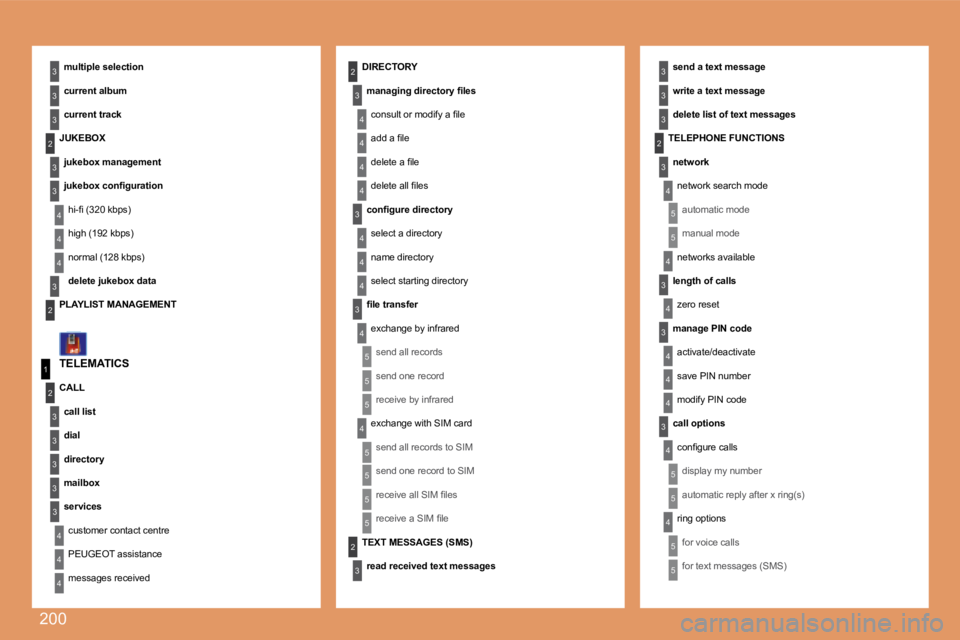
TELEMATICS
multiple selection
current album
current track
send a text message
write a text message
delete list of text messages
DIRECTORY
managing directory fi les
consult or modify a fi le
add a fi le
delete a fi le
delete all fi les
confi gure directory
select a directory
name directory
select starting directory
fi le transfer
exchange by infrared
send all records
send one record
receive by infrared
exchange with SIM card
send all records to SIM
send one record to SIM
receive all SIM fi les
receive a SIM fi le
JUKEBOX
jukebox management
jukebox confi guration
hi-fi (320 kbps)
high (192 kbps)
normal (128 kbps)
delete jukebox data
PLAYLIST MANAGEMENT
CALL
call list
dial
directory
mailbox
services
customer contact centre
PEUGEOT assistance
messages received
TEXT MESSAGES (SMS)
read received text messages
TELEPHONE FUNCTIONS
network
network search mode
automatic mode
manual mode
networks available
length of calls
zero reset
manage PIN code
activate/deactivate
save PIN number
modify PIN code
call options
confi gure calls
display my number
automatic reply after x ring(s)
ring options
for voice calls
for text messages (SMS)
Page 214 of 255
201
1
2
3
3
3
3
2
3
3
4
4
1
3
2
3
1
2
3
3
2
2
2
1
2
2
2
1
1
1
MENU
4
3
2
2
3
3
6text message ring
call diversion to mailbox n°
delete calls log* The parameters vary according to vehicle (refer to the "Operation warning lights" chapter).
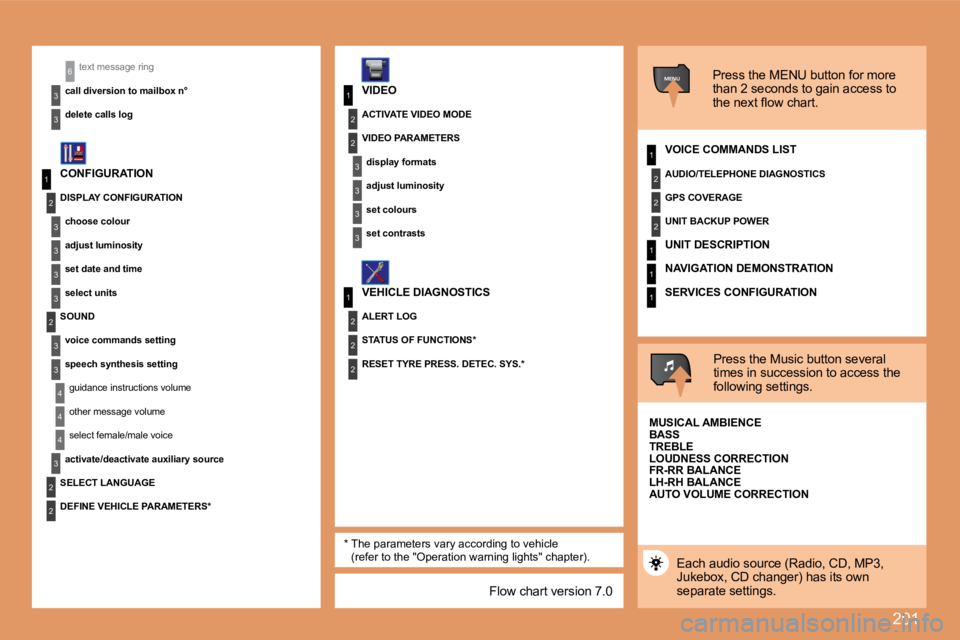
CONFIGURATION
VIDEO
VEHICLE DIAGNOSTICS Press the MENU button for more
than 2 seconds to gain access to
the next flow chart.
VOICE COMMANDS LIST
Press the Music button several
times in succession to access the
following settings.
AUTO VOLUME CORRECTION
SELECT LANGUAGE
Each audio source (Radio, CD, MP3,
Jukebox, CD changer) has its own
separate settings.
DISPLAY CONFIGURATION
choose colour
adjust luminosity
set date and time
select units
SOUND voice commands setting
speech synthesis settingguidance instructions volume
other message volume
select female/male voice
activate/deactivate auxiliary source
DEFINE VEHICLE PARAMETERS* RESET TYRE PRESS. DETEC. SYS.*
ACTIVATE VIDEO MODE
VIDEO PARAMETERS
display formats
adjust luminosity
set colours
set contrasts
ALERT LOG
STATUS OF FUNCTIONS* AUDIO/TELEPHONE DIAGNOSTICS
GPS COVERAGE
UNIT BACKUP POWER
UNIT DESCRIPTION
NAVIGATION DEMONSTRATION
SERVICES CONFIGURATION
MUSICAL AMBIENCE
BASS
TREBLE
LOUDNESS CORRECTION
FR-RR BALANCE
LH-RH BALANCE
Flow chart version 7.0
Page 224 of 255
208
11
22
33
11
22
4411
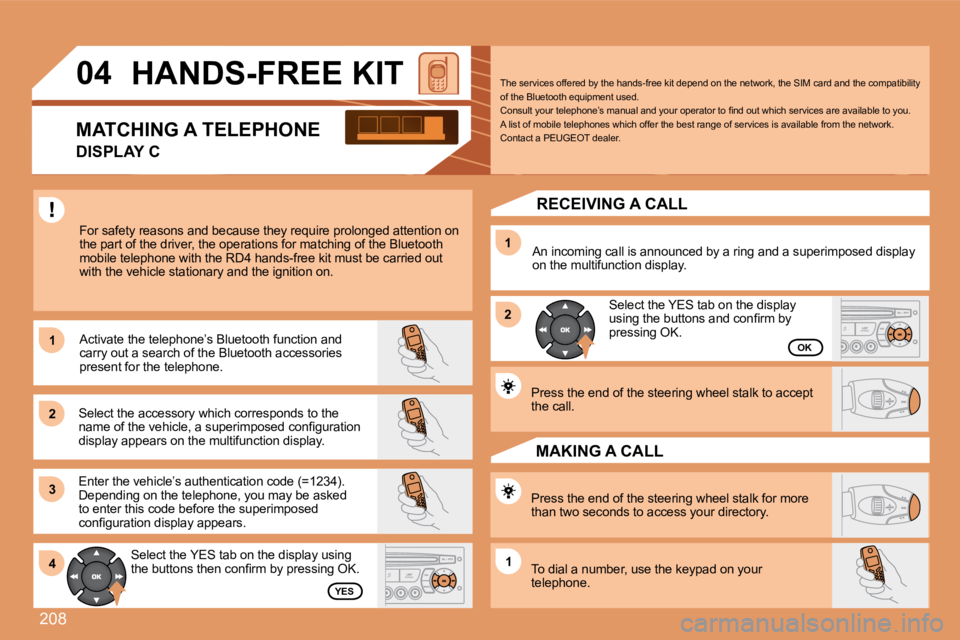
04 HANDS-FREE KIT
For safety reasons and because they require prolonged attention on the part of the driver, the operations for matching of the Bluetooth mobile telephone with the RD4 hands-free kit must b e carried out with the vehicle stationary and the ignition on.
Select the accessory which corresponds to the name of the vehicle, a superimposed confi guration display appears on the multifunction display.
Activate the telephone’s Bluetooth function and carry out a search of the Bluetooth accessories present for the telephone.
Select the YES tab on the display using the buttons then confi rm by pressing OK.
Enter the vehicle’s authentication code (=1234). Depending on the telephone, you may be asked to enter this code before the superimposed confi guration display appears.
YES
OK
The services offered by the hands-free kit depend on the network, the SIM card and the compatibility of the Bluetooth equipment used. Consult your telephone’s manual and your operator to fi nd out which services are available to you. A list of mobile telephones which offer the best range of services is available from the network. Contact a PEUGEOT dealer.
RECEIVING A CALL
An incoming call is announced by a ring and a supe rimposed display on the multifunction display.
Select the YES tab on the display using the buttons and confi rm by pressing OK.
Press the end of the steering wheel stalk to accept the call.
Press the end of the steering wheel stalk for more than two seconds to access your directory.
To dial a number, use the keypad on your telephone.
MAKING A CALL
MATCHING A TELEPHONE
DISPLAY C
Page 227 of 255
211
1
1
2
3
4
3
4
3
4
2
3
4
3
4
2
3
4
2
4
4
3
4
4
4
3
4
4
1
2
3
2
3
3
2
2
1
2
3
3
3
4
4
4
2
3
4
3
4
3
4
2
3
3
3
4
07
STATUS OF FUNCTIONS
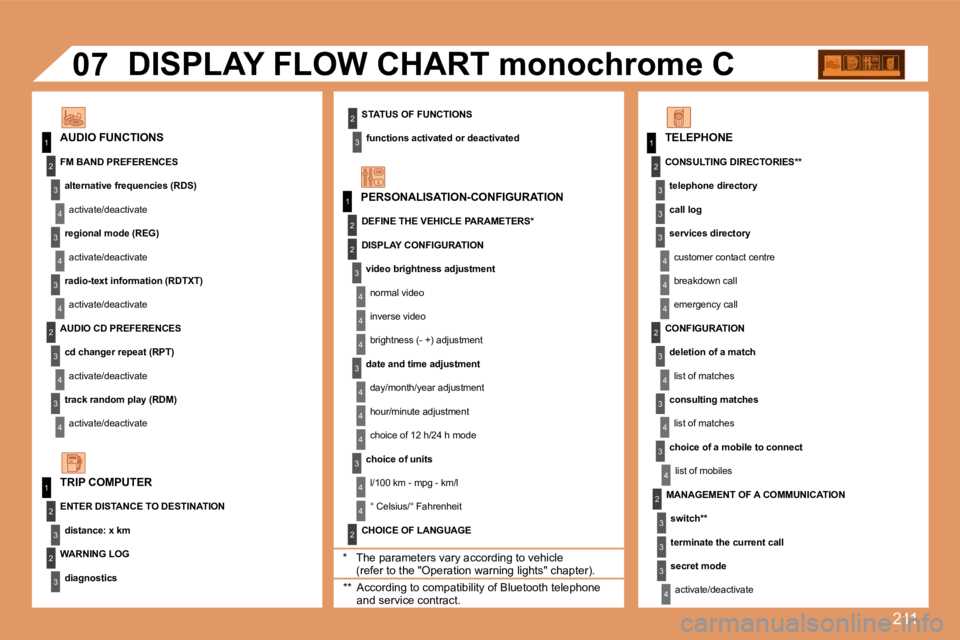
functions activated or deactivated AUDIO FUNCTIONS
DISPLAY FLOW CHART monochrome C
* The parameters vary according to vehicle (refer to the "Operation warning lights" chapter).
WARNING LOG
diagnostics
TRIP COMPUTER
FM BAND PREFERENCES
alternative frequencies (RDS)
activate/deactivate
regional mode (REG)
activate/deactivate
radio-text information (RDTXT)
activate/deactivate
AUDIO CD PREFERENCES
cd changer repeat (RPT)
activate/deactivate
track random play (RDM)
activate/deactivate
ENTER DISTANCE TO DESTINATION
distance: x km
PERSONALISATION-CONFIGURATION
DEFINE THE VEHICLE PARAMETERS *
CHOICE OF LANGUAGE
TELEPHONE
CONSULTING DIRECTORIES **
telephone directory
call log
services directory
customer contact centre
breakdown call
emergency call
DISPLAY CONFIGURATION
video brightness adjustment
normal video
inverse video
brightness (- +) adjustment
date and time adjustment
day/month/year adjustment
hour/minute adjustment
choice of 12 h/24 h mode
choice of units
l/100 km - mpg - km/l
° Celsius/° Fahrenheit
** According to compatibility of Bluetooth telephone and service contract.
MANAGEMENT OF A COMMUNICATION
switch **
terminate the current call
secret mode
activate/deactivate
CONFIGURATION
deletion of a match
list of matches
consulting matches
list of matches
choice of a mobile to connect
list of mobiles
Page 237 of 255
9
03
1
2
3
4
7
85
6
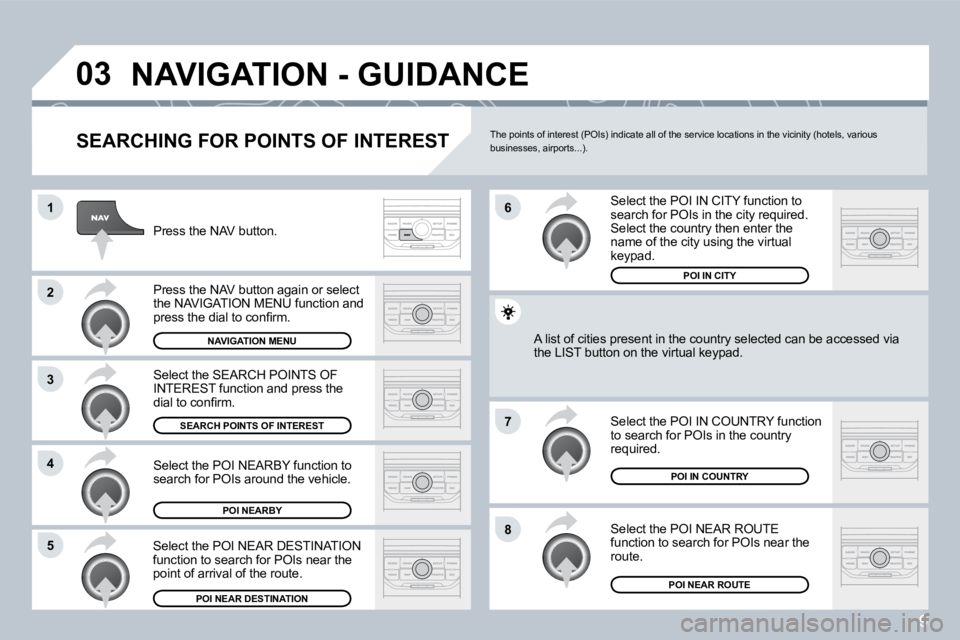
NAVIGATION - GUIDANCE
SEARCHING FOR POINTS OF INTEREST
Press the NAV button.
Press the NAV button again or select the NAVIGATION MENU function and press the dial to confi rm.
Select the POI NEARBY function to search for POIs around the vehicle.
Select the SEARCH POINTS OF INTEREST function and press the dial to confi rm.
NAVIGATION MENU
SEARCH POINTS OF INTEREST
POI NEARBY
Select the POI IN CITY function to search for POIs in the city required. Select the country then enter the name of the city using the virtual keypad.
Select the POI NEAR ROUTE function to search for POIs near the route.
Select the POI IN COUNTRY function to search for POIs in the country required.
Select the POI NEAR DESTINATION function to search for POIs near the point of arrival of the route.
POI NEAR DESTINATION
POI IN COUNTRY
POI NEAR ROUTE
A list of cities present in the country selected can be accbe accessed via the LIST button on the virtual keypad.
POI IN CITY
The points of interest (POIs) indicate all of the service locations in the vicinity (hotels, various businesses, airports...).
Page 245 of 255
17
07
1
3
5
4
2
1
2
The services offered by the telephone depend on the network, the SIM card and the compatibility of the Bluetooth equipment used. Refer to your telepho ne's manual and your operator to check which services you have access to. A list of mobile telephones which offer the best range of services is available from dealers.
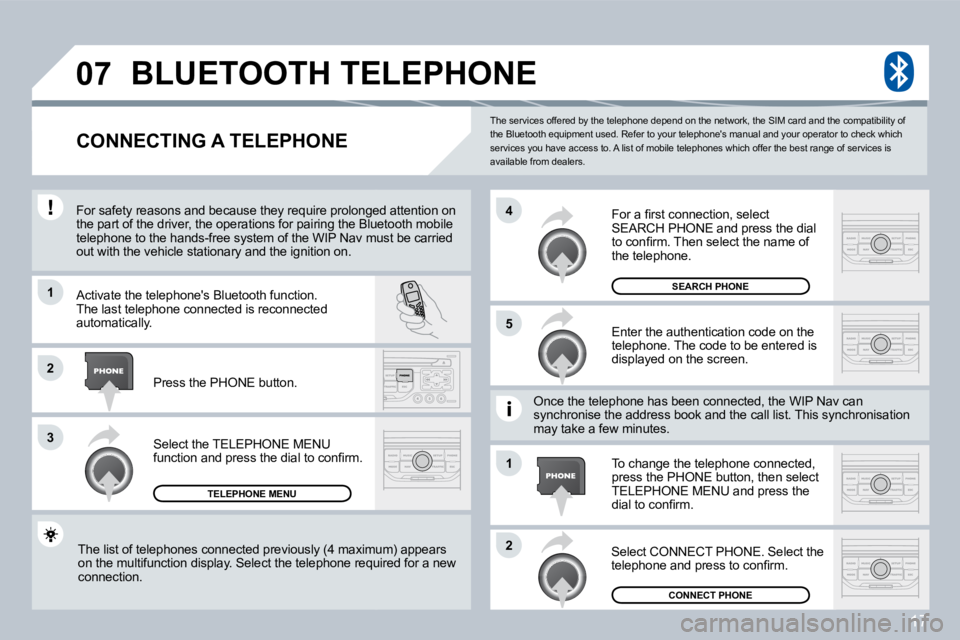
BLUETOOTH TELEPHONE
CONNECTING A TELEPHONE
For safety reasons and because they require prolon ged attention on For safety reasons and because they require prolonged attention on the part of the driver, the operations for pairing the Bluetooth mobile the part of the driver, the operations for pairing the Bluetooth mobile telephone to the hands-free system of the WIP Nav m usv must be carried out with the vehicle stationary and the ignition on.
Activate the telephone's Bluetooth function. The last telephone connected is reconnected automatically.
Select the TELEPHONE MENU function and press the dial to confi rm.
TELEPHONE MENU
Enter the authentication code on the telephone. The code to be entered is displayed on the screen.
To change the telephone connected, press the PHONE button, then select TELEPHONE MENU and press the dial to confi rm.
Once the telephone has been connected, the WIP Nav Nav can synchronise the address book and the call list. This syncis synchronisation may take a few minutes.
Select CONNECT PHONE. Select the telephone and press to confi rm. The list of telephones connected previously (4 max imumximum) appears on the multifunction display. Select the telephone requir required for a new connection.
Press the PHONE button.
For a fi rst connection, select SEARCH PHONE and press the dial to confi rm. Then select the name of the telephone.
SEARCH PHONE
CONNECT PHONE