trip computer PEUGEOT 207 CC 2011 User Guide
[x] Cancel search | Manufacturer: PEUGEOT, Model Year: 2011, Model line: 207 CC, Model: PEUGEOT 207 CC 2011Pages: 224, PDF Size: 7.12 MB
Page 160 of 224
158
01 FIRST STEPS
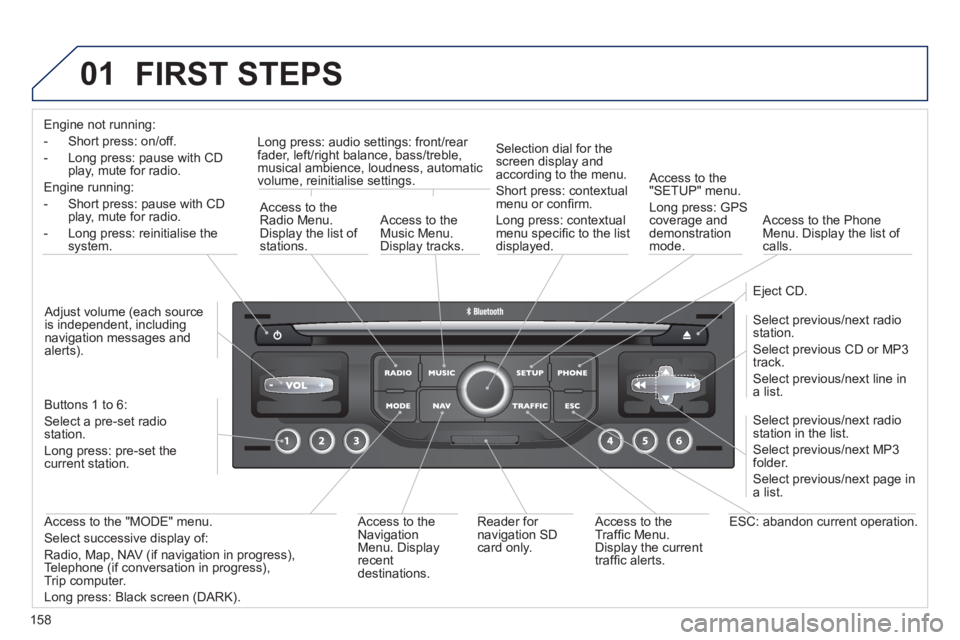
Engine not running:
-
Short press: on/off.
- Long press: pause with
CD play, mute for radio.
Engine running:
- Short
press: pause with CD play, mute for radio.
-
Long press: reinitialise thesystem.
Access to theRadio Menu.Display the list of stations.
Access to theMusic Menu. Display tracks. Lon
g press: audio settings: front/rear fader, left/right balance, bass/treble,
musical ambience, loudness, automatic
volume, reinitialise settings.
Selection dial for the
screen display and according to the menu.
Short press: contextual
menu or confi rm.
Long press: contextual
menu specifi c to the list
displayed.
A
ccess to the"SETUP" menu.
Lon
g press: GPS coverage anddemonstration
mode.
Access to the PhoneMenu. Display the list of calls.
E
ject CD.
Select previous/next radio station.
Select previous CD or MP3
track.
Select previous/next line in a list.
Select
previous/next radio station in the list.
Select previous/next MP3
folder.
Select previous/next page in a list.
E
SC: abandon current operation.
Access to theTraffi c Menu. Display the current
traffi c alerts. R
eader for navigation SDcard only.
A
ccess to theNavigation Menu. Displayrecent destinations.
A
ccess to the "MODE" menu.
Select successive display of:
Radio, Map, NAV (if navigation in progress),
Telephone (if conversation in progress),Trip computer.
Long press: Black screen (DARK). Buttons 1 to
6:
Select a pre-set radiostation.
Long press: pre-set the current station.
Ad
just volume (each source
is independent, including
navigation messages andalerts).
Page 162 of 224
160
03 GENERAL OPERATION
For a detailed global view of the menus available, refer to the"Screen menu map" section.
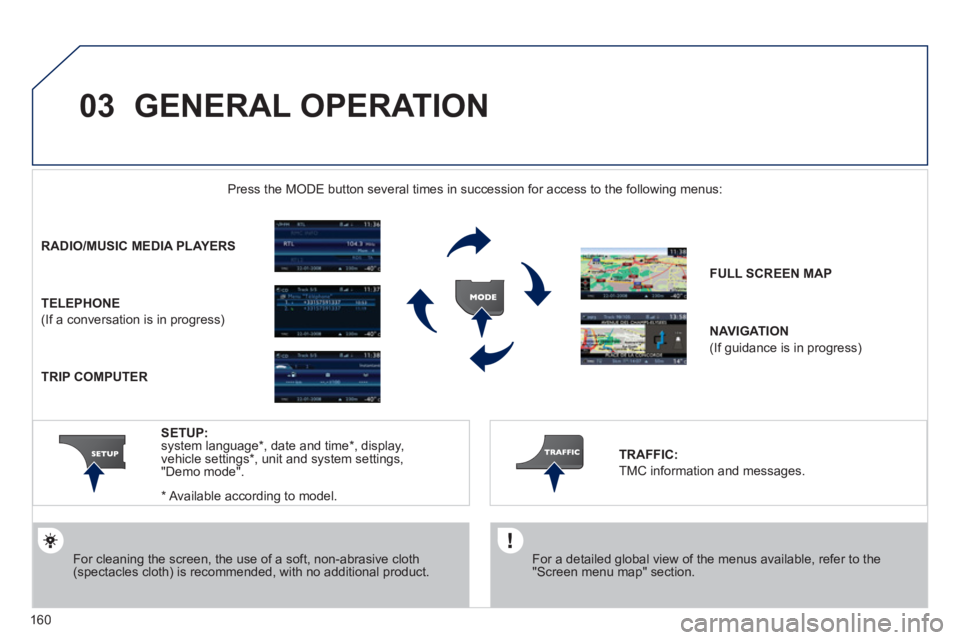
Press the M
ODE button several times in succession for access to the following menus:
For cleaning the screen, the use of a soft, non-abrasive cloth (spectacles cloth) is recommended, with no additional product.
RADIO /MUSIC MEDIA PLAYERS
TELEPHONE
(If a conversation is in progress)
FULL SCREEN MA
P
NAVIGATION
(If guidance is in progress)
SETUP:
system language *
, date and time *
, display,
vehicle settings * , unit and system settings,
"Demo mode".
TRAFFIC:
TMC information and messages.
*
Available accordin
g to model.
TRIP COMPUTER
Page 163 of 224
161
03
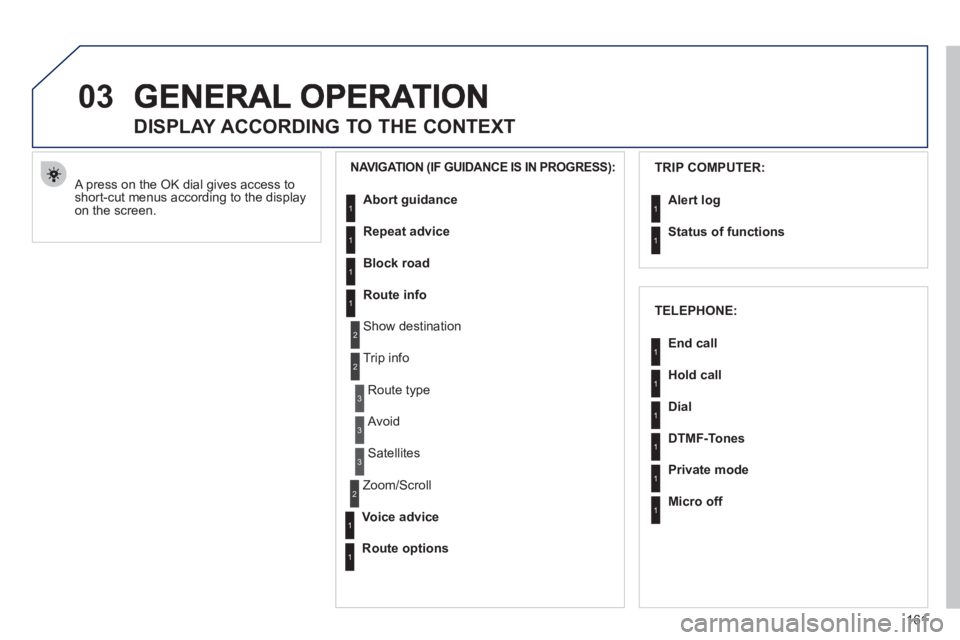
A press on the OK dial gives access to short-cut menus according to the displayon the screen.
DISPLAY ACCORDING TO THE CONTEXT
NAVIGATION (IF GUIDANCE IS IN PROGRESS):TRIP COMPUTER:
Abort
guidance
Repeat advice
Block road
Route info
Show destination
Tri
p info
Route t
ype
Avoid
Satellites
Zoom
/Scroll
Voice advice
Route options
Alert log
Status of functions
1
2
3
3
2
1
1
1
3
1
1
1
1
2
TELEPHONE:
End call
Hold call
Dial
DTMF-Tones
Private mode
Micro off
1
1
1
1
1
1
Page 192 of 224
190
01 FIRST STEPS
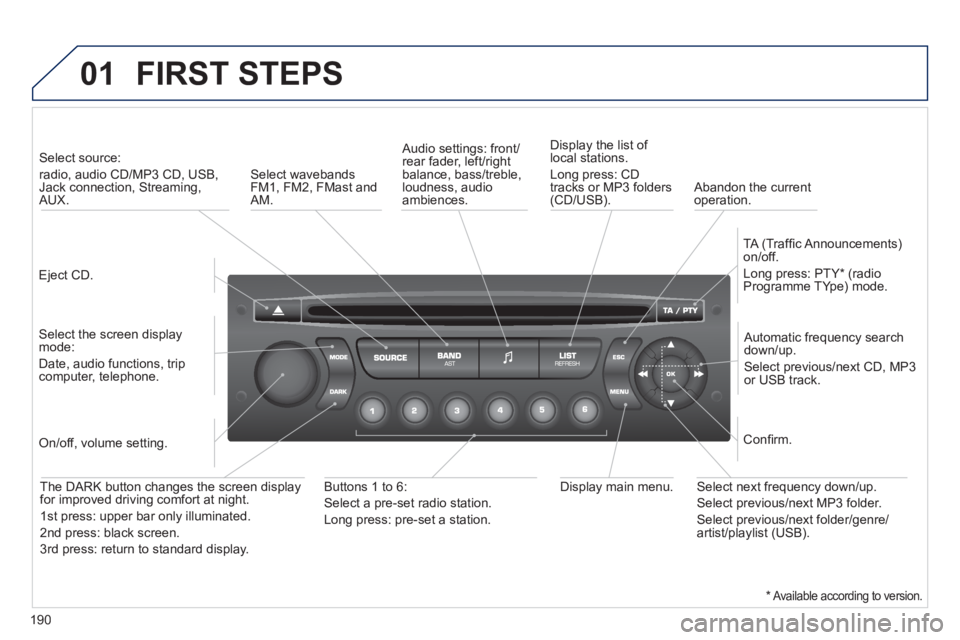
Eject CD.
Select source:
radio, audio CD/MP3 CD, USB, Jack connection, Streaming,AUX.
Select the screen displaymode:
Date, audio functions, tripcomputer, telephone.
Automatic frequency search
down/up.
Select previous/next CD, MP3
or USB track.
Audio settings: front/rear fader, left/right
balance, bass/treble, loudness, audio ambiences. Displa
y the list of local stations.
Lon
g press: CD
tracks or MP3 folders(CD/USB).
TA
(Traffi c Announcements)
on/off.
Lon
g press: PTY * (radio
Programme TYpe) mode.
Display main menu. The DARK button changes the screen display
for improved driving comfort at night.
1stpress: upper bar only illuminated.
2ndpress: black screen.
3rdpress: return to standard display.
On/off, volume setting.
Buttons 1 to 6:
Select a pre-set radio station.
Lon
g press: pre-set a station.
Select next frequency down/up.
Select previous/next MP3 folder.
Select previous/next folder/genre/artist/playlist (USB).
Confi rm.
Select wavebandsFM1, FM2, FMast and AM.
Abandon the current
operation.
*Available according to version.
Page 194 of 224
192
03 MAIN MENU
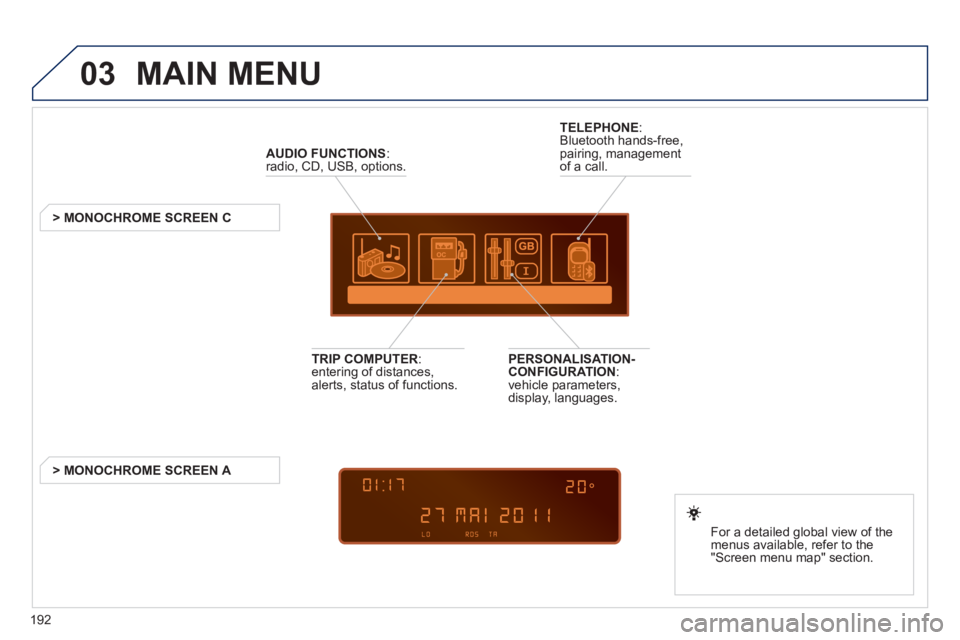
AUDIO FUNCTIONS
:radio, CD, USB, options.
> MONOCHROME SCREEN C
For a detailed
global view of the
menus available, refer to the
"Screen menu ma
p" section.
TELEPHONE
:
Bluetooth hands-free,
pairing, managementof a call.
PERSONALISATION-
CONFIGURATION:
vehicle parameters,
display, languages.
TRIP COMPUTER: entering of distances,alerts, status of functions.
> MONOCHROME
SCREEN A
Page 209 of 224
207
08
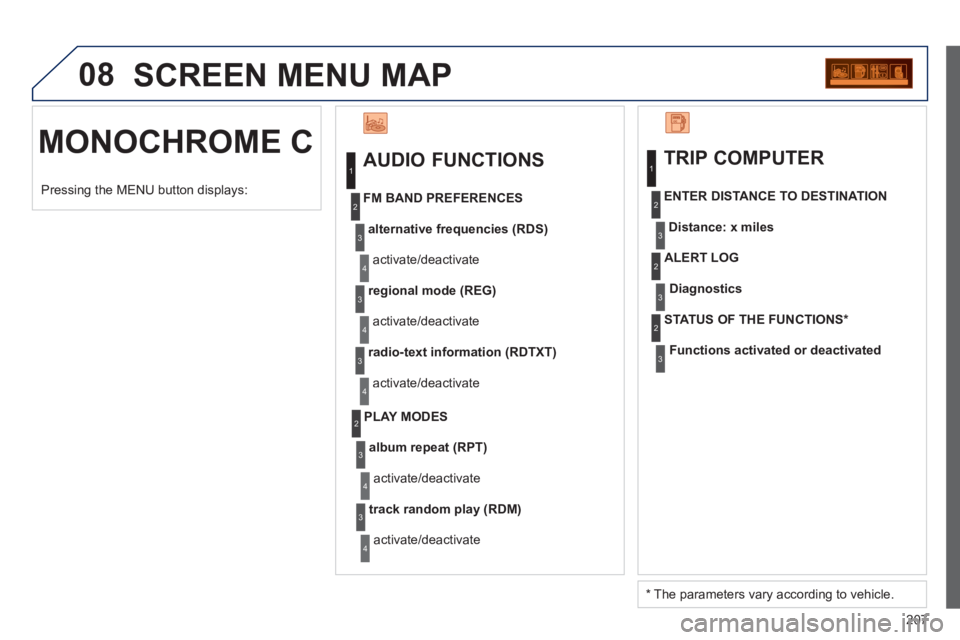
MONOCHROME C SCREEN MENU MAP
AUDIO FUNCTIONS
alternative frequencies (RDS)
activate/deactivate
FM BAND PREFERENCE
S
regional mode (REG)
activate/deactivate
radio-text information (RDTXT)
activate/deactivate
1
2
3
4
3
4
3
4
PLAY MODES
album repeat (RPT)
activate/deactivate
track random play (RDM)
activate/deactivate
2
3
4
3
4
TRIP COMPUTER
Distance: x miles
ENTER DISTANCE TO DESTINATION
Diagnostic s
ALERT LOG
Functions activated or deactivated
STAT US OF THE FUNCTIONS
*
1
2
3
3
2
3
2
Pressing the MENU button displays:
*
The parameters vary according to vehicle.
Page 215 of 224
213
VISUAL SEARCH
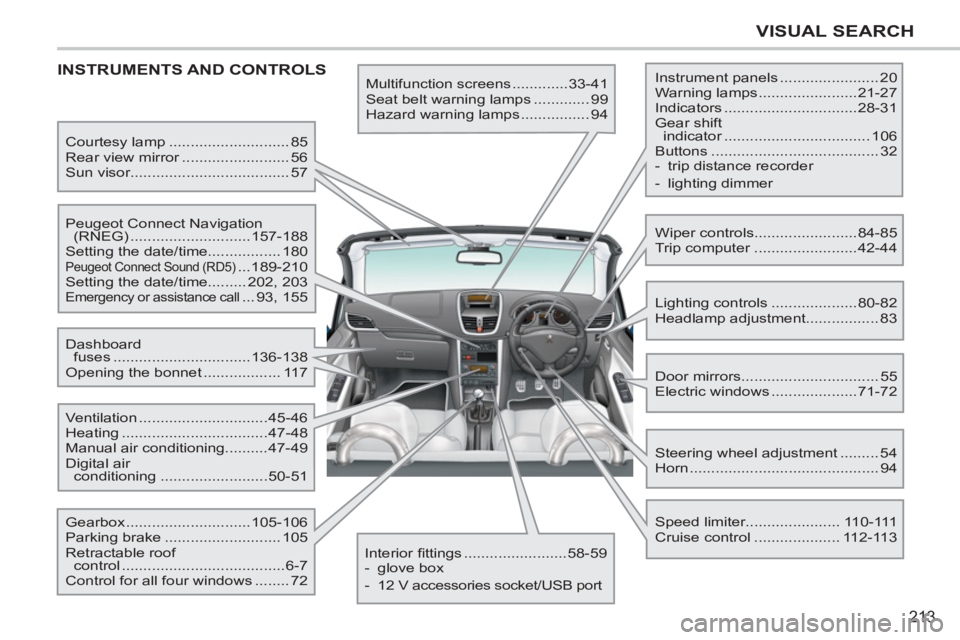
INSTRUMENTS AND CONTROLS
Multifunction screens .............33-41
Seat belt warning lamps ............. 99
Hazard warning lamps ................ 94 Instrument panels ....................... 20
Warning lamps .......................21-27
Indicators ...............................28-31
Gear shift
indicator .................................. 106
Buttons ....................................... 32
- trip distance recorder
- lighting dimmer
Lighting controls ....................80-82
Headlamp adjustment................. 83
Speed limiter...................... 110-111
Cruise control .................... 112-113 Door mirrors ................................ 55
Electric windows ....................71-72 Dashboard
fuses ................................136-138
Opening the bonnet .................. 117
Steering wheel adjustment ......... 54
Horn ............................................ 94 Courtesy lamp ............................ 85
Rear view mirror ......................... 56
Sun visor..................................... 57
Wiper controls........................84-85
Trip computer ........................42-44 Peugeot Connect Navigation
(RNEG) ............................157-188
Setting the date/time................. 180
Peugeot Connect Sound (RD5) ...189-210
Setting the date/time......... 202, 203
Emergency or assistance call ... 93, 155
Ventilation ..............................45-46
Heating ..................................47-48
Manual air conditioning..........47-49
Digital air
conditioning .........................50-51
Interior fi ttings ........................58-59
- glove box
- 12 V accessories socket/USB port Gearbox .............................105-106
Parking brake ........................... 105
Retractable roof
control ......................................6-7
Control for all four windows ........ 72
Page 220 of 224
218
ALPHABETICAL INDEX
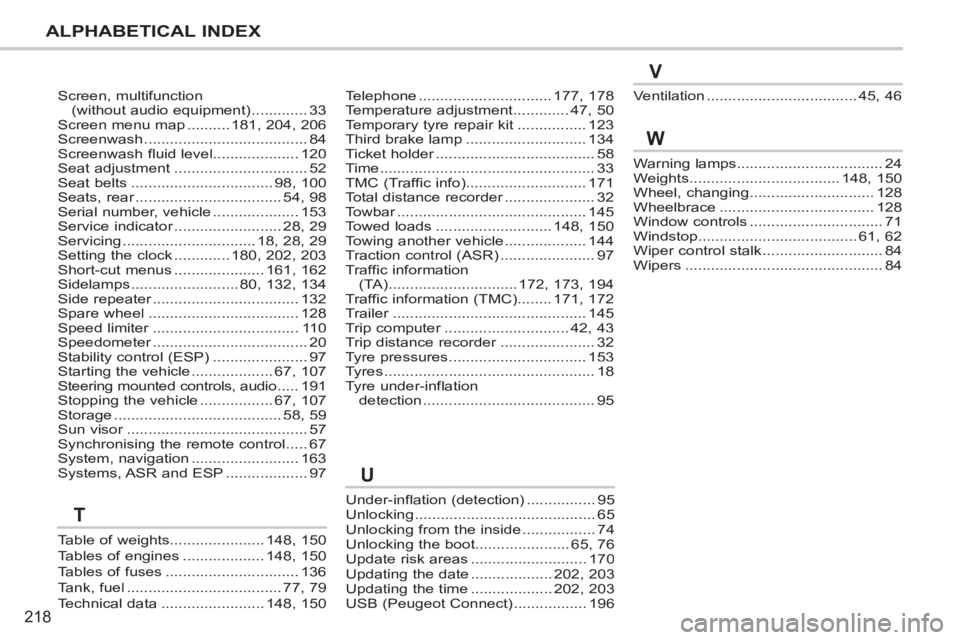
Screen, multifunction(without audio equipment).............33Screen menu map..........181,204,206Screenwash......................................84Screenwash fluid level....................120Seat adjustment...............................52Seat belts.................................98,100Seats, rear..................................r54,98Serial number, vehicle....................153Service indicator.........................r28,29Servicing...............................18,28,29Setting the clock.............180,202,203Short-cut menus.....................161,162Sidelamps.........................80,132,134Side repeater..................................r132Spare wheel...................................128Speed limiter..................................r110Speedometer....................................r20Stability control (ESP)......................97Starting the vehicle...................67,107Steering mounted controls, audio.....191Stopping the vehicle.................67,107Storage.......................................58,59Sun visor..........................................r57Synchronising the remote control.....67System, navigation.........................163Systems, ASR and ESP...................97
Under-inflation (detection)................95Unlocking..........................................65Unlocking from the inside.................74Unlocking the boot......................65, 76Update risk areas ........................... 170Updating the date ................... 202, 203Updating the time ...................202, 203USB (Peugeot Connect) .................196
Telephone...............................177, 178Temperature adjustment.............47, 50Temporary tyre repair kit................123Third brake lamp............................134Ticket holder.....................................r58Time..................................................33TMC (Traffic info)............................171Total distance recorder.....................r32Towbar............................................r145Towed loads...........................148, 150Towing another vehicle...................144Traction control (ASR)......................97Traffic information(TA)..............................172,173, 194Traffic information (TMC)........171, 172Trailer.............................................r145Trip computer.............................r42, 43Trip distance recorder......................r32Tyre pressures................................153Tyres.................................................18Tyre under-inflation detection........................................95
Warning lamps..................................24Weights...................................148,150Wheel, changing.............................128Wheelbrace....................................128Window controls...............................71Windstop.....................................61,62Wiper control stalk ............................84Wipers..............................................84
Ventilation...................................45,46
W
U
V
Table of weights......................148,150Tables of engines...................148,150Tables of fuses ...............................136Tank, fuel....................................77,79Technical data........................148,150
T