navigation PEUGEOT 207 CC 2011 Owner's Manual
[x] Cancel search | Manufacturer: PEUGEOT, Model Year: 2011, Model line: 207 CC, Model: PEUGEOT 207 CC 2011Pages: 224, PDF Size: 7.12 MB
Page 179 of 224
177
08
1
2
3
4
BLUETOOTH TELEPHONE
*
The services available depend on the network, the SIM card and thecompatibility of the Bluetooth telephone used. Check the telephone
manual and with your network provider for details of the servicesavailable to you.
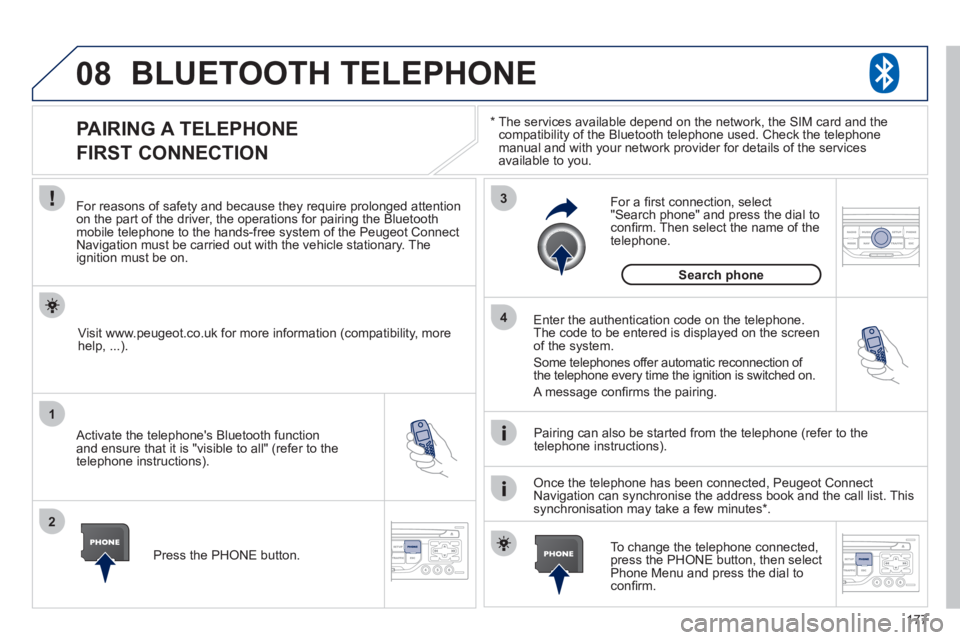
PAIRING A TELEPHONE
FIRST CONNECTION
For reasons of safety and because they require prolonged attentionon the part of the driver, the operations for pairing the Bluetooth mobile telephone to the hands-free system of the Peugeot ConnectNavigation must be carried out with the vehicle stationary. Theignition must be on.
Activate the telephone's Bluetooth
function
and ensure that it is "visible to all" (refer to the
telephone instructions). Enter the authentication code on the tele
phone.
The code to be entered is displayed on the screen
of the system.
Some telephones offer automatic reconnection o
f
the telephone every time the ignition is switched on.
A messa
ge confi rms the pairing.
To change the telephone connected, press the PHONE button, then select Phone Menu and press the dial toconfi rm.
Once the telephone has been connected, Peugeot Connect
Navigation can synchronise the address book and the call list. This
synchronisation may take a few minutes * . Pairin
g can also be started from the telephone (refer to the
telephone instructions). Visit www.peu
geot.co.uk for more information (compatibility, more
help, ...).
Press the PH
ONE button.
For a
fi rst connection, select"Search phone" and press the dial to confi rm. Then select the name of thetelephone.
Search
phone
Page 180 of 224
178
08
1
2
2
1
*
The services available depend on the network, the SIM card and the compatibility of the Bluetooth telephone used. Check the telephone manual and with your network provider for details of the services
available to you.
BLUETOOTH TELEPHONE
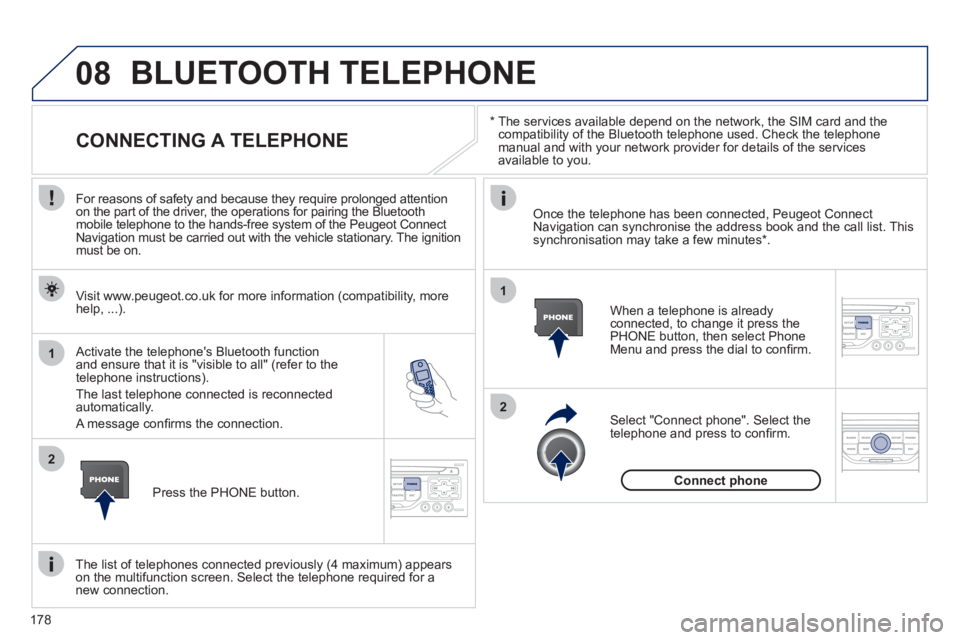
CONNECTING A TELEPHONE
For reasons of safety and because they require prolonged attention
on the part of the driver, the operations for pairing the Bluetooth
mobile telephone to the hands-free system of the Peugeot Connect
Navigation must be carried out with the vehicle stationary. The ignition
must be on.
Activate the tele
phone's Bluetooth function and ensure that it is "visible to all" (refer to the
telephone instructions).
The last telephone connected is reconnected automatically.
A messa
ge confi rms the connection. When a telephone is alread
yconnected, to change it press the
PHONE button, then select PhoneMenu and press the dial to confi rm.
Once the telephone has been connected, Peugeot Connect Navigation can synchronise the address book and the call list. This synchronisation may take a few minutes *
.
The list o
f telephones connected previously (4 maximum) appearson the multifunction screen. Select the telephone required for a
new connection. Visit www.peu
geot.co.uk for more information (compatibility, more
help, ...).
Press the PH
ONE button.Select "Connect
phone". Select the
telephone and press to confi rm.
Connect
phone
Page 181 of 224
179
08
1
3 2
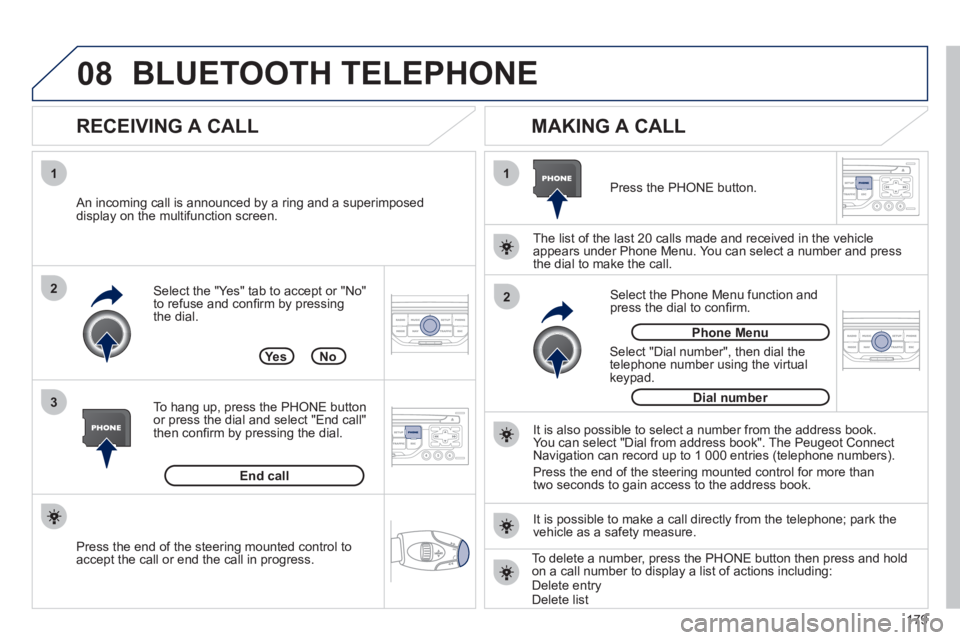
2 1Select the "Yes" tab to accept or "No"
to refuse and confi rm by pressing
the dial.
RECEIVING A CALL
MAKING A CALL
An incoming call is announced by a ring and a superimposed
display on the multifunction screen.
Yes
To han
g up, press the PHONE button
or press the dial and select "End call"then confi rm by pressing the dial.
End callPress the PH
ONE button.
Select "Dial number"
, then dial the
telephone number using the virtualkeypad.
Select the Phone Menu function and
press the dial to confi rm.
The list of the last 2
0 calls made and received in the vehicle
appears under Phone Menu. You can select a number and press
the dial to make the call.
No
It is also possible to select a number from the address book. You can select "Dial from address book". The Peugeot Connect
Navigation can record up to 1 000 entries (telephone numbers).
Press the end o
f the steering mounted control for more than
two seconds to gain access to the address book.
Phone Menu
Dial number
It is possible to make a call directl
y from the telephone; park the
vehicle as a safety measure.
BLUETOOTH TELEPHONE
Press the end of the steering mounted control to
accept the call or end the call in progress.To delete a number, press the PHONE button then press and hold
on a call number to display a list of actions including:Delete entryDelete list
Page 184 of 224
182
Abort guidance/Resume guidance
Destination input Geo
position
Ma
p
Stopovers
Add stopover
Navi
gate HOME
Choose from address book Rearran
ge route
Choose from last destinations Replace stopover
Delete stopover
Recalculate
Fast route
Short route
Optimized route
POI search
POI nearby
Route options
Route t
ype
Short route F
ast route
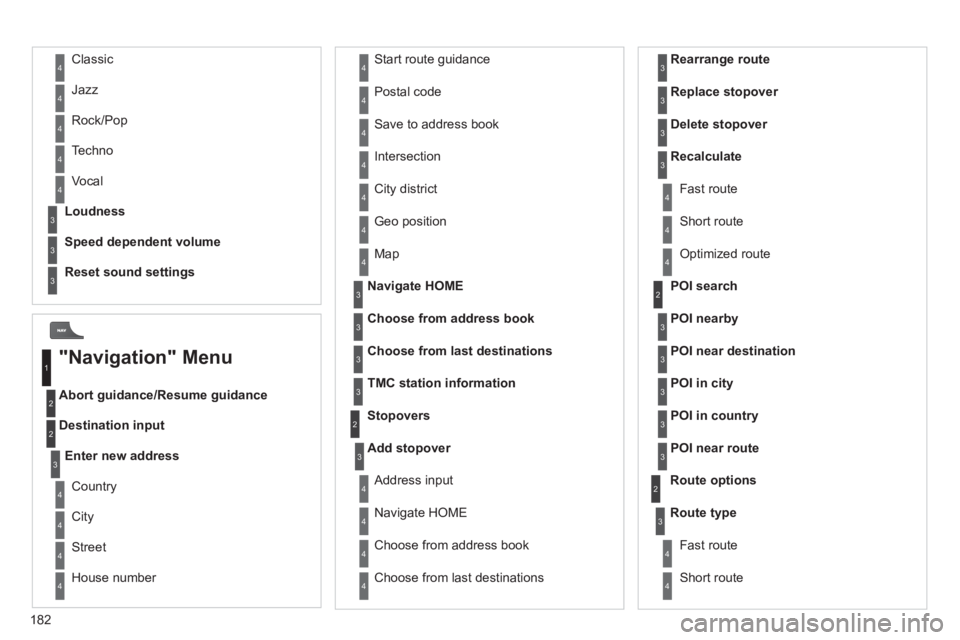
"Navigation" Menu
City
Street
Enter new address
Country
Navigate HOME Cit
y district
H
ouse number Start route
guidance
P
ostal code
Save to address book
Int
ersection
Address in
put
POI near destination
POI in city
POI in country
POI near route
Choose from address book
3
3
Choose from last destinations
TMC station information Lou
dness
S
peed dependent volume
Reset sound settings
3
3
3
1
2
4
4
4
4
4
4
4
4
4
4
4
3
2
3
3
2
3
4
4
4
4
3
3
3
3
4
4
4
2
4
2
3
3
3
3
3
3
4
Classic
Jazz
Rock/Pop
Techno
Vocal
4
4
4
4
4
Page 189 of 224
187
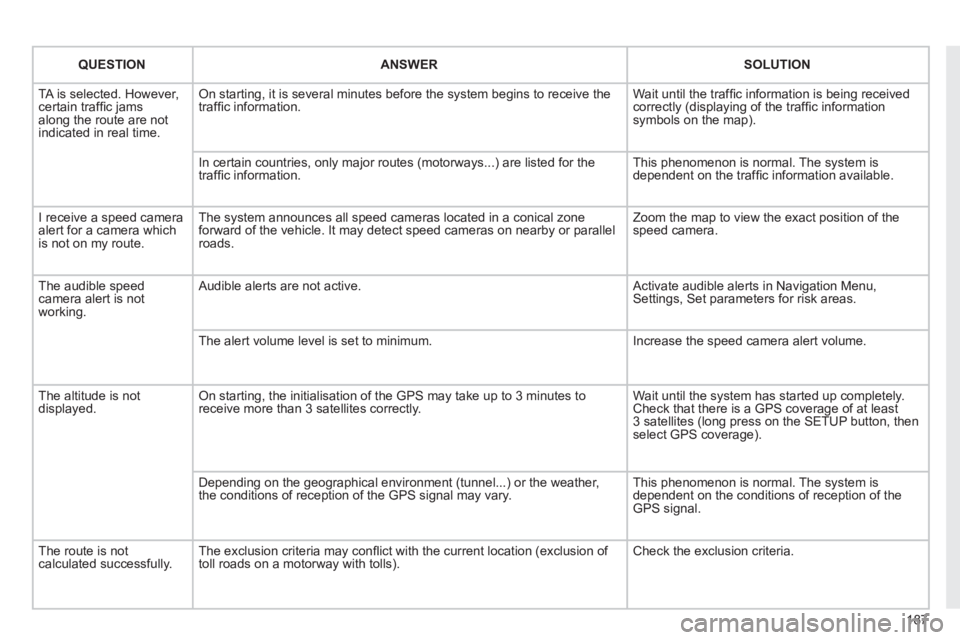
QUESTIONANSWER SOLUTION
TA is selected. However, certain traffi c jams
along the route are not
indicated in real time.
On starting, it is several minutes before the system begins to receive the
traffi c information. Wait until the traffi c information is being received correctly (displaying of the traffi c information symbols on the map).
In certain countries, onl
y major routes (motorways...) are listed for the
traffi c information. This phenomenon is normal. The system is
dependent on the traffi c information available.
I receive a speed camera
alert for a camera which
is not on my route.The s
ystem announces all speed cameras located in a conical zoneforward of the vehicle. It may detect speed cameras on nearby or parallel roads. Zoom the map to view the exact position o
f thespeed camera.
The audible speedcamera alert is not
working.
Audible alerts are not active. Activate audible alerts in Navigation Menu, Settings, Set parameters for risk areas.
Th
e alert volume level is set to minimum. Increase the speed camera alert volume.
The altitude is not displayed. On starting, the initialisation of the GPS may take up to 3 minutes toreceive more than 3 satellites correctly. Wait until the system has started up completely. Check that there is a GPS coverage of at least
3 satellites (long press on the SETUP button, then select GPS coverage).
Dependin
g on the geographical environment (tunnel...) or the weather,
the conditions of reception of the GPS signal may vary. This phenomenon is normal. The system is
dependent on the conditions of reception of the
GPS si
gnal.
Th
e route is notcalculated successfully.The exclusion criteria may confl ict with the current location (exclusion of
toll roads on a motorway with tolls). Check the exclusion criteria.
Page 190 of 224
188
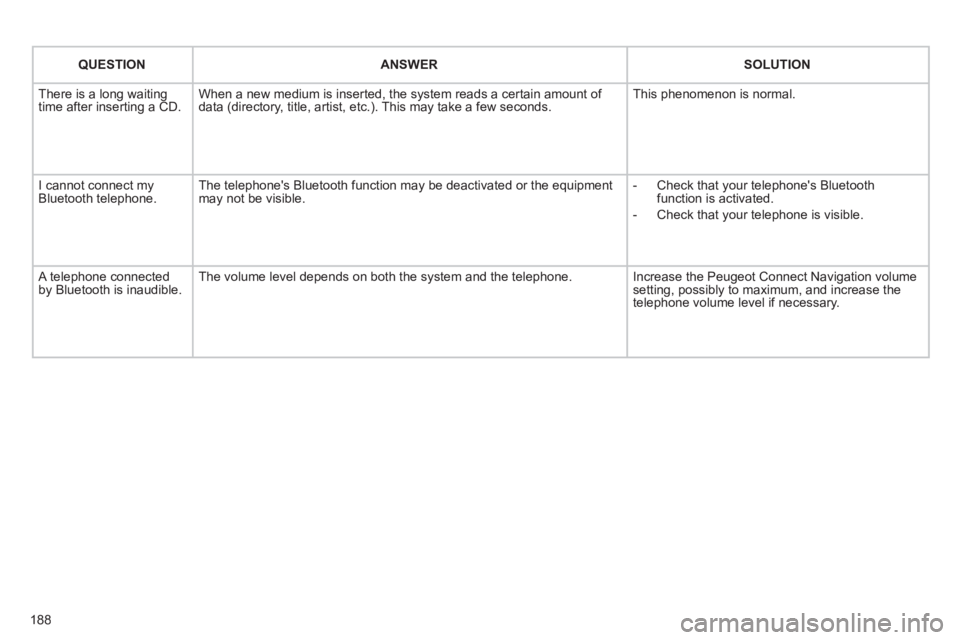
QUESTIONANSWER SOLUTION
There is a long waiting
time after inserting a CD. When a new medium is inserted, the system reads a certain amount of
data (directory, title, artist, etc.). This may take a few seconds. This phenomenon is normal.
I cannot connect myBluetooth telephone.The telephone's Bluetooth function may be deactivated or the equipment
may not be visible.
- Check that your telephone's Bluetoothfunction is activated.
-
Check that your telephone is visible.
A telephone connected by Bluetooth is inaudible.The volume level depends on both the system and the telephone. Increase the Peugeot Connect Navigation volume setting, possibly to maximum, and increase the
telephone volume level if necessary.
Page 199 of 224
197
3
4
05
2
1
LISTREFRESH
LISTREFRESH
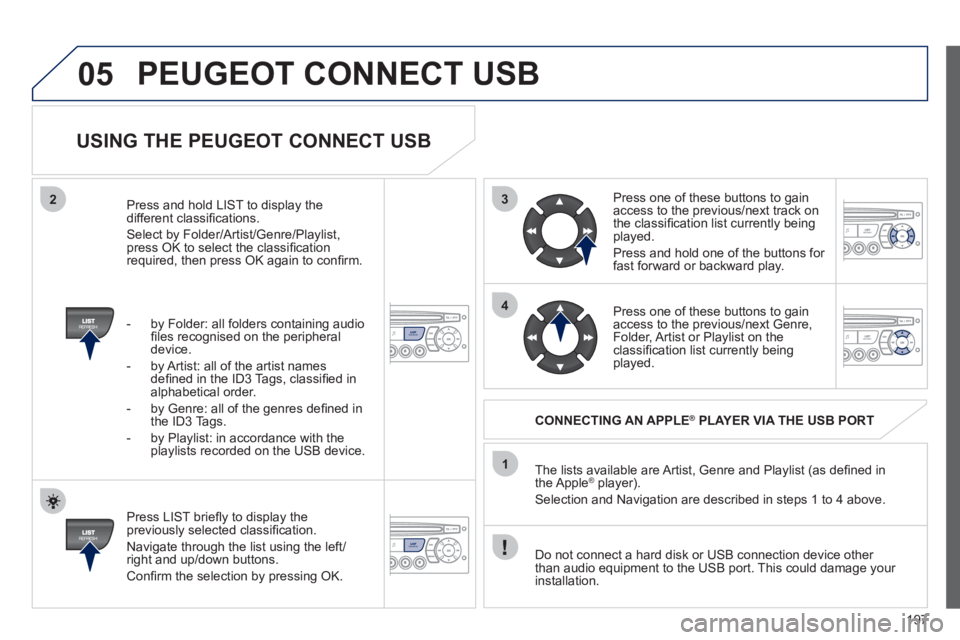
USING THE PEUGEOT CONNECT USB
Press LIST briefl y to display thepreviously selected classifi cation.
Navi
gate through the list using the left/right and up/down buttons.
Confi rm the selection by pressing OK. The lists available are Artist, Genre and Pla
ylist (as defi ned in
the Apple® player).®
Selection and Navigation are described in steps 1 to 4 above.
Do not connect a hard disk or
USB connection device other
than audio equipment to the USB port. This could damage your
installation.
CONNECTING AN APPLE®PLAYER VIA THE USB PORT®
Press one of these buttons to gain
access to the previous/next track on
the classifi cation list currently beingplayed.
Pr
ess and hold one of the buttons for fast forward or backward play.
Press one of these buttons to
gain
access to the previous/next Genre,
Folder, Artist or Playlist on theclassifi cation list currently being played.
Press and hold LI
ST to display the different classifi cations.
Select b
y Folder/Artist/Genre/Playlist, press OK to select the classifi cation required, then press OK again to confi rm.
- b
y Folder: all folders containing audio fi les recognised on the peripheraldevice.
- by Artist: all o
f the artist names
defi ned in the ID3 Tags, classifi ed in alphabetical order.
- b
y Genre: all of the genres defi ned in
the ID3 Tags.
- b
y Playlist: in accordance with the
playlists recorded on the USB device.
PEUGEOT CONNECT USB
Page 215 of 224
213
VISUAL SEARCH
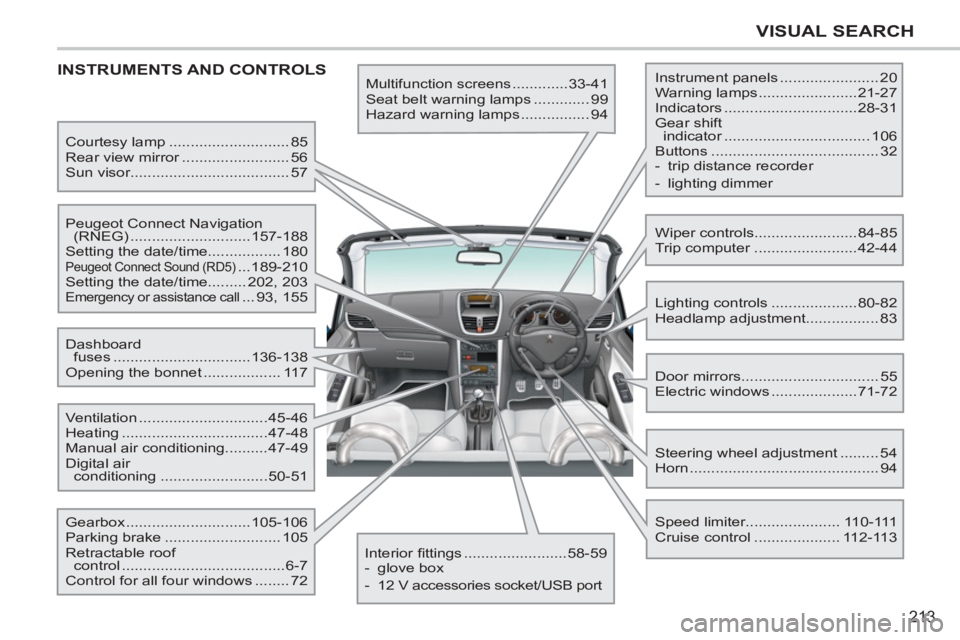
INSTRUMENTS AND CONTROLS
Multifunction screens .............33-41
Seat belt warning lamps ............. 99
Hazard warning lamps ................ 94 Instrument panels ....................... 20
Warning lamps .......................21-27
Indicators ...............................28-31
Gear shift
indicator .................................. 106
Buttons ....................................... 32
- trip distance recorder
- lighting dimmer
Lighting controls ....................80-82
Headlamp adjustment................. 83
Speed limiter...................... 110-111
Cruise control .................... 112-113 Door mirrors ................................ 55
Electric windows ....................71-72 Dashboard
fuses ................................136-138
Opening the bonnet .................. 117
Steering wheel adjustment ......... 54
Horn ............................................ 94 Courtesy lamp ............................ 85
Rear view mirror ......................... 56
Sun visor..................................... 57
Wiper controls........................84-85
Trip computer ........................42-44 Peugeot Connect Navigation
(RNEG) ............................157-188
Setting the date/time................. 180
Peugeot Connect Sound (RD5) ...189-210
Setting the date/time......... 202, 203
Emergency or assistance call ... 93, 155
Ventilation ..............................45-46
Heating ..................................47-48
Manual air conditioning..........47-49
Digital air
conditioning .........................50-51
Interior fi ttings ........................58-59
- glove box
- 12 V accessories socket/USB port Gearbox .............................105-106
Parking brake ........................... 105
Retractable roof
control ......................................6-7
Control for all four windows ........ 72
Page 219 of 224
217
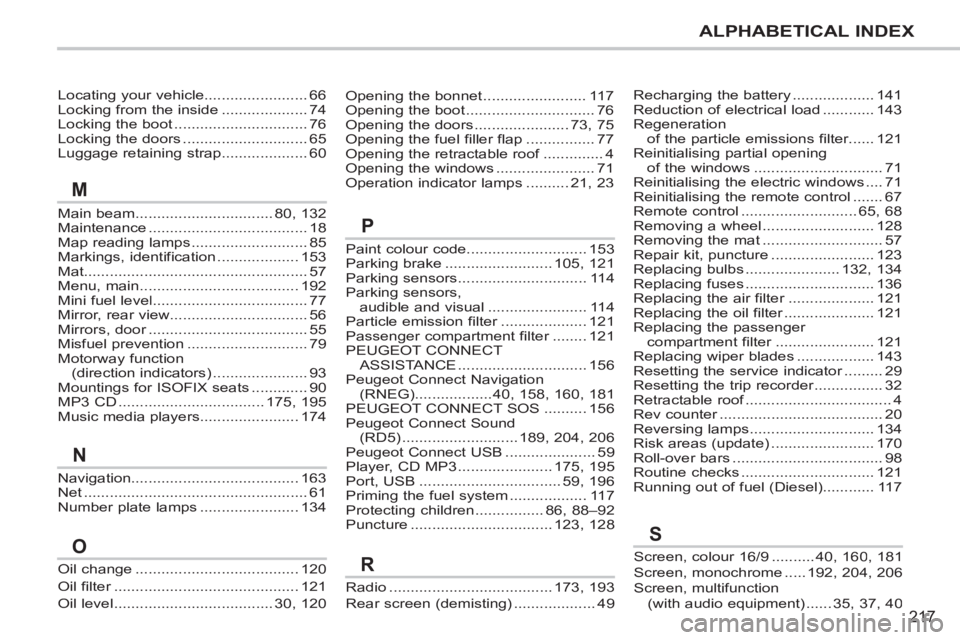
ALPHABETICAL INDEX
Locating your vehicle........................66Locking from the inside....................74Locking the boot...............................76Locking the doors.............................65Luggage retaining strap....................60
Main beam ................................80,132Maintenance.....................................18Map reading lamps...........................85Markings, identification ...................153Mat....................................................57Menu, main.....................................192Mini fuel level....................................77Mirror, rear view................................56Mirrors, door.....................................r55Misfuel prevention............................79Motorway function(direction indicators) ......................93Mountings for ISOFIX seats .............90MP3 CD..................................175,195Music media players.......................174
Paint colour code............................ 153Parking brake ......................... 105, 121Parking sensors .............................. 114Parking sensors,audible and visual ....................... 114Particle emission filter....................r121Passenger compartment filter........r121PEUGEOT CONNECT ASSISTA NCE.............................. 156Peugeot Connect Navigation(RNEG)..................40,158,160, 181PEUGEOT CONNECT SOS .......... 156Peugeot Connect Sound (RD5)........................... 189,204, 206Peugeot Connect USB .....................59Player, CD MP3 ...................... 175, 195Port, USB .................................59, 196Priming the fuel system .................. 117Protecting children................86,88–92Puncture................................. 123, 128
Opening the bonnet........................117Opening the boot..............................76Opening the doors......................73, 75Opening the fuel filler flap................77Opening the retractable roof..............f4Opening the windows.......................71Operation indicator lamps..........21, 23
Recharging the battery ...................141Reduction of electrical load ............143Regeneration of the particle emissions filter......r121Reinitialising partial opening of the windows ..............................71Reinitialising the electric windows ....71Reinitialising the remote control .......67Remote control...........................65,68Removing a wheel ..........................128Removing the mat ............................57Repair kit, puncture ........................123Replacing bulbs......................132,134Replacing fuses ..............................136Replacing the air filter....................r121Replacing the oil filter.....................r121Replacing the passenger compartment filter.......................r121Replacing wiper blades ..................143Resetting the service indicator.........r29Resetting the trip recorder................r32Retractable roof..................................f4Rev counter......................................r20Reversing lamps.............................134Risk areas (update) ........................170Roll-over bars...................................98Routine checks ...............................121Running out of fuel (Diesel)............117
M
P
Navigation.......................................163Net....................................................61Number plate lamps .......................134
N
Oil change ......................................120
Oil filter...........................................r121
Oil level .....................................30,120
O
Radio......................................173, 193
Rear screen (demisting)...................49
RScreen, colour 16/9 ..........40,160,181Screen, monochrome .....192,204,206Screen, multifunction(with audio equipment) ......35,37,40
S
Page 220 of 224
218
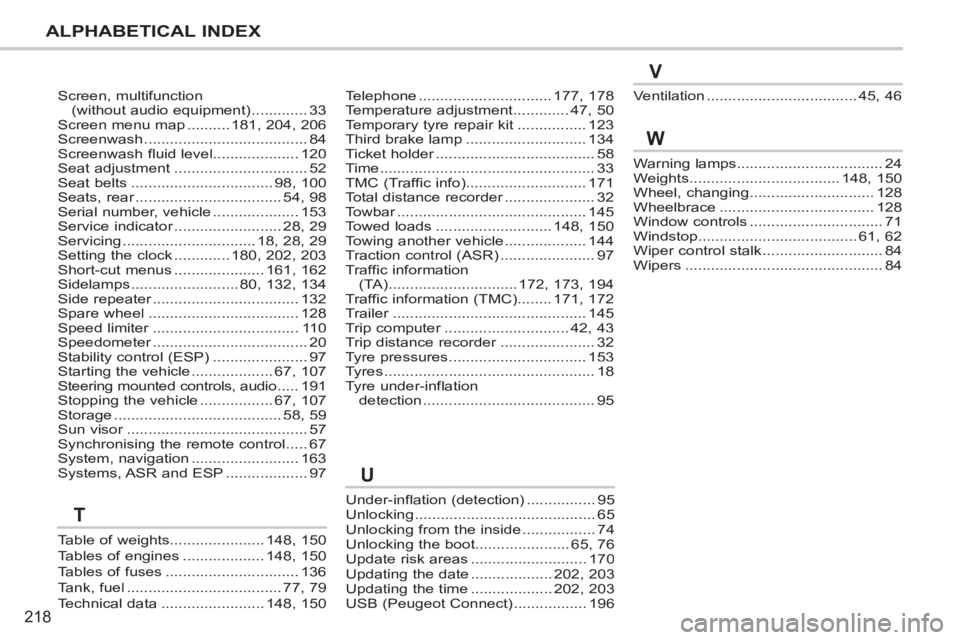
ALPHABETICAL INDEX
Screen, multifunction(without audio equipment).............33Screen menu map..........181,204,206Screenwash......................................84Screenwash fluid level....................120Seat adjustment...............................52Seat belts.................................98,100Seats, rear..................................r54,98Serial number, vehicle....................153Service indicator.........................r28,29Servicing...............................18,28,29Setting the clock.............180,202,203Short-cut menus.....................161,162Sidelamps.........................80,132,134Side repeater..................................r132Spare wheel...................................128Speed limiter..................................r110Speedometer....................................r20Stability control (ESP)......................97Starting the vehicle...................67,107Steering mounted controls, audio.....191Stopping the vehicle.................67,107Storage.......................................58,59Sun visor..........................................r57Synchronising the remote control.....67System, navigation.........................163Systems, ASR and ESP...................97
Under-inflation (detection)................95Unlocking..........................................65Unlocking from the inside.................74Unlocking the boot......................65, 76Update risk areas ........................... 170Updating the date ................... 202, 203Updating the time ...................202, 203USB (Peugeot Connect) .................196
Telephone...............................177, 178Temperature adjustment.............47, 50Temporary tyre repair kit................123Third brake lamp............................134Ticket holder.....................................r58Time..................................................33TMC (Traffic info)............................171Total distance recorder.....................r32Towbar............................................r145Towed loads...........................148, 150Towing another vehicle...................144Traction control (ASR)......................97Traffic information(TA)..............................172,173, 194Traffic information (TMC)........171, 172Trailer.............................................r145Trip computer.............................r42, 43Trip distance recorder......................r32Tyre pressures................................153Tyres.................................................18Tyre under-inflation detection........................................95
Warning lamps..................................24Weights...................................148,150Wheel, changing.............................128Wheelbrace....................................128Window controls...............................71Windstop.....................................61,62Wiper control stalk ............................84Wipers..............................................84
Ventilation...................................45,46
W
U
V
Table of weights......................148,150Tables of engines...................148,150Tables of fuses ...............................136Tank, fuel....................................77,79Technical data........................148,150
T